warning light JEEP CHEROKEE 2019 Owner handbook (in English)
[x] Cancel search | Manufacturer: JEEP, Model Year: 2019, Model line: CHEROKEE, Model: JEEP CHEROKEE 2019Pages: 344, PDF Size: 6.35 MB
Page 145 of 344
• The parking brake can be engaged even
when the ignition is OFF, however, it can
only be disengaged when the ignition is in
the ON/RUN mode.
• SafeHold a new feature that will automati-
cally apply the park brake under certain
conditions. The EPB monitors the status of
the driver’s seat belt, driver’s door and
pedal positions to determine if the driver
may have exited while the vehicle is still
capable of moving and will then automati-
cally apply the park brake to prevent the
vehicle from rolling.
• The EPB fault light will illuminate if the
EPB switch is held for longer than 90 sec-
onds in either the released or applied posi-
tion. The light will extinguish upon releas-
ing the switch.
Refer to the Starting And Operating section in
the Owner’s Manual.
WARNING!
• Never use the PARK position as a sub-
stitute for the parking brake. Always ap-
ply the parking brake fully when exiting
WARNING!
the vehicle to guard against vehicle
movement and possible injury or dam-
age.
• When exiting the vehicle, always make
sure the ignition is in the OFF mode,
remove the key fob from the vehicle, and
lock your vehicle.
• Never leave children alone in a vehicle,
or with access to an unlocked vehicle.
Allowing children to be in a vehicle un-
attended is dangerous for a number of
reasons. A child or others could be seri-
ously or fatally injured. Children should
be warned not to touch the parking
brake, brake pedal or the transmission
gear selector.
• Do not leave the key fob in or near the
vehicle, (or in a location accessible to
children), and do not leave the ignition
in the ACC or ON/RUN mode. A child
could operate power windows, other con-
trols, or move the vehicle.
• Be sure the parking brake is fully disen-
gaged before driving; failure to do so can
lead to brake failure and a collision.
WARNING!
• Always fully apply the parking brake
when leaving your vehicle, or it may roll
and cause damage or injury. Also be
certain to leave the transmission in
PARK. Failure to do so may allow the
vehicle to roll and cause damage or in-
jury.
• Driving the vehicle with the parking
brake engaged, or repeated use of the
parking brake to slow the vehicle may
cause serious damage to the brake sys-
tem.
CAUTION!
If the Brake System Warning Light remains
on with the parking brake released, a brake
system malfunction is indicated. Have the
brake system serviced by an authorized
dealer immediately.
Auto Park Brake
The electric park brake can be programmed
to be applied automatically whenever the
vehicle is at a standstill and the automatic
143
Page 146 of 344
transmission is placed in PARK, or with a
manual transmission, whenever the ignition
is turned “OFF”. Auto Park Brake is enabled
and disabled by customer selection through
the customer programmable features section
of the Uconnect Settings.
Any single auto park brake application can be
bypassed by pushing the EPB switch to the
release position while the transmission is
placed in PARK.
SafeHold
SafeHold is a safety feature of the Electric
Park Brake System that will engage the park
brake automatically if the vehicle is left un-
secured while the ignition is in ON/RUN.
For automatic transmissions, the park brake
will automatically engage if all of the follow-
ing conditions are met:
• The vehicle is at a standstill.
• There is no attempt to depress the brake
pedal or accelerator pedal.
• The seat belt is unbuckled.
• The driver door is open.For manual transmissions, the park brake will
automatically engage if all of the following
conditions are met:
• The vehicle is at a standstill.
• There is no attempt to depress the brake
pedal or accelerator pedal.
• The clutch pedal is not pressed.
• The seat belt is unbuckled.
• The driver door is open.MANUAL TRANSMISSION —
IF EQUIPPED
WARNING!
You or others could be injured if you leave
the vehicle unattended without having the
parking brake fully applied. The parking
brake should always be applied when the
driver is not in the vehicle, especially on
an incline.
CAUTION!
• Never drive with your foot resting on the
clutch pedal, or attempt to hold the
vehicle on a hill with the clutch pedal
partially engaged, as this will cause ab-
normal wear on the clutch.
• Do not drive with your hand resting on
the gear selector as the force exerted,
even if slight, could lead over time to
premature wear of the gearbox internal
components.
NOTE:
During cold weather, you may experience
increased effort in shifting until the transmis-
sion fluid warms up. This is normal.
Shifting
Fully press the clutch pedal before shifting
gears. As you release the clutch pedal, lightly
press the accelerator pedal.
You should always use first gear when starting
from a standing position.
STARTING AND OPERATING
144
Page 154 of 344
Shift Positions
For additional information on the appropriate
use of each 4WD system mode position, see
the information below:
NEUTRAL
This range disengages the driveline from the
powertrain.
WARNING!
You or others could be injured or killed if
you leave the vehicle unattended with the
power transfer unit in the NEUTRAL (N)
position without first fully engaging the
parking brake. The NEUTRAL (N) position
disengages both the front and rear drive-
shafts from the powertrain and will allow
the vehicle to roll, even if the automatic
transmission is in PARK (or manual trans-
mission is in gear). The parking brake
should always be applied when the driver
is not in the vehicle.
4WD LOW
This range is for low speed four-wheel drive.
It provides an additional gear reduction
which allows for increased torque to be deliv-
ered to both the front and rear wheels while
providing maximum pulling power for loose,
slippery road surfaces only. Do not exceed
25 mph (40 km/h).
NOTE:
Refer to “Selec-Terrain — If Equipped” for
further information on the various positions
and their intended usages.
Shifting Procedures
Shifting Into 4X4 LOW
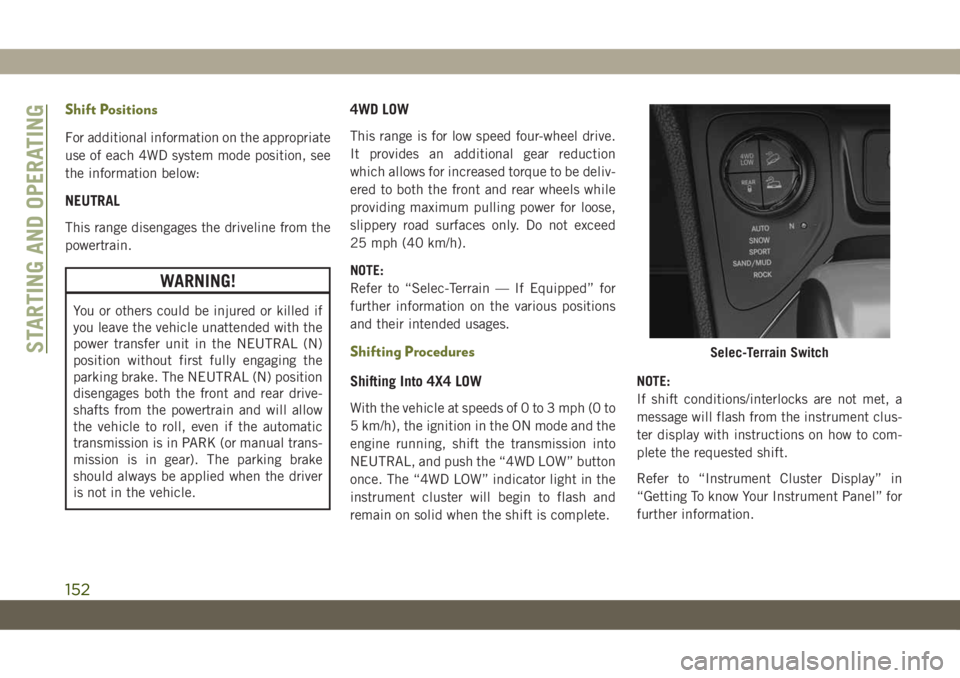
With the vehicle at speeds of 0 to 3 mph (0 to
5 km/h), the ignition in the ON mode and the
engine running, shift the transmission into
NEUTRAL, and push the “4WD LOW” button
once. The “4WD LOW” indicator light in the
instrument cluster will begin to flash and
remain on solid when the shift is complete.NOTE:
If shift conditions/interlocks are not met, a
message will flash from the instrument clus-
ter display with instructions on how to com-
plete the requested shift.
Refer to “Instrument Cluster Display” in
“Getting To know Your Instrument Panel” for
further information.
Selec-Terrain SwitchSTARTING AND OPERATING
152
Page 155 of 344
Shifting Out Of 4X4 LOW
With the vehicle at speeds of 0 to 3 mph (0 to
5 km/h), the ignition in the ON mode and the
engine running, shift the transmission into
NEUTRAL, and push the “4WD LOW” button
once. The “4WD LOW” indicator light in the
instrument cluster will flash and go out when
the shift is complete.
NOTE:
• If shift conditions/interlocks are not met, a
message will flash from the instrument
cluster display with instructions on how to
complete the requested shift. Refer to “In-
strument Cluster Display” in “Getting To
Know Your Instrument Panel” for further
information.
• Shifting into or out of 4WD LOW is possible
with the vehicle completely stopped; how-
ever, difficulty may occur due to the mating
clutch teeth not being properly aligned.
Several attempts may be required for
clutch teeth alignment and shift comple-
tion to occur. The preferred method is with
the vehicle rolling 0 to 3 mph (0 to 5 km/h).If the vehicle is moving faster than 3 mph
(5 km/h), the 4WD system will not allow the
shift.
NEUTRAL Shift Procedure
WARNING!
You or others could be injured or killed if
you leave the vehicle unattended with the
power transfer unit in the NEUTRAL (N)
position without first fully engaging the
parking brake. The NEUTRAL (N) position
disengages both the front and rear drive-
shafts from the powertrain and will allow
the vehicle to roll, even if the automatic
transmission is in PARK (or manual trans-
mission is in gear). The parking brake
should always be applied when the driver
is not in the vehicle.
1. Bring the vehicle to a complete stop on
level ground and shift the automatic
transmission to PARK
2. Turn the engine OFF.
3. Turn the ignition to the ON/RUN mode,
but do not start the engine.
4. Press and hold the brake pedal.5. Shift the transmission into NEUTRAL.
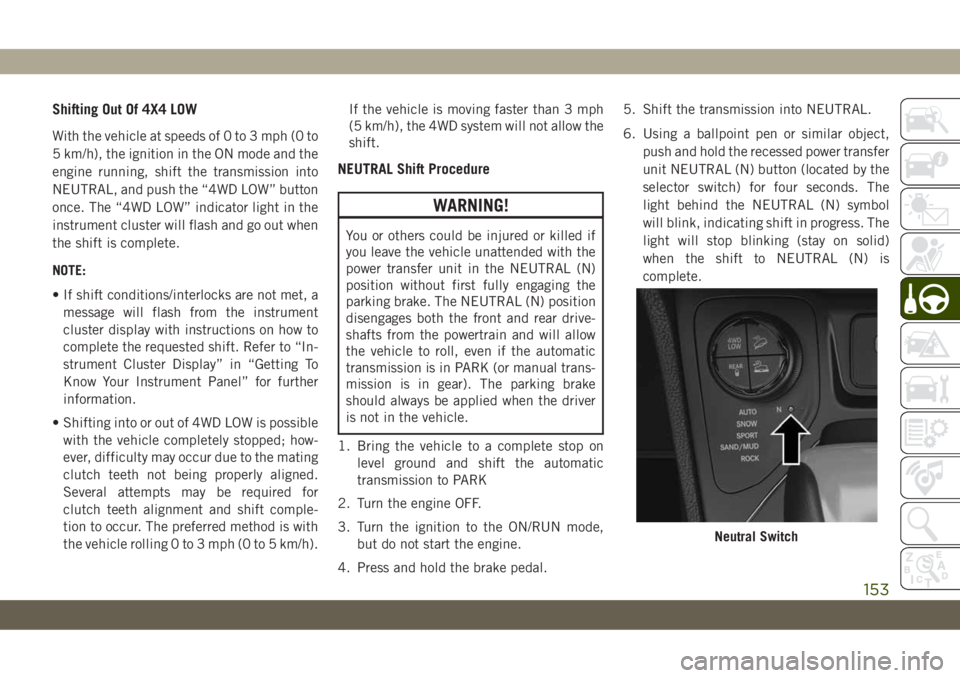
6. Using a ballpoint pen or similar object,
push and hold the recessed power transfer
unit NEUTRAL (N) button (located by the
selector switch) for four seconds. The
light behind the NEUTRAL (N) symbol
will blink, indicating shift in progress. The
light will stop blinking (stay on solid)
when the shift to NEUTRAL (N) is
complete.
Neutral Switch
153
Page 158 of 344
tain operating conditions), the transmis-
sion may use second gear (rather than first
gear) during launches, to minimize wheel
slippage.
•Sport— This mode alters the transmis-
sion's automatic shift schedule for sportier
driving. Upshift speeds are increased to
make full use of available engine power.
NOTE:
SPORT mode is not available when 4WD LOW
is selected.
•Sand/Mud— Off-road calibration for use on
low traction surfaces such as mud, sand, or
wet grass. Driveline is maximized for trac-
tion. Some binding may be felt on less
forgiving surfaces. The electronic brake
controls are set to limit traction control
management of throttle and wheel spin.
•Rock— Off-road calibration only available
in 4WD LOW range. Traction based tuning
with improved steer-ability for use on high
traction off-road surfaces. Use for low
speed obstacles such as large rocks, deep
ruts, etc.NOTE:
• Rock mode is only available on the vehicles
equipped with the Off-Road package.
• Activate the Hill Descent Control or Selec
Speed Control for steep downhill control.
See “Electronic Brake Control System” in
“Safety” for further information.
STOP/START SYSTEM
The Stop/Start function was developed to
reduce fuel consumption. The system will
stop the engine automatically during a ve-
hicle stop if the required conditions are met.
Releasing the brake pedal or pressing the
accelerator pedal will automatically restart
the engine.
This vehicle has been upgraded with a Heavy
Duty Battery, Starter, as well as other engine
parts, to handle the Additional engine starts.
Automatic Mode
The Stop/Start feature is enabled after every
normal customer engine start. At that time,
the system will go into STOP/START READY
and if all other conditions are met, can go
into a STOP/START AUTOSTOP ACTIVE “Au-
tostop” mode.
To Activate The Autostop Mode, The Following
Must Occur:
• The system must be in STOP/START
READY state. A STOP/START READY mes-
sage will be displayed in the instrument
cluster display within the Stop/Start sec-
tion. Refer to “Warning Lights And Mes-
sages” in “Getting To Know Your Instru-
ment Panel” in your Owner’s Manual.
• The vehicle must be completely stopped.
• The gear selector must be in a forward gear
and the brake pedal depressed.
The engine will shut down, the tachometer
will move to the zero position and the Stop/
Start telltale will illuminate indicating you
are in Autostop. Customer settings will be
maintained upon return to an engine running
condition.
STARTING AND OPERATING
156
Page 160 of 344
Conditions That Force An Application Of The
Electric Park Brake While In Autostop Mode:
• The driver’s door is open and brake pedal
released.
• The driver’s door is open and the driver’s
seat belt is unbuckled.
• The engine hood has been opened.
• A STOP/START system error occurs.
If the Electric Park Brake is applied with the
engine off, the engine may require a manual
restart and the electric park brake may re-
quire a manual release (depress brake pedal
and push Electric Park Brake switch). Refer
to “Instrument Cluster Display” in “Getting
To Know Your Instrument Panel” in your Own-
er’s Manual.
To Manually Turn Off The Stop/Start
System
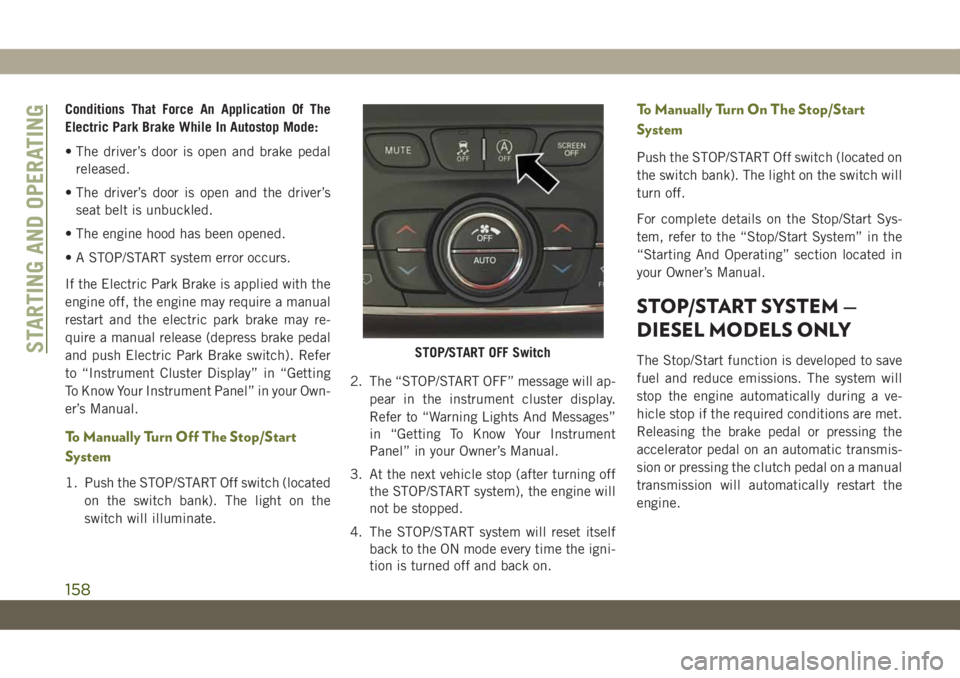
1. Push the STOP/START Off switch (located
on the switch bank). The light on the
switch will illuminate.2. The “STOP/START OFF” message will ap-
pear in the instrument cluster display.
Refer to “Warning Lights And Messages”
in “Getting To Know Your Instrument
Panel” in your Owner’s Manual.
3. At the next vehicle stop (after turning off
the STOP/START system), the engine will
not be stopped.
4. The STOP/START system will reset itself
back to the ON mode every time the igni-
tion is turned off and back on.
To Manually Turn On The Stop/Start
System
Push the STOP/START Off switch (located on
the switch bank). The light on the switch will
turn off.
For complete details on the Stop/Start Sys-
tem, refer to the “Stop/Start System” in the
“Starting And Operating” section located in
your Owner’s Manual.
STOP/START SYSTEM —
DIESEL MODELS ONLY
The Stop/Start function is developed to save
fuel and reduce emissions. The system will
stop the engine automatically during a ve-
hicle stop if the required conditions are met.
Releasing the brake pedal or pressing the
accelerator pedal on an automatic transmis-
sion or pressing the clutch pedal on a manual
transmission will automatically restart the
engine.STOP/START OFF SwitchSTARTING AND OPERATING
158
Page 163 of 344
3. At the next vehicle stop (after turning off
the STOP/START system) the engine will
not be stopped.
4. If the STOP/START system is manually
turned off, the engine can only be started
and stopped by cycling the ignition
switch.
5. The STOP/START system will reset itself
back to an ON condition every time the
key is turned off and back on.
To Manually Turn On The Stop/Start
System
Push the STOP/START Off switch (located on
the switch bank). The light on the switch will
turn off.
SPEED CONTROL
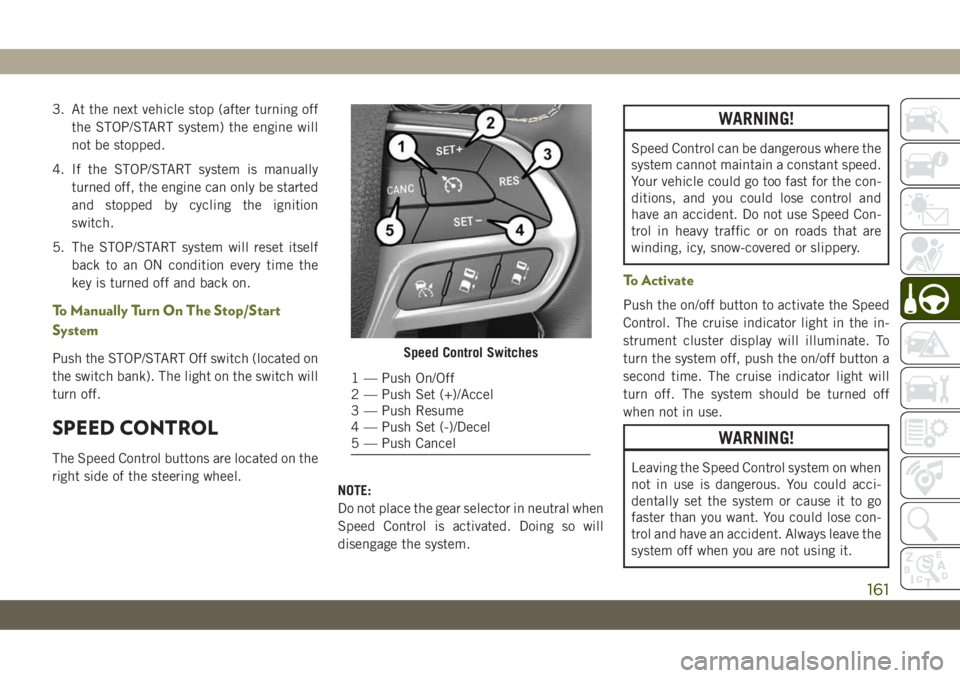
The Speed Control buttons are located on the
right side of the steering wheel.
NOTE:
Do not place the gear selector in neutral when
Speed Control is activated. Doing so will
disengage the system.
WARNING!
Speed Control can be dangerous where the
system cannot maintain a constant speed.
Your vehicle could go too fast for the con-
ditions, and you could lose control and
have an accident. Do not use Speed Con-
trol in heavy traffic or on roads that are
winding, icy, snow-covered or slippery.
To Activate
Push the on/off button to activate the Speed
Control. The cruise indicator light in the in-
strument cluster display will illuminate. To
turn the system off, push the on/off button a
second time. The cruise indicator light will
turn off. The system should be turned off
when not in use.
WARNING!
Leaving the Speed Control system on when
not in use is dangerous. You could acci-
dentally set the system or cause it to go
faster than you want. You could lose con-
trol and have an accident. Always leave the
system off when you are not using it.
Speed Control Switches
1 — Push On/Off
2 — Push Set (+)/Accel
3 — Push Resume
4 — Push Set (-)/Decel
5 — Push Cancel
161
Page 177 of 344
5. Remove funnel from filler pipe, clean off
prior to putting back in the spare tire
storage area.
NOTE:
• When the fuel nozzle “clicks” or shuts off,
the fuel tank is full.
WARNING!
• Never have any smoking materials lit in
or near the vehicle when the fuel door is
open or the tank is being filled.
• Never add fuel when the engine is run-
ning. This is in violation of most coun-
tries regulations and may cause the
“Malfunction Indicator Light” to turn
on.
• Do not apply any object/cap to the end of
the filler which is not provided for the
car. The use of non-compliant objects/
plugs could cause a pressure increase
inside the tank, resulting in dangerous
situations.
WARNING!
• A fire may result if fuel is pumped into a
portable container that is inside of a
vehicle. You could be burned. Always
place fuel containers on the ground
while filling.
REFUELING THE VEHICLE —
DIESEL ENGINE
The Capless Fuel System uses a flapper
placed at the filler pipe of the fuel tank; it
opens and closes automatically upon
insertion/extraction of the fuel nozzle. The
Capless Fuel System is designed so that it
prevents the filling of an incorrect type of
fuel.
1. Unlock the Fuel Filler Door by pushing the
unlock button on the key fob or the unlock
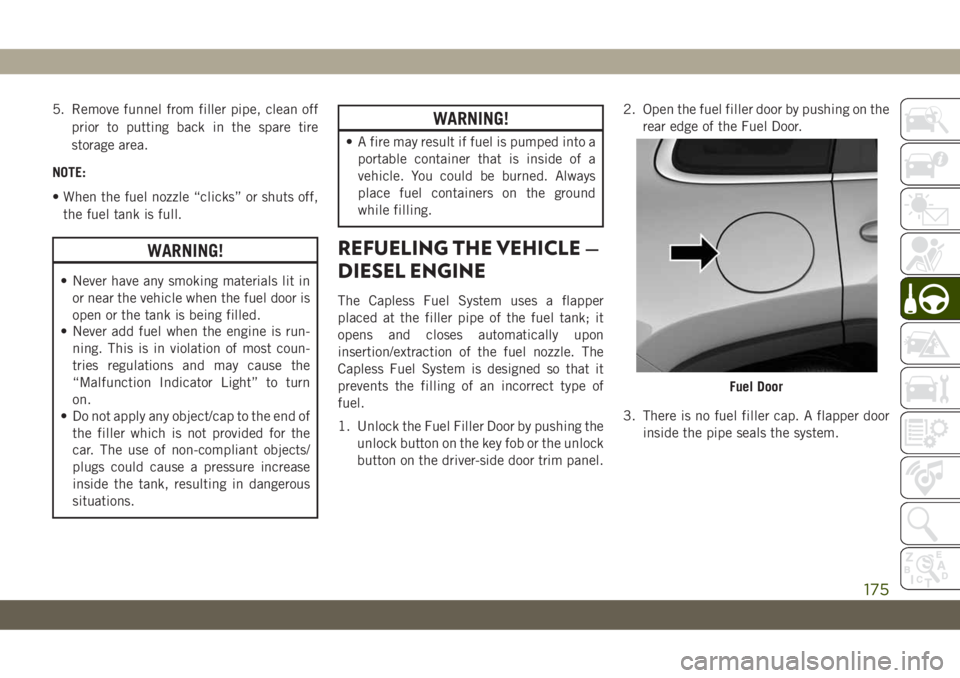
button on the driver-side door trim panel.2. Open the fuel filler door by pushing on the
rear edge of the Fuel Door.
3. There is no fuel filler cap. A flapper door
inside the pipe seals the system.
Fuel Door
175
Page 178 of 344
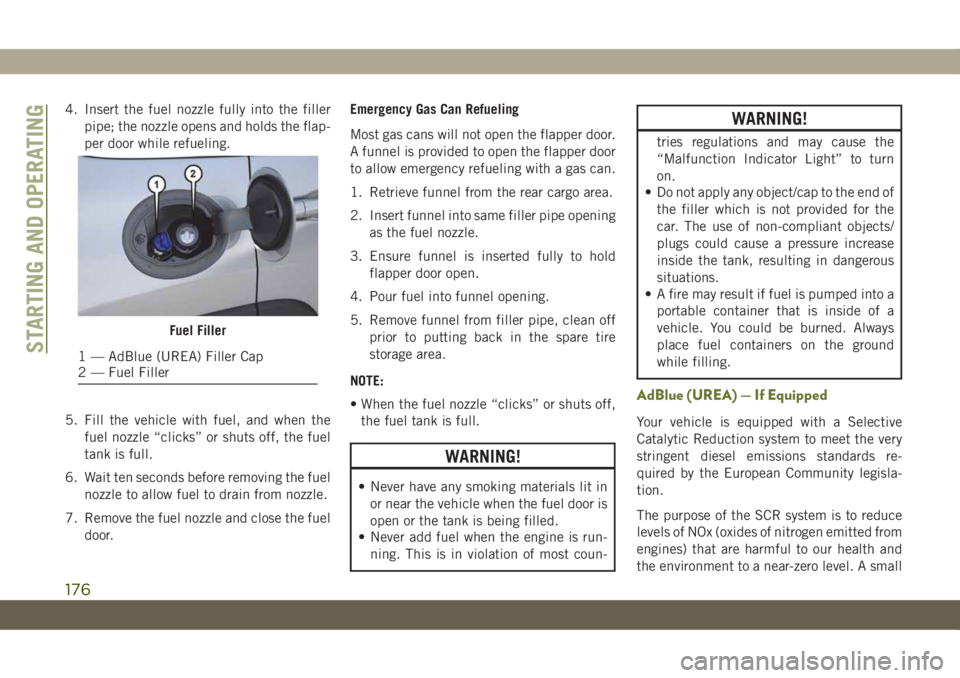
4. Insert the fuel nozzle fully into the filler
pipe; the nozzle opens and holds the flap-
per door while refueling.
5. Fill the vehicle with fuel, and when the
fuel nozzle “clicks” or shuts off, the fuel
tank is full.
6. Wait ten seconds before removing the fuel
nozzle to allow fuel to drain from nozzle.
7. Remove the fuel nozzle and close the fuel
door.Emergency Gas Can Refueling
Most gas cans will not open the flapper door.
A funnel is provided to open the flapper door
to allow emergency refueling with a gas can.
1. Retrieve funnel from the rear cargo area.
2. Insert funnel into same filler pipe opening
as the fuel nozzle.
3. Ensure funnel is inserted fully to hold
flapper door open.
4. Pour fuel into funnel opening.
5. Remove funnel from filler pipe, clean off
prior to putting back in the spare tire
storage area.
NOTE:
• When the fuel nozzle “clicks” or shuts off,
the fuel tank is full.
WARNING!
• Never have any smoking materials lit in
or near the vehicle when the fuel door is
open or the tank is being filled.
• Never add fuel when the engine is run-
ning. This is in violation of most coun-
WARNING!
tries regulations and may cause the
“Malfunction Indicator Light” to turn
on.
• Do not apply any object/cap to the end of
the filler which is not provided for the
car. The use of non-compliant objects/
plugs could cause a pressure increase
inside the tank, resulting in dangerous
situations.
• A fire may result if fuel is pumped into a
portable container that is inside of a
vehicle. You could be burned. Always
place fuel containers on the ground
while filling.
AdBlue (UREA) — If Equipped
Your vehicle is equipped with a Selective
Catalytic Reduction system to meet the very
stringent diesel emissions standards re-
quired by the European Community legisla-
tion.
The purpose of the SCR system is to reduce
levels of NOx (oxides of nitrogen emitted from
engines) that are harmful to our health and
the environment to a near-zero level. A small
Fuel Filler
1 — AdBlue (UREA) Filler Cap
2 — Fuel FillerSTARTING AND OPERATING
176
Page 181 of 344
CAUTION!
• Never add anything other than AdBlue
(UREA) to the tank – especially any form
of hydrocarbon such as diesel fuel, fuel
system additives, gasoline, or any other
petroleum-based product. Even a very
small amount of these, less than
100 parts per million or less than 1 oz.
(30 ml) per 78 gallons (295 liters) will
contaminate the entire AdBlue (UREA)
system and will require replacement. If
owners use a container, funnel or nozzle
when refilling the tank, it should either
be new or one that is has only been used
for adding AdBlue (UREA). Mopar pro-
vides an attachable nozzle with its Ad-
Blue (UREA) for this purpose.3. Stop filling the AdBlue (UREA) tank im-
mediately when any of the following hap-
pen: AdBlue (UREA) splashes out the fill
inlet, or a AdBlue (UREA) pump nozzle
automatically shuts off.
4. After removing the nozzle, refit the cap on
the AdBlue (UREA) filler by turning it
clockwise until it is fully tightened. Cycle
the ignition to the ACC position (no need
to start the engine).
5. Wait for the warning on the instrument
panel to switch off before moving the
vehicle, the warning light may stay on for
a few seconds to half a minute. In case of
engine start-up and movement of the ve-
hicle, the warning light will remain on for
a longer period of time, but there are no
problems on the engine functionality. If
topping up is done with the AdBlue
(UREA) tank empty, you have to wait two
minutes before starting the vehicle.When Refueling The Additive For Diesel Emis-
sions AdBlue (UREA) With Bottle:
• Park the vehicle on level ground.
• Turn off the engine by cycling the ignition to
the OFF position.
• Open the fuel filler and then unscrew and
remove the cap from the AdBlue (UREA)
filler.
• Press the bottom of the bottle towards the
filler to release the bottle's safety valve and
start topping up; if the level of AdBlue
(UREA) in the bottle.
• Stop filling the AdBlue (UREA) tank imme-
diately when any of the following happen:
AdBlue (UREA) stops flowing from the fill
bottle into the AdBlue (UREA) fill inlet,
AdBlue (UREA) splashes out the fill inlet.
• If the level of AdBlue (UREA) in the bottle
does not drop while topping up, it means
that you have filled the reservoir, so pull the
bottle towards you to re-close the bottle's
safety valve and unscrew the bottle from
the filler.
179