4WD JEEP CHEROKEE 2023 Owner's Manual
[x] Cancel search | Manufacturer: JEEP, Model Year: 2023, Model line: CHEROKEE, Model: JEEP CHEROKEE 2023Pages: 276, PDF Size: 12.55 MB
Page 143 of 276
MULTIMEDIA141
OFF-ROAD PAGES — IF EQUIPPED
Your vehicle may be equipped with Off-Road Pages, which
displays vehicle information related to the drivetrain,
transfer case, and coolant/oil gauges.
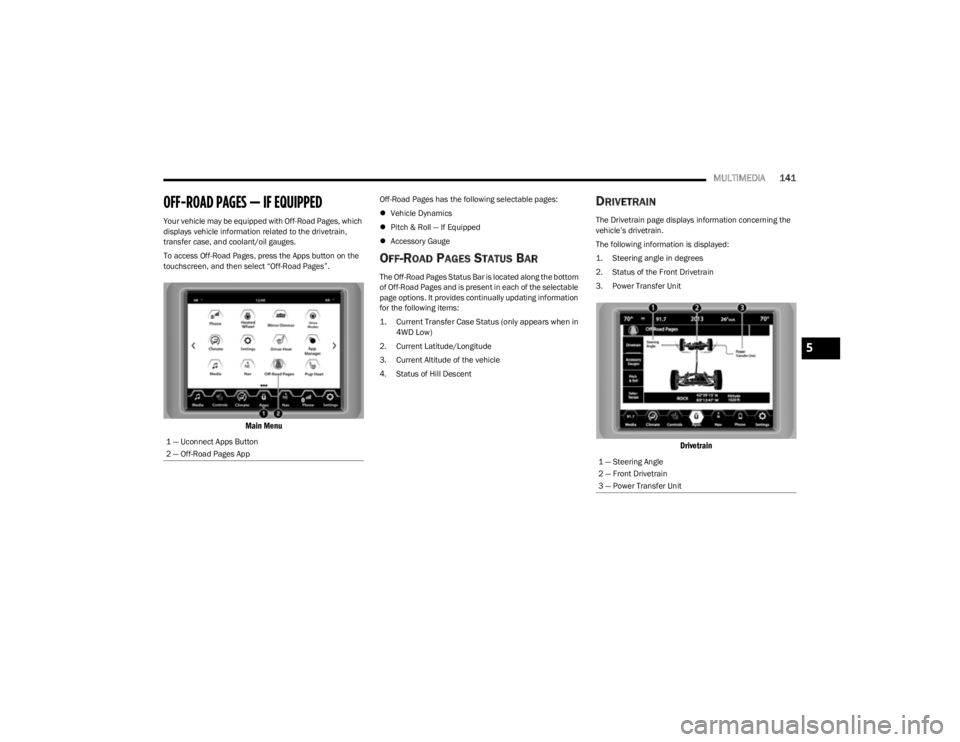
To access Off-Road Pages, press the Apps button on the
touchscreen, and then select “Off-Road Pages”.
Main Menu
Off-Road Pages has the following selectable pages:
Vehicle Dynamics
Pitch & Roll — If Equipped
Accessory Gauge
OFF-ROAD PAGES STATUS BAR
The Off-Road Pages Status Bar is located along the bottom
of Off-Road Pages and is present in each of the selectable
page options. It provides continually updating information
for the following items:
1. Current Transfer Case Status (only appears when in
4WD Low)
2. Current Latitude/Longitude
3. Current Altitude of the vehicle
4. Status of Hill Descent
DRIVETRAIN
The Drivetrain page displays information concerning the
vehicle’s drivetrain.
The following information is displayed:
1. Steering angle in degrees
2. Status of the Front Drivetrain
3. Power Transfer Unit
Drivetrain
1 — Uconnect Apps Button
2 — Off-Road Pages App
1 — Steering Angle
2 — Front Drivetrain
3 — Power Transfer Unit
5
23_KL_OM_EN_USC_t.book Page 141
Page 144 of 276
142MULTIMEDIA
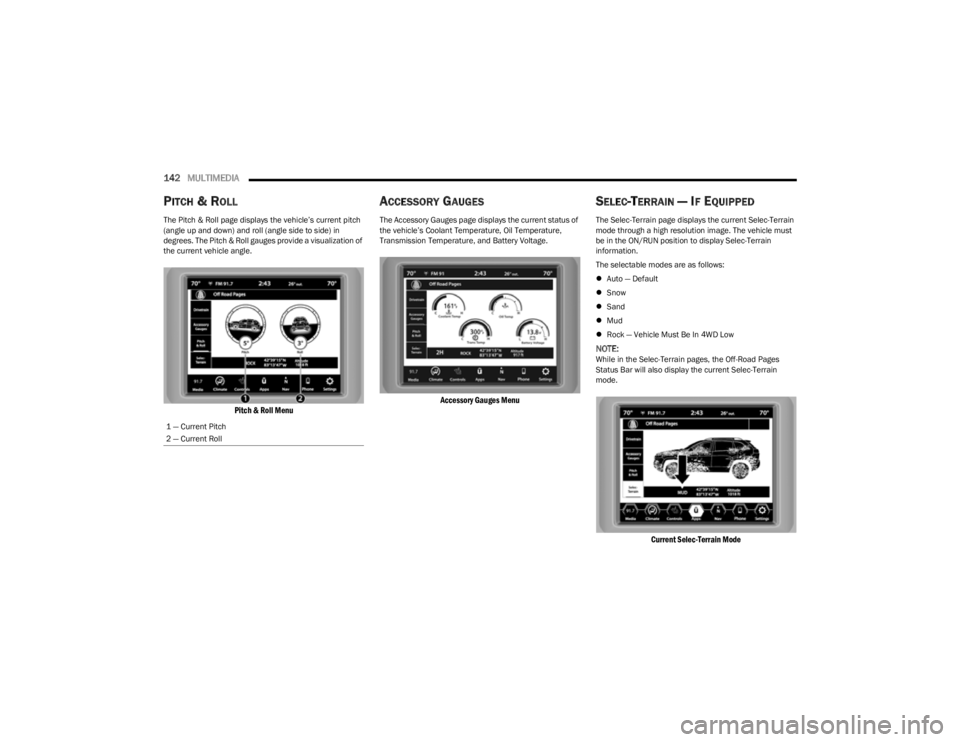
PITCH & ROLL
The Pitch & Roll page displays the vehicle’s current pitch
(angle up and down) and roll (angle side to side) in
degrees. The Pitch & Roll gauges provide a visualization of
the current vehicle angle.
Pitch & Roll Menu
ACCESSORY GAUGES
The Accessory Gauges page displays the current status of
the vehicle’s Coolant Temperature, Oil Temperature,
Transmission Temperature, and Battery Voltage.
Accessory Gauges Menu
SELEC-TERRAIN — IF EQUIPPED
The Selec-Terrain page displays the current Selec-Terrain
mode through a high resolution image. The vehicle must
be in the ON/RUN position to display Selec-Terrain
information.
The selectable modes are as follows:
Auto — Default
Snow
Sand
Mud
Rock — Vehicle Must Be In 4WD Low
NOTE:While in the Selec-Terrain pages, the Off-Road Pages
Status Bar will also display the current Selec-Terrain
mode.
Current Selec-Terrain Mode
1 — Current Pitch
2 — Current Roll
23_KL_OM_EN_USC_t.book Page 142
Page 148 of 276
146SAFETY
(Continued)
Full Off — If Equipped
This mode is intended for off-highway or off-road use only
and should not be used on any public roadways. In this
mode, TCS and ESC features are turned off. To enter the
“Full Off” mode, push and hold the ESC OFF button for five
seconds while the vehicle is stopped with the engine
running. After five seconds, a chime will sound, the ESC
OFF Indicator Light will illuminate, and the ESC OFF
message will display in the instrument cluster. To turn ESC
on again, momentarily push the ESC OFF button.
NOTE:System may switch from ESC “Full Off” to “Partial Off”
mode when vehicle exceeds a predetermined speed.
When the vehicle speed slows below the predetermined
speed the system will return to ESC “Full Off”.
ESC modes may also be affected by drive modes (if
equipped).ESC Activation/Malfunction Indicator Light
And ESC OFF Indicator Light
The ESC Activation/Malfunction Indicator Light
in the instrument cluster will come on when the
ignition is placed in the ON/RUN mode. It
should turn off with the engine running. If the
ESC Activation/Malfunction Indicator Light comes on
continuously with the engine running, a malfunction has
been detected in the ESC system. If this light remains on
after several ignition cycles, and the vehicle has been
driven several miles (kilometers) at speeds greater than
30 mph (48 km/h), see an authorized dealer as soon as possible to have the problem diagnosed and corrected.
The ESC Activation/Malfunction Indicator Light starts to
flash as soon as the tires lose traction and the ESC system
becomes active. The ESC Activation/Malfunction Indicator
Light also flashes when TCS is active. If the ESC
Activation/Malfunction Indicator Light begins to flash
during acceleration, ease up on the accelerator and apply
as little throttle as possible. Be sure to adapt your speed
and driving to the prevailing road conditions. The ESC OFF Indicator Light indicates that the
Electronic Stability Control (ESC) is in a reduced
mode.
NOTE:
The ESC Activation/Malfunction Indicator Light and the
ESC OFF Indicator Light come on momentarily each
time the ignition is placed in the ON position.
Each time the ignition is placed in the ON position, the
ESC system will be on even if it was turned off previ -
ously.
The ESC system will make buzzing or clicking sounds
when it is active. This is normal; the sounds will stop
when ESC becomes inactive following the maneuver
that caused the ESC activation.
Hill Descent Control (HDC) — If Equipped
HDC is intended for low speed off-road driving while in
4WD Low. HDC maintains vehicle speed while descending
hills during various driving situations. HDC controls vehicle
speed by actively controlling the brakes.
HDC Has Three States:
1. Off (feature is not enabled and will not activate).
2. Enabled (feature is enabled and ready but activation
conditions are not met, or driver is actively overriding
with brake or throttle application).
3. Active (feature is enabled and actively controlling vehicle speed).WARNING!
In the ESC “Full Off” mode, the engine torque reduc -
tion and stability features are disabled. Therefore,
enhanced vehicle stability offered by the ESC system
is unavailable. In an emergency evasive maneuver,
the ESC system will not engage to assist in main -
taining stability. ESC “Full Off” mode is intended for
off-highway or off-road use only.
The Electronic Stability Control (ESC) cannot prevent
the natural laws of physics from acting on the
vehicle, nor can it increase the traction afforded by
prevailing road conditions. ESC cannot prevent all
accidents, including those resulting from excessive
speed in turns, driving on very slippery surfaces, or
hydroplaning. ESC also cannot prevent collisions.
WARNING!
23_KL_OM_EN_USC_t.book Page 146
Page 149 of 276

SAFETY147
Enabling HDC
HDC is enabled by pushing the HDC button, but the
following conditions must also be met to enable HDC:
The driveline is in 4WD Low
The vehicle speed is below 5 mph (8 km/h)
The parking brake is released
The driver door is closed
Activating HDC
Once HDC is enabled it will activate automatically if driven
down a grade of sufficient magnitude. The set speed for
HDC is selectable by the driver, and can be adjusted by
using the gear shift +/-. The following summarizes the
HDC set speeds:
HDC Target Set Speeds
P = No set speed. HDC may be enabled but will not acti -
vate.
R = 0.6 mph (1 km/h)
N = 1.2 mph (2 km/h)
D = 0.6 mph (1 km/h)
1st = 0.6 mph (1 km/h)
2nd = 1.2 mph (2 km/h)
3rd = 1.8 mph (3 km/h)
4th = 2.5 mph (4 km/h)
5th = 3.1 mph (5 km/h)
6th = 3.7 mph (6 km/h)
7th = 4.3 mph (7 km/h)
8th = 5.0 mph (8 km/h)
9th = 5.6 mph (9 km/h) – If EquippedNOTE:During HDC the +/- shifter input is used for HDC target
speed selection, but will not affect the gear chosen by the
transmission. When actively controlling HDC the trans -
mission will shift appropriately for the driver-selected set
speed and corresponding driving conditions.
Driver Override
The driver may override HDC activation with throttle or
brake application at any time.
Deactivating HDC
HDC will be deactivated but remain available if any of the
following conditions occur:
Driver overrides HDC set speed with throttle or brake
application.
Vehicle speed exceeds 20 mph (32 km/h) but remains
below 40 mph (64 km/h).
Vehicle is on a downhill grade of insufficient magni-
tude, is on level ground, or is on an uphill grade.
Vehicle is shifted to PARK.
Disabling HDC
HDC will be deactivated and disabled if any of the
following conditions occur:
The driver pushes the HDC button.
The driveline is shifted out of 4WD Low.
The parking brake is applied.
The driver door opens.
The vehicle is driven greater than 20 mph (32 km/h)
for greater than 70 seconds.
The vehicle is driven greater than 40 mph (64 km/h)
(HDC exits immediately).
HDC detects excessive brake temperature.
Feedback To The Driver
The instrument cluster has an HDC icon and the HDC
button has an LED icon, which offers feedback to the
driver about the state HDC is in.
The cluster icon and button light will illuminate and
remain on solid when HDC is enabled or activated. This
is the normal operating condition for HDC.
The cluster icon and button light will flash for several
seconds then extinguish when the driver pushes the
HDC button but enable conditions are not met.
The cluster icon and button light will flash for several
seconds then extinguish when HDC disables due to
excess speed.
The cluster icon and button light will flash when HDC
deactivates due to overheated brakes. The flashing will
stop and HDC will activate again once the brakes have
cooled sufficiently.
WARNING!
HDC is only intended to assist the driver in controlling
vehicle speed when descending hills. The driver must
remain attentive to the driving conditions and is
responsible for maintaining a safe vehicle speed.
6
23_KL_OM_EN_USC_t.book Page 147
Page 151 of 276

SAFETY149
Ready Alert Braking (RAB)
RAB may reduce the time required to reach full braking
during emergency braking situations. It anticipates when
an emergency braking situation may occur by monitoring
how fast the throttle is released by the driver. The
Electronic Brake Controller (EBC) will prepare the brake
system for a panic stop.
Selec-Speed Control (SSC) — If Equipped
SSC is intended for off-road driving in 4WD Low only. SSC
maintains vehicle speed by actively controlling engine
torque and brakes.
SSC has three states:
1. Off (feature is not enabled and will not activate).
2. Enabled (feature is enabled and ready but activation
conditions are not met, or driver is actively overriding
with brake or throttle application).
3. Active (feature is enabled and actively controlling vehicle speed).
Enabling SSC
SSC is enabled by pushing the SSC button, but the
following conditions must also be met to enable SSC:
The driveline is in 4WD Low
The vehicle speed is below 5 mph (8 km/h)
The parking brake is released
The driver door is closed
The driver is not applying throttle Activating SSC
Once SSC is enabled it will activate automatically once the
following conditions are met:
Driver releases throttle
Driver releases brake
Transmission is in any selection other than PARK (P)
Vehicle speed is below 20 mph (32 km/h)
The set speed for SSC is selectable by the driver, and can
be adjusted by using the gear shift +/-. Additionally, the
SSC set speed may be reduced when climbing a grade and
the level of set speed reduction depends on the
magnitude of grade. The following summarizes the SSC
set speeds:
SSC Target Set Speeds
1st = .6 mph (1 km/h)
2nd = 1.2 mph (2 km/h)
3rd = 1.8 mph (3 km/h)
4th = 2.5 mph (4 km/h)
5th = 3.1 mph (5 km/h)
6th = 3.7 mph (6 km/h)
7th = 4.3 mph (7 km/h)
8th = 5 mph (8 km/h)
9th = 5.6 mph (9 km/h) – If Equipped
REVERSE = .6 mph (1 km/h)
NEUTRAL = 1.2 mph (2 km/h)
PARK = SSC remains enabled but not active
NOTE:
During SSC the +/- shifter input is used for SSC target
speed selection but will not affect the gear chosen by
the transmission. While actively controlling SSC the
transmission will shift appropriately for the
driver-selected set speed and corresponding driving
conditions.
SSC performance is influenced by the Selec-Terrain
mode. This difference may be notable to the driver and
may be perceived as a varying level of aggressiveness.
Driver Override:
The driver may override SSC activation with throttle or
brake application at any time.
Deactivating SSC
SSC will be deactivated but remain available if any of the
following conditions occur:
Driver overrides SSC set speed with throttle or brake
application.
Vehicle speed exceeds 20 mph (32 km/h) but remains
below 40 mph (64 km/h).
Vehicle is shifted to PARK.
6
23_KL_OM_EN_USC_t.book Page 149
Page 152 of 276
150SAFETY
Disabling SSC
SSC will deactivate and be disabled if any of the following
conditions occur:
The driver pushes the SSC button.
The driveline is shifted out of 4WD Low.
The parking brake is applied.
The driver door opens.
The vehicle is driven greater than 20 mph (32 km/h)
for greater than 70 seconds.
The vehicle is driven greater than 40 mph (64 km/h)
(SSC exits immediately).
Feedback To The Driver:
The instrument cluster has an SSC icon and the SSC
button has an LED which offers feedback to the driver
about the state SSC is in.
The cluster icon and button lamp will illuminate and
remain on solid when SSC is enabled or activated. This
is the normal operating condition for SSC.
The cluster icon and button lamp will flash for several
seconds then extinguish when the driver pushes the
SSC button but enable conditions are not met.
The cluster icon and button lamp will flash for several
seconds then extinguish when SSC disables due to
excess speed.
The cluster icon and button lamp will flash then extin -
guish when SSC deactivates due to overheated brakes.
Traction Control System (TCS)
The TCS monitors the amount of wheel spin of each of the
driven wheels. If wheel spin is detected, the TCS may apply
brake pressure to the spinning wheel(s) and/or reduce
engine power to provide enhanced acceleration and
stability. A feature of the TCS, Brake Limited Differential
(BLD) functions similarly to a limited slip differential and
controls the wheel spin across a driven axle. If one wheel
on a driven axle is spinning faster than the other, the
system will apply the brake of the spinning wheel. This will
allow more engine torque to be applied to the wheel that
is not spinning. BLD may remain enabled even if TCS and
Electronic Stability Control (ESC) are in reduced modes.
Trailer Sway Control (TSC)
TSC uses sensors in the vehicle to recognize an
excessively swaying trailer and will take the appropriate
actions to attempt to stop the sway.
NOTE:
TSC cannot stop all trailers from swaying. Always use
caution when towing a trailer and follow the trailer tongue
weight recommendations
Úpage 114.
When TSC is functioning, the ESC Activation/Malfunction
Indicator Light will flash, the engine power may be reduced
and you may feel the brakes being applied to individual wheels to attempt to stop the trailer from swaying. TSC is
disabled when the ESC system is in the “Partial Off” or
“Full Off” modes.
AUXILIARY DRIVING SYSTEMS
BLIND SPOT MONITORING (BSM) —
I
F EQUIPPED
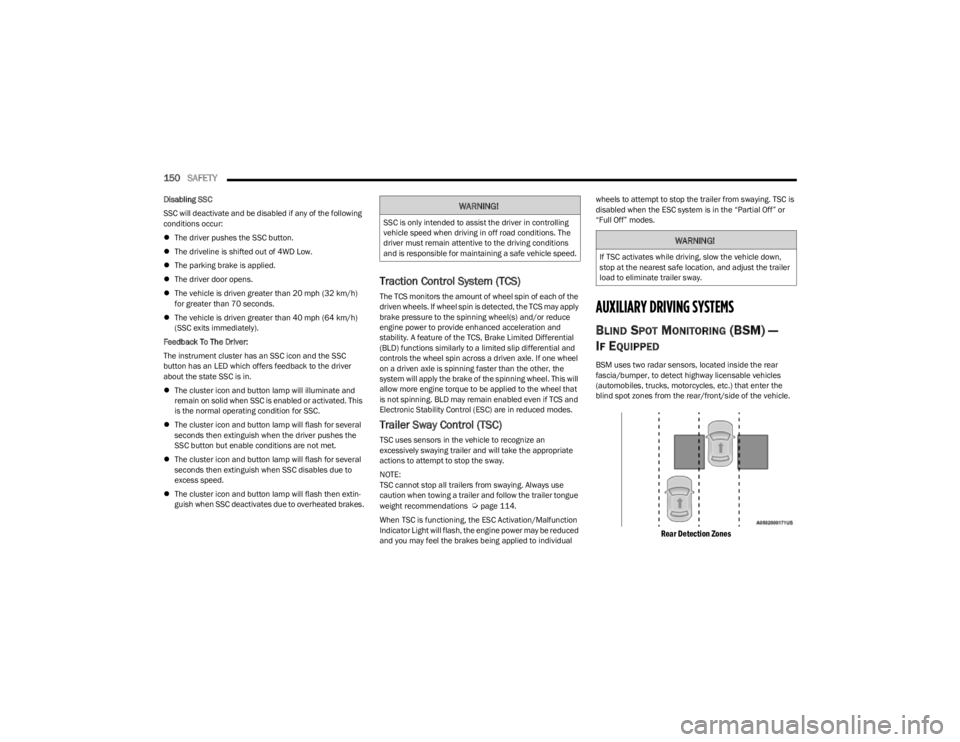
BSM uses two radar sensors, located inside the rear
fascia/bumper, to detect highway licensable vehicles
(automobiles, trucks, motorcycles, etc.) that enter the
blind spot zones from the rear/front/side of the vehicle.
Rear Detection Zones
WARNING!
SSC is only intended to assist the driver in controlling
vehicle speed when driving in off road conditions. The
driver must remain attentive to the driving conditions
and is responsible for maintaining a safe vehicle speed.
WARNING!
If TSC activates while driving, slow the vehicle down,
stop at the nearest safe location, and adjust the trailer
load to eliminate trailer sway.
23_KL_OM_EN_USC_t.book Page 150
Page 230 of 276

228SERVICING AND MAINTENANCE
CavityBlade Fuse Cartridge Fuse Description
* If Equipped
F01 –70 Amp Gray Electric Power Str
F02 –150 Amp Gray Aux PDC *
F03 –300 Amp Gray Alternator
F04 ––Battery
F05 –100 Amp Gray Rad Fan
F06 ––Not Used
F07 15 Amp Blue –Powertrain Control Mod (PCM) * / Surge Solenoid Purge Valve *
F08 25 Amp Clear –Fuel Injectors / ECM / PCM/
F09 10 Amp Red
–UREA Coolant Pump/PCM *
15 Amp Blue Coolant Pump *
F10 20 Amp Yellow –Power Transfer Unit (PTU) 4WD *
F11 ––Not Used
F12 10 Amp Red –Purging Pump *
F13 10 Amp Red –Voltage Stability Mod (VSM)/Powertrain Control Mod (PCM)/Engine Control Module (ECM)
F14 10 Amp Red –Drivetrain Control Module (DTCM)*/Power Take-Off Unit (PTU)*/Electric Park Brake (EPB) /
RDM*/ Brake System Module (BSM) / Brake Pedal Switch / Back Up Lamp Switch *
F15 ––Not Used
F16 20 Amp Yellow –Ign Coils / Additional Diesel Content
F17 30 Amp Pink –Brake Vacuum Pump *
F18 ––Not Used
F19 –40 Amp Green Starter
F20 10 Amp Red –A/C Clutch
23_KL_OM_EN_USC_t.book Page 228
Page 233 of 276

SERVICING AND MAINTENANCE231
F6510 Amp Red –In Vehicle Temperature Sensor*/Humidity Sensor*/Driver Assist System Module (DASM)*/
Park Assist (PAM) *
F66 15 Amp Blue –HVAC (ECC)/Instrument Panel Cluster (IPC)/Gateway Module
F67 ––Not Used
F68 ––Not Used
F69 10 Amp Red –Transfer Case Switch (TSBM)/Active Grill Shutter (AGS) *
F70 5 Amp Tan –Intelligent Battery Sensor (IBS)
F71 ––Not Used
F72 10 Amp Red –Heated Mirrors * / PM Sensor *
F73 –20 Amp Blue NOX Sensors*/ Trailer Tow Backup *
F74 –30 Amp Pink Rear Defroster (EBL)
F75 20 Amp Yellow –Cigar Lighter *
F76 20 Amp Yellow –Rear Differential Module (RDM) 4WD *
F77 10 Amp Red –Hands Free Release */ Brake Pedal Switch *
F78 10 Amp Red –DTV / TBM / OBD Port
F79 10 Amp Red –Integrated Center Stack (ICS) / HVAC /Electric Park Brake (EPB) SW Steering Control Mod
(SCCM) /Instrument Panel Cluster (IPC)
F80 20 Amp Yellow –Radio
F81 ––Not Used
F82 5 Amp Tan –Gateway Module
F83 –20 Amp Blue Engine Controller Module (ECM)*
30 Amp Pink SCU Module *
F84 –30 Amp Pink Electric Park Brake (EPB) – Left
Cavity
Blade Fuse Cartridge Fuse Description
* If Equipped
8
23_KL_OM_EN_USC_t.book Page 231
Page 250 of 276
248SERVICING AND MAINTENANCE
(Continued)
TIRE ROTATION RECOMMENDATIONS
The tires on the front and rear of your vehicle operate at
different loads and perform different steering, handling,
and braking functions. For these reasons, they wear at
unequal rates.
These effects can be reduced by timely rotation of tires.
The benefits of rotation are especially worthwhile with
aggressive tread designs such as those on On/Off Road
type tires. Rotation will increase tread life, help to
maintain mud, snow, and wet traction levels, and
contribute to a smooth, quiet ride. Refer to the Maintenance Plan for the proper
maintenance intervals
Úpage 209. The reasons for any
rapid or unusual wear should be corrected prior to rotation
being performed.
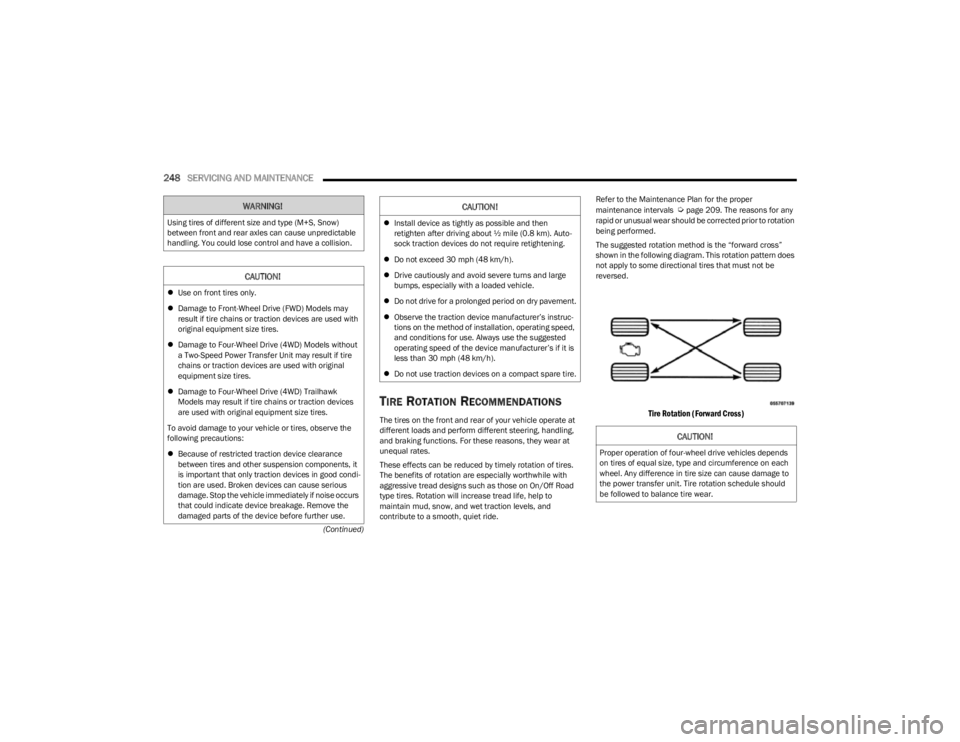
The suggested rotation method is the “forward cross”
shown in the following diagram. This rotation pattern does
not apply to some directional tires that must not be
reversed.
Tire Rotation (Forward Cross)
WARNING!
Using tires of different size and type (M+S, Snow)
between front and rear axles can cause unpredictable
handling. You could lose control and have a collision.
CAUTION!
Use on front tires only.
Damage to Front-Wheel Drive (FWD) Models may
result if tire chains or traction devices are used with
original equipment size tires.
Damage to Four-Wheel Drive (4WD) Models without
a Two-Speed Power Transfer Unit may result if tire
chains or traction devices are used with original
equipment size tires.
Damage to Four-Wheel Drive (4WD) Trailhawk
Models may result if tire chains or traction devices
are used with original equipment size tires.
To avoid damage to your vehicle or tires, observe the
following precautions:
Because of restricted traction device clearance
between tires and other suspension components, it
is important that only traction devices in good condi -
tion are used. Broken devices can cause serious
damage. Stop the vehicle immediately if noise occurs
that could indicate device breakage. Remove the
damaged parts of the device before further use.
Install device as tightly as possible and then
retighten after driving about ½ mile (0.8 km). Auto -
sock traction devices do not require retightening.
Do not exceed 30 mph (48 km/h).
Drive cautiously and avoid severe turns and large
bumps, especially with a loaded vehicle.
Do not drive for a prolonged period on dry pavement.
Observe the traction device manufacturer’s instruc -
tions on the method of installation, operating speed,
and conditions for use. Always use the suggested
operating speed of the device manufacturer’s if it is
less than 30 mph (48 km/h).
Do not use traction devices on a compact spare tire.
CAUTION!
CAUTION!
Proper operation of four-wheel drive vehicles depends
on tires of equal size, type and circumference on each
wheel. Any difference in tire size can cause damage to
the power transfer unit. Tire rotation schedule should
be followed to balance tire wear.
23_KL_OM_EN_USC_t.book Page 248