high JEEP CHEROKEE 2023 Owners Manual
[x] Cancel search | Manufacturer: JEEP, Model Year: 2023, Model line: CHEROKEE, Model: JEEP CHEROKEE 2023Pages: 276, PDF Size: 12.55 MB
Page 2 of 276
WARNING: Operating, servicing and maintaining a passenger vehicle or off-highway
motor vehicle can expose you to chemicals including engine exhaust, carbon monoxide,
phthalates, and lead, which are known to the State of California to cause cancer and
birth defects or other reproductive harm. To minimize exposure, avoid breathing exhaust,
do not idle the engine except as necessary, service your vehicle in a well-ventilated area
and wear gloves or wash your hands frequently when servicing your vehicle. For more
information go to www.P65Warnings.ca.gov/passenger-vehicle.
This Owner’s Manual illustrates and describes the operation of features and equipment that are either standard or optional on this vehicle. This manual may also include a description of features and equipment that are no longer available or were not ordered on this vehicle. Please disregard any features and equipment described in this manual that are not on this vehicle. FCA US LLC reserves the right to make changes in design and specifications, and/or make additions to or improvements to its products without imposing any obligation upon itself to install them on products previously manufactured.
With respect to any vehicles sold in Canada, the name FCA US LLC shall be deemed to be deleted and the name FCA Canada Inc. used in substitution therefore.
This Owner’s Manual is intended to familiarize you with the important features of your vehicle. Your most up-to-date Owner’s Manual, Navigation/Uconnect manuals and Warranty Booklet can be found by visiting the website on the back cover.
ROADSIDE ASSISTANCE 24 HOURS, 7 DAYS A WEEK AT YOUR SERVICE. CALL 1-800-521-2779 OR VISIT CHRYSLER.RSAHELP.COM (USA) CALL 1-800-363-4869 OR VISIT FCA.ROADSIDEAID.COM (CANADA) SERVICES: Flat Tire Service, Out Of Gas/Fuel Delivery, Battery Jump Assistance, Lockout Service and Towing Service
Please see the Customer Assistance chapter in this Owner’s Manual for further information.
FCA US LLC reserves the right to modify the terms or discontinue the Roadside Assistance Program at any time. The Roadside Assistance Program is subject to restrictions and conditions of use, that are determined solely by FCA US LLC.
The driver’s primary responsibility is the safe operation of the vehicle. Driving while distracted can result in loss of vehicle control, resulting in an accident and personal injury. FCA US LLC strongly recommends that the driver use extreme caution when using any device or feature that may take their attention off the road. Use of any electrical devices, such as cellular telephones, computers, portable radios, vehicle navigation or other devices by the driver while the vehicle is moving is dangerous and could lead to a serious accident. Texting while driving is also dangerous and should never be done while the vehicle is moving. If you find yourself unable to devote your full attention to vehicle operation, pull off the road to a safe location and stop your vehicle. Some states or provinces prohibit the use of cellular telephones or texting while driving. It is always the driver’s responsibility to comply with all local laws.
This Owner’s Manual has been prepared to help you get acquainted with your new Jeep® brand vehicle and to provide a convenient reference source for common questions.
Not all features shown in this manual may apply to your vehicle. For additional information, visit mopar.com/om (USA), owners.mopar.ca (Canada) or your local Jeep® brand dealer.
U.S. Residents: If you are the first registered retail owner of your vehicle, you may obtain a complimentary printed copy of the Warranty Booklet by calling 1-877-426-5337 or by contacting your dealer. Replacement kits can be purchased by visiting www.techauthority.com.
Canadian Residents: If you are the first registered retail owner of your vehicle, you may obtain a complimentary printed copy of the Warranty Booklet or purchase a replacement kit by calling 1-800-387-1143 or by contacting your dealer.
DRIVING AND ALCOHOL
Drunk driving is one of the most frequent causes of accidents. Your driving ability can be seriously impaired with blood alcohol levels far below the legal minimum. If you are drinking, don’t drive. Ride with a designated non-drinking driver, call a cab, a rideshare, a friend or use public transportation.
WARNING
Driving after drinking can lead to an accident. Your perceptions are less sharp, your reflexes are slower and your judgment is impaired when you have been drinking. Never drink and then drive.
Page 4 of 276

2
INTRODUCTION
SYMBOLS KEY ....................................................................... 8
ROLLOVER WARNING ......................................................... 8
VEHICLE MODIFICATIONS/ALTERATIONS ........................ 8
SYMBOL GLOSSARY ............................................................. 9
GETTING TO KNOW YOUR VEHICLE
KEYS ....................................................................................13Key Fob ........................................................................ 13
SENTRY KEY ........................................................................16
IGNITION SWITCH ...............................................................16 Ignition Node Module (IGNM) —
If Equipped .................................................................. 16
Keyless Enter ‘n Go™ Ignition
(If Equipped) ................................................................ 16
REMOTE START — IF EQUIPPED .......................................18 How To Use Remote Start .......................................... 18
To Exit Remote Start Mode ........................................ 18
Remote Start Front Defrost Activation —
If Equipped .................................................................. 19
Remote Start Comfort Systems —
If Equipped ................................................................. 19
Remote Start Windshield Wiper De-Icer
Activation — If Equipped ............................................. 19
Remote Start Cancel Message .................................. 19
VEHICLE SECURITY SYSTEM — IF EQUIPPED ..................20 To Arm The System .................................................... 20
To Disarm The System ............................................... 20
Rearming Of The System ............................................ 20
Security System Manual Override.............................. 20 DOORS ................................................................................ 20
Manual Door Locks......................................................20
Power Door Locks .......................................................21
Keyless Enter ‘n Go™ — Passive Entry ....................... 22
Automatic Unlock Doors On Exit ................................. 23
Automatic Door Locks — If Equipped ........................ 24
Child-Protection Door Lock System — Rear Doors .... 24
STEERING WHEEL............................................................... 24 Tilt/Telescoping Steering Column ..............................24
Heated Steering Wheel — If Equipped ....................... 25
UCONNECT VOICE RECOGNITION ..................................... 25 Introducing Voice Recognition .................................... 25
Basic Voice Commands............................................... 25
Get Started ................................................................... 26
Additional Information................................................. 26
DRIVER MEMORY SETTINGS — IF EQUIPPED ................ 26 Programming The Memory Feature............................ 27
Linking And Unlinking The Key Fob To Memory......... 27
Memory Position Recall............................................... 27
SEATS .................................................................................. 28 Manual Adjustment
(Front Seats) — If Equipped......................................... 28
Manual Adjustment (Rear Seats) ............................... 29
Power Adjustment (Front Seats) — If Equipped ......... 30
Heated Seats — If Equipped........................................ 31
Ventilated Seats — If Equipped................................... 32
Head Restraints ........................................................... 32
MIRRORS ............................................................................ 34 Inside Rearview Mirror ................................................ 34
Illuminated Vanity Mirrors ........................................... 34
Outside Mirrors ........................................................... 34
Outside Mirrors With Turn Signal And Approach
Lighting — If Equipped ................................................. 35
Power Mirrors...............................................................35
Heated Mirrors — If Equipped .................................... 35 UNIVERSAL GARAGE DOOR OPENER
(HOMELINK®) — IF EQUIPPED
S
................................... 35
Before You Begin Programming HomeLink® ............ 36
Erasing All The HomeLink® Channels ....................... 36
Identifying Whether You Have A Rolling Code Or
Non-Rolling Code Device............................................. 36
Programming HomeLink® To A Garage Door
Opener ......................................................................... 36
Programming HomeLink® To A Miscellaneous
Device .......................................................................... 37
Reprogramming A Single HomeLink® Button ........... 37
Canadian/Gate Operator Programming .................... 37
Security ........................................................................ 38
Troubleshooting Tips ................................................... 38
EXTERIOR LIGHTS .............................................................. 39 Multifunction Lever .................................................... 39
Headlight Switch.......................................................... 39
Daytime Running Lights (DRLs) — If Equipped .......... 40
High/Low Beam Switch............................................... 40
Automatic High Beam Headlamp Control —
If Equipped .................................................................. 40
Flash-To-Pass............................................................... 40
Automatic Headlights — If Equipped ......................... 40
Parking Lights .............................................................. 40
Automatic Headlights With
Wipers — If Equipped .................................................. 41
Headlight Time Delay .................................................. 41
Lights-On Reminder .................................................... 41
Fog Lights — If Equipped ............................................. 41
Turn Signals ................................................................. 42
Lane Change Assist — If Equipped ............................. 42
Battery Saver ............................................................... 42
INTERIOR LIGHTS ............................................................... 42 Interior Courtesy Lights ............................................... 42
Illuminated Entry ........................................................ 43
23_KL_OM_EN_USC_t.book Page 2
Page 9 of 276

7
INTRODUCTION
Dear Customer,
Congratulations on the purchase of your new Jeep®. Be assured that it represents precision workmanship, distinctive styling, and high quality.
This is a specialized utility vehicle. It can go places and perform tasks that are not intended for conventional passenger vehicles. It handles and maneuvers differently from many
passenger vehicles both on-road and off-road, so take time to become familiar with your vehicle. If equipped, the two-wheel drive version of this vehicle was designed for on-road use
only. It is not intended for off-road driving or use in other severe conditions suited for a four-wheel drive vehicle. Before you drive this vehicle, read the Owner’s Manual. Be sure you are
familiar with all vehicle controls, particularly those used for braking, steering, transmission, and transfer case shifting. Learn how your vehicle handles on different road surfaces. Your
driving skills will improve with experience. When driving off-road, or working the vehicle, don’t overload the vehicle or expect the vehicle to overcome the natural laws of physics. Always
observe federal, state, provincial and local laws wherever you drive. As with other vehicles of this type, failure to operate this vehicle correctly may result in loss of control or a collision
Úpage 123.
This Owner's Manual has been prepared with the assistance of service and engineering specialists to acquaint you with the operation and maintenance of your vehicle. It is
supplemented by customer-oriented documents. Within this information, you will find a description of the services that FCA US LLC offers to its customers as well as the details of the
terms and conditions for maintaining its validity. Please take the time to read all of these publications carefully before driving your vehicle for the first time. Following the instructions,
recommendations, tips, and important warnings in this manual will help ensure safe and enjoyable operation of your vehicle.
This Owner’s Manual describes all versions of this vehicle. Options and equipment dedicated to specific markets or versions are not expressly indicated in the text. Therefore, you should
only consider the information that is related to the trim level, engine, and version that you have purchased. Any content introduced throughout the Owner’s Information, which may or
may not be applicable to your vehicle, will be identified with the wording “If Equipped”. All data contained in this publication are intended to help you use your vehicle in the best possible
way. FCA US LLC aims at a constant improvement of the vehicles produced. For this reason, it reserves the right to make changes to the model described for technical and/or commercial
reasons. For further information, contact an authorized dealer.
When it comes to service, remember that authorized dealers know your Jeep® best, have factory-trained technicians, genuine Mopar® parts, and care about your satisfaction.
1
23_KL_OM_EN_USC_t.book Page 7
Page 10 of 276
8
SYMBOLS KEY
If you do not read the entire Owner’s Manual, you may miss important information.
Observe all Cautions and Warnings.
ROLLOVER WARNING
Utility vehicles have a significantly higher rollover rate than other types of vehicles. This
vehicle has a higher ground clearance and a higher center of gravity than many passenger
vehicles. It is capable of performing better in a wide variety of off-road applications. Driven
in an unsafe manner, all vehicles can go out of control. Because of the higher center of
gravity, if this vehicle is out of control it may roll over while some other vehicles may not.Do not attempt sharp turns, abrupt maneuvers, or other unsafe driving actions that can
cause loss of vehicle control. Failure to operate this vehicle safely may result in a collision,
rollover of the vehicle, and severe or fatal injury. Drive carefully.
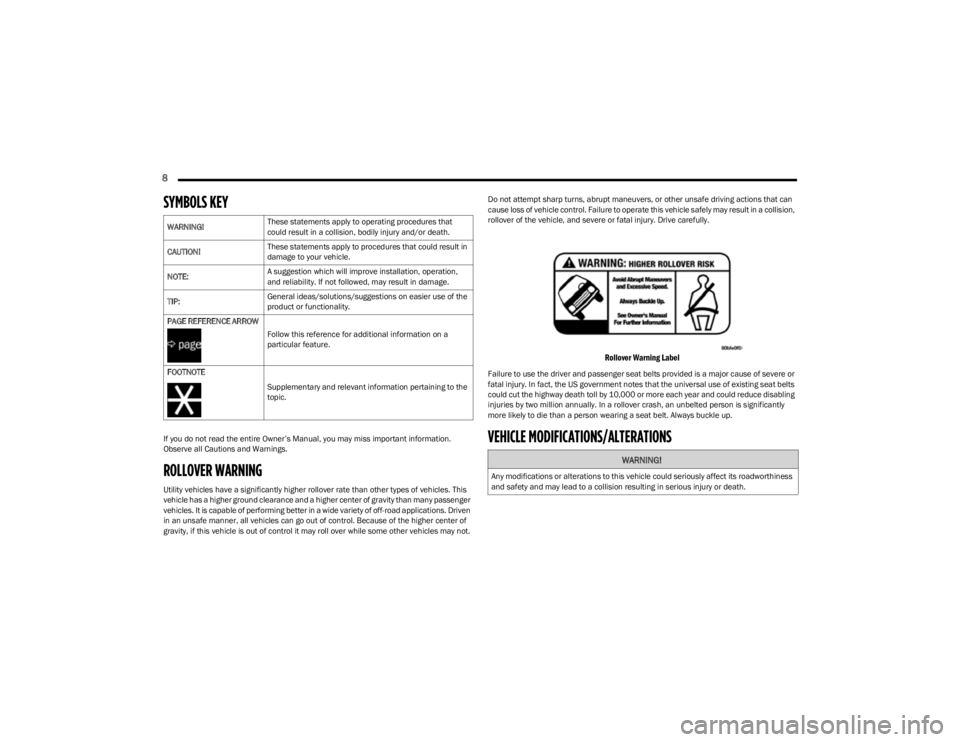
Rollover Warning Label
Failure to use the driver and passenger seat belts provided is a major cause of severe or
fatal injury. In fact, the US government notes that the universal use of existing seat belts
could cut the highway death toll by 10,000 or more each year and could reduce disabling
injuries by two million annually. In a rollover crash, an unbelted person is significantly
more likely to die than a person wearing a seat belt. Always buckle up.
VEHICLE MODIFICATIONS/ALTERATIONS
WARNING!
These statements apply to operating procedures that
could result in a collision, bodily injury and/or death.
CAUTION! These statements apply to procedures that could result in
damage to your vehicle.
NOTE: A suggestion which will improve installation, operation,
and reliability. If not followed, may result in damage.
TIP: General ideas/solutions/suggestions on easier use of the
product or functionality.
PAGE REFERENCE ARROW
Follow this reference for additional information on a
particular feature.
FOOTNOTE Supplementary and relevant information pertaining to the
topic.
WARNING!
Any modifications or alterations to this vehicle could seriously affect its roadworthiness
and safety and may lead to a collision resulting in serious injury or death.
23_KL_OM_EN_USC_t.book Page 8
Page 14 of 276
12
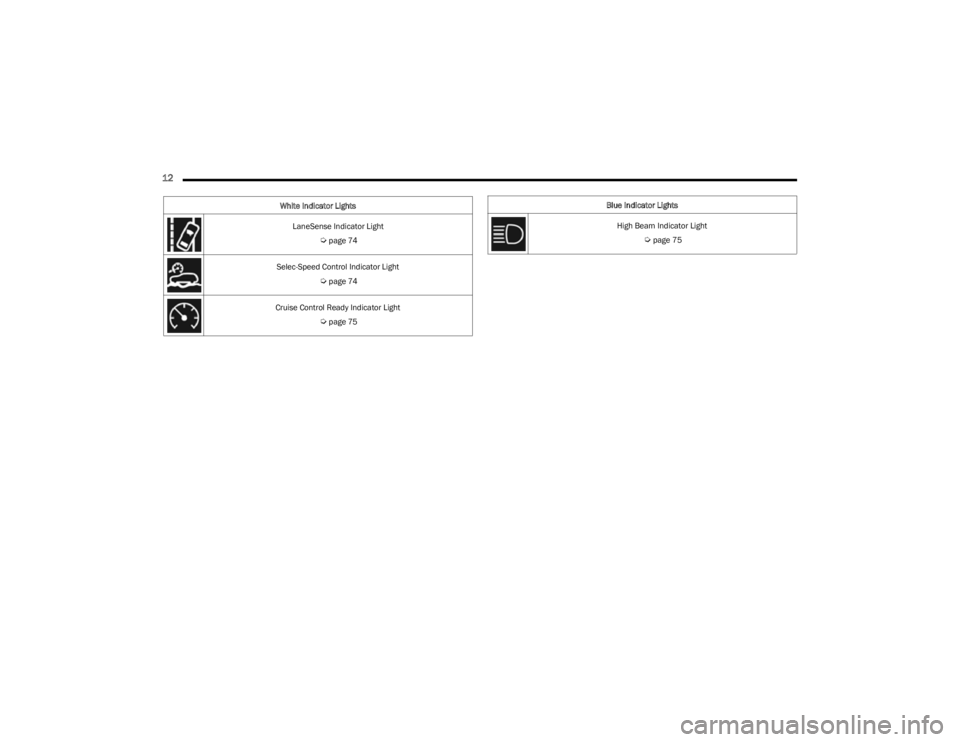
LaneSense Indicator Light
Úpage 74
Selec-Speed Control Indicator Light
Úpage 74
Cruise Control Ready Indicator Light
Úpage 75
White Indicator Lights
Blue Indicator Lights
High Beam Indicator Light
Úpage 75
23_KL_OM_EN_USC_t.book Page 12
Page 31 of 276
GETTING TO KNOW YOUR VEHICLE29
Manual Front Seat Recline Adjustment
To adjust the seatback, lift the lever located on the
outboard side of the seat, lean back to the desired
position and release the lever. To return the seatback, lift
the lever, lean forward and release the lever.
MANUAL ADJUSTMENT (REAR SEATS)
Rear Seat Recline Adjustment
The rear seatback also reclines for additional passenger
comfort.
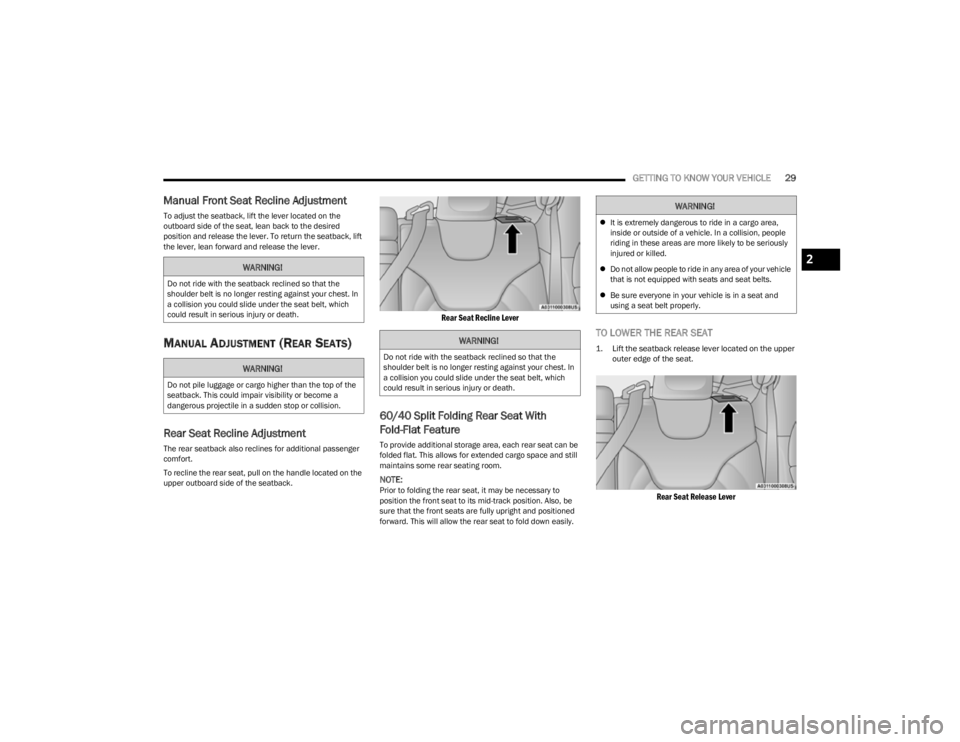
To recline the rear seat, pull on the handle located on the
upper outboard side of the seatback.
Rear Seat Recline Lever
60/40 Split Folding Rear Seat With
Fold-Flat Feature
To provide additional storage area, each rear seat can be
folded flat. This allows for extended cargo space and still
maintains some rear seating room.
NOTE:Prior to folding the rear seat, it may be necessary to
position the front seat to its mid-track position. Also, be
sure that the front seats are fully upright and positioned
forward. This will allow the rear seat to fold down easily.
TO LOWER THE REAR SEAT
1. Lift the seatback release lever located on the upper
outer edge of the seat.
Rear Seat Release Lever
WARNING!
Do not ride with the seatback reclined so that the
shoulder belt is no longer resting against your chest. In
a collision you could slide under the seat belt, which
could result in serious injury or death.
WARNING!
Do not pile luggage or cargo higher than the top of the
seatback. This could impair visibility or become a
dangerous projectile in a sudden stop or collision.
WARNING!
Do not ride with the seatback reclined so that the
shoulder belt is no longer resting against your chest. In
a collision you could slide under the seat belt, which
could result in serious injury or death.
WARNING!
It is extremely dangerous to ride in a cargo area,
inside or outside of a vehicle. In a collision, people
riding in these areas are more likely to be seriously
injured or killed.
Do not allow people to ride in any area of your vehicle
that is not equipped with seats and seat belts.
Be sure everyone in your vehicle is in a seat and
using a seat belt properly.
2
23_KL_OM_EN_USC_t.book Page 29
Page 34 of 276
32GETTING TO KNOW YOUR VEHICLE
VENTILATED SEATS — IF EQUIPPED
Located in the seat cushion and seatback are fans that
draw the air from the passenger compartment and move
air through fine perforations in the seat cover to help keep
the occupant cooler in higher ambient temperatures.
Front Ventilated Seats — If Equipped
The front ventilated seat controls are located
within the climate and control screen in the
Uconnect system. The fans operate at two
speeds: HI and LO.
Press the ventilated seat button once to choose HI.
Press the ventilated seat button a second time to
choose LO.
Press the ventilated seat button a third time to turn the
ventilated seat off.
NOTE:The engine must be running for the ventilated seats to
operate.
For information on use with the Remote Start system, see
Úpage 19.
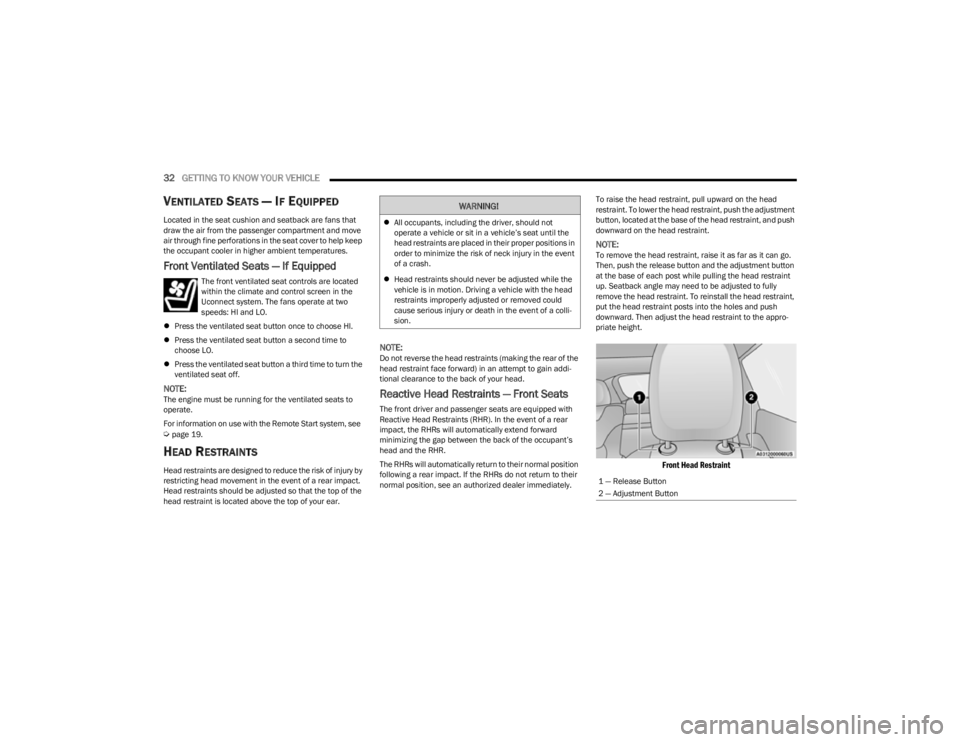
HEAD RESTRAINTS
Head restraints are designed to reduce the risk of injury by
restricting head movement in the event of a rear impact.
Head restraints should be adjusted so that the top of the
head restraint is located above the top of your ear.
NOTE:Do not reverse the head restraints (making the rear of the
head restraint face forward) in an attempt to gain addi -
tional clearance to the back of your head.
Reactive Head Restraints — Front Seats
The front driver and passenger seats are equipped with
Reactive Head Restraints (RHR). In the event of a rear
impact, the RHRs will automatically extend forward
minimizing the gap between the back of the occupant’s
head and the RHR.
The RHRs will automatically return to their normal position
following a rear impact. If the RHRs do not return to their
normal position, see an authorized dealer immediately. To raise the head restraint, pull upward on the head
restraint. To lower the head restraint, push the adjustment
button, located at the base of the head restraint, and push
downward on the head restraint.
NOTE:To remove the head restraint, raise it as far as it can go.
Then, push the release button and the adjustment button
at the base of each post while pulling the head restraint
up. Seatback angle may need to be adjusted to fully
remove the head restraint. To reinstall the head restraint,
put the head restraint posts into the holes and push
downward. Then adjust the head restraint to the appro
-
priate height.
Front Head Restraint
WARNING!
All occupants, including the driver, should not
operate a vehicle or sit in a vehicle’s seat until the
head restraints are placed in their proper positions in
order to minimize the risk of neck injury in the event
of a crash.
Head restraints should never be adjusted while the
vehicle is in motion. Driving a vehicle with the head
restraints improperly adjusted or removed could
cause serious injury or death in the event of a colli -
sion.
1 — Release Button
2 — Adjustment Button
23_KL_OM_EN_USC_t.book Page 32
Page 42 of 276

40GETTING TO KNOW YOUR VEHICLE
DAYTIME RUNNING LIGHTS (DRLS) —
I
F EQUIPPED
The Daytime Running Lights will turn on when the engine
is started and remain on unless the headlamps are turned
on, the parking brake is applied, or the ignition is placed in
the OFF position.
NOTE:
For vehicles sold in Canada, the Daytime Running
Lights will automatically deactivate when the front fog
lights are turned on.
If allowed by law in the country in which the vehicle was
purchased, the Daytime Running Lights can be turned
on and off using the Uconnect system
Úpage 126.
On some vehicles, the Daytime Running Lights may
deactivate, or reduce intensity, on one side of the
vehicle (when a turn signal is activated on that side), or
on both sides of the vehicle (when the hazard warning
lights are activated).
HIGH/LOW BEAM SWITCH
After the low beam headlights are turned on, push the
multifunction lever, located on the left side of the steering
wheel, away from you to switch the headlights to high
beam. Pulling the multifunction lever back will turn the low
beams on.
AUTOMATIC HIGH BEAM HEADLAMP
C
ONTROL — IF EQUIPPED
The Automatic High Beam Headlamp Control system
provides increased forward lighting at night by automatically controlling the high beams through the use
of a camera mounted on the windshield. This camera
detects vehicle specific light and automatically switches
from high beams to low beams until the approaching
vehicle is out of view.
NOTE:
The Automatic High Beam Headlamp Control is
enabled through the Uconnect system Úpage 126.
The multifunction lever must be in the high beam posi -
tion and the low beams must be turned on in order to
activate the Automatic High Beams.
Broken, muddy, or obstructed headlights and taillights
of vehicles in the field of view will cause headlights to
remain on longer (closer to the vehicle). Also, dirt, film,
and other obstructions on the windshield or camera
lens will cause the system to function improperly.
When set to AUTO, and the low beams are on and the
multifunction lever is in the high beam position, the
system automatically turns the high beams on or off
based on light levels of the approaching vehicles.
Vehicle speed must be greater than 22 mph (35 km/h)
to activate Automatic High Beams. Once activated,
Automatic High Beams will remain on until the speed
falls below 15 mph (25 km/h).
FLASH-TO-PASS
You can signal another vehicle with your headlights by
lightly pulling the multifunction lever toward you. This will
cause the high beam headlights to turn on, and remain on,
until the lever is released.
AUTOMATIC HEADLIGHTS — IF EQUIPPED
This system automatically turns the headlights on or off
according to ambient light levels. To turn the system on,
rotate the headlight switch to the AUTO position for
automatic headlight operation. When the system is on, the
headlight time delay feature is also on. This means the
headlights will stay on for up to 90 seconds (depending on
customer programmable time of 30, 60, or 90 seconds)
after you place the ignition in the OFF position. To turn the
automatic system off, move the headlight switch out of the
AUTO position.
NOTE:The engine must be running before the headlights will
come on in the automatic mode.
PARKING LIGHTS
Rotate the headlight switch clockwise to the first detent
for parking lights and instrument panel lights operation.
Rotate the headlight switch to the second detent for
headlights, parking lights and instrument panel lights
operation.
NOTE:Vehicles sold in Canada are equipped with a headlight
switch with an AUTO and ON detent but without an OFF
detent. Headlights will be deactivated when the headlight
switch is placed in the parking lights position. However,
the Daytime Running Lights (DRLs) will be activated along
with the front and rear marker lights. The DRLs may be
deactivated when the parking brake is engaged.
23_KL_OM_EN_USC_t.book Page 40
Page 43 of 276
GETTING TO KNOW YOUR VEHICLE41
AUTOMATIC HEADLIGHTS WITH
WIPERS — IF EQUIPPED
When this feature is programmed on and the headlight
switch is set to AUTO, the headlights will turn on after the
wipers are turned on. This feature will also turn the
headlights off when the wipers are turned off.
NOTE:This feature can be turned on or off using the Uconnect
system Úpage 126.
HEADLIGHT TIME DELAY
This feature provides the safety of headlight illumination
for up to 90 seconds (programmable) when leaving your
vehicle in an unlit area.
To activate the delay feature, place the ignition in the OFF
position while the headlights are still on. Then, turn off the
headlights within 45 seconds of placing the ignition in the
OFF position. The delay interval begins when the headlight
switch is turned off.
NOTE:The headlight delay feature is automatically activated if
the customer leaves the headlight switch in the AUTO
position while the ignition is placed in the OFF position.
If you turn the headlights or parking lights on, or place the
ignition in ACC or RUN, the system will cancel the delay.
If you turn the headlights off before the ignition, they will
turn off in the normal manner.
NOTE:
The lights must be turned off within 45 seconds of
placing the ignition in the OFF position to activate this
feature.
The headlight delay time is programmable using the
Uconnect system
Úpage 126.
LIGHTS-ON REMINDER
If the headlights or parking lights are on after the ignition
is placed in the OFF position, the vehicle will chime to alert
the driver when the driver's door is opened.
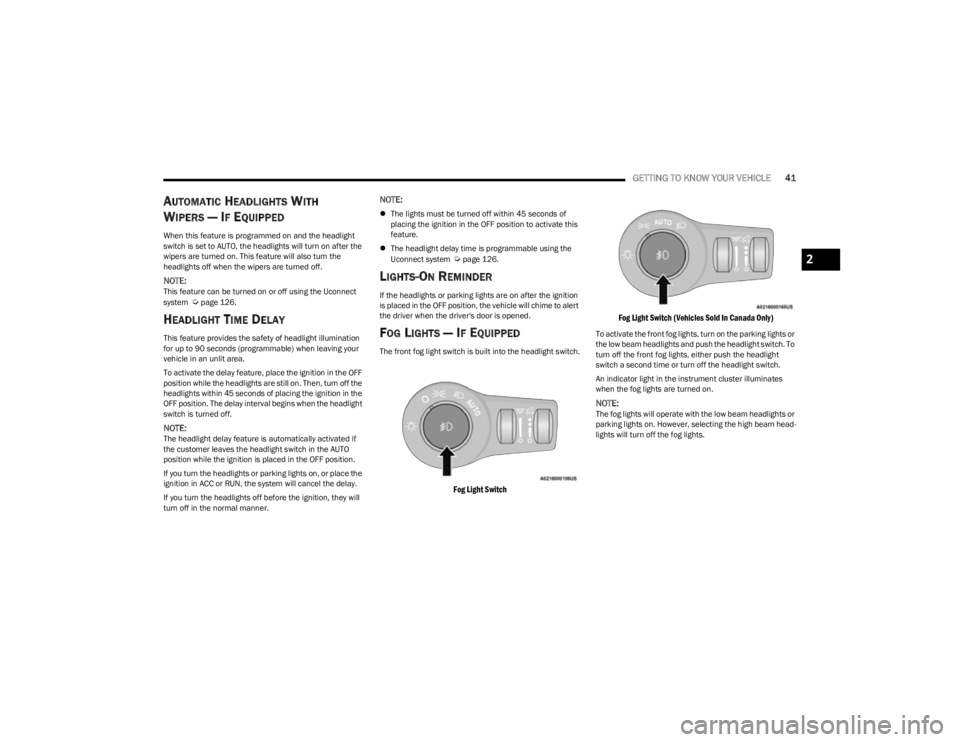
FOG LIGHTS — IF EQUIPPED
The front fog light switch is built into the headlight switch.
Fog Light Switch Fog Light Switch (Vehicles Sold In Canada Only)
To activate the front fog lights, turn on the parking lights or
the low beam headlights and push the headlight switch. To
turn off the front fog lights, either push the headlight
switch a second time or turn off the headlight switch.
An indicator light in the instrument cluster illuminates
when the fog lights are turned on.
NOTE:The fog lights will operate with the low beam headlights or
parking lights on. However, selecting the high beam head
-
lights will turn off the fog lights.
2
23_KL_OM_EN_USC_t.book Page 41
Page 46 of 276
44GETTING TO KNOW YOUR VEHICLE
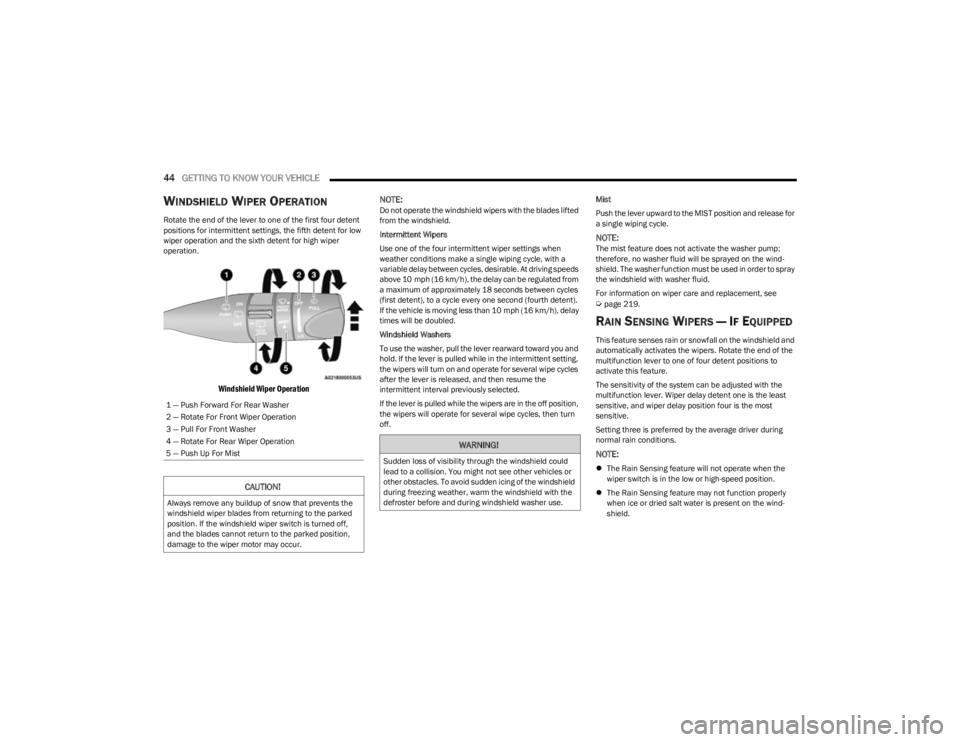
WINDSHIELD WIPER OPERATION
Rotate the end of the lever to one of the first four detent
positions for intermittent settings, the fifth detent for low
wiper operation and the sixth detent for high wiper
operation.
Windshield Wiper Operation
NOTE:
Do not operate the windshield wipers with the blades lifted
from the windshield.
Intermittent Wipers
Use one of the four intermittent wiper settings when
weather conditions make a single wiping cycle, with a
variable delay between cycles, desirable. At driving speeds
above 10 mph (16 km/h), the delay can be regulated from
a maximum of approximately 18 seconds between cycles
(first detent), to a cycle every one second (fourth detent).
If the vehicle is moving less than 10 mph (16 km/h), delay
times will be doubled.
Windshield Washers
To use the washer, pull the lever rearward toward you and
hold. If the lever is pulled while in the intermittent setting,
the wipers will turn on and operate for several wipe cycles
after the lever is released, and then resume the
intermittent interval previously selected.
If the lever is pulled while the wipers are in the off position,
the wipers will operate for several wipe cycles, then turn
off. Mist
Push the lever upward to the MIST position and release for
a single wiping cycle.
NOTE:The mist feature does not activate the washer pump;
therefore, no washer fluid will be sprayed on the wind
-
shield. The washer function must be used in order to spray
the windshield with washer fluid.
For information on wiper care and replacement, see
Úpage 219.
RAIN SENSING WIPERS — IF EQUIPPED
This feature senses rain or snowfall on the windshield and
automatically activates the wipers. Rotate the end of the
multifunction lever to one of four detent positions to
activate this feature.
The sensitivity of the system can be adjusted with the
multifunction lever. Wiper delay detent one is the least
sensitive, and wiper delay position four is the most
sensitive.
Setting three is preferred by the average driver during
normal rain conditions.
NOTE:
The Rain Sensing feature will not operate when the
wiper switch is in the low or high-speed position.
The Rain Sensing feature may not function properly
when ice or dried salt water is present on the wind -
shield.
1 — Push Forward For Rear Washer
2 — Rotate For Front Wiper Operation
3 — Pull For Front Washer
4 — Rotate For Rear Wiper Operation
5 — Push Up For Mist
CAUTION!
Always remove any buildup of snow that prevents the
windshield wiper blades from returning to the parked
position. If the windshield wiper switch is turned off,
and the blades cannot return to the parked position,
damage to the wiper motor may occur.
WARNING!
Sudden loss of visibility through the windshield could
lead to a collision. You might not see other vehicles or
other obstacles. To avoid sudden icing of the windshield
during freezing weather, warm the windshield with the
defroster before and during windshield washer use.
23_KL_OM_EN_USC_t.book Page 44