change time JEEP COMMANDER 2008 1.G Owner's Manual
[x] Cancel search | Manufacturer: JEEP, Model Year: 2008, Model line: COMMANDER, Model: JEEP COMMANDER 2008 1.GPages: 478, PDF Size: 6.97 MB
Page 241 of 478

4. To move the minute forward, touch the screen where
the word ªMinº with the arrow pointing upward is
displayed. To move the minute backward, touch the
screen where the word ªMinº with the arrow pointing
downward is displayed.
5. To save the new time setting, touch the screen where
the word ªSaveº is displayed.
Changing Daylight Savings Time
When selected, this feature will display the time of day in
daylight savings time. Proceed as follows to change the
current setting:
1. Turn on the system.
2. Touch the screen where the time is displayed. The
clock setting menu will appear on the screen.3. When this feature is on, a check mark will appear in
the box next to the words ªDaylight Savings.º Touch the
screen where the words ªDaylight Savingsº are dis-
played to change the current setting.
Show Time if Radio is Off
When selected, this feature will display the time of day
on the touch screen when the system is turned off.
Proceed as follows to change the current setting:
1. Turn on the system.
2. Touch the screen where the time is displayed. The
clock setting menu will appear on the screen.
3. When this feature is on, a check mark will appear in
the box next to the words ªShow Time if Radio is Off.º
Touch the screen where the words ªShow Time if Radio is
Offº are displayed to change the current setting.
UNDERSTANDING YOUR INSTRUMENT PANEL 241
4
Page 243 of 478

Operating Instructions Ð Satellite Radio
Refer to your ªNavigation User's Manualº for detailed
operating instructions.
Clock Setting Procedure
The GPS receiver used in this system is synchronized to
the time data being transmitted by the GPS satellite. The
satellites' clock is Greenwich Mean Time (GMT). This is
the worldwide standard for time. This makes the sys-
tem's clock very accurate once the appropriate time zone
and daylight savings information is set.
To Manually Set the Clock
1. Turn the ignition switch to the ON or ACC position.
2. If the radio is off, turn it on by pressing the ON/OFF
Volume radio knob.
3. Press theTimesoft key on the lower left side of the
face of the radio.4. Press theHOUR or MINsoft keys on the face of the
radio.
5. The time setting will change each time you press the
HOUR or MIN soft key.
6. Press theSAVEsoft key on the face of the radio.
Changing the Time Zone
1. Press theTimesoft key on the lower left side of the
face of the radio.
2. Press theSet Time Zonesoft key on the face of the
radio.
3. Select the appropriate time zone for your location, and
press theSAVEsoft key to store your selection.
NOTE:When you are traveling and enter a new time
zone, the clock must be reset manually for the new zone.
UNDERSTANDING YOUR INSTRUMENT PANEL 243
4
Page 252 of 478

By pressing the SEEK button when the Music Type
function is active, the radio will be tuned to the next
channel with the same selected Music Type name.
If a preset button is activated while in the Music Type
(Program Type) mode, the Music Type mode will be
exited and the radio will tune to the preset channel.
SETUP Button
Pressing the SETUP button allows you to select the
following items:
²Display Sirius ID number Ð Press the SELECT button
to display the Sirius ID number. This number is used
to activate, deactivate, or change the Sirius subscrip-
tion.
SET Button Ð To Set the Push-Button Memory
When you are receiving a channel that you wish to
commit to push-button memory, press the SET button.
The symbol SET 1 will now show in the display window.Select the button (1-6) you wish to lock onto this channel
and press and release that button. If a button is not
selected within 5 seconds after pressing the SET button,
the channel will continue to play but will not be stored
into push-button memory.
You may add a second channel to each push-button by
repeating the above procedure with this exception: Press
the SET button twice and SET 2 will show in the display
window. Each button can be set for SET 1 and SET 2. This
allows a total of 12 Satellite channels to be stored into
push-button memory. The channels stored in SET 2
memory can be selected by pressing the push-button
twice.
Every time a preset button is used, a corresponding
button number will display.Buttons1-6
These buttons tune the radio to the channels that you
commit to push-button memory {12 Satellite stations}.
252 UNDERSTANDING YOUR INSTRUMENT PANEL
Page 358 of 478

Towing Tips Ð Automatic Transmission
The ªDº range can be selected when towing. However, if
frequent shifting occurs while in this range, the ºTow/
Haulº mode (if equipped) or a lower gear range should
be selected.
NOTE:Using the ºTow/Haulº mode (if equipped) or a
lower gear range while operating the vehicle under
heavy operating conditions will improve performance
and extend transmission life by reducing excessive shift-
ing and heat build up. This action will also provide better
engine braking.
The automatic transmission fluid and filter should be
changed if you REGULARLY tow a trailer for more than
45 minutes of continuous operation. Refer to the ªMain-
tenance Scheduleº in Section 8 of this manual for trans-
mission fluid change intervals.
NOTE:Check the automatic transmission fluid level
before towing.
Towing Tips Ð Electronic Speed Control (If
Equipped)
þ
Don't use in hilly terrain or with heavy loads.
þWhen using the speed control, if you experience speed
drops greater than 10 mph (16 km/h), disengage until
you can get back to cruising speed.
þUse speed control in flat terrain and with light loads to
maximize fuel efficiency.
Towing Tips Ð Cooling System
To reduce potential for engine and transmission over-
heating, take the following actions:
þCity Driving
When stopped for short periods of time, put transmission
in N (Neutral) and increase engine idle speed.
þHighway Driving
Reduce speed.
358 STARTING AND OPERATING
Page 401 of 478
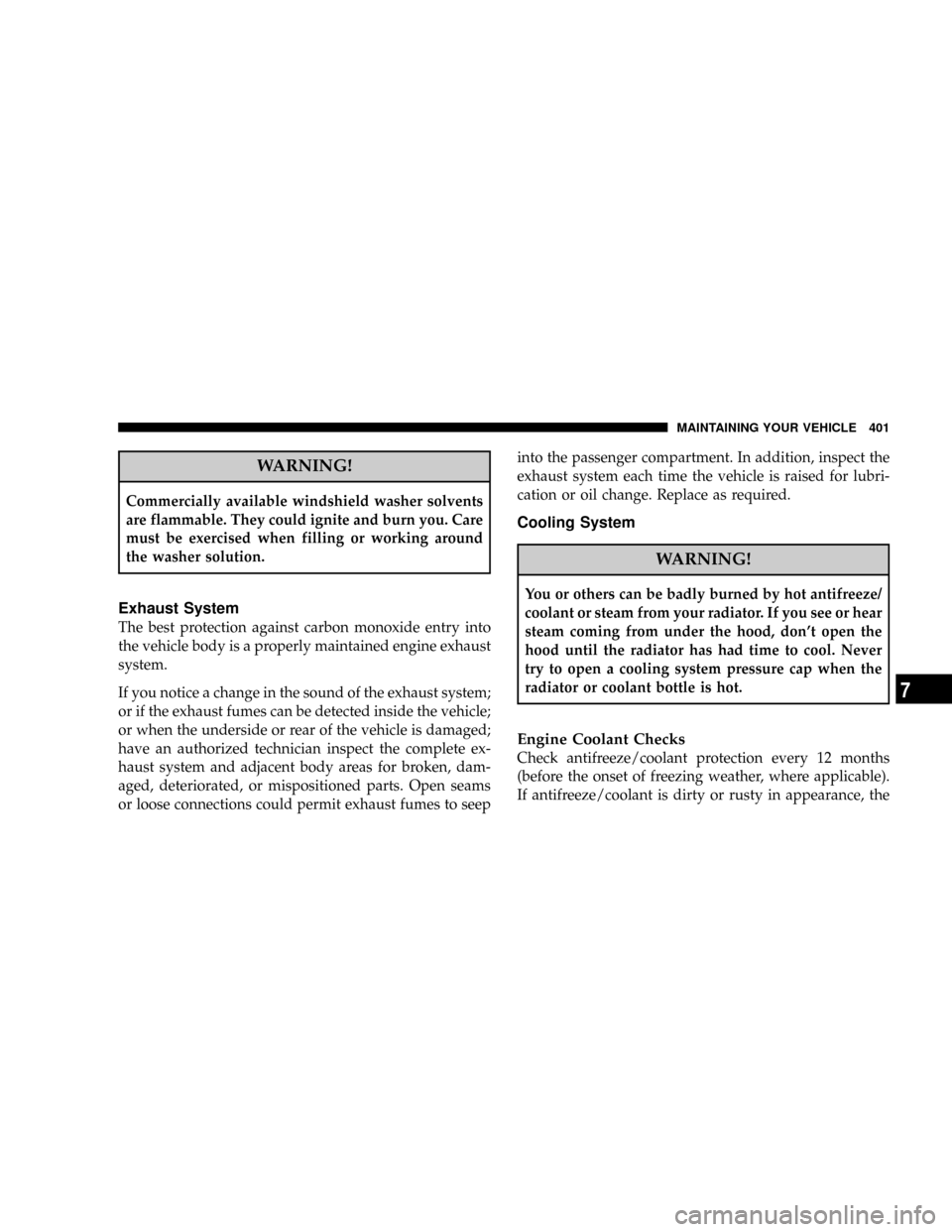
WARNING!
Commercially available windshield washer solvents
are flammable. They could ignite and burn you. Care
must be exercised when filling or working around
the washer solution.
Exhaust System
The best protection against carbon monoxide entry into
the vehicle body is a properly maintained engine exhaust
system.
If you notice a change in the sound of the exhaust system;
or if the exhaust fumes can be detected inside the vehicle;
or when the underside or rear of the vehicle is damaged;
have an authorized technician inspect the complete ex-
haust system and adjacent body areas for broken, dam-
aged, deteriorated, or mispositioned parts. Open seams
or loose connections could permit exhaust fumes to seepinto the passenger compartment. In addition, inspect the
exhaust system each time the vehicle is raised for lubri-
cation or oil change. Replace as required.
Cooling System
WARNING!
You or others can be badly burned by hot antifreeze/
coolant or steam from your radiator. If you see or hear
steam coming from under the hood, don't open the
hood until the radiator has had time to cool. Never
try to open a cooling system pressure cap when the
radiator or coolant bottle is hot.
Engine Coolant Checks
Check antifreeze/coolant protection every 12 months
(before the onset of freezing weather, where applicable).
If antifreeze/coolant is dirty or rusty in appearance, the
MAINTAINING YOUR VEHICLE 401
7
Page 440 of 478
EMISSION CONTROL SYSTEM MAINTENANCE
The ªScheduledº maintenance services, listed inbold
typemust be done at the times or mileages specified to
assure the continued proper functioning of the emission
control system. These, and all other maintenance services
included in this manual, should be done to provide best
vehicle performance and reliability. More frequent main-
tenance may be needed for vehicles in severe operating
conditions such as dusty areas and very short trip
driving.
Inspection and service also should be done any time a
malfunction is suspected.
NOTE:Maintenance, replacement, or repair of the emis-
sion control devices and systems on your vehicle may be
performed by any automotive repair establishment or
individual using any automotive part which has been
certified pursuant to U.S. EPA or, in the State of Califor-
nia, California Air Resources Board regulations.
MAINTENANCE SCHEDULE Ð GASOLINE
ENGINES
The oil change indicator system will remind you that it is
time to take your vehicle in for scheduled maintenance.
On Electronic Vehicle Information Center (EVIC)
equipped vehicles, ªOil Change Requiredº will be dis-
played in the EVIC and a single chime will sound,
indicating that an oil change is necessary.
Based on engine operation condition the oil change
indicator message will illuminate, this means that service
is required for your vehicle. Have your vehicle serviced
as soon as possible, within the next 500 miles (805 km).
NOTE:
²The oil change indicator message will not monitor the
time since the last oil change. Change your vehicles oil
if it has been 6 months since your last oil change even
if the oil change indicator message is NOT illumi-
nated.
440 MAINTENANCE SCHEDULES
8
M
A
I
N
T
E
N
A
N
C
E
S
C
H
E
D
U
L
E
S
Page 441 of 478
²Change your engine oil more often if you drive your
vehicle off-road for an extended period of time.
²Under no circumstances should oil change intervals
exceed 6,000 miles (10,000 km) or 6 months, whichever
comes first.
Your dealer will reset the oil change indicator message
after completing the scheduled oil change. If this sched-
uled oil change is performed by someone other than your
dealer the message can be reset by referring to the steps
described under ªOil Change Requiredº in ªUse Factory
Settingsº of the EVIC section in this manual.
At Each Stop for Fuel
²Check the engine oil level about 5 minutes after a fully
warmed engine is shut off. Checking the oil level while
the vehicle is on level ground will improve the accu-
racy of the oil level reading. Add oil only when the
level is at or below the ADD or MIN mark.
²Check the windshield washer solvent and add if
required.
Once a Month
²Check tire pressure and look for unusual wear or
damage.
²Inspect the battery and clean and tighten the terminals
as required.
²Check the fluid levels of coolant reservoir, brake
master cylinder, power steering and transmission and
add as needed.
²Check all lights and other electrical items for correct
operation.
MAINTENANCE SCHEDULES 441
8
M
A
I
N
T
E
N
A
N
C
E
S
C
H
E
D
U
L
E
S
Page 443 of 478
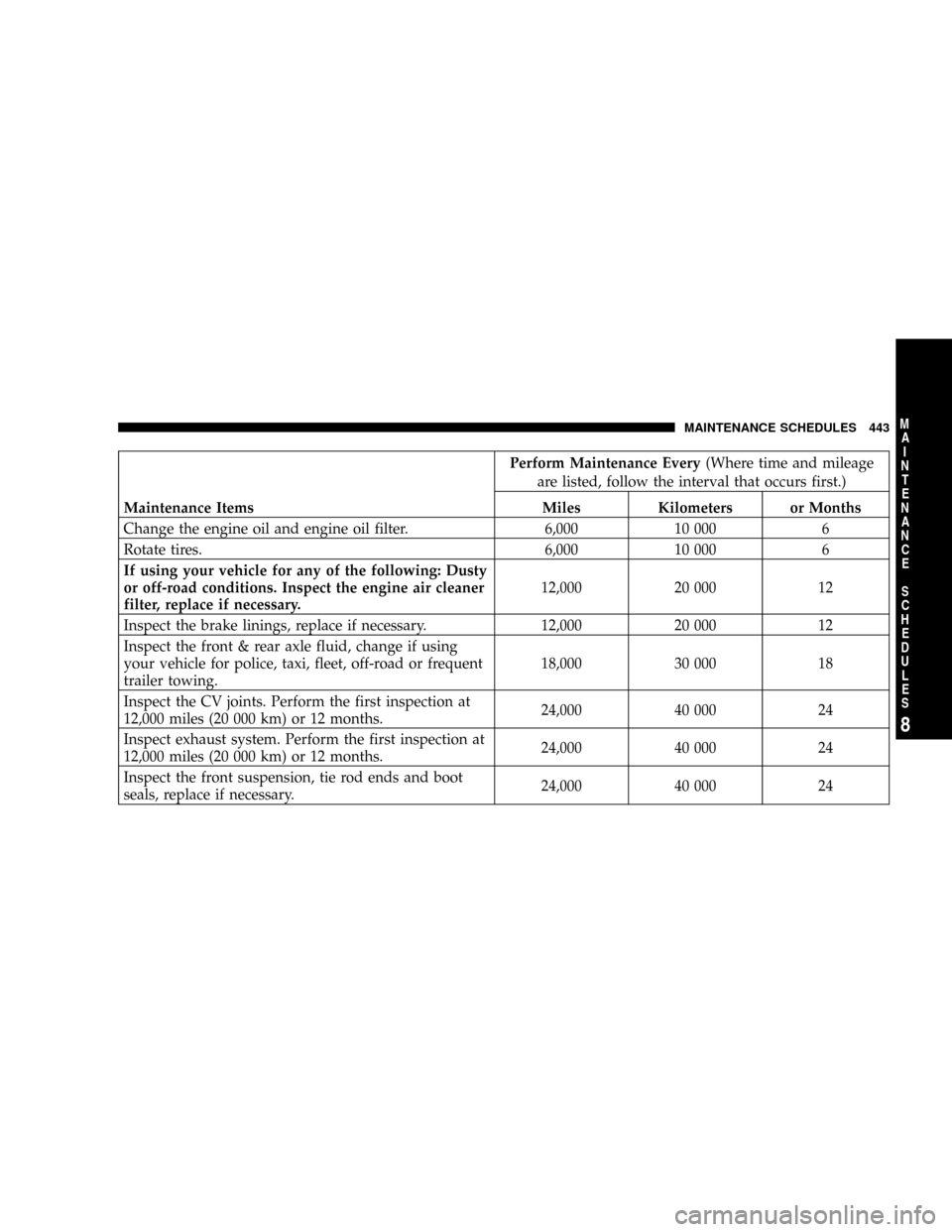
Perform Maintenance Every(Where time and mileage
are listed, follow the interval that occurs first.)
Maintenance Items Miles Kilometers or Months
Change the engine oil and engine oil filter. 6,000 10 000 6
Rotate tires. 6,000 10 000 6
If using your vehicle for any of the following: Dusty
or off-road conditions. Inspect the engine air cleaner
filter, replace if necessary.12,000 20 000 12
Inspect the brake linings, replace if necessary. 12,000 20 000 12
Inspect the front & rear axle fluid, change if using
your vehicle for police, taxi, fleet, off-road or frequent
trailer towing.18,000 30 000 18
Inspect the CV joints. Perform the first inspection at
12,000 miles (20 000 km) or 12 months.24,000 40 000 24
Inspect exhaust system. Perform the first inspection at
12,000 miles (20 000 km) or 12 months.24,000 40 000 24
Inspect the front suspension, tie rod ends and boot
seals, replace if necessary.24,000 40 000 24
MAINTENANCE SCHEDULES 443
8
M
A
I
N
T
E
N
A
N
C
E
S
C
H
E
D
U
L
E
S
Page 444 of 478
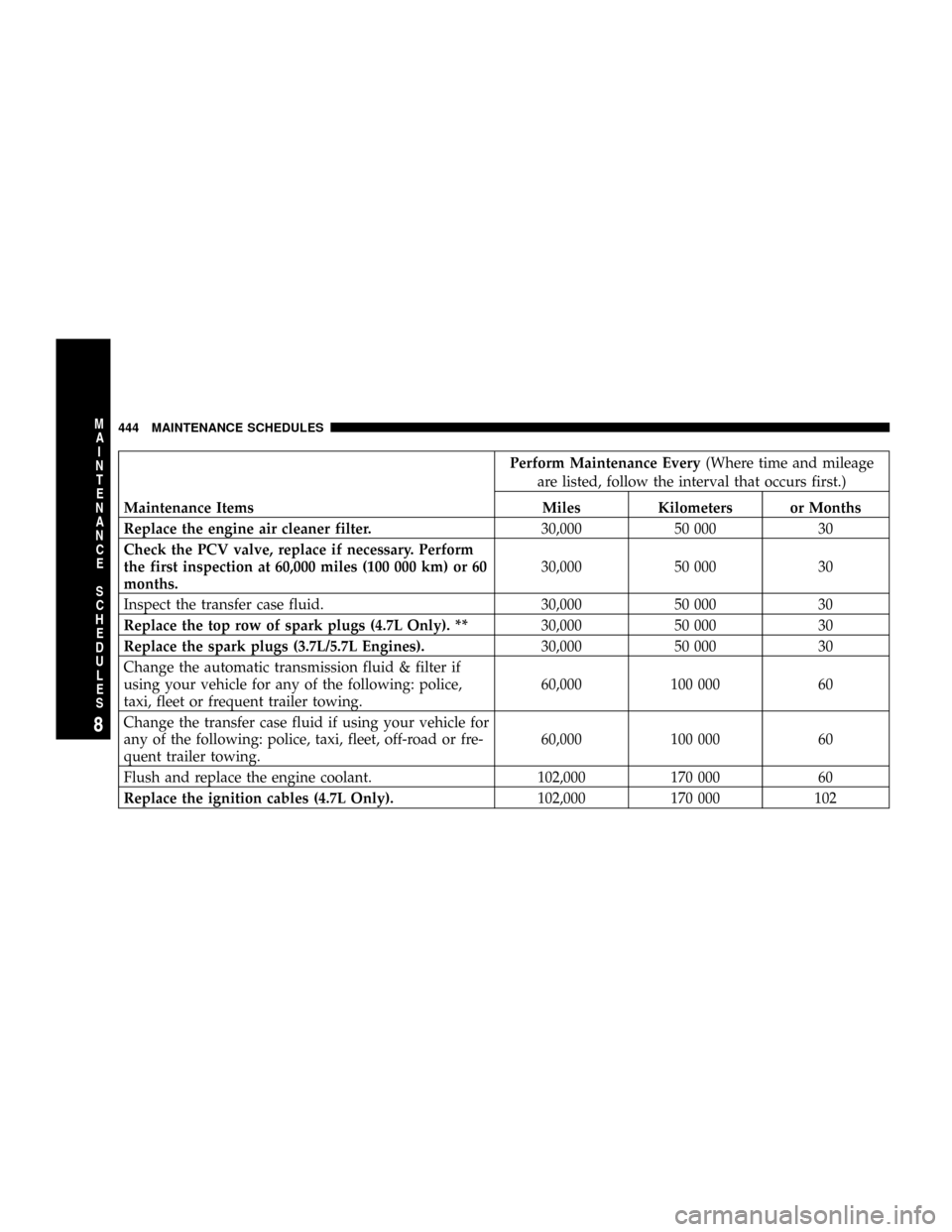
Perform Maintenance Every(Where time and mileage
are listed, follow the interval that occurs first.)
Maintenance Items Miles Kilometers or Months
Replace the engine air cleaner filter.30,000 50 000 30
Check the PCV valve, replace if necessary. Perform
the first inspection at 60,000 miles (100 000 km) or 60
months.30,000 50 000 30
Inspect the transfer case fluid. 30,000 50 000 30
Replace the top row of spark plugs (4.7L Only). **30,000 50 000 30
Replace the spark plugs (3.7L/5.7L Engines).30,000 50 000 30
Change the automatic transmission fluid & filter if
using your vehicle for any of the following: police,
taxi, fleet or frequent trailer towing.60,000 100 000 60
Change the transfer case fluid if using your vehicle for
any of the following: police, taxi, fleet, off-road or fre-
quent trailer towing.60,000 100 000 60
Flush and replace the engine coolant. 102,000 170 000 60
Replace the ignition cables (4.7L Only).102,000 170 000 102
444 MAINTENANCE SCHEDULES
8
M
A
I
N
T
E
N
A
N
C
E
S
C
H
E
D
U
L
E
S
Page 445 of 478
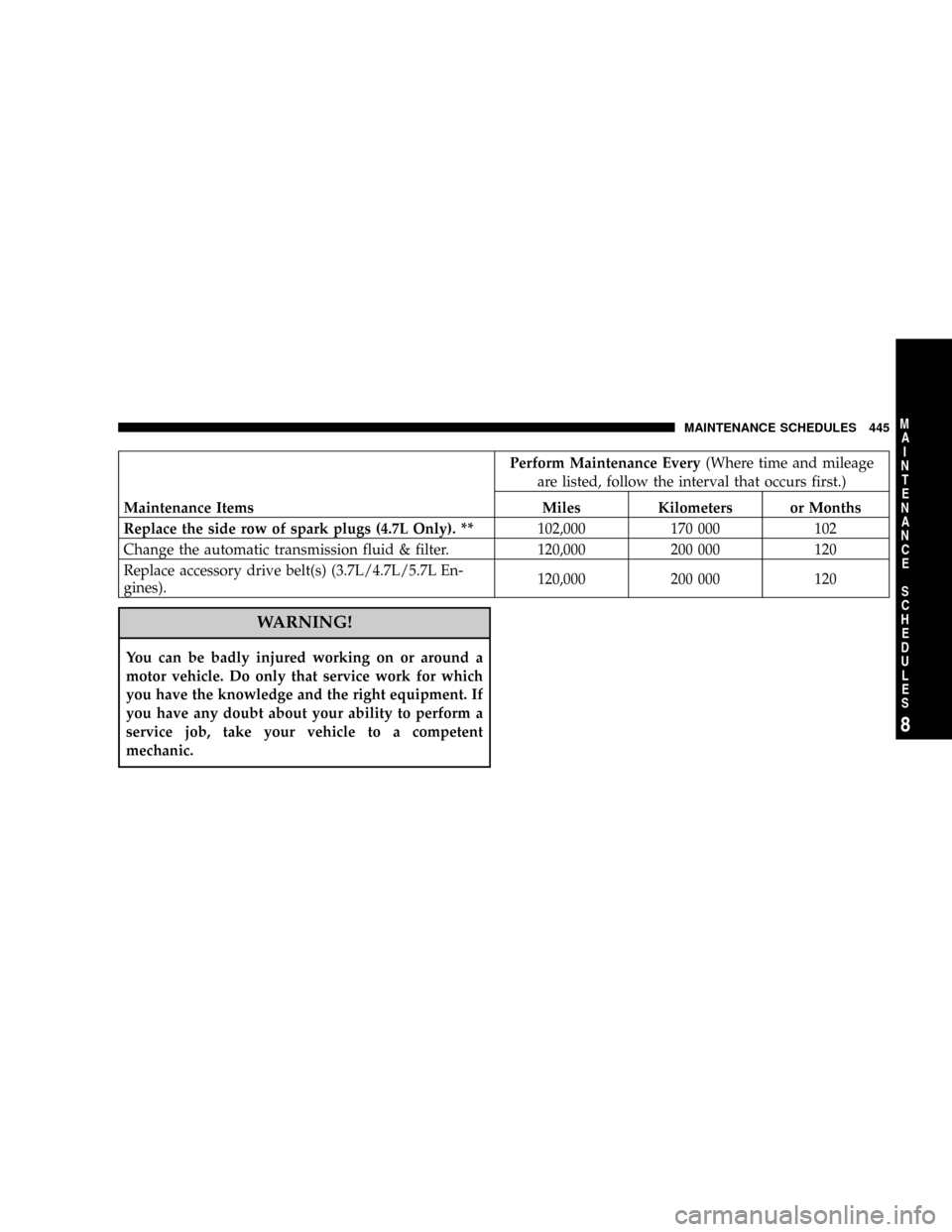
Perform Maintenance Every(Where time and mileage
are listed, follow the interval that occurs first.)
Maintenance Items Miles Kilometers or Months
Replace the side row of spark plugs (4.7L Only). **102,000 170 000 102
Change the automatic transmission fluid & filter. 120,000 200 000 120
Replace accessory drive belt(s) (3.7L/4.7L/5.7L En-
gines).120,000 200 000 120
WARNING!
You can be badly injured working on or around a
motor vehicle. Do only that service work for which
you have the knowledge and the right equipment. If
you have any doubt about your ability to perform a
service job, take your vehicle to a competent
mechanic.
MAINTENANCE SCHEDULES 445
8
M
A
I
N
T
E
N
A
N
C
E
S
C
H
E
D
U
L
E
S