instrument panel JEEP COMPASS 2008 1.G User Guide
[x] Cancel search | Manufacturer: JEEP, Model Year: 2008, Model line: COMPASS, Model: JEEP COMPASS 2008 1.GPages: 399, PDF Size: 6.59 MB
Page 70 of 399

NManual Seat Height Adjustment Ð
If Equipped.........................104
NManual LumbarÐ If Equipped............105
NDriver's Seat Back Recline...............105
NAdjustable Head Restraints..............106
NHeated Seats Ð If Equipped.............107
NFold Flat Front Passenger Seat............108
NFolding Rear Seat.....................109
NReclining Rear Seat Ð If Equipped.........110
mTo Open And Close The Hood.............112
mLights...............................113
NMap/Reading Lights...................113
NMulti-Function Control Lever.............114NHeadlights, Parking Lights, Instrument Panel
Lights.............................114
NDaytime Running Lights (DRL) Ð
If Equipped.........................115
NLights-On Reminder...................115
NFog Lights Ð If Equipped...............116
NTurn Signals.........................116
NHighbeam/Lowbeam Select Switch.........117
NPassing Light........................118
NOff-Road Lights ± If Equipped............118
mWindshield Wipers And Washers...........119
NWindshield Washers...................119
NMist Feature.........................120
NWindshield Wiper Operation.............121
70 UNDERSTANDING THE FEATURES OF YOUR VEHICLE
Page 92 of 399

Phone and Network Status Indicators
If available on the radio and/or on a premium display
such as the instrument panel cluster, and supported by
your cell phone, the UConnectŸ system will provide
notification to inform you of your phone and network
status when you are attempting to make a phone call
using UConnectŸ. The status is given for roaming,
network signal strength, phone battery strength, etc.
Dialing Using the Cellular Phone Keypad
You can dial a phone number with your cellular phone
keypad and still use the UConnectŸ system (while
dialing via the cell phone keypad, the user must exercise
caution and take precautionary safety measures). By
dialing a number with your paired BluetoothŸ cellular
phone, the audio will be played through your vehicle's
audio system. The UConnectŸ system will work the
same as if you dial the number using voice recognition.NOTE:Certain brands of mobile phones do not send the
dial ring to the UConnectŸ system to play it on the
vehicle audio system, so you will not hear it. Under this
situation, after successfully dialing a number, the user
may feel that the call did not go through even though the
call is in progress. Once your call is answered, you will
hear the audio.
Mute/Un-Mute (Mute Off)
When you mute the UConnectŸ system, you will still be
able to hear the conversation coming from the other
party, but the other party will not be able to hear you. In
order to mute the UConnectŸ system:
²Press the ªVoice Recognitionº button.
²Following the beep, say9Mute.9
In order to un-mute the UConnectŸ system:
²Press the ªVoice Recognitionº button.
²Following the beep, say9Mute-off.9
92 UNDERSTANDING THE FEATURES OF YOUR VEHICLE
Page 107 of 399
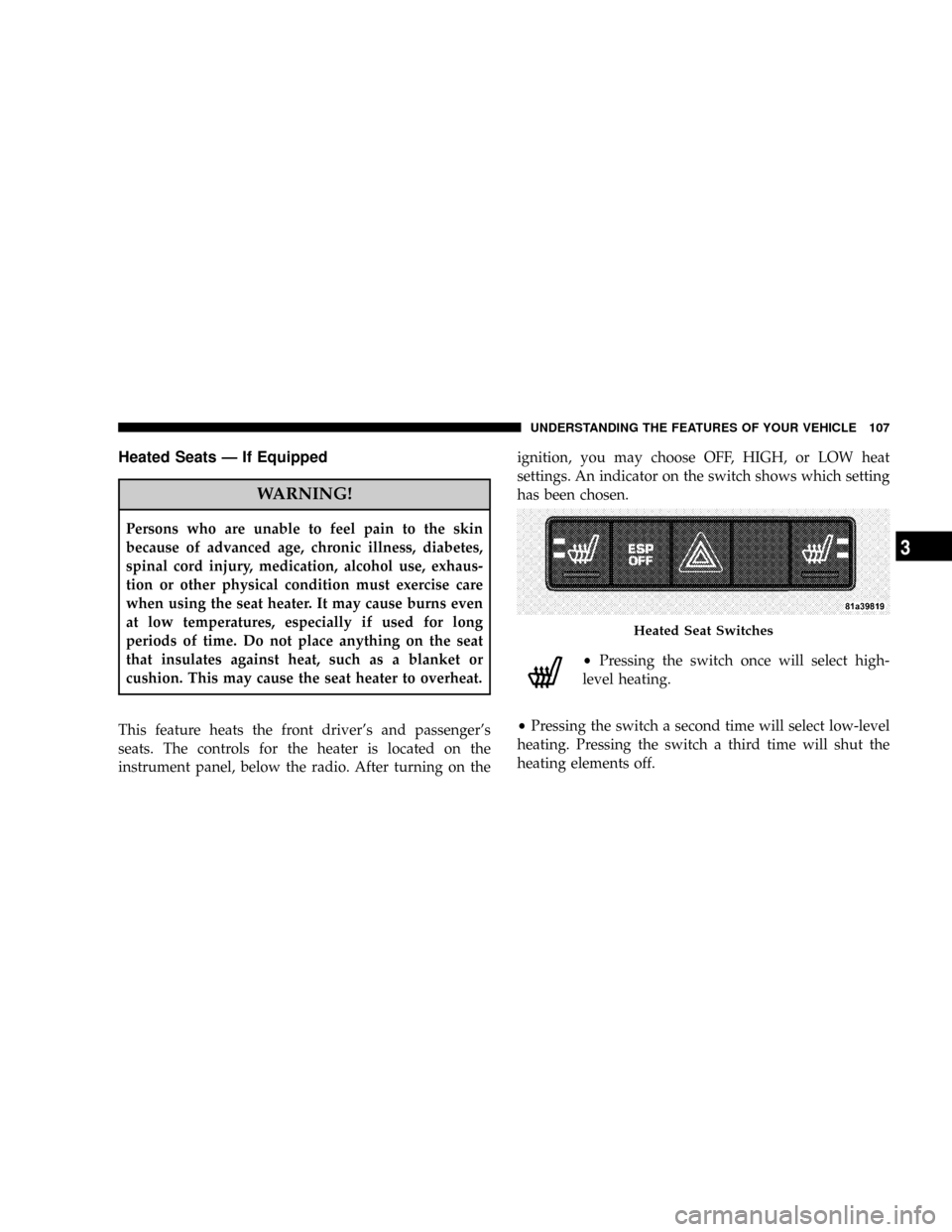
Heated Seats Ð If Equipped
WARNING!
Persons who are unable to feel pain to the skin
because of advanced age, chronic illness, diabetes,
spinal cord injury, medication, alcohol use, exhaus-
tion or other physical condition must exercise care
when using the seat heater. It may cause burns even
at low temperatures, especially if used for long
periods of time. Do not place anything on the seat
that insulates against heat, such as a blanket or
cushion. This may cause the seat heater to overheat.
This feature heats the front driver's and passenger's
seats. The controls for the heater is located on the
instrument panel, below the radio. After turning on theignition, you may choose OFF, HIGH, or LOW heat
settings. An indicator on the switch shows which setting
has been chosen.
²Pressing the switch once will select high-
level heating.
²Pressing the switch a second time will select low-level
heating. Pressing the switch a third time will shut the
heating elements off.
Heated Seat Switches
UNDERSTANDING THE FEATURES OF YOUR VEHICLE 107
3
Page 114 of 399

NOTE:The lights will remain on until the switch is
pressed a second time, so be sure they have been turned
off before leaving the vehicle. They will not turn off
automatically.
Multi-Function Control Lever
The Multi-Function Control Lever controls the operation
of the headlights, parking lights, turn signals, headlight
beam selection, instrument panel light dimming, interior
lights, the passing lights, and fog lights. The lever is
located on the left side of the steering column.
Headlights, Parking Lights, Instrument Panel
Lights
Turn the end of the Multi-Function Control Lever to the
first detent for parking light operation. Turn to the
second detent for headlight operation.To change the brightness of the instrument panel lights,
rotate the center portion of the Multi-Function Control
Lever up or down.
Headlight Control
114 UNDERSTANDING THE FEATURES OF YOUR VEHICLE
Page 155 of 399

UNDERSTANDING YOUR INSTRUMENT PANEL
CONTENTS
mInstrument Panel Features.................158
mInstrument ClusterÐPremium..............159
mInstrument Cluster Descriptions............160
mElectronic Vehicle Information Center (EVIC) ±
If Equipped...........................171
NEngine Oil Change Indicator System........172
NEVIC Functions.......................173
NCompass/Temperature/Audio............174
NAverage Fuel Economy.................174NDistance To Empty (DTE)...............175
NElapsed Time........................175
NTire Pressure Monitor (TPM).............175
NPersonal Settings (Customer Programmable
Features)...........................175
mRadio General Information................181
NRadio Broadcast Signals.................181
NTwo Types Of Signals..................181
NElectrical Disturbances..................1814
Page 156 of 399

NAM Reception.......................181
NFM Reception........................181
mElectronic Digital Clock..................182
NClock Setting Procedure.................182
mSales Code REF Ð AM/FM/CD (Single Disc)
Radio With Optional Satellite Radio And Hands
Free Phone Capability...................183
NOperating Instructions - Radio Mode.......183
NOperation Instructions - CD Mode.........187
NOperation Instructions - Auxiliary Mode.....189
NOperating Instructions - Hands Free Phone Ð
If Equipped.........................190
NOperating Instructions - Satellite Radio Ð
If Equipped.........................190mSales Code RAQ ± AM/FM/CD (6-Disc) Radio
With Optional Satellite Radio, Hands Free Phone,
And Vehicle Entertainment Systems (VES)
Capabilities...........................190
NOperating Instructions - Radio Mode.......191
NOperation Instructions - (CD Mode For CD
Audio Play).........................196
NLoad/Eject Button (CD Mode For CD Audio
Play)..............................197
NNotes On Playing MP3 Files.............199
NOperation Instructions - (CD Mode For MP3
Audio Play).........................202
NLoad/Eject Button (CD Mode For MP3 Play) . . 202
mSales Code REC Ð AM/FM/CD (6±Disc) Radio
With Navigation System..................204
156 UNDERSTANDING YOUR INSTRUMENT PANEL
Page 157 of 399

NOperating Instructions Ð Satellite Radio
(If Equipped)........................205
NREC Setting The Clock.................205
NAudio Clock Display...................207
mSatellite Radio Ð If Equipped..............208
NSystem Activation.....................208
NElectronic Serial Number/Sirius Identification
Number (ESN/SID)....................209
NSelecting Satellite Mode In REF, And RAQ,
Radios.............................209
NSelecting a Channel....................210
NStoring And Selecting Pre-Set Channels......210
NUsing The PTY (Program Type) Button
(If Equipped)........................211
NPTY Button9Scan9.....................211NPTY Button9Seek9.....................211
NSatellite Antenna......................211
NReception Quality.....................212
mRemote Sound System Controls Ð If Equipped . . 212
NRadio Operation......................213
NCD Player..........................213
mCD/DVD Disc Maintenance...............214
mRadio Operation And Cellular Phones........214
mClimate Controls.......................214
NClimate Controls......................214
NAir Conditioning.....................218
NAir Filtration System ± If Equipped........219
NOperating Tips.......................220
UNDERSTANDING YOUR INSTRUMENT PANEL 157
4
Page 158 of 399

INSTRUMENT PANEL FEATURES
1 Ð Air Outlet 5 Ð Glove Box 9 Ð Hazard Warning Flasher
2 ÐDemisters 6 Ð Storage Bin 10 Ð ESP OFF Switch Ð If Equipped
3 Ð Instrument Cluster 7 Ð Climate Controls
4 Ð Radio 8 Ð Heated Seat Switches Ð If Equipped 158 UNDERSTANDING YOUR INSTRUMENT PANEL
Page 159 of 399

INSTRUMENT CLUSTERÐPREMIUM
UNDERSTANDING YOUR INSTRUMENT PANEL 159
4
Page 160 of 399

INSTRUMENT CLUSTER DESCRIPTIONS
1. Fuel Gauge/Fuel Door Location
When the ignition switch is in the ON position,
the pointer will show the level of fuel remain-
ing in the fuel tank. The fuel pump symbol
points to the side of the vehicle where the fuel
door is located.
2. Voltage Warning Light
This light shows the status of the electrical charg-
ing system. The light should come on when the
ignition switch is first turned ON and remain on briefly
as a bulb check. If the Charging System light remains on,
or comes on while driving, it means that the vehicle is
experiencing a problem with the charging system. Obtain
SERVICE IMMEDIATELY. See your authorized dealer.3. Electronic Throttle Control (ETC) Warning Light
This light informs you of a problem with the
Electronic Throttle Control system. If a prob-
lem is detected, the light will come on while the
engine is running. If the light remains lit with
the engine running your vehicle will usually be drivable
and not need towing, however see your dealer for service
as soon as possible.
If the light is flashing when the engine is running you
may experience power loss, an elevated/rough idle, and
increased brake pedal effort, and your vehicle may
require towing. Immediate service is required.
The light will come on when the ignition switch is first
turned on and remain on briefly as a bulb check. This is
normal. If the light does not come on during starting,
have the system checked by an authorized dealer.
160 UNDERSTANDING YOUR INSTRUMENT PANEL