tow JEEP COMPASS 2008 1.G User Guide
[x] Cancel search | Manufacturer: JEEP, Model Year: 2008, Model line: COMPASS, Model: JEEP COMPASS 2008 1.GPages: 399, PDF Size: 6.59 MB
Page 102 of 399
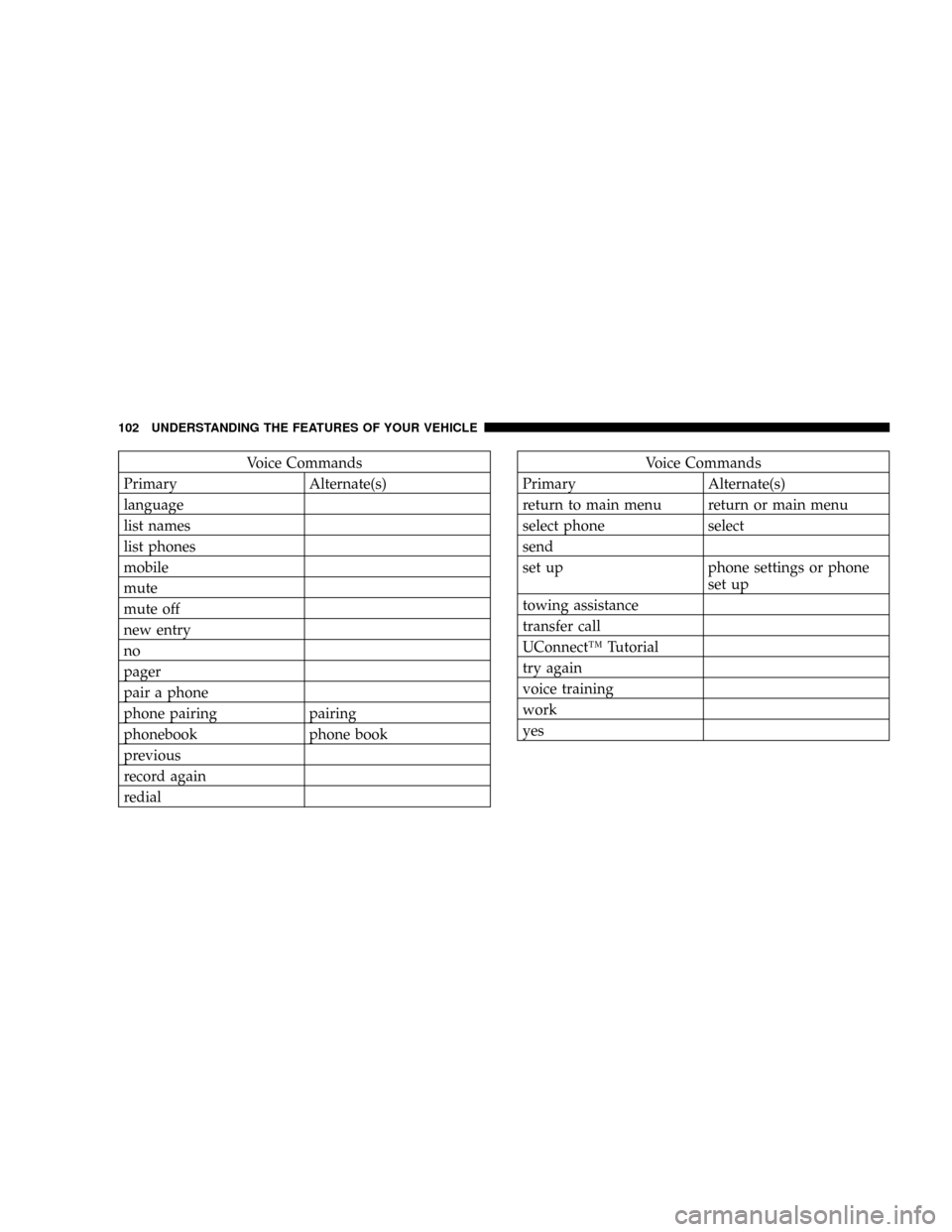
Voice Commands
Primary Alternate(s)
language
list names
list phones
mobile
mute
mute off
new entry
no
pager
pair a phone
phone pairing pairing
phonebook phone book
previous
record again
redialVoice Commands
Primary Alternate(s)
return to main menu return or main menu
select phone select
send
set up phone settings or phone
set up
towing assistance
transfer call
UConnectŸ Tutorial
try again
voice training
work
yes
102 UNDERSTANDING THE FEATURES OF YOUR VEHICLE
Page 117 of 399

Move the Multi-Function Control Lever up or down and
the arrows on each side of the instrument cluster flash to
show proper operation of the front and rear turn signal
lights. You can signal a lane change by moving the lever
partially up or down without moving beyond the detent.
If either light remains on and does not flash, or there is a
very fast flash rate, check for a defective outside light
bulb. If an indicator fails to light when the lever is
moved, it would suggest that the fuse or indicator bulb is
defective.Highbeam/Lowbeam Select Switch
Push the Multi-Function Control Lever away from you to
switch the headlights to HIGH beam. Pull the Lever
toward you, to switch the headlights back to Low beam.
High Beam Control
UNDERSTANDING THE FEATURES OF YOUR VEHICLE 117
3
Page 118 of 399

Passing Light
You can signal another vehicle with your headlights by
lightly pulling the Multi-Function Control Lever toward
you. This will cause the headlights to turn on at high
beam and remain on until the lever is released.
NOTE:If the Multi-Function Control Lever is held in
the flash to pass position for more than 15 seconds, the
high beams will shut off. If this occurs, wait 30 seconds
for the next flash to pass operation.
Off-Road lights ± If equipped
CAUTION!
The auxiliary lights mounted on the front bumper
should be illuminated during ªOff-Road Use Onlyº.
Having them illuminated on public streets, high-
ways, roads, etc. may be illegal in your state. Your
state may also require auxiliary lights to be covered
when operating your vehicle on public streets, high-
ways, roads, etc. Further illuminating these lights
with supplied covers installed could cause perma-
nent damage to the lamps or covers. Before using
these auxiliary lights, contact your State Authorities
for proper operation and use of these lights.
118 UNDERSTANDING THE FEATURES OF YOUR VEHICLE
Page 119 of 399

The auxiliary Off-Road lights can be turned on by
pressing the top of the switch when Off-Road conditions
require additional lighting. To turn off the auxiliary lights
press the bottom of the switch.WINDSHIELD WIPERS AND WASHERS
The wipers and washers are operated by a switch
on the control lever. The lever is located on the
right side of the steering column.
Windshield Washers
To use the washer, pull the control lever toward you and
hold while spray is desired. If the lever is pulled while in
the delay range, the wiper will operate in low speed for
two wipe cycles after the lever is released, and then
resume the intermittent interval previously selected.
Off-Road Light Switch
UNDERSTANDING THE FEATURES OF YOUR VEHICLE 119
3
Page 124 of 399

WARNING!
Leaving the Electronic Speed Control system on
when not in use is dangerous. You could accidentally
set the system or cause it to go faster than you want.
You could lose control and have an accident. Always
leave the system OFF when you are not using it.
To Set At A Desired Speed
When the vehicle has reached the desired speed, press
down on the lever and release. Release the accelerator
and the vehicle will operate at the selected speed.
NOTE:The vehicle should be traveling at a steady
speed and on level ground before pressing the SET lever.
To Deactivate
A soft tap on the brake pedal, pulling the speed control
lever towards you ªCANCELº, or normal brake or clutch
pressure while slowing the vehicle will deactivate speed
control without erasing the set speed memory. Pressing
the ON/OFF button or turning off the ignition switch
erases the set speed memory.
To Resume Speed
To resume a previously set speed, push the ªRESUME
ACCELº lever up and release. Resume can be used at any
speed above 20 mph (32 km/h).
To Vary The Speed Setting
When the speed control is ON, speed can be increased by
pushing up and holding ªRESUME ACCELº. Release the
lever when the desired speed is reached, and the new
speed will be set.
124 UNDERSTANDING THE FEATURES OF YOUR VEHICLE
Page 143 of 399

Pinch Protect Feature
This feature will detect an obstruction in the opening of
the sunroof during Express Close operation. If an ob-
struction in the path of the sunroof is detected, the
sunroof will automatically retract. Next, press the switch
forward and release to Express Close.
Pinch Protect Override
If a known obstruction (ice, debris, etc.) prevents closing,
press the switch forward and hold for two seconds after
the reversal occurs. This allows the sunroof to move
towards the close position.
NOTE:Pinch protection is disabled while the switch is
pressed.
Venting Sunroof ± Express
Press and hold the ªVº button, and the sunroof will open
to the vent position. This is called Express Vent, and will
occur regardless of the sunroof position. During Express
Vent operation, any movement of the switch will stop the
sunroof.
Sunshade Operation
The sunshade can be opened manually. However, the
sunshade will open automatically as the sunroof opens.
NOTE:The sunshade cannot be closed if the sunroof is
open.
Wind Buffeting
Wind buffeting can be described as the perception of
pressure on the ears or a helicopter type sound in the
ears. Your vehicle may exhibit wind buffeting with the
windows down, or the sunroof (if equipped) in certain
open or partially open positions. This is a normal occur-
rence and can be minimized. If the buffeting occurs with
UNDERSTANDING THE FEATURES OF YOUR VEHICLE 143
3
Page 147 of 399
CONSOLE FEATURES
WARNING!
Do not operate this vehicle with the console compart-
ment lid in the open position. Cell phones, music
players, and other hand held electronic devices
should be stowed while driving. Use of these devices
while driving can cause an accident due to distrac-
tion, resulting in death or injury.
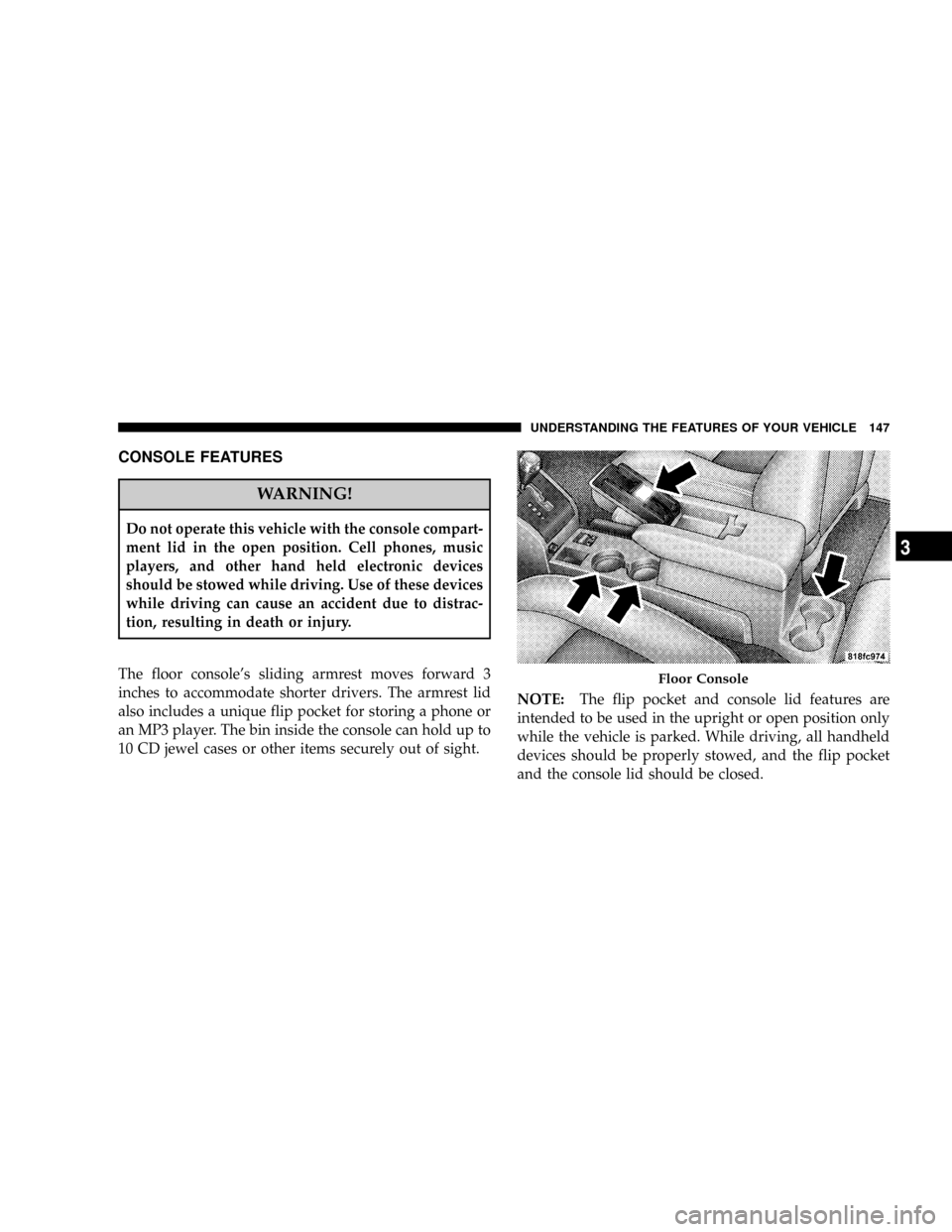
The floor console's sliding armrest moves forward 3
inches to accommodate shorter drivers. The armrest lid
also includes a unique flip pocket for storing a phone or
an MP3 player. The bin inside the console can hold up to
10 CD jewel cases or other items securely out of sight.NOTE:The flip pocket and console lid features are
intended to be used in the upright or open position only
while the vehicle is parked. While driving, all handheld
devices should be properly stowed, and the flip pocket
and the console lid should be closed.
Floor Console
UNDERSTANDING THE FEATURES OF YOUR VEHICLE 147
3
Page 160 of 399

INSTRUMENT CLUSTER DESCRIPTIONS
1. Fuel Gauge/Fuel Door Location
When the ignition switch is in the ON position,
the pointer will show the level of fuel remain-
ing in the fuel tank. The fuel pump symbol
points to the side of the vehicle where the fuel
door is located.
2. Voltage Warning Light
This light shows the status of the electrical charg-
ing system. The light should come on when the
ignition switch is first turned ON and remain on briefly
as a bulb check. If the Charging System light remains on,
or comes on while driving, it means that the vehicle is
experiencing a problem with the charging system. Obtain
SERVICE IMMEDIATELY. See your authorized dealer.3. Electronic Throttle Control (ETC) Warning Light
This light informs you of a problem with the
Electronic Throttle Control system. If a prob-
lem is detected, the light will come on while the
engine is running. If the light remains lit with
the engine running your vehicle will usually be drivable
and not need towing, however see your dealer for service
as soon as possible.
If the light is flashing when the engine is running you
may experience power loss, an elevated/rough idle, and
increased brake pedal effort, and your vehicle may
require towing. Immediate service is required.
The light will come on when the ignition switch is first
turned on and remain on briefly as a bulb check. This is
normal. If the light does not come on during starting,
have the system checked by an authorized dealer.
160 UNDERSTANDING YOUR INSTRUMENT PANEL
Page 169 of 399

Certain conditions such as a loose or missing gas cap,
poor fuel quality, etc. may illuminate the light after
engine start. The vehicle should be serviced if the light
stays on through several of your typical driving cycles. In
most situations the vehicle will drive normally and will
not require towing.
If the Malfunction Indicator Light flashes when the
engine is running, serious conditions may exist that
could lead to immediate loss of power or severe catalytic
converter damage. The vehicle should be serviced as
soon as possible if this occurs.
NOTE:If this indicator comes on, it will brighten to
FULL DAYTIME INTENSITY and will not be dimmable.
26. Front Fog Light Indicator Light Ð If Equipped
This light shows when the front fog lights are ON.27. Electronic Stability Program (ESP) Indicator
Light/Traction Control System (TCS) Indicator Light Ð
If Equipped
If this indicator light flashes during accelera-
tion, apply as little throttle as possible. While
driving, ease up on the accelerator. Adapt your
speed and driving to the prevailing road con-
ditions, and do not switch off the ESP, or TCS Ð if
equipped.
28. Electronic Stability Program (ESP) Indicator Light
The malfunction lamp for the ESP is combined
with BAS. The yellow ªESP/BAS Warning
Lampº comes on when the ignition switch is
turned to the ªONº position. They should go
out with the engine running. If the ªESP/BAS Warning
Lampº comes on continuously with the engine running,
a malfunction has been detected in either the ESP or the
BAS system. If this light remains on after several ignition
UNDERSTANDING YOUR INSTRUMENT PANEL 169
4
Page 217 of 399

Defrost
Air is directed through the windshield and side
window demist outlets. Use this mode with maxi-
mum fan and temperature settings for best windshield
and side window defrosting.
NOTE:
The air conditioning compressor operates in both
Mix and Defrost or a blend of these modes even if the Air
Conditioning Snowflake button is not pressed. This dehu-
midifies the air to help dry the windshield. To improve
fuel economy, use these modes only when necessary.
Air Outlets
The airflow from each of the instrument panel outlets can
be adjusted for direction and turned on or off to control
air flow.
NOTE:For maximum airflow to the rear seat passen-
gers, the center instrument panel outlets can be aimed, so
that the left center outlet is directed toward the right rear
passenger and the right center outlet is directed toward
the left rear passenger.
Temperature Control
Use this control to regulate
the temperature of the air in-
side the passenger compart-
ment. The blue area of the
scale indicates cooler tem-
peratures while the red area
indicates warmer tempera-
tures.
NOTE:If your air conditioning performance seems
lower than expected, check the front of the A/C con-
denser: located in front of the radiator, for an accumula-
tion of dirt or insects. Clean with a gentle water spray
from behind the radiator and through the condenser.
Fabric front fascia protectors may reduce air flow to the
condenser, reducing air conditioning performance.
UNDERSTANDING YOUR INSTRUMENT PANEL 217
4