audio JEEP COMPASS 2008 1.G Owner's Manual
[x] Cancel search | Manufacturer: JEEP, Model Year: 2008, Model line: COMPASS, Model: JEEP COMPASS 2008 1.GPages: 399, PDF Size: 6.59 MB
Page 199 of 399

RND/PTY Button (Random Play Button) (CD
MODE for CD Audio Play)
Press this button while the CD is playing to activate
Random Play. This feature plays the selections on the
compact disc in random order to provide an interesting
change of pace.
Press the SEEK button to move to the next randomly
selected track.
Press and hold the FF button to fast forward through the
tracks. Release the FF button to stop the fast forward
feature.
Press the RND button a second time to stop Random
Play.
Buttons1-6(CDMODE for CD Audio Play)
Selects disc positions1-6forPlay/Load/Eject.
Notes On Playing MP3 Files
The radio can play MP3 files, however, acceptable MP3
file recording media and formats are limited. When
writing MP3 files, pay attention to the following restric-
tions.
Supported Media (Disc Types)
The MP3 file recording media supported by the radio are
CD-ROM, CD-R and CD-RW.
Supported Medium Formats (File Systems)
The medium formats supported by the radio are ISO 9660
Level 1 and Level 2 and includes the Joliet extension.
When reading discs recorded using formats other than
ISO 9660 Level 1 and Level 2, the radio may fail to read
files properly and may be unable to play the file nor-
mally. UDF and Apple HFS formats are not supported.
UNDERSTANDING YOUR INSTRUMENT PANEL 199
4
Page 200 of 399

The radio uses the following limits for file systems:
²Maximum number of directory levels: 15
²Maximum number of files: 255
²Maximum number of folders: 100
²Maximum number of characters in file/folder names:
²Level 1: 12 (including a separator9.9and a
3-character extension)
²Level 2: 31 (including a separator9.9and a
3-character extension)
Multisession disc formats are supported by the radio.
Multisession discs may contain combinations of normal
CD audio tracks and computer files (including MP3 files).
Discs created with an option such as9keep disc open after
writing9are most likely multisession discs. The use of
multisession for CD audio or MP3 playback may result in
longer disc loading times.
Supported MP3 File Formats
The radio will recognize only files with the *.mp3 exten-
sion as MP3 files. Non-MP3 files named with the *.mp3
extension may cause playback problems. The radio is
designed to recognize the file as an invalid MP3 and will
not play the file.
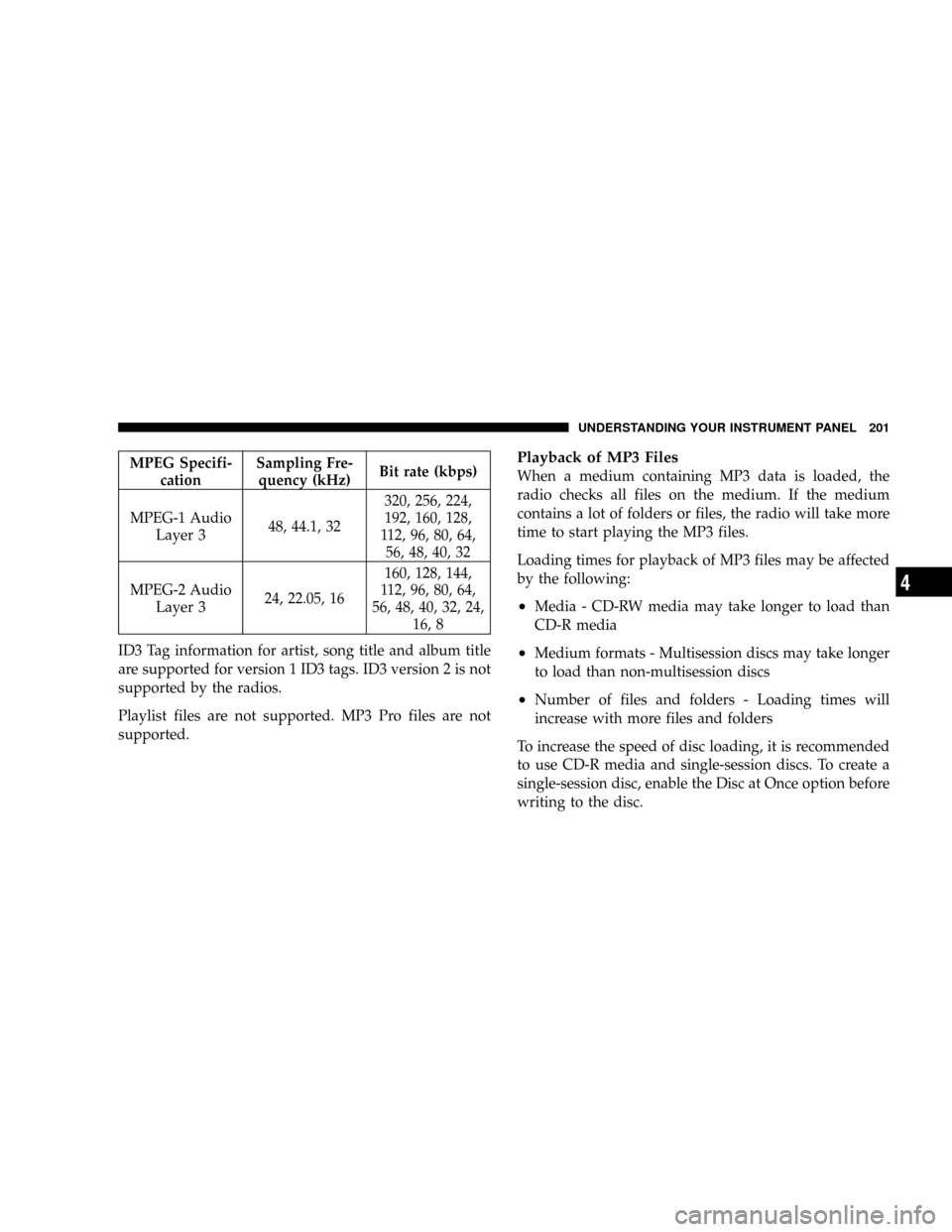
When using the MP3 encoder to compress audio data to
an MP3 file, the bit rate and sampling frequencies in the
following table are supported. In addition, variable bit
rates (VBR) are also supported. The majority of MP3 files
use a 44.1 kHz sampling rate and a 192, 160, 128, 96 or
VBR bit rates.
200 UNDERSTANDING YOUR INSTRUMENT PANEL
Page 201 of 399
MPEG Specifi-
cationSampling Fre-
quency (kHz)Bit rate (kbps)
MPEG-1 Audio
Layer 348, 44.1, 32320, 256, 224,
192, 160, 128,
112, 96, 80, 64,
56, 48, 40, 32
MPEG-2 Audio
Layer 324, 22.05, 16160, 128, 144,
112, 96, 80, 64,
56, 48, 40, 32, 24,
16, 8
ID3 Tag information for artist, song title and album title
are supported for version 1 ID3 tags. ID3 version 2 is not
supported by the radios.
Playlist files are not supported. MP3 Pro files are not
supported.Playback of MP3 Files
When a medium containing MP3 data is loaded, the
radio checks all files on the medium. If the medium
contains a lot of folders or files, the radio will take more
time to start playing the MP3 files.
Loading times for playback of MP3 files may be affected
by the following:
²Media - CD-RW media may take longer to load than
CD-R media
²Medium formats - Multisession discs may take longer
to load than non-multisession discs
²Number of files and folders - Loading times will
increase with more files and folders
To increase the speed of disc loading, it is recommended
to use CD-R media and single-session discs. To create a
single-session disc, enable the Disc at Once option before
writing to the disc.
UNDERSTANDING YOUR INSTRUMENT PANEL 201
4
Page 202 of 399

Operation Instructions - (CD Mode for MP3 Audio
Play)
SEEK Button (CD Mode for MP3 Play)
Pressing the right side of the SEEK button plays the next
MP3 File. Pressing the left side of the SEEK button plays
the beginning of the MP3 file. Pressing the button within
the first ten seconds plays the previous file.
LOAD/EJECT Button (CD Mode for MP3 Play)
LOAD/ EJECT - Load
Press the LOAD/ EJECT button and the push-
button with the corresponding number where
the CD is being loaded. The radio will display
PLEASE WAIT and prompt when to INSERT
DISC. After the radio displays9LOAD DISC9insert the
CD into the player.
Radio display will show9LOADING DISC9when the disc
is loading.
LOAD / EJECT - Eject
Press the LOAD/ EJECT button and the push-
button with the corresponding number where
the CD was loaded and the disc will unload
and move to the entrance for easy removal.
Radio display will show9EJECTING DISC9when the disc
is being ejected and prompt the user to remove the disc.
If you have ejected a disc and have not removed it within
15 seconds, it will be reloaded. If the CD is not removed,
the radio will continue to play the non-removed CD. If
the CD is removed and there are other CD's in the radio,
the radio will play the next CD after a 2 minute timeout.
If the CD is removed and there are no other CD's in the
radio, the radio will remain in CD mode and display
9INSERT DISCº for 2 minutes. After 2 minutes the radio
will go to the previous tuner mode.
202 UNDERSTANDING YOUR INSTRUMENT PANEL
Page 207 of 399

3. To decrease the clock by one hour, use the Select
Encoder to highlight the ª-º sign. Press ENTER. Press
ENTER again to decrease the clock by another hour.
4. To increase the clock by minutes, make sure ªMIN +º
is highlighted and press ENTER. Press ENTER again to
increase the clock by another minute.
5. To decrease the clock by minutes, use the Select
Encoder to highlight the ª-ª sign. Press ENTER. Press
ENTER again to decrease the clock by another minute.
6. Select ªDONEº to exit from the clock setting mode.
Press ENTER to save your changes. If you press CAN-
CEL or NAV then your changes will not be saved.Audio Clock Display
Select this option to change the size of the clock on the
audio screens.
1. When you are at an audio screen, quickly press the
TIME button on the navigation faceplate.
2. In this example the large clock appears on the screen.
UNDERSTANDING YOUR INSTRUMENT PANEL 207
4
Page 212 of 399

Reception Quality
Satellite reception may be interrupted due to one of the
following reasons.
²The vehicle is parked in an underground parking
structure or under a physical obstacle.
²Dense tree coverage may interrupt reception in the
form of short audio mutes.
²Driving under wide bridges or along tall buildings can
cause intermittent reception.
²Placing objects over or too close to the antenna can
cause signal blockage.
REMOTE SOUND SYSTEM CONTROLS Ð IF
EQUIPPED
The remote sound system controls are located on the rear
surface of the steering wheel. Reach behind the wheel to
access the switches.
212 UNDERSTANDING YOUR INSTRUMENT PANEL
Page 399 of 399
INTRODUCTION INTRODUCTION ROLLOVER WARNING HOW TO USE THIS MANUAL WARNINGS AND CAUTIONS VEHICLE IDENTIFICATION NUMBER VEHICLE MODIFICATIONS/ALTERATIONS THINGS TO KNOW BEFORE STARTING YOUR VEHICLE A WORD
ABOUT YOUR KEYS Ignition Key RemovalLocking Doors With The KeyKey-In-Ignition ReminderSTEERING WHEEL LOCK - MANUAL TRANSMISSION ONLY To Manually Lock the Steering WheelTo Release the Steering Wheel LockSENTRY KEY Replacement Keys
Customer Key ProgrammingGeneral InformationSECURITY ALARM SYSTEM - IF EQUIPPED To Set the AlarmTo Disarm the SystemSecurity System Manual OverrideREMOTE KEYLESS ENTRY - IF EQUIPPED To Unlock the Doors and LiftgateTo Lock the Doors and
LiftgateUsing The Panic AlarmTo Turn Off Flash Lights With LockProgramming Additional TransmittersGeneral InformationBattery ReplacementDOORLOCKS Manual Door LocksPower Door LocksChild-Protection Door Lock System (Rear Doors) - If EquippedPOWER
WINDOWS- IF EQUIPPED Power Window Switches Auto DownWindow Lockout SwitchLIFTGATE OCCUPANT RESTRAINTS Lap/Shoulder BeltsAdjustable Upper Shoulder Belt AnchorageSecond Row Center Lap/Shoulder Belt Operating InstructionsSeat Belt Pretensioners
Enhanced Driver Seat Belt Reminder System (BeltAlert) Seat Belt ExtenderSeat Belts And Pregnant WomenDriver and Front Passenger Supplemental Restraint System (SRS) - AirbagEvent Data Recorder (EDR)Child RestraintENGINE BREAK-IN RECOMMENDATIONS
SAFETY TIPS Exhaust GasSafety Checks You Should Make Inside The VehiclePeriodic Safety Checks You Should Make Outside The VehicleUNDERSTANDING THEFEATURES OF YOUR VEHICLE MIRRORS Inside Day/Night Mirror - If EquippedOutside Mirror-Drivers
SideOutside Mirror-Passengers SidePower Remote Control Mirrors - If EquippedVanity Mirrors - If EquippedSun Visor Sliding FeatureHANDS-FREE COMMUNICATION (UConnect) - IF EQUIPPED OperationPhone Call FeaturesUConnect System FeaturesAdvanced Phone
ConnectivityThings You Should Know About Your UConnect SystemGeneral InformationSEATS Front Seat AdjustmentManual Seat Height Adjustment - If EquippedManual Lumbar- If EquippedDrivers Seat Back ReclineAdjustable Head RestraintsHeated Seats - If Equipped
Fold Flat Front Passenger Seat Folding Rear SeatReclining Rear Seat - If Equipped TO OPEN AND CLOSE THE HOOD LIGHTS Map/Reading LightsMulti-FunctionControl LeverHeadlights, Parking Lights, Instrument Panel LightsDaytime Running Lights (DRL) - If Equipped
Lights-On ReminderFog Lights - If Equipped Turn Signals Highbeam/Lowbeam Select Switch Passing LightOff-Road lights - If equippedWINDSHIELD WIPERS AND WASHERS Windshield WashersMist FeatureWindshield Wiper OperationIntermittent Wiper SystemAdding
Washer FluidTILT STEERING COLUMN ELECTRONIC SPEED CONTROL - IF EQUIPPED To ActivateTo Set At A Desired SpeedTo DeactivateTo Resume SpeedTo Vary The Speed SettingManual TransaxleTo Accelerate For PassingANTI-LOCK BRAKE SYSTEM (ABS)
- IF EQUIPPED ELECTRONIC BRAKE CONTROL SYSTEM - ABS/TCS/BAS/ERM/ESP Anti-Lock Brake System - (ABS)Traction Control System (TCS)Brake Assist System (BAS)Electronic Roll Mitigation (ERM)ESP (Electronic Stability Program)GARAGE DOOR OPENER
- IF EQUIPPED Programming HomeLinkGate Operator/Canadian ProgrammingUsing HomeLinkReprogramming a Single HomeLink ButtonSecurityTroubleshooting TipsGeneral InformationPOWER SUNROOF - IF EQUIPPED Opening the SunroofClosing the SunroofPinch
Protect FeaturePinch Protect OverrideVenting Sunroof - ExpressSunshade OperationWind BuffetingSunroof MaintenanceIgnition Off OperationELECTRICAL POWER OUTLETS - IF EQUIPPED Electrical Outlet Use With Engine OffCONSOLE FEATURES CARGO AREA
FEATURES Cargo Light/Removable Self Recharging Flashlight - If EquippedCargo Cover - If EquippedRemovable Load FloorCargo Tie-Down LoopsFold Down Speakers - If EquippedREAR WINDOW FEATURES Rear Window Wiper/WasherRear Window DefrosterROOF
LUGGAGE RACK - IF EQUIPPED UNDERSTANDING YOUR INSTRUMENT PANEL INSTRUMENT PANEL FEATURES INSTRUMENT CLUSTER-PREMIUM INSTRUMENT CLUSTER DESCRIPTIONS ELECTRONIC VEHICLE INFORMATION CENTER (EVIC) - IF
EQUIPPED Engine Oil Change Indicator SystemEVIC Functions Compass/Temperature/AudioAverage Fuel EconomyDistance To Empty (DTE)Elapsed TimeTire Pressure Monitor (TPM)Personal Settings (Customer Programmable Features)RADIO GENERAL
INFORMATION Radio Broadcast SignalsTwo Types of SignalsElectrical DisturbancesAM ReceptionFM ReceptionELECTRONIC DIGITAL CLOCK Clock SettingProcedureSALES CODE REF - AM/FM/CD (SINGLE DISC) RADIO WITH OPTIONAL SATELLITE RADIO AND
HANDS FREE PHONE CAPABILITY Operating Instructions - Radio ModeOperation Instructions - CD ModeOperation Instructions - Auxiliary ModeOperatingInstructions - Hands Free Phone - If EquippedOperating Instructions - Satellite Radio - If EquippedSALES CODE
RAQ - AM/FM/CD (6-DISC) RADIO WITH OPTIONAL SATELLITE RADIO, HANDS FREE PHONE, AND VEHICLE ENTERTAINMENT SYSTEMS (VES) CAPABILITIES Operating Instructions - Radio ModeOperation Instructions - (CD MODE for CD Audio Play)LOAD/EJECT
Button (CD Mode for CD Audio Play)Notes On Playing MP3 FilesOperation Instructions - (CD Mode for MP3 Audio Play)LOAD/EJECT Button (CD Mode for MP3 Play)SALES CODE REC - AM/FM/CD (6-DISC) RADIO WITH NAVIGATION SYSTEM Operating Instructions
- Satellite Radio (If Equipped)REC Setting the ClockAudio Clock DisplaySATELLITE RADIO - IF EQUIPPED System ActivationElectronic Serial Number/Sirius Identification Number (ESN/SID)Selecting Satellite Mode in REF, and RAQ, RadiosSelecting a ChannelStoring
and Selecting Pre-Set ChannelsUsing the PTY (Program Type) Button (if equipped)PTY Button SCANPTY Button SEEKSatellite AntennaReception QualityREMOTE SOUND SYSTEM CONTROLS - IF EQUIPPED Radio OperationCD PlayerCD/DVD DISC MAINTENANCE
RADIO OPERATION AND CELLULAR PHONES CLIMATE CONTROLS Climate ControlsAir ConditioningAir Filtration System - If EquippedOperating Tips STARTINGAND OPERATING STARTING PROCEDURES Manual TransaxleAutomatic TransaxleNormal Starting
Extremely Cold Weather (below -20 degrees F or -29 degrees C)If Engine Fails to StartAfter StartingMANUAL TRANSAXLE - IF EQUIPPED Recommended Shift SpeedsDownshiftingAUTOMATIC TRANSAXLE - IF EQUIPPED Brake/Transmission Interlock SystemAutomatic
Transaxle Ignition Interlock SystemGear Ranges For Continuously Variable Automatic Transaxle (CVT)AUTOSTICK - IF EQUIPPED Autostick Operation Autostick General InformationFOUR WHEEL DRIVE OPERATION - IF EQUIPPED DRIVING ON SLIPPERY SURFACES
AccelerationTractionDRIVING THROUGH WATER Flowing/Rising WaterShallow Standing WaterPARKING BRAKE BRAKE SYSTEM Anti-Lock Brake System (ABS) -If EquippedPOWER STEERING TIRE SAFETY INFORMATION Tire Markings Tire Identification Number
(TIN)Tire Loading and Tire PressureTIRES - GENERAL INFORMATION Tire PressureTire Inflation PressuresRadial-Ply TiresCompact Spare Tire - If EquippedLimited Use Spare - If EquippedTire SpinningTread Wear IndicatorsLife of TireReplacement TiresAlignment And
BalanceTIRE CHAINS TIRE ROTATION RECOMMENDATIONS TIRE PRESSURE MONITORING SYSTEM (TPMS) - IF EQUIPPED Base System - If EquippedPremium System - If EquippedGeneral InformationSNOW TIRES FUEL REQUIREMENTS GASOLINE ENGINES
Reformulated GasolineGasoline/Oxygenate BlendsMMT In GasolineMaterials Added to FuelFuel System CautionsCarbon Monoxide WarningsADDING FUELFuel Filler Cap (Gas Cap)Loose Fuel Filler Cap MessageVEHICLE LOADING Gross Vehicle Weight Rating (GVWR)
TRAILER TOWING Common Towing DefinitionsTrailer Hitch ClassificationTrailer Towing Weights (Maximum Trailer Weight Ratings)Trailer and TongueWeightTowing RequirementsTowing TipsRECREATIONAL TOWING (BEHIND MOTORHOME, ETC.) Towing This Vehicle
Behind Another Vehicle (Flat towing with all four wheels on the ground)WHAT TO DO IN EMERGENCIES HAZARD WARNING FLASHER IF YOUR ENGINE OVERHEATS AUTOMATIC TRANSAXLE OVERHEATING JACKING AND TIRE CHANGING Jack LocationSpare
Tire StowagePreparations For JackingJacking InstructionsJUMP-STARTING PROCEDURES DUE TO A LOW BATTERY FREEING A STUCK VEHICLE TOWING A DISABLED VEHICLE With Ignition KeyWithout The Ignition KeyMAINTAINING YOUR VEHICLE ENGINE
COMPARTMENT - GASOLINE ONBOARD DIAGNOSTIC SYSTEM - OBD II Loose Fuel Filler Cap MessageEMISSIONS INSPECTION AND MAINTENANCE PROGRAMS REPLACEMENT PARTS DEALER SERVICE MAINTENANCE PROCEDURES Engine OilDrive Belt
- Check ConditionSpark PlugsCatalytic ConverterCrankcase Emission Control SystemFuel FilterAir Cleaner Element (Filter)Maintenance-Free BatteryAir Conditioner MaintenancePower Steering - Fluid CheckFront Suspension Ball JointsBody LubricationWindshield Wiper
BladesWindshield Washer ReservoirExhaust SystemCooling SystemHoses And Vacuum/Vapor HarnessesFuel System ConnectionsBrake SystemAutomaticTransaxle (CVT)Manual TransaxleRear Drive Assembly (RDA) - AWD/4WD Models OnlyPower Transfer Unit (PTU)
- AWD/4WD Models OnlyAppearance Care And Protection From CorrosionFUSES/INTEGRATED POWER MODULE (IPM) VEHICLE STORAGE REPLACEMENT BULBS BULB REPLACEMENT Headlamps Fog Lights Tail Lights, Rear Turn Signals And Backup Lights -
ReplacementLicense LightsCenter High-Mounted StoplightOff-Road LightFLUIDS AND CAPACITIES FLUIDS, LUBRICANTS, AND GENUINE PARTS EngineChassisMAINTENANCE SCHEDULES EMISSION CONTROL SYSTEM MAINTENANCE MAINTENANCE
SCHEDULE Required Maintenance IntervalsIF YOU NEED CONSUMER ASSISTANCE SUGGESTIONS FOR OBTAINING SERVICE FOR YOUR VEHICLE Prepare For The AppointmentPrepare A ListBe Reasonable With RequestsIF YOU NEED ASSISTANCE WARRANTY
INFORMATION (U.S. Vehicles Only) MOPAR PARTS REPORTING SAFETY DEFECTS In CanadaPUBLICATION ORDER FORMS DEPARTMENT OF TRANSPORTATION UNIFORM TIREQUALITY GRADES TreadwearTraction GradesTemperature GradesINDEX