phone JEEP COMPASS 2008 1.G Owner's Manual
[x] Cancel search | Manufacturer: JEEP, Model Year: 2008, Model line: COMPASS, Model: JEEP COMPASS 2008 1.GPages: 399, PDF Size: 6.59 MB
Page 93 of 399

Advanced Phone Connectivity
Transfer Call to and from Cellular Phone
The UConnectŸ system allows on going calls to be
transferred from your cellular phone to the UConnectŸ
system without terminating the call. To transfer an ongo-
ing call from your UConnectŸ paired cellular phone to
the UConnectŸ system or vice-versa, press the ªVoice
Recognitionº button and say9Transfer Call.9
Connect or Disconnect Link Between the
UConnectŸ System and Cellular Phone
Your cellular phone can be paired with many different
electronic devices, but can only be actively9connected9
with one electronic device at a time.
If you would like to connect or disconnect the Blue-
toothŸ connection between a UConnectŸ paired cellular
phone and the UConnectŸ system, then follow the
instruction described in your cellular phone user's
manual.
List Paired Cellular Phone Names
²
Press the ªPhoneº button to begin.
²After the ªReadyº prompt and the following beep, say
ªSetup Phone Pairing.º
²When prompted, say9List Phones.9
²The UConnectŸ system will play the phone names of
all paired cellular phones in order from the highest to
the lowest priority. To ªselectº or ªdeleteº a paired
phone being announced, press the ªVoice Recogni-
tionº button and say ªSelectº or ªDelete.º Also, see the
next two sections for an alternate way to ªselectº or
ªdeleteº a paired phone.
UNDERSTANDING THE FEATURES OF YOUR VEHICLE 93
3
Page 94 of 399

Select another Cellular Phone
This feature allows you to select and start using another
phone with the UConnectŸ system. The phone must
have been previously paired to the UConnectŸ system
that you want to use it with.
²Press the ªPhoneº button to begin.
²After the9Ready9prompt and the following beep, say
9Setup Select Phone9and follow the prompts.
²You can also press the ªVoice Recognitionº button
anytime while the list is being played, and then choose
the phone that you wish to select.
²The selected phone will be used for the next phone
call. If the selected phone is not available, the UCon-
nectŸ system will return to using the highest priority
phone present in or near (approximately within 30
feet) the vehicle.
Delete UConnectŸ Paired Cellular Phones
²
Press the ªPhoneº button to begin.
²After the9Ready9prompt and the following beep, say
9Setup Phone Pairing.9
²At the next prompt, say9Delete9and follow the
prompts.
²You can also press the ªVoice Recognitionº button
anytime while the list is being played, and then choose
the phone you wish to delete.
94 UNDERSTANDING THE FEATURES OF YOUR VEHICLE
Page 95 of 399

Things You Should Know About Your UConnectŸ
System
UConnectŸ Tutorial
To hear a brief tutorial of the system features, press the
ªPhoneº button and say ªUConnectŸ Tutorial.º
Voice Training
For users experiencing difficulty with the system recog-
nizing their voice commands or numbers, the UCon-
nectŸ system Voice Training feature may be used. To
enter this training mode, follow one of the two proce-
dures:
From outside the UConnectŸ mode (e.g. from radio
mode)
²Press and hold the ªVoice Recognitionº button for 5
seconds until the session begins, or,
²Press the ªVoice Recognitionº button and say9Setup,
Voice Training9command.Repeat the words and phrases when prompted by the
UConnectŸ system. For best results, the Voice Training
session should be completed when the vehicle is parked,
engine running, all windows closed, and the blower fan
switched off.
This procedure may be repeated with a new user. The
system will adapt to the last trained voice only.
To restore the Voice Recognition system to factory default
settings, enter the Voice Training session via the above
procedure and follow the prompts.
Voice Recognition (VR)
²
For best performance, adjust the rear view mirror to
provide at least1¤2inch (1 cm) gap between the
overhead console (if equipped) and the mirror.
²Always wait for the beep before speaking.
²Speak normally, without pausing, just as you would
speak to a person sitting approximately eight (8) feet
away from you.
UNDERSTANDING THE FEATURES OF YOUR VEHICLE 95
3
Page 96 of 399

²Make sure that no one other than you is speaking
during a voice recognition period.
²Performance is maximized under:
²low-to-medium blower setting,
²low-to-medium vehicle speed,
²low road noise,
²smooth road surface,
²fully closed windows,
²dry weather condition.
²Even though the system is designed for users speaking
in North American English, French, and Spanish ac-
cents, the system may not always work for some.
²When navigating through an automated system, such
as voice mail, or when sending a page, at the end of
speaking the digit string, make sure to say9Send.9
²Storing names in phone book when vehicle is not in
motion is recommended.
²It is not recommended to store similar sounding
names in the UConnectŸ phone book.
²UConnectŸ phone book nametag recognition rate is
optimized for the person who stored the name in the
phone book.
²You can say9O9(letter9O9) for909(zero).98009must be
spoken9eight-zero-zero.9
²Even though international dialing for most number
combinations is supported, some shortcut dialing
number combinations may not be supported.
²In a convertible vehicle, system performance may be
compromised with the convertible top down.
96 UNDERSTANDING THE FEATURES OF YOUR VEHICLE
Page 97 of 399

Far End Audio Performance
²
Audio quality is maximized under:
²low-to-medium blower setting,
²low-to-medium vehicle speed,
²low road noise,
²smooth road surface,
²fully closed windows, and
²dry weather condition.
²operation from driver seat.
²Performance, such as audio clarity, echo, and loudness
to a large degree rely on the phone and network, and
not the UConnectŸ system.
²Echo at far end can sometime be reduced by lowering
the in-vehicle audio volume.
²In a convertible vehicle, system performance may be
compromised with the convertible top down.
Bluetooth Communication Link
Cellular phones have been found to lose connection to
the UConnectŸ system. When this happens, the connec-
tion can generally be re-established by switching the
phone off/on. Your cell phone is recommended to remain
in Bluetooth9on9mode.
Power-Up
After switching the ignition key from OFF to either ON
or ACC position, or after a language change, you must
wait at least five (5) seconds prior to using the system.
UNDERSTANDING THE FEATURES OF YOUR VEHICLE 97
3
Page 102 of 399

Voice Commands
Primary Alternate(s)
language
list names
list phones
mobile
mute
mute off
new entry
no
pager
pair a phone
phone pairing pairing
phonebook phone book
previous
record again
redialVoice Commands
Primary Alternate(s)
return to main menu return or main menu
select phone select
send
set up phone settings or phone
set up
towing assistance
transfer call
UConnectŸ Tutorial
try again
voice training
work
yes
102 UNDERSTANDING THE FEATURES OF YOUR VEHICLE
Page 144 of 399

the rear windows open, open the front and rear windows
together to minimize the buffeting. If the buffeting occurs
with the sunroof open, adjust the sunroof opening to
minimize the buffeting or open any window.
Sunroof Maintenance
Use only a non-abrasive cleaner and a soft cloth to clean
the glass panel.
Ignition Off Operation
The sunroof will also operate up to 45 seconds after the
ignition has been turned off. The sunroof operation will
be canceled if either of the front doors are opened during
the 45 second time period.
ELECTRICAL POWER OUTLETS Ð IF EQUIPPED
There is a standard 12-Volt power outlet in the instru-
ment panel and a 115 Volt (150 Watts Maximum) power
outlet in the center console on certain models for added
convenience. These outlets can power cell phones, elec-
tronics and other low power devices.
NOTE:Due to overload protection the inverter will shut
down if the power rating is exceeded.
144 UNDERSTANDING THE FEATURES OF YOUR VEHICLE
Page 146 of 399

Electrical Outlet Use With Engine Off
CAUTION!
²Many accessories that can be plugged in draw
power from the vehicle's battery, even when not in
use (i.e. cellular phones, etc.). Eventually, if
plugged in long enough, the vehicle's battery will
discharge sufficiently to degrade battery life
and/or prevent engine starting.
²Accessories that draw higher power (i.e. coolers,
vacuum cleaners, lights, etc.); will degrade the
battery even more quickly. Only use these inter-
mittently and with greater caution.
²After the use of high power draw accessories, or
long periods of the vehicle not being started (with
accessories still plugged in), the vehicle must be
driven a sufficient length of time to allow the
generator to recharge the vehicle's battery.
Power Outlet 115 Volts (150 Watt)
146 UNDERSTANDING THE FEATURES OF YOUR VEHICLE
Page 147 of 399
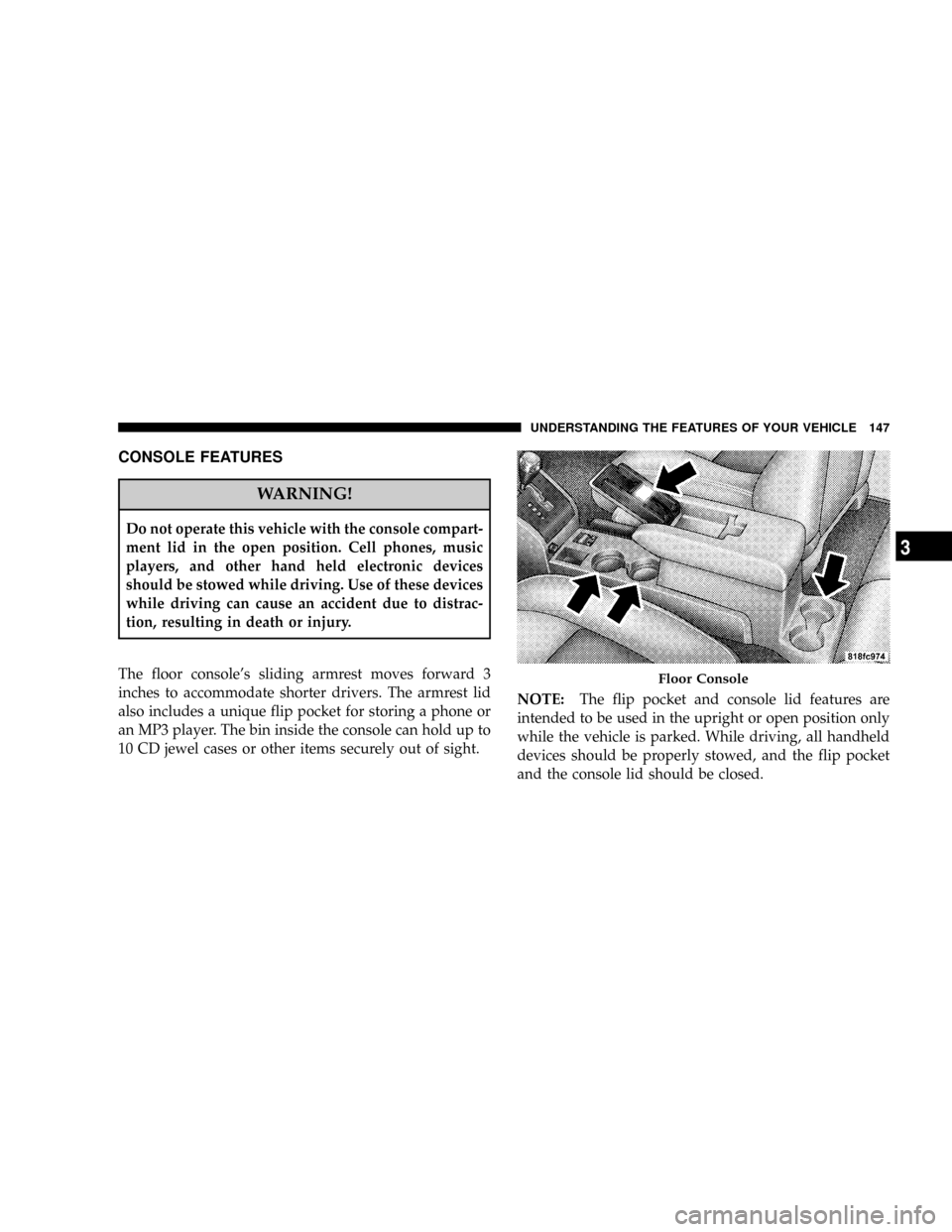
CONSOLE FEATURES
WARNING!
Do not operate this vehicle with the console compart-
ment lid in the open position. Cell phones, music
players, and other hand held electronic devices
should be stowed while driving. Use of these devices
while driving can cause an accident due to distrac-
tion, resulting in death or injury.
The floor console's sliding armrest moves forward 3
inches to accommodate shorter drivers. The armrest lid
also includes a unique flip pocket for storing a phone or
an MP3 player. The bin inside the console can hold up to
10 CD jewel cases or other items securely out of sight.NOTE:The flip pocket and console lid features are
intended to be used in the upright or open position only
while the vehicle is parked. While driving, all handheld
devices should be properly stowed, and the flip pocket
and the console lid should be closed.
Floor Console
UNDERSTANDING THE FEATURES OF YOUR VEHICLE 147
3
Page 156 of 399

NAM Reception.......................181
NFM Reception........................181
mElectronic Digital Clock..................182
NClock Setting Procedure.................182
mSales Code REF Ð AM/FM/CD (Single Disc)
Radio With Optional Satellite Radio And Hands
Free Phone Capability...................183
NOperating Instructions - Radio Mode.......183
NOperation Instructions - CD Mode.........187
NOperation Instructions - Auxiliary Mode.....189
NOperating Instructions - Hands Free Phone Ð
If Equipped.........................190
NOperating Instructions - Satellite Radio Ð
If Equipped.........................190mSales Code RAQ ± AM/FM/CD (6-Disc) Radio
With Optional Satellite Radio, Hands Free Phone,
And Vehicle Entertainment Systems (VES)
Capabilities...........................190
NOperating Instructions - Radio Mode.......191
NOperation Instructions - (CD Mode For CD
Audio Play).........................196
NLoad/Eject Button (CD Mode For CD Audio
Play)..............................197
NNotes On Playing MP3 Files.............199
NOperation Instructions - (CD Mode For MP3
Audio Play).........................202
NLoad/Eject Button (CD Mode For MP3 Play) . . 202
mSales Code REC Ð AM/FM/CD (6±Disc) Radio
With Navigation System..................204
156 UNDERSTANDING YOUR INSTRUMENT PANEL