ESP JEEP COMPASS 2014 1.G User Guide
[x] Cancel search | Manufacturer: JEEP, Model Year: 2014, Model line: COMPASS, Model: JEEP COMPASS 2014 1.GPages: 572, PDF Size: 3.63 MB
Page 130 of 572
NOTE:You should program the desired Towing Assis-
tance phone number using the Voice Command system.
To do this, press the button and say “Setup,” followed by
“Towing Assistance.” When prompted say 1-800-
521-2779 for U.S./Canada, say 55-14-3454 for Mexico City
and 1-800-712-3040 for outside Mexico City in Mexico.
Paging
To learn how to page, refer to “Working with Automated
Systems.” Paging works properly except for pagers of
certain companies, which time out a little too soon to
work properly with the Uconnect® Phone.
Voice Mail Calling
To learn how to access your voice mail, refer to “Working
with Automated Systems”.
Working With Automated Systems
This method is used in instances where one generally has
to press numbers on the mobile phone keypad while
navigating through an automated telephone system.
You can use your Uconnect® Phone to access a voice mail
system or an automated service, such as a paging service
or automated customer service line. Some services re-
quire immediate response selection. In some instances,
that may be too quick for use of the Uconnect® Phone.
When calling a number with your Uconnect® Phone that
normally requires you to enter in a touch-tone sequence
on your mobile phone keypad, you can press the
button and say the sequence you wish to enter,
followed by the word “Send.” For example, if required
to enter your PIN followed with a pound, ( 3746#),
you can press the
button and say, “3 7 4 6 # Send.”
Saying a number, or sequence of numbers, followed
128 UNDERSTANDING THE FEATURES OF YOUR VEHICLE
Page 144 of 572
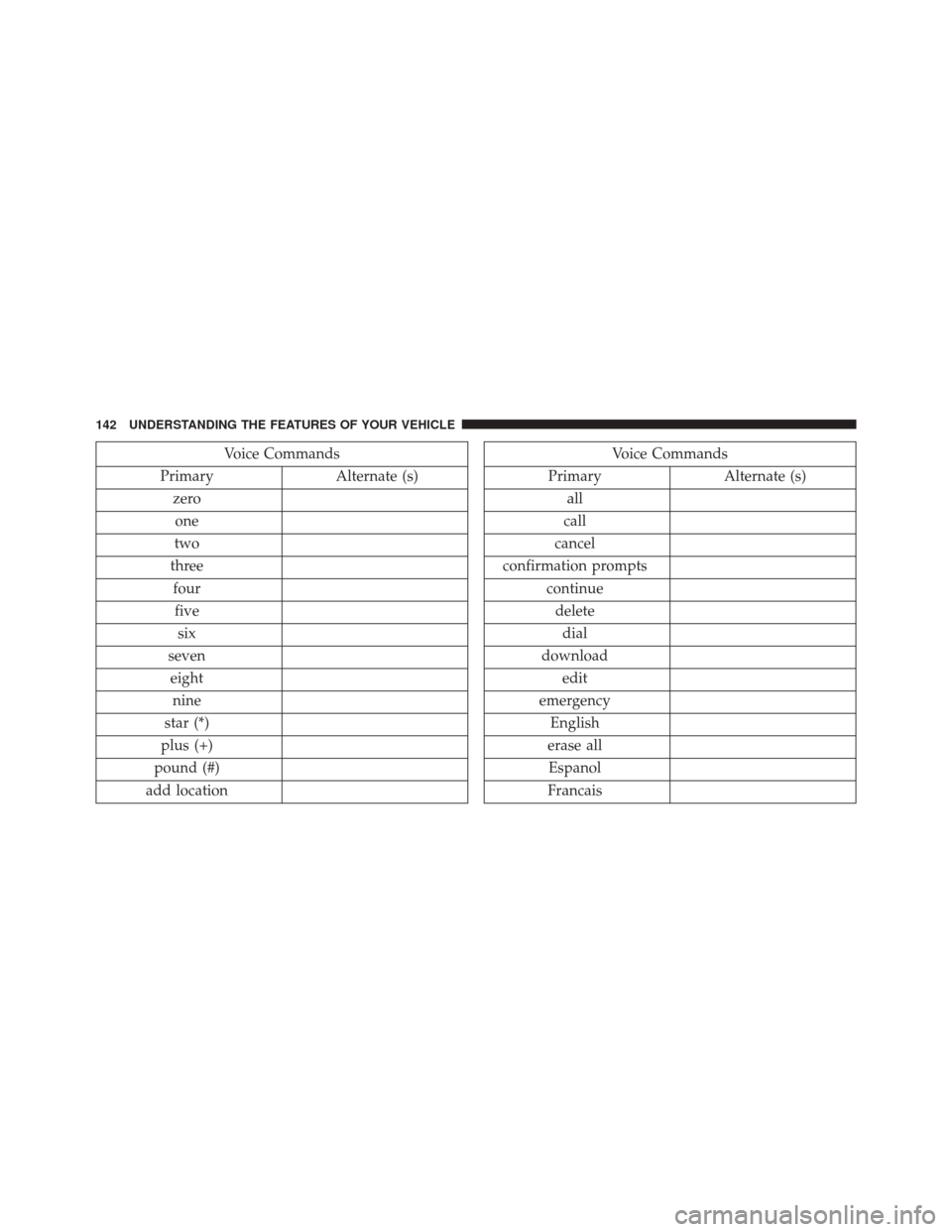
Voice Commands
Primary Alternate (s)
zero one
two
three fourfive six
seven eight nine
star (*)
plus (+)
pound (#)
add locationVoice Commands
Primary Alternate (s)
all
call
cancel
confirmation prompts continuedeletedial
download edit
emergency English
erase all Espanol
Francais
142 UNDERSTANDING THE FEATURES OF YOUR VEHICLE
Page 146 of 572
General Information
This device complies with Part 15 of the FCC rules and
RSS 210 of Industry Canada. Operation is subject to the
following conditions:
•Changes or modifications not expressly approved by
the party responsible for compliance could void the
user’s authority to operate the equipment.
• This device may not cause harmful interference.
• This device must accept any interference received,
including interference that may cause undesired op-
eration.
VOICE COMMAND — IF EQUIPPED
Voice Command System Operation
The Uconnect® Voice Command system allows
you to control your AM, FM radio, disk player,
USB mass storage class device, iPod® family of
devices, Bluetooth® Streaming Audio Device,
satellite radio, disc player, and a memo recorder.
NOTE: Take care to speak into the Voice Interface System
as calmly and normally as possible. The ability of the
Voice Interface System to recognize user voice commands
may be negatively affected by rapid speaking or a raised
voice level.
144 UNDERSTANDING THE FEATURES OF YOUR VEHICLE
Page 155 of 572
When the HIGH-level setting is selected, the heater will
provide a boosted heat level during the initial stages of
operation. Then, the heat output will drop to the normal
HI-level. If the HI-level setting is selected, the system will
automatically switch to LOW-level after approximately
30 minutes of continuous operation. At that time, the
display will change from HI to LO, indicating the change.
When the LOW-level heating is selected, the system
automatically turns the heater and the indicator light
OFF after approximately 30 minutes of continuous op-
eration.
NOTE:Once a heat setting is selected, heat will be felt
within two to five minutes.WARNING!
• Persons who are unable to feel pain to the skin
because of advanced age, chronic illness, diabetes,
spinal cord injury, medication, alcohol use, exhaus-
tion or other physical condition must exercise care
when using the seat heater. It may cause burns
even at low temperatures, especially if used for
long periods of time.
• Do not place anything on the seat or seatback that
insulates against heat, such as a blanket or cushion.
This may cause the seat heater to overheat. Sitting
in a seat that has been overheated could cause
serious burns due to the increased surface tempera-
ture of the seat.
3
UNDERSTANDING THE FEATURES OF YOUR VEHICLE 153
Page 184 of 572
When displayed, static grid lines will illustrate the width
of the vehicle while a dashed center-line will indicate the
center of the vehicle to assist with aligning to a hitch/
receiver. The static grid lines will show separate zonesthat will help indicate the distance to the rear of the
vehicle. The following table shows the approximate
distances for each zone:
Zone
Distance to the rear of the vehicle
Red 0 - 1 ft (0 - 30 cm)
Yellow 1 ft - 3 ft (30 cm - 1 m)
Green 3 ft or greater (1 m or greater)
WARNING!
Drivers must be careful when backing up even when
using the ParkView® Rear Back Up Camera. Always
check carefully behind your vehicle, and be sure to
check for pedestrians, animals, other vehicles, ob-
structions, or blind spots before backing up. You are
responsible for the safety of your surroundings and
must continue to pay attention while backing up.
Failure to do so can result in serious injury or death.
182 UNDERSTANDING THE FEATURES OF YOUR VEHICLE
Page 194 of 572
WARNING!(Continued)
use a garage door opener without these safety fea-
tures. Call toll-free 1–800–355–3515 or, on the Internet
at www.HomeLink.com for safety information or
assistance.
General Information
This device complies with FCC rules Part 15 and Industry
Canada RSS-210. Operation is subject to the following
two conditions:
1. This device may not cause harmful interference.
2. This device must accept any interference that may be
received including interference that may cause unde-
sired operation. NOTE:
•
The transmitter has been tested and it complies with
FCC and IC rules. Changes or modifications not ex-
pressly approved by the party responsible for compli-
ance could void the user ’s authority to operate the
device.
• The term IC before the certification/registration num-
ber only signifies that Industry Canada technical speci-
fications were met.
192 UNDERSTANDING THE FEATURES OF YOUR VEHICLE
Page 217 of 572
CAUTION!(Continued)
•Long loads which extend over the windshield, such
as wood panels or surfboards, or loads with large
frontal area should be secured to both the front and
rear of the vehicle.
• Travel at reduced speeds and turn corners carefully
when carrying large or heavy loads on the roof
rack. Wind forces, due to natural causes or nearby
truck traffic, can add sudden upward lift to a load.
This is especially true on large flat loads and may
result in damage to the cargo or your vehicle.
WARNING!
Cargo must be securely tied before driving your
vehicle. Improperly secured loads can fly off the
vehicle, particularly at high speeds, resulting in per-
sonal injury or property damage. Follow the roof rack
cautions when carrying cargo on your roof rack.
3
UNDERSTANDING THE FEATURES OF YOUR VEHICLE 215
Page 231 of 572
20. Shift Lever Indicator
The Shift Lever Indicator is self-contained within the
instrument cluster. It displays the gear position of the
automatic transmission.
NOTE:You must apply the brakes before shifting from
PARK.
21. Odometer/Trip Odometer Reset Button
Press this button to change the display from odometer to
either of the two trip odometer settings. Trip A or Trip B
will appear when in the trip odometer mode. Push in and
hold the button for two seconds to reset the trip odometer
to 0 miles or kilometers. The odometer must be in Trip
mode to reset.
22. Tire Pressure Monitoring Telltale Light
Each tire, including the spare (if provided),
should be checked monthly when cold and
inflated to the inflation pressure recommended by the vehicle manufacturer on the vehicle placard or tire
inflation pressure label. (If your vehicle has tires of a
different size than the size indicated on the vehicle
placard or tire inflation pressure label, you should deter-
mine the proper tire inflation pressure for those tires.)
As an added safety feature, your vehicle has been
equipped with a Tire Pressure Monitoring System
(TPMS) that illuminates a low tire pressure telltale when
one or more of your tires is significantly under-inflated.
Accordingly, when the low tire pressure telltale illumi-
nates, you should stop and check your tires as soon as
possible, and inflate them to the proper pressure. Driving
on a significantly under-inflated tire causes the tire to
overheat and can lead to tire failure. Under-inflation also
reduces fuel efficiency and tire tread life, and may affect
the vehicle’s handling and stopping ability.
Please note that the TPMS is not a substitute for proper
tire maintenance, and it is the driver ’s responsibility to
4
UNDERSTANDING YOUR INSTRUMENT PANEL 229
Page 246 of 572
reset all digits will change to zeros and time will start
incrementing again if the ignition switch is in RUN or
START.
Display Units Of Measure In
To make your selection, press and release the SELECT
button until “ENGLISH” or “METRIC” appears.
Personal Settings (Customer-Programmable
Features)
This allows the driver to set and recall features when the
transmission is in PARK (automatic transmission) or the
vehicle is stopped (manual transmission).
Press and release the MENU or DOWN buttons until
“Personal Settings” is displayed in the EVIC then press
the SELECT button.
Use the SELECT button to display one of the following
choices:
Language
When in this display you may select different languages
for all display nomenclature, including the trip functions.
Pressing the SELECT button while in this display selects
English, Espanol, Deutsch, Italiano, Francais or NL de-
pending on availability. As you continue, the displayed
information will be shown in the selected language.
NOTE:Uconnect® language will not change using the
EVIC. Please refer to “Language Selection” in Uconnect®
phone — If Equipped for details.
Auto Lock Doors
When ON is selected, all doors lock automatically when
the speed of the vehicle reaches 15 mph (24 km/h). Press
and hold the SELECT button when in this display until
“ON” or “OFF” appears to make your selection.
244 UNDERSTANDING YOUR INSTRUMENT PANEL
Page 260 of 572
Every time a preset button is used, a corresponding
button number will display.
Buttons1-6
These buttons tune the radio to the stations that you
commit to pushbutton memory {12 AM, 12 FM, and 12
Satellite (if equipped) stations}.
DISC Button
Pressing the DISC button will allow you to switch from
AM/FM modes to Disc modes.
Operation Instructions — DISC Mode For CD And
MP3/WMA Audio Play, DVD – Video
The radio DVD player and many DVD discs are coded by
geographic region. These region codes must match for
the disc to play. If the region code for the DVD disc does
not match the region code for the radio DVD player, it
will not play the disc. Customers may take their vehicleto an authorized dealer to change the region code of the
player a maximum of five times.
CAUTION!
The radio may shut down during extremely hot
conditions. When this occurs, the radio will indicate
“Disc Hot” and shut off until a safe temperature is
reached. This shutdown is necessary to protect the
optics of the DVD player and other radio internal
components.
NOTE: The ignition switch must be in the ON or ACC
position to operate the radio.
LOAD Button — Loading Compact Disc(s)
Press the LOAD button and the pushbutton with the
corresponding number (1-6) where the CD is being
loaded. The radio will display PLEASE WAIT and
258 UNDERSTANDING YOUR INSTRUMENT PANEL