audio JEEP COMPASS 2015 1.G User Guide
[x] Cancel search | Manufacturer: JEEP, Model Year: 2015, Model line: COMPASS, Model: JEEP COMPASS 2015 1.GPages: 560, PDF Size: 11.51 MB
Page 212 of 560
▫Operation Instructions — DISC Mode For CD
And MP3/WMA Audio Play, DVD – Video . . .250
▫LIST Button — DISC Mode For
MP3/WMA Play......................254
▫INFO Button — DISC Mode For
MP3/WMA Play......................254
▫Uconnect® (Satellite Radio) — If Equipped . . .257
!Uconnect® 730N/430/430N CD/DVD/
HDD/NAV — IF EQUIPPED..............261
▫Operating Instructions
(Voice Command System) — If Equipped.....261
▫Operating Instructions (Uconnect® Phone) —
If Equipped..........................261
!Uconnect® 130........................261
▫Operating Instructions — Radio Mode......262
▫Operation Instructions — CD MODE For
CD And MP3 Audio Play...............265
▫Notes On Playing MP3 Files.............267
▫Operation Instructions — Auxiliary Mode . . . .270
!Uconnect® 130 WITH SATELLITE RADIO.....270
▫Operating Instructions — Radio Mode......271
▫Operation Instructions — CD MODE For
CD And MP3 Audio Play...............277
▫Notes On Playing MP3 Files.............279
▫LIST Button — CD Mode For MP3 Play......282
▫INFO Button — CD Mode For MP3 Play.....282
▫Uconnect® (Satellite Radio) — If Equipped . . .283
!iPod®/USB/MP3 CONTROL — IF EQUIPPED . . .287
▫Connecting The iPod® Or External USB Device . .288
210 UNDERSTANDING YOUR INSTRUMENT PANEL
Page 213 of 560
▫Using This Feature.....................288
▫Controlling The iPod® Or External USB Device
Using Radio Buttons....................289
▫Play Mode..........................289
▫List Or Browse Mode...................291
▫Bluetooth® Streaming Audio (BTSA).......293
!STEERING WHEEL AUDIO CONTROLS......294
▫Radio Operation......................295
▫CD Player...........................295
!CD/DVD DISC MAINTENANCE...........296
!RADIO OPERATION AND MOBILE PHONES . . .296
!CLIMATE CONTROLS...................297
▫Manual Heating And Air Conditioning......297
▫Automatic Temperature Control (ATC) —
If Equipped.........................301
▫Operating Tips.......................306
4
UNDERSTANDING YOUR INSTRUMENT PANEL 211
Page 232 of 560
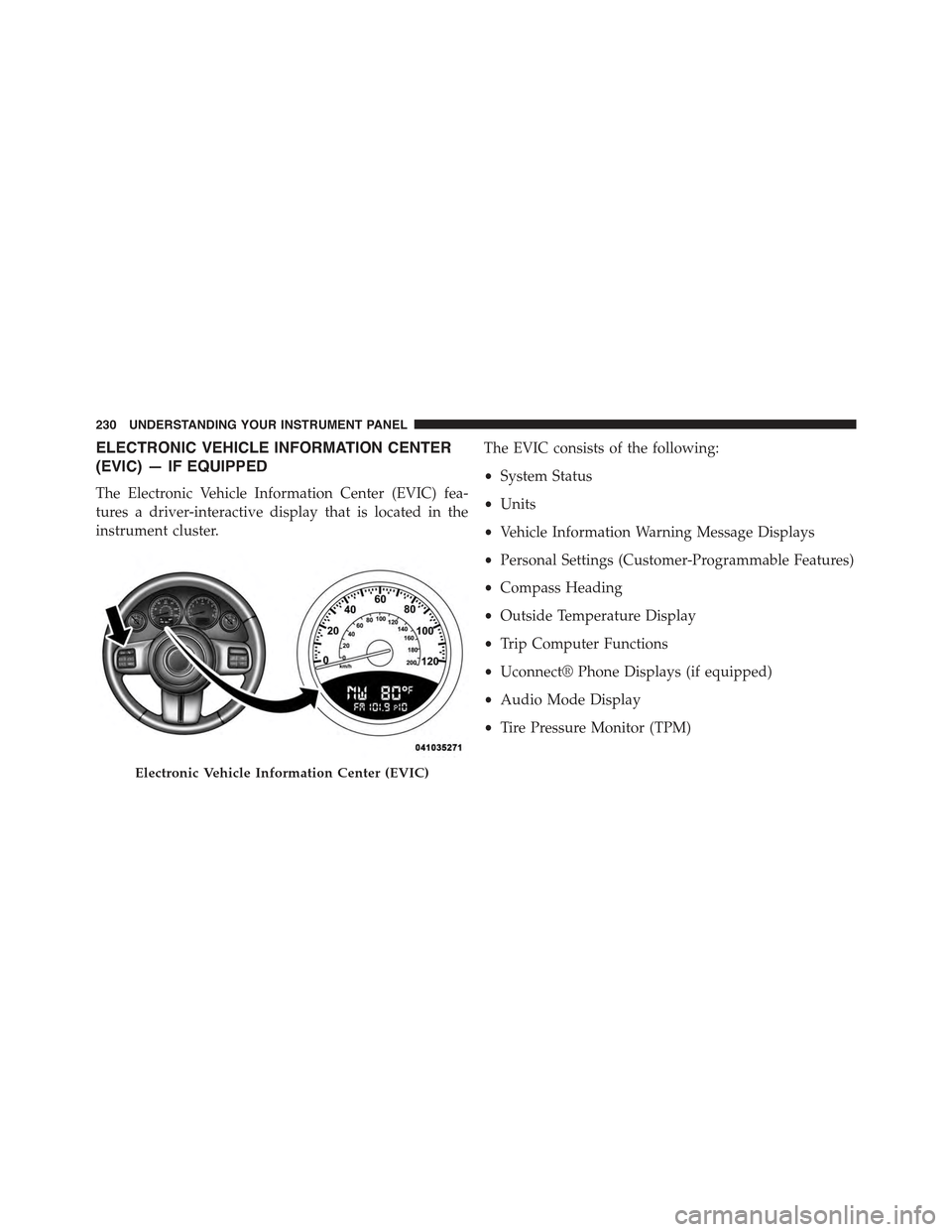
ELECTRONIC VEHICLE INFORMATION CENTER
(EVIC) — IF EQUIPPED
The Electronic Vehicle Information Center (EVIC) fea-
tures a driver-interactive display that is located in the
instrument cluster.
The EVIC consists of the following:
•System Status
•Units
•Vehicle Information Warning Message Displays
•Personal Settings (Customer-Programmable Features)
•Compass Heading
•Outside Temperature Display
•Trip Computer Functions
•Uconnect® Phone Displays (if equipped)
•Audio Mode Display
•Tire Pressure Monitor (TPM)
Electronic Vehicle Information Center (EVIC)
230 UNDERSTANDING YOUR INSTRUMENT PANEL
Page 236 of 560
EVIC Functions
•Compass/Temperature/Audio
•Average Fuel Economy
•Distance To Empty (DTE)
•Units In
•Elapsed Time
•Tire Pressure Monitor (TPM)
•Personal Settings
To Reset The Display
Pushing and holding the RIGHT/SELECT arrow button
once will clear the function currently being displayed.
Reset will only occur if a resettable function is currently
being displayed. To reset all resettable functions, push
and release the RIGHT/SELECT arrow button a second
time within three seconds of resetting the currently
displayed function. Reset ALL will be displayed during
this three-second window.
Compass/Temperature/Audio
Push and release the COMPASS button to display one of
eight compass headings to indicate the direction the
vehicle is facing, the outside temperature, and the current
radio station.
For additional information regarding the compass, refer
to Personal Settings (Customer-Programmable Features).
Average Fuel Economy
Shows the average fuel economy since the last reset.
When the fuel economy is reset, the display will read
“RESET” or show dashes for two seconds. Then, the
history information will be erased, and the averaging will
continue from the last fuel reading before the reset.
234 UNDERSTANDING YOUR INSTRUMENT PANEL
Page 243 of 560
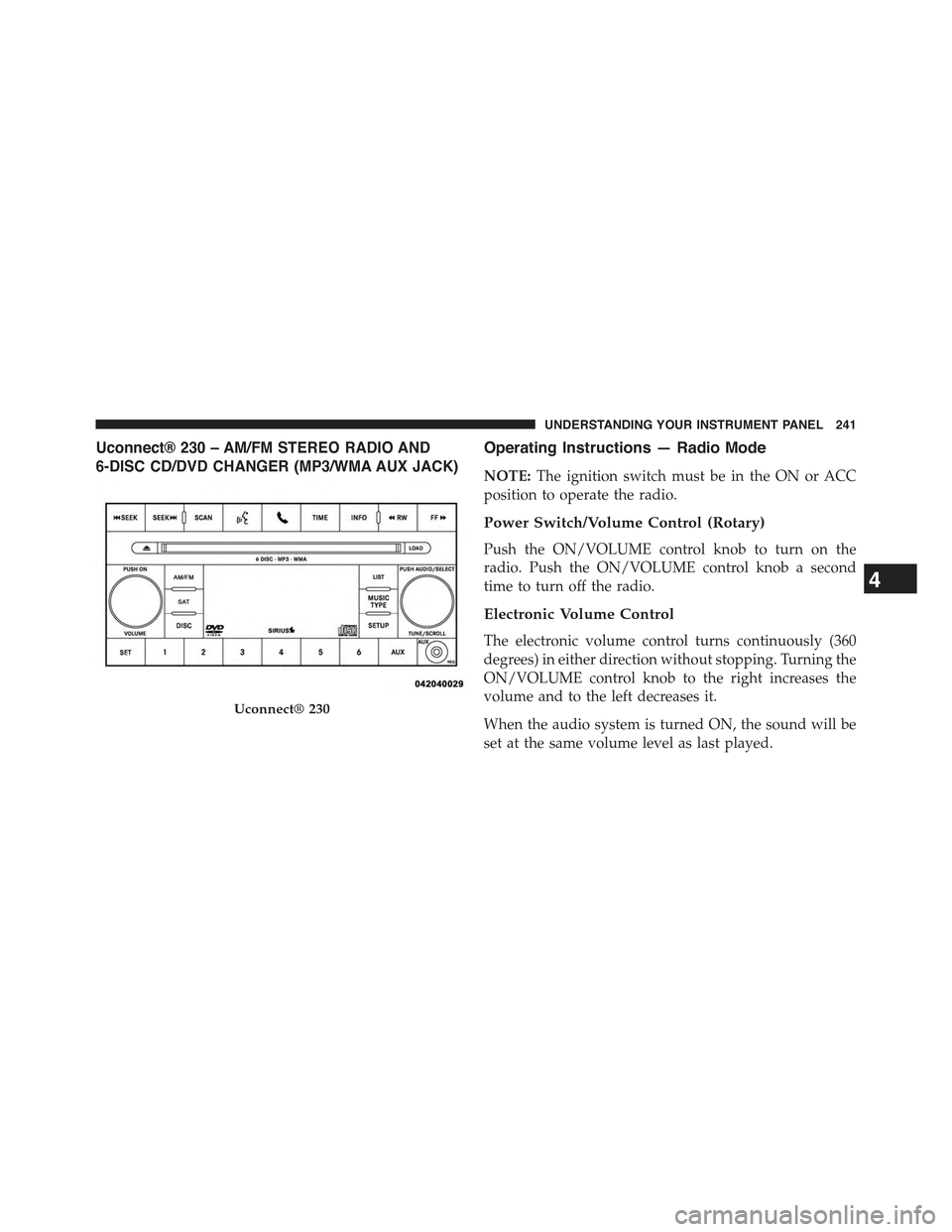
Uconnect® 230 – AM/FM STEREO RADIO AND
6-DISC CD/DVD CHANGER (MP3/WMA AUX JACK)
Operating Instructions — Radio Mode
NOTE:The ignition switch must be in the ON or ACC
position to operate the radio.
Power Switch/Volume Control (Rotary)
Push the ON/VOLUME control knob to turn on the
radio. Push the ON/VOLUME control knob a second
time to turn off the radio.
Electronic Volume Control
The electronic volume control turns continuously (360
degrees) in either direction without stopping. Turning the
ON/VOLUME control knob to the right increases the
volume and to the left decreases it.
When the audio system is turned ON, the sound will be
set at the same volume level as last played.
Uconnect® 230
4
UNDERSTANDING YOUR INSTRUMENT PANEL 241
Page 248 of 560
By pushing the SEEK button when the Music Type icon is
displayed, the radio will be tuned to the next frequency
station with the same selected Music Type name. The
Music Type function only operates when in the FM
mode.
If a preset button is activated while in the Music Type
(Program Type) mode, the Music Type mode will be
exited and the radio will tune to the preset station.
SETUP Button
Pushing the SETUP button allows you to select between
the following items:
NOTE:Turn the TUNE/SCROLL control knob to scroll
through the entries. Push the AUDIO/SELECT button to
select an entry and make changes.
•DVD Enter —When the disc is in DVD Menu mode,
selecting DVD Enter will allow you to play the current
highlighted selection. Use the remote control to scroll
up and down the menu (if equipped).
•DISC Play/Pause —
You can toggle between playing the DVD and
pausing the DVD by pushing the SELECT
button (if equipped).
•DVD Play Options —Selecting the DVD Play Options
will display the following:
•Subtitle — Repeatedly pressing SELECT will switch
subtitles to different subtitle languages that are avail-
able on the disc (if equipped).
•Audio Stream — Repeatedly pressing SELECT will
switch to different audio languages (if supported on
the disc) (if equipped).
246 UNDERSTANDING YOUR INSTRUMENT PANEL
Page 249 of 560
•Angle — Repeatedly pressing SELECT will change
the viewing angle if supported by the DVD disc
(if equipped).
NOTE:
•The available selections for each of the above entries
varies depending upon the disc.
•These selections can only be made while playing a
DVD.
•VES™ Power— Allows you to turn VES™ ON and
OFF (if equipped).
•VES™ Lock —Locks out rear VES™ remote controls
(if equipped).
•VES™ CH1/CH2 —Allows the user to change the
mode of either the IR1 or IR2 wireless headphones by
pressing the AUDIO/SELECT button (if equipped).
•Set Home Clock —Pressing the SELECT button
allows you to set the clock. Turn the TUNE/SCROLL
control knob to adjust the hours and then press and
turn the TUNE/SCROLL control knob to adjust the
minutes. Press the TUNE/SCROLL control knob again
to save changes.
•Player Defaults —Selecting this item will allow the
user to scroll through the following items and set
defaults according to customer preference.
Menu Language — If Equipped
Selecting this item will allow the user to choose the
default startup DVD menu language (effective only if
language supported by disc). If you want to select a
language not listed, then scroll down and select#other.#
Enter the four-digit country code using the TUNE/
SCROLL control knob to scroll up and down to select the
number and then push to select.
4
UNDERSTANDING YOUR INSTRUMENT PANEL 247
Page 250 of 560
Audio Language — If Equipped
Selecting this item allows you to choose a default audio
language (effective only if the language is supported by
the disc). You can select a language not listed by scrolling
down and selecting#other.#Enter the country code using
the TUNE/SCROLL control knob to scroll up and down
to select the number and then push to select.
Subtitle Language — If Equipped
Selecting this item allows you to choose a default subtitle
language (effective only if the language is supported by
the disc). You can select a language not listed by scrolling
down and selecting#other.#Enter the country code using
the TUNE/SCROLL control knob to scroll up and down
to select the number and then push to select.
Subtitles — If Equipped
Selecting this item allows you to choose between subtitle
Off or On.
Audio DRC — If Equipped
Selecting this item allows you to limit maximum audio
dynamic range. The default is set to#High,#and under
this setting, dialogues will play at 11 db higher than if the
setting is#Normal.#
Aspect Ratio — If Equipped
Selecting this item allows you to choose between wide
screen, pan scan, and letter box.
AutoPlay — If Equipped
When this is set to On and a DVD video is inserted, it will
bypass the DVD menu screen and automatically play the
movie. In some rare cases, the DVD player may not
auto-play the main title. In such cases, use the MENU
button on the remote control to select desired title to play.
248 UNDERSTANDING YOUR INSTRUMENT PANEL
Page 252 of 560
Operation Instructions — DISC Mode For CD And
MP3/WMA Audio Play, DVD – Video
The radio DVD player and many DVD discs are coded by
geographic region. These region codes must match for
the disc to play. If the region code for the DVD disc does
not match the region code for the radio DVD player, it
will not play the disc. Customers may take their vehicle
to an authorized dealer to change the region code of the
player a maximum of five times.
CAUTION!
The radio may shut down during extremely hot
conditions. When this occurs, the radio will indicate
“Disc Hot” and shut off until a safe temperature is
reached. This shutdown is necessary to protect the
optics of the DVD player and other radio internal
components.
NOTE:The ignition switch must be in the ON or ACC
position to operate the radio.
LOAD Button — Loading Compact Disc(s)
Push the LOAD button and the pushbutton with the
corresponding number (1-6) where the CD is being
loaded. The radio will display PLEASE WAIT and
prompt when to INSERT DISC. After the radio displays
#INSERT DISC,#insert the CD into the player.
Radio display will show#LOADING DISC#when the disc
is loading and “READING DISC” when the radio is
reading the disc.
CAUTION!
This CD player will accept 4–3/4 in (12 cm) discs only.
The use of other sized discs may damage the CD
player mechanism.
250 UNDERSTANDING YOUR INSTRUMENT PANEL
Page 254 of 560
AM Or FM Button (CD MODE)
Switches the radio into the AM or FM radio mode.
Notes On Playing MP3/WMA Files
The radio can play MP3/WMA files; however, acceptable
MP3/WMA file recording media and formats are limited.
When writing MP3/WMA files, pay attention to the
following restrictions.
Supported Media (Disc Types)
The MP3/WMA file recording media supported by the
radio are CDDA, CD-R, CD-RW, MP3,WMA, DVD Video,
DVD-R, DVD-RW, DVD+R, DVD+RW, and CDDA+MP3.
Supported Medium Formats (File Systems)
The medium formats supported by the radio are ISO 9660
Level 1 and Level 2 and includes the Joliet extension.
When reading discs recorded using formats other than
ISO 9660 Level 1 and Level 2, the radio may fail to read
files properly and may be unable to play the file nor-
mally. UDF and Apple HFS formats are not supported.
The radio uses the following limits for file systems:
•Maximum number of directory levels: 8
•Maximum number of files: 255
•Maximum number of folders: 100
•Maximum number of characters in file/folder names:
•Level 1: 12 (including a separator#.#and a three-
character extension)
•Level 2: 31 (including a separator#.#and a three-
character extension)
Multisession disc formats are supported by the radio.
Multisession discs may contain combinations of normal
CD audio tracks and computer files (including MP3/
WMA files). Discs created with an option such as#keep
disc open after writing#are most likely multisession
252 UNDERSTANDING YOUR INSTRUMENT PANEL