trailer JEEP COMPASS 2018 Owner handbook (in English)
[x] Cancel search | Manufacturer: JEEP, Model Year: 2018, Model line: COMPASS, Model: JEEP COMPASS 2018Pages: 348, PDF Size: 6.03 MB
Page 66 of 348
Do not operate the vehicle until the cause is
corrected. This light does not indicate how
much oil is in the engine. The engine oil level
must be checked under the hood.
— Oil Temperature Warning Light
This telltale indicates engine oil temperature
is high. If the light turns on while driving,
stop the vehicle and shut off the engine as
soon as possible. Wait for oil temperature to
return to normal levels.
— Seat Belt Reminder Warning Light
This light indicates when the driver or pas-
senger seat belt is unbuckled. When the
ignition is first placed in the ON/RUN or
ACC/ON/RUN position and if the driver’s seat
belt is unbuckled, a chime will sound and the
light will turn on. When driving, if the driver
or front passenger seat belt remains unbuck-
led, the Seat Belt Reminder Light will flash or
remain on continuously and a chime will
sound. Refer to “Occupant Restraints Sys-
tems” in “Safety” for further information.
— Transmission Fault Warning Light —
If Equipped
This light will illuminate (together with a
message in the instrument cluster display
and a buzzer) to indicate a transmission
fault. Contact your authorized dealer if the
message remains after restarting the engine.
— Transmission Temperature Warning
Light — If Equipped
This light indicates high transmission fluid
temperature. This may occur with strenuous
usage such as trailer towing. If this light turns
on, stop the vehicle and run the engine at idle
or slightly faster, with the transmission in
PARK or NEUTRAL, until the light turns off.
Once the light turns off, you may continue to
drive normally.
WARNING!
If you continue operating the vehicle when
the Transmission Temperature Warning Light
is illuminated you could cause the fluid to
boil over, come in contact with hot engine or
exhaust components and cause a fire.
CAUTION!
Continuous driving with the Transmission
Temperature Warning Light illuminated
will eventually cause severe transmission
damage or transmission failure.
— Vehicle Security Warning Light — If
Equipped
This light will flash at a fast rate for approxi-
mately 15 seconds when the vehicle security
alarm is arming, and then will flash slowly
until the vehicle is disarmed.
Yellow Warning Lights
— Active Speed Limiter Fault Indica-
tor Light — If Equipped
This light will turn on when there is a fault
detected with the Active Speed Limiter.
GETTING TO KNOW YOUR INSTRUMENT PANEL
64
Page 79 of 348
required. However, the conventional brake
system will continue to operate normally if
the “Brake System Warning Light” is not on.
If the “Anti-Lock Brake Warning Light” is on,
the brake system should be serviced as soon
as possible to restore the benefits of anti-lock
brakes. If the “Anti-Lock Brake Warning
Light” does not come on when the ignition is
turned to the ON/RUN mode, have the light
repaired as soon as possible.
Electronic Brake Control System
Your vehicle is equipped with an advanced
Electronic Brake Control system (EBC). This
system includes Electronic Brake Force Dis-
tribution (EBD), Anti-Lock Brake System
(ABS), Brake Assist System (BAS), Hill Start
Assist (HSA), Traction Control System (TCS),
Electronic Stability Control (ESC), and Elec-
tronic Roll Mitigation (ERM). These systems
work together to enhance both vehicle stabil-
ity and control in various driving conditions.
Your vehicle may also be equipped with
Ready Alert Braking (RAB), Rain Brake Sup-
port (RBS), Trailer Sway Control (TSC), and
Dynamic Steering Torque (DST).
Traction Control System (TCS)
This system monitors the amount of wheel
spin of each of the driven wheels. If wheel
spin is detected, the TCS may apply brake
pressure to the spinning wheel(s) and/or re-
duce vehicle power to provide enhanced ac-
celeration and stability. A feature of the TCS,
Brake Limited Differential (BLD), functions
similar to a limited slip differential and con-
trols the wheel spin across a driven axle. If
one wheel on a driven axle is spinning faster
than the other, the system will apply the
brake of the spinning wheel. This will allow
more vehicle torque to be applied to the
wheel that is not spinning. BLD may remain
enabled even if TCS and ESC are in a reduced
mode.
Brake Assist System (BAS) — If Equipped
The BAS is designed to optimize the vehicle’s
braking capability during emergency braking
maneuvers. The system detects an emer-
gency braking situation by sensing the rate
and amount of brake application and then
applies optimum pressure to the brakes. This
can help reduce braking distances. The BAS
complements the anti-lock brake system(ABS). Applying the brakes very quickly re-
sults in the best BAS assistance. To receive
the benefit of the system, you must apply
continuous braking pressure during the stop-
ping sequence, (do not “pump” the brakes).
Do not reduce brake pedal pressure unless
braking is no longer desired. Once the brake
pedal is released, the BAS is deactivated.
WARNING!
The Brake Assist System (BAS) cannot
prevent the natural laws of physics from
acting on the vehicle, nor can it increase
the traction afforded by prevailing road
conditions. BAS cannot prevent collisions,
including those resulting from excessive
speed in turns, driving on very slippery
surfaces, or hydroplaning. The capabilities
of a BAS-equipped vehicle must never be
exploited in a reckless or dangerous man-
ner, which could jeopardize the user's
safety or the safety of others.
77
Page 82 of 348
ESC Operating Modes
NOTE:
Depending upon model and mode of opera-
tion, the ESC system may have multiple op-
erating modes.ESC On
This is the normal operating mode for the
ESC. Whenever the vehicle is started, the
ESC system will be in this mode. This mode
should be used for most driving conditions.
Alternate ESC modes should only be used for
specific reasons as noted in the following
paragraphs.
Partial Off
The “Partial Off” mode is intended for times
when a more spirited driving experience is
desired. This mode may modify TCS and ESC
thresholds for activation, which allows for
more wheel spin than normally allowed. This
mode may be useful if the vehicle becomes
stuck.
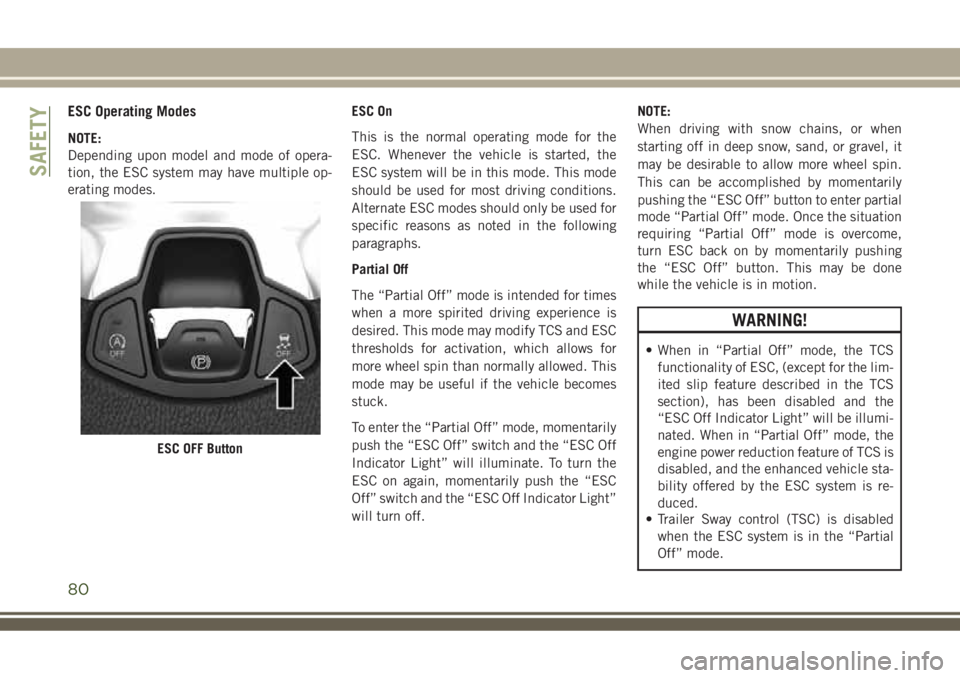
To enter the “Partial Off” mode, momentarily
push the “ESC Off” switch and the “ESC Off
Indicator Light” will illuminate. To turn the
ESC on again, momentarily push the “ESC
Off” switch and the “ESC Off Indicator Light”
will turn off.NOTE:
When driving with snow chains, or when
starting off in deep snow, sand, or gravel, it
may be desirable to allow more wheel spin.
This can be accomplished by momentarily
pushing the “ESC Off” button to enter partial
mode “Partial Off” mode. Once the situation
requiring “Partial Off” mode is overcome,
turn ESC back on by momentarily pushing
the “ESC Off” button. This may be done
while the vehicle is in motion.
WARNING!
• When in “Partial Off” mode, the TCS
functionality of ESC, (except for the lim-
ited slip feature described in the TCS
section), has been disabled and the
“ESC Off Indicator Light” will be illumi-
nated. When in “Partial Off” mode, the
engine power reduction feature of TCS is
disabled, and the enhanced vehicle sta-
bility offered by the ESC system is re-
duced.
• Trailer Sway control (TSC) is disabled
when the ESC system is in the “Partial
Off” mode.
ESC OFF Button
SAFETY
80
Page 86 of 348
The following conditions must be met in
order for HSA to activate:
• The feature must be enabled.
• The vehicle must be stopped.
• Park brake must be off.
• Driver door must be closed.
• The vehicle must be on a sufficient grade.
• The gear selection must match vehicle up-
hill direction (i.e., vehicle facing uphill is in
forward gear; vehicle backing uphill is in
REVERSE gear).
• HSA will work in REVERSE gear and all
forward gears. The system will not activate
if the transmission is in PARK or NEU-
TRAL. For vehicles equipped with a manual
transmission, if the clutch is pressed, HSA
will remain active.
WARNING!
There may be situations where the Hill
Start Assist (HSA) will not activate and
slight rolling may occur, such as on minor
hills or with a loaded vehicle, or while
pulling a trailer. HSA is not a substitute for
WARNING!
active driving involvement. It is always the
driver’s responsibility to be attentive to
distance to other vehicles, people, and
objects, and most importantly brake op-
eration to ensure safe operation of the
vehicle under all road conditions. Your
complete attention is always required
while driving to maintain safe control of
your vehicle. Failure to follow these warn-
ings can result in a collision or serious
personal injury.
Towing With HSA
HSA will also provide assistance to mitigate
roll back while towing a trailer.
WARNING!
• If you use a trailer brake controller with
your trailer, the trailer brakes may be
activated and deactivated with the brake
switch. If so, there may not be enough
brake pressure to hold both the vehicle
and the trailer on a hill when the brake
WARNING!
pedal is released. In order to avoid roll-
ing down an incline while resuming ac-
celeration, manually activate the trailer
brake or apply more vehicle brake pres-
sure prior to releasing the brake pedal.
• HSA is not a parking brake. Always apply
the parking brake fully when exiting your
vehicle. Also, be certain to place the
transmission in PARK.
• Failure to follow these warnings can re-
sult in a collision or serious personal
injury.
Disabling And Enabling HSA
This feature can be turned on or turned off.
To change the current setting, proceed as
follows:
• If disabling HSA using Uconnect Settings,
refer to “Uconnect Settings” in “Multime-
dia” for further information.
SAFETY
84
Page 87 of 348
Rain Brake Support (RBS)
Rain Brake Support may improve braking
performance in wet conditions. It will periodi-
cally apply a small amount of brake pressure
to remove any water buildup on the front
brake rotors. It functions when the wind-
shield wipers are in LO or HI speed. When
Rain Brake Support is active, there is no
notification to the driver and no driver inter-
action is required.
Ready Alert Braking (RAB)
Ready Alert Braking may reduce the time
required to reach full braking during emer-
gency braking situations. It anticipates when
an emergency braking situation may occur by
monitoring how fast the throttle is released by
the driver. The EBC will prepare the brake
system for a panic stop.
Trailer Sway Control (TSC)
TSC uses sensors in the vehicle to recognize
an excessively swaying trailer and will take
the appropriate actions to attempt to stop the
sway. TSC will become active automatically
once an excessively swaying trailer is recog-
nized.NOTE:
TSC cannot stop all trailers from swaying.
Always use caution when towing a trailer and
follow the trailer tongue weight recommenda-
tions. Refer to “Trailer Towing” in “Starting
And Operating” for further information.
When TSC is functioning, the “ESC
Activation/Malfunction Indicator Light” will
flash, the engine power may be reduced and
you may feel the brakes being applied to
individual wheels to attempt to stop the
trailer from swaying. TSC is disabled when
the ESC system is in the “Partial Off” or “Full
Off” modes.
WARNING!
If TSC activates while driving, slow the
vehicle down, stop at the nearest safe
location, and adjust the trailer load to
eliminate trailer sway.
AUXILIARY DRIVING
SYSTEMS
Blind Spot Monitoring (BSM) — If
Equipped
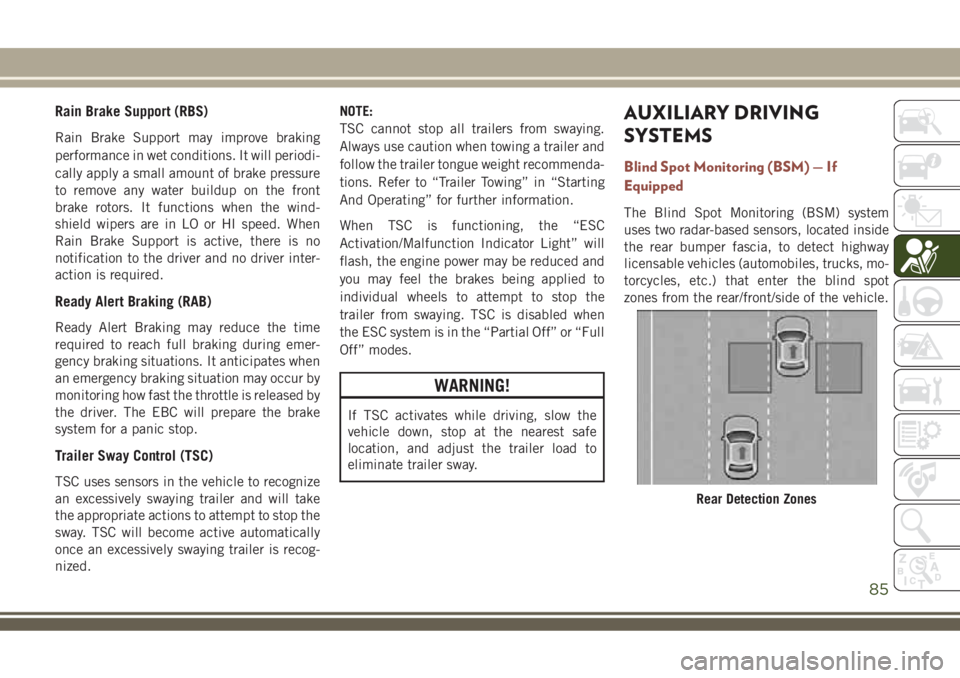
The Blind Spot Monitoring (BSM) system
uses two radar-based sensors, located inside
the rear bumper fascia, to detect highway
licensable vehicles (automobiles, trucks, mo-
torcycles, etc.) that enter the blind spot
zones from the rear/front/side of the vehicle.
Rear Detection Zones
85
Page 88 of 348
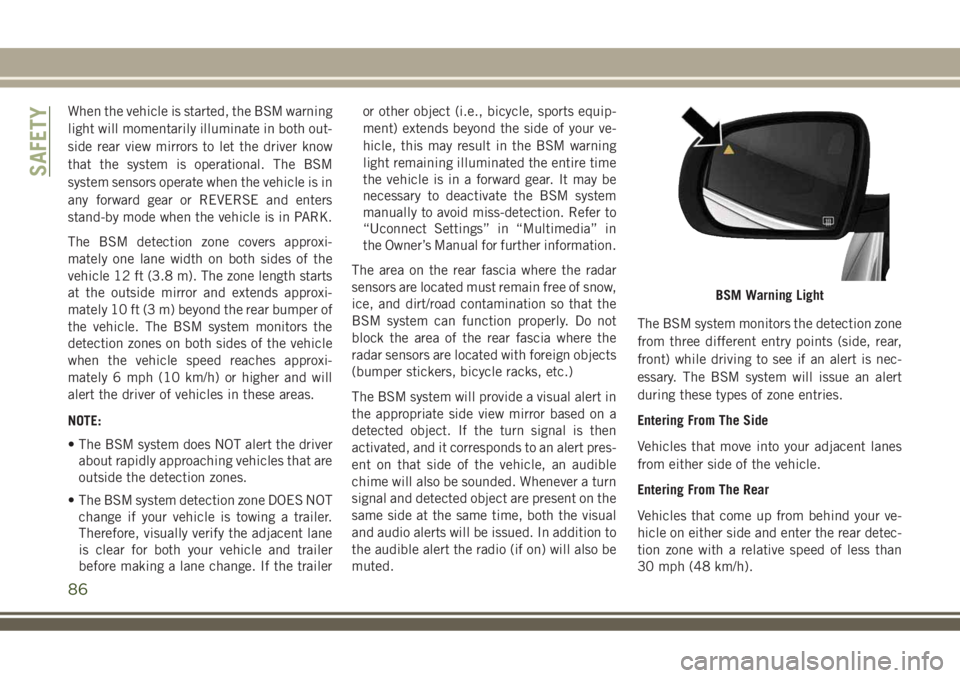
When the vehicle is started, the BSM warning
light will momentarily illuminate in both out-
side rear view mirrors to let the driver know
that the system is operational. The BSM
system sensors operate when the vehicle is in
any forward gear or REVERSE and enters
stand-by mode when the vehicle is in PARK.
The BSM detection zone covers approxi-
mately one lane width on both sides of the
vehicle 12 ft (3.8 m). The zone length starts
at the outside mirror and extends approxi-
mately 10 ft (3 m) beyond the rear bumper of
the vehicle. The BSM system monitors the
detection zones on both sides of the vehicle
when the vehicle speed reaches approxi-
mately 6 mph (10 km/h) or higher and will
alert the driver of vehicles in these areas.
NOTE:
• The BSM system does NOT alert the driver
about rapidly approaching vehicles that are
outside the detection zones.
• The BSM system detection zone DOES NOT
change if your vehicle is towing a trailer.
Therefore, visually verify the adjacent lane
is clear for both your vehicle and trailer
before making a lane change. If the traileror other object (i.e., bicycle, sports equip-
ment) extends beyond the side of your ve-
hicle, this may result in the BSM warning
light remaining illuminated the entire time
the vehicle is in a forward gear. It may be
necessary to deactivate the BSM system
manually to avoid miss-detection. Refer to
“Uconnect Settings” in “Multimedia” in
the Owner’s Manual for further information.
The area on the rear fascia where the radar
sensors are located must remain free of snow,
ice, and dirt/road contamination so that the
BSM system can function properly. Do not
block the area of the rear fascia where the
radar sensors are located with foreign objects
(bumper stickers, bicycle racks, etc.)
The BSM system will provide a visual alert in
the appropriate side view mirror based on a
detected object. If the turn signal is then
activated, and it corresponds to an alert pres-
ent on that side of the vehicle, an audible
chime will also be sounded. Whenever a turn
signal and detected object are present on the
same side at the same time, both the visual
and audio alerts will be issued. In addition to
the audible alert the radio (if on) will also be
muted.The BSM system monitors the detection zone
from three different entry points (side, rear,
front) while driving to see if an alert is nec-
essary. The BSM system will issue an alert
during these types of zone entries.
Entering From The Side
Vehicles that move into your adjacent lanes
from either side of the vehicle.
Entering From The Rear
Vehicles that come up from behind your ve-
hicle on either side and enter the rear detec-
tion zone with a relative speed of less than
30 mph (48 km/h).
BSM Warning Light
SAFETY
86
Page 141 of 348
STARTING AND OPERATING
STARTING THE ENGINE.......141
Normal Starting — Gasoline Engine . . .141
Stopping The Engine............143
Normal Starting — Diesel Engine. . . .143
PARKBRAKE ..............145
Electric Park Brake (EPB).........145
MANUAL TRANSMISSION — IF
EQUIPPED................147
Shifting....................148
Downshifting.................148
Parking....................150
AUTOMATIC TRANSMISSION — IF
EQUIPPED.................150
Ignition Park Interlock...........151
Brake/Transmission Shift Interlock
System....................151
Six-Speed Or Nine-Speed Automatic
Transmission.................152
FOUR-WHEEL DRIVE OPERATION
— IF EQUIPPED.............157
Jeep Active Drive..............157
SELEC-TERRAIN — IF
EQUIPPED.................159
Mode Selection Guide...........159
STOP/START SYSTEM — IF
EQUIPPED.................160
Operating Modes..............160
Manual Activation / Deactivation.....161
SPEED CONTROL............162
To Activate..................162
To Set A Desired Speed..........163
To Vary The Speed Setting.........163
To Resume Speed.............164
To Accelerate For Passing.........164
To Deactivate................164
ADAPTIVE CRUISE CONTROL
(ACC) ....................164
Activation..................165
Setting A Desired Speed..........165
Varying The Speed.............165
To Resume..................165
Deactivation.................166Setting The Following Distance......166
Changing Modes..............166
PARKSENSE REAR PARK ASSIST —
IF EQUIPPED...............167
ParkSense Sensors.............168
Enabling And Disabling ParkSense . . .168
Instrument Cluster Display — Warning .168
ParkSense System Usage Precautions . .168
PARKSENSE FRONT AND REAR
PARKASSIST...............169
ParkSense Sensors.............169
Enabling And Disabling ParkSense . . .170
Engagement/Disengagement.......170
Side Distance Warning System......171
Operation With A Trailer..........171
General Warnings..............171
PARKSENSE ACTIVE PARK
ASSIST ...................172
Enabling And Disabling ParkSense Active
Park Assist..................172
LANESENSE................173
STARTING AND OPERATING
139
Page 142 of 348
LaneSense Operation............173
Turning LaneSense On Or Off.......173
LaneSense Warning Message.......174
Changing LaneSense Status........175
PARKVIEW REAR BACK-UP
CAMERA..................176
Symbols And Messages On The Display .176
REFUELING THE VEHICLE.....176
Emergency Fuel Filler Door Release . . .178
TRAILER TOWING...........179
Common Towing Definitions........179
Trailer Towing Weights (Maximum Trailer
Weight Ratings)...............181
Towing Requirements...........181
RECREATIONAL TOWING (BEHIND
MOTORHOME, ETC.)..........183
Towing This Vehicle Behind Another
Vehicle....................183
Recreational Towing — Front-Wheel Drive
(FWD) Models................183
Recreational Towing — 4X4 Models . . .184
STARTING AND OPERATING
140
Page 150 of 348
To engage REVERSE gear from the NEUTRAL
position, lift the REVERSE ring, located be-
low the knob and move the gear selector all
the way left and then forward.
Shifting
Fully press the clutch pedal before shifting
gears. As you release the clutch pedal, lightly
press the accelerator pedal.You should always use first gear when starting
from a standing position.
Recommended Vehicle Shift Speeds
To utilize your manual transmission effi-
ciently for fuel economy and performance, it
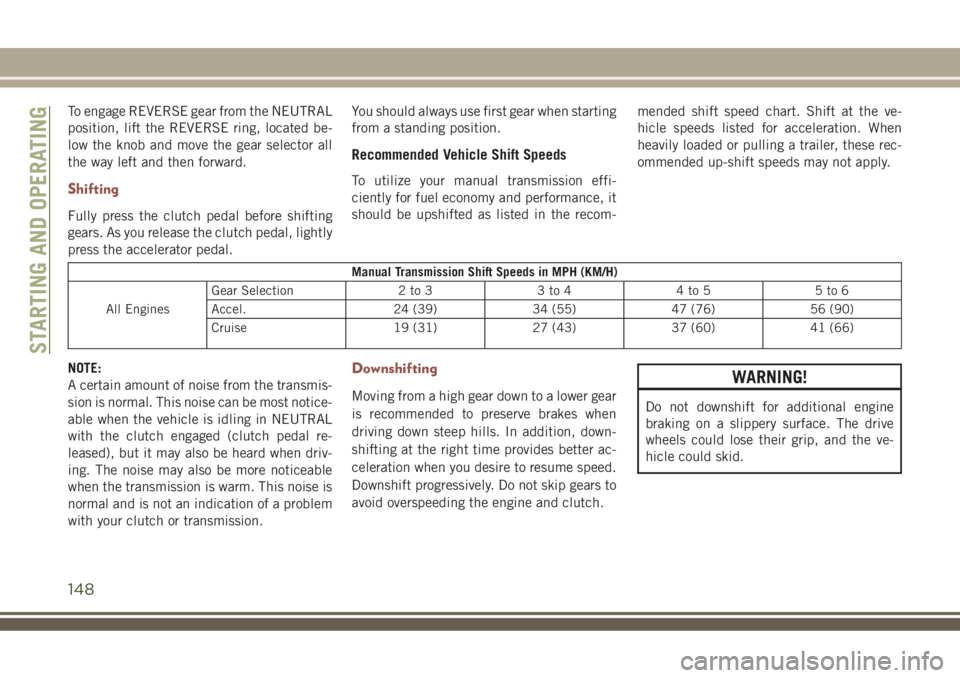
should be upshifted as listed in the recom-mended shift speed chart. Shift at the ve-
hicle speeds listed for acceleration. When
heavily loaded or pulling a trailer, these rec-
ommended up-shift speeds may not apply.
Manual Transmission Shift Speeds in MPH (KM/H)
All EnginesGear Selection 2 to 3 3 to 4 4 to 5 5 to 6
Accel. 24 (39) 34 (55) 47 (76) 56 (90)
Cruise 19 (31) 27 (43) 37 (60) 41 (66)
NOTE:
A certain amount of noise from the transmis-
sion is normal. This noise can be most notice-
able when the vehicle is idling in NEUTRAL
with the clutch engaged (clutch pedal re-
leased), but it may also be heard when driv-
ing. The noise may also be more noticeable
when the transmission is warm. This noise is
normal and is not an indication of a problem
with your clutch or transmission.Downshifting
Moving from a high gear down to a lower gear
is recommended to preserve brakes when
driving down steep hills. In addition, down-
shifting at the right time provides better ac-
celeration when you desire to resume speed.
Downshift progressively. Do not skip gears to
avoid overspeeding the engine and clutch.
WARNING!
Do not downshift for additional engine
braking on a slippery surface. The drive
wheels could lose their grip, and the ve-
hicle could skid.
STARTING AND OPERATING
148
Page 157 of 348
WARNING!
Do not coast in NEUTRAL and never turn
off the ignition to coast down a hill. These
are unsafe practices that limit your re-
sponse to changing traffic or road condi-
tions. You might lose control of the vehicle
and have a collision.
CAUTION!
Towing the vehicle, coasting, or driving for
any other reason with the transmission in
NEUTRAL can cause severe transmission
damage.
Refer to “Recreational Towing” in “Start-
ing And Operating” and “Towing A Dis-
abled Vehicle” in “In Case Of Emergency”
for further information.
DRIVE (D)
This range should be used for most city and
highway driving. It provides the smoothest
upshifts and downshifts, and the best fuel
economy. The transmission automatically up-shifts through all forward gears. The DRIVE
position provides optimum driving character-
istics under all normal operating conditions.
When frequent transmission shifting occurs
(such as when operating the vehicle under
heavy loading conditions, in hilly terrain,
traveling into strong head winds, or while
towing a heavy trailer), use the AutoStick
shift control to select a lower gear (refer to
"AutoStick" in this section for further infor-
mation). Under these conditions, using a
lower gear will improve performance and ex-
tend transmission life by reducing excessive
shifting and heat buildup.
If the transmission temperature exceeds nor-
mal operating limits, the transmission con-
troller may modify the transmission shift
schedule, reduce engine torque, and/or ex-
pand the range of torque converter clutch
engagement. This is done to prevent trans-
mission damage due to overheating.
If the transmission becomes extremely hot,
the "Transmission Temperature Warning
Light" may illuminate, and the transmission
may operate differently until the transmis-
sion cools down.During cold temperatures, transmission op-
eration may be modified depending on en-
gine and/or transmission temperature as well
as vehicle speed. This feature improves warm
up time of the engine and transmission to
achieve maximum efficiency. Engagement of
the torque converter clutch (and, for the
nine-speed, shifts into 8th or 9th gear), are
inhibited until the engine and/or transmis-
sion is warm (refer to the “Note” under
“Torque Converter Clutch” in this section).
Normal operation will resume once the tem-
perature(s) have risen to a suitable level.
AUTOSTICK
AutoStick is a driver-interactive transmission
feature providing manual shift control, giving
you more control of the vehicle. AutoStick
allows you to maximize engine braking, elimi-
nate undesirable upshifts and downshifts,
and improve overall vehicle performance.
This system can also provide you with more
control during passing, city driving, cold slip-
pery conditions, mountain driving, trailer
towing, and many other situations.
155