service JEEP COMPASS 2019 Owner handbook (in English)
[x] Cancel search | Manufacturer: JEEP, Model Year: 2019, Model line: COMPASS, Model: JEEP COMPASS 2019Pages: 362, PDF Size: 6.23 MB
Page 3 of 362
Congratulations on selecting your new FCA
vehicle. Be assured that it represents preci-
sion workmanship, distinctive styling, and
high quality.
ALWAYS drive safely and pay attention to the
road. ALWAYS drive safely with your hands on
the steering wheel. You have full responsibil-
ity and assume all risks related to the use of
the features and applications in this vehicle.
Only use the features and applications when
it is safe to do so. Failure to do so may result
in an accident involving serious injury or
death.
This guide illustrates and describes the op-
eration of features and equipment that are
either standard or optional on this vehicle.
This guide may also include a description of
features and equipment that are no longer
available or were not ordered on this vehicle.
Please disregard any features and equipment
described in this guide that are not available
on this vehicle. FCA reserves the right to
make changes in design and specifications
and/or make additions to or improvements to
its products without imposing any obligation
upon itself to install them on products previ-
ously manufactured.This User Guide has been prepared to help
you quickly become acquainted with the im-
portant features of your vehicle. It contains
most things you will need to operate and
maintain the vehicle, including emergency
information.
When it comes to service, remember that your
authorized dealer knows your Jeep
®vehicle
best, has factory-trained technicians and
genuine MOPAR
®parts, and cares about your
satisfaction.
HOW TO FIND YOUR
OWNER’S MANUAL ONLINE
This publication has been prepared as a ref-
erence item to help you quickly become ac-
quainted with the most important features
and processes of your vehicle. It contains
most things you will need to operate and
maintain the vehicle, including emergency
information and procedures.
This User Guide is not a replacement for the full
Owner’s Manual, and does not fully cover every
operation and procedure possible with your ve-
hicle.For more detailed descriptions of the topics
discussed in this User Guide, as well as
information covering features and processes
not covered in this User Guide, the full ve-
hicle Owner’s Manual can be accessed for
free online in a printer-friendly PDF format.
To get the full Owner’s Manual or applicable
supplement for your vehicle, follow the appro-
priate web address below:
www.mopar.eu/owner
or alternatively, to access
this information, go to the Internet website at
http://aftersales.fiat.com/elum/.
FCA is committed to protecting our environ-
ment and natural resources. By converting
from paper to electronic delivery for the ma-
jority of the user information for your vehicle,
together we greatly reduce the demand for
tree-based products and lessen the stress on
our environment.
WELCOME FROM FCA
1
Page 5 of 362
IMPORTANT NOTICE
ALL MATERIAL CONTAINED IN THIS PUB-
LICATION IS BASED ON THE LATEST IN-
FORMATION AVAILABLE AT TIME OF PUB-
LICATION APPROVAL. THE RIGHT IS
RESERVED TO PUBLISH REVISIONS AT
ANY TIME.
This User Guide has been prepared with the
assistance of service and engineering spe-
cialists to acquaint you with the operation
and maintenance of your new vehicle. It is
supplemented by a Warranty Information
Booklet and various customer-oriented docu-
ments. You are urged to read these publica-
tions carefully. Following the instructions and
recommendations in this User Guide will help
assure safe and enjoyable operation of your
vehicle.
After you have read the User Guide, it should
be stored in the vehicle for convenient refer-
ence and remain with the vehicle when sold.The manufacturer reserves the right to make
changes in design and specifications, and/or
to make additions to or improvements in its
products without imposing any obligations
upon itself to install them on products previ-
ously manufactured.
The User Guide illustrates and describes the
features that are standard or available as
extra cost options. Therefore, some of the
equipment and accessories in this publica-
tion may not appear on your vehicle.
NOTE:
Be sure to read the User guide first before
driving your vehicle and before attaching or
installing parts/accessories or making other
modifications to the vehicle.
In view of the many replacement parts and
accessories from various manufacturers
available on the market, the manufacturer
cannot be certain that the driving safety of
your vehicle will not be impaired by the at-
tachment or installation of such parts. Even if
such parts are officially-approved (for ex-
ample, by a general operating permit for the
part or by constructing the part in an officially
approved design), or if an individual operat-ing permit was issued for the vehicle after the
attachment or installation of such parts, it
cannot be implicitly assumed that the driving
safety of your vehicle is unimpaired. There-
fore, neither experts nor official agencies are
liable. The manufacturer only assumes re-
sponsibility when parts, which are expressly
authorized or recommended by the manufac-
turer, are attached or installed at an autho-
rized dealer. The same applies when modifi-
cations to the original condition are
subsequently made on the manufacturer's
vehicles.
Your warranties do not cover any part that the
manufacturer did not supply. Nor do they
cover the cost of any repairs or adjustments
that might be caused or needed because of
the installation or use of non-manufacturer
parts, components, equipment, materials, or
additives. Nor do your warranties cover the
costs of repairing damage or conditions
caused by any changes to your vehicle that do
not comply with the manufacturers specifica-
tions.
HOW TO USE THIS MANUAL
3
Page 10 of 362
Enabling And Disabling The ParkSense
Active Park Assist System........... 173
Exiting The Parking Space........... 174
LANESENSE — IF EQUIPPED............. 176LaneSense Operation.............. 176
Turning LaneSense On Or Off......... 177
LaneSense Warning Message.......... 177
Changing LaneSense Status.......... 179
PARKVIEW REAR BACK UP CAMERA —
IF EQUIPPED...................... 179
REFUELING THE VEHICLE............... 180
Emergency Fuel Filler Door Release..... 181
REFUELING THE VEHICLE — DIESEL ENGINE.... 183Adblue (UREA) — If Equipped........ 184
TRAILER TOWING................... 187Common Towing Definitions.......... 187
Trailer Towing Weights (Maximum
Trailer Weight Ratings)............. 189
Towing Requirements.............. 189
RECREATIONAL TOWING (BEHIND MOTORHOME,
ETC.).......................... 191
Towing This Vehicle Behind Another
Vehicle....................... 191
Recreational Towing — Front-Wheel Drive (FWD)
Models....................... 191
Recreational Towing — 4X4 Models..... 192
IN CASE OF EMERGENCY
HAZARD WARNING FLASHERS............ 193
BULB REPLACEMENT................. 193
Replacement Bulbs............... 193
Replacing Exterior Bulbs............ 195
FUSES......................... 199General Information............... 200Fuse Location................... 200
Engine Compartment Fuses/Distribution
Unit........................ 200
Engine Compartment Fuses/Auxiliary Unit . . 204
Interior Fuses................... 205
Rear Cargo Fuse/Relay Distribution Unit . . . 206
JACKING AND TIRE CHANGING............ 208Jack Location/Spare Tire Stowage....... 208
Preparations For Jacking............ 209
Jacking Instructions............... 210
Road Tire Installation.............. 213
EC Declaration Of Conformance........ 213
Jack Usage Precautions............ 214
TIRE SERVICE KIT — IF EQUIPPED.......... 215
JUMP STARTING.................... 220
Preparations For Jump Start.......... 221
Jump Starting Procedure............ 222
REFUELING IN EMERGENCY.............. 223
IF YOUR ENGINE OVERHEATS............. 223
GEAR SELECTOR OVERRIDE.............. 224
FREEING A STUCK VEHICLE.............. 225
TOWING A DISABLED VEHICLE............ 226
Without The Key Fob.............. 227
Front-Wheel Drive (FWD) Models —
WithKeyFob ................... 227
4x4 Models.................... 227
Emergency Tow Hooks.............. 228
Tow Eye Usage — If Equipped......... 229
ENHANCED ACCIDENT RESPONSE SYSTEM (EARS) . 230
EVENT DATA RECORDER (EDR)............ 230
SERVICING AND MAINTENANCE
SCHEDULED SERVICING................ 2311.4L Gasoline Engine.............. 231Diesel Engines.................. 235
ENGINE COMPARTMENT............... 2401.4L Engine.................... 240
2.0L Diesel Engine............... 241
1.6L Diesel Engine............... 242
Checking Oil Level................ 243
Adding Washer Fluid.............. 243
Maintenance-Free Battery........... 244
DEALER SERVICE................... 245Air Conditioner Maintenance.......... 245
Wiper Blades................... 245
Exhaust System................. 246
Cooling System.................. 247
Brake System.................. 248
Manual Transmission — If Equipped..... 249
Automatic Transmission............. 249
RAISING THE VEHICLE................. 250
TIRES.......................... 250
Tires — General Information......... 250
Tire Types..................... 255
Spare Tires — If Equipped.......... 256
Tire Chains (Traction Devices)......... 257
Tire Rotation Recommendations........ 258
STORING THE VEHICLE................ 259
BODYWORK....................... 260
Preserving The Bodywork............ 260
INTERIORS....................... 261Seats And Fabric Parts............. 261
Plastic And Coated Parts............ 262
Leather Parts................... 262
Glass Surfaces.................. 262
TECHNICAL SPECIFICATIONS
IDENTIFICATION DATA................. 263Vehicle Identification Number......... 263
TABLE OF CONTENTS
8
Page 16 of 362
The keyless ignition key fob also includes an
emergency key, which stores in the rear of the
key fob.
The emergency key allows for entry into the
vehicle should the battery in the vehicle or
the key fob go dead. The emergency key is
also for locking the glove compartment. You
can keep the emergency key with you when
valet parking.
To remove the emergency key from the key-
less ignition key fob, slide the mechanical
latch at the top of the key fob sideways with
your thumb and then pull the key out with
your other hand.
WARNING!
Push the Mechanical Key Release Button
only with the key fob facing away from your
body, especially your eyes and objects that
may be damaged, such as clothing.
To Unlock The Doors And Liftgate
Push and release the unlock button on the
key fob once to unlock the driver's door or
twice within five seconds to unlock all doors
and the liftgate.
All doors can be programmed to unlock on
the first push of the unlock button. Refer to
“Uconnect Settings” in “Multimedia” in the
Owner’s Manual for further information.
To Lock The Doors And Liftgate
Push and release the lock button on the key
fob to lock all doors and liftgate.
Request For Additional Key Fobs
NOTE:
Only key fobs that are programmed to the
vehicle electronics can be used to start and
operate the vehicle. Once a key fob is pro-
grammed to a vehicle, it cannot be pro-
grammed to any other vehicle.
WARNING!
• Always remove the key fobs from the
vehicle and lock all doors when leaving
the vehicle unattended.
• For vehicles equipped with Keyless
Enter-N-Go — Ignition, always remem-
ber to place the ignition in the OFF
mode.
NOTE:
Used batteries may be harmful to the envi-
ronment if not disposed of correctly. Always
dispose of used batteries by specialized bat-
tery disposal container, or by taking used
batteries to an authorized dealer.
Duplication of key fobs may be performed at
an authorized dealer. This procedure consists
of programming a blank key fob to the vehicle
electronics. A blank key fob is one that has
never been programmed.
NOTE:
When having the Sentry Key Immobilizer Sys-
tem serviced, bring all vehicle keys with you
to an authorized dealer.
GETTING TO KNOW YOUR VEHICLE
14
Page 32 of 362
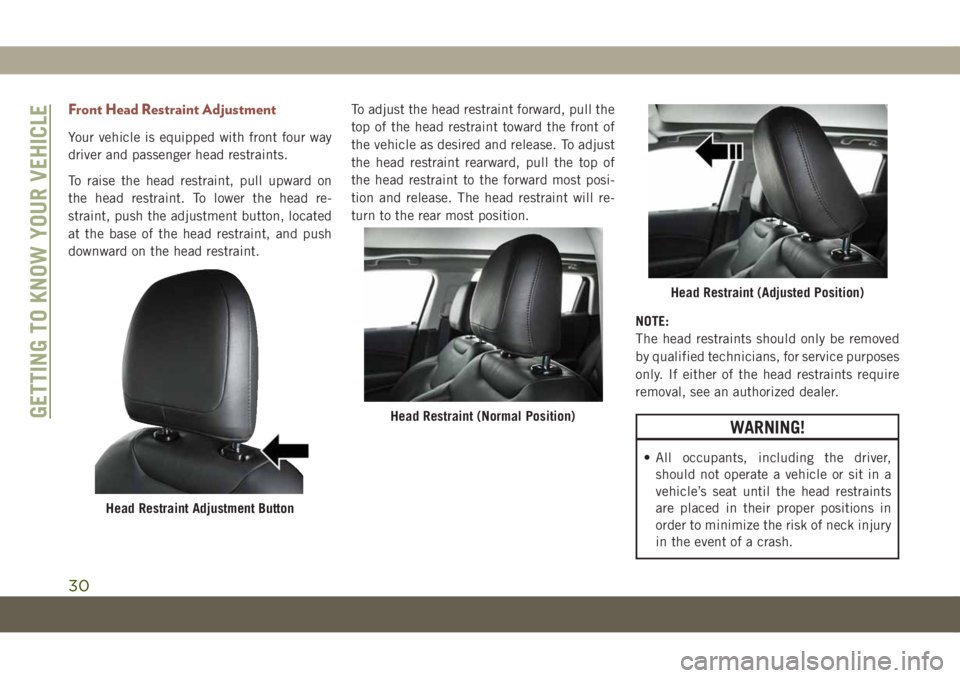
Front Head Restraint Adjustment
Your vehicle is equipped with front four way
driver and passenger head restraints.
To raise the head restraint, pull upward on
the head restraint. To lower the head re-
straint, push the adjustment button, located
at the base of the head restraint, and push
downward on the head restraint.To adjust the head restraint forward, pull the
top of the head restraint toward the front of
the vehicle as desired and release. To adjust
the head restraint rearward, pull the top of
the head restraint to the forward most posi-
tion and release. The head restraint will re-
turn to the rear most position.
NOTE:
The head restraints should only be removed
by qualified technicians, for service purposes
only. If either of the head restraints require
removal, see an authorized dealer.
WARNING!
• All occupants, including the driver,
should not operate a vehicle or sit in a
vehicle’s seat until the head restraints
are placed in their proper positions in
order to minimize the risk of neck injury
in the event of a crash.
Head Restraint Adjustment Button
Head Restraint (Normal Position)
Head Restraint (Adjusted Position)
GETTING TO KNOW YOUR VEHICLE
30
Page 33 of 362
WARNING!
• Head restraints should never be ad-
justed while the vehicle is in motion.
Driving a vehicle with the head restraints
improperly adjusted or removed could
cause serious injury or death in the
event of a collision.
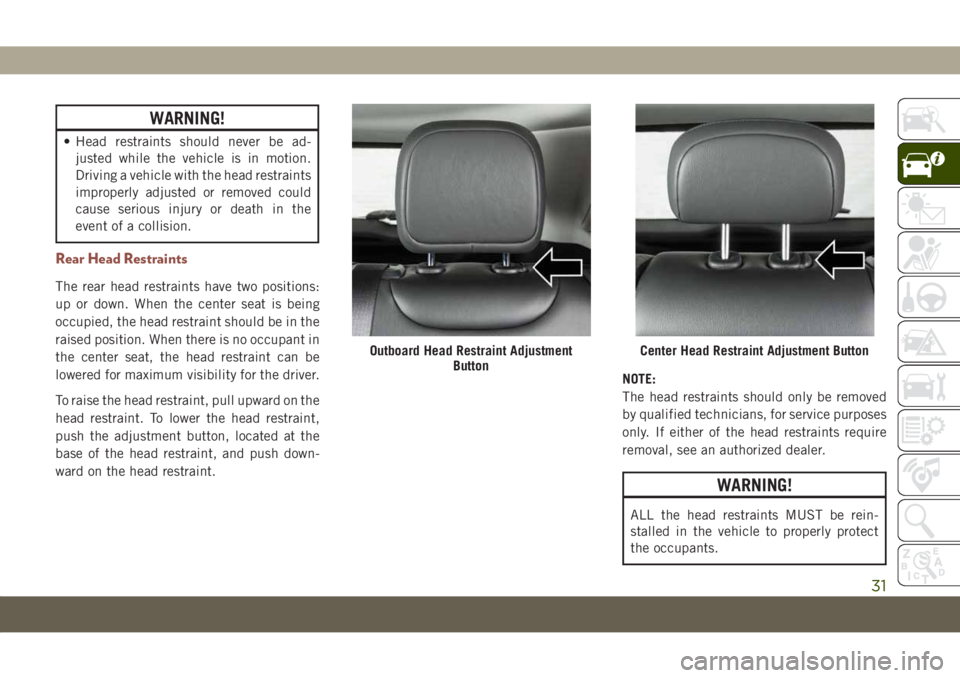
Rear Head Restraints
The rear head restraints have two positions:
up or down. When the center seat is being
occupied, the head restraint should be in the
raised position. When there is no occupant in
the center seat, the head restraint can be
lowered for maximum visibility for the driver.
To raise the head restraint, pull upward on the
head restraint. To lower the head restraint,
push the adjustment button, located at the
base of the head restraint, and push down-
ward on the head restraint.NOTE:
The head restraints should only be removed
by qualified technicians, for service purposes
only. If either of the head restraints require
removal, see an authorized dealer.
WARNING!
ALL the head restraints MUST be rein-
stalled in the vehicle to properly protect
the occupants.
Outboard Head Restraint Adjustment
ButtonCenter Head Restraint Adjustment Button
31
Page 49 of 362
Automatic Temperature Control (ATC)
Automatic Operation
1. Push the AUTO button on the faceplate,
or the AUTO button on the touchscreen (if
equipped) on the Automatic Temperature
Control (ATC) Panel.
2. Next, adjust the temperature you would
like the system to maintain by adjusting
the temperature control buttons. Once the
desired temperature is displayed, the sys-
tem achieves and automatically maintains
that comfort level.
3. When the system is set up for your comfort
level, it is not necessary to change the
settings. You experience the greatest effi-
ciency by simply allowing the system to
function automatically.
NOTE:
• It is not necessary to move the temperature
settings for cold or hot vehicles. The system
automatically adjusts the temperature,
mode, and blower speed to provide comfort
as quickly as possible.• The temperature can be displayed in U.S.
or Metric units by selecting the US/Metric
customer-programmable feature.
To provide you with maximum comfort in the
Automatic mode during cold start-ups, the
blower fan remains on low until the engine
warms up. The blower increases in speed and
transition into Auto mode.
Manual Operation Override
This system offers a full complement of
manual override features. The AUTO symbol
in the front ATC display will be turned off
when the system is being used in the manual
mode.
Operating Tips
Summer Operation
The engine cooling system must be protected
with a high-quality antifreeze coolant to pro-
vide proper corrosion protection and to pro-
tect against engine overheating. OAT coolant
(conforming to MS.90032) is recommended.
Winter Operation
To ensure the best possible heater and de-
froster performance, make sure the engine
cooling system is functioning properly and
the proper amount, type, and concentration
of coolant is used. Use of the Air Recircula-
tion mode during Winter months is not rec-
ommended, because it may cause window
fogging.
Vacation/Storage
Before you store your vehicle, or keep it out of
service (i.e., vacation) for two weeks or more,
run the air conditioning system at idle for
about five minutes, in fresh air with the
blower setting on high. This will ensure ad-
equate system lubrication to minimize the
possibility of compressor damage when the
system is started again.
Window Fogging
Vehicle windows tend to fog on the inside in
mild, rainy, and/or humid weather. To clear
the windows, select Defrost or Mix mode and
increase the front blower speed. Do not use
the Recirculation mode without A/C for long
periods, as fogging may occur.
47
Page 50 of 362
CAUTION!
Failure to follow these cautions can cause
damage to the heating elements:
• Use care when washing the inside of
the rear window. Do not use abrasive
window cleaners on the interior surface
of the window. Use a soft cloth and a
mild washing solution, wiping parallel
to the heating elements. Labels can be
peeled off after soaking with warm
water.
• Do not use scrapers, sharp instru-
ments, or abrasive window cleaners on
the interior surface of the window.
• Keep all objects a safe distance from
the window.
Outside Air Intake
Make sure the air intake, located directly in
front of the windshield, is free of obstruc-
tions, such as leaves. Leaves collected in the
air intake may reduce airflow, and if they
enter the plenum, they could plug the water
drains. In Winter months, make sure the air
intake is clear of ice, slush, and snow.
Cabin Air Filter
The climate control system filters out dust
and pollen from the air. Contact an autho-
rized dealer to service your cabin air filter,
and to have it replaced when needed.
WINDOWS
Power Window Controls
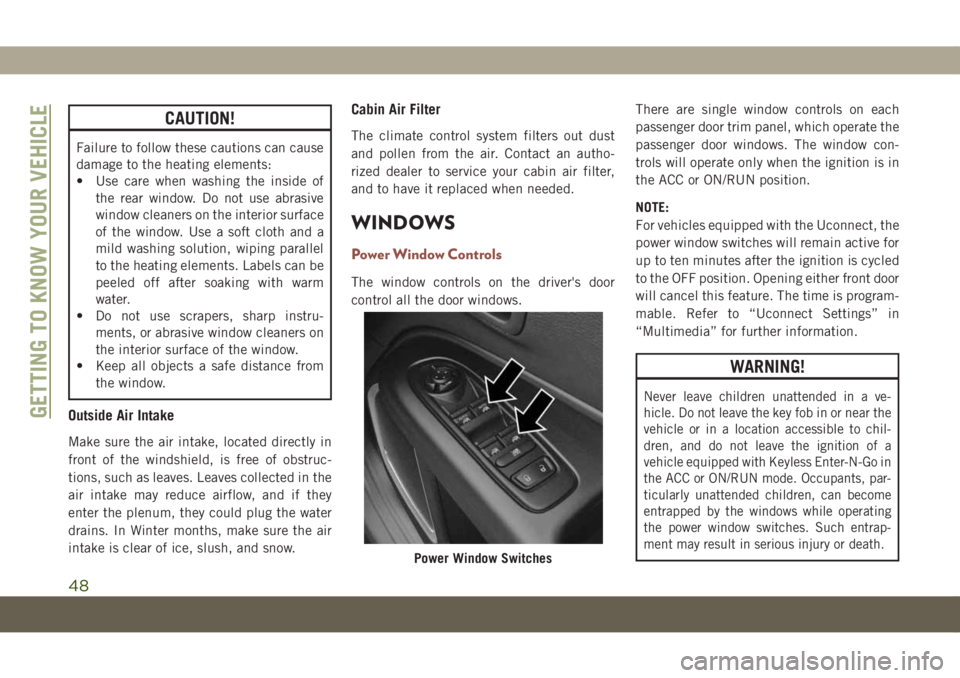
The window controls on the driver's door
control all the door windows.There are single window controls on each
passenger door trim panel, which operate the
passenger door windows. The window con-
trols will operate only when the ignition is in
the ACC or ON/RUN position.
NOTE:
For vehicles equipped with the Uconnect, the
power window switches will remain active for
up to ten minutes after the ignition is cycled
to the OFF position. Opening either front door
will cancel this feature. The time is program-
mable. Refer to “Uconnect Settings” in
“Multimedia” for further information.
WARNING!
Never leave children unattended in a ve-
hicle. Do not leave the key fob in or near the
vehicle or in a location accessible to chil-
dren, and do not leave the ignition of a
vehicle equipped with Keyless Enter-N-Go in
the ACC or ON/RUN mode. Occupants, par-
ticularly unattended children, can become
entrapped by the windows while operating
the power window switches. Such entrap-
ment may result in serious injury or death.
Power Window Switches
GETTING TO KNOW YOUR VEHICLE
48
Page 65 of 362
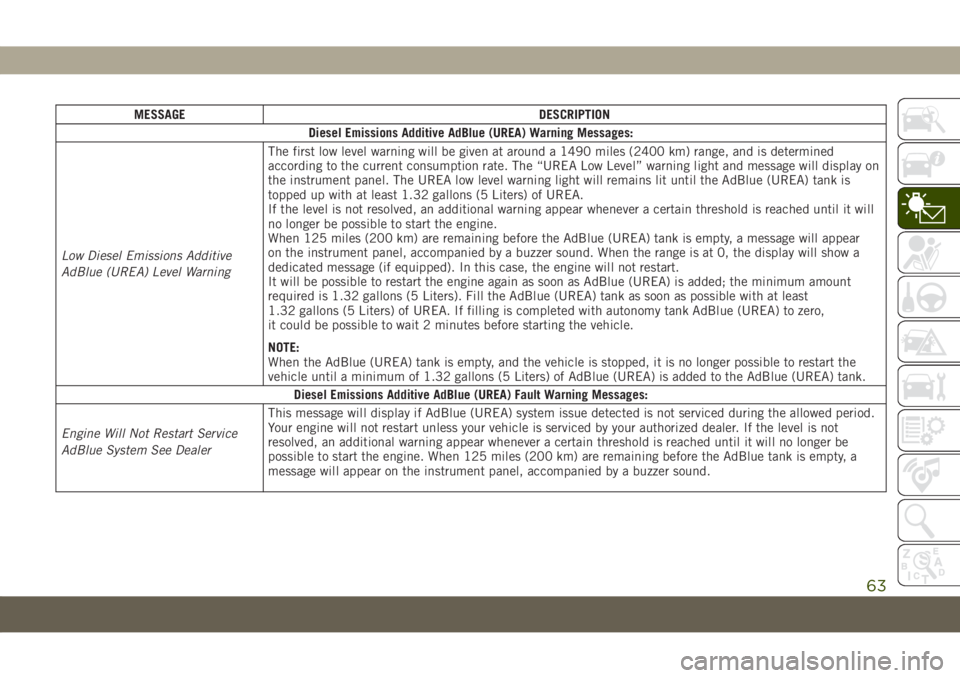
MESSAGE DESCRIPTION
Diesel Emissions Additive AdBlue (UREA) Warning Messages:
Low Diesel Emissions Additive
AdBlue (UREA) Level WarningThe first low level warning will be given at around a 1490 miles (2400 km) range, and is determined
according to the current consumption rate. The “UREA Low Level” warning light and message will display on
the instrument panel. The UREA low level warning light will remains lit until the AdBlue (UREA) tank is
topped up with at least 1.32 gallons (5 Liters) of UREA.
If the level is not resolved, an additional warning appear whenever a certain threshold is reached until it will
no longer be possible to start the engine.
When 125 miles (200 km) are remaining before the AdBlue (UREA) tank is empty, a message will appear
on the instrument panel, accompanied by a buzzer sound. When the range is at 0, the display will show a
dedicated message (if equipped). In this case, the engine will not restart.
It will be possible to restart the engine again as soon as AdBlue (UREA) is added; the minimum amount
required is 1.32 gallons (5 Liters). Fill the AdBlue (UREA) tank as soon as possible with at least
1.32 gallons (5 Liters) of UREA. If filling is completed with autonomy tank AdBlue (UREA) to zero,
it could be possible to wait 2 minutes before starting the vehicle.
NOTE:
When the AdBlue (UREA) tank is empty, and the vehicle is stopped, it is no longer possible to restart the
vehicle until a minimum of 1.32 gallons (5 Liters) of AdBlue (UREA) is added to the AdBlue (UREA) tank.
Diesel Emissions Additive AdBlue (UREA) Fault Warning Messages:
Engine Will Not Restart Service
AdBlue System See DealerThis message will display if AdBlue (UREA) system issue detected is not serviced during the allowed period.
Your engine will not restart unless your vehicle is serviced by your authorized dealer. If the level is not
resolved, an additional warning appear whenever a certain threshold is reached until it will no longer be
possible to start the engine. When 125 miles (200 km) are remaining before the AdBlue tank is empty, a
message will appear on the instrument panel, accompanied by a buzzer sound.
63
Page 66 of 362
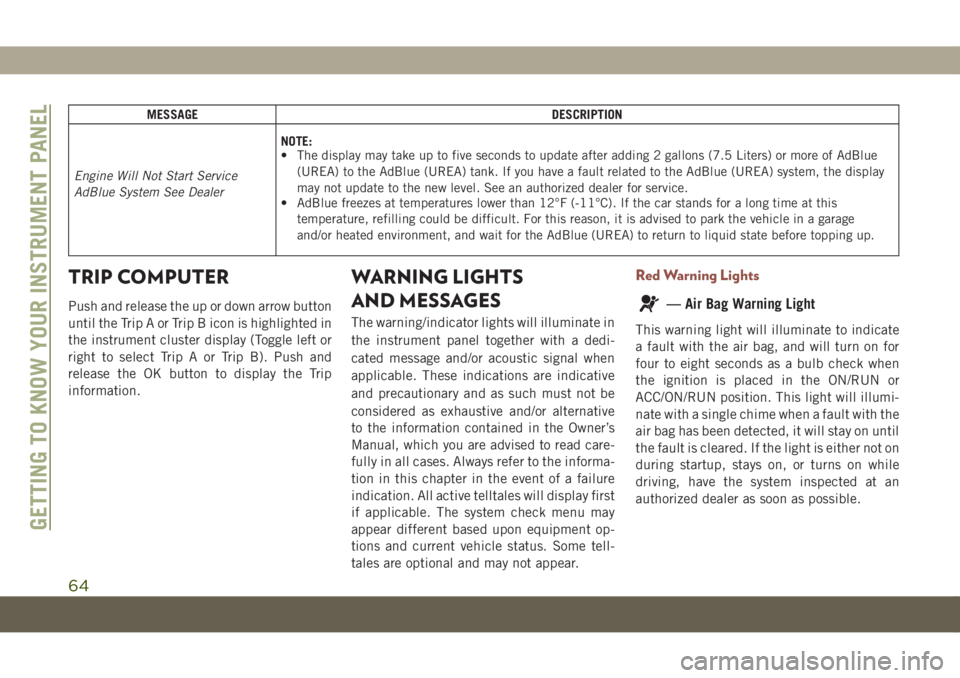
MESSAGE DESCRIPTION
Engine Will Not Start Service
AdBlue System See DealerNOTE:
• The display may take up to five seconds to update after adding 2 gallons (7.5 Liters) or more of AdBlue
(UREA) to the AdBlue (UREA) tank. If you have a fault related to the AdBlue (UREA) system, the display
may not update to the new level. See an authorized dealer for service.
• AdBlue freezes at temperatures lower than 12°F (-11°C). If the car stands for a long time at this
temperature, refilling could be difficult. For this reason, it is advised to park the vehicle in a garage
and/or heated environment, and wait for the AdBlue (UREA) to return to liquid state before topping up.
TRIP COMPUTER
Push and release the up or down arrow button
until the Trip A or Trip B icon is highlighted in
the instrument cluster display (Toggle left or
right to select Trip A or Trip B). Push and
release the OK button to display the Trip
information.
WARNING LIGHTS
AND MESSAGES
The warning/indicator lights will illuminate in
the instrument panel together with a dedi-
cated message and/or acoustic signal when
applicable. These indications are indicative
and precautionary and as such must not be
considered as exhaustive and/or alternative
to the information contained in the Owner’s
Manual, which you are advised to read care-
fully in all cases. Always refer to the informa-
tion in this chapter in the event of a failure
indication. All active telltales will display first
if applicable. The system check menu may
appear different based upon equipment op-
tions and current vehicle status. Some tell-
tales are optional and may not appear.
Red Warning Lights
— Air Bag Warning Light
This warning light will illuminate to indicate
a fault with the air bag, and will turn on for
four to eight seconds as a bulb check when
the ignition is placed in the ON/RUN or
ACC/ON/RUN position. This light will illumi-
nate with a single chime when a fault with the
air bag has been detected, it will stay on until
the fault is cleared. If the light is either not on
during startup, stays on, or turns on while
driving, have the system inspected at an
authorized dealer as soon as possible.
GETTING TO KNOW YOUR INSTRUMENT PANEL
64