reset JEEP COMPASS 2023 User Guide
[x] Cancel search | Manufacturer: JEEP, Model Year: 2023, Model line: COMPASS, Model: JEEP COMPASS 2023Pages: 344, PDF Size: 18.8 MB
Page 85 of 344
GETTING TO KNOW YOUR INSTRUMENT PANEL83
VEHICLE INFO (CUSTOMER INFORMATION
FEATURES)
Push and release the up or down arrow
button until the Vehicle Info Menu item is displayed
in the instrument cluster display. Push and release
the left or right arrow button to cycle through
the Vehicle Info submenus and follow the prompts
on each screen as needed.
1. Tire Pressure
If tire pressure is OK for all tires a vehicle
ICON is displayed with tire pressure values
in each corner of the ICON.
If one or more tires have low pressure,
“Inflate Tire To XX” is displayed with the
vehicle ICON and the tire pressure values in
each corner of the ICON with the pressure
value of the low tire displayed in a different
color than the other tire pressure value.
If the Tire Pressure system requires service,
“Service Tire Pressure System” is displayed.
Tire PSI is an information only function and
cannot be reset Ú page 201.
2. Coolant Temperature
Displays the actual coolant temperature.
3. Transmission Temperature — Automatic Transmission Only
Displays the actual transmission tempera -
ture.
4. Oil Temperature
Displays the level of oil temperature.
5. Battery Voltage
Displays the actual battery voltage.
6. Clutch Message — If Equipped
“Drive in First Gear” message will be shown
in manual transmission vehicle during initial
launch and any time the vehicle speed fluc -
tuates below 5mph (8 km/h).
DRIVER ASSIST
Push and release the up or down arrow
button until the Driver Assist menu title is
highlighted in the instrument cluster display.
The instrument cluster display displays the current
ACC system settings. The information displayed
depends on ACC system status. Push the Adaptive Cruise Control (ACC) ON/OFF
button (located on the steering wheel) until one of
the following displays in the instrument cluster
display:
Adaptive Cruise Control Off
When ACC is deactivated, the display will read
“Adaptive Cruise Control Off.”
Adaptive Cruise Control Ready
When ACC is activated but the vehicle speed
setting has not been selected, the display will read
“Adaptive Cruise Control Ready.”
Push and release the SET + or the SET- button
(located on the steering wheel) and the following
will display in the instrument cluster display:
ACC SET
When ACC is set, the set speed will display in the
instrument cluster.
The ACC screen may display once again if any ACC
activity occurs, which may include any of the
following:
Distance Setting Change
System Cancel
Driver Override
System Off
ACC Proximity Warning
ACC Unavailable Warning
3
22_MP_OM_EN_USC_t.book Page 83
Page 86 of 344
84GETTING TO KNOW YOUR INSTRUMENT PANEL
NOTE:The instrument cluster display will return to the last
display selected after five seconds of no ACC
display activity Úpage 118.
The instrument cluster display displays the current
Active Lane Management system settings. The
information displayed depends on Active Lane
Management system status and the conditions
that need to be met Ú page 145.
FUEL ECONOMY
Push and release the up or down arrow
button until the Fuel Economy menu title is
displayed in the instrument cluster display. Push
and hold the OK button to reset average fuel
economy feature.
Range – The display shows the estimated
distance (mi or km) that can be traveled with the
fuel remaining in the tank. When the Range
value is less than 30 miles (48 km) estimated
driving distance, the Range display will change
to a “LOW FUEL” message. Adding a significant
amount of fuel to the vehicle will turn off the
“LOW FUEL” message and a new Range value
will display. Range cannot be reset through the
OK button.
NOTE:Significant changes in driving style or vehicle
loading will greatly affect the actual drivable
distance of the vehicle, regardless of the Range
displayed value.
Average – The display shows the average fuel
economy (MPG, or L/100 km, or km/L) since
the last reset.
Current – This display shows the current fuel
economy (MPG, or L/100 km, or km/L) while
driving.
TRIP INFO
Push and release the up or down arrow
button until the Trip menu title is displayed in the
instrument cluster display. Toggle the left or
right arrow button to select Trip A or Trip B. The
Trip information will display the following:
Distance – Shows the total distance (mi or km)
traveled for Trip A or Trip B since the last reset.
Average Fuel Economy – Shows the average
fuel economy (MPG or L/100 km or km/L) of
Trip A or Trip B since the last reset.
Elapsed Time – Shows the total elapsed time of
travel since Trip A or Trip B has been reset.
Hold the OK button to reset feature information.
NAVIGATION — IF EQUIPPED
Push and release the left or right arrow
button until the Navigation display icon/title is
highlighted in the instrument cluster display. Start
Route will display when no active route is set.
Cancel Route will display when an active route
is set.
OFF ROAD — IF EQUIPPED
Push and release the up or down arrow
button until the Off Road Menu icon/title is
highlighted. Push the left or right arrow
button to scroll the submenus.
Terrain Status
Selec-Terrain Status
Air Suspension Status
Vehicle Dynamics
Wheel Articulation
Transfer Case Status
Steering Angle
Sway Bar Status
Axle Lock Status
Pitch And Roll
Vehicle Pitch
Vehicle Roll
22_MP_OM_EN_USC_t.book Page 84
Page 108 of 344
106STARTING AND OPERATING
(Continued)
Brake Service Mode
We recommend having your brakes serviced by an
authorized dealer.
You should only make repairs for which you have
the knowledge and the right equipment. You
should only enter Brake Service Mode during
brake service.
When servicing your rear brakes, it may be
necessary for you or your technician to push the
rear piston into the rear caliper bore. With the EPB
system, this can only be done after retracting the
EPB actuator. The actuator retraction can be done
easily by entering the Brake Service Mode through
the Uconnect Settings in your vehicle. This
menu-based system will guide you through the
steps necessary to retract the EPB actuator in
order to perform rear brake service.
Service Mode has requirements that must be met
in order to be activated:
The vehicle must be at a standstill.
The parking brake must be disabled.
The transmission must be in PARK or NEUTRAL.
The EPB switch not activated.
The vehicle in ignition ON/RUN position.
The brake pedal not pressed.While in Service Mode, the EPB fault lamp will flash
continuously while the ignition switch is ON/RUN.
NOTE:A dedicated message will appear in the instrument
cluster display if Brake Service Mode cannot be
activated.
When brake service work is complete, the following
steps must be followed to reset the parking brake
system to normal operation:
Ensure the vehicle is at a standstill.
Press the brake pedal with moderate force.
Apply the EPB Switch.
NOTE:A dedicated message will appear in the instrument
cluster display if Brake Service Mode cannot be
deactivated.
AUTOMATIC TRANSMISSION
You must press and hold the brake pedal while
shifting out of PARK.
WARNING!
You can be badly injured working on or around a
motor vehicle. Do only that service work for
which you have the knowledge and the right
equipment. If you have any doubt about your
ability to perform a service job, take your vehicle
to a competent mechanic.
WARNING!
Never use the PARK (P) position as a substi
-
tute for the parking brake. Always apply the
parking brake fully when exiting the vehicle to
guard against vehicle movement and possible
injury or damage.
Your vehicle could move and injure you and
others if it is not in PARK. Check by trying to
move the gear selector out of PARK with the
brake pedal released. Make sure the trans -
mission is in PARK before exiting the vehicle.
It is dangerous to shift out of PARK or
NEUTRAL (N) if the engine speed is higher
than idle speed. If your foot is not firmly
pressing the brake pedal, the vehicle could
accelerate quickly forward or in reverse. You
could lose control of the vehicle and hit
someone or something. Only shift into gear
when the engine is idling normally and your
foot is firmly pressing the brake pedal.
The vehicle may not engage a newly selected
gear when shifting between PARK, REVERSE
(R), or DRIVE (D) if the vehicle is moving while
shifting.
22_MP_OM_EN_USC_t.book Page 106
Page 113 of 344
STARTING AND OPERATING111
AUTOSTICK
AutoStick is a driver-interactive transmission
feature providing manual shift control, giving you
more control of the vehicle. AutoStick allows you to
maximize engine braking, eliminate undesirable
upshifts and downshifts, and improve overall
vehicle performance. This feature can also provide
you with more control during passing, city driving,
cold slippery conditions, mountain driving, trailer
towing, and many other situations.
Operation
When the gear selector is in the AutoStick position
(beside the DRIVE (D) position), it can be moved
forward and rearward. This allows the driver to
manually select the transmission gear being used.
Moving the gear selector forward (-) triggers a
downshift and rearward (+) an upshift. The current
gear is displayed in the instrument cluster.
In AutoStick mode, the transmission will shift up or
down when the driver moves the gear selector
rearward (+) or forward (-), unless an engine
lugging or overspeed condition would result. It will
remain in the selected gear until another upshift or
downshift is chosen, except as described below.
6-speed transmissions will automatically
upshift when necessary to prevent engine
over-speed.
The transmission will automatically downshift
as the vehicle slows (to prevent engine lugging)
and will display the current gear.
The transmission will automatically downshift to
FIRST gear when coming to a stop. After a stop,
the driver should manually upshift (+) the trans -
mission as the vehicle is accelerated.
You can start out, from a stop, in FIRST or
SECOND gear (or THIRD gear, in 6-speed
models, or in 4WD LOW, SNOW mode, or SAND
mode, where available). Tapping (+) (at a stop)
will allow starting in SECOND gear. Starting out
in SECOND gear can be helpful in snowy or icy
conditions.
If a requested downshift would cause the
engine to over-speed, that shift will not occur.
The system will ignore attempts to upshift at too
low of a vehicle speed.
Transmission shifting will be more noticeable
when AutoStick is enabled.
The system may revert to automatic shift mode
if a fault or overheat condition is detected.
NOTE:When Selec-Speed or Hill Descent Control is
enabled, AutoStick is not active.
To disengage AutoStick, return the gear selector to
the DRIVE position. You can shift in or out of the
AutoStick position at any time without taking your
foot off the accelerator pedal.
TRANSMISSION LIMP HOME MODE
Transmission function is monitored electronically
for abnormal conditions. If a condition is detected
that could result in transmission damage,
Transmission Limp Home Mode is activated. In this
mode, the transmission may operate only in a fixed
gear, or may remain in NEUTRAL (N). The
Malfunction Indicator Light (MIL) may be
illuminated. Limp Home Mode may allow the
vehicle to be driven to an authorized dealer for
service without damaging the transmission.
In the event of a momentary problem, the
transmission can be reset to regain all forward
gears by performing the following steps:
1. Stop the vehicle.
2. Shift the transmission into PARK (P), if possible. If not, shift the transmission to
NEUTRAL.
3. Push and hold the ignition until the engine turns off.
4. Wait approximately 30 seconds.
WARNING!
Do not downshift for additional engine braking
on a slippery surface. The drive wheels could
lose their grip and the vehicle could skid,
causing a collision or personal injury.
4
22_MP_OM_EN_USC_t.book Page 111
Page 114 of 344
112STARTING AND OPERATING
5. Restart the engine.
6. Shift into the desired gear range. If the problem is no longer detected, the
transmission will return to normal operation.
NOTE:Even if the transmission can be reset, we
recommend that you visit an authorized dealer at
your earliest possible convenience. An authorized
dealer has diagnostic equipment to assess the
condition of your transmission. If the transmission
cannot be reset, authorized dealer service is
required.
TORQUE CONVERTER CLUTCH
A feature designed to improve fuel economy has
been included in the automatic transmission on
your vehicle. A clutch within the torque converter
engages automatically at calibrated speeds. This
may result in a slightly different feeling or response
during normal operation in the upper gears. When
the vehicle speed drops or during some
accelerations, the clutch automatically
disengages.
NOTE:The torque converter clutch will not engage until
the engine and/or transmission is warm (usually
after 1 to 3 miles [2 to 5 km] of driving). Because
the engine speed is higher when the torque
converter clutch is not engaged, it may seem as if the transmission is not shifting properly when the
vehicle is cold. This is normal. The torque converter
clutch will function normally once the powertrain is
sufficiently warm.
FOUR-WHEEL DRIVE OPERATION —
IF EQUIPPED
JEEP® ACTIVE DRIVE
Your vehicle may be equipped with a Power
Transfer Unit (PTU). This system is automatic
with no driver inputs or additional driving skills
required. Under normal driving conditions, the
front wheels provide most of the traction. If the
front wheels begin to lose traction, power is shifted
automatically to the rear wheels. The greater the
front wheel traction loss, the greater the power
transfer to the rear wheels.
Additionally, on dry pavement under heavy throttle
input (where one may have no wheel spin), torque
will be sent to the rear in a preemptive effort to
improve vehicle launch and performance
characteristics.
Four-Wheel Drive (4x4)
The four-wheel drive (4WD) is fully automatic in
normal driving mode.
NOTE:It is not possible to carry out the change of mode
when the vehicle exceeds the speed of 75 mph
(120 km/h).
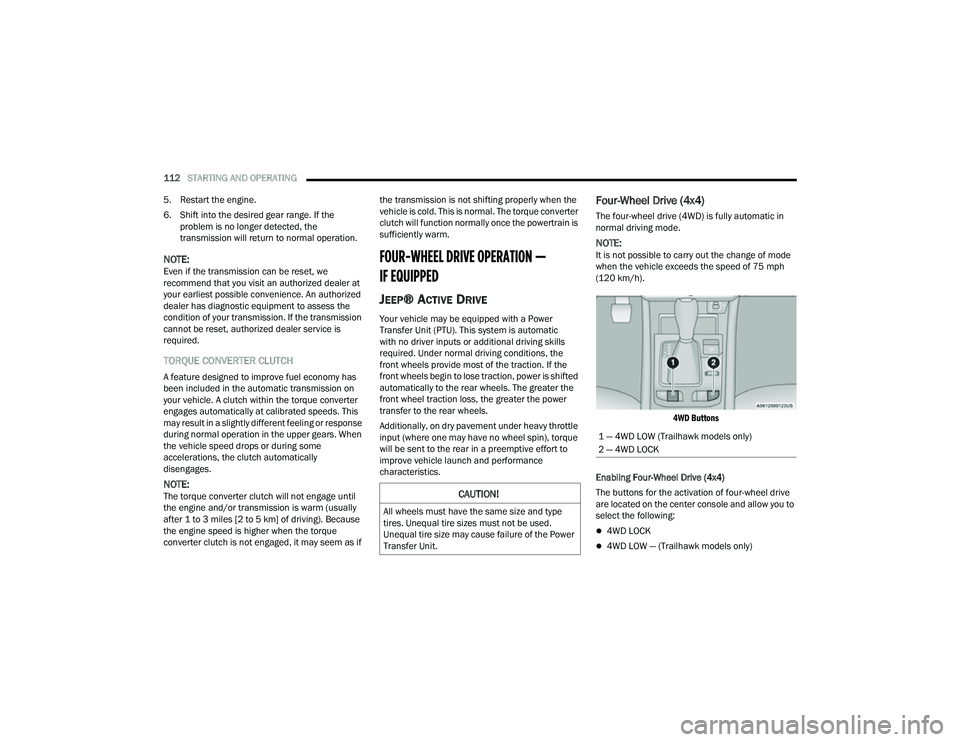
4WD Buttons
Enabling Four-Wheel Drive (4x4)
The buttons for the activation of four-wheel drive
are located on the center console and allow you to
select the following:
4WD LOCK
4WD LOW — (Trailhawk models only)
CAUTION!
All wheels must have the same size and type
tires. Unequal tire sizes must not be used.
Unequal tire size may cause failure of the Power
Transfer Unit.
1 — 4WD LOW (Trailhawk models only)
2 — 4WD LOCK
22_MP_OM_EN_USC_t.book Page 112
Page 118 of 344
116STARTING AND OPERATING
TO MANUALLY TURN OFF THE STOP/
S
TART SYSTEM
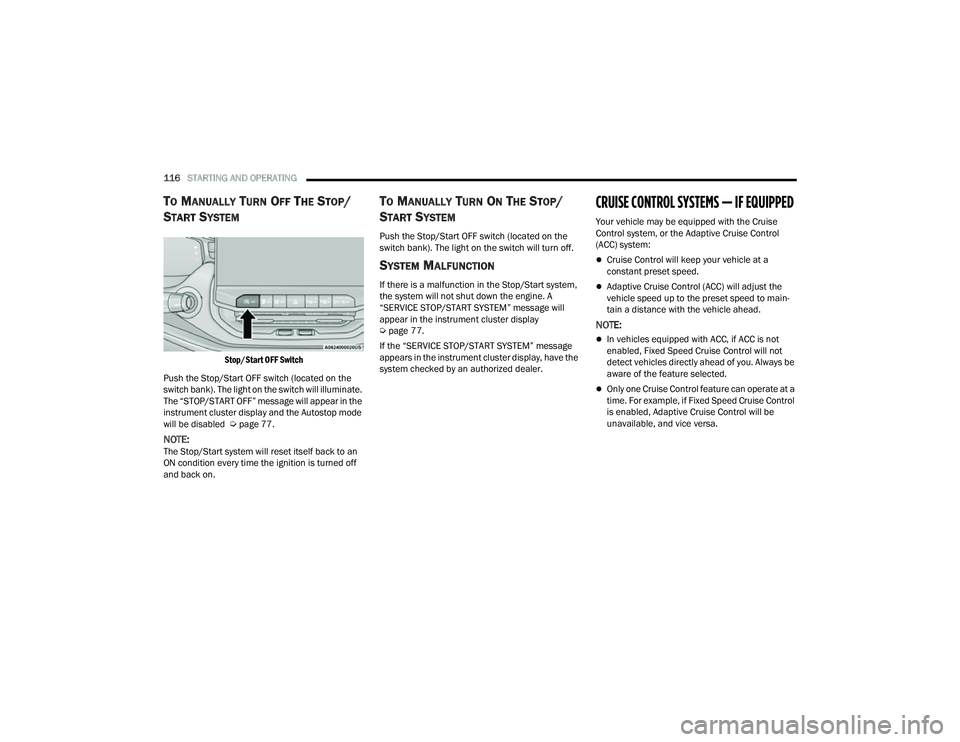
Stop/Start OFF Switch
Push the Stop/Start OFF switch (located on the
switch bank). The light on the switch will illuminate.
The “STOP/START OFF” message will appear in the
instrument cluster display and the Autostop mode
will be disabled Ú page 77.
NOTE:The Stop/Start system will reset itself back to an
ON condition every time the ignition is turned off
and back on.
TO MANUALLY TURN ON THE STOP/
S
TART SYSTEM
Push the Stop/Start OFF switch (located on the
switch bank). The light on the switch will turn off.
SYSTEM MALFUNCTION
If there is a malfunction in the Stop/Start system,
the system will not shut down the engine. A
“SERVICE STOP/START SYSTEM” message will
appear in the instrument cluster display
Ú page 77.
If the “SERVICE STOP/START SYSTEM” message
appears in the instrument cluster display, have the
system checked by an authorized dealer.
CRUISE CONTROL SYSTEMS — IF EQUIPPED
Your vehicle may be equipped with the Cruise
Control system, or the Adaptive Cruise Control
(ACC) system:
Cruise Control will keep your vehicle at a
constant preset speed.
Adaptive Cruise Control (ACC) will adjust the
vehicle speed up to the preset speed to main -
tain a distance with the vehicle ahead.
NOTE:
In vehicles equipped with ACC, if ACC is not
enabled, Fixed Speed Cruise Control will not
detect vehicles directly ahead of you. Always be
aware of the feature selected.
Only one Cruise Control feature can operate at a
time. For example, if Fixed Speed Cruise Control
is enabled, Adaptive Cruise Control will be
unavailable, and vice versa.
22_MP_OM_EN_USC_t.book Page 116
Page 120 of 344
118STARTING AND OPERATING
Metric Speed (km/h)
Pushing the SET (+) , or SET (-) button once will
result in a 1 km/h speed adjustment. Each
subsequent tap of the button results in an
adjustment of 1 km/h.
If the button is continually pushed, the set
speed will continue to adjust until the button is
released, then the new set speed will be estab -
lished.
To Accelerate For Passing
While the Cruise Control is set, press the
accelerator to pass as you would normally. When
the pedal is released, the vehicle will return to the
set speed.
USING CRUISE CONTROL ON HILLS
The transmission may downshift on hills to
maintain the vehicle set speed.
The Cruise Control system maintains speed up and
down hills. A slight speed change on moderate hills
is normal. On steep hills, a greater speed loss or
gain may occur so it may be preferable to drive
without Cruise Control.
To Resume Speed
To resume a previously set speed, push the RES
button and release. Resume can be used at any
speed above 20 mph (32 km/h).
To Deactivate
A tap on the brake pedal, or pushing the CANC
button, or normal brake pressure will deactivate
the Cruise Control system without erasing the set
speed from memory.
The following conditions will also deactivate the
Cruise Control without erasing the set speed from
memory:
Vehicle parking brake is applied
Stability event occurs
Gear selector is moved out of DRIVE
Engine overspeed occurs
Pushing the on/off button or placing the ignition in
the OFF position, will erase the set speed from
memory.
ADAPTIVE CRUISE CONTROL (ACC)
Adaptive Cruise Control (ACC) increases the driving
convenience provided by Cruise Control while
traveling on highways and major roadways.
However, it is not a safety system and not designed
to prevent collisions. The Cruise Control function
performs differently if your vehicle is not equipped
with ACC Ú page 117.
ACC will allow you to keep Cruise Control engaged
in light to moderate traffic conditions without the
constant need to reset your speed. ACC utilizes a
radar sensor and a forward facing camera
designed to detect a vehicle directly ahead of you
to maintain a set speed.
NOTE:
If the ACC sensor detects a vehicle ahead, ACC
will apply limited braking or accelerate (not to
exceed the original set speed) automatically to
maintain a preset following distance, while
matching the speed of the vehicle ahead.
Any chassis/suspension or tire size modifica -
tions to the vehicle will affect the performance
of the Adaptive Cruise Control and Forward Colli -
sion Warning system.
Fixed Speed Cruise Control (ACC not enabled)
will not detect vehicles directly ahead of you.
Always be aware of the feature selected
Ú page 328.
WARNING!
Cruise Control can be dangerous where the
system cannot maintain a constant speed. Your
vehicle could go too fast for the conditions, and
you could lose control and have an accident. Do
not use Cruise Control in heavy traffic or on roads
that are winding, icy, snow-covered or slippery.
22_MP_OM_EN_USC_t.book Page 118
Page 167 of 344
MULTIMEDIA165
UCONNECT SETTINGS
The Uconnect system uses a combination of
buttons on the touchscreen and buttons on the
faceplate located in the center of the instrument
panel. These buttons allow you to access and
change Programmable Features. Many features
can vary by vehicle and packages.
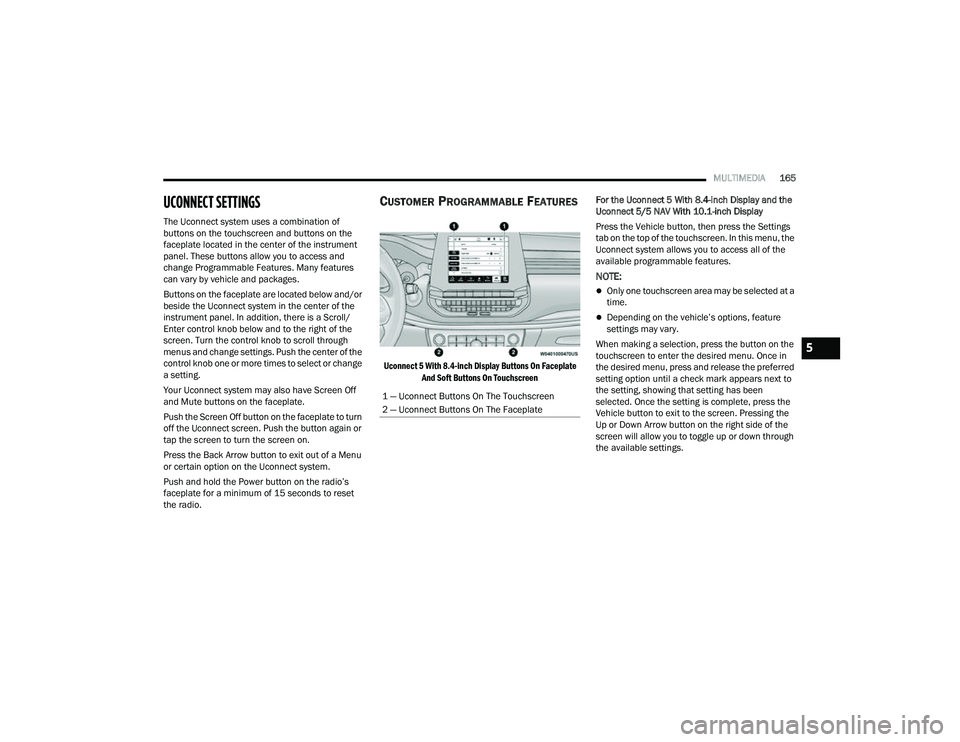
Buttons on the faceplate are located below and/or
beside the Uconnect system in the center of the
instrument panel. In addition, there is a Scroll/
Enter control knob below and to the right of the
screen. Turn the control knob to scroll through
menus and change settings. Push the center of the
control knob one or more times to select or change
a setting.
Your Uconnect system may also have Screen Off
and Mute buttons on the faceplate.
Push the Screen Off button on the faceplate to turn
off the Uconnect screen. Push the button again or
tap the screen to turn the screen on.
Press the Back Arrow button to exit out of a Menu
or certain option on the Uconnect system.
Push and hold the Power button on the radio’s
faceplate for a minimum of 15 seconds to reset
the radio.
CUSTOMER PROGRAMMABLE FEATURES
Uconnect 5 With 8.4-inch Display Buttons On Faceplate
And Soft Buttons On Touchscreen
For the Uconnect 5 With 8.4-inch Display and the
Uconnect 5/5 NAV With 10.1-inch Display
Press the Vehicle button, then press the Settings
tab on the top of the touchscreen. In this menu, the
Uconnect system allows you to access all of the
available programmable features.
NOTE:
Only one touchscreen area may be selected at a
time.
Depending on the vehicle’s options, feature
settings may vary.
When making a selection, press the button on the
touchscreen to enter the desired menu. Once in
the desired menu, press and release the preferred
setting option until a check mark appears next to
the setting, showing that setting has been
selected. Once the setting is complete, press the
Vehicle button to exit to the screen. Pressing the
Up or Down Arrow button on the right side of the
screen will allow you to toggle up or down through
the available settings.
1 — Uconnect Buttons On The Touchscreen
2 — Uconnect Buttons On The Faceplate
5
22_MP_OM_EN_USC_t.book Page 165
Page 170 of 344
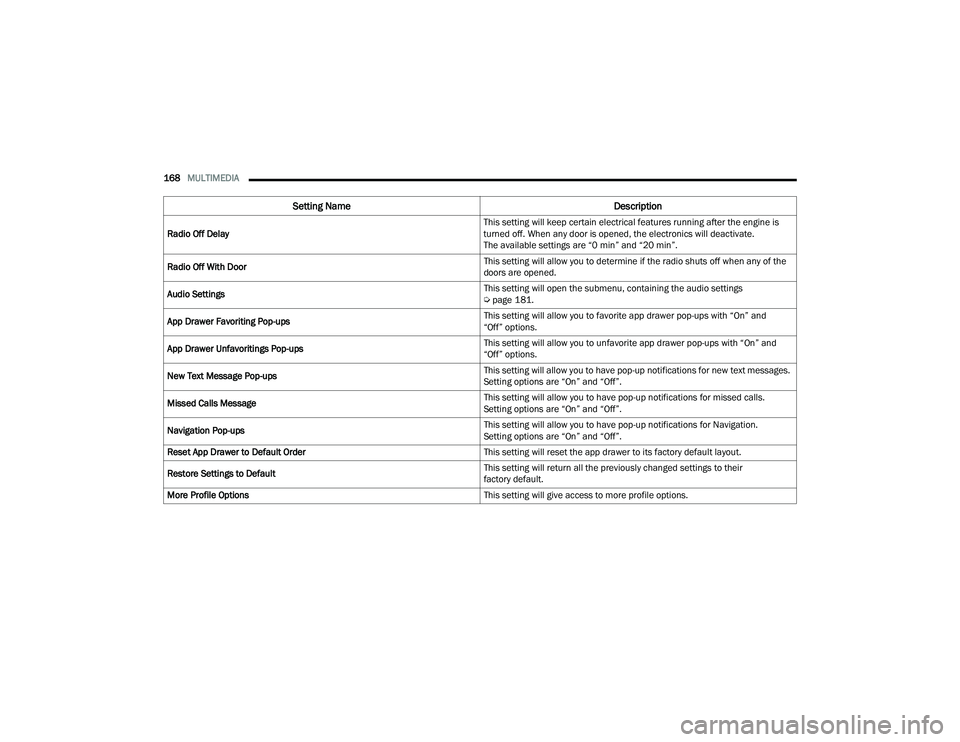
168MULTIMEDIA
Radio Off Delay This setting will keep certain electrical features running after the engine is
turned off. When any door is opened, the electronics will deactivate.
The available settings are “0 min” and “20 min”.
Radio Off With Door This setting will allow you to determine if the radio shuts off when any of the
doors are opened.
Audio Settings This setting will open the submenu, containing the audio settings
Ú
page 181.
App Drawer Favoriting Pop-ups This setting will allow you to favorite app drawer pop-ups with “On” and
“Off” options.
App Drawer Unfavoritings Pop-ups This setting will allow you to unfavorite app drawer pop-ups with “On” and
“Off” options.
New Text Message Pop-ups This setting will allow you to have pop-up notifications for new text messages.
Setting options are “On” and “Off”.
Missed Calls Message This setting will allow you to have pop-up notifications for missed calls.
Setting options are “On” and “Off”.
Navigation Pop-ups This setting will allow you to have pop-up notifications for Navigation.
Setting options are “On” and “Off”.
Reset App Drawer to Default Order This setting will reset the app drawer to its factory default layout.
Restore Settings to Default This setting will return all the previously changed settings to their
factory default.
More Profile Options This setting will give access to more profile options.
Setting NameDescription
22_MP_OM_EN_USC_t.book Page 168
Page 187 of 344
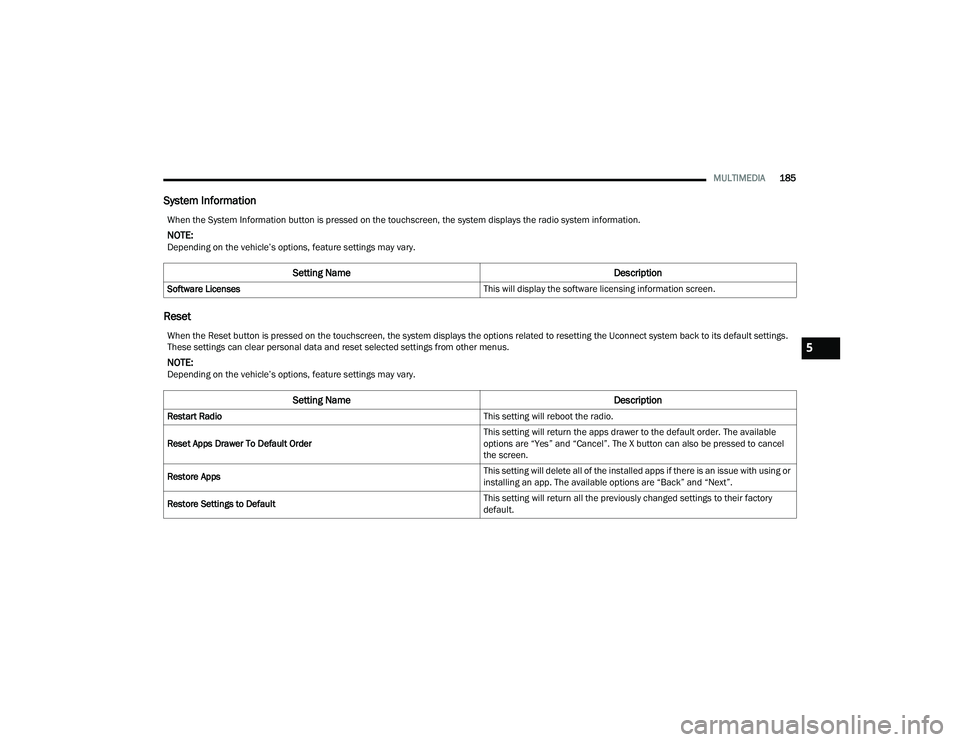
MULTIMEDIA185
System Information
Reset
When the System Information button is pressed on the touchscreen, the system displays the radio system information.
NOTE:Depending on the vehicle’s options, feature settings may vary.
Setting Name Description
Software Licenses This will display the software licensing information screen.
When the Reset button is pressed on the touchscreen, the system displays the options related to resetting the Uconnect system back to its default settings.
These settings can clear personal data and reset selected settings from other menus.
NOTE:Depending on the vehicle’s options, feature settings may vary.
Setting NameDescription
Restart Radio This setting will reboot the radio.
Reset Apps Drawer To Default Order This setting will return the apps drawer to the default order. The available
options are “Yes” and “Cancel”. The X button can also be pressed to cancel
the screen.
Restore Apps This setting will delete all of the installed apps if there is an issue with using or
installing an app. The available options are “Back” and “Next”.
Restore Settings to Default This setting will return all the previously changed settings to their factory
default.
5
22_MP_OM_EN_USC_t.book Page 185