battery JEEP GLADIATOR 2023 User Guide
[x] Cancel search | Manufacturer: JEEP, Model Year: 2023, Model line: GLADIATOR, Model: JEEP GLADIATOR 2023Pages: 448, PDF Size: 17.37 MB
Page 26 of 448
24GETTING TO KNOW YOUR VEHICLE
occurred, the Vehicle Security system will arm
regardless of whether you are in the vehicle or not.
If you remain in the vehicle and open a door, the
alarm will sound. If this occurs, disarm the Vehicle
Security system.
If the Vehicle Security system is armed and the
battery becomes disconnected, the Vehicle
Security system will remain armed when the
battery is reconnected; the exterior lights will flash,
and the horn will sound. If this occurs, disarm the
Vehicle Security system.
REARMING OF THE SYSTEM
If something triggers the alarm and no action is
taken to disarm it, the Vehicle Security system will
turn the horn off after a 29 second cycle (with five
seconds between cycles and up to eight cycles if
the trigger remains active) and then rearm itself.
DOORS
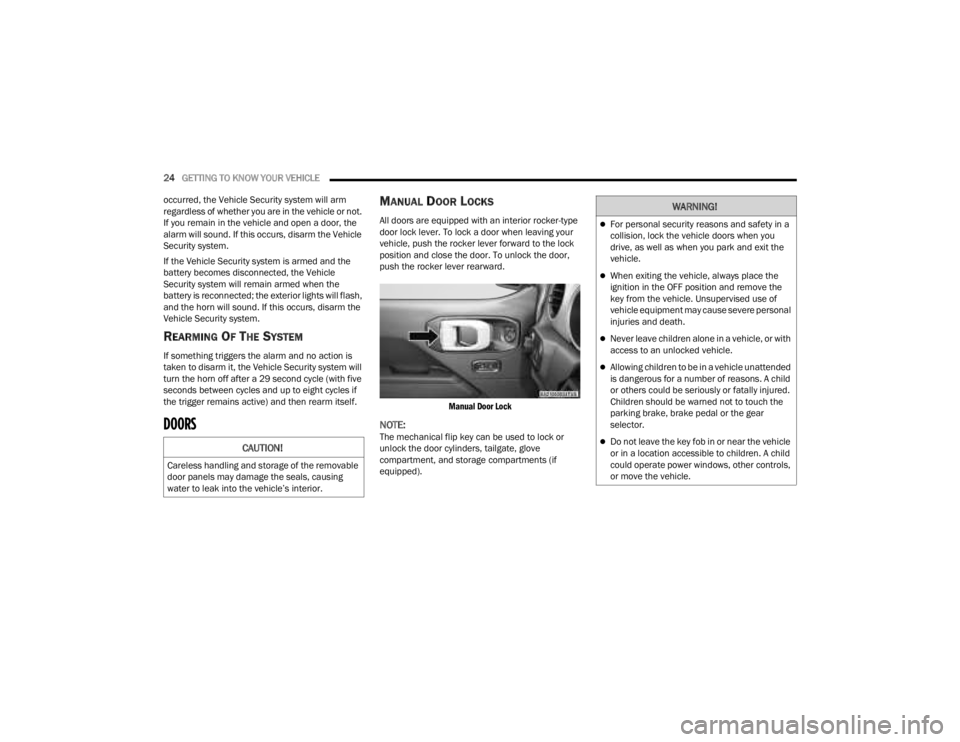
MANUAL DOOR LOCKS
All doors are equipped with an interior rocker-type
door lock lever. To lock a door when leaving your
vehicle, push the rocker lever forward to the lock
position and close the door. To unlock the door,
push the rocker lever rearward.
Manual Door Lock
NOTE:The mechanical flip key can be used to lock or
unlock the door cylinders, tailgate, glove
compartment, and storage compartments (if
equipped).CAUTION!
Careless handling and storage of the removable
door panels may damage the seals, causing
water to leak into the vehicle’s interior.
WARNING!
For personal security reasons and safety in a
collision, lock the vehicle doors when you
drive, as well as when you park and exit the
vehicle.
When exiting the vehicle, always place the
ignition in the OFF position and remove the
key from the vehicle. Unsupervised use of
vehicle equipment may cause severe personal
injuries and death.
Never leave children alone in a vehicle, or with
access to an unlocked vehicle.
Allowing children to be in a vehicle unattended
is dangerous for a number of reasons. A child
or others could be seriously or fatally injured.
Children should be warned not to touch the
parking brake, brake pedal or the gear
selector.
Do not leave the key fob in or near the vehicle
or in a location accessible to children. A child
could operate power windows, other controls,
or move the vehicle.
23_JT_OM_EN_USC_t.book Page 24
Page 29 of 448
GETTING TO KNOW YOUR VEHICLE27
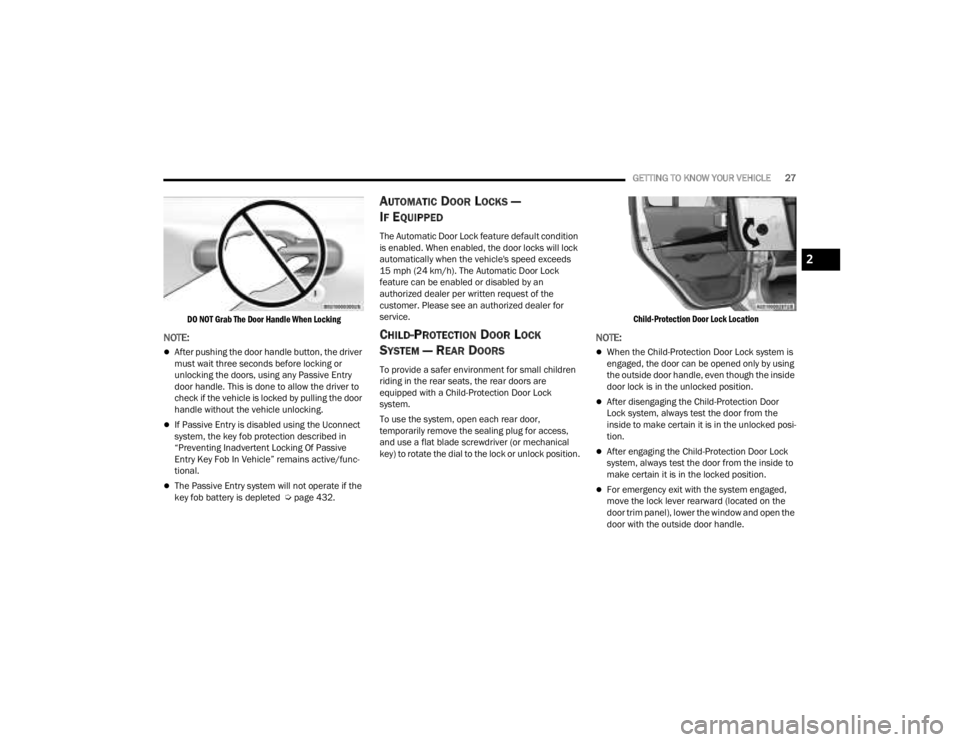
DO NOT Grab The Door Handle When Locking
NOTE:
After pushing the door handle button, the driver
must wait three seconds before locking or
unlocking the doors, using any Passive Entry
door handle. This is done to allow the driver to
check if the vehicle is locked by pulling the door
handle without the vehicle unlocking.
If Passive Entry is disabled using the Uconnect
system, the key fob protection described in
“Preventing Inadvertent Locking Of Passive
Entry Key Fob In Vehicle” remains active/func -
tional.
The Passive Entry system will not operate if the
key fob battery is depleted Ú page 432.
AUTOMATIC DOOR LOCKS —
I
F EQUIPPED
The Automatic Door Lock feature default condition
is enabled. When enabled, the door locks will lock
automatically when the vehicle's speed exceeds
15 mph (24 km/h). The Automatic Door Lock
feature can be enabled or disabled by an
authorized dealer per written request of the
customer. Please see an authorized dealer for
service.
CHILD-PROTECTION DOOR LOCK
S
YSTEM — REAR DOORS
To provide a safer environment for small children
riding in the rear seats, the rear doors are
equipped with a Child-Protection Door Lock
system.
To use the system, open each rear door,
temporarily remove the sealing plug for access,
and use a flat blade screwdriver (or mechanical
key) to rotate the dial to the lock or unlock position.
Child-Protection Door Lock Location
NOTE:
When the Child-Protection Door Lock system is
engaged, the door can be opened only by using
the outside door handle, even though the inside
door lock is in the unlocked position.
After disengaging the Child-Protection Door
Lock system, always test the door from the
inside to make certain it is in the unlocked posi
-
tion.
After engaging the Child-Protection Door Lock
system, always test the door from the inside to
make certain it is in the locked position.
For emergency exit with the system engaged,
move the lock lever rearward (located on the
door trim panel), lower the window and open the
door with the outside door handle.
2
23_JT_OM_EN_USC_t.book Page 27
Page 54 of 448
52GETTING TO KNOW YOUR VEHICLE
POWER MIRRORS — IF EQUIPPED
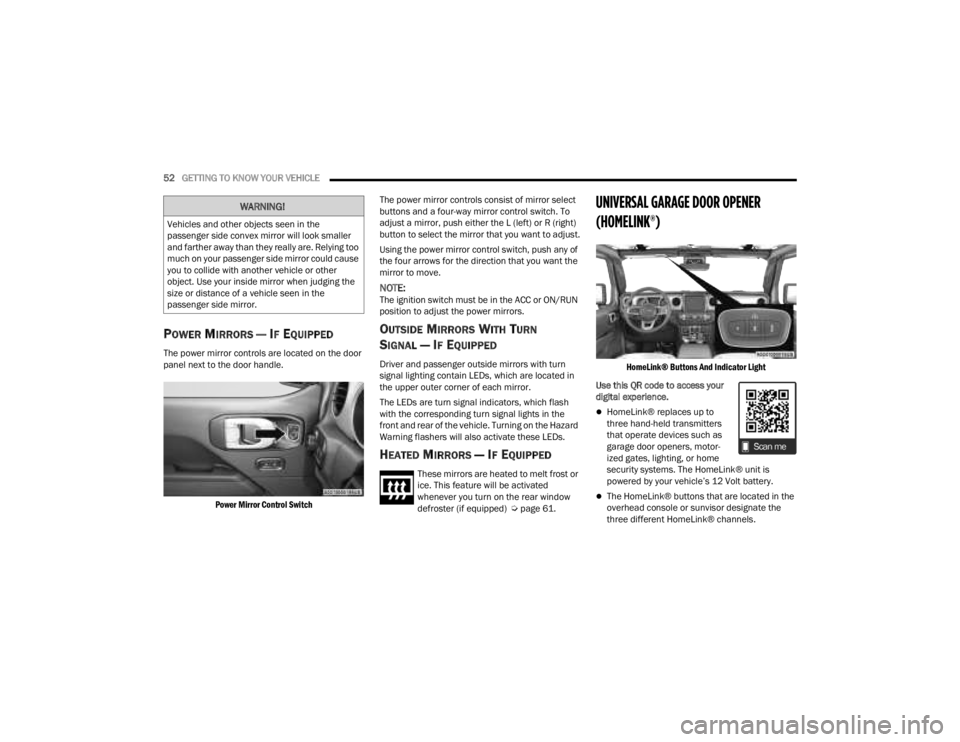
The power mirror controls are located on the door
panel next to the door handle.
Power Mirror Control Switch
The power mirror controls consist of mirror select
buttons and a four-way mirror control switch. To
adjust a mirror, push either the L (left) or R (right)
button to select the mirror that you want to adjust.
Using the power mirror control switch, push any of
the four arrows for the direction that you want the
mirror to move.
NOTE:The ignition switch must be in the ACC or ON/RUN
position to adjust the power mirrors.
OUTSIDE MIRRORS WITH TURN
SIGNAL — IF EQUIPPED
Driver and passenger outside mirrors with turn
signal lighting contain LEDs, which are located in
the upper outer corner of each mirror.
The LEDs are turn signal indicators, which flash
with the corresponding turn signal lights in the
front and rear of the vehicle. Turning on the Hazard
Warning flashers will also activate these LEDs.
HEATED MIRRORS — IF EQUIPPED
These mirrors are heated to melt frost or
ice. This feature will be activated
whenever you turn on the rear window
defroster (if equipped) Ú
page 61.
UNIVERSAL GARAGE DOOR OPENER
(HOMELINK®)
HomeLink® Buttons And Indicator Light
Use this QR code to access your
digital experience.
HomeLink® replaces up to
three hand-held transmitters
that operate devices such as
garage door openers, motor -
ized gates, lighting, or home
security systems. The HomeLink® unit is
powered by your vehicle’s 12 Volt battery.
The HomeLink® buttons that are located in the
overhead console or sunvisor designate the
three different HomeLink® channels.
WARNING!
Vehicles and other objects seen in the
passenger side convex mirror will look smaller
and farther away than they really are. Relying too
much on your passenger side mirror could cause
you to collide with another vehicle or other
object. Use your inside mirror when judging the
size or distance of a vehicle seen in the
passenger side mirror.
23_JT_OM_EN_USC_t.book Page 52
Page 55 of 448

GETTING TO KNOW YOUR VEHICLE53
To operate HomeLink®, push and release any
of the programmed HomeLink® buttons. These
buttons will activate the devices they are
programmed to with each press of the corre -
sponding HomeLink® button.
The HomeLink® indicator light is located above
the center button.
NOTE:HomeLink® is disabled when the Vehicle Security
system is active Ú page 432.
BEFORE YOU BEGIN PROGRAMMING
H
OMELINK®
For efficient programming and accurate
transmission of the radio-frequency signal, it is
recommended that a new battery be placed in the
hand-held transmitter of the device that is being
programmed to the HomeLink® system. Make
sure your hand-held transmitter is programmed to
activate the device you are trying to program your
HomeLink® button to.
Ensure that your vehicle is parked outside of the
garage before you begin programming.
It is recommended that you erase all the channels
of your HomeLink® before you use it for the first
time.
ERASING ALL THE HOMELINK®
C
HANNELS
To erase the channels, follow this procedure:
1. Place the ignition switch into the ON/RUN
position.
2. Push and hold the two outside HomeLink® buttons (I and III) for up to 20 seconds, or until
the HomeLink® indicator light flashes.
NOTE:Erasing all channels should only be performed
when programming HomeLink® for the first time.
Do not erase channels when programming addi -
tional buttons.
IDENTIFYING WHETHER YOU HAVE A
R
OLLING CODE OR NON-ROLLING CODE
D
EVICE
Before programming a device to one of your
HomeLink® buttons, you must determine whether
the device has a rolling code or non-rolling code.
Rolling Code Devices
To determine if your device has a rolling code, a
good indicator is its manufacturing date. Typically,
devices manufactured after 1995 have rolling
codes. A device with a rolling code will also have a
“LEARN” or “TRAIN” button located where the antenna is attached to the device. The button may
not be immediately visible when looking at the
device. The name and color of the button may vary
slightly by manufacturer.
NOTE:The “LEARN” or “TRAIN” button is not the button
you normally use to operate the device.
Non-rolling Code Devices
Most devices manufactured before 1995 will not
have a rolling code. These devices will also not
have a “LEARN” or “TRAIN” button.
PROGRAMMING HOMELINK® TO A
G
ARAGE DOOR OPENER
To program any of the HomeLink® buttons to
activate your garage door opener motor, proceed
as follows:
NOTE:All HomeLink® buttons are programmed using this
procedure. You do not need to erase all channels
when programming additional buttons.
1. Place the ignition switch into the ON/RUN
position.
2. Place the garage door opener transmitter 1 to 3 inches (3 to 8 cm) away from the
HomeLink® button you wish to program, while
keeping the HomeLink® indicator light in view.
2
23_JT_OM_EN_USC_t.book Page 53
Page 58 of 448
56GETTING TO KNOW YOUR VEHICLE
SECURITY
It is advised to erase all channels before you sell or
turn in your vehicle.
To do this, push and hold the two outside buttons
for 20 seconds until the indicator flashes. Note
that all channels will be erased. Individual
channels cannot be erased.
The HomeLink® Universal Transceiver is disabled
when the Vehicle Security system is active.
NOTE:The universal garage door opener only operates
when the engine is running for security reasons
associated with removable tops and doors.
TROUBLESHOOTING TIPS
If you are having trouble programming
HomeLink®, here are some of the most common
solutions:
Replace the battery in the garage door opener
hand-held transmitter.
Push the LEARN button on the garage door
opener to complete the training for a rolling code.
Did you unplug the device for programming and
remember to plug it back in? If you have any problems, or require assistance,
please call toll-free 1-800-355-3515 or, on the
Internet at HomeLink.com for information or
assistance.
EXTERIOR LIGHTS
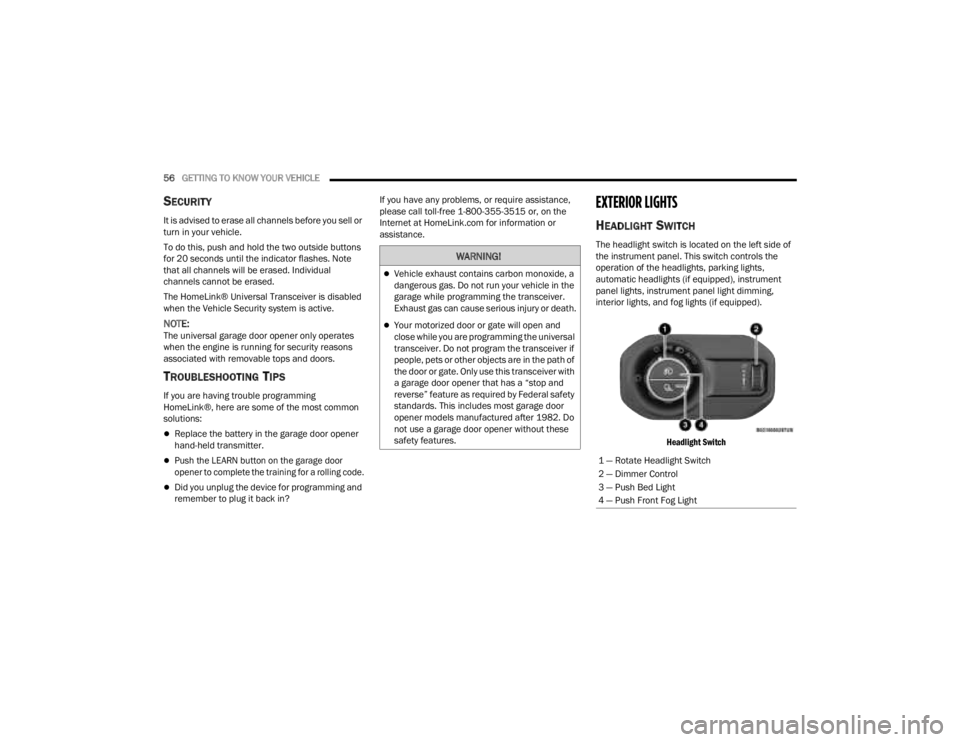
HEADLIGHT SWITCH
The headlight switch is located on the left side of
the instrument panel. This switch controls the
operation of the headlights, parking lights,
automatic headlights (if equipped), instrument
panel lights, instrument panel light dimming,
interior lights, and fog lights (if equipped).
Headlight Switch
WARNING!
Vehicle exhaust contains carbon monoxide, a
dangerous gas. Do not run your vehicle in the
garage while programming the transceiver.
Exhaust gas can cause serious injury or death.
Your motorized door or gate will open and
close while you are programming the universal
transceiver. Do not program the transceiver if
people, pets or other objects are in the path of
the door or gate. Only use this transceiver with
a garage door opener that has a “stop and
reverse” feature as required by Federal safety
standards. This includes most garage door
opener models manufactured after 1982. Do
not use a garage door opener without these
safety features.
1 — Rotate Headlight Switch
2 — Dimmer Control
3 — Push Bed Light
4 — Push Front Fog Light
23_JT_OM_EN_USC_t.book Page 56
Page 62 of 448
60GETTING TO KNOW YOUR VEHICLE
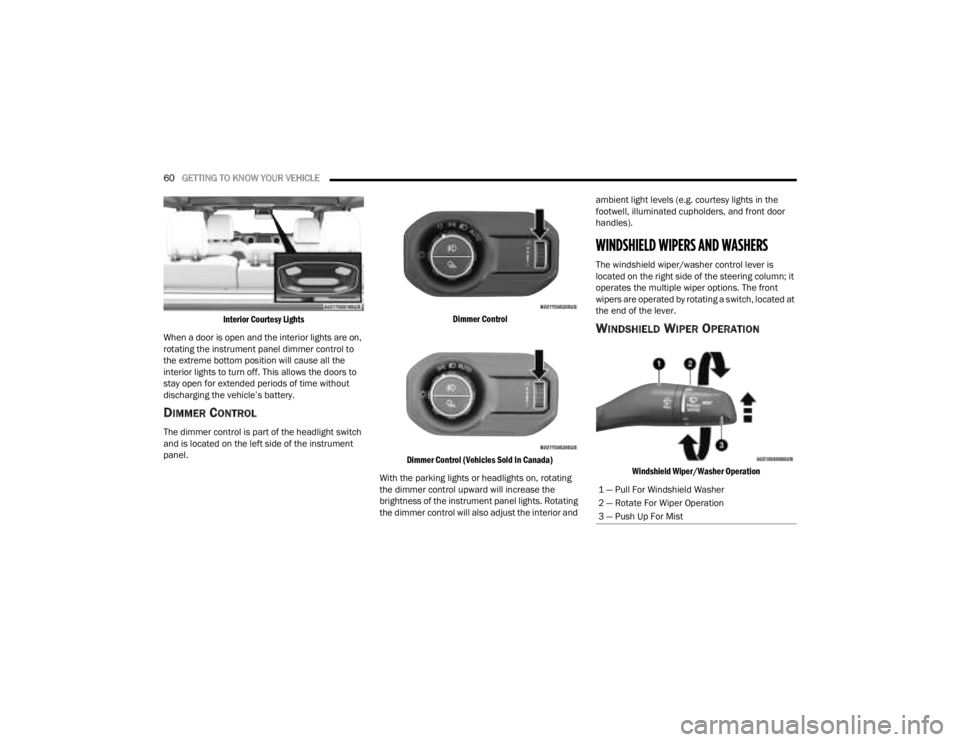
Interior Courtesy Lights
When a door is open and the interior lights are on,
rotating the instrument panel dimmer control to
the extreme bottom position will cause all the
interior lights to turn off. This allows the doors to
stay open for extended periods of time without
discharging the vehicle’s battery.
DIMMER CONTROL
The dimmer control is part of the headlight switch
and is located on the left side of the instrument
panel.
Dimmer Control
Dimmer Control (Vehicles Sold In Canada)
With the parking lights or headlights on, rotating
the dimmer control upward will increase the
brightness of the instrument panel lights. Rotating
the dimmer control will also adjust the interior and ambient light levels (e.g. courtesy lights in the
footwell, illuminated cupholders, and front door
handles).
WINDSHIELD WIPERS AND WASHERS
The windshield wiper/washer control lever is
located on the right side of the steering column; it
operates the multiple wiper options. The front
wipers are operated by rotating a switch, located at
the end of the lever.
WINDSHIELD WIPER OPERATION
Windshield Wiper/Washer Operation
1 — Pull For Windshield Washer
2 — Rotate For Wiper Operation
3 — Push Up For Mist
23_JT_OM_EN_USC_t.book Page 60
Page 74 of 448
72GETTING TO KNOW YOUR VEHICLE
Depending on your vehicle’s specifications, the USB
port may contain playback capabilities and will allow
you to play music from your smartphone device or
USB devices through your vehicle’s sound system.
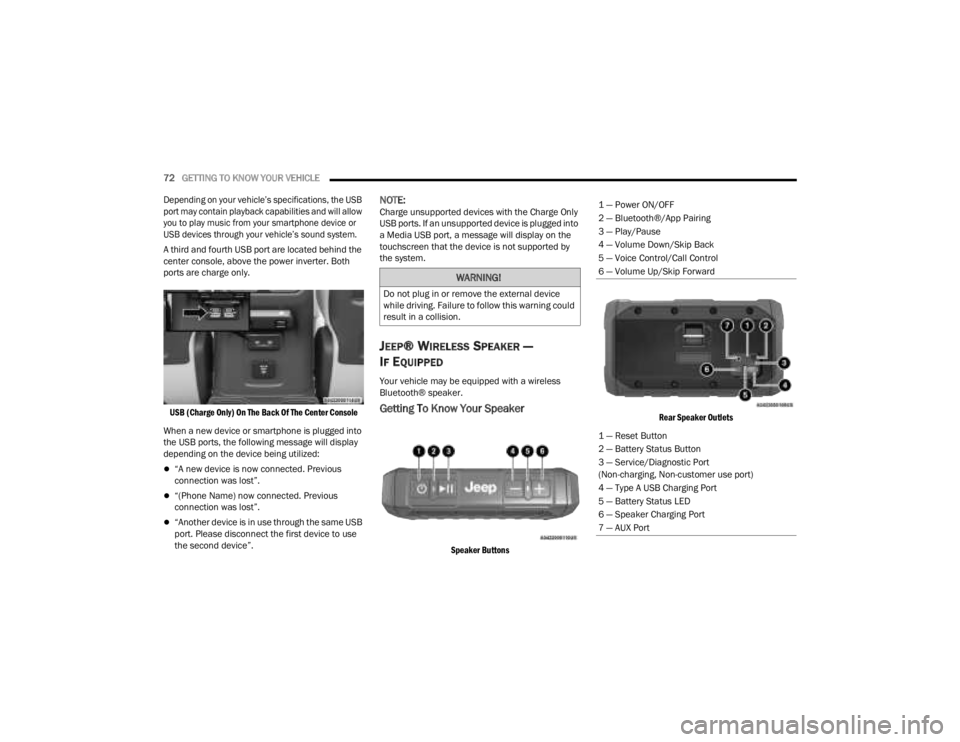
A third and fourth USB port are located behind the
center console, above the power inverter. Both
ports are charge only.
USB (Charge Only) On The Back Of The Center Console
When a new device or smartphone is plugged into
the USB ports, the following message will display
depending on the device being utilized:
“A new device is now connected. Previous
connection was lost”.
“(Phone Name) now connected. Previous
connection was lost”.
“Another device is in use through the same USB
port. Please disconnect the first device to use
the second device”.
NOTE:Charge unsupported devices with the Charge Only
USB ports. If an unsupported device is plugged into
a Media USB port, a message will display on the
touchscreen that the device is not supported by
the system.
JEEP® WIRELESS SPEAKER —
I
F EQUIPPED
Your vehicle may be equipped with a wireless
Bluetooth® speaker.
Getting To Know Your Speaker
Speaker Buttons Rear Speaker Outlets
WARNING!
Do not plug in or remove the external device
while driving. Failure to follow this warning could
result in a collision.
1 — Power ON/OFF
2 — Bluetooth®/App Pairing
3 — Play/Pause
4 — Volume Down/Skip Back
5 — Voice Control/Call Control
6 — Volume Up/Skip Forward
1 — Reset Button
2 — Battery Status Button
3 — Service/Diagnostic Port
(Non-charging, Non-customer use port)
4 — Type A USB Charging Port
5 — Battery Status LED
6 — Speaker Charging Port
7 — AUX Port
23_JT_OM_EN_USC_t.book Page 72
Page 75 of 448
GETTING TO KNOW YOUR VEHICLE73
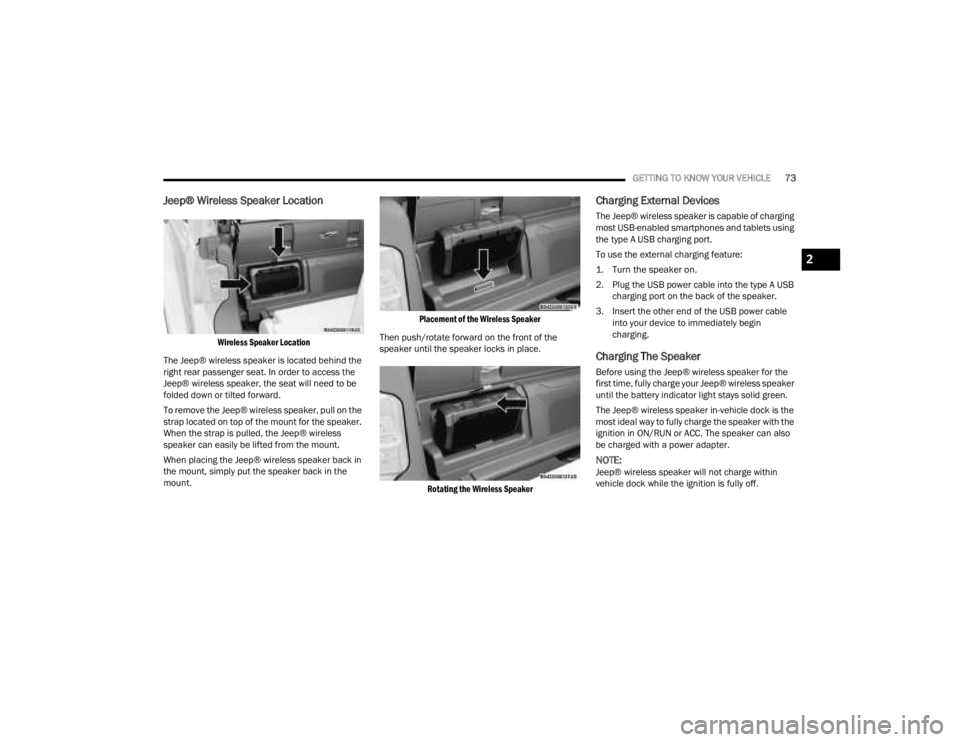
Jeep® Wireless Speaker Location
Wireless Speaker Location
The Jeep® wireless speaker is located behind the
right rear passenger seat. In order to access the
Jeep® wireless speaker, the seat will need to be
folded down or tilted forward.
To remove the Jeep® wireless speaker, pull on the
strap located on top of the mount for the speaker.
When the strap is pulled, the Jeep® wireless
speaker can easily be lifted from the mount.
When placing the Jeep® wireless speaker back in
the mount, simply put the speaker back in the
mount.
Placement of the Wireless Speaker
Then push/rotate forward on the front of the
speaker until the speaker locks in place.
Rotating the Wireless Speaker
Charging External Devices
The Jeep® wireless speaker is capable of charging
most USB-enabled smartphones and tablets using
the type A USB charging port.
To use the external charging feature:
1. Turn the speaker on.
2. Plug the USB power cable into the type A USB charging port on the back of the speaker.
3. Insert the other end of the USB power cable into your device to immediately begin
charging.
Charging The Speaker
Before using the Jeep® wireless speaker for the
first time, fully charge your Jeep® wireless speaker
until the battery indicator light stays solid green.
The Jeep® wireless speaker in-vehicle dock is the
most ideal way to fully charge the speaker with the
ignition in ON/RUN or ACC. The speaker can also
be charged with a power adapter.
NOTE:Jeep® wireless speaker will not charge within
vehicle dock while the ignition is fully off.
2
23_JT_OM_EN_USC_t.book Page 73
Page 76 of 448

74GETTING TO KNOW YOUR VEHICLE
To charge the Jeep® wireless speaker with a
power adapter, insert the power adapter into a wall
outlet. Next, plug the power adapter into the Jeep®
wireless speaker charging port on the back of the
speaker.
NOTE:
Power adapter needed for the Jeep® wireless
speaker has to have a range of 14 VDC to 16.5 VDC,
with a minimum of 2.7A and a barrel connector
dimension of 5.5 mm by 2.5 mm. Power adapter is
not included.
Operating Temperature
The Jeep® wireless speaker contains a lithium-ion rechargeable battery. Typical charging temperatures for these types of batteries are from 0 to 45°C
(32 to 113°F).
NOTE:The functions described are for when the Jeep® wireless speaker is undocked from the vehicle. When plugged into the docking station, the Jeep® wireless
speaker functions as part of the vehicle’s sound system.
Monitoring Battery Level Status LED Light
Red 40% or lower
Yellow 40% to 70%
Green 70% to 100%
Temperature <-4°F (< -20°C)-4 to 32°F
(< -20 to 0°C) 32 to 113°F
(0 to 45°C) 115 to 140°F
(46 to 60°C) >140°F (>60°C)
Speaker state
(docked or Direct Current [DC] plugged in) Off
OnOnOnOff
Speaker state
(undocked and running off battery) Off
OnOnOnOff
Speaker’s Internal Battery Charging NoNoYes NoNo
23_JT_OM_EN_USC_t.book Page 74
Page 77 of 448

GETTING TO KNOW YOUR VEHICLE75
Phone & Bluetooth® Pairing
A feature of the Jeep® wireless speaker is the
ability for the Jeep® wireless speaker to connect to
devices using Bluetooth®. Follow these simple
steps to connect a Bluetooth®-enabled device to
the Jeep® wireless speaker:
1. Press and hold the power button for 2-3 sec-
onds to turn the Jeep® wireless speaker on.
2. Turn “on” Bluetooth® for the device you desire to be connected to the Jeep® wireless
speaker. For instructions on how to turn on
and off Bluetooth® settings for the desired
device, refer to the device’s user manual.
3. When powered on, the Jeep® wireless speaker will automatically enter pairing mode.
To pair a second device, press and hold the
Bluetooth® button for 2-3 seconds, until an
audio cue is heard. Then go to the devices’
Bluetooth® settings and select “Jeep®
Speaker” from the list.
The Jeep® wireless speaker will remember the last
eight devices it has paired with.
NOTE:If the Jeep® wireless speaker is left on with an
inactive Bluetooth® connection for 30 minutes, it
will automatically turn off. The Jeep® wireless
speaker can be turned on again by pressing and
holding the power button for 2-3 seconds.
Resetting Your Jeep® Wireless Speaker
To reset the Jeep® wireless speaker to its original
factory setting, press and hold the reset button
under the back cover for 8-10 seconds.
Speakerphone
The speakerphone feature can be used by
pressing the “Voice Control” button on the Jeep®
wireless speaker. This feature can be used to
answer and end calls over the speakerphone.
Volume And Playback Control
Volume can be increased or decreased by briefly
pressing the + button or - button. When the
maximum volume is reached, an audio cue will
sound.
To skip to the next track, press and hold the
+ button. To go to the previous track, press the
- button.
Qualcomm TrueWireless™ Stereo
A feature of the Jeep® wireless speaker is being
able to pair two Jeep® wireless speakers together
for Qualcomm TrueWireless™ Stereo. This feature
allows for two Jeep® wireless speakers to play left
and right stereo sound. Below are the steps needed for Qualcomm
TrueWireless™ Stereo:
1. Push and hold the power button on both
Jeep® wireless speakers until both speakers
turn on.
2. Place both speakers into Qualcomm TrueWireless™ Stereo pairing mode. This can
be achieved by pressing and holding the
Battery Status button on both speakers until
an audio notification is heard from both
speakers.
3. Connect one of the Jeep® wireless speakers to the Bluetooth® source. Refer to previous
section “Phone & Bluetooth® Pairing” for
additional information.
4. Once the Jeep® wireless speaker is connected to the Bluetooth® device, audio will be played
from both speakers.
NOTE:While in Qualcomm TrueWireless™ Stereo mode,
the volume will not have independent speaker
control. Pushing the Up or Down Volume button on
either Jeep® wireless speaker will affect the audio
output on both, as well as volume adjustments on
the Bluetooth® device.
2
23_JT_OM_EN_USC_t.book Page 75