maintenance schedule JEEP GLADIATOR 2023 Owners Manual
[x] Cancel search | Manufacturer: JEEP, Model Year: 2023, Model line: GLADIATOR, Model: JEEP GLADIATOR 2023Pages: 448, PDF Size: 17.37 MB
Page 9 of 448

7
TOWING A DISABLED VEHICLE .......................... 350 Four–Wheel Drive Models ............................ 351
Without The Key Fob ..................................... 351
Emergency Tow Hooks —
If Equipped .................................................... 351
ENHANCED ACCIDENT RESPONSE SYSTEM
(EARS) .................................................................. 352
EVENT DATA RECORDER (EDR) ......................... 352
SERVICING AND MAINTENANCE
SCHEDULED SERVICING — GASOLINE
ENGINE ................................................................. 353
Maintenance Plan ......................................... 354
SCHEDULED SERVICING — DIESEL ENGINE .... 357
Maintenance Plan — Diesel Fuel Up To
B5 Biodiesel................................................... 358Additional Maintenance — B6 To B20
Biodiesel ........................................................ 361
ENGINE COMPARTMENT .................................... 362
3.6L Gasoline Engine ................................... 3623.0L Diesel Engine ........................................ 363
Checking Oil Level ......................................... 364
Adding Washer Fluid ..................................... 364
Maintenance-Free Battery ............................ 364
Pressure Washing ......................................... 365 VEHICLE MAINTENANCE..................................... 365
Engine Oil ....................................................... 365
Engine Oil Filter ............................................. 366Engine Air Cleaner Filter ............................... 366
Draining Fuel/Water Separator Filter —
Diesel Engine ................................................. 368
Fuel Filter Replacement — Diesel Engine .... 369
Priming If The Engine Has Run Out Of
Fuel — Diesel Engine .................................... 370
Intervention Regeneration Strategy —
Message Process Flow ................................ 371Diesel Exhaust Fluid ..................................... 371
Accessory Drive Belt Inspection ................... 372Air Conditioner Maintenance........................ 372
Body Lubrication ........................................... 374Windshield Wiper Blades.............................. 374Exhaust System ............................................ 376
Cooling System .............................................. 377
Charge Air Cooler — Inter-Cooler
(Diesel Engine) .............................................. 379
Brake System ............................................... 380
Front/Rear Axle Fluid ................................... 380Transfer Case ............................................... 381
Manual Transmission — If Equipped............ 381
Automatic Transmission —
If Equipped .................................................... 381
Fuses ............................................................. 382Bulb Replacement ........................................ 392 TIRES ..................................................................... 395
Tire Safety Information ................................. 395
Tires — General Information ......................... 401
Tire Types....................................................... 405Spare Tires — If Equipped ............................ 406
Wheel And Wheel Trim Care......................... 407
Snow Traction Devices ................................. 408
Tire Rotation Recommendations ................. 409
DEPARTMENT OF TRANSPORTATION
UNIFORM TIRE QUALITY GRADES .................... 410
Treadwear...................................................... 410
Traction Grades ............................................. 410Temperature Grades..................................... 410
STORING THE VEHICLE ....................................... 411
BODYWORK .......................................................... 411
Protection From Atmospheric Agents .......... 411
Body And Underbody Maintenance ............. 412
Preserving The Bodywork ............................. 412
INTERIORS ........................................................... 414
Carpet Safety Information ............................ 414
Carpet Removal............................................. 415Seats And Fabric Parts ................................. 416
Plastic And Coated Parts .............................. 417
Leather Surfaces........................................... 417
Glass Surfaces ............................................. 417
23_JT_OM_EN_USC_t.book Page 7
Page 125 of 448

GETTING TO KNOW YOUR INSTRUMENT PANEL123
and release the OK button. To reset the oil change
indicator system (after performing the scheduled
maintenance), refer to the following procedure.
Oil Life Reset
1. Without pushing the brake pedal, place the ignition in the ON/RUN mode (do not start the
engine).
2. Navigate to "Oil Life" submenu in "Vehicle Info" in the instrument cluster display.
3. Push and hold the OK button until the gauge
resets to 100%.
Secondary Method For Oil Change Reset
Procedure
1. Without pushing the brake pedal, place the ignition in the ON/RUN position (do not start
the engine).
2. Fully press the accelerator pedal, slowly, three times within ten seconds.
3. Without pushing the brake pedal, place the ignition in the OFF position.
NOTE:If the indicator message illuminates when you start
the vehicle, the oil change indicator system did not
reset. If necessary, repeat this procedure.
OFF ROAD+ DISPLAY — IF EQUIPPED
When the Off Road+ button is pushed in the switch
bank, the Instrument Cluster Display will begin to
show messages related to the feature. Depending
on the Four Wheel Drive mode in use, the
messages will differ, and after five seconds, all
messages will clear from the display. The
messages are as follows:
2H: Off Road+ Unavailable, Shift to 4WD
4H: 4WD High Off Road+ Active
4L: 4WD Low Off Road+ Active
Adaptive Cruise Control (ACC) and Cruise Control
are not available when using Off Road+. If either
option is selected, a dedicated message will
display indicating that the features are not usable
concurrently. Messages are as follows:
4H: Cruise Control — Cruise Control Unavailable
in Off Road+
4H: Adaptive Cruise Control — Adaptive Cruise
Control (ACC) Unavailable in Off Road+
4L: Cruise Control — Cruise Control Unavailable
in 4WD Low
4L: Adaptive Cruise Control — Adaptive Cruise
Control (ACC) Unavailable in 4WD Low
NOTE:The behavior of Electronic Stability Control while in
Off Road+ varies depending on the 4WD status. If
the vehicle is in 4WD High, Traction Control is auto -
matically turned off. Also, holding the ESC OFF
button for five seconds will turn off ESC. In 4WD
Low, Electronic Stability Control automatically
shuts off regardless of the Off Road Status.
INSTRUMENT CLUSTER DISPLAY
S
ELECTABLE ITEMS
The instrument cluster display can be used to view
the following main menu items:
NOTE:Depending on the vehicles options, feature
settings may vary.
Speedometer Driver Assist —
If EquippedMessages
Vehicle Info Trip Info Screen Setup
Fuel Economy Stop/Start Audio
Off Road —
If Equipped
3
23_JT_OM_EN_USC_t.book Page 123
Page 265 of 448

MULTIMEDIA263
(Continued)
Automatic SOS — If Equipped
Automatic SOS is a hands-free safety service that
can immediately connect you with help in the event
that your vehicle’s airbags deploy. After an
accident, a live agent will contact you through the
Uconnect system and alert emergency services.
NOTE:An active SiriusXM Guardian™ subscription is
required for this feature to function.
After a crash where the airbags deploy:
1. Automatic SOS will initiate a call with an agent.
2. An agent will receive the call and confirm the location of the emergency.
3. If needed, the agent will request the assistance of emergency services.
4. First responders will arrive on scene. The agent will remain on the call until emergency
services arrive.
NOTE:
Agents are available 24/7 to assist you in the
case of an emergency.
On your behalf, agents are able to notify family
members about the collision.
Agents can brief first responders of the situation
before they arrive on scene.
WARNING!
Never place anything on or near the vehicle’s
LTE (voice/data) or 4G (data) and GPS
antennas. You could prevent LTE (voice/data)
or 4G (data) and GPS signal reception, which
can prevent your vehicle from placing an
emergency call.
Do not add any aftermarket electrical equip -
ment to the vehicle’s electrical system. This
may prevent your vehicle from sending a
signal to initiate an emergency call. To avoid
interference that can cause the SOS Call
system to fail, never add aftermarket equip -
ment (e.g., two-way mobile radio, CB radio,
data recorder, etc.) to your vehicle’s electrical
system or modify the antennas on your
vehicle. IF YOUR VEHICLE LOSES POWER FOR
ANY REASON (INCLUDING DURING OR AFTER
AN ACCIDENT), NEITHER THE VEHICLE
BRANDED APPS NOR THE SIRIUSXM
GUARDIAN™ CONNECTED SERVICES WILL
OPERATE.
The Occupant Restraint Controller (ORC) turns
on the Air Bag Warning Light on the instru -
ment panel if a malfunction in any part of the
air bag system is detected. If the Air Bag
Warning Light is illuminated, the air bag
system may not be working properly and the
SOS Call system may not be able to send a
signal to the SiriusXM Guardian™ Customer
Care center. If the Air Bag Warning Light is illu -
minated, have an authorized dealer service
your vehicle immediately.
Ignoring the Rearview Mirror Light could mean
you will not have SOS Call services if needed.
If the Rearview Mirror Light is illuminated,
have an authorized dealer service the SOS
Call system immediately.
If anyone in the vehicle could be in danger
(e.g., fire or smoke is visible, dangerous road
conditions or location), do not wait for voice
contact from a SiriusXM Guardian™ Customer
Care agent. All occupants should exit the
vehicle immediately and move to a safe loca -
tion.
Failure to perform scheduled maintenance
and regular inspection of your vehicle may
result in vehicle damage, accident or injury.
WARNING!
5
23_JT_OM_EN_USC_t.book Page 263
Page 271 of 448

MULTIMEDIA269
on your device, select “Help”, and then select
“SiriusXM Guardian™ Customer Care” to make
the call.
3. SiriusXM Guardian™ Customer Care will authenticate that you are the owner of the
vehicle and contact the law enforcement with
whom you filed the stolen vehicle report.
4. SiriusXM Guardian™ Customer Care will work with your local law enforcement to locate the
vehicle. You will be contacted by law
enforcement if your vehicle is recovered. While
the investigation is ongoing, you should also
contact your insurance company to inform it of
the situation.
Requirements
Vehicle must be properly equipped with the
Uconnect system.
Vehicle must have an operable LTE (voice/data)
or 4G (data) network connection compatible
with your device.
Vehicle must be registered with SiriusXM
Guardian™ and have an active subscription that
includes the applicable feature.
NOTE:Not all features of SiriusXM Guardian™ are
available everywhere at all times, particularly in
remote or enclosed areas.
Monthly Vehicle Health Report —
If Equipped
Description
Monthly Vehicle Health Report is a Uconnect
service through which a summary of the
performance of your vehicle’s key systems will be
sent to you every month so you can stay on top of
your vehicle’s maintenance needs. This is provided
as a convenience to you and does not substitute
for regular maintenance to your vehicle.
In order to provide the Monthly Vehicle Health
Report, the Uconnect system in your vehicle may
collect and transmit vehicle data to SiriusXM
Guardian™ and to FCA, such as your vehicle’s
health and performance, your vehicle’s location,
your utilization of the features in your vehicle, and
other data.
This data collection and transmission begins when
you enroll in SiriusXM Guardian™ and will continue
even if you cancel your SiriusXM Guardian™
subscription unless you call SiriusXM Guardian™
Customer Care and tell them to deactivate your
Uconnect Services.
Please see the Uconnect Privacy Policy for more
information, located at www.driveuconnect.com/
connectedservices/privacy.html (US Residents) or
www.driveuconnect.ca (Canadian Residents). For more information on SiriusXM Guardian™
private policy, see https://siriusxmcvs.com/
privacy-policy.NOTE:Your vehicle must be enrolled in an active
subscription with SiriusXM Guardian™ Connected
Services. If you have concerns about the operation,
function or performance of your vehicle, please
take it to an authorized dealer. This report does not
replace regularly scheduled maintenance. Check
the instrument cluster warning lights and cautions
in your vehicle for the most accurate vehicle health
information.
Vehicle Health Alert —If Equipped
Description
Your vehicle will send you an email alert if it senses
a problem with one of your vehicle’s key systems.
For further information, go to your Owner’s
website.
NOTE:Vehicle Health Alert emails require you to register
and activate services. During this process you will
be asked to provide an email address to which the
reports will be sent.
5
23_JT_OM_EN_USC_t.book Page 269
Page 355 of 448
353
SERVICING AND MAINTENANCE
SCHEDULED SERVICING — GASOLINE
ENGINE
Your vehicle is equipped with an automatic oil
change indicator system. The oil change indicator
system will remind you that it is time to take your
vehicle in for scheduled maintenance.
Based on engine operation conditions, the oil
change indicator message will illuminate. This
means that service is required for your vehicle.
Operating conditions such as frequent short-trips,
trailer tow, or extremely hot or cold ambient
temperatures will influence when the “Change Oil”
or “Oil Change Required” message is displayed.
Have your vehicle serviced as soon as possible,
within the next 500 miles (805 km).
On vehicles equipped with an instrument cluster
display, “Oil Change Required” will be displayed
and a single chime will sound, indicating that an oil
change is necessary. On vehicles not equipped with an instrument
cluster display, “Change Oil” will flash in the
instrument cluster odometer and a single chime
will sound, indicating that an oil change is
necessary.
An authorized dealer will reset the oil change
indicator message after completing the scheduled
oil change. To reset the system follow the steps
described Ú
page 122.
NOTE:Under no circumstances should oil change
intervals exceed 10,000 miles (16,000 km),
12 months or 350 hours of engine run time,
whichever comes first. The 350 hours of engine
run or idle time is generally only a concern for fleet
customers. Once A Month Or Before A Long Trip:
Check engine oil level.
Check windshield washer fluid level.
Check the tire pressures and look for unusual
wear or damage, rotate at the first sign of irreg
-
ular wear.
Check the fluid levels of the coolant reservoir,
brake master cylinder, and power steering, and
fill as needed.
Check function of all interior and exterior lights.
8
23_JT_OM_EN_USC_t.book Page 353
Page 359 of 448

SERVICING AND MAINTENANCE357
SCHEDULED SERVICING — DIESEL ENGINE
Your vehicle is equipped with an automatic oil
change indicator system. The oil change indicator
system will remind you that it is time to take your
vehicle in for scheduled maintenance.
Based on engine operation conditions, the oil
change indicator message will illuminate. This
means that service is required for your vehicle.
Operating conditions such as frequent short-trips,
trailer tow, extremely hot or cold ambient
temperatures will influence when the “Oil Change
Required” message is displayed. Have your vehicle
serviced as soon as possible, within the next
500 miles (805 km).
An authorized dealer will reset the oil change
indicator message after completing the scheduled
oil change. If a scheduled oil change is performed
by someone other than an authorized dealer, to
reset the message Úpage 121.
NOTE:Under no circumstances should oil change
intervals exceed 10,000 miles (16,000 km) or
12 months, whichever comes first.
Engine Oil Filter Replacement
Residual oil in the housing may spill from the
housing when the new filter is installed if the
residual oil is not either removed from the housing
or enough time has not elapsed to allow the oil to
drain back into the engine. When servicing the oil
filter on this engine, open the filter cap
approximately six turns until the cap o-ring is
visible and stop. Wait five minutes with the cap in
this position to allow dirty engine oil to drain back
into the engine. After five minutes, the cap and
filter assembly can be removed and discarded. Once A Month Or Before A Long Trip:Check engine oil level
Check windshield washer fluid level
Check the tire pressures and look for unusual
wear or damage
Check the fluid levels of the coolant reservoir,
brake master cylinder, and fill as needed
Check function of all interior and exterior lights
8
23_JT_OM_EN_USC_t.book Page 357
Page 369 of 448
SERVICING AND MAINTENANCE367
Engine Air Cleaner Filter Selection
The quality of replacement engine air cleaner filter
varies considerably. Only high quality Mopar®
filters should be used.
Engine Air Cleaner Filter Inspection and
Replacement — Gasoline Engine
Follow the recommended maintenance intervals
as shown in the Maintenance Schedule in this
section.
Engine Air Cleaner Filter Removal
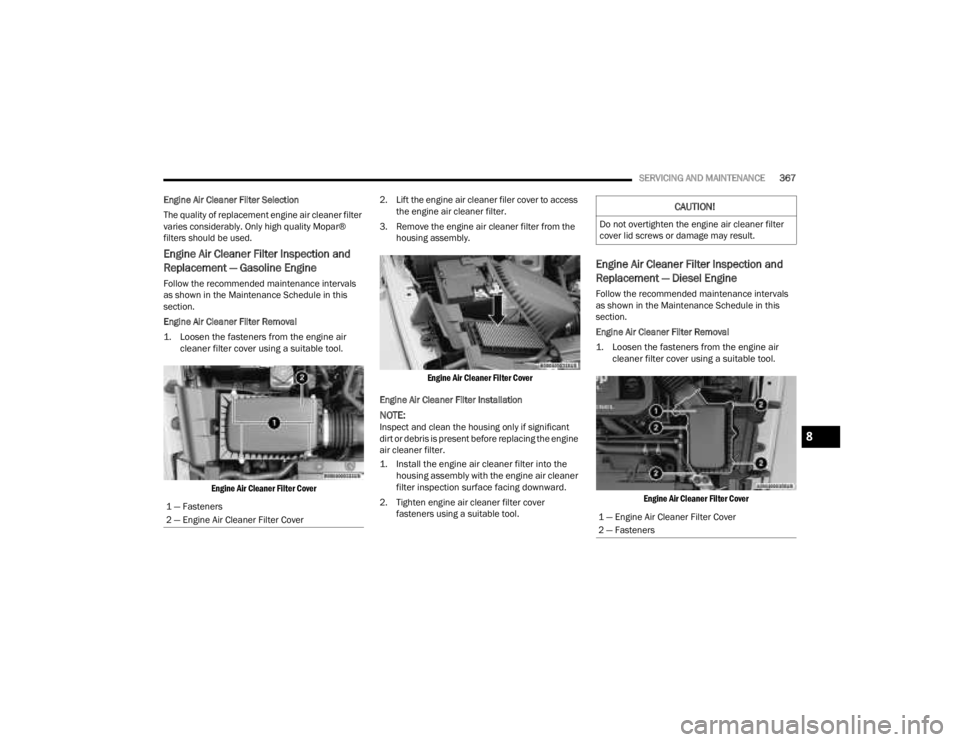
1. Loosen the fasteners from the engine air cleaner filter cover using a suitable tool.
Engine Air Cleaner Filter Cover
2. Lift the engine air cleaner filer cover to access
the engine air cleaner filter.
3. Remove the engine air cleaner filter from the housing assembly.
Engine Air Cleaner Filter Cover
Engine Air Cleaner Filter Installation
NOTE:Inspect and clean the housing only if significant
dirt or debris is present before replacing the engine
air cleaner filter.
1. Install the engine air cleaner filter into the housing assembly with the engine air cleaner
filter inspection surface facing downward.
2. Tighten engine air cleaner filter cover fasteners using a suitable tool.
Engine Air Cleaner Filter Inspection and
Replacement — Diesel Engine
Follow the recommended maintenance intervals
as shown in the Maintenance Schedule in this
section.
Engine Air Cleaner Filter Removal
1. Loosen the fasteners from the engine air cleaner filter cover using a suitable tool.
Engine Air Cleaner Filter Cover
1 — Fasteners
2 — Engine Air Cleaner Filter Cover
CAUTION!
Do not overtighten the engine air cleaner filter
cover lid screws or damage may result.
1 — Engine Air Cleaner Filter Cover
2 — Fasteners
8
23_JT_OM_EN_USC_t.book Page 367
Page 406 of 448
404SERVICING AND MAINTENANCE
Tread Wear Indicators
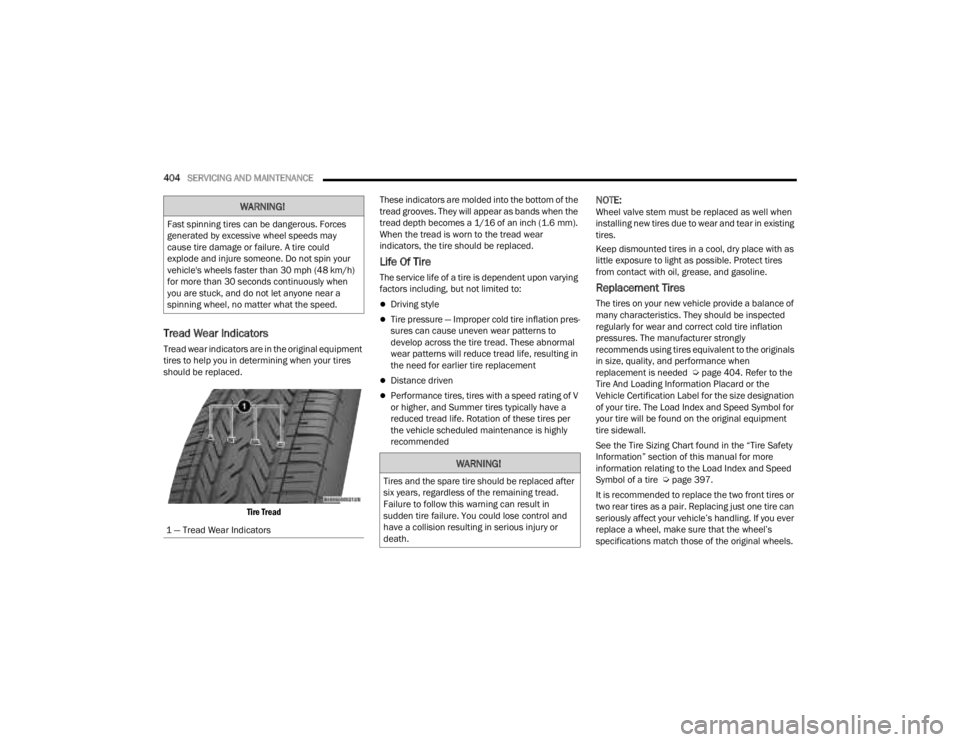
Tread wear indicators are in the original equipment
tires to help you in determining when your tires
should be replaced.
Tire Tread
These indicators are molded into the bottom of the
tread grooves. They will appear as bands when the
tread depth becomes a 1/16 of an inch (1.6 mm).
When the tread is worn to the tread wear
indicators, the tire should be replaced.
Life Of Tire
The service life of a tire is dependent upon varying
factors including, but not limited to:
Driving style
Tire pressure — Improper cold tire inflation pres
-
sures can cause uneven wear patterns to
develop across the tire tread. These abnormal
wear patterns will reduce tread life, resulting in
the need for earlier tire replacement
Distance driven
Performance tires, tires with a speed rating of V
or higher, and Summer tires typically have a
reduced tread life. Rotation of these tires per
the vehicle scheduled maintenance is highly
recommended
NOTE:Wheel valve stem must be replaced as well when
installing new tires due to wear and tear in existing
tires.
Keep dismounted tires in a cool, dry place with as
little exposure to light as possible. Protect tires
from contact with oil, grease, and gasoline.
Replacement Tires
The tires on your new vehicle provide a balance of
many characteristics. They should be inspected
regularly for wear and correct cold tire inflation
pressures. The manufacturer strongly
recommends using tires equivalent to the originals
in size, quality, and performance when
replacement is needed Ú page 404. Refer to the
Tire And Loading Information Placard or the
Vehicle Certification Label for the size designation
of your tire. The Load Index and Speed Symbol for
your tire will be found on the original equipment
tire sidewall.
See the Tire Sizing Chart found in the “Tire Safety
Information” section of this manual for more
information relating to the Load Index and Speed
Symbol of a tire Ú page 397.
It is recommended to replace the two front tires or
two rear tires as a pair. Replacing just one tire can
seriously affect your vehicle’s handling. If you ever
replace a wheel, make sure that the wheel’s
specifications match those of the original wheels.
WARNING!
Fast spinning tires can be dangerous. Forces
generated by excessive wheel speeds may
cause tire damage or failure. A tire could
explode and injure someone. Do not spin your
vehicle's wheels faster than 30 mph (48 km/h)
for more than 30 seconds continuously when
you are stuck, and do not let anyone near a
spinning wheel, no matter what the speed.
1 — Tread Wear Indicators
WARNING!
Tires and the spare tire should be replaced after
six years, regardless of the remaining tread.
Failure to follow this warning can result in
sudden tire failure. You could lose control and
have a collision resulting in serious injury or
death.
23_JT_OM_EN_USC_t.book Page 404
Page 411 of 448
SERVICING AND MAINTENANCE409
(Continued)
TIRE ROTATION RECOMMENDATIONS
The tires on the front and rear of your vehicle
operate at different loads and perform different
steering, handling, and braking functions. For
these reasons, they wear at unequal rates.
These effects can be reduced by timely rotation of
tires. The benefits of rotation are especially
worthwhile with aggressive tread designs such as
those on On/Off Road type tires. Rotation will
increase tread life, help to maintain mud, snow,
and wet traction levels, and contribute to a
smooth, quiet ride. For the proper maintenance intervals
Úpage 354.
The reasons for any rapid or unusual wear should
be corrected prior to rotation being performed.
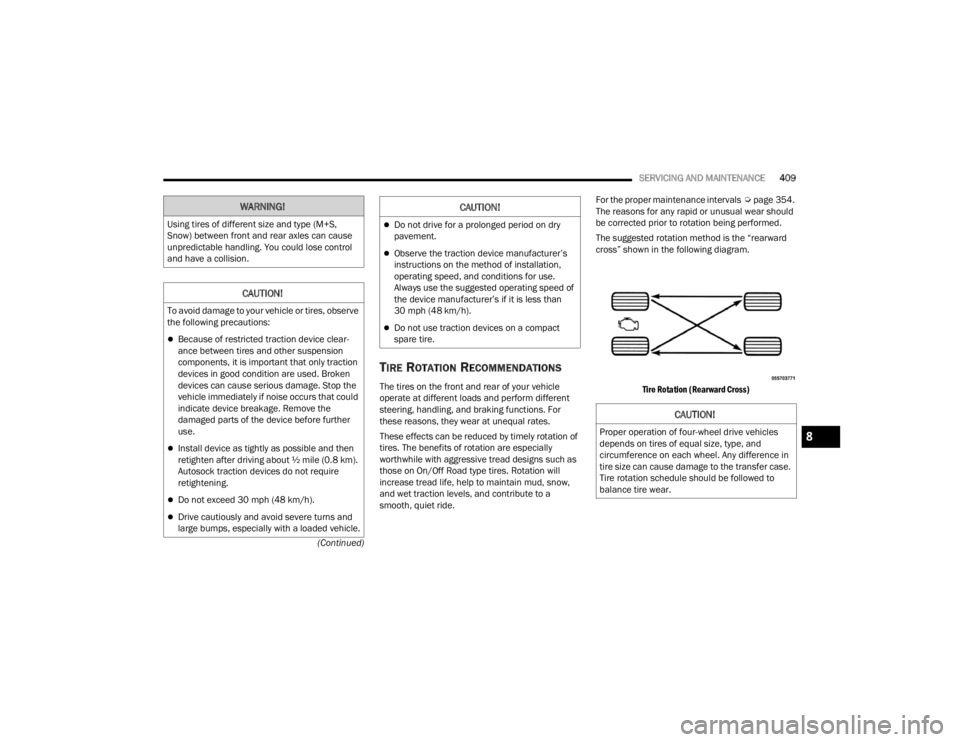
The suggested rotation method is the “rearward
cross” shown in the following diagram.
Tire Rotation (Rearward Cross)
WARNING!
Using tires of different size and type (M+S,
Snow) between front and rear axles can cause
unpredictable handling. You could lose control
and have a collision.
CAUTION!
To avoid damage to your vehicle or tires, observe
the following precautions:
Because of restricted traction device clear -
ance between tires and other suspension
components, it is important that only traction
devices in good condition are used. Broken
devices can cause serious damage. Stop the
vehicle immediately if noise occurs that could
indicate device breakage. Remove the
damaged parts of the device before further
use.
Install device as tightly as possible and then
retighten after driving about ½ mile (0.8 km).
Autosock traction devices do not require
retightening.
Do not exceed 30 mph (48 km/h).
Drive cautiously and avoid severe turns and
large bumps, especially with a loaded vehicle.
Do not drive for a prolonged period on dry
pavement.
Observe the traction device manufacturer’s
instructions on the method of installation,
operating speed, and conditions for use.
Always use the suggested operating speed of
the device manufacturer’s if it is less than
30 mph (48 km/h).
Do not use traction devices on a compact
spare tire.
CAUTION!
CAUTION!
Proper operation of four-wheel drive vehicles
depends on tires of equal size, type, and
circumference on each wheel. Any difference in
tire size can cause damage to the transfer case.
Tire rotation schedule should be followed to
balance tire wear.8
23_JT_OM_EN_USC_t.book Page 409
Page 424 of 448

422TECHNICAL SPECIFICATIONS
BIODIESEL FUEL REQUIREMENTS
A maximum blend of 5% biodiesel meeting ASTM
specification D975 is recommended for use with
your diesel engine. If frequent operation with
biodiesel blends that are between 6% and 20%
(B6–B20) is desired, the maintenance schedule is
subject to shorter intervals.
The oil and filter change along with fuel filter
replacement is subject to shorter intervals when
operating your engine on biodiesel greater than
5%. Do not use biodiesel greater than 20%.
For regular use of biodiesel blends between 6%
and 20% (B6–B20) it is important that you
understand and comply with these requirements
Úpage 358.
Biodiesel is a fuel produced from renewable
resources typically derived from animal fat,
rapeseed oil (Rapeseed Methyl Ester (RME) base),
or soybean oil (Soy Methyl Ester (SME or SOME)
base). Biodiesel fuel has inherent limitations which
require that you understand and adhere to the
following requirements if you use blends of
biodiesel between 6% and 20% (B6–B20). There
are no unique restrictions for the use of B5.
Biodiesel Fuel Properties — Low Ambient
Temperatures
Biodiesel fuel may gel or solidify at low ambient
temperatures, which may pose problems for both
storage and operation. Precautions can be
necessary at low ambient temperatures, such as
storing the fuel in a heated building or a heated
storage tank, or using cold temperature additives.
Fuel Quality — Must Comply With ASTM
Standards
The quality of Biodiesel fuel may vary widely. Only
fuel produced by a BQ9000 supplier to the
following specifications may be blended to meet
biodiesel blend B6 – B20 fuel meeting ASTM
specification D-7467:
Petrodiesel fuel meeting ASTM specification
D-975 and biodiesel fuel (B100) meeting ASTM
specification D-6751
Fuel Oxidation Stability — Must Use Fuel
Within Six Months Of Manufacture
Biodiesel fuel has poor oxidation stability which
can result in long term storage problems. Fuel
produced to approved ASTM standards, if stored
properly, provides for protection against fuel
oxidation for up to six months.
CAUTION!
Failure to comply with Oil Change requirements
for vehicles operating on biodiesel blends
between 6% and 20% (B6–B20) will result in
premature engine wear. Such wear is not
covered by the New Vehicle Limited Warranty.
CAUTION!
Use of blends greater than 20% is not approved.
Use of blends greater than 20% can result in
engine damage. Such damage is not covered by
the New Vehicle Limited Warranty.
CAUTION!
In the event that the vehicle is filled with
biodiesel and not used for more than a month,
the fuel should either be used up by driving (up
to quarter tank) and filled with standard diesel
blends with less than 5% that is normally
available. This will help prevent the fuel filter
clogging and potential damage to the fuel
injection system due to degraded biodiesel,
which is not covered by the New Vehicle Limited
Warranty.
23_JT_OM_EN_USC_t.book Page 422