instrument panel JEEP GRAND CHEROKEE 2004 WK / 3.G User Guide
[x] Cancel search | Manufacturer: JEEP, Model Year: 2004, Model line: GRAND CHEROKEE, Model: JEEP GRAND CHEROKEE 2004 WK / 3.GPages: 344, PDF Size: 6.09 MB
Page 56 of 344

mLights................................75
NInterior Lighting.......................75
NFront Map/Reading Lights...............75
NMulti-Function Control Lever..............76
NBattery Saver FeatureÐExterior/Interior
Lights..............................76
NHeadlights And Parking Lights............77
NAutomatic Headlight System Ð If Equipped . . .77
NInstrument Panel And Interior Lights........78
NDaytime Running Lights Ð Canada Only.....78
NLights-On Reminder....................78
NFog Lights Ð If Equipped................79
NTurn Signals..........................79NHeadlight Dimmer Switch................79
NPassing Light.........................79
NHeadlight Time Delay...................80
mWindshield Wipers And Washers.............80
NMist................................81
NSpeed Sensitive Intermittent Wiper System....81
NRain Sensitive Wiper System Ð If Equipped . . .82
mTilt Steering Column.....................84
mAdjustable Pedals Ð If Equipped............84
mElectronic Speed Control...................86
NTo Activate...........................86
NTo Set At a Desired Speed................86
NTo Deactivate.........................86
56 UNDERSTANDING THE FEATURES OF YOUR VEHICLE
Page 71 of 344

Heated Seats Ð If Equipped
This feature heats the driver's and passenger's front
seats. The controls for the heated seats are located on the
instrument panel below the heater/air conditioning con-
trols. After turning on the ignition you can choose from
HI, OFF, or LO heat settings.An indicator on the switch shows which setting has been
selected. To turn off the heated seats, position the switch
in the middle.
60/40 Split Rear Seat
Either side of the rear seat can be folded flat to allow for
extended cargo space and still maintain some rear seating
room.
NOTE:Be sure that the front seats are fully upright and
positioned forward. This will allow the rear seatback to
fold down easily.
UNDERSTANDING THE FEATURES OF YOUR VEHICLE 71
3
Page 74 of 344

TO OPEN AND CLOSE THE HOOD
To open the hood, pull the release lever inside your
vehicle located below the instrument panel and in front
of the driver's door.
Then reach under the hood and pull upward on the
safety latch and lift the hood. To prevent possible dam-
age, do not slam the hood to close it. Use a firm
downward push at the center of the hood to ensure that
both latches engage.
74 UNDERSTANDING THE FEATURES OF YOUR VEHICLE
Page 75 of 344
WARNING!
If the hood is not fully latched, it could fly up when
the vehicle is moving and block your forward vision.
Be sure all hood latches are fully latched before
driving.
LIGHTS
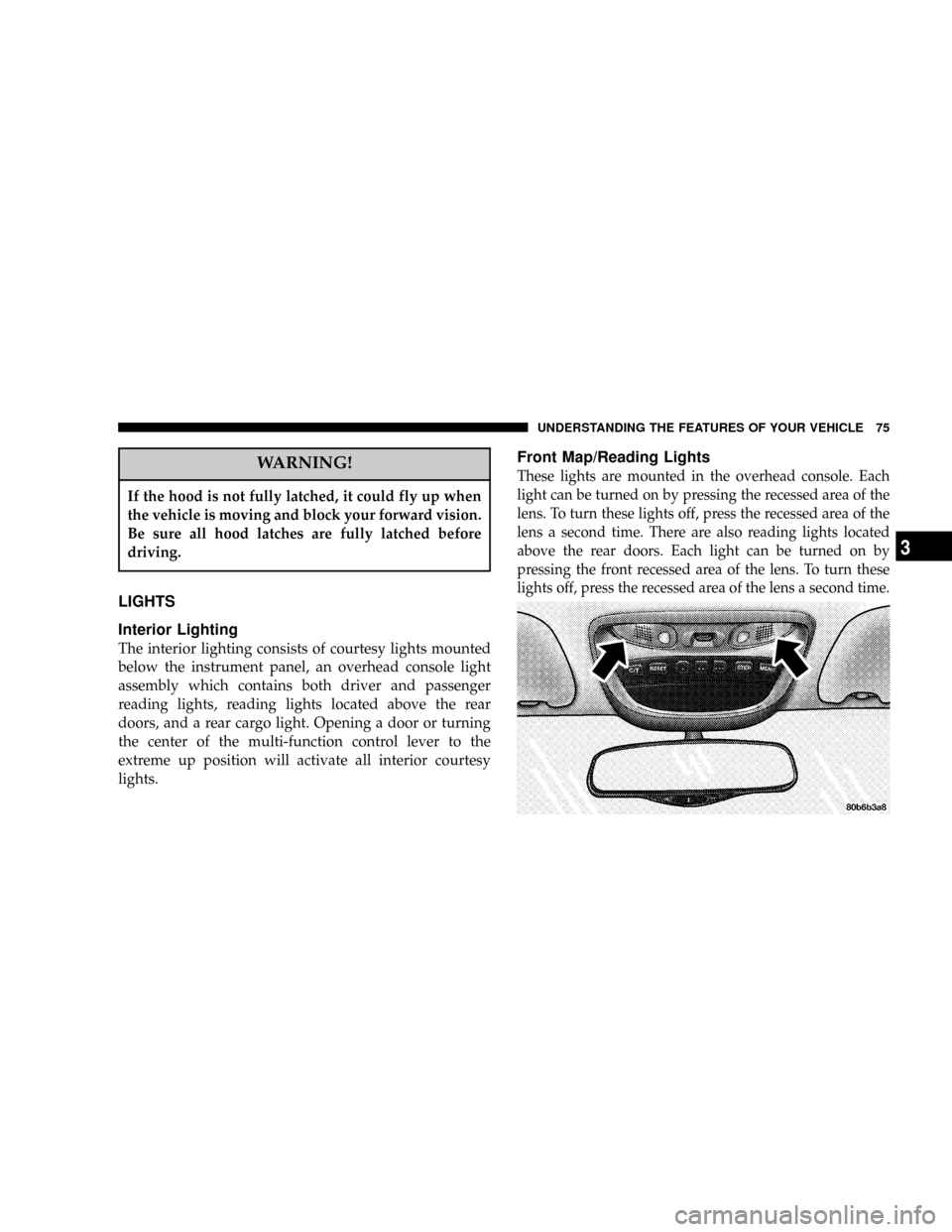
Interior Lighting
The interior lighting consists of courtesy lights mounted
below the instrument panel, an overhead console light
assembly which contains both driver and passenger
reading lights, reading lights located above the rear
doors, and a rear cargo light. Opening a door or turning
the center of the multi-function control lever to the
extreme up position will activate all interior courtesy
lights.
Front Map/Reading Lights
These lights are mounted in the overhead console. Each
light can be turned on by pressing the recessed area of the
lens. To turn these lights off, press the recessed area of the
lens a second time. There are also reading lights located
above the rear doors. Each light can be turned on by
pressing the front recessed area of the lens. To turn these
lights off, press the recessed area of the lens a second time.
UNDERSTANDING THE FEATURES OF YOUR VEHICLE 75
3
Page 76 of 344

Multi-Function Control Lever
The multi-function control lever controls the operation of
the headlights, turn signals, headlight beam selection,
instrument panel light dimming, passing light, interior
courtesy/dome lights, and optional fog lights.
Battery Saver FeatureÐExterior/Interior Lights
If the multi-function control lever is left in the interior
light position, parking light position, or the headlight
position when the ignition switch is moved to the OFF
position, the battery saver feature will automatically turn
off the exterior and interior lights after eight minutes.
Normal operation will resume when the ignition is
turned ON or when the headlight switch is turned to
another position.
76 UNDERSTANDING THE FEATURES OF YOUR VEHICLE
Page 78 of 344

to turn this feature on or off. Also, refer to ªWindshield
Wipers and Washersº in this section for more information
NOTE:When your headlights come on during the
daytime, the instrument panel lights will automatically
dim to the lower nighttime intensity. Refer to ªInstru-
ment Panel and Interior Lightsº below for setting the
instrument panel lights to full daytime intensity.
Instrument Panel and Interior Lights
When the multi-function control lever is in the parklight,
headlights, or AUTO position (if equipped), rotating the
center portion of the lever up and down will increase and
decrease the brightness (dimmer control) of the instru-
ment panel lights. Full daytime brightness on all elec-
tronic displays (odometer, overhead console, radio, and
Automatic Climate Control (if equipped) is obtained by
rotating the center portion of the control to the first
detent above the dimmer range. Rotating the control to
the second detent above the dimmer range turns theinterior lights on. Rotating the control to the ªOffº
(extreme bottom) position disables all the interior lights,
even when the doors and liftgate are open. While in the
ªOffº position the instrument panel lighting is at the
lowest light level and may not be suitable for night
driving.
Daytime Running Lights Ð Canada Only
The headlights come on at a low intensity level whenever
the engine is running. The lights remain on until the
ignition switch is turned OFF or the parking brake is
engaged. The headlight switch must be used for normal
night time driving.
Lights-On Reminder
If the headlights or parking lights are on after the ignition
is turned OFF, a chime will sound when the driver's door
is opened.
78 UNDERSTANDING THE FEATURES OF YOUR VEHICLE
Page 96 of 344

display selects English, Francais, Deutsch, Italiana, or
Espanol. As you continue the displayed information will
be shown in the selected language.
Display U.S. or Metric?
Pressing the STEP button when in this display selects US
or Metric. The overhead console and instrument panel
displays will be in the selected units.
Auto Door Locks?
When this feature is selected, all doors and the liftgate
lock automatically when the speed of the vehicle reaches
15 mph (25 km/h). Pressing the STEP button when in this
display will select ªYesº or ªNo.º
Auto Unlock On Exit? (Available Only When the
AUTO DOOR LOCKS Feature is Turned On )
When this feature is selected all the vehicle's doors will
unlock when the driver's door is opened if the vehicle is
stopped and the transmission is in P (Park) or N (Neu-
tral) position. Pressing the STEP button when in this
display will select ªYesº or ªNo.º
Remote Unlock Driver's Door 1st?
When this feature is selected only the driver's door will
unlock on the first press of the remote keyless entry
unlock button and require a second press to unlock the
remaining locked doors and liftgate. WhenREMOTE
UNLOCK ALL DOORSis selected all of the doors and
96 UNDERSTANDING THE FEATURES OF YOUR VEHICLE
Page 98 of 344

headlights will turn on when the wipers are turned on.
The headlights will also turn off when the wipers are
turned off if they were turned on in this way. Pressing the
STEP button when in this display will select ªYesº or
ªNo.º
NOTE:Turning the headlights on during the daytime
causes the instrument panel lights to dim. To increase the
brightness, refer to ªLightsº in this section.
Service Interval
When this feature is selected a service interval between
2,000 (3 200 km) and 6,000 miles (10 000 km) in 500 mile
(800 km) increments may be selected. Pressing the STEP
button when in this display will select distances between
2,000 (3 200 km) and 6,000 miles (10 000 km) in 500 mile
(800 km) increments.
Reset Service Distance (Displays Only if Service
Interval was Changed)
When this feature is selected the current accumulated
service distance can be reset to the newly selected service
interval. Pressing the STEP button when in this display
will select ªYesº or ªNo.º
Low Fuel Chime?
When this feature is selected a chime will sound when
the ªLow Fuel Indicator Lightº is displayed in the
instrument panel cluster. Pressing the STEP button when
in this display will select ªYesº or ªNo.º
Easy Exit Seat? (Available with Memory Seat Only)
When this feature is selected, the driver's seat moves
rearward 2 inches (5 cm) or to the farthest rearward
position if this distance is less than 2 inches (5 cm) when
the key is removed from the ignition switch so that the
driver can more easily exit the vehicle. The seat will
return to the memorized seat location (if REMOTE LINK
98 UNDERSTANDING THE FEATURES OF YOUR VEHICLE
Page 115 of 344

POWER OUTLET
To the right of the convenience tray (lower center of
instrument panel) is an outlet for electrically powered
accessories. Pull lightly on the tab of the plastic cover to
access the outlet.
There is a rear power outlet located in the right rear cargo
area rearward of the storage bin/CD changer (if equipped).
The power outlets are a direct feed from the battery so
they receive power whether the ignition is in the ON or
OFF position.
All accessories connected to this outlet should be re-
moved or turned off when the vehicle is not in use to
protect the battery against discharge.
Rear Power Outlet
UNDERSTANDING THE FEATURES OF YOUR VEHICLE 115
3
Page 123 of 344

UNDERSTANDING YOUR INSTRUMENT PANEL
CONTENTS
mInstrument Panel And Interior Controls.......126
mInstrument Cluster......................127
NInstrument Cluster Ð If Equipped.........128
mInstrument Cluster Description.............129
mElectronic Digital Clock..................135
NClock Setting Procedure.................135
mRadio General Information................135
NRadio Broadcast Signals.................135
NTwo Types Of Signals..................135NElectrical Disturbances..................136
NAM Reception.......................136
NFM Reception........................136
mSales Code RBKÐAM/ FM Stereo Radio With
CD Player And CD Changer Controls........136
NRadio Operation......................136
NCD Player Operation...................139
NCD Changer Control Capability Ð If
Equipped...........................140
NRadio Display Messages................1424