ABS JEEP GRAND CHEROKEE 2014 WK2 / 4.G User Guide
[x] Cancel search | Manufacturer: JEEP, Model Year: 2014, Model line: GRAND CHEROKEE, Model: JEEP GRAND CHEROKEE 2014 WK2 / 4.GPages: 220, PDF Size: 6.12 MB
Page 10 of 220
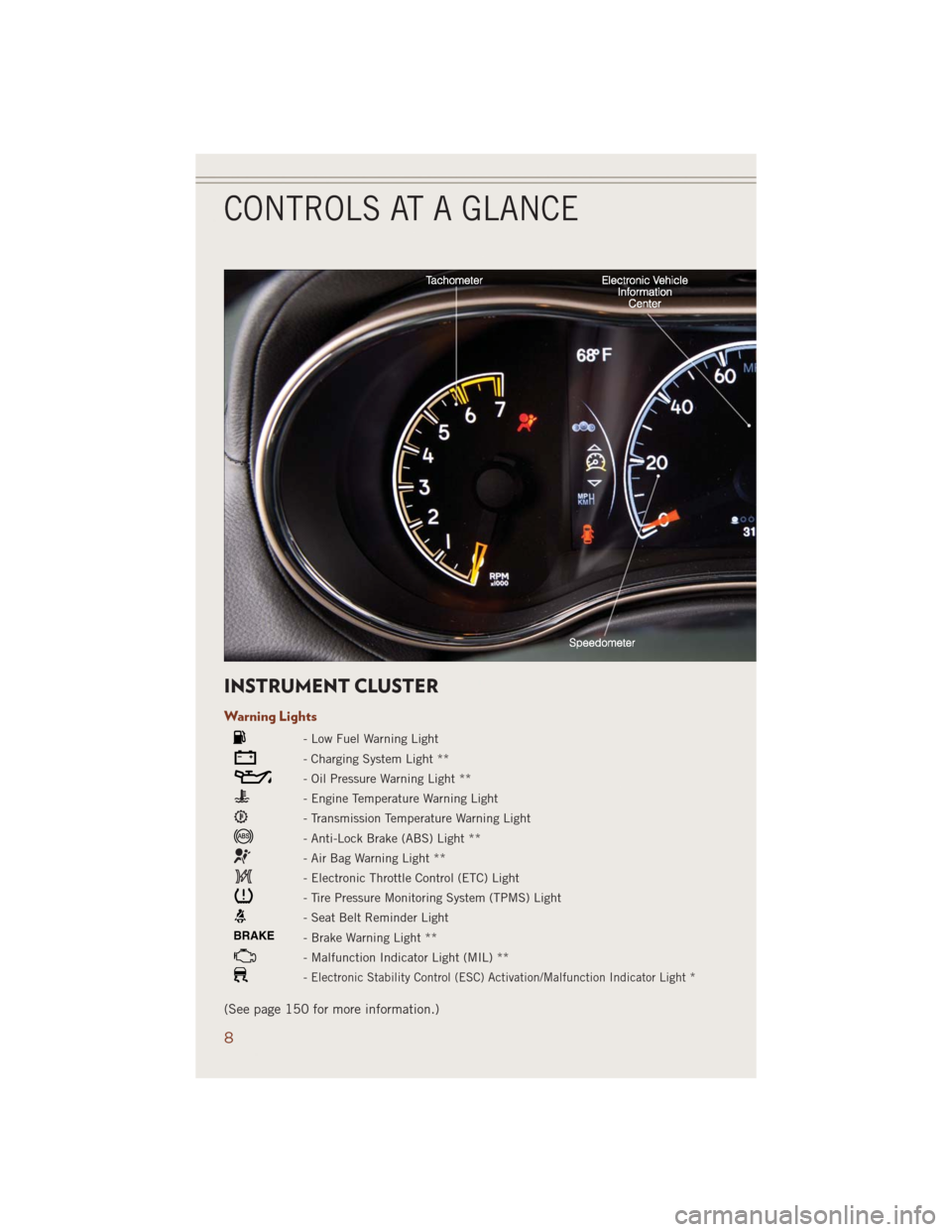
INSTRUMENT CLUSTER
Warning Lights
- Low Fuel Warning Light
- Charging System Light **
- Oil Pressure Warning Light **
- Engine Temperature Warning Light
- Transmission Temperature Warning Light
- Anti-Lock Brake (ABS) Light **
- Air Bag Warning Light **
- Electronic Throttle Control (ETC) Light
- Tire Pressure Monitoring System (TPMS) Light
- Seat Belt Reminder Light
BRAKE- Brake Warning Light **
- Malfunction Indicator Light (MIL) **
-Electronic Stability Control (ESC) Activation/Malfunction Indicator Light *
(See page 150 for more information.)
CONTROLS AT A GLANCE
8
Page 58 of 220
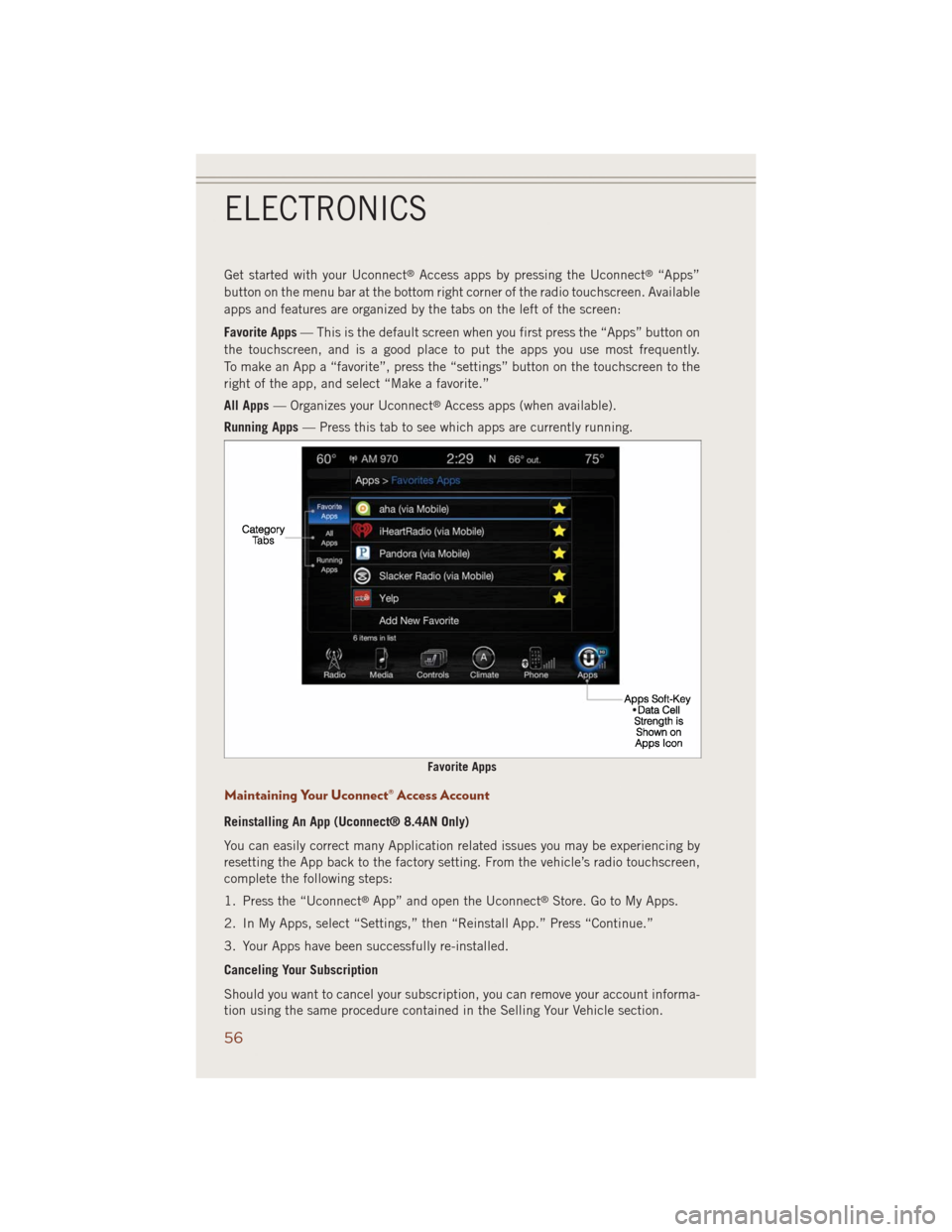
Get started with your Uconnect®Access apps by pressing the Uconnect®“Apps”
button on the menu bar at the bottom right corner of the radio touchscreen. Available
apps and features are organized by the tabs on the left of the screen:
Favorite Apps— This is the default screen when you first press the “Apps” button on
the touchscreen, and is a good place to put the apps you use most frequently.
To make an App a “favorite”, press the “settings” button on the touchscreen to the
right of the app, and select “Make a favorite.”
All Apps— Organizes your Uconnect
®Access apps (when available).
Running Apps— Press this tab to see which apps are currently running.
Maintaining Your Uconnect® Access Account
Reinstalling An App (Uconnect® 8.4AN Only)
You can easily correct many Application related issues you may be experiencing by
resetting the App back to the factory setting. From the vehicle’s radio touchscreen,
complete the following steps:
1. Press the “Uconnect
®App” and open the Uconnect®Store. Go to My Apps.
2. In My Apps, select “Settings,” then “Reinstall App.” Press “Continue.”
3. Your Apps have been successfully re-installed.
Canceling Your Subscription
Should you want to cancel your subscription, you can remove your account informa-
tion using the same procedure contained in the Selling Your Vehicle section.
Favorite Apps
ELECTRONICS
56
Page 124 of 220
QUADRA-TRAC I® FOUR-WHEEL DRIVE
Quadra-Trac I® Operating Instructions/Precautions — 3.6L Only
The Quadra-Trac I®is a single-speed (HI range only) transfer case, which provides
convenient full-time four-wheel drive. No driver interaction is required. The Brake
Traction Control (BTC) System, which combines standard ABS and Traction Control,
provides resistance to any wheel that is slipping to allow additional torque transfer to
wheels with traction.
QUADRA-TRAC II®/QUADRA-DRIVE II® FOUR-WHEEL
DRIVE
Quadra-Trac II®/Quadra-Drive II® Operating Instructions/Precautions
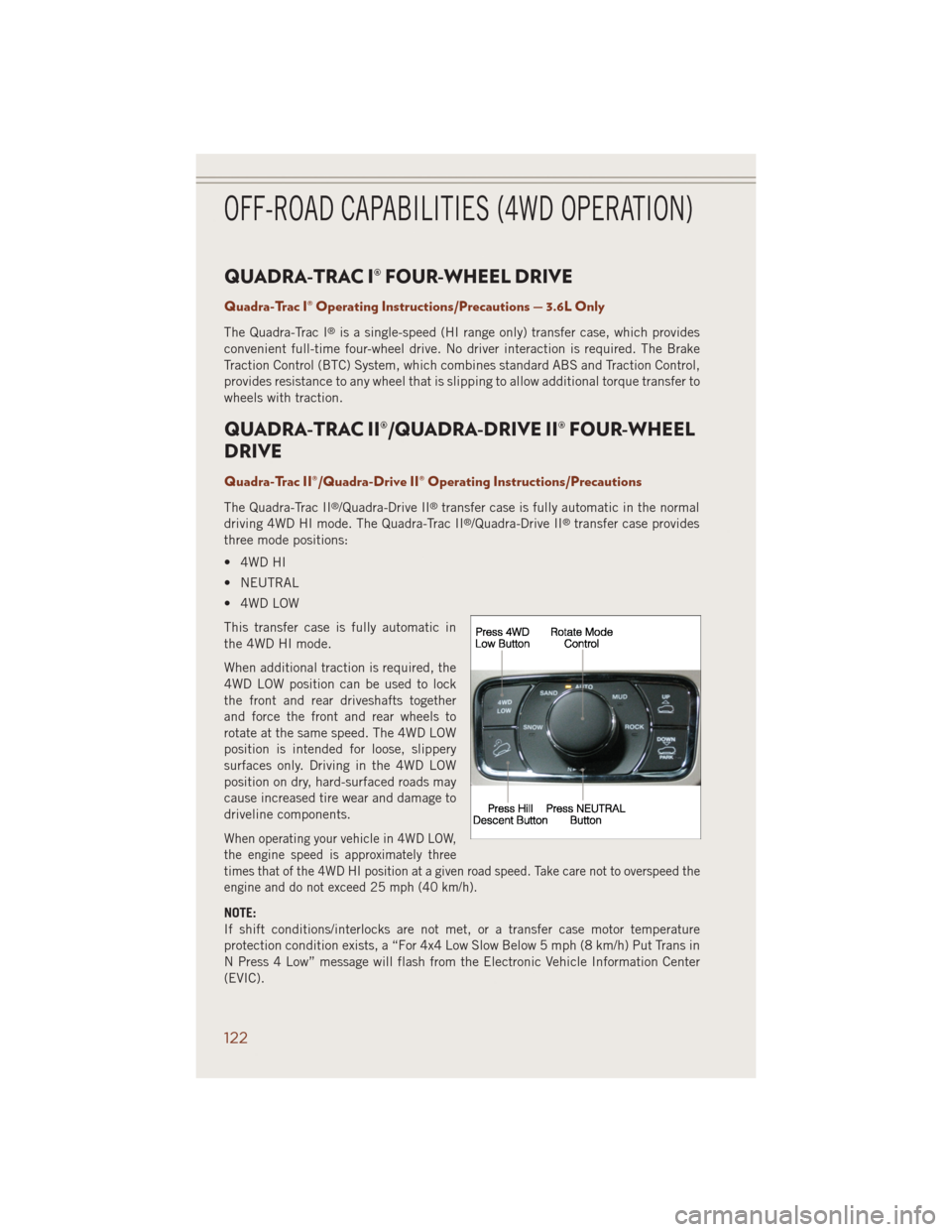
The Quadra-Trac II®/Quadra-Drive II®transfer case is fully automatic in the normal
driving 4WD HI mode. The Quadra-Trac II®/Quadra-Drive II®transfer case provides
three mode positions:
• 4WD HI
• NEUTRAL
• 4WD LOW
This transfer case is fully automatic in
the 4WD HI mode.
When additional traction is required, the
4WD LOW position can be used to lock
the front and rear driveshafts together
and force the front and rear wheels to
rotate at the same speed. The 4WD LOW
position is intended for loose, slippery
surfaces only. Driving in the 4WD LOW
position on dry, hard-surfaced roads may
cause increased tire wear and damage to
driveline components.
When operating your vehicle in 4WD LOW,
the engine speed is approximately three
times that of the 4WD HI position at a given road speed. Take care not to overspeed the
engine and do not exceed 25 mph (40 km/h).
NOTE:
If shift conditions/interlocks are not met, or a transfer case motor temperature
protection condition exists, a “For 4x4 Low Slow Below 5 mph (8 km/h) Put Trans in
N Press 4 Low” message will flash from the Electronic Vehicle Information Center
(EVIC).
OFF-ROAD CAPABILITIES (4WD OPERATION)
122
Page 131 of 220
Trailer Hitch Receiver Cover Removal (Summit Models) — If Equipped
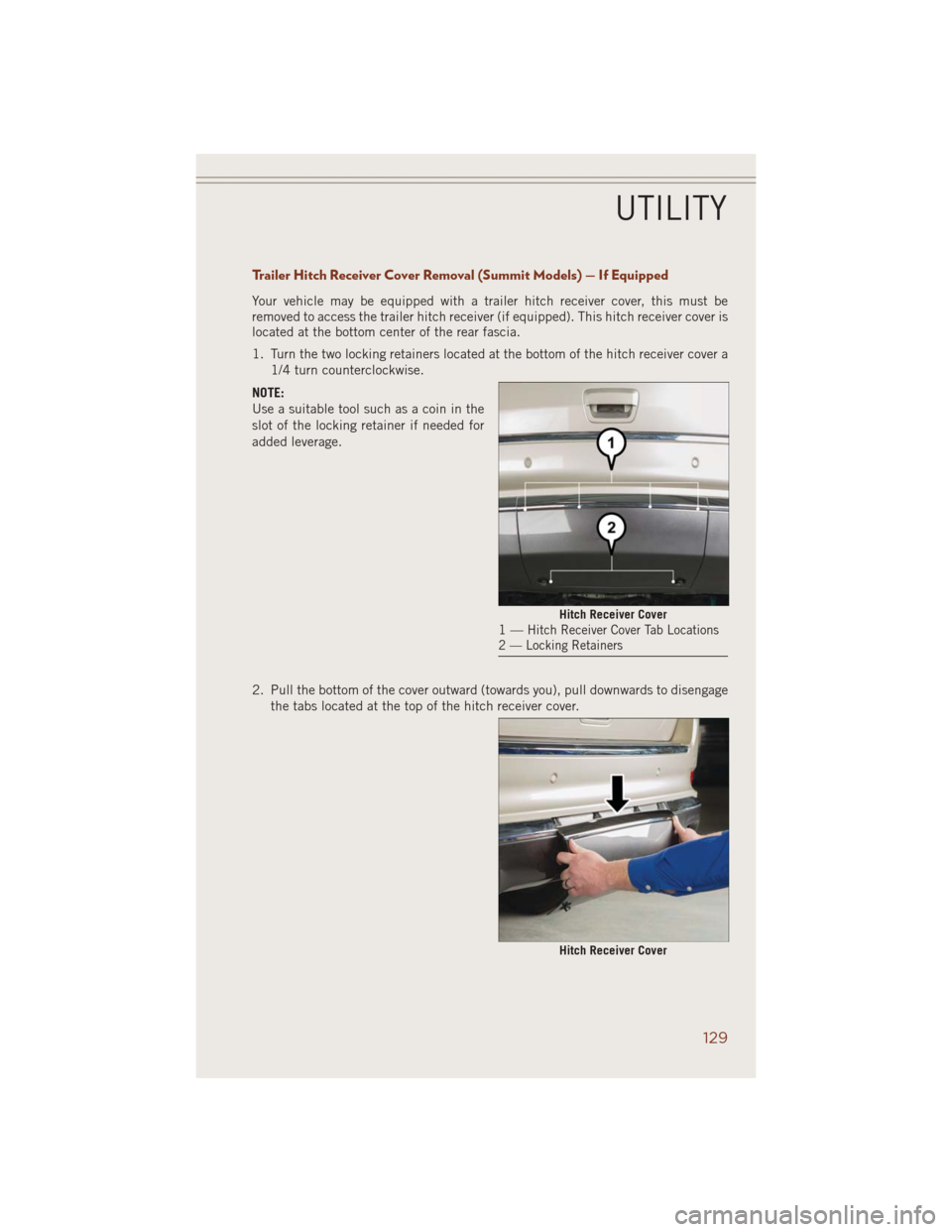
Your vehicle may be equipped with a trailer hitch receiver cover, this must be
removed to access the trailer hitch receiver (if equipped). This hitch receiver cover is
located at the bottom center of the rear fascia.
1. Turn the two locking retainers located at the bottom of the hitch receiver cover a
1/4 turn counterclockwise.
NOTE:
Use a suitable tool such as a coin in the
slot of the locking retainer if needed for
added leverage.
2. Pull the bottom of the cover outward (towards you), pull downwards to disengage
the tabs located at the top of the hitch receiver cover.
Hitch Receiver Cover1—Hitch Receiver Cover Tab Locations
2 — Locking Retainers
Hitch Receiver Cover
UTILITY
129
Page 132 of 220
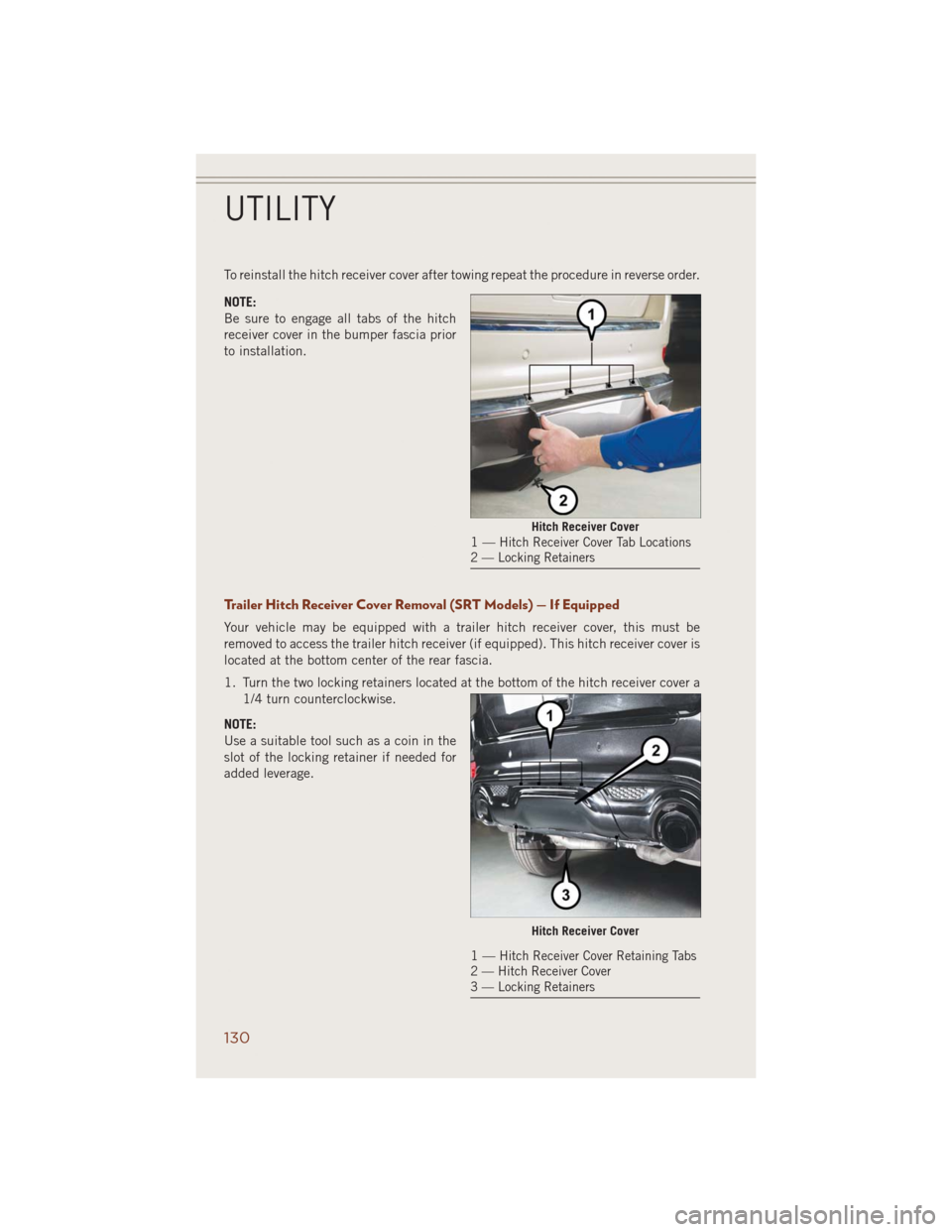
To reinstall the hitch receiver cover after towing repeat the procedure in reverse order.
NOTE:
Be sure to engage all tabs of the hitch
receiver cover in the bumper fascia prior
to installation.
Trailer Hitch Receiver Cover Removal (SRT Models) — If Equipped
Your vehicle may be equipped with a trailer hitch receiver cover, this must be
removed to access the trailer hitch receiver (if equipped). This hitch receiver cover is
located at the bottom center of the rear fascia.
1. Turn the two locking retainers located at the bottom of the hitch receiver cover a
1/4 turn counterclockwise.
NOTE:
Use a suitable tool such as a coin in the
slot of the locking retainer if needed for
added leverage.
Hitch Receiver Cover1—Hitch Receiver Cover Tab Locations
2 — Locking Retainers
Hitch Receiver Cover
1—Hitch Receiver Cover Retaining Tabs
2 — Hitch Receiver Cover
3 — Locking Retainers
UTILITY
130
Page 133 of 220
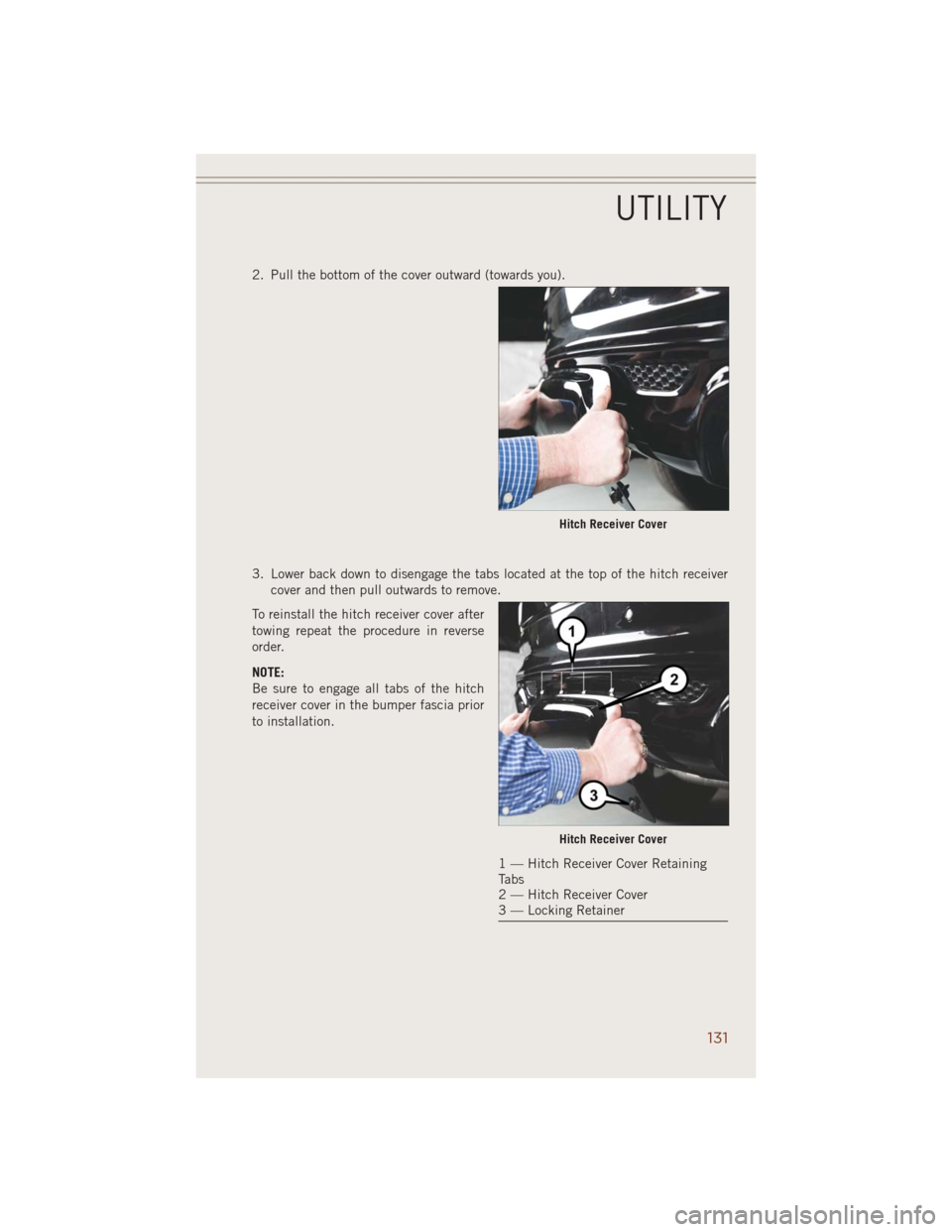
2. Pull the bottom of the cover outward (towards you).
3. Lower back down to disengage the tabs located at the top of the hitch receiver
cover and then pull outwards to remove.
To reinstall the hitch receiver cover after
towing repeat the procedure in reverse
order.
NOTE:
Be sure to engage all tabs of the hitch
receiver cover in the bumper fascia prior
to installation.
Hitch Receiver Cover
Hitch Receiver Cover
1 — Hitch Receiver Cover Retaining
Tabs
2 — Hitch Receiver Cover
3 — Locking Retainer
UTILITY
131
Page 154 of 220
- Brake Warning Light
This light monitors various brake functions, including brake fluid level and parking
brake application. If the brake light turns on it may indicate that the parking brake is
applied, that the brake fluid level is low, or that there is a problem with the anti-lock
brake system reservoir.
If the light remains on when the parking brake has been disengaged, and the fluid
level is at the full mark on the master cylinder reservoir, it indicates a possible brake
hydraulic system malfunction or that a problem with the Brake Booster has been
detected by the Anti-Lock Brake System (ABS)/Electronic Stability Control (ESC)
system. In this case, the light will remain on until the condition has been corrected.
If the problem is related to the brake booster, the ABS pump will run when applying
the brake and a brake pedal pulsation may be felt during each stop.
The dual brake system provides a reserve braking capacity in the event of a failure to
a portion of the hydraulic system. A leak in either half of the dual brake system is
indicated by the Brake Warning Light, which will turn on when the brake fluid level
in the master cylinder has dropped below a specified level. The light will remain on
until the cause is corrected.
Vehicles equipped with the Anti-Lock Brake System (ABS), are also equipped with
Electronic Brake Force Distribution (EBD). In the event of an EBD failure, the Brake
Warning Light will turn on along with the ABS Light. Immediate repair to the ABS
system is required.
Operation of the Brake Warning Light can be checked by turning the ignition switch
from the OFF position to the ON/RUN position. The light should illuminate for
approximately two seconds. The light should then turn off unless the parking brake
is applied or a brake fault is detected. If the light does not illuminate, have the light
inspected by an authorized dealer.
The light also will turn on when the parking brake is applied with the ignition switch
in the ON/RUN position.
NOTE:
This light shows only that the parking brake is applied. It does not show the degree
of brake application.
WARNING!
Driving a vehicle with the red brake light on is dangerous. Part of the brake system
may have failed. It will take longer to stop the vehicle. You could have a collision.
Have the vehicle checked immediately.
WHAT TO DO IN EMERGENCIES
152
Page 156 of 220
• The ESC system will make buzzing or clicking sounds when it is active. This is
normal; the sounds will stop when ESC becomes inactive following the maneuver
that caused the ESC activation.
• To improve the vehicle's traction when starting off in deep snow, sand or gravel, it
may be desirable to switch the ESC system to Partial Off mode by momentarily
pressing the ESC Off
switch located below the climate controls, on the switch
panel.
- Electronic Stability Control (ESC) OFF Indicator Light
This light indicates the Electronic Stability Control (ESC) is off.
- Charging System Light
This light shows the status of the electrical charging system. If the charging system
light remains on, it means that the vehicle is experiencing a problem with the
charging system.
We recommend you do not continue driving if the charging system light is on. Have
the vehicle serviced immediately.
- Oil Pressure Warning Light
This light indicates low engine oil pressure. If the light turns on while driving, stop
the vehicle and shut off the engine as soon as possible. A chime will sound for four
minutes when this light turns on.
We recommend you do not operate the vehicle or engine damage will occur. Have the
vehicle serviced immediately.
- Anti-Lock Brake (ABS) Light
This light monitors the Anti-Lock Brake System (ABS). The light will turn on when the
ignition switch is turned to the ON/RUN position and may stay on for as long as four
seconds.
If the ABS light remains on or turns on while driving, it indicates that the Anti-Lock
portion of the brake system is not functioning and that service is required. However,
the conventional brake system will continue to operate normally if the BRAKE
warning light is not on.
If the ABS light is on, the brake system should be serviced as soon as possible to
restore the benefits of Anti-Lock brakes. If the ABS light does not turn on when the
ignition switch is turned to the ON/RUN position, have the light inspected by an
authorized dealer.
WHAT TO DO IN EMERGENCIES
154
Page 213 of 220
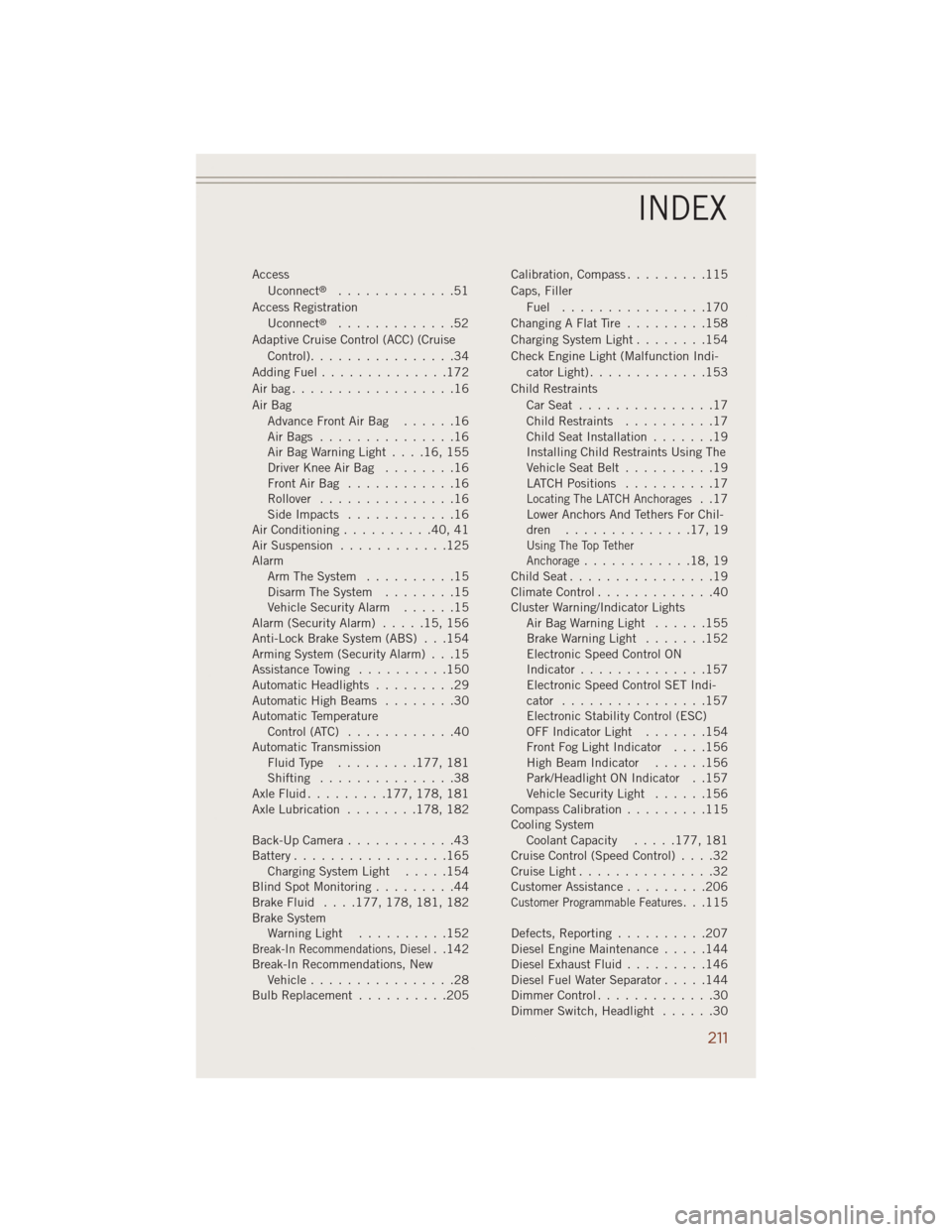
Access
Uconnect®.............51
Access Registration
Uconnect
®.............52
Adaptive Cruise Control (ACC) (Cruise
Control)................34
Adding Fuel..............172
Airbag..................16
Air Bag
AdvanceFrontAirBag ......16
AirBags ...............16
AirBagWarningLight....16,155
Driver Knee Air Bag........16
FrontAirBag ............16
Rollover...............16
SideImpacts ............16
Air Conditioning..........40,41
Air Suspension............125
Alarm
Arm The System..........15
Disarm The System........15
Vehicle Security Alarm......15
Alarm (Security Alarm).....15,156
Anti-Lock Brake System (ABS) . . .154
Arming System (Security Alarm) . . .15
Assistance Towing..........150
Automatic Headlights.........29
Automatic High Beams........30
Automatic Temperature
Control (ATC)............40
Automatic Transmission
FluidType .........177, 181
Shifting...............38
AxleFluid.........177, 178, 181
Axle Lubrication........178, 182
Back-Up Camera............43
Battery.................165
Charging System Light.....154
Blind Spot Monitoring.........44
Brake Fluid....177, 178, 181, 182
Brake System
WarningLight ..........152
Break-In Recommendations, Diesel. .142
Break-In Recommendations, New
Vehicle................28
BulbReplacement ..........205Calibration, Compass.........115
Caps, Filler
Fuel ................170
ChangingAFlatTire .........158
Charging System Light........154
Check Engine Light (Malfunction Indi-
cator Light).............153
Child Restraints
CarSeat ...............17
Child Restraints..........17
Child Seat Installation.......19
Installing Child Restraints Using The
Vehicle Seat Belt..........19
LATCH Positions..........17
Locating The LATCH Anchorages..17
Lower Anchors And Tethers For Chil-
dren ..............17,19
Using The Top Tether
Anchorage............18,19
ChildSeat................19
Climate Control.............40
Cluster Warning/Indicator Lights
AirBagWarningLight ......155
Brake Warning Light.......152
Electronic Speed Control ON
Indicator..............157
Electronic Speed Control SET Indi-
cator................157
Electronic Stability Control (ESC)
OFF Indicator Light.......154
Front Fog Light Indicator....156
High Beam Indicator......156
Park/Headlight ON Indicator . .157
Vehicle Security Light......156
Compass Calibration.........115
Cooling System
Coolant Capacity.....177, 181
Cruise Control (Speed Control)....32
CruiseLight...............32
Customer Assistance.........206
Customer Programmable Features...115
Defects, Reporting..........207
Diesel Engine Maintenance.....144
Diesel Exhaust Fluid.........146
Diesel Fuel Water Separator.....144
DimmerControl.............30
Dimmer Switch, Headlight......30
INDEX
211