instrument cluster JEEP GRAND CHEROKEE 2015 WK2 / 4.G Owners Manual
[x] Cancel search | Manufacturer: JEEP, Model Year: 2015, Model line: GRAND CHEROKEE, Model: JEEP GRAND CHEROKEE 2015 WK2 / 4.GPages: 717, PDF Size: 18.54 MB
Page 17 of 717
Ignition Or Accessory On Message
Opening the driver’s door when the ignition is in ACC or
ON (engine not running), a chime will sound to remind
you to cycle the ignition to OFF. In addition to the chime,
the ignition or accessory on message will display in the
cluster.
NOTE:With the Uconnect® system, the power window
switches, radio, power sunroof (if equipped), and power
outlets will remain active for up to 10 minutes after the
ignition is cycled to the OFF position. Opening either
front door will cancel this feature. The time for this
feature is programmable. Refer to “Uconnect® Settings”
in “Understanding Your Instrument Panel” for further
information.
WARNING!
•When leaving the vehicle, always remove the Key
Fob from the vehicle and lock your vehicle.
•Never leave children alone in a vehicle, or with
access to an unlocked vehicle.
•Allowing children to be in a vehicle unattended is
dangerous for a number of reasons. A child or others
could be seriously or fatally injured. Children
should be warned not to touch the parking brake,
brake pedal or the transmission gear selector.
•Do not leave the Key Fob in or near the vehicle, or
in a location accessible to children, and do not
leave the ignition of a vehicle equipped with
Keyless Enter-N-Go™ in the ACC or ON/RUN
mode. A child could operate power windows, other
controls, or move the vehicle.
(Continued)
2
THINGS TO KNOW BEFORE STARTING YOUR VEHICLE 15
Page 164 of 717
•To set a memory profile to your RKE transmitter, refer
to “Linking And Unlinking The Remote Keyless Entry
Transmitter To Memory” in this section.
Linking And Unlinking The Remote Keyless Entry
Transmitter To Memory
Your RKE transmitters can be programmed to recall one
of two pre-programmed memory profiles by pressing the
UNLOCK button on the RKE transmitter.
NOTE:Before programming your RKE transmitters you
must select the “Memory To FOB” feature through the
Uconnect® system screen. Refer to “Uconnect® Settings ”
in “Understanding Your Instrument Panel” for further
information.
To program your RKE transmitters, perform the follow-
ing:
1. Cycle the vehicles ignition to the OFF position.
2. Select a desired memory profile (1) or (2).
NOTE:If a memory profile has not already been set,
refer to#Programming The Memory Feature#in this
section for instructions on how to set a memory profile.
3. Once the profile has been recalled, press and release
the SET (S) button on the memory switch.
4. Within five seconds, press and release button (1) or (2)
accordingly. “Memory Profile Set” (1 or 2) will display
in the instrument cluster.
5. Press and release the LOCK button on the RKE
transmitter within 10 seconds.
NOTE:Your RKE transmitters can be unlinked to your
memory settings by pressing the SET (S) button, and
within 10 seconds, followed by pressing the UNLOCK
button on the RKE transmitter.
162 UNDERSTANDING THE FEATURES OF YOUR VEHICLE
Page 174 of 717
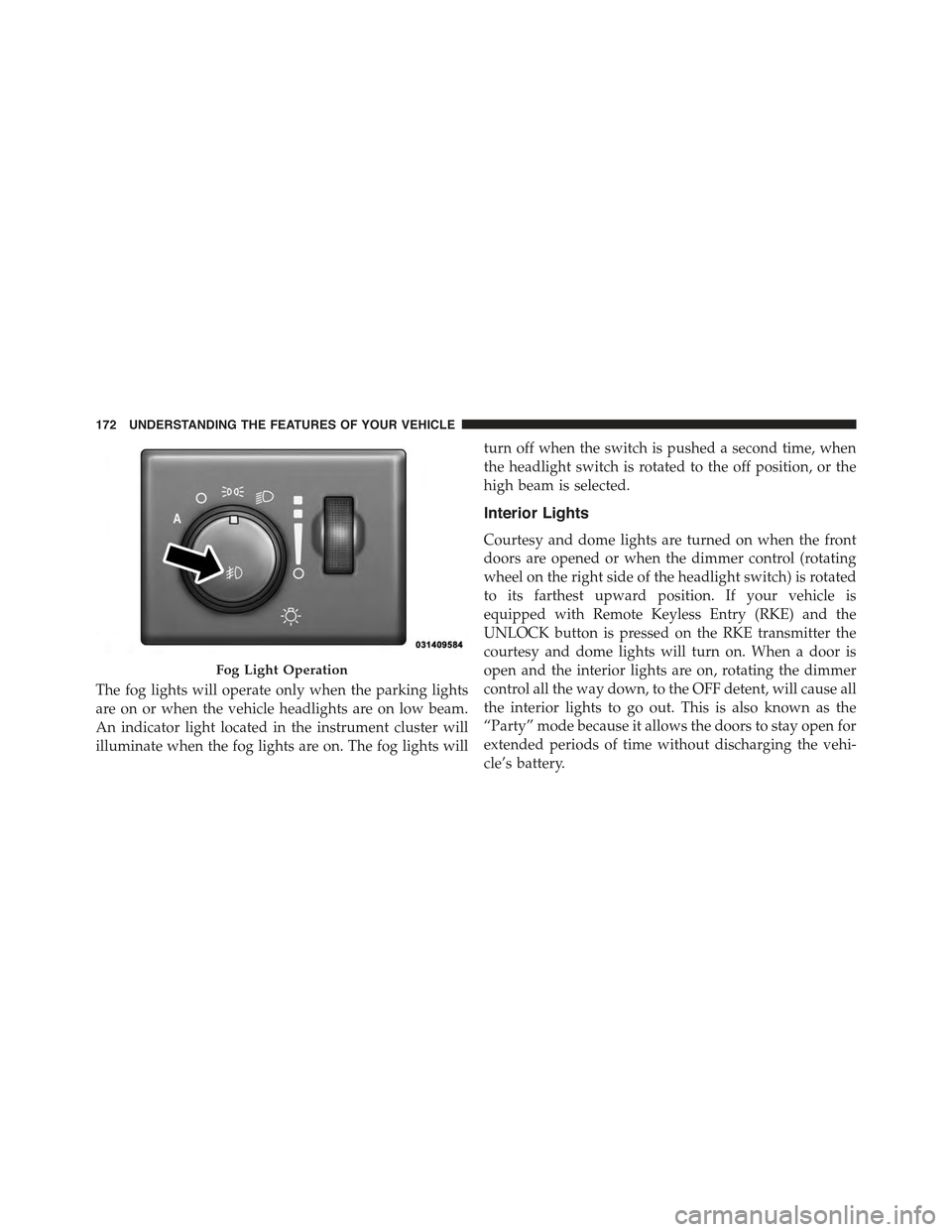
The fog lights will operate only when the parking lights
are on or when the vehicle headlights are on low beam.
An indicator light located in the instrument cluster will
illuminate when the fog lights are on. The fog lights will
turn off when the switch is pushed a second time, when
the headlight switch is rotated to the off position, or the
high beam is selected.
Interior Lights
Courtesy and dome lights are turned on when the front
doors are opened or when the dimmer control (rotating
wheel on the right side of the headlight switch) is rotated
to its farthest upward position. If your vehicle is
equipped with Remote Keyless Entry (RKE) and the
UNLOCK button is pressed on the RKE transmitter the
courtesy and dome lights will turn on. When a door is
open and the interior lights are on, rotating the dimmer
control all the way down, to the OFF detent, will cause all
the interior lights to go out. This is also known as the
“Party” mode because it allows the doors to stay open for
extended periods of time without discharging the vehi-
cle’s battery.
Fog Light Operation
172 UNDERSTANDING THE FEATURES OF YOUR VEHICLE
Page 179 of 717
Turn Signals
Move the multifunction lever up or down and the arrows
on each side of the instrument cluster flash to show
proper operation of the front and rear turn signal lights.
NOTE:If either light remains on and does not flash, or
there is a very fast flash rate, check for a defective outside
light bulb. If an indicator fails to light when the lever is
moved, it would suggest that the indicator bulb is
defective.
Lane Change Assist
Tap the lever up or down once, without moving beyond
the detent, and the turn signal (right or left) will flash
three times then automatically turn off.
Flash-To-Pass
You can signal another vehicle with your headlights by
partially pulling the multifunction lever toward the steer-
ing wheel. This will cause the high beam headlights to
turn on until the lever is released.
High/Low Beam Switch
Push the multifunction lever toward the instrument
panel to switch the headlights to high beam. Pulling the
multifunction back toward the steering wheel will turn
the low beams back on, or shut the high beams off.
3
UNDERSTANDING THE FEATURES OF YOUR VEHICLE 177
Page 191 of 717
NOTE:In order to ensure proper operation, the Elec-
tronic Speed Control System has been designed to shut
down if multiple Speed Control functions are operated at
the same time. If this occurs, the Electronic Speed Control
System can be reactivated by pushing the Electronic
Speed Control ON/OFF button and resetting the desired
vehicle set speed.
To Activate
Push the ON/OFF button to activate the electronic speed
control. CRUISE CONTROL READY will appear on the
instrument cluster to indicate the electronic speed control
is on. To turn the system off, push the ON/OFF button a
second time. CRUISE CONTROL OFF will appear on the
instrument cluster to indicate the electronic speed control
is off. The system should be turned off when not in use.
WARNING!
Leaving the Electronic Speed Control system on
when not in use is dangerous. You could accidentally
set the system or cause it to go faster than you want.
You could lose control and have an accident. Always
leave the system OFF when you are not using it.
To Set A Desired Speed
Turn the Electronic Speed Control ON. When the vehicle
has reached the desired speed, press the SET (+) or
SET (-) button and release. Release the accelerator and the
vehicle will operate at the selected speed. Once a speed
has been set a message CRUISE CONTROL SET TO MPH
(km/h) will appear indicating what speed was set. A
CRUISE indicator lamp will also appear and stay on in
the instrument cluster when the speed is set.
3
UNDERSTANDING THE FEATURES OF YOUR VEHICLE 189
Page 209 of 717
WARNING!
When the ACC system is resumed, the driver must
ensure that there are no pedestrians, vehicles or
objects in the path of the vehicle. Failure to follow
these warnings can result in a collision and death or
serious personal injury.
Adaptive Cruise Control (ACC) Menu
The DID displays the current ACC system settings. The
DID is located in the center of the instrument cluster. The
information it displays depends on ACC system status.
Press the ADAPTIVE CRUISE CONTROL (ACC) ON/
OFF button (located on the steering wheel) until one of
the following displays in the DID:
Adaptive Cruise Control Off
When ACC is deactivated, the display will read “Adap-
tive Cruise Control Off.”
Adaptive Cruise Control Ready
When ACC is activated but the vehicle speed setting has
not been selected, the display will read “Adaptive Cruise
Control Ready.”
Press the SET + or the SET- button (located on the
steering wheel) and the following will display in the DID:
ACC SET
When ACC is set, the set speed will display in the
instrument cluster.
The ACC screen may display once again if any ACC
activity occurs, which may include any of the following:
•Distance Setting Change
•System Cancel
•Driver Override
•System Off
3
UNDERSTANDING THE FEATURES OF YOUR VEHICLE 207
Page 231 of 717
Enabling And Disabling ParkSense®
ParkSense® can be enabled and disabled with the
ParkSense® switch.
When the ParkSense® switch is pressed to disable
the system, the instrument cluster will display the
“PARKSENSE OFF” message for approximately
five seconds. Refer to “Driver Information Dis-
play (DID)” in “Understanding Your Instrument Panel” for
further information. When the shift lever/gear selector is
moved to REVERSE and the system is disabled, the DID will
display the “PARKSENSE OFF” message for as long as the
vehicle is in REVERSE.
The ParkSense® switch LED will be ON when ParkSense®
is disabled or requires service. The ParkSense® switch LED
will be OFF when the system is enabled. If the ParkSense®
switch is pressed, and the system requires service, the
ParkSense® switch LED will blink momentarily, and then
the LED will be ON.
Service The ParkSense® Rear Park Assist
System
During vehicle start up, when the ParkSense® Rear Park
Assist System has detected a faulted condition, the
instrument cluster will actuate a single chime, once per
ignition cycle, and it will display the “PARKSENSE
UNAVAILABLE WIPE REAR SENSORS” or the
“PARKSENSE UNAVAILABLE SERVICE REQUIRED”
message. Refer to “Driver Information Display (DID)” for
further information. When the shift lever/gear selector is
moved to REVERSE and the system has detected a
faulted condition, the DID will display the#PARKSENSE
UNAVAILABLE WIPE REAR SENSORS#or
#PARKSENSE UNAVAILABLE SERVICE REQUIRED#
message for as long as the vehicle is in REVERSE. Under
this condition, ParkSense® will not operate.
3
UNDERSTANDING THE FEATURES OF YOUR VEHICLE 229
Page 240 of 717
Front Park Assist Audible Alerts
ParkSense® will turn off the Front Park Assist audible
alert (chime) after approximately 3 seconds when an
obstacle has been detected, the vehicle is stationary, and
brake pedal is applied.
Adjustable Chime Volume Settings
Front and Rear chime volume settings can be selected
from the Uconnect® System. Refer to#Uconnect® Set-
tings” in “Understanding Your Instrument Panel” for
further information.
The chime volume settings include LOW, MEDIUM, and
HIGH. The factory default volume setting is MEDIUM.
ParkSense® will retain its last known configuration state
through ignition cycles.
Enabling And Disabling ParkSense®
ParkSense® can be enabled and disabled with the
ParkSense® switch.
When the ParkSense® switch is pressed to disable
the system, the instrument cluster will display the
“PARKSENSE OFF” message for approximately
five seconds. Refer to “Driver Information Dis-
play (DID)” in “Understanding Your Instrument Panel” for
further information. When the shift lever/gear selector is
moved to REVERSE and the system is disabled, the DID will
display the “PARKSENSE OFF” message for as long as the
vehicle is in REVERSE.
The ParkSense® switch LED will be ON when
ParkSense® is disabled or requires service. The
ParkSense® switch LED will be OFF when the system is
enabled. If the ParkSense® switch is pressed, and the
system requires service, the ParkSense® switch LED will
blink momentarily, and then the LED will be ON.
238 UNDERSTANDING THE FEATURES OF YOUR VEHICLE
Page 241 of 717
Service The ParkSense® Park Assist System
During vehicle start up, when the ParkSense® System
has detected a faulted condition, the instrument cluster
will actuate a single chime, once per ignition cycle, and it
will display the#PARKSENSE UNAVAILABLE WIPE
REAR SENSORS#,#PARKSENSE UNAVAILABLE WIPE
FRONT SENSORS#,orthe#PARKSENSE UNAVAIL-
ABLE SERVICE REQUIRED#message for five seconds.
When the shift lever is moved to Reverse and the system
has detected a faulted condition, the Driver Information
Display (DID) will display a#PARKSENSE UNAVAIL-
ABLE WIPE REAR SENSORS#,#PARKSENSE UNAVAIL-
ABLE WIPE FRONT SENSORS#or#PARKSENSE UN-
AVAILABLE SERVICE REQUIRED#pop up message for
five seconds. After five seconds, a car graphic will be
displayed with#UNAVAILABLE#at either the front or
rear sensor location depending on where the fault is
detected. The system will continue to provide arc alerts
for the side that is functioning properly. These arc alerts
will interrupt the#PARKSENSE UNAVAILABLE WIPE
REAR SENSORS#,#PARKSENSE UNAVAILABLE WIPE
FRONT SENSORS#,or#PARKSENSE UNAVAILABLE
SERVICE REQUIRED#messages if an object is detected
within the five second pop-up duration. The car graphic
will remain displayed for as long as the vehicle is in
REVERSE. Refer to “Driver Information Display (DID)”
for further information.
If#PARKSENSE UNAVAILABLE WIPE REAR SENSORS#
or#PARKSENSE UNAVAILABLE WIPE FRONT SEN-
SORS#appears in the Driver Information Display (DID)
make sure the outer surface and the underside of the rear
fascia/bumper and/or front fascia/bumper is clean and
clear of snow, ice, mud, dirt or other obstruction and then
cycle the ignition. If the message continues to appear see
an authorized dealer.
If the#PARKSENSE UNAVAILABLE SERVICE RE-
QUIRED#message appears in the DID, see an authorized
dealer.
3
UNDERSTANDING THE FEATURES OF YOUR VEHICLE 239
Page 242 of 717
Cleaning The ParkSense® System
Clean the ParkSense® sensors with water, car wash soap
and a soft cloth. Do not use rough or hard cloths. Do not
scratch or poke the sensors. Otherwise, you could dam-
age the sensors.
ParkSense® System Usage Precautions
NOTE:
•Ensure that the front and rear bumper are free of snow,
ice, mud, dirt and debris to keep the ParkSense®
system operating properly.
•Jackhammers, large trucks, and other vibrations could
affect the performance of ParkSense®.
•When you turn ParkSense® off, the instrument cluster
will display “PARKSENSE OFF.” Furthermore, once
you turn ParkSense® off, it remains off until you turn
it on again, even if you cycle the ignition key.
•When you move the shift lever to the REVERSE
position and ParkSense® is turned off, the instrument
cluster will display “PARKSENSE OFF” for as long as
the vehicle is in REVERSE.
•ParkSense®, when on, will reduce the volume of the
radio when it is sounding a tone.
•Clean the ParkSense® sensors regularly, taking care
not to scratch or damage them. The sensors must not
be covered with ice, snow, slush, mud, dirt or debris.
Failure to do so can result in the system not working
properly. The ParkSense® system might not detect an
obstacle behind or in front of the fascia/bumper, or it
could provide a false indication that an obstacle is
behind or in front of the fascia/bumper.
240 UNDERSTANDING THE FEATURES OF YOUR VEHICLE