four wheel drive JEEP GRAND CHEROKEE 2018 Owner handbook (in English)
[x] Cancel search | Manufacturer: JEEP, Model Year: 2018, Model line: GRAND CHEROKEE, Model: JEEP GRAND CHEROKEE 2018Pages: 368, PDF Size: 5.72 MB
Page 38 of 368
If the windshield or Automatic High Beam
Headlamp Control mirror is replaced, the
mirror must be re-aimed to ensure proper
performance. See your local authorized
dealer.
Flash-To-Pass
You can signal another vehicle with your
headlights by partially pulling the multifunc-
tion lever toward the steering wheel. This will
cause the high beam headlights to turn on
until the lever is released.
Parking Lights And Panel Lights
To turn on the parking lights and instrument
panel lights, rotate the headlight switch
clockwise. To turn off the parking lights,
rotate the headlight switch back to the O (Off)
position.
Headlights On Automatically With
Wipers
If your vehicle is equipped with Automatic
Headlights, it also has this customer-
programmable feature. When your headlights
are in the automatic mode and the engine isrunning, they will automatically turn on when
the wiper system is on. This feature is pro-
grammable through the Uconnect system
screen. Refer to “Uconnect Settings” in
“Multimedia” in the Owner’s Manual for fur-
ther information.
If your vehicle is equipped with a “Rain
Sensitive Wiper System” and it is activated,
the headlights will automatically turn on after
the wipers complete five wipe cycles within
approximately one minute, and they will turn
off approximately four minutes after the wip-
ers completely stop. Refer to “Windshield
Wipers And Washers” in “Getting To Know
Your Vehicle” for further information.
NOTE:
When your headlights come on during the
daytime, the instrument panel lights will au-
tomatically dim to the lower nighttime inten-
sity.
Headlight Delay
To aid in your exit, your vehicle is equipped
with a headlight delay that will leave the
headlights on for approximately up to 90 sec-
onds. This delay is initiated when the ignitionis turned OFF while the headlight switch is
on, and then the headlight switch is cycled
off. Headlight delay can be cancelled by
either turning the headlight switch on then
off, or by turning the ignition ON.
NOTE:
This feature can be programmed through the
Uconnect system. Refer to “Uconnect Set-
tings” in “Multimedia” in the Owner’s
Manual for further information.
Lights-On Reminder
If the headlights, parking lights, or cargo
lights are left on after the ignition is turned
OFF, a chime will sound when the driver’s
door is opened.
Front And Rear Fog Lights — If Equipped
The front and rear fog lights may be operated
as desired when visibility is poor due to fog.
The fog lights will activate in the following
order: Push the headlight switch once and
the front fog lights come on. Push the switch
a second time and the rear fog lights will
come on (front fog lights stay on). Push the
GETTING TO KNOW YOUR VEHICLE
36
Page 75 of 368
Your vehicle has also been equipped with a
TPMS malfunction indicator to indicate when
the system is not operating properly. The
TPMS malfunction indicator is combined
with the low tire pressure telltale. When the
system detects a malfunction, the telltale will
flash for approximately one minute and then
remain continuously illuminated. This se-
quence will continue upon subsequent ve-
hicle start-ups as long as the malfunction
exists. When the malfunction indicator is
illuminated, the system may not be able to
detect or signal low tire pressure as intended.
TPMS malfunctions may occur for a variety of
reasons, including the installation of replace-
ment or alternate tires or wheels on the ve-
hicle that prevent the TPMS from functioning
properly. Always check the TPMS malfunc-
tion telltale after replacing one or more tires
or wheels on your vehicle to ensure that the
replacement or alternate tires and wheels
allow the TPMS to continue to function
properly.CAUTION!
The TPMS has been optimized for the
original equipment tires and wheels.
TPMS pressures and warning have been
established for the tire size equipped on
your vehicle. Undesirable system opera-
tion or sensor damage may result when
using replacement equipment that is not
of the same size, type, and/or style. After-
market wheels can cause sensor damage.
Using aftermarket tire sealants may cause
the Tire Pressure Monitoring System
(TPMS) sensor to become inoperable. Af-
ter using an aftermarket tire sealant it is
recommended that you take your vehicle to
your authorized dealer to have your sensor
function checked.
Yellow Indicator Lights
— Air Suspension Light — If
Equipped
This light will illuminate when the air suspen-
sion system is actively adjusting the ride
height.
— Forward Collision Warning Off Indi-
cator Light — If Equipped
This light indicates that Forward Collision
Warning is off.
— 4WD Low Indicator Light — If
Equipped
This light alerts the driver that the vehicle is
in the four-wheel drive LOW mode. The front
and rear driveshafts are mechanically locked
together forcing the front and rear wheels to
rotate at the same speed. Low range provides
a greater gear reduction ratio to provide in-
creased torque at the wheels.
Refer to “Four-Wheel Drive Operation — If
Equipped” in “Starting And Operating” for
further information on four-wheel drive op-
eration and proper use.
— Rear Fog Indicator — If Equipped
This indicator light will illuminate when the
rear fog lights are on.
73
Page 78 of 368
and flash along with a continuous chime.
Speed Warning can be turned on and off in
the instrument cluster display.
NOTE:
The indication will not turn yellow and flash
with a continuous chime unless the speed is
exceeded by 1.9 mph (3 km/h) or more.
Refer to “Instrument Cluster Display Menu
Items” in “Getting To Know Your Instrument
Panel” in the Owner’s Manual for further
information.
The number “55” is only an example of a
speed that can be set.
— Set Speed Warning Light — If
Equipped
When Set Speed Warning is turned on, the
speed warning telltale will illuminate in the
instrument cluster with a number matching
the set speed. When the set speed is ex-
ceeded, a single chime will sound along with
pop up message of speed warning exceeded.
When the set speed is exceeded, the indica-
tion will light up yellow and flash along with a
continuous chime (up to ten seconds or until
the speed is no longer exceeded). SpeedWarning can be turned on and off in the
instrument cluster display, for further infor-
mation refer to “Instrument Cluster Display
Menu Items” in “Getting To Know Your In-
strument Panel.”
NOTE:
The indication will not turn yellow and flash
with a continuous chime unless the speed is
exceeded by 1.9 mph (3 km/h) or more.
NOTE:
The number “55” is only an example of a
speed that can be set.
— Cruise Control Ready Indicator
Light
This light will turn on when the speed control
has been turned on, but not set. Refer to
“Speed Control — If Equipped” in “Starting
And Operating” for further information.
— Selec Speed Control Indicator
Light — If Equipped
This light will turn on when “Selec Speed
Control” is activated.To activate “Selec Speed Control”, assure the
vehicle is Four Wheel Drive Low (4WD) and
push the button on the Instrument Panel.
NOTE:
If the vehicle is not in 4WD Low, “To Enter
Selec-Speed Shift to 4WD Low” will appear
in the instrument cluster display.
— Valet Mode SRT Indicator Light
This light will turn on when Valet Mode is
active.
Blue Indicator Lights
— High Beam Indicator Light
This indicator shows that the high beam
headlights are on. With the low beams acti-
vated, push the multifunction lever forward
(toward the front of the vehicle) to turn on the
high beams. Pull the multifunction lever rear-
ward (toward the rear of the vehicle) to turn
off the high beams. If the high beams are off,
pull the lever toward you for a temporary high
beam on, "flash to pass" scenario.
GETTING TO KNOW YOUR INSTRUMENT PANEL
76
Page 82 of 368
SAFETY FEATURES
Anti-Lock Brake System (ABS)
The Anti-Lock Brake System (ABS) provides
increased vehicle stability and brake perfor-
mance under most braking conditions. The
system automatically prevents wheel lock,
and enhances vehicle control during braking.
The ABS performs a self-check cycle to en-
sure that the ABS is working properly each
time the vehicle is started and driven. During
this self-check, you may hear a slight clicking
sound as well as some related motor noises.
ABS is activated during braking when the
system detects one or more wheels begin to
lock. Road conditions such as ice, snow,
gravel, bumps, railroad tracks, loose debris,
or panic stops may increase the likelihood of
ABS activation(s).
You also may experience the following when
ABS activates:
• The ABS motor noise (it may continue to
run for a short time after the stop).
• The clicking sound of solenoid valves.• Brake pedal pulsations.
• A slight drop of the brake pedal at the end
of the stop.
These are all normal characteristics of ABS.
WARNING!
• The ABS contains sophisticated elec-
tronic equipment that may be suscep-
tible to interference caused by improp-
erly installed or high output radio
transmitting equipment. This interfer-
ence can cause possible loss of anti-lock
braking capability. Installation of such
equipment should be performed by
qualified professionals.
• Pumping of the Anti-Lock Brakes will
diminish their effectiveness and may
lead to a collision. Pumping makes the
stopping distance longer. Just press
firmly on your brake pedal when you
need to slow down or stop.
• The ABS cannot prevent the natural laws
of physics from acting on the vehicle,
nor can it increase braking or steering
efficiency beyond that afforded by the
WARNING!
condition of the vehicle brakes and tires
or the traction afforded.
• The ABS cannot prevent collisions, in-
cluding those resulting from excessive
speed in turns, following another vehicle
too closely, or hydroplaning.
• The capabilities of an ABS equipped
vehicle must never be exploited in a
reckless or dangerous manner that could
jeopardize the user’s safety or the safety
of others.
ABS is designed to function with the OEM
tires. Modification may result in degraded
ABS performance.
Anti-Lock Brake Warning Light
The yellow “Anti-Lock Brake Warning Light”
will turn on when the ignition is turned to the
ON/RUN mode and may stay on for as long as
four seconds.
SAFETY
80
Page 85 of 368
For vehicles not equipped with an instrument
cluster display, perform the following steps:
1. Center the steering wheel (front wheels
pointing straight forward).
2. Shift the transmission into PARK.
3. Apply the parking brake.
4. Start the engine.
5. Rotate the steering wheel slightly more
than one-half turn to the left.
6. Push the “ESC Off” button located in the
lower switch bank below the climate con-
trol four times within 20 seconds. The
“ESC Off Indicator Light” should turn on
and turn off two times.
7. Rotate the steering wheel back to center
and then an additional slightly more than
one-half turn to the right.
8. Turn the ignition to the OFF mode and
then back to ON. If the sequence was
completed properly, the “ESC Off Indica-
tor Light” will blink several times to con-
firm HSA is disabled.
9. Repeat these steps if you want to return
this feature to its previous setting.Towing With HSA
HSA will also provide assistance to mitigate
roll back while towing a trailer.
WARNING!
• If you use a trailer brake controller with
your trailer, the trailer brakes may be
activated and deactivated with the brake
switch. If so, there may not be enough
brake pressure to hold both the vehicle
and the trailer on a hill when the brake
pedal is released. In order to avoid roll-
ing down an incline while resuming ac-
celeration, manually activate the trailer
brake or apply more vehicle brake pres-
sure prior to releasing the brake pedal.
• HSA is not a parking brake. Always apply
the parking brake fully when exiting your
vehicle. Also, be certain to place the
transmission in PARK.
• Failure to follow these warnings can re-
sult in a collision or serious personal
injury.
Traction Control System (TCS)
This system monitors the amount of wheel
spin of each of the driven wheels. If wheel
spin is detected, the TCS may apply brake
pressure to the spinning wheel(s) and/or re-
duce engine power to provide enhanced ac-
celeration and stability. A feature of the TCS,
Brake Limited Differential (BLD), functions
similar to a limited slip differential and con-
trols the wheel spin across a driven axle. If
one wheel on a driven axle is spinning faster
than the other, the system will apply the
brake of the spinning wheel. This will allow
more engine torque to be applied to the wheel
that is not spinning. BLD may remain en-
abled even if TCS and ESC are in a reduced
mode.
Electronic Stability Control (ESC)
This system enhances directional control and
stability of the vehicle under various driving
conditions. ESC corrects for oversteering or
understeering of the vehicle by applying the
brake of the appropriate wheel(s) to assist in
counteracting the oversteer or understeer
condition. Engine power may also be reduced
to help the vehicle maintain the desired path.
83
Page 101 of 368
pressure value instead of dashes (- -), as long
as no tire pressure is below the low-pressure
warning limit in any of the four active road
tires. The vehicle may need to be driven for
up to 10 minutes above 15 mph (24 km/h) in
order for the TPMS to receive this informa-
tion.
TPMS Deactivation — If Equipped
The TPMS can be deactivated if replacing all
four wheel and tire assemblies (road tires)
with wheel and tire assemblies that do not
have TPMS Sensors, such as when installing
winter wheel and tire assemblies on your
vehicle.
To deactivate the TPMS, first, replace all four
wheel and tire assemblies (road tires) with
tires not equipped with Tire Pressure Moni-
toring (TPM) Sensors. Then, drive the vehicle
for 10 minutes above 15 mph (24 km/h). The
TPMS will chime, the "TPM Telltale Light"
will flash on and off for 75 seconds and then
remain on. The instrument cluster will dis-
play the “SERVICE TPM SYSTEM” message
and then display dashes (--) in place of the
pressure values.Beginning with the next ignition cycle, the
TPMS will no longer chime or display the
“SERVICE TPM SYSTEM” message in the
instrument cluster but dashes (--) will remain
in place of the pressure values.
To reactivate the TPMS, replace all four
wheel and tire assemblies (road tires) with
tires equipped with TPM sensors. Then, drive
the vehicle for up to 10 minutes above
15 mph (24 km/h). The TPMS will chime, the
"TPM Telltale Light" will flash on and off for
75 seconds and then turn off. The instrument
cluster will display the “SERVICE TPM SYS-
TEM” message and then display pressure
values in place of the dashes. On the next
ignition cycle the "SERVICE TPM SYSTEM"
message will no longer be displayed as long
as no system fault exists.
OCCUPANT RESTRAINT
SYSTEMS
Some of the most important safety features in
your vehicle are the restraint systems:
Occupant Restraint Systems Features
• Seat Belt Systems
• Supplemental Restraint Systems (SRS) Air
Bags
• Supplemental Active Head Restraints
• Child Restraints
Some of the safety features described in this
section may be standard equipment on some
models, or may be optional equipment on
others. If you are not sure, ask your autho-
rized dealer.
Important Safety Precautions
Please pay close attention to the information
in this section. It tells you how to use your
restraint system properly, to keep you and
your passengers as safe as possible.
Here are some simple steps you can take to
minimize the risk of harm from a deploying
air bag:
1. Children 12 years old and under should
always ride buckled up in the rear seat of
a vehicle with a rear seat.
99
Page 111 of 368
the AHRs have deployed. The head restraint
must be reset into the original position to best
protect the occupant for all types of colli-
sions. An authorized FCA US LLC dealer must
reset the AHRs on the driver’s and front
passenger’s seat before driving. Personally
attempting to reset the AHRs may result in
damage to the AHRs that could impair their
function.
WARNING!
Deployed AHRs are not able to best protect
you in all types of collisions. Have de-
ployed AHRs reset by an authorized dealer
immediately.
Supplemental Restraint Systems (SRS)
Some of the safety features described in this
section may be standard equipment on some
models, or may be optional equipment on
others. If you are not sure, ask your autho-
rized dealer.The air bag system must be ready to protect
you in a collision. The Occupant Restraint
Controller (ORC) monitors the internal cir-
cuits and interconnecting wiring associated
with the electrical Air Bag System Compo-
nents. Your vehicle may be equipped with the
following Air Bag System Components:
Air Bag System Components
• Occupant Restraint Controller (ORC)
• Air Bag Warning Light
• Steering Wheel and Column
• Instrument Panel
• Knee Impact Bolsters
• Driver and Front Passenger Air Bags
• Seat Belt Buckle Switch
• Supplemental Side Air Bags
• Supplemental Knee Air Bags
• Front and Side Impact Sensors
• Seat Belt Pretensioners
Air Bag Warning Light
The ORC monitors the readiness of the
electronic parts of the air bag system when-
ever the ignition switch is in the START or
ON/RUN position. If the ignition switch is in
the OFF position or in the ACC position, the
air bag system is not on and the air bags will
not inflate.
The ORC contains a backup power supply
system that may deploy the air bag system
even if the battery loses power or it becomes
disconnected prior to deployment.
The ORC turns on the Air Bag Warning Light
in the instrument panel for approximately
four to eight seconds for a self-check when
the ignition switch is first in the ON/RUN
position. After the self-check, the Air Bag
Warning Light will turn off. If the ORC detects
a malfunction in any part of the system, it
turns on the Air Bag Warning Light, either
momentarily or continuously. A single chime
will sound to alert you if the light comes on
again after initial startup.
109
Page 112 of 368
The ORC also includes diagnostics that will
illuminate the instrument panel Air Bag
Warning Light if a malfunction is detected
that could affect the air bag system. The
diagnostics also record the nature of the
malfunction. While the air bag system is
designed to be maintenance free, if any of
the following occurs, have an authorized
dealer service the air bag system immedi-
ately.
• The Air Bag Warning Light does not come
on during the four to eight seconds when
the ignition switch is first in the ON/RUN
position.
• The Air Bag Warning Light remains on after
the four to eight-second interval.
• The Air Bag Warning Light comes on inter-
mittently or remains on while driving.
NOTE:
If the speedometer, tachometer, or any en-
gine related gauges are not working, the Oc-
cupant Restraint Controller (ORC) may also
be disabled. In this condition the air bags
may not be ready to inflate for your protec-
tion. Have an authorized dealer service the
air bag system immediately.WARNING!
Ignoring the Air Bag Warning Light in your
instrument panel could mean you won’t
have the air bag system to protect you in a
collision. If the light does not come on as a
bulb check when the ignition is first
turned on, stays on after you start the
vehicle, or if it comes on as you drive, have
an authorized dealer service the air bag
system immediately.
Redundant Air Bag Warning Light
If a fault with the Air Bag Warning Light is
detected, which could affect the Supplemen-
tal Restraint System (SRS), the Redundant
Air Bag Warning Light will illuminate on the
instrument panel. The Redundant Air Bag
Warning Light will stay on until the fault is
cleared. In addition, a single chime will
sound to alert you that the Redundant Air Bag
Warning Light has come on and a fault has
been detected. If the Redundant Air Bag
Warning Light comes on intermittently or
remains on while driving have an authorized
dealer service the vehicle immediately. Foradditional information regarding the Redun-
dant Air Bag Warning Light refer to “Getting
To Know Your Instrument Panel” section of
this manual.
Front Air Bags
This vehicle has front air bags and lap/
shoulder belts for both the driver and front
passenger. The front air bags are a supple-
ment to the seat belt restraint systems. The
driver front air bag is mounted in the center
of the steering wheel. The passenger front air
bag is mounted in the instrument panel,
above the glove compartment. The words
“SRS AIRBAG” or “AIRBAG” are embossed
on the air bag covers.
SAFETY
110
Page 137 of 368
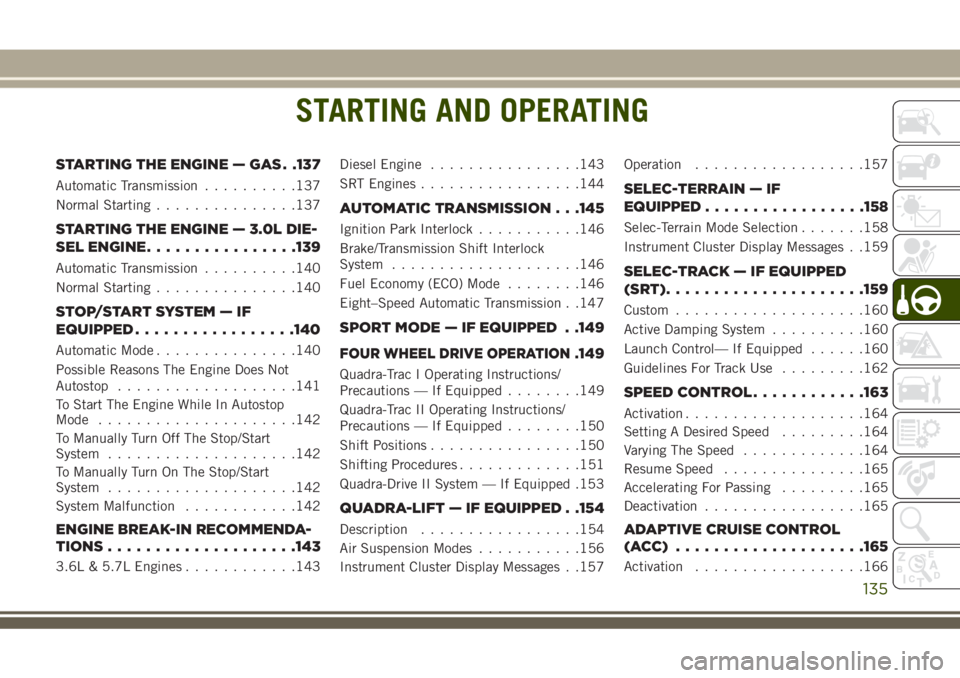
STARTING AND OPERATING
STARTING THE ENGINE — GAS . .137
Automatic Transmission..........137
Normal Starting...............137
STARTING THE ENGINE — 3.0L DIE-
SEL ENGINE................139
Automatic Transmission..........140
Normal Starting...............140
STOP/START SYSTEM — IF
EQUIPPED.................140
Automatic Mode...............140
Possible Reasons The Engine Does Not
Autostop...................141
To Start The Engine While In Autostop
Mode.....................142
To Manually Turn Off The Stop/Start
System....................142
To Manually Turn On The Stop/Start
System....................142
System Malfunction............142
ENGINE BREAK-IN RECOMMENDA-
TIONS....................143
3.6L & 5.7L Engines............143Diesel Engine................143
SRT Engines.................144
AUTOMATIC TRANSMISSION . . .145
Ignition Park Interlock...........146
Brake/Transmission Shift Interlock
System....................146
Fuel Economy (ECO) Mode........146
Eight–Speed Automatic Transmission . .147
SPORT MODE — IF EQUIPPED . .149
FOUR WHEEL DRIVE OPERATION.149
Quadra-Trac I Operating Instructions/
Precautions — If Equipped........149
Quadra-Trac II Operating Instructions/
Precautions — If Equipped........150
Shift Positions................150
Shifting Procedures.............151
Quadra-Drive II System — If Equipped .153
QUADRA-LIFT — IF EQUIPPED . .154
Description.................154
Air Suspension Modes...........156
Instrument Cluster Display Messages . .157Operation..................157
SELEC-TERRAIN — IF
EQUIPPED.................158
Selec-Terrain Mode Selection.......158
Instrument Cluster Display Messages . .159
SELEC-TRACK — IF EQUIPPED
(SRT).....................159
Custom....................160
Active Damping System..........160
Launch Control— If Equipped......160
Guidelines For Track Use.........162
SPEED CONTROL............163
Activation...................164
Setting A Desired Speed.........164
Varying The Speed.............164
Resume Speed...............165
Accelerating For Passing.........165
Deactivation.................165
ADAPTIVE CRUISE CONTROL
(ACC) ....................165
Activation..................166
STARTING AND OPERATING
135
Page 138 of 368
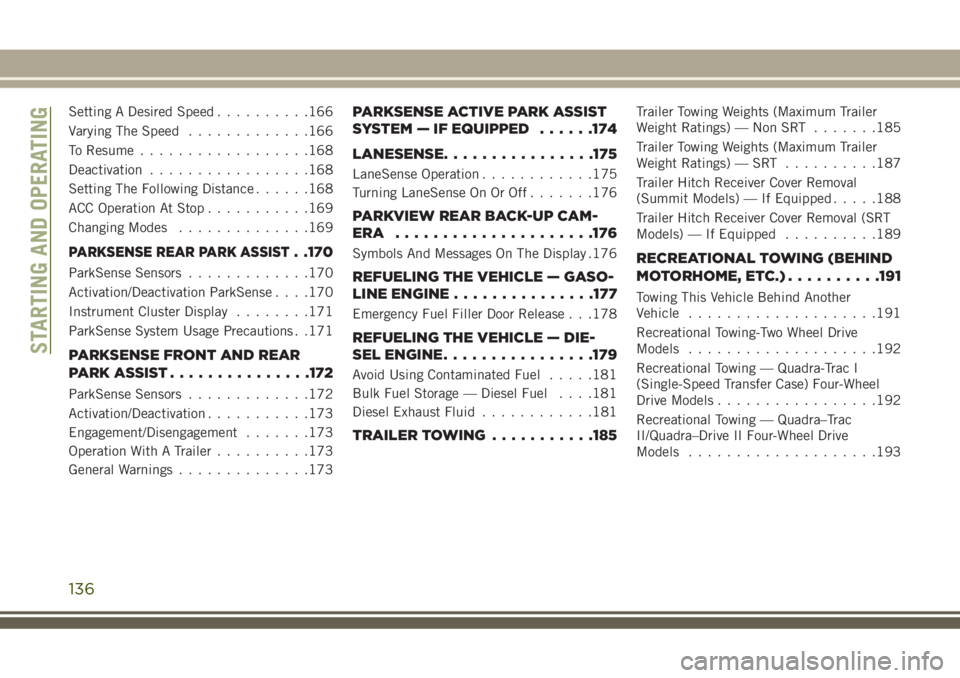
Setting A Desired Speed..........166
Varying The Speed.............166
To Resume..................168
Deactivation.................168
Setting The Following Distance......168
ACC Operation At Stop...........169
Changing Modes..............169
PARKSENSE REAR PARK ASSIST. .170
ParkSense Sensors.............170
Activation/Deactivation ParkSense. . . .170
Instrument Cluster Display........171
ParkSense System Usage Precautions . .171
PARKSENSE FRONT AND REAR
PARKASSIST...............172
ParkSense Sensors.............172
Activation/Deactivation...........173
Engagement/Disengagement.......173
Operation With A Trailer..........173
General Warnings..............173
PARKSENSE ACTIVE PARK ASSIST
SYSTEM — IF EQUIPPED......174
LANESENSE................175
LaneSense Operation............175
Turning LaneSense On Or Off.......176
PARKVIEW REAR BACK-UP CAM-
ERA .....................176
Symbols And Messages On The Display .176
REFUELING THE VEHICLE — GASO-
LINE ENGINE...............177
Emergency Fuel Filler Door Release . . .178
REFUELING THE VEHICLE — DIE-
SEL ENGINE................179
Avoid Using Contaminated Fuel.....181
Bulk Fuel Storage — Diesel Fuel. . . .181
Diesel Exhaust Fluid............181
TRAILER TOWING...........185
Trailer Towing Weights (Maximum Trailer
Weight Ratings) — Non SRT.......185
Trailer Towing Weights (Maximum Trailer
Weight Ratings) — SRT..........187
Trailer Hitch Receiver Cover Removal
(Summit Models) — If Equipped.....188
Trailer Hitch Receiver Cover Removal (SRT
Models) — If Equipped..........189
RECREATIONAL TOWING (BEHIND
MOTORHOME, ETC.)..........191
Towing This Vehicle Behind Another
Vehicle....................191
Recreational Towing-Two Wheel Drive
Models....................192
Recreational Towing — Quadra-Trac I
(Single-Speed Transfer Case) Four-Wheel
Drive Models.................192
Recreational Towing — Quadra–Trac
II/Quadra–Drive II Four-Wheel Drive
Models....................193
STARTING AND OPERATING
136