USB JEEP GRAND CHEROKEE 2023 User Guide
[x] Cancel search | Manufacturer: JEEP, Model Year: 2023, Model line: GRAND CHEROKEE, Model: JEEP GRAND CHEROKEE 2023Pages: 424, PDF Size: 15.48 MB
Page 240 of 424

238MULTIMEDIA
PARENTAL CONTROLS (USING THE REAR
S
CREENS)
If parental controls were not set during the first
time start up of the system, they can be set by
following these steps:
1. Push the Gear/Settings button on the Voice
Remote with Alexa or tap the screen to access
Settings in the “quick menu”.
2. Select the Gear/Settings icon on the screen.
3. Select “Settings” on the screen.
4. While in Settings, select “Preferences”.
5. Select “Parental Controls”; from here you can turn Parental Controls on or off and set up a
PIN for the controls using the Voice Remote
with Alexa.
VOICE REMOTE WITH ALEXA PAIRING
(U
SING THE REAR SCREENS)
If the Voice Remote with Alexa needs to be paired
again or a new remote is being paired, follow these
procedures:
1. Install batteries into the remote.
2. Tap the screen and Select the Gear/Settings
icon on the screen.
3. Select “Settings” on the screen.
4. In Settings, select “Controllers & Bluetooth® Devices”.
5. From this menu, select “Add New Remote”.
6. Follow the on-screen steps for Voice Remote with Alexa pairing.
A long press on the Home button can also re-pair a
Voice Remote with Alexa that has become
disconnected.
NOTE:Your vehicle is included with two Voice Remotes
with Alexa. A Voice Remote with Alexa can be
paired to each rear screen. It will function with the
rear screen it was paired with. The pairing steps
will need to be done for each rear screen.
MEDIA SOURCES INPUT (USING THE
F
RONT RADIO AND REAR SCREENS)
Front Radio Screen
Users can select inputs for each rear screen from
the front radio touchscreen by selecting the Rear
Seat tab and choosing the desired content by
selecting “Launch Source” on the Screen 1 or
Screen 2 tab.
Inputs available within Launch Source under
“Inputs” are “Fire TV”, “HDMI”, and “USB”.
Rear Screens
To select inputs on the rear screen, scroll down on
the Fire TV Home screen and select your desired
input under “Input”.
Inputs can also be selected from the Brand tab in
the top menu. While in this tab, scroll down to
“Inputs” for selection options.
NOTE:The Brand tab naming in the top menu will depend
on the naming of the vehicle’s brand.
23_WL_OM_EN_USC_t.book Page 238
Page 242 of 424

240MULTIMEDIA
REAR SEAT ENTERTAINMENT WITH FIRE
TV B
UILT-IN STREAMING (USING THE
F
RONT RADIO AND REAR SCREENS)
Access Using Launch Source
To access Rear Seat Entertainment with Fire TV
built-in from the front radio, press the Media tab
located on the bottom menu bar. Then select the
Rear Seat option located on the top menu bar.
Select “Launch Source”, and then under “Inputs”
select “Fire TV Home”.
Access Using Browse Media
Selecting “Browse Media” on the front radio
screen will give access to different media within
Rear Seat Entertainment with Fire TV built-in.
These options will be in the top menu of “Browse
Media” and include:
Fire TV — Selecting “Fire TV” will show streaming
options for categories and to select apps. This
option will be selectable on the left slider menu
in “Browse Media”. While in “Browse Media”
under Fire TV, it will display recent activity under
“Recent”. This will display recent videos viewed
from Fire TV and recent downloads as well.
USB Video — Under “USB Videos”, videos will
appear that are options with a USB device
connected to Rear Seat Entertainment with Fire
TV built-in.
USB Music — Under “USB Music”, music will
appear that are options with a USB device
connected to Rear Seat Entertainment with Fire
TV built-in.
Access Using the Voice Remote with Alexa and
Rear Screens
Rear passengers will be able to access some
options for streaming by pressing the “Prime
Video”, “App 1”, or “App 2” button on the Voice
Remote with Alexa. Selecting one of those buttons
on the Voice Remote with Alexa will take you to the
home page for that respective streaming service.
Turning on either of the rear screens will launch
Fire TV. By default, the rear screens will always
launch in Fire TV. More streaming options can be
selected on the Fire TV home page.
Fire TV
Fire TV is your source for online streaming with
Rear Seat Entertainment with Fire TV built-in.
NOTE:A data source needs to be connected to the system
for streaming to be accessible. This can be set up
when Fire TV is turned on for the first time from the
rear screens. Some of these options can be an
in-vehicle 4G Wi-Fi hot spot, capable Wi-Fi hot spot
from a mobile device, or Wi-Fi from an outside
source like a home or a garage. To access Fire TV on the front screen, select
“Launch Source” on the front radio rear seat
screen and then “Fire TV Home” under the Inputs.
Viewing from the front radio screen or passenger
screen mirrors or controls the Fire TV experience
from one of the rear Fire TV displays.
The menu bar for Fire TV will have the options for
“Home”, “Find”, “Library”, “Brand”, and “Live”.
Below the menu bar will be streaming options
linked to your Prime account like “Prime Video”.
The front radio screen offers some options:
Power — This will turn Fire TV on or off.
Screen 1 and Screen 2 Toggle
— This toggles
between the Rear Screens (for use with front
radio screen only).
Collapse — While viewing on the front radio
screen, this will collapse the screen to dash -
board view.
Source Drawer — This will open the “Source
Drawer” and the source logo will be displayed
on the icon.
Browse Media — This will open the “Browse
Media” pop-up.
Back — This will let you go back the previous
page.
23_WL_OM_EN_USC_t.book Page 240
Page 244 of 424
242MULTIMEDIA
USING THE VIDEO USB PORT
Plug in a USB drive or mass storage device and
play your favorite music or movies.
NOTE:To view USB media on the rear screens, insert a
USB drive into the port. The USB drive port is
located under the radio controls in the instrument
panel.
On the rear screen you can browse the content of
the USB device by going to the USB source in the
inputs. Use the search feature to find your media
faster.
PLAY VIDEO GAMES
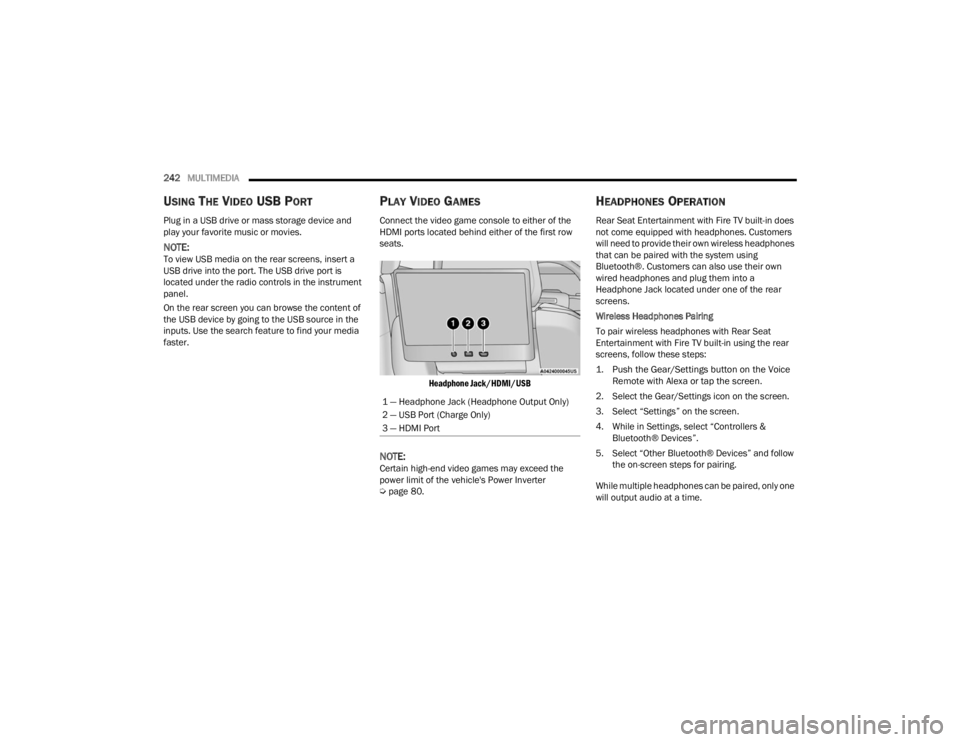
Connect the video game console to either of the
HDMI ports located behind either of the first row
seats.
Headphone Jack/HDMI/USB
NOTE:Certain high-end video games may exceed the
power limit of the vehicle's Power Inverter
Úpage 80.
HEADPHONES OPERATION
Rear Seat Entertainment with Fire TV built-in does
not come equipped with headphones. Customers
will need to provide their own wireless headphones
that can be paired with the system using
Bluetooth®. Customers can also use their own
wired headphones and plug them into a
Headphone Jack located under one of the rear
screens.
Wireless Headphones Pairing
To pair wireless headphones with Rear Seat
Entertainment with Fire TV built-in using the rear
screens, follow these steps:
1. Push the Gear/Settings button on the Voice
Remote with Alexa or tap the screen.
2. Select the Gear/Settings icon on the screen.
3. Select “Settings” on the screen.
4. While in Settings, select “Controllers & Bluetooth® Devices”.
5. Select “Other Bluetooth® Devices” and follow the on-screen steps for pairing.
While multiple headphones can be paired, only one
will output audio at a time.
1 — Headphone Jack (Headphone Output Only)
2 — USB Port (Charge Only)
3 — HDMI Port
23_WL_OM_EN_USC_t.book Page 242
Page 364 of 424

362SERVICING AND MAINTENANCE
F10 40 Amp Green –HVAC Blower Motor
F11 ––Spare
F12 –20 Amp YellowAssy Cigar Lighter
F13 –10 Amp RedAssy Mirror Inside Rearview / Digital
TV (DTV) */ Sunroof Single - Dual
Pane / Port UC1 Dual USB RR /
Interior Monitoring Camera
F14 ––Spare
F15A ––Spare
F15B ––Spare
F16 –10 Amp RedMOD ORC
F17 ––Spare
F18 ––Spare
F19 ––Spare
F20 –10 Amp RedOverhead Console Assy (OHC) W/
Sunshade / Intrusion Module /
Intrusion Sensor / Siren / Head Up
Display (HUD) / Digital TV (DTV) *
F21 30 Amp Pink –Trailer Tow Electric Brake -
Aftermarket
F22 ––Spare
F23 ––Spare
Cavity Cartridge Fuse Micro FuseDescription
* If Equipped
23_WL_OM_EN_USC_t.book Page 362
Page 368 of 424

366SERVICING AND MAINTENANCE
F63A –15 Amp BlueMedia HUB #1 Frt / Port UC1 Dual
USB Frt / Wireless Charging Pad MOD
(WCPM)
F63B Not Populated
F64A –10 Amp RedMOD ORC
F64B Steering Column Control Module
(SCCM)
F65 –5 Amp TanMOD SGW (Cybersecurity)
F66 ––Spare
CB1 ––Spare
CB2 ––Spare
CB3 ––Spare
CB4 ––Spare
CB5 ––Spare
CB6 ––Spare
Cavity Cartridge Fuse Micro FuseDescription
* If Equipped
23_WL_OM_EN_USC_t.book Page 366
Page 371 of 424

SERVICING AND MAINTENANCE369
F29A –10 Amp RedMOD ICS Switch Bank Rear (Frt
Console)
F29B Spare
F30 30 Amp Pink –MOD Memory / Power Seat (Driver
Frt)
F31 ––Spare
F32 ––Spare
F33 ––Spare
F34 30 Amp Pink –MOD Door MUX Driver
F35 25 Amp Clear –Trailer Tow Module #2
F36A –10 Amp RedIntelligent Event Base Lighting
Module
F36B Port Pwr USB Console (USB CH Only) /
Port UCI Dual USB Rear
F37 25 Amp Clear –Trailer Tow Module #1
F38 ––Spare
F39 ––Spare
F40 –30 Amp GreenMod Audio Amplifier #1A
F41 ––Spare
Cavity Cartridge Fuse Micro FuseDescription
* If Equipped
8
23_WL_OM_EN_USC_t.book Page 369
Page 373 of 424

SERVICING AND MAINTENANCE371
F53 30 Amp Pink –Electronic Limited Slip Differential
(ELSD) Rear #1
F54 ––Spare
F55 30 Amp Pink –MOD Inverter
F56 30 Amp Pink –Folding Seat Module 3rd Row Feed
#2*
F57 ––Spare
F58 –15 Amp Blue3rd Row Additional USB charge (Only
LT - RT) / Port Pwr USB Console UBS
(CH Only)
F59 ––Spare
F60 ––Spare
F61 ––Spare
F62 –20 Amp YellowModule Seat Heater Frt (Driver)*
F63 30 Amp Pink –Assy Trailer Tow Receptacle B+
F64 ––Spare
F65 ––Spare
F66 20 Amp Blue –MOD Door MUX Passenger Rear -
Smart Motor
Cavity
Cartridge Fuse Micro FuseDescription
* If Equipped
8
23_WL_OM_EN_USC_t.book Page 371
Page 374 of 424

372SERVICING AND MAINTENANCE
F67 –30 Amp GreenMOD Audio Amplifier #1B
F68 ––Spare
F69 –20 Amp YellowL2+ Central ADAS Decision Module
(CADM) MID*
F70 –10 Amp RedVideo Routing Module (VRM) / Port
Power - USB IP (USB Ch Only)
F71 ––Spare
F72 ––Spare
F73 ––Spare
F74 –5 Amp Tan
L2+ Intelligent Battery Sensor (IBS) - 2*
F75 ––Spare
F76 ––Spare
F77 ––Spare
F78 50 Amp Red –MOD IAir Suspension
F79 ––Spare
Cavity Cartridge Fuse Micro FuseDescription
* If Equipped
23_WL_OM_EN_USC_t.book Page 372
Page 415 of 424

413
Octane Rating
........................................... 397Requirements................................. 397, 400Specifications............................................ 401Tank Capacity............................................ 400Fuel Saver Technology................................... 139Fuel System Cautions.................................... 399Fueling........................................................... 183Fuses............................................................. 352
G
Garage Door Opener (HomeLink).................... 53Gasoline, (Fuel)............................................. 397Gasoline, Clean Air........................................ 398Gasoline, Reformulated................................. 398Gear Ranges.................................................. 128Glass Cleaning............................................... 395Gross Axle Weight Rating............................... 186Gross Combination Weight Rating................. 186Gross Trailer Weight...................................... 185Gross Vehicle Weight Rating.......................... 185GVWR............................................................ 184
H
Hands-Free Liftgate......................................... 89Hazard Warning Flashers.............................. 307Head Restraints............................................... 47Head Up Display (hud) — If Equipped
b
.......105
Headlights....................................................... 57Automatic.................................................... 59Cleaning................................................... 393Delay........................................................... 60High Beam/Low Beam Select Switch.......... 59Leveling....................................................... 61Lights On Reminder..................................... 61On With Wipers............................................ 60Passing........................................................ 59Switch.......................................................... 57Heads Up Display (HUD)............................... 105Heated Mirrors................................................. 53Heated Seats................................................... 45Heated Steering Wheel.................................... 33Hill Descent Control............................. 116, 253Hill Descent Control Indicator....................... 253Hill Start Assist.............................................. 254Hitches Trailer Towing........................................... 188Hold ’N Go.................................................... 125HomeLink (Garage Door Opener)..................... 53HoodClosing...................................................... 110Opening.................................................... 110Hood Release.................................................. 87HUD.............................................................. 105
I
Ignition.............................................................22Key Fob Battery Low Or Dead......................22Key Fob Not Detected..................................22Keyless Ignition...........................................22Keyless Push Button....................................22Push Button Ignition....................................22Switch..........................................................22Ignition Park Interlock................................... 127Immobilizer (Sentry Key)..................................22Inside Rearview Mirror........................... 49, 307Instrument Cluster...........................................98Descriptions.............................................. 116Display.........................................................98Home........................................................ 103Menu Items.............................................. 103Instrument Cluster DisplayVehicle Info............................................... 103Instrument Panel Lens Cleaning................... 395Interior And Instrument Lights.........................62Interior Appearance Care.............................. 394Interior Lights...................................................62Interior Monitoring Camera........................... 177Intermittent Wipers (Delay Wipers)..................64Intersection Collision Assist.......................... 264InverterPower...........................................................80iPod/USB/MP3 Control....................................7711
23_WL_OM_EN_USC_t.book Page 413
Page 419 of 424

417
Remote Keyless Entry
...................................... 18Arm The Alarm............................................. 26Disarm The Alarm........................................ 27Programming Additional Key Fobs.............. 21Remote Sound System (Radio) Control......... 228Remote Starting Exit Remote Start Mode.............................. 25Remote Starting System.................................. 24Replacement Bulbs....................................... 374Replacement Keys........................................... 21Replacement Tires......................................... 385Reporting Safety Defects............................... 406Restraints, Child............................................ 289Restraints, Head.............................................. 47Roll Over Warning............................................ 11Roof Luggage Rack.......................................... 93Rotation, Tires............................................... 391
S
Safety Checks Inside Vehicle......................... 303Safety Checks Outside Vehicle...................... 305Safety Defects, Reporting.............................. 406Safety Information, Tire................................. 374Safety Tips..................................................... 303Safety, Exhaust Gas....................................... 305Schedule, Maintenance................................. 330Screen, Passenger......................................... 228
Seat Belts............................................ 270, 303Adjustable Shoulder Belt.......................... 274Adjustable Upper Shoulder Anchorage..... 274
Adjustable Upper Shoulder Belt Anchorage.. 274
Automatic Locking Retractor (ALR)........... 275Child Restraints........................................ 289Energy Management Feature................... 275Extender................................................... 274Front Seat............................... 270, 271, 273Inspection................................................. 303Lap/Shoulder Belt Operation.................... 273Lap/Shoulder Belt Untwisting................... 273Lap/Shoulder Belts.................................. 271Operating Instructions.............................. 273Pregnant Women...................................... 275Pretensioners........................................... 275Rear Seat................................................. 271Reminder................................ 110, 116, 270Seat Belt Extender.................................... 274Seat Belt Pretensioner............................. 275Seat Belt Reminder.................................. 116Untwisting Procedure............................... 273Seat Belts Maintenance............................... 394Seats.......................................... 36, 41, 42, 45Adjustment........................................... 36, 42Bolster Adjustment...................................... 42Easy Entry.................................................... 43
Extend.........................................................43Heated.........................................................45Massage......................................................44Memory.......................................................34Rear Folding................................................36Reclining......................................................37Seatback Release........................................36Tilting...........................................................36Vented.........................................................46Ventilated....................................................46Second Row USB.............................................78Security Alarm........................................ 26, 111Arm The System...........................................26Disarm The System......................................27Selec-Terrain................................................. 134Sentry Key (Immobilizer)..................................22Sentry Key Replacement..................................21Service Assistance........................................ 403Service Contract............................................ 405Service Manuals........................................... 407Settings................................................ 104, 204Shift Paddles................................................. 130Shifting.......................................................... 126Automatic Transmission.................. 126, 127Shifting Into NEUTRAL (N)............................. 197Shifting Out Of NEUTRAL (N)......................... 198Shoulder Belts.............................................. 27111
23_WL_OM_EN_USC_t.book Page 417