battery JEEP GRAND CHEROKEE 2023 User Guide
[x] Cancel search | Manufacturer: JEEP, Model Year: 2023, Model line: GRAND CHEROKEE, Model: JEEP GRAND CHEROKEE 2023Pages: 424, PDF Size: 15.48 MB
Page 27 of 424

GETTING TO KNOW YOUR VEHICLE25
(Continued)
All of the following conditions must be met before
the engine will remote start:
Gear selector in PARK
Doors closed
Hood closed
Liftgate closed
Hazard switch off
Brake switch inactive (brake pedal not pressed)
Battery at an acceptable charge level
System not disabled from previous Remote
Start event
Vehicle Security Light is flashing
Ignition in OFF position
Fuel level meets minimum requirement
Vehicle Security system is not signaling an intru
-
sion
Malfunction Indicator Light is not illuminated
TO EXIT REMOTE START MODE
To drive the vehicle after starting the Remote Start
system, either push and release the unlock button
on the key fob to unlock the doors, or unlock the
vehicle using Keyless Enter ‘n Go™ — Passive Entry
via the door handles, and disarm the Vehicle
Security system (if equipped). Then, prior to the
end of the 15 minute cycle, push and release the
START/STOP ignition button.
The Remote Start system will turn the engine off if
the Remote Start button on the key fob is pushed
again, or if the engine is allowed to run for the
entire 15 minute cycle. Once the ignition is placed
in the ON/RUN position, the climate controls will
resume the previously set operations
(temperature, blower control, etc.).
NOTE:
To avoid unintentional shutdowns, the system
will disable for two seconds after receiving a
valid Remote Start request.
For vehicles equipped with the Keyless
Enter ‘n Go™ — Passive Entry feature, the message
“Remote Start Active — Push Start Button” will
display in the instrument cluster display until you
push the START/STOP ignition button.
REMOTE START FRONT DEFROST
A
CTIVATION — IF EQUIPPED
When Remote Start is active, and the outside
ambient temperature is 40°F (4.5°C) or below, the
system will automatically activate front defrost for
15 minutes or less. The timing is dependent on the
ambient temperature. Once the timer expires, the
system will automatically adjust the settings
depending on ambient conditions. See “Remote
Start Comfort Systems — If Equipped” in the next
section for detailed operation.
REMOTE START COMFORT SYSTEMS —
I
F EQUIPPED
When Remote Start is activated, the front and rear
defrost will automatically turn on in cold weather. The
heated steering wheel and driver heated seat feature
will turn on if selected in the Comfort menu screen
within Uconnect Settings
Ú
page 204. In warm
weather, the driver vented seat feature will
automatically turn on when Remote Start is activated,
if programmed in the Comfort menu screen. The
vehicle will adjust the climate control settings
depending on the outside ambient temperature.
WARNING!
Do not start or run an engine in a closed
garage or confined area. Exhaust gas contains
carbon monoxide (CO) which is odorless and
colorless. Carbon monoxide is poisonous and
can cause serious injury or death when
inhaled.
Keep key fobs away from children. Operation
of the Remote Start system, windows, door
locks or other controls could cause serious
injury or death.
WARNING!
2
23_WL_OM_EN_USC_t.book Page 25
Page 29 of 424

GETTING TO KNOW YOUR VEHICLE27
When the Vehicle Security system is armed, the
Vehicle Security Light (located in the lower right
portion of the instrument cluster display) will begin
to flash every two seconds until it is disarmed.
NOTE:If the system is armed by pushing the lock button
on the interior door panel, the Vehicle Security
Light will flash rapidly for about 15 seconds once
the door is closed, then slow down to every two
seconds.
TO DISARM THE SYSTEM
The Vehicle Security system can be disarmed using
any of the following methods:
Push the unlock button on the key fob.
Grab the Passive Entry door handle to unlock
the door Ú page 29.
Cycle the ignition out of the OFF position to
disarm the system.
NOTE:
The driver's door key cylinder cannot arm or
disarm the Vehicle Security system. Use of the
door key cylinder when the alarm is armed will
sound the alarm when the door is opened.
The Vehicle Security system remains armed
when the power liftgate is opened using the lift -
gate button on the key fob. If someone enters the vehicle through the opened liftgate, then
opens any door from the inside, the alarm will
sound.
If Passive Entry (if equipped) is used to unlock
the liftgate, the Vehicle Security system is
disarmed and the rest of the vehicle doors will
remain locked unless all doors are set to unlock
on first press within Uconnect Settings.
When the Vehicle Security system is armed, the
interior power door lock switches will not unlock
the doors.
The Vehicle Security system is designed to protect
your vehicle. However, you can create conditions
where the system will give you a false alarm. If one
of the previously described arming sequences has
occurred, the Vehicle Security system will arm
regardless of whether you are in the vehicle or not.
If you remain in the vehicle and open a door, the
alarm will sound. If this occurs, disarm the Vehicle
Security system.
If the Vehicle Security system is armed and the
battery becomes disconnected, the Vehicle
Security system will remain armed when the
battery is reconnected; the exterior lights will flash,
and the horn will sound. If this occurs, disarm the
Vehicle Security system.
REARMING OF THE SYSTEM
If something triggers the alarm and no action is
taken to disarm it, the Vehicle Security system will
turn the horn off after a 29 second cycle (with five
seconds between cycles and up to eight cycles if
the trigger remains active) and then rearm itself.
SECURITY SYSTEM MANUAL OVERRIDE
The Vehicle Security system will not arm if you lock
the doors using the emergency lock lever
Ú page 27.
TAMPER ALERT
If something has triggered the Vehicle Security
system in your absence, the horn will sound three
times and the exterior lights will blink three times
when you disarm the Vehicle Security system.
DOORS
MANUAL DOOR LOCKS
The front doors can be manually unlocked with a
single pull of the inside door handle. The driver’s
door can also be manually unlocked by inserting
the emergency key into the lock cylinder on the
outside door handle.
2
23_WL_OM_EN_USC_t.book Page 27
Page 32 of 424
30GETTING TO KNOW YOUR VEHICLE
There are five situations that trigger a FOBIK-Safe
search in any Passive Entry vehicle:
A lock request is made by a valid Passive Entry
key fob while a door is open.
A lock request is made by the Passive Entry door
handle while a door is open.
A lock request is made by the door panel switch
while the door is open.
When the Vehicle Security system is in pre-arm
or armed status and the liftgate transitions from
opened to closed.
When the liftgate transitions from open to
closed and Remote Start is active.
When any of these situations occur, after all open
doors are shut, the FOBIK-Safe search will be
executed. If it detects a Passive Entry key fob
inside the vehicle, the vehicle will unlock and alert
the customer.
NOTE:The vehicle will only unlock the doors when a valid
Passive Entry key fob is detected inside the
vehicle. The vehicle will not unlock the doors when
any of the following conditions are true:
The doors are manually locked using the emer -
gency lock lever.
Three attempts are made to lock the doors
using the door panel switch and then the doors
are closed.
There is a valid Passive Entry key fob outside the
vehicle within 5 ft (1.5 m) of a Passive Entry
door handle.
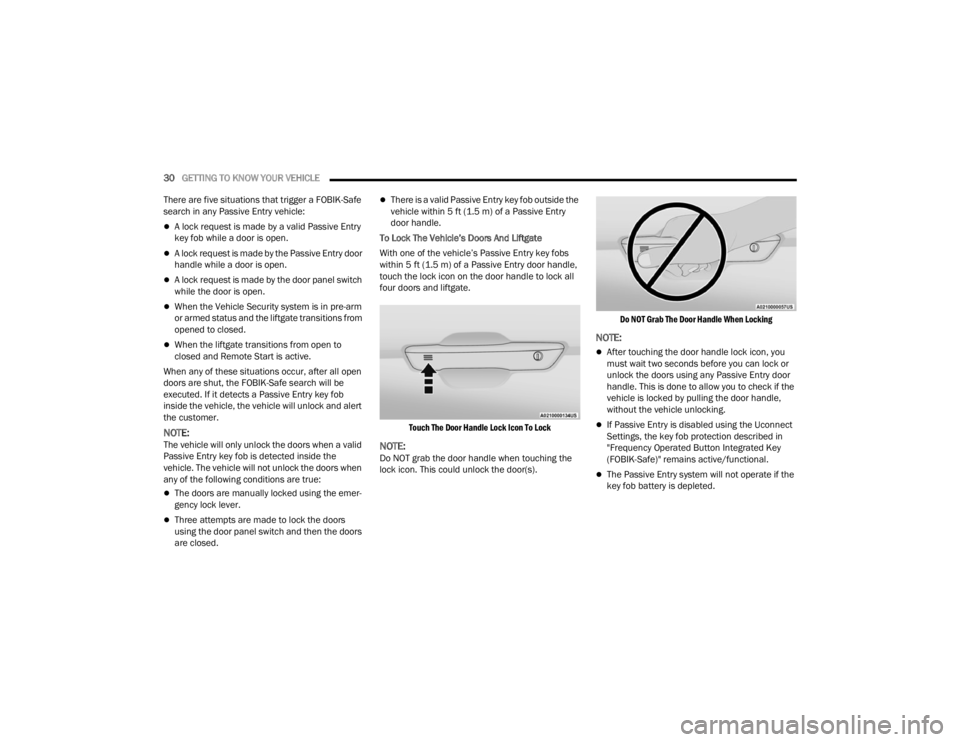
To Lock The Vehicle’s Doors And Liftgate
With one of the vehicle’s Passive Entry key fobs
within 5 ft (1.5 m) of a Passive Entry door handle,
touch the lock icon on the door handle to lock all
four doors and liftgate.
Touch The Door Handle Lock Icon To Lock
NOTE:Do NOT grab the door handle when touching the
lock icon. This could unlock the door(s).
Do NOT Grab The Door Handle When Locking
NOTE:
After touching the door handle lock icon, you
must wait two seconds before you can lock or
unlock the doors using any Passive Entry door
handle. This is done to allow you to check if the
vehicle is locked by pulling the door handle,
without the vehicle unlocking.
If Passive Entry is disabled using the Uconnect
Settings, the key fob protection described in
"Frequency Operated Button Integrated Key
(FOBIK-Safe)" remains active/functional.
The Passive Entry system will not operate if the
key fob battery is depleted.
23_WL_OM_EN_USC_t.book Page 30
Page 55 of 424

GETTING TO KNOW YOUR VEHICLE53
AUTOMATIC POWER FOLDING MIRRORS —
I
F EQUIPPED
When enabled within Uconnect Settings
Ú page 204, the exterior mirrors will automatically
fold when the vehicle’s ignition is placed in the OFF
position, and after the doors are locked and
closed.
The exterior mirrors will auto-fold in the following
situations after the ignition is placed in the OFF
position:
Pushing the lock button on the door panel
before the door is opened.
NOTE:If the doors are already locked, push the lock
button again.
Opening the door, then pushing the lock button
on the door panel, followed by closing the door.
After exiting the vehicle, close the doors then
push the lock button on the key fob.
After exiting the vehicle, close the doors then
touch the lock icon on the Passive Entry door
handle.
If the exterior mirrors were folded automatically,
they will unfold when the ignition is placed in the
ON/RUN position.
NOTE:If the mirrors were folded manually, by using the
power folding mirror switch on the driver’s door
panel, they will not automatically unfold.
HEATED MIRRORS — IF EQUIPPED
These mirrors are heated to melt frost or
ice. This feature will be activated
whenever you turn on the rear window
defroster (if equipped) Ú page 66.
TILT SIDE MIRRORS IN REVERSE —
I
F EQUIPPED
Tilt Side Mirrors In Reverse provides automatic
outside mirror positioning which will aid the
driver’s view of the ground rearward of the front
doors. Outside mirrors will move slightly downward
from the present position when the vehicle is
shifted into REVERSE. Outside mirrors will then
return to the original position when the vehicle is
shifted out of REVERSE position. Each stored
memory setting will have an associated Tilt Side
Mirrors In Reverse position.
NOTE:The Tilt Side Mirrors In Reverse feature can be
turned on and off using the Uconnect system
Ú page 204.
UNIVERSAL GARAGE DOOR OPENER
(HOMELINK®) — IF EQUIPPED
HomeLink® Buttons And Indicator Light
Use this QR code to access your
digital experience.
HomeLink® replaces up to
three hand-held transmitters
that operate devices such as
garage door openers, motor -
ized gates, lighting or home
security systems. The HomeLink® unit is
powered by your vehicle’s 12 Volt battery.
The HomeLink® buttons that are located in the
overhead console or sun visor designate the
three different HomeLink® channels.
2
23_WL_OM_EN_USC_t.book Page 53
Page 56 of 424

54GETTING TO KNOW YOUR VEHICLE
To operate HomeLink®, push and release any
of the programmed HomeLink® buttons. These
buttons will activate the devices they are
programmed to with each press of the corre -
sponding HomeLink® button.
The HomeLink® indicator light is located above
the center button.
NOTE:HomeLink® is disabled when the Vehicle Security
system is active Ú page 408.
BEFORE YOU BEGIN PROGRAMMING
H
OMELINK®
For efficient programming and accurate
transmission of the Radio Frequency (RF) signal, it
is recommended that a new battery be placed in
the hand-held transmitter of the device that is
being programmed to the HomeLink® system.
Make sure your hand-held transmitter is
programmed to activate the device you are trying
to program your HomeLink® button to.
Ensure that your vehicle is parked outside of the
garage before you begin programming.
It is recommended that you erase all the channels
of your HomeLink® before you use it for the first
time.
ERASING ALL THE HOMELINK®
C
HANNELS
To erase the channels, follow this procedure:
1. Place the ignition switch into the ON/RUN
position.
2. Push and hold the two outside HomeLink® buttons (I and III) for up to 20 seconds, or until
the HomeLink® indicator light flashes.
NOTE:Erasing all channels should only be performed
when programming HomeLink® for the first time.
Do not erase channels when programming addi -
tional buttons.
IDENTIFYING WHETHER YOU HAVE A
R
OLLING CODE OR NON-ROLLING CODE
D
EVICE
Before programming a device to one of your
HomeLink® buttons, you must determine whether
the device has a rolling code or non-rolling code.
Rolling Code Devices
To determine if your device has a rolling code, a
good indicator is its manufacturing date. Typically,
devices manufactured after 1995 have rolling
codes. A device with a rolling code will also have a
“LEARN” or “TRAIN” button located where the
antenna is attached to the device. The button may not be immediately visible when looking at the
device. The name and color of the button may vary
slightly by manufacturer.
NOTE:The “LEARN” or “TRAIN” button is not the button
you normally use to operate the device.
Non-rolling Code Devices
Most devices manufactured before 1995 will not
have a rolling code. These devices will also not
have a “LEARN” or “TRAIN” button.
PROGRAMMING HOMELINK® TO A
G
ARAGE DOOR OPENER
To program any of the HomeLink® buttons to
activate your garage door opener motor, proceed
as follows:
NOTE:All HomeLink® buttons are programmed using this
procedure. You do not need to erase all channels
when programming additional buttons.
1. Place the ignition switch into the ON/RUN
position.
2. Place the garage door opener transmitter 1 to 3 inches (3 to 8 cm) away from the
HomeLink® button you wish to program, while
keeping the HomeLink® indicator light in view.
23_WL_OM_EN_USC_t.book Page 54
Page 59 of 424
GETTING TO KNOW YOUR VEHICLE57
SECURITY
It is advised to erase all channels before you sell or
turn in your vehicle.
To do this, push and hold the two outside buttons
for 20 seconds until the indicator flashes. Note
that all channels will be erased. Individual
channels cannot be erased.
The HomeLink® Universal Transceiver is disabled
when the Vehicle Security system is active.
TROUBLESHOOTING TIPS
If you are having trouble programming
HomeLink®, here are some of the most common
solutions:
Replace the battery in the garage door opener
hand-held transmitter.
Push the LEARN button on the garage door
opener to complete the training for a rolling
code.
Did you unplug the device for programming and
remember to plug it back in?
If you have any problems, or require assistance,
please call toll-free 1-800-355-3515 or on the
Internet at
HomeLink.com for information or
assistance.
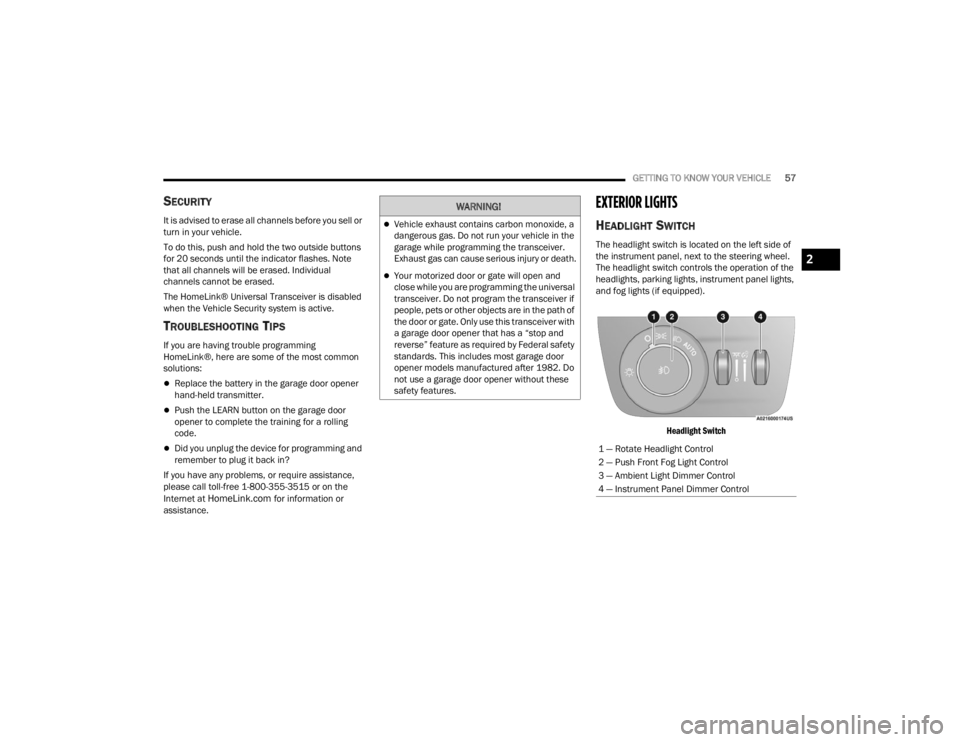
EXTERIOR LIGHTS
HEADLIGHT SWITCH
The headlight switch is located on the left side of
the instrument panel, next to the steering wheel.
The headlight switch controls the operation of the
headlights, parking lights, instrument panel lights,
and fog lights (if equipped).
Headlight Switch
WARNING!
Vehicle exhaust contains carbon monoxide, a
dangerous gas. Do not run your vehicle in the
garage while programming the transceiver.
Exhaust gas can cause serious injury or death.
Your motorized door or gate will open and
close while you are programming the universal
transceiver. Do not program the transceiver if
people, pets or other objects are in the path of
the door or gate. Only use this transceiver with
a garage door opener that has a “stop and
reverse” feature as required by Federal safety
standards. This includes most garage door
opener models manufactured after 1982. Do
not use a garage door opener without these
safety features.
1 — Rotate Headlight Control
2 — Push Front Fog Light Control
3 — Ambient Light Dimmer Control
4 — Instrument Panel Dimmer Control
2
23_WL_OM_EN_USC_t.book Page 57
Page 62 of 424

60GETTING TO KNOW YOUR VEHICLE
HEADLIGHTS ON AUTOMATICALLY WITH
W
IPERS
If your vehicle is equipped with Automatic
Headlights, it also has this
customer-programmable feature. When your
headlights are in the automatic mode and the
engine is running, they will automatically turn on
when the wiper system is on. This feature is
programmable through the Uconnect system
Ú page 204.
NOTE:When your headlights come on during the daytime,
the vehicle will monitor outside brightness and
decide if the instrument panel needs to be dimmed
Úpage 62.
HEADLIGHT ILLUMINATION ON
A
PPROACH
When enabled, the headlights, exterior door
handle pocket lights (if equipped), and interior
lights will illuminate when the unlock button on the
key fob is pushed as the operator is approaching
the vehicle. This feature can be turned on/off, and
the length of time the headlights stay on can be
programmed for up to 90 seconds within Uconnect
Settings Ú page 204. Proximity Wake-Up — If Equipped
This feature is enabled/disabled within the
Uconnect system, and is activated when the
operator approaches the driver’s door,
passenger’s door, or liftgate with a valid key fob on
their person. Some exterior and interior lights will
illuminate in order to provide an increased sense
of welcome and security as the operator
approaches the vehicle in the dark. “Headlight
Illumination On Approach” must be selected and
set to a time value other than zero within Uconnect
Settings for Proximity Wake-Up to activate.
The doors may be locked or unlocked for this
feature to activate, as long as the ignition is in the
OFF position, or during a Remote Start event. It will
not activate if the doors are locked and the ignition
was placed in the ON/RUN position.
NOTE:Proximity Wake-Up may not activate under the
following conditions:
After numerous consecutive activations, in
order to conserve the vehicle’s battery
After the vehicle’s engine has been off for
several days
Headlight Animation — If Equipped
When “Headlight Illumination On Approach” is
turned on, and set to a time value above zero, the
exterior lights illuminate in a theatrical manner
during approach to the vehicle. This feature is
activated in the following situations:
Proximity Wake-Up (if equipped) is activated
Remote Start is activated
The unlock button on the key fob is pushed
NOTE:For Headlight Animation to activate with Remote
Start or with the push of the unlock button,
“Greeting Lights” must also be selected within the
Uconnect system.
HEADLIGHT DELAY
To aid in your exit, your vehicle is equipped with a
headlight delay that will leave the headlights on for
approximately 90 seconds. This delay is initiated
when the ignition is placed in the OFF position
while the headlight switch is on, and then the
headlight switch is cycled off. Headlight delay can
be canceled by either turning the headlight switch
on then off, or by placing the ignition in the ON/
RUN position.
NOTE:The headlight delay time is programmable through
Uconnect Settings Ú
page 204.
23_WL_OM_EN_USC_t.book Page 60
Page 64 of 424
62GETTING TO KNOW YOUR VEHICLE
BATTERY SAVER
To protect the life of your vehicle’s battery, load
shedding is provided for both the interior and
exterior lights.
If the ignition is placed in the OFF position and any
door is left ajar for 10 minutes or the overhead
console Dome On switch is left on for 10 minutes,
the interior lights will automatically turn off.
NOTE:Battery saver mode is canceled if the ignition is in
the ON/RUN position.
If the headlights remain on while the ignition is
placed in the OFF position, the exterior lights will
automatically turn off after eight minutes. If the
headlights are turned on and left on for eight
minutes while the ignition is in the OFF position,
the exterior lights will automatically turn off.
INTERIOR LIGHTS
COURTESY LIGHTS
Courtesy and dome lights are turned on when the
front doors are opened or the Dome ON button is
pushed on the overhead console. If your vehicle is
equipped with Remote Keyless Entry and the
unlock button is pushed on the key fob, the
courtesy and dome lights will turn on. When a door
is open and the interior lights are on, pressing the Dome Defeat button on the overhead console will
cause all of the interior lights to turn off.
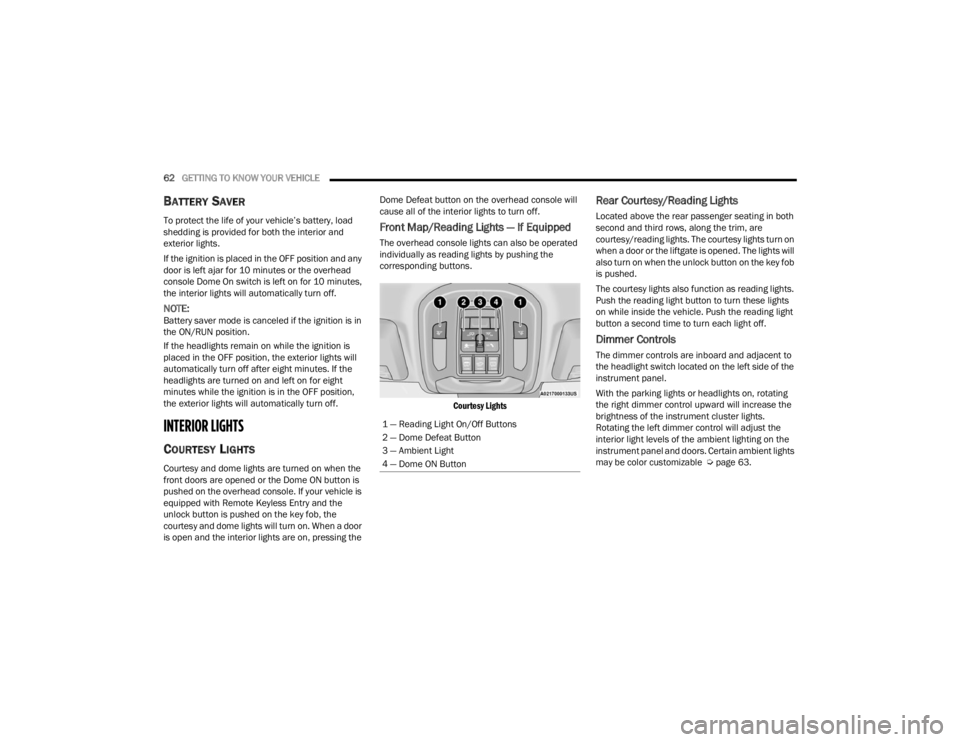
Front Map/Reading Lights — If Equipped
The overhead console lights can also be operated
individually as reading lights by pushing the
corresponding buttons.
Courtesy Lights
Rear Courtesy/Reading Lights
Located above the rear passenger seating in both
second and third rows, along the trim, are
courtesy/reading lights. The courtesy lights turn on
when a door or the liftgate is opened. The lights will
also turn on when the unlock button on the key fob
is pushed.
The courtesy lights also function as reading lights.
Push the reading light button to turn these lights
on while inside the vehicle. Push the reading light
button a second time to turn each light off.
Dimmer Controls
The dimmer controls are inboard and adjacent to
the headlight switch located on the left side of the
instrument panel.
With the parking lights or headlights on, rotating
the right dimmer control upward will increase the
brightness of the instrument cluster lights.
Rotating the left dimmer control will adjust the
interior light levels of the ambient lighting on the
instrument panel and doors. Certain ambient lights
may be color customizable Ú page 63.
1 — Reading Light On/Off Buttons
2 — Dome Defeat Button
3 — Ambient Light
4 — Dome ON Button
23_WL_OM_EN_USC_t.book Page 62
Page 79 of 424
GETTING TO KNOW YOUR VEHICLE77
Sun Screen Extended
To lower the sun screen, gently lift the tab upward
to disengage the hooks, and feed the screen back
into the base sill.
USB/AUX CONTROL
This feature allows an external USB device to be
plugged into one of the USB ports, located in the
center stack of the instrument panel.
Plugging in a smartphone device to a USB port will
activate Android Auto™ or Apple CarPlay®
features, if equipped. For further information, refer
to “Android Auto™” or “Apple CarPlay®” in the
Uconnect Radio Instruction Manual.
NOTE:Two devices can be plugged in at the same time,
and both ports will provide charging capabilities.
Only one port can transfer data to the system at a
time. For example, if a device is plugged into the Type A
USB port and another device is plugged into the
Type C USB port, a message will appear and allow
you to select which device to use.
The following messages will appear when a
non-phone device is plugged into the smaller and
larger USB ports, and when a phone device is
plugged into the smaller and larger USB ports:
“A new device is now connected. Previous
connection was lost.”
“(Phone Name) now connected. Previous
connection was lost.”
“Another device is in use through the same USB
port. Please disconnect the first device to use
the second device.”
Plugging in a phone or another USB device may
cause the connection to a previous device to be
lost.
Connecting AUX Or The External USB
Device
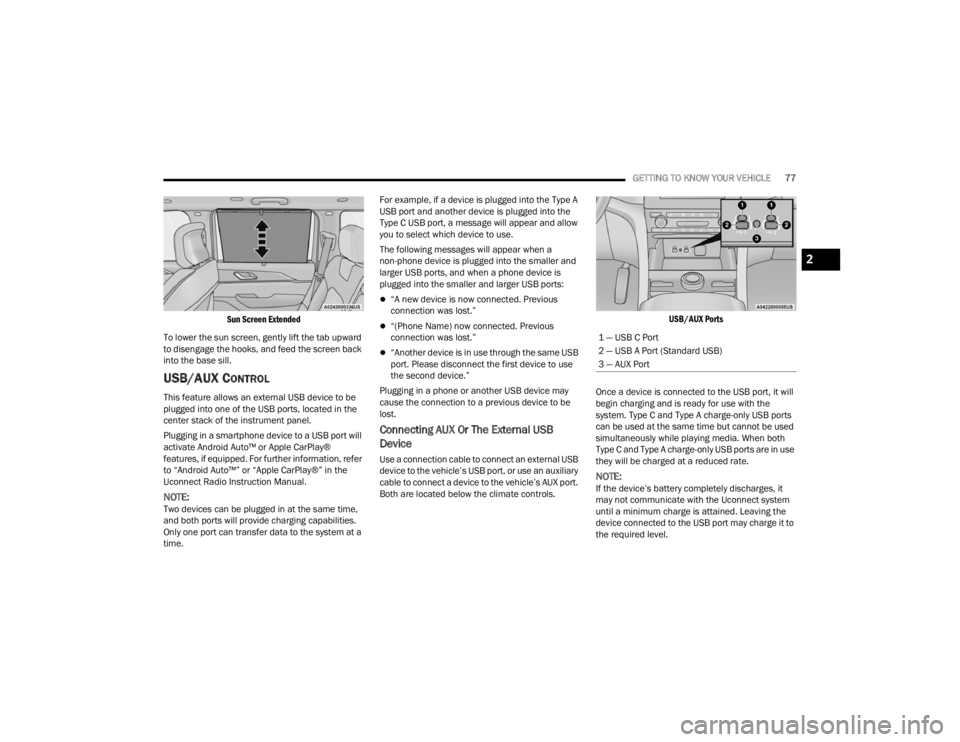
Use a connection cable to connect an external USB
device to the vehicle’s USB port, or use an auxiliary
cable to connect a device to the vehicle’s AUX port.
Both are located below the climate controls.
USB/AUX Ports
Once a device is connected to the USB port, it will
begin charging and is ready for use with the
system. Type C and Type A charge-only USB ports
can be used at the same time but cannot be used
simultaneously while playing media. When both
Type C and Type A charge-only USB ports are in use
they will be charged at a reduced rate.
NOTE:If the device’s battery completely discharges, it
may not communicate with the Uconnect system
until a minimum charge is attained. Leaving the
device connected to the USB port may charge it to
the required level.
1 — USB C Port
2 — USB A Port (Standard USB)
3 — AUX Port
2
23_WL_OM_EN_USC_t.book Page 77
Page 80 of 424
78GETTING TO KNOW YOUR VEHICLE
Using This Feature
By using a USB cable to connect an external
device:
The device can be played on the vehicle’s sound
system, and provides the artist, track title, and
album information on the radio display.
NOTE:Depending on track configuration, track infor -
mation may not be present on the radio display.
The device can be controlled using the radio
buttons to play and browse the contents of the
device.
The audio device battery charges when plugged
into the USB port.
By using an auxiliary cable to connect an external
device:
The audio device can be played on the vehicle’s
sound system. The Uconnect system will not
display information related to the artist, track
title, and album information.
NOTE:When using the AUX port, the external device
cannot be controlled using the radio buttons. The
device will not charge.
For further information, refer to the Uconnect
Radio Instruction Manual.
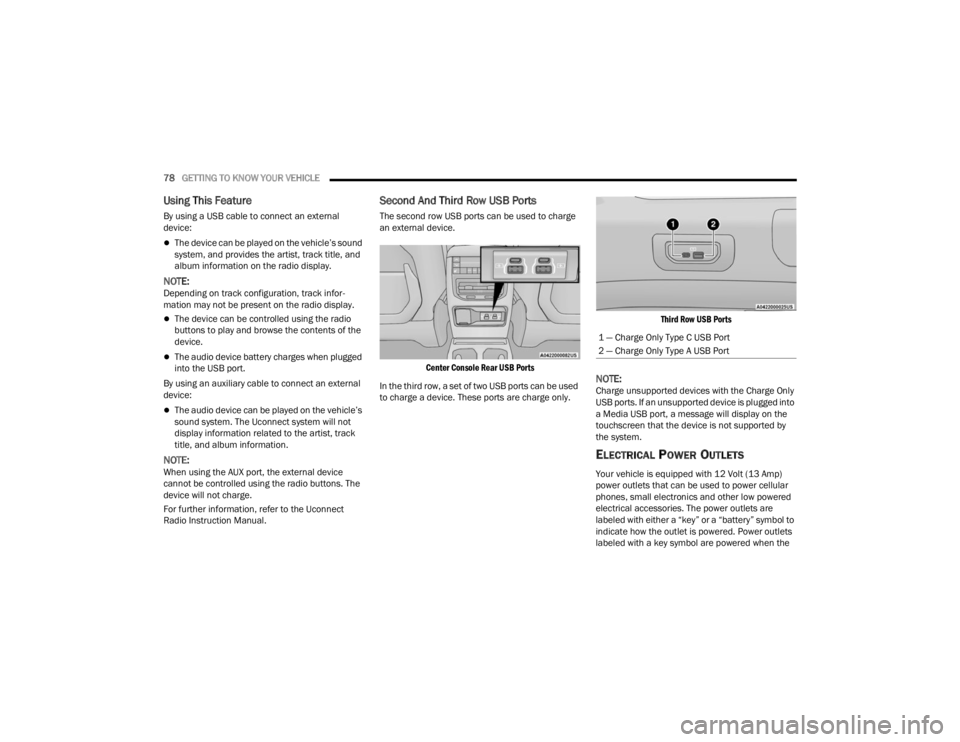
Second And Third Row USB Ports
The second row USB ports can be used to charge
an external device.
Center Console Rear USB Ports
In the third row, a set of two USB ports can be used
to charge a device. These ports are charge only.
Third Row USB Ports
NOTE:Charge unsupported devices with the Charge Only
USB ports. If an unsupported device is plugged into
a Media USB port, a message will display on the
touchscreen that the device is not supported by
the system.
ELECTRICAL POWER OUTLETS
Your vehicle is equipped with 12 Volt (13 Amp)
power outlets that can be used to power cellular
phones, small electronics and other low powered
electrical accessories. The power outlets are
labeled with either a “key” or a “battery” symbol to
indicate how the outlet is powered. Power outlets
labeled with a key symbol are powered when the
1 — Charge Only Type C USB Port
2 — Charge Only Type A USB Port
23_WL_OM_EN_USC_t.book Page 78