Liftgate open JEEP GRAND CHEROKEE 2023 Owner's Manual
[x] Cancel search | Manufacturer: JEEP, Model Year: 2023, Model line: GRAND CHEROKEE, Model: JEEP GRAND CHEROKEE 2023Pages: 424, PDF Size: 15.48 MB
Page 183 of 424
STARTING AND OPERATING181
SURROUND VIEW CAMERA SYSTEM —
IF EQUIPPED
Your vehicle may be equipped with the Surround
View Camera system that allows you to see an
on-screen image of the surroundings and Top View
of your vehicle whenever the gear selector is put
into REVERSE or a different view is selected
through the touchscreen buttons. The Top View of
the vehicle will show which doors are open. The
image will be displayed on the Uconnect display
along with a caution note “Check Entire
Surroundings” across the top of the screen. After
five seconds, this note will disappear. The
Surround View Camera system is comprised of four
sequential cameras located in the front grille, rear
liftgate and side mirrors.
NOTE:The Surround View Camera system has program -
mable settings that may be selected through the
Uconnect system Ú page 204.
Press this button on the touchscreen to
enter the Surround View Camera menu in
the Uconnect system.
When the vehicle is shifted into REVERSE, the Rear
View or Top View is the default view of the system. When the vehicle is shifted out of REVERSE with
camera delay turned on, the camera image will
continue to be displayed for up to 10 seconds
unless the vehicle speed exceeds 8 mph
(13 km/h), the vehicle is shifted into PARK or the
ignition is placed in the OFF position. There is a
touchscreen X button to disable the display of the
camera image.
When the vehicle is shifted out of REVERSE with
camera delay turned off, the Surround View
Camera mode is exited and the last known screen
appears again.
When enabled, active guidelines are overlaid on
the image to illustrate the width of the vehicle,
including the side view mirrors and its projected
backup path based on the steering wheel position.
Different colored zones indicate the distance to
the rear of the vehicle.
The following table shows the approximate
distances for each zone:
Modes Of Operation
Manual activation of the Surround View Camera is
selected by pressing the Surround View Camera
button located in the Controls menu within the
Uconnect system.
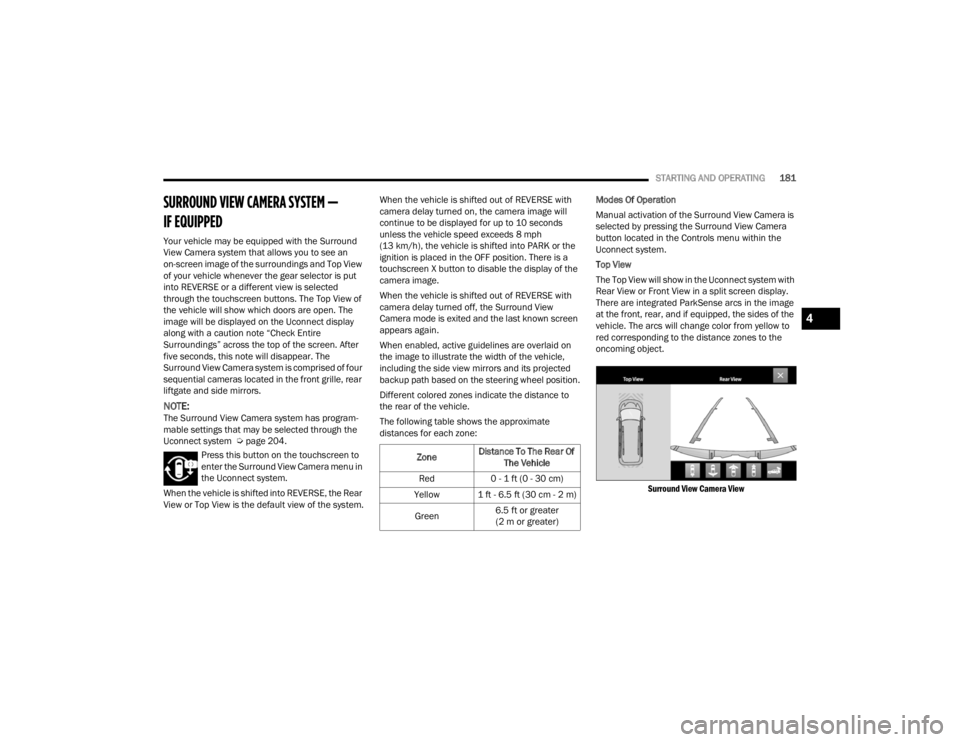
Top View
The Top View will show in the Uconnect system with
Rear View or Front View in a split screen display.
There are integrated ParkSense arcs in the image
at the front, rear, and if equipped, the sides of the
vehicle. The arcs will change color from yellow to
red corresponding to the distance zones to the
oncoming object.
Surround View Camera View
Zone Distance To The Rear Of
The Vehicle
Red 0 - 1 ft (0 - 30 cm)
Yellow 1 ft - 6.5 ft (30 cm - 2 m)
Green 6.5 ft or greater
(2 m or greater)
4
23_WL_OM_EN_USC_t.book Page 181
Page 184 of 424
182STARTING AND OPERATING
NOTE:
Front tires will be in image when the tires are
turned.
Due to wide angle cameras in the mirrors, the
image may appear distorted.
Top View will show which doors are open.
Open front doors and/or liftgate will cancel
outside image in Top View, but the standard
view remains unchanged.
Rear View Plus Top View This is the default view of the system in
REVERSE and is always paired with the
Top View of the vehicle with optional
active guidelines for the projected path
when enabled.
Rear Cross Path View
Pressing the Rear Cross Path button will
give the driver a wider angle view of the
rear camera system. The Top View will be
disabled when this is selected.
Front View Plus Top View The Front View will show you what is
immediately in front of the vehicle and is
always paired with the Top View of the
vehicle. Front Cross Path View
Pressing the Front Cross Path button will
give the driver a wider angle view of the
front camera system. The Top View will
be disabled when this is selected.
Back Up Camera View Pressing the Back Up Camera button will
provide a full screen rear view with Zoom
View.
NOTE:If the Rear View Camera view was selected through
the Surround View Camera menu, exiting out of the
Rear View screen will return to the Surround View
Camera menu. If the Back Up Camera was
manually activated through the Controls menu of
the Uconnect system, exiting out of the display
screen will return to the Controls menu.
Deactivation
The system can be deactivated under the following
conditions:
The speed of the vehicle is greater than 8 mph
(13 km/h).
The vehicle is shifted into PARK.
The vehicle is in any gear other than REVERSE
and the touchscreen X button is pressed.
The camera delay system is turned off manually
through Uconnect Settings Ú page 204.Front And Rear Camera Washers
When the front windshield washer is activated by
pulling the windshield wiper/washer lever
rearward, the front camera is also washed.
When the rear window washer is activated by
pushing the windshield wiper/washer lever
forward, the Rear Back Up camera and Digital
Rearview Mirror (if equipped) cameras are also
washed. For more information, see Ú
page 66.
NOTE:
If snow, ice, mud, or any foreign substance
builds up on the camera lenses, clean the
lenses, rinse with water, and dry with a soft
cloth. Do not cover the lenses.
If a malfunction with the system has occurred,
see an authorized dealer.
WARNING!
Drivers must be careful when backing up even
when using the Surround View Camera. Always
check carefully behind your vehicle, and be sure
to check for pedestrians, animals, other
vehicles, obstructions, or blind spots before
backing up. You are responsible for the safety of
your surroundings and must continue to pay
attention while backing up. Failure to do so can
result in serious injury or death.
23_WL_OM_EN_USC_t.book Page 182
Page 222 of 424

220MULTIMEDIA
Seats & Comfort
Passive Entry This setting will allow you to turn the Passive Entry feature
(Keyless Enter ‘n Go™) on or off.
Personal Settings Linked To Key Fob This setting will recall preset radio stations and driver seat position that have
been linked to the key fob.
Power Liftgate Alert This setting will chime an audible alert when the power liftgate is raising or
lowering. Selectable options are “On” and “Off”.
Hands-Free Power Liftgate This setting will use hands-free technology to automatically open or close the
power liftgate. Selectable options are “On” and “Off”.
Auto Relock This setting will lock the doors after 30 seconds of the doors remaining
unlocked. The available options are “On” and “Off”.
Setting Name
Description
When Seats & Comfort button is pressed on the touchscreen, the system displays the options related to the vehicle’s comfort systems when remote start has
been activated or the vehicle has been started.
NOTE:Depending on the vehicle’s options, feature settings may vary.
Setting NameDescription
Easy Exit Seats This setting will automatically move the driver seat rearward when the engine
is shut off. The available settings are “On” and “Off”.
23_WL_OM_EN_USC_t.book Page 220
Page 315 of 424
IN CASE OF EMERGENCY313
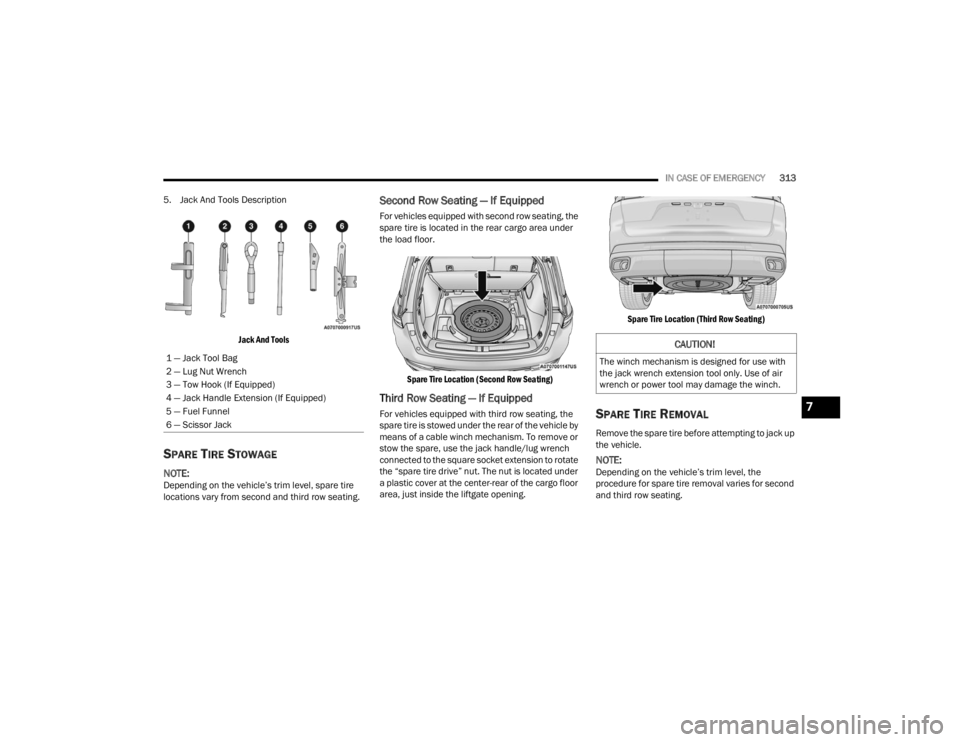
5. Jack And Tools Description
Jack And Tools
SPARE TIRE STOWAGE
NOTE:Depending on the vehicle’s trim level, spare tire
locations vary from second and third row seating.
Second Row Seating — If Equipped
For vehicles equipped with second row seating, the
spare tire is located in the rear cargo area under
the load floor.
Spare Tire Location (Second Row Seating)
Third Row Seating — If Equipped
For vehicles equipped with third row seating, the
spare tire is stowed under the rear of the vehicle by
means of a cable winch mechanism. To remove or
stow the spare, use the jack handle/lug wrench
connected to the square socket extension to rotate
the “spare tire drive” nut. The nut is located under
a plastic cover at the center-rear of the cargo floor
area, just inside the liftgate opening.
Spare Tire Location (Third Row Seating)
SPARE TIRE REMOVAL
Remove the spare tire before attempting to jack up
the vehicle.
NOTE:Depending on the vehicle’s trim level, the
procedure for spare tire removal varies for second
and third row seating.
1 — Jack Tool Bag
2 — Lug Nut Wrench
3 — Tow Hook (If Equipped)
4 — Jack Handle Extension (If Equipped)
5 — Fuel Funnel
6 — Scissor Jack
CAUTION!
The winch mechanism is designed for use with
the jack wrench extension tool only. Use of air
wrench or power tool may damage the winch.
7
23_WL_OM_EN_USC_t.book Page 313
Page 415 of 424

413
Octane Rating
........................................... 397Requirements................................. 397, 400Specifications............................................ 401Tank Capacity............................................ 400Fuel Saver Technology................................... 139Fuel System Cautions.................................... 399Fueling........................................................... 183Fuses............................................................. 352
G
Garage Door Opener (HomeLink).................... 53Gasoline, (Fuel)............................................. 397Gasoline, Clean Air........................................ 398Gasoline, Reformulated................................. 398Gear Ranges.................................................. 128Glass Cleaning............................................... 395Gross Axle Weight Rating............................... 186Gross Combination Weight Rating................. 186Gross Trailer Weight...................................... 185Gross Vehicle Weight Rating.......................... 185GVWR............................................................ 184
H
Hands-Free Liftgate......................................... 89Hazard Warning Flashers.............................. 307Head Restraints............................................... 47Head Up Display (hud) — If Equipped
b
.......105
Headlights....................................................... 57Automatic.................................................... 59Cleaning................................................... 393Delay........................................................... 60High Beam/Low Beam Select Switch.......... 59Leveling....................................................... 61Lights On Reminder..................................... 61On With Wipers............................................ 60Passing........................................................ 59Switch.......................................................... 57Heads Up Display (HUD)............................... 105Heated Mirrors................................................. 53Heated Seats................................................... 45Heated Steering Wheel.................................... 33Hill Descent Control............................. 116, 253Hill Descent Control Indicator....................... 253Hill Start Assist.............................................. 254Hitches Trailer Towing........................................... 188Hold ’N Go.................................................... 125HomeLink (Garage Door Opener)..................... 53HoodClosing...................................................... 110Opening.................................................... 110Hood Release.................................................. 87HUD.............................................................. 105
I
Ignition.............................................................22Key Fob Battery Low Or Dead......................22Key Fob Not Detected..................................22Keyless Ignition...........................................22Keyless Push Button....................................22Push Button Ignition....................................22Switch..........................................................22Ignition Park Interlock................................... 127Immobilizer (Sentry Key)..................................22Inside Rearview Mirror........................... 49, 307Instrument Cluster...........................................98Descriptions.............................................. 116Display.........................................................98Home........................................................ 103Menu Items.............................................. 103Instrument Cluster DisplayVehicle Info............................................... 103Instrument Panel Lens Cleaning................... 395Interior And Instrument Lights.........................62Interior Appearance Care.............................. 394Interior Lights...................................................62Interior Monitoring Camera........................... 177Intermittent Wipers (Delay Wipers)..................64Intersection Collision Assist.......................... 264InverterPower...........................................................80iPod/USB/MP3 Control....................................7711
23_WL_OM_EN_USC_t.book Page 413
Page 416 of 424

414 J
Jack Location
................................................. 311Jack Operation............................................... 315Jacking And Tire Changing
b
....................... 310Jacking And Tire Changing Instructions......... 311Jacking Instructions....................................... 315Jump Starting................................................ 319
K
Key Fob Arm The System
.......................................... 26Disarm The System..................................... 27Programming Additional Key Fobs.............. 21Key Fob Battery Service
(Remote Keyless Entry)................................... 19
Key Fob Programming (Remote Keyless Entry).. 21
Keyless Enter 'n Go™..................................... 119Passive Entry............................................... 29Passive Entry Programming......................... 29Keys................................................................. 18Replacement............................................... 21Sentry (Immobilizer).................................... 22
L
Lane Change Assist......................................... 61Lane Management System............................ 171Lap/Shoulder Belts....................................... 271Latches.......................................................... 305Lead Free Gasoline........................................ 397Leaks, Fluid................................................... 305
Life Of Tires................................................... 384Liftgate...................................................88, 110Adjustable Height........................................ 89Closing......................................................... 88Hands-Free.................................................. 89Opening....................................................... 88Liftgate Window Wiper/Washer....................... 66Light Bulbs.................................................... 305Lighted Cupholders.......................................... 76Lights............................................................ 305Air Bag.................................... 108, 277, 303Ambient....................................................... 62Ambient, Mutlicolor..................................... 63Automatic Headlights.................................. 59Brake Assist Warning............................... 252Brake Warning.......................................... 108Bulb Replacement.................................... 374Cruise.............................................. 115, 116Daytime Running......................................... 58Dimmer Switch............................................ 62Dimmer Switch, Headlight........................... 57Electric Power Steering............................. 109Electronic Stability Control............... 111, 112Exterior...............................................57, 305Fog.....................................................61, 115Hazard Warning Flasher........................... 307Headlights On With Wipers.......................... 60High Beam................................................ 117
High Beam/Low Beam Select......................59Hill Descent Control Indicator.......... 116, 253Interior.........................................................62Lights On Reminder.....................................61Low Fuel................................................... 112Malfunction Indicator (Check Engine)....... 112NEUTRAL.................................................. 115Night Vision.............................110, 113, 116Oil Temperature........................................ 110Park................................................... 59, 116Passing........................................................59Reading.......................................................62Seat Belt Reminder.................................. 110Security Alarm.......................................... 111SelecSpeed Control.................................. 117Service...................................................... 374Sport Mode............................................... 116StopStart.................................................. 116Sway Bar................................................... 115Sway Bar Fault.......................................... 113Traction Control........................................ 252Transmission Temperature....................... 110Turn Signals.............................. 61, 116, 305Vanity Mirror................................................50Load Shed Battery Saver Mode..................... 106Load Shed Battery Saver On......................... 106Load Shed Electrical Load Reduction........... 106Load Shed Intelligent Battery Sensor............ 106
23_WL_OM_EN_USC_t.book Page 414