brake light JEEP GRAND CHEROKEE 2023 Owner's Manual
[x] Cancel search | Manufacturer: JEEP, Model Year: 2023, Model line: GRAND CHEROKEE, Model: JEEP GRAND CHEROKEE 2023Pages: 424, PDF Size: 15.48 MB
Page 143 of 424
STARTING AND OPERATING141
TO START THE ENGINE WHILE IN
A
UTOSTOP MODE
While in a forward gear, the engine will start when
the brake pedal is released or the throttle pedal is
pressed. The transmission will automatically
re-engage upon engine restart.
Conditions That Will Cause The Engine To Start
Automatically While In Autostop Mode:
The transmission selector is moved out of
DRIVE.
To maintain cabin temperature comfort.
HVAC is set to full defrost mode.
HVAC system temperature or fan speed is
manually adjusted.
Battery voltage drops too low.
Stop/Start OFF switch is pushed.
A Stop/Start system error occurs.
Steering angle is beyond threshold.
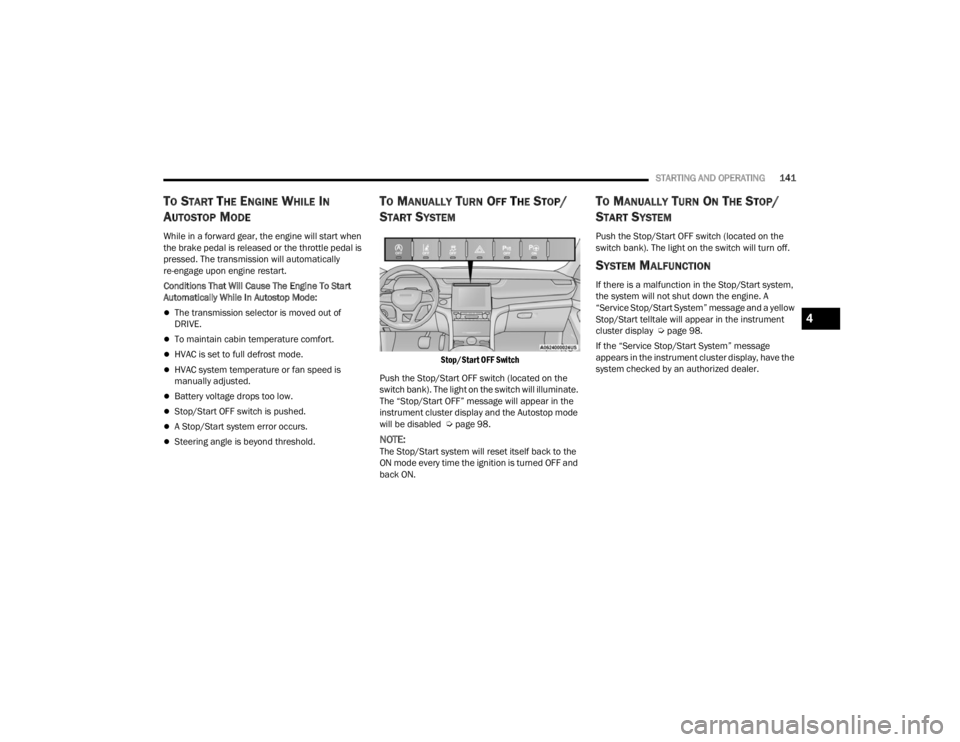
TO MANUALLY TURN OFF THE STOP/
S
TART SYSTEM
Stop/Start OFF Switch
Push the Stop/Start OFF switch (located on the
switch bank). The light on the switch will illuminate.
The “Stop/Start OFF” message will appear in the
instrument cluster display and the Autostop mode
will be disabled Ú page 98.
NOTE:The Stop/Start system will reset itself back to the
ON mode every time the ignition is turned OFF and
back ON.
TO MANUALLY TURN ON THE STOP/
S
TART SYSTEM
Push the Stop/Start OFF switch (located on the
switch bank). The light on the switch will turn off.
SYSTEM MALFUNCTION
If there is a malfunction in the Stop/Start system,
the system will not shut down the engine. A
“Service Stop/Start System” message and a yellow
Stop/Start telltale will appear in the instrument
cluster display Ú page 98.
If the “Service Stop/Start System” message
appears in the instrument cluster display, have the
system checked by an authorized dealer.
4
23_WL_OM_EN_USC_t.book Page 141
Page 144 of 424

142STARTING AND OPERATING
(Continued)
CRUISE CONTROL SYSTEMS
Your vehicle is equipped with the Adaptive Cruise
Control (ACC) system which will adjust the vehicle
speed up to the preset speed to maintain a
distance with the vehicle ahead.
NOTE:In vehicles NOT equipped with the Active Driving
Assist (ADA) system:
Fixed Speed Cruise Control can be used when
ACC is not enabled, and functions as normal
cruise control.
Fixed Speed Cruise Control will not detect vehi -
cles directly ahead of you. Always be aware of
the feature selected.
Only one Cruise Control feature can operate at a
time. For example, if Fixed Speed Cruise Control
is enabled, Adaptive Cruise Control will be
unavailable, and vice versa.
ADAPTIVE CRUISE CONTROL (ACC)
Adaptive Cruise Control (ACC) increases the driving
convenience provided by Cruise Control while
traveling on highways and major roadways.
However, it is not a safety system and not designed
to prevent collisions. ACC will allow you to keep Cruise Control engaged
in light to moderate traffic conditions without the
constant need to reset your Cruise Control. ACC
utilizes a radar sensor and a forward facing
camera designed to detect a vehicle directly ahead
of you.
NOTE:
If the ACC sensor detects a vehicle ahead, ACC
will apply limited braking or acceleration (not to
exceed the original set speed) automatically to
maintain a preset following distance, while
matching the speed of the vehicle ahead.
Any chassis/suspension or tire size modifica
-
tions to the vehicle will affect the performance
of the Adaptive Cruise Control and Forward Colli -
sion Warning system.
In vehicles NOT equipped with the Active Driving
Assist system, Fixed Speed Cruise Control (ACC
not enabled) will not detect vehicles directly
ahead of you. Always be aware of the feature
selected Ú page 408.
WARNING!
Adaptive Cruise Control (ACC) is a conve -
nience system. It is not a substitute for active
driver involvement. It is always the driver’s
responsibility to be attentive of road, traffic,
and weather conditions, vehicle speed,
distance to the vehicle ahead and, most
importantly, brake operation to ensure safe
operation of the vehicle under all road condi -
tions. Your complete attention is always
required while driving to maintain safe control
of your vehicle. Failure to follow these warn -
ings can result in a collision and death or
serious personal injury.
The ACC system:
Does not react to pedestrians, oncoming
vehicles, and stationary objects (e.g., a
stationary vehicle in a traffic jam or a
disabled vehicle).
Cannot take street, traffic, and weather
conditions into account, and may be limited
upon adverse sight distance conditions.
Does not always fully recognize complex
driving conditions, which can result in
wrong or missing distance warnings.
23_WL_OM_EN_USC_t.book Page 142
Page 148 of 424
146STARTING AND OPERATING
To Vary The Speed Setting
To Increase Or Decrease The Set Speed
After setting a speed, you can increase the set
speed by pushing the SET (+) button, or decrease
speed by pushing the SET (-) button.
U.S. Speed (mph)
Pushing the SET (+) , or SET (-) button once will
result in a 1 mph speed adjustment. Each
subsequent tap of the button results in an
adjustment of 1 mph.
If the button is continually pushed, the set
speed will continue to adjust in 5 mph incre -
ments until the button is released. The new set
speed is reflected in the instrument cluster
display.
Metric Speed (km/h)
Pushing the SET (+) , or SET (-) button once will
result in a 1 km/h speed adjustment. Each
subsequent tap of the button results in an
adjustment of 1 km/h.
If the button is continually pushed, the set
speed will continue to adjust in 10 km/h incre -
ments until the button is released. The new set
speed is reflected in the instrument cluster
display.
NOTE:When you override and push the SET (+) button or
SET (-) button, the new set speed will be the current
speed of the vehicle.
When ACC Is Active
When you use the SET (-) button to decelerate, if
the engine’s braking power does not slow the
vehicle sufficiently to reach the set speed, the
brake system will automatically slow the
vehicle.
The ACC system decelerates the vehicle to a full
stop when following the vehicle in front. If your
vehicle follows the vehicle in front to a standstill,
after two seconds the driver will either have to
push the RES (resume) button, or apply the
accelerator pedal to reengage the ACC to the
existing set speed.
The ACC system maintains set speed when
driving uphill and downhill. However, a slight
speed change on moderate hills is normal. In
addition, downshifting may occur while climbing
uphill or descending downhill. This is normal
operation and necessary to maintain set speed.
When driving uphill and downhill, the ACC
system will cancel if the braking temperature
exceeds normal range (overheated).
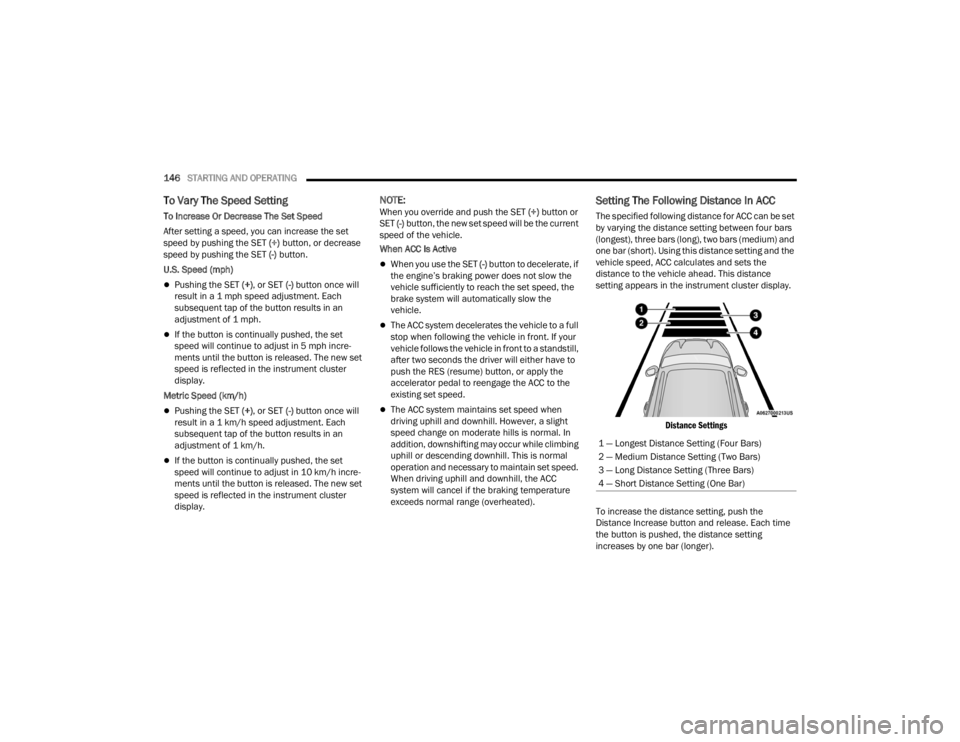
Setting The Following Distance In ACC
The specified following distance for ACC can be set
by varying the distance setting between four bars
(longest), three bars (long), two bars (medium) and
one bar (short). Using this distance setting and the
vehicle speed, ACC calculates and sets the
distance to the vehicle ahead. This distance
setting appears in the instrument cluster display.
Distance Settings
To increase the distance setting, push the
Distance Increase button and release. Each time
the button is pushed, the distance setting
increases by one bar (longer). 1 — Longest Distance Setting (Four Bars)
2 — Medium Distance Setting (Two Bars)
3 — Long Distance Setting (Three Bars)
4 — Short Distance Setting (One Bar)
23_WL_OM_EN_USC_t.book Page 146
Page 149 of 424

STARTING AND OPERATING147
To decrease the distance setting, push the
Distance Decrease button and release. Each time
the button is pushed, the distance setting
decreases by one bar (shorter).
If there is no vehicle ahead, the vehicle will
maintain the set speed. If a slower moving vehicle
is detected in the same lane, the instrument
cluster display will show the ACC Set With Target
Detected Indicator Light, and the system will adjust
the vehicle speed automatically to maintain the
distance setting, regardless of the set speed.
The vehicle will then maintain the set distance
until:
The vehicle ahead accelerates to a speed above
the set speed.
The vehicle ahead moves out of your lane or
view of the sensor.
The distance setting is changed.
The system disengages Ú page 144.
The maximum braking applied by ACC is limited;
however, the driver can always apply the brakes
manually, if necessary.
NOTE:The brake lights will illuminate whenever the ACC
system applies the brakes. A Proximity Warning will alert the driver if ACC
predicts that its maximum braking level is not
sufficient to maintain the set distance. If this
occurs, a visual alert “BRAKE!” will flash in the
instrument cluster display and a chime will sound
while ACC continues to apply its maximum braking
capacity.
NOTE:The “BRAKE!” screen in the instrument cluster
display is a warning for the driver to take action
and does not necessarily mean that the Forward
Collision Warning system is applying the brakes
autonomously.
Overtake Aid
When driving with Adaptive Cruise Control (ACC)
engaged and following a vehicle, the system will
provide an additional acceleration up to the ACC
set speed to assist in passing the vehicle. This
additional acceleration is triggered when the driver
utilizes the left turn signal and will only be active
when passing on the left hand side.
ACC Operation At Stop
If the ACC system brings your vehicle to a standstill
while following a vehicle ahead, your vehicle will
resume motion, without any driver interaction, if
the vehicle ahead starts moving within two
seconds of your vehicle coming to a standstill.If the vehicle in front does not start moving within
two seconds of your vehicle coming to a standstill,
the driver will either have to push the RES (resume)
button, or apply the accelerator pedal to reengage
the ACC to the existing set speed.
NOTE:
If your vehicle is at a standstill for longer than
two seconds, the system will hold brake pres
-
sure for up to 10 minutes. If no driver action is
taken after the 10 minutes, the Electric Park
Brake will be applied and the ACC system will
cancel.
While ACC is holding your vehicle at a standstill
(or the vehicle is traveling below 3 mph
(5 km/h), and the driver seat belt is unbuckled
or the driver door is opened, the Electric Park
Brake will be applied and the ACC system will
cancel.
WARNING!
When the ACC system is resumed, the driver
must ensure that there are no pedestrians,
vehicles or objects in the path of the vehicle.
Failure to follow these warnings can result in a
collision and death or serious personal injury.
4
23_WL_OM_EN_USC_t.book Page 147
Page 158 of 424
156STARTING AND OPERATING
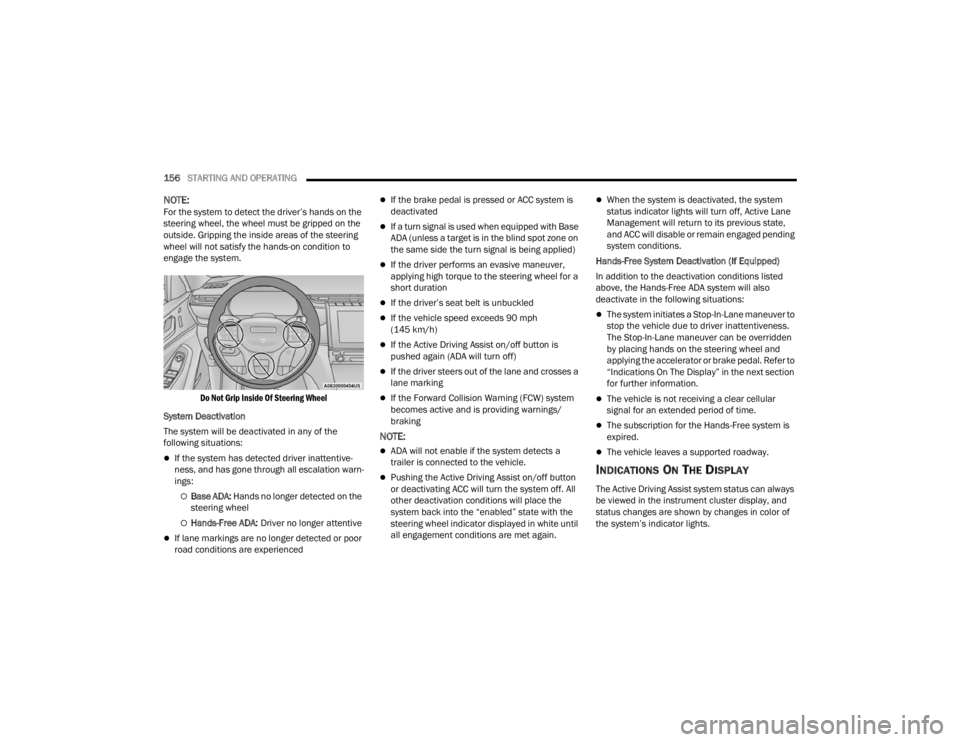
NOTE:For the system to detect the driver’s hands on the
steering wheel, the wheel must be gripped on the
outside. Gripping the inside areas of the steering
wheel will not satisfy the hands-on condition to
engage the system.
Do Not Grip Inside Of Steering Wheel
System Deactivation
The system will be deactivated in any of the
following situations:
If the system has detected driver inattentive -
ness, and has gone through all escalation warn -
ings:
Base ADA: Hands no longer detected on the
steering wheel
Hands-Free ADA: Driver no longer attentive
If lane markings are no longer detected or poor
road conditions are experienced
If the brake pedal is pressed or ACC system is
deactivated
If a turn signal is used when equipped with Base
ADA (unless a target is in the blind spot zone on
the same side the turn signal is being applied)
If the driver performs an evasive maneuver,
applying high torque to the steering wheel for a
short duration
If the driver’s seat belt is unbuckled
If the vehicle speed exceeds 90 mph
(145 km/h)
If the Active Driving Assist on/off button is
pushed again (ADA will turn off)
If the driver steers out of the lane and crosses a
lane marking
If the Forward Collision Warning (FCW) system
becomes active and is providing warnings/
braking
NOTE:
ADA will not enable if the system detects a
trailer is connected to the vehicle.
Pushing the Active Driving Assist on/off button
or deactivating ACC will turn the system off. All
other deactivation conditions will place the
system back into the “enabled” state with the
steering wheel indicator displayed in white until
all engagement conditions are met again.
When the system is deactivated, the system
status indicator lights will turn off, Active Lane
Management will return to its previous state,
and ACC will disable or remain engaged pending
system conditions.
Hands-Free System Deactivation (If Equipped)
In addition to the deactivation conditions listed
above, the Hands-Free ADA system will also
deactivate in the following situations:
The system initiates a Stop-In-Lane maneuver to
stop the vehicle due to driver inattentiveness.
The Stop-In-Lane maneuver can be overridden
by placing hands on the steering wheel and
applying the accelerator or brake pedal. Refer to
“Indications On The Display” in the next section
for further information.
The vehicle is not receiving a clear cellular
signal for an extended period of time.
The subscription for the Hands-Free system is
expired.
The vehicle leaves a supported roadway.
INDICATIONS ON THE DISPLAY
The Active Driving Assist system status can always
be viewed in the instrument cluster display, and
status changes are shown by changes in color of
the system’s indicator lights.
23_WL_OM_EN_USC_t.book Page 156
Page 159 of 424
STARTING AND OPERATING157
As the system detects driver inattentiveness as
previously described Ú page 152, the system
status indicator lights will change from green, to
yellow, to red. The following indicators will change
in color as warnings to the driver escalate:
Active Driving Assist Indicator (steering wheel
icon in the instrument cluster display or Head
Up Display [if equipped])
Glow effect of the instrument cluster display
For Hands-Free ADA only, light strips in the
driver and front passenger’s door panels (red
and green only)
For Base ADA, if driver attention is not returned,
the system will deactivate.
For Hands-Free ADA, if driver attention is not
returned, the system will perform a Stop-In-Lane
maneuver. Once the vehicle is at a standstill, the
vehicle will be shifted to PARK and the Electric Park
Brake (EPB) will be applied. Then, the vehicle will
attempt to place an emergency call through the
Assist and SOS system. If too many Stop-In-Lane
maneuvers are initiated, or if one is completed, the
system will be unavailable until the ignition is
cycled OFF, then back to ON.
Active Driving Assist Indicators Are Off
ADA is not turned on/enabled by the driver. Active Driving Assist Indicators Are White
ADA is turned on/enabled by the driver, but the
system is not actively steering and providing
speed control for the vehicle.
Active Driving Assist Indicators Are Green
System is actively steering and providing speed
control for the vehicle and the system detects
driver is attentive.
Active Driving Assist Indicators Are Yellow
Driver inattentiveness has been detected,
warning the driver to place hands on the
steering wheel, or look back toward the road (if
equipped with the Hands-Free system).
Active Driving Assist Indicators Are Red
Driver inattentiveness is still being detected, or
driver take-over is being requested, warning the
driver to place hands on the steering wheel, or if
equipped with the Hands-Free system, take
control of the vehicle.
NOTE:For both Base ADA and Hands-Free ADA, the driver
MUST replace hands on the steering wheel and
take control of the vehicle when the system is
deactivated.
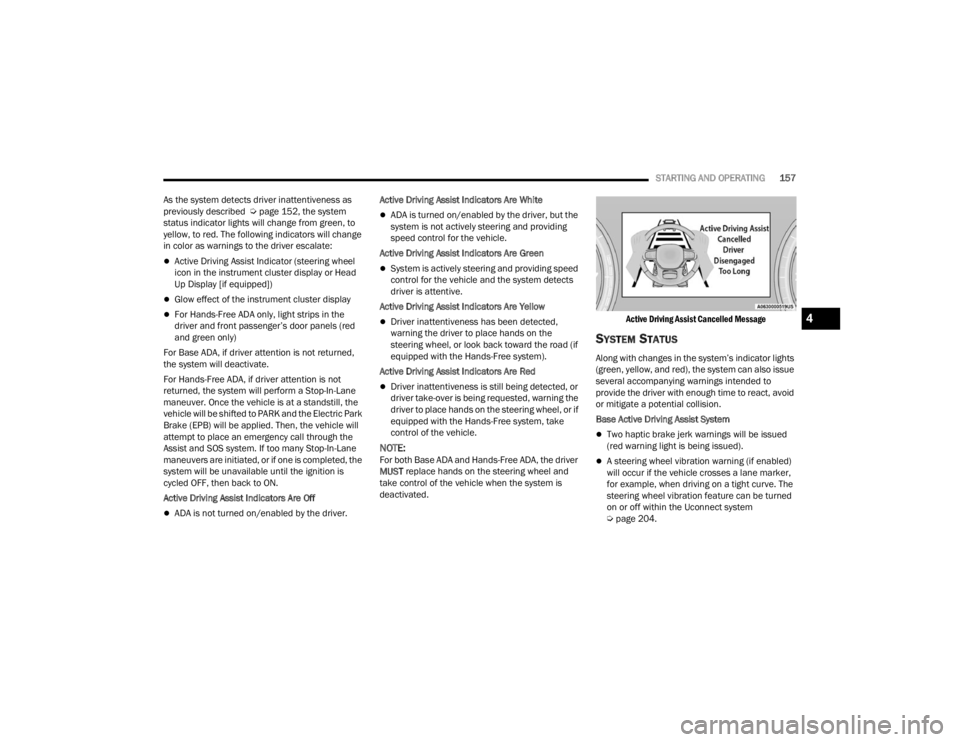
Active Driving Assist Cancelled Message
SYSTEM STATUS
Along with changes in the system’s indicator lights
(green, yellow, and red), the system can also issue
several accompanying warnings intended to
provide the driver with enough time to react, avoid
or mitigate a potential collision.
Base Active Driving Assist System
Two haptic brake jerk warnings will be issued
(red warning light is being issued).
A steering wheel vibration warning (if enabled)
will occur if the vehicle crosses a lane marker,
for example, when driving on a tight curve. The
steering wheel vibration feature can be turned
on or off within the Uconnect system
Ú
page 204.
4
23_WL_OM_EN_USC_t.book Page 157
Page 160 of 424

158STARTING AND OPERATING
(Continued)
Hands-Free Active Driving Assist System
Two haptic brake jerk warnings will be issued
(red warning light is being issued).
A seat vibration warning will occur (red warning
light is being issued).
The driver can take control of the vehicle at
anytime to override the warnings by pressing the
gas or brake pedal, moving the steering wheel, and
being attentive to the road.
SYSTEM OPERATION/LIMITATIONS
The Base Active Driving Assist and Hands-Free
Active Driving Assist systems DO NOT:
Warn or prevent collisions with other vehicles
Steer your vehicle around stopped vehicles,
slower vehicles, construction zones or equip -
ment, pedestrians, or animals
Respond to traffic lights or stop signs
Merge onto highways or exit off ramps
Change lanes (exception: Hands-Free, only
when initiated by the driver)
React to cross traffic
NOTE:Adaptive Cruise Control (ACC) is a core component
of ADA. For ACC system limitations Ú page 142.
The Active Driving Assist system may have limited
or reduced functionality when one of the following
conditions occur:
The vehicle’s radar sensors and/or forward
facing camera is damaged, covered,
misaligned, or obstructed (e.g. by mud, ice,
snow, etc.)
WARNING!
Active Driving Assist is an SAE Level 2 Driver
Assist feature, requiring driver attention at all
times. To prevent serious injury or death:
Always remember that the Active Driving
Assist system is a convenience system that
cannot accurately detect all situations.
Complete attention is always required while
driving, even when using the Active Driving
Assist system.
Always remain alert and be ready to take
control of the vehicle in the event that the
Active Driving Assist system deactivates, or
otherwise lacks full functionality as described
further before and after this statement.
Always keep your hands on the steering wheel
when the Base Active Driving Assist system is
activated.
Always keep your eyes on the road when the
Hands-Free Active Driving Assist system is
activated.
Maintain a safe distance from other vehicles
and pay attention to traffic conditions.
Do not use a hand held device when either
Base, or Hands-Free Active Driving Assist
system is engaged.
Always pay attention to the road when the
Hands-Free Active Driving Assist system is
engaged. The Active Driving Assist system will
not steer to avoid safety hazards, construction
zones, objects, or road impediments. You
need to take control to steer and brake the
vehicle in such situations, and when merging
into traffic, exiting the highway, making a turn
for crossing traffic, or stopping for traffic
control devices.
Do not place any objects on the steering wheel
(e.g. steering wheel covers) which could inter -
fere with the hand detection sensors.
WARNING!
23_WL_OM_EN_USC_t.book Page 158
Page 181 of 424

STARTING AND OPERATING179
(Continued)
The Night Vision alert status telltale will
be gray when the warnings are
suppressed. The telltale will also turn
gray to indicate that the alerts are
suppressed due to environmental factors (e.g.
daylight hours, external temperature is greater
than 86°F (30°C)) or if the gear selector is in
REVERSE. When the Night Vision alerts are active,
the telltale will be green Ú page 108.
Camera Washers
When the front window washer is activated, the
Night Vision camera will also be washed
Ú page 64.
DETECTION RANGE
The system can detect people 4 ft (1.25 m) tall or
greater in the upright position. The system can also
detect animals that are four-legged and 3 ft (1 m)
tall or greater in the upright position.
The detection distance for the system is between
26 ft (8 m) and 328 ft (100 m) from the front of the
vehicle.
The system may not be able to detect pedestrians
or animals in the following situations:
Pedestrian/animal is outside of the detection
range
Pedestrian/animal is fully or partially covered
Pedestrian/animal does not reach the minimum
detection height
NOTE:Other objects on the road that meet the height/
shape/temperature (e.g. sun exposure) of pedes -
trians/animals may be detected and classified as
targets.
WARNING!
Do not jerk the steering wheel in response to
a warning.
Never attempt to swerve around animals if
doing so would endanger you or others.
Do not stare at the image while driving. You
could crash and you or others could be
injured.
The Night Vision system only provides alerts to
objects of interest and cannot serve as a
substitute for the driver’s personal judgment.
The warnings are meant to direct your atten-
tion to the detected objects, but the Night
Vision system does not automatically brake
the vehicle and may not provide a warning
with enough time to help avoid a crash.
Warnings are only provided if a pedestrian or
large animal is detected by the system.
It is always the driver’s responsibility to be
attentive of road, traffic, and weather condi -
tions, vehicle speed, distance to the vehicle
ahead, and most importantly, brake opera -
tion, to ensure safe operation of the vehicle
under all road conditions. Your complete
attention is always required while driving to
maintain safe control of your vehicle.
WARNING!
4
23_WL_OM_EN_USC_t.book Page 179
Page 195 of 424
STARTING AND OPERATING193
Towing Requirements — Trailer Brakes
Do not interconnect the hydraulic brake system
or vacuum system of your vehicle with that of
the trailer. This could cause inadequate braking
and possible personal injury.
An electronically actuated trailer brake
controller is required when towing a trailer with
electronically actuated brakes. When towing a
trailer equipped with a hydraulic surge actuated
brake system, an electronic brake controller is
not required.
Trailer brakes are recommended for trailers
over 1,000 lb (453 kg) and required for trailers
in excess of 2,000 lb (907 kg).
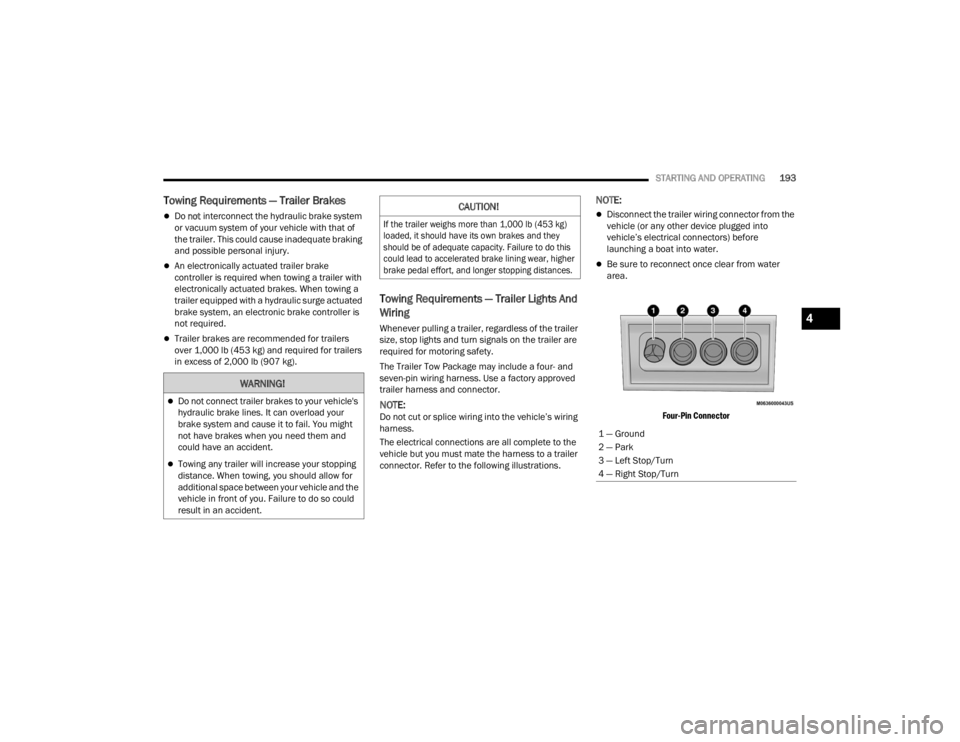
Towing Requirements — Trailer Lights And
Wiring
Whenever pulling a trailer, regardless of the trailer
size, stop lights and turn signals on the trailer are
required for motoring safety.
The Trailer Tow Package may include a four- and
seven-pin wiring harness. Use a factory approved
trailer harness and connector.
NOTE:Do not cut or splice wiring into the vehicle’s wiring
harness.
The electrical connections are all complete to the
vehicle but you must mate the harness to a trailer
connector. Refer to the following illustrations.
NOTE:
Disconnect the trailer wiring connector from the
vehicle (or any other device plugged into
vehicle’s electrical connectors) before
launching a boat into water.
Be sure to reconnect once clear from water
area.
Four-Pin Connector
WARNING!
Do not connect trailer brakes to your vehicle's
hydraulic brake lines. It can overload your
brake system and cause it to fail. You might
not have brakes when you need them and
could have an accident.
Towing any trailer will increase your stopping
distance. When towing, you should allow for
additional space between your vehicle and the
vehicle in front of you. Failure to do so could
result in an accident.
CAUTION!
If the trailer weighs more than 1,000 lb (453 kg)
loaded, it should have its own brakes and they
should be of adequate capacity. Failure to do this
could lead to accelerated brake lining wear, higher
brake pedal effort, and longer stopping distances.
1 — Ground
2 — Park
3 — Left Stop/Turn
4 — Right Stop/Turn
4
23_WL_OM_EN_USC_t.book Page 193
Page 196 of 424

194STARTING AND OPERATING
Seven-Pin Connector
TOWING TIPS
Before towing, practice turning, stopping, and
backing up the trailer in an area located away from
heavy traffic.
Automatic Transmission
Select the DRIVE (D) range when towing. The
transmission controls include a drive strategy to
avoid frequent shifting when towing. However, if
frequent shifting does occur while in DRIVE, you
can use the AutoStick shift control to manually
select a lower gear.
NOTE:Using a lower gear while operating the vehicle
under heavy loading conditions, will improve
performance and extend transmission life by
reducing excessive shifting and heat buildup. This
action will also provide better engine braking.
Cruise Control — If Equipped
Do not use on hilly terrain or with heavy loads.
When using the Cruise Control, if you experience
speed drops greater than 10 mph (16 km/h),
disengage until you can get back to cruising
speed.
Use Cruise Control in flat terrain and with light
loads to maximize fuel efficiency.
1 — Backup Lamps
2 — Running Lamps
3 — Left Stop/Turn
4 — Ground
5 — Battery
6 — Right Stop/Turn
7 — Electric Brakes
23_WL_OM_EN_USC_t.book Page 194