Shift lock JEEP GRAND CHEROKEE 2023 Owners Manual
[x] Cancel search | Manufacturer: JEEP, Model Year: 2023, Model line: GRAND CHEROKEE, Model: JEEP GRAND CHEROKEE 2023Pages: 424, PDF Size: 15.48 MB
Page 6 of 424

4
POWER SUNROOF — IF EQUIPPED .................... 83 Single Pane Power Sunroof — If Equipped ....83
Dual Pane Power Sunroof —If Equipped ........85
HOOD ...................................................................... 87
Opening The Hood............................................87
Closing The Hood .............................................87
LIFTGATE ................................................................. 88
To Unlock/Open The Liftgate...........................88
To Lock/Close The Liftgate ..............................88
Adjustable Power Liftgate Height ....................89
Hands-Free Liftgate — If Equipped .................89
Cargo Area Features ........................................90
ROOF LUGGAGE RACK — IF EQUIPPED ............. 93
GETTING TO KNOW YOUR
INSTRUMENT PANEL
DIGITAL INSTRUMENT CLUSTER ......................... 95
Digital Instrument Cluster Descriptions ..........96
ANALOG INSTRUMENT CLUSTER ........................ 97
Analog Instrument Cluster Descriptions .........98 INSTRUMENT CLUSTER DISPLAY.........................98
Location And Controls ......................................98
Engine Oil Life Reset .................................... 100
Display And Messages .................................. 101
Instrument Cluster Display Menu Items ..... 103
Head Up Display (HUD) — If Equipped ......... 105Battery Saver On/Battery Saver Mode
Message — Electrical Load Reduction
Actions — If Equipped ................................... 106
WARNING LIGHTS AND MESSAGES ................ 108
Red Warning Lights ....................................... 108
Yellow Warning Lights ................................... 111Yellow Indicator Lights .................................. 114
Green Indicator Lights .................................. 115
White Indicator Lights ................................... 116Blue Indicator Lights ..................................... 117
Gray Indicator Lights ..................................... 117
ONBOARD DIAGNOSTIC SYSTEM — OBD II ..... 117
Onboard Diagnostic System
(OBD II) Cybersecurity ................................... 117
EMISSIONS INSPECTION AND MAINTENANCE
PROGRAMS ......................................................... 118
STARTING AND OPERATING
STARTING THE ENGINE ...................................... 119
Automatic Transmission ............................... 119
Keyless Enter ‘n Go™ — Ignition .................. 119
Normal Starting ............................................ 119
AutoPark ........................................................ 120
Extended Park Starting ................................. 121
If Engine Fails To Start .................................. 122Cold Weather Operation
(Below –22°F Or −30°C) ............................ 122
After Starting ................................................. 122
ENGINE BREAK-IN RECOMMENDATIONS ......... 122
PARKING BRAKE ................................................. 123
Electric Park Brake (EPB) ............................. 123Auto Park Brake ............................................ 125
SafeHold ........................................................ 125
Hold ‘N Go — If Equipped ............................. 125Brake Maintenance Mode ............................ 125
AUTOMATIC TRANSMISSION ............................. 126
Ignition Park Interlock................................... 127
Brake/Transmission Shift Interlock (BTSI)
System .......................................................... 1278-Speed Automatic Transmission ............... 127
SPORT MODE — IF EQUIPPED............................ 131
23_WL_OM_EN_USC_t.book Page 4
Page 55 of 424

GETTING TO KNOW YOUR VEHICLE53
AUTOMATIC POWER FOLDING MIRRORS —
I
F EQUIPPED
When enabled within Uconnect Settings
Ú page 204, the exterior mirrors will automatically
fold when the vehicle’s ignition is placed in the OFF
position, and after the doors are locked and
closed.
The exterior mirrors will auto-fold in the following
situations after the ignition is placed in the OFF
position:
Pushing the lock button on the door panel
before the door is opened.
NOTE:If the doors are already locked, push the lock
button again.
Opening the door, then pushing the lock button
on the door panel, followed by closing the door.
After exiting the vehicle, close the doors then
push the lock button on the key fob.
After exiting the vehicle, close the doors then
touch the lock icon on the Passive Entry door
handle.
If the exterior mirrors were folded automatically,
they will unfold when the ignition is placed in the
ON/RUN position.
NOTE:If the mirrors were folded manually, by using the
power folding mirror switch on the driver’s door
panel, they will not automatically unfold.
HEATED MIRRORS — IF EQUIPPED
These mirrors are heated to melt frost or
ice. This feature will be activated
whenever you turn on the rear window
defroster (if equipped) Ú page 66.
TILT SIDE MIRRORS IN REVERSE —
I
F EQUIPPED
Tilt Side Mirrors In Reverse provides automatic
outside mirror positioning which will aid the
driver’s view of the ground rearward of the front
doors. Outside mirrors will move slightly downward
from the present position when the vehicle is
shifted into REVERSE. Outside mirrors will then
return to the original position when the vehicle is
shifted out of REVERSE position. Each stored
memory setting will have an associated Tilt Side
Mirrors In Reverse position.
NOTE:The Tilt Side Mirrors In Reverse feature can be
turned on and off using the Uconnect system
Ú page 204.
UNIVERSAL GARAGE DOOR OPENER
(HOMELINK®) — IF EQUIPPED
HomeLink® Buttons And Indicator Light
Use this QR code to access your
digital experience.
HomeLink® replaces up to
three hand-held transmitters
that operate devices such as
garage door openers, motor -
ized gates, lighting or home
security systems. The HomeLink® unit is
powered by your vehicle’s 12 Volt battery.
The HomeLink® buttons that are located in the
overhead console or sun visor designate the
three different HomeLink® channels.
2
23_WL_OM_EN_USC_t.book Page 53
Page 104 of 424

102GETTING TO KNOW YOUR INSTRUMENT PANEL
Unstored Messages Until RUN
These messages deal primarily with the Remote
Start feature. This message type is displayed
until the ignition is in the RUN state. Examples of
this message type are “Remote Start Canceled - Door Ajar” and “Press Brake Pedal and Push
Button to Start”.
Five Second Unstored Messages
When the appropriate conditions occur, this
type of message takes control of the main display area for five seconds and then returns to
the previous screen. An example of this
message type is “Automatic High Beams On”.
Includes the following, but not limited to:
The Reconfigurable Telltales section is divided into the white or yellow telltales area on the left, and the green or red telltales area on the right. Vehicle Speed is Too High to Shift to R
Front Seat Belts UnbuckledDriver Seat Belt Unbuckled
Doors Open Passenger Seat Belt UnbuckledTraction Control Off
Vehicle Speed Too High To Shift to D Washer Fluid LowOil Pressure Low
Hood Open Oil Change DueFuel Low
Shift Not Allowed Service Anti-lock Brake SystemService Electronic Throttle Control
Service Shifter Service Power SteeringCruise Off
Vehicle Speed is Too High to Shift to P Cruise ReadyACC Override
Service Transmission Cruise Set To XXX mph or km/hClose Fuel Door
Liftgate Open Vehicle Not In ParkService Tire Pressure System
Door Open Park Brake EngagedBrake Fluid Low
Service Air Bag Warning Light Lights OnEngine Temperature Hot
Remote Start Disabled Start To Reset Right Front Turn Signal Light OutRight Rear Turn Signal Light Out
Service Air Bag System Left Front Turn Signal Light OutLeft Rear Turn Signal Light Out
Remote Start Canceled Liftgate Open Ignition OnCheck The Rear Seat
Remote Start Canceled Time Expired Remote Start Active Push Start ButtonRemote Start Canceled Fuel Low
Remote Start Canceled Hood Open Remote Start Canceled Door Open
23_WL_OM_EN_USC_t.book Page 102
Page 121 of 424
119
(Continued)
(Continued)
STARTING AND OPERATING
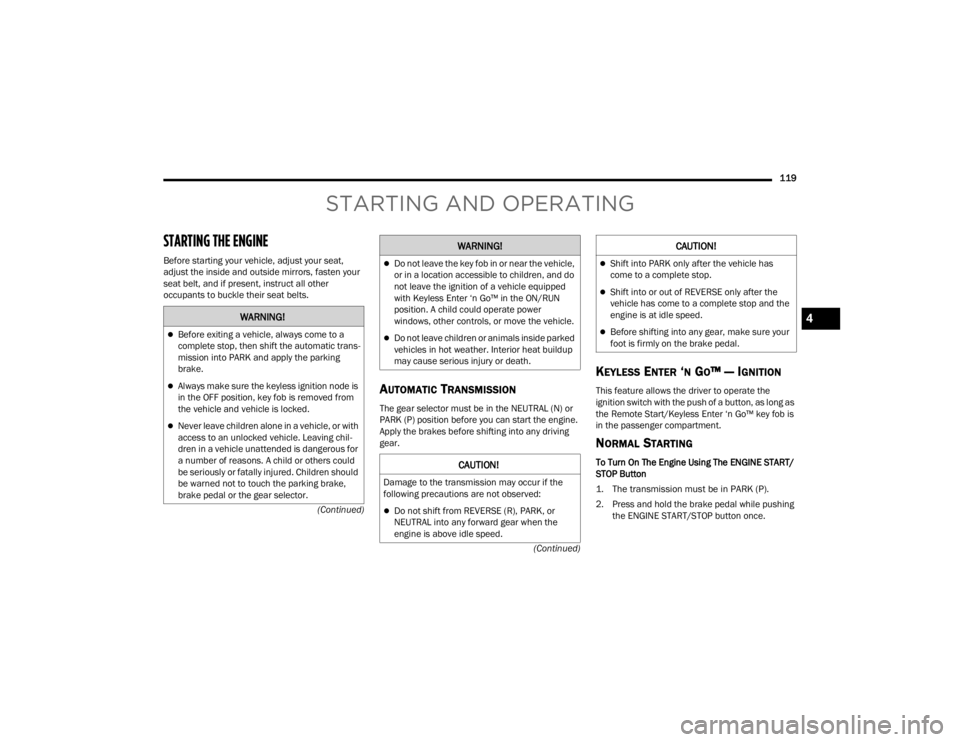
STARTING THE ENGINE
Before starting your vehicle, adjust your seat,
adjust the inside and outside mirrors, fasten your
seat belt, and if present, instruct all other
occupants to buckle their seat belts.
AUTOMATIC TRANSMISSION
The gear selector must be in the NEUTRAL (N) or
PARK (P) position before you can start the engine.
Apply the brakes before shifting into any driving
gear.
KEYLESS ENTER ‘N GO™ — IGNITION
This feature allows the driver to operate the
ignition switch with the push of a button, as long as
the Remote Start/Keyless Enter ‘n Go™ key fob is
in the passenger compartment.
NORMAL STARTING
To Turn On The Engine Using The ENGINE START/
STOP Button
1. The transmission must be in PARK (P).
2. Press and hold the brake pedal while pushing
the ENGINE START/STOP button once.
WARNING!
Before exiting a vehicle, always come to a
complete stop, then shift the automatic trans -
mission into PARK and apply the parking
brake.
Always make sure the keyless ignition node is
in the OFF position, key fob is removed from
the vehicle and vehicle is locked.
Never leave children alone in a vehicle, or with
access to an unlocked vehicle. Leaving chil -
dren in a vehicle unattended is dangerous for
a number of reasons. A child or others could
be seriously or fatally injured. Children should
be warned not to touch the parking brake,
brake pedal or the gear selector.
Do not leave the key fob in or near the vehicle,
or in a location accessible to children, and do
not leave the ignition of a vehicle equipped
with Keyless Enter ‘n Go™ in the ON/RUN
position. A child could operate power
windows, other controls, or move the vehicle.
Do not leave children or animals inside parked
vehicles in hot weather. Interior heat buildup
may cause serious injury or death.
CAUTION!
Damage to the transmission may occur if the
following precautions are not observed:
Do not shift from REVERSE (R), PARK, or
NEUTRAL into any forward gear when the
engine is above idle speed.
WARNING!
Shift into PARK only after the vehicle has
come to a complete stop.
Shift into or out of REVERSE only after the
vehicle has come to a complete stop and the
engine is at idle speed.
Before shifting into any gear, make sure your
foot is firmly on the brake pedal.
CAUTION!
4
23_WL_OM_EN_USC_t.book Page 119
Page 128 of 424

126STARTING AND OPERATING
(Continued)
(Continued)
Maintenance Mode has requirements that must be
met in order to be activated:
The vehicle must be at a standstill.
The parking brake must be unapplied.
The transmission must be in PARK or NEUTRAL.
While in Maintenance Mode, the EPB Warning
Light will flash continuously while the ignition is
ON.
When brake maintenance work is complete, the
following steps must be followed to reset the
parking brake system to normal operation:
Ensure the vehicle is at a standstill.
Press the brake pedal with moderate force.
Apply the EPB Switch.
AUTOMATIC TRANSMISSION
You must press and hold the brake pedal while
shifting out of PARK.
WARNING!
You can be badly injured working on or around a
motor vehicle. Do only that service work for
which you have the knowledge and the right
equipment. If you have any doubt about your
ability to perform a service job, take your vehicle
to a competent mechanic.
WARNING!
Never use the PARK (P) position as a substi -
tute for the parking brake. Always apply the
parking brake fully when exiting the vehicle to
guard against vehicle movement and possible
injury or damage.
Your vehicle could move and injure you and
others if it is not in PARK. Check by trying to
move the transmission gear selector out of
PARK with the brake pedal released. Make
sure the transmission is in PARK before
exiting the vehicle.
The transmission may not engage PARK if the
vehicle is moving. Always bring the vehicle to a
complete stop before shifting to PARK, and
verify that the transmission gear position indi -
cator solidly indicates PARK without blinking.
Ensure that the vehicle is completely stopped,
and the PARK position is properly indicated,
before exiting the vehicle.
It is dangerous to shift out of PARK or
NEUTRAL (N) if the engine speed is higher
than idle speed. If your foot is not firmly
pressing the brake pedal, the vehicle could
accelerate quickly forward or in reverse. You
could lose control of the vehicle and hit
someone or something. Only shift into gear
when the engine is idling normally and your
foot is firmly pressing the brake pedal.
Unintended movement of a vehicle could
injure those in or near the vehicle. As with all
vehicles, you should never exit a vehicle while
the engine is running. Before exiting a vehicle,
always come to a complete stop, then apply
the parking brake, shift the transmission into
PARK, and turn the ignition OFF. When the
ignition is in the OFF position, the transmis -
sion is locked in PARK, securing the vehicle
against unwanted movement.
When exiting the vehicle, always make sure
the ignition is in the OFF position, remove the
key fob from the vehicle, and lock the vehicle.
WARNING!
23_WL_OM_EN_USC_t.book Page 126
Page 129 of 424

STARTING AND OPERATING127
IGNITION PARK INTERLOCK
This vehicle is equipped with an Ignition Park
Interlock which requires the transmission to be in
PARK (P) before the ignition can be turned to the
OFF position. This helps the driver avoid
inadvertently leaving the vehicle without placing
the transmission in PARK. This system also locks
the transmission in PARK whenever the ignition is
in the OFF position.
NOTE:The transmission will NOT shift out of the PARK
position if the engine is not running even when the
brakes are applied. Ensure that the transmission is
in PARK, and the ignition is OFF (not in the ON/RUN
position) before exiting the vehicle.
BRAKE/TRANSMISSION SHIFT
I
NTERLOCK (BTSI) SYSTEM
This vehicle is equipped with a BTSI system that
holds the transmission gear selector in PARK
unless the brakes are applied. To shift the
transmission out of PARK, the engine must be
running and the brake pedal must be pressed. The
brake pedal must also be pressed to shift from
NEUTRAL into DRIVE or REVERSE when the vehicle
is stopped or moving at low speeds.
8-SPEED AUTOMATIC TRANSMISSION
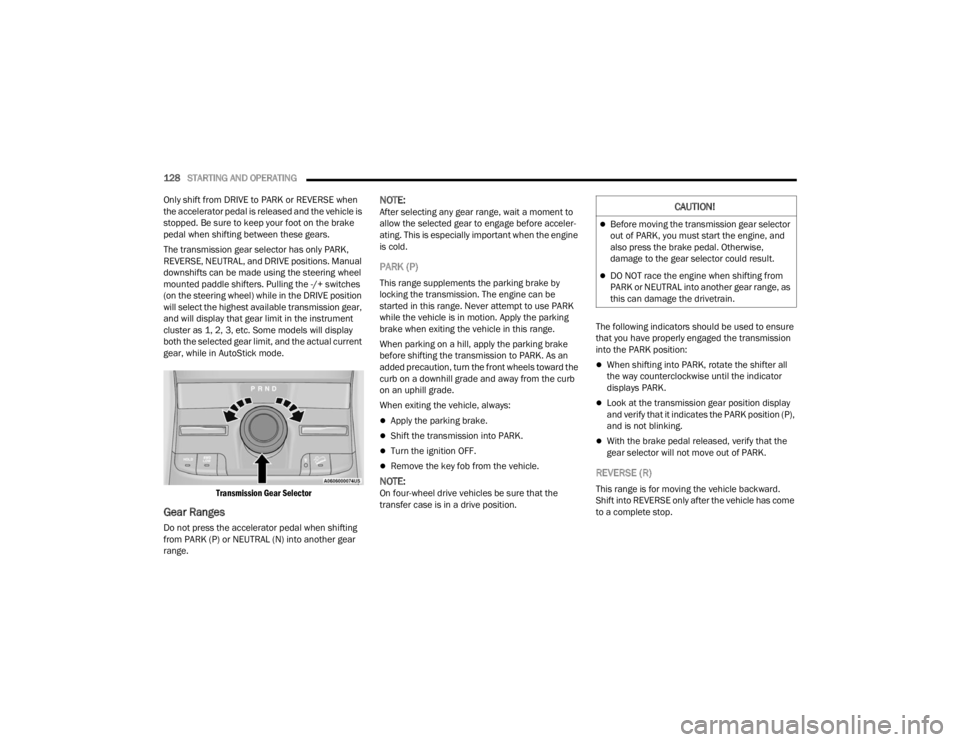
The transmission is controlled using a rotary
electronic gear selector located on the center
console. The transmission gear range (PRND) is
displayed both above the gear selector and in the
instrument cluster. To select a gear range, simply
rotate the gear selector. You must press the brake
pedal to shift the transmission out of PARK (or
NEUTRAL, when the vehicle is stopped or moving at
low speeds). To shift past multiple gear ranges at
once (such as PARK to DRIVE), simply rotate the
gear selector to the appropriate detent. Select the
DRIVE range for normal driving.
NOTE:In the event of a mismatch between the gear
selector position and the actual transmission gear
(for example, driver selects PARK while driving),
the position indicator will blink continuously until
the selector is returned to the proper position, or
the requested shift can be completed.
The electronically controlled transmission adapts
its shift schedule based on driver inputs, along
with environmental and road conditions. The
transmission electronics are self-calibrating;
therefore, the first few shifts on a new vehicle may
be somewhat abrupt. This is a normal condition,
and precision shifts will develop within a few
hundred miles (kilometers).
Never leave children alone in a vehicle, or with
access to an unlocked vehicle. Allowing chil -
dren to be in a vehicle unattended is
dangerous for a number of reasons. A child or
others could be seriously or fatally injured.
Children should be warned not to touch the
parking brake, brake pedal or the transmis -
sion gear selector.
Do not leave the key fob in or near the vehicle
(or in a location accessible to children), and do
not leave the ignition in the ON/RUN position.
A child could operate power windows, other
controls, or move the vehicle.
CAUTION!
Damage to the transmission may occur if the
following precautions are not observed:
Shift into or out of PARK or REVERSE (R) only
after the vehicle has come to a complete stop.
Do not shift between PARK, REVERSE,
NEUTRAL, or DRIVE (D) when the engine is
above idle speed.
Before shifting into any gear, make sure your
foot is firmly pressing the brake pedal.
WARNING!
4
23_WL_OM_EN_USC_t.book Page 127
Page 130 of 424
128STARTING AND OPERATING
Only shift from DRIVE to PARK or REVERSE when
the accelerator pedal is released and the vehicle is
stopped. Be sure to keep your foot on the brake
pedal when shifting between these gears.
The transmission gear selector has only PARK,
REVERSE, NEUTRAL, and DRIVE positions. Manual
downshifts can be made using the steering wheel
mounted paddle shifters. Pulling the -/+ switches
(on the steering wheel) while in the DRIVE position
will select the highest available transmission gear,
and will display that gear limit in the instrument
cluster as 1, 2, 3, etc. Some models will display
both the selected gear limit, and the actual current
gear, while in AutoStick mode.
Transmission Gear Selector
Gear Ranges
Do not press the accelerator pedal when shifting
from PARK (P) or NEUTRAL (N) into another gear
range.
NOTE:After selecting any gear range, wait a moment to
allow the selected gear to engage before acceler -
ating. This is especially important when the engine
is cold.
PARK (P)
This range supplements the parking brake by
locking the transmission. The engine can be
started in this range. Never attempt to use PARK
while the vehicle is in motion. Apply the parking
brake when exiting the vehicle in this range.
When parking on a hill, apply the parking brake
before shifting the transmission to PARK. As an
added precaution, turn the front wheels toward the
curb on a downhill grade and away from the curb
on an uphill grade.
When exiting the vehicle, always:
Apply the parking brake.
Shift the transmission into PARK.
Turn the ignition OFF.
Remove the key fob from the vehicle.
NOTE:On four-wheel drive vehicles be sure that the
transfer case is in a drive position. The following indicators should be used to ensure
that you have properly engaged the transmission
into the PARK position:
When shifting into PARK, rotate the shifter all
the way counterclockwise until the indicator
displays PARK.
Look at the transmission gear position display
and verify that it indicates the PARK position (P),
and is not blinking.
With the brake pedal released, verify that the
gear selector will not move out of PARK.
REVERSE (R)
This range is for moving the vehicle backward.
Shift into REVERSE only after the vehicle has come
to a complete stop.
CAUTION!
Before moving the transmission gear selector
out of PARK, you must start the engine, and
also press the brake pedal. Otherwise,
damage to the gear selector could result.
DO NOT race the engine when shifting from
PARK or NEUTRAL into another gear range, as
this can damage the drivetrain.
23_WL_OM_EN_USC_t.book Page 128
Page 134 of 424
132STARTING AND OPERATING
Proper operation of four-wheel drive vehicles
depends on tires of equal size, type, and
circumference on each wheel. Any difference will
adversely affect performance and function of the
transfer case.
Because four-wheel drive provides improved
traction, there is a tendency to exceed safe turning
and stopping speeds. Do not go faster than road
conditions permit.
SHIFT POSITIONS
For additional information on the appropriate use
of each four-wheel drive system mode position,
see the following:
4WD HI
This is the default operating range for daily use.
N (NEUTRAL)
This range disengages the driveline from the
powertrain. It is used for towing your vehicle
behind another vehicle Ú page 195.
4WD LOW
This range is for low speed four-wheel drive. It
provides an additional gear reduction which allows
for increased torque to be delivered to both the
front and rear wheels while providing maximum
pulling power for loose, slippery road surfaces only.
Do not exceed 25 mph (40 km/h).
SHIFTING PROCEDURES
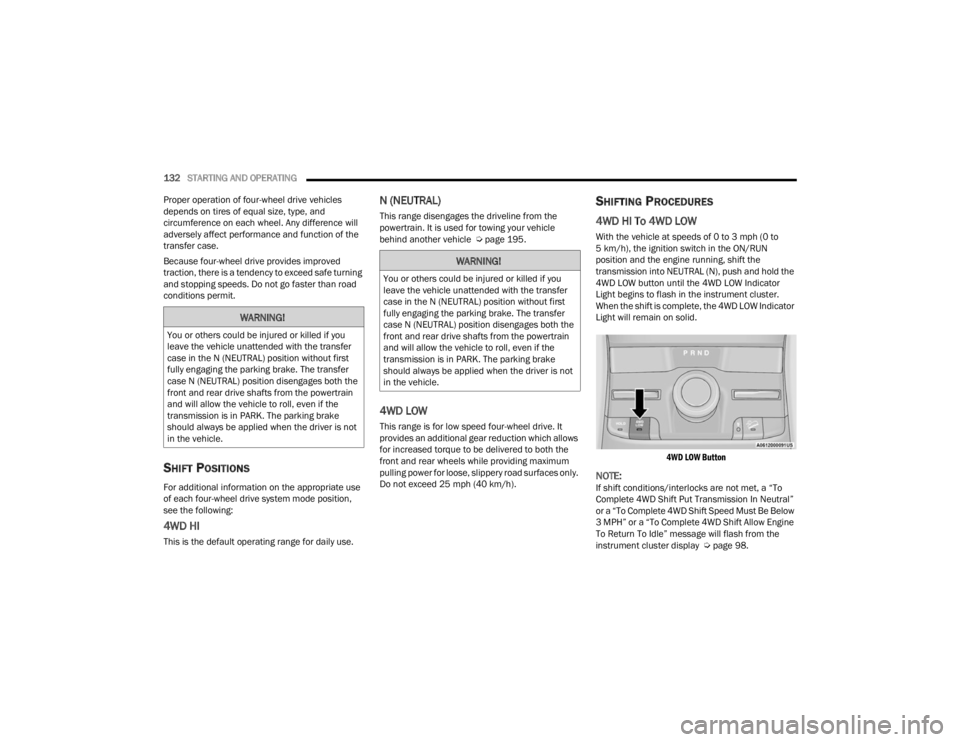
4WD HI To 4WD LOW
With the vehicle at speeds of 0 to 3 mph (0 to
5 km/h), the ignition switch in the ON/RUN
position and the engine running, shift the
transmission into NEUTRAL (N), push and hold the
4WD LOW button until the 4WD LOW Indicator
Light begins to flash in the instrument cluster.
When the shift is complete, the 4WD LOW Indicator
Light will remain on solid.
4WD LOW Button
NOTE:If shift conditions/interlocks are not met, a “To
Complete 4WD Shift Put Transmission In Neutral”
or a “To Complete 4WD Shift Speed Must Be Below
3 MPH” or a “To Complete 4WD Shift Allow Engine
To Return To Idle” message will flash from the
instrument cluster display Ú page 98.
WARNING!
You or others could be injured or killed if you
leave the vehicle unattended with the transfer
case in the N (NEUTRAL) position without first
fully engaging the parking brake. The transfer
case N (NEUTRAL) position disengages both the
front and rear drive shafts from the powertrain
and will allow the vehicle to roll, even if the
transmission is in PARK. The parking brake
should always be applied when the driver is not
in the vehicle.
WARNING!
You or others could be injured or killed if you
leave the vehicle unattended with the transfer
case in the N (NEUTRAL) position without first
fully engaging the parking brake. The transfer
case N (NEUTRAL) position disengages both the
front and rear drive shafts from the powertrain
and will allow the vehicle to roll, even if the
transmission is in PARK. The parking brake
should always be applied when the driver is not
in the vehicle.
23_WL_OM_EN_USC_t.book Page 132
Page 135 of 424
STARTING AND OPERATING133
4WD LOW To 4WD HI
With the vehicle at speeds of 0 to 3 mph (0 to
5 km/h), the ignition switch in the ON position or
the engine running, shift the transmission into
NEUTRAL (N), push and hold the 4WD LOW button
until the 4WD LOW Indicator Light begins to flash
in the instrument cluster. When the shift is
complete, the 4WD LOW Indicator Light will
remain off.
NOTE:
If shift conditions/interlocks are not met —
“4WD Shift Cancelled” or “4WD Shift Aborted/
Retry Shift” message will be displayed on the
instrument cluster. To reattempt shift, put the
transmission in NEUTRAL (N) and push and hold
the 4WD LOW button.
If shift conditions/interlocks are not met, a “To
Complete 4WD Shift Put Transmission In
Neutral” or a “To Complete 4WD Shift Speed
Must Be Below 3 MPH” or a “To Complete 4WD
Shift Allow Engine To Return To Idle” message
will flash from the instrument cluster display
Úpage 98.
Shifting into or out of 4WD LOW is possible with
the vehicle completely stopped; however, diffi -
culty may occur due to the mating clutch teeth
not being properly aligned. Several attempts
may be required for clutch teeth alignment and shift completion to occur. The preferred
method is with the vehicle rolling 0 to 3 mph
(0 to 5 km/h). If the vehicle is moving faster
than 3 mph (5 km/h), the transfer case will not
allow the shift.
QUADRA-TRAC II SYSTEM —
I
F EQUIPPED
The Quadra-Trac II System features two torque
transfer couplings. The couplings include an
Electronic Limited-Slip Differential (ELSD) rear axle
and the Quadra-Trac II transfer case. The ELSD
axle is fully automatic and requires no driver input
to operate. Under normal driving conditions, the
unit functions as a standard axle, balancing torque
evenly between left and right wheels. With a
traction difference between left and right wheels,
the coupling will sense a speed difference. As one
wheel begins to spin faster than the other, torque
will automatically transfer from the wheel that has
less traction, to the wheel that has traction. While
the transfer case and axle coupling differ in design,
their operation is similar. Follow the Quadra-Trac II
transfer case shifting information, preceding this
section, for shifting this system.
ELECTRONIC SWAY BAR DISCONNECT —
I
F EQUIPPED
Your vehicle may be equipped with an electronic
disconnecting stabilizer/sway bar. This system
allows greater front suspension travel in off-road
situations.
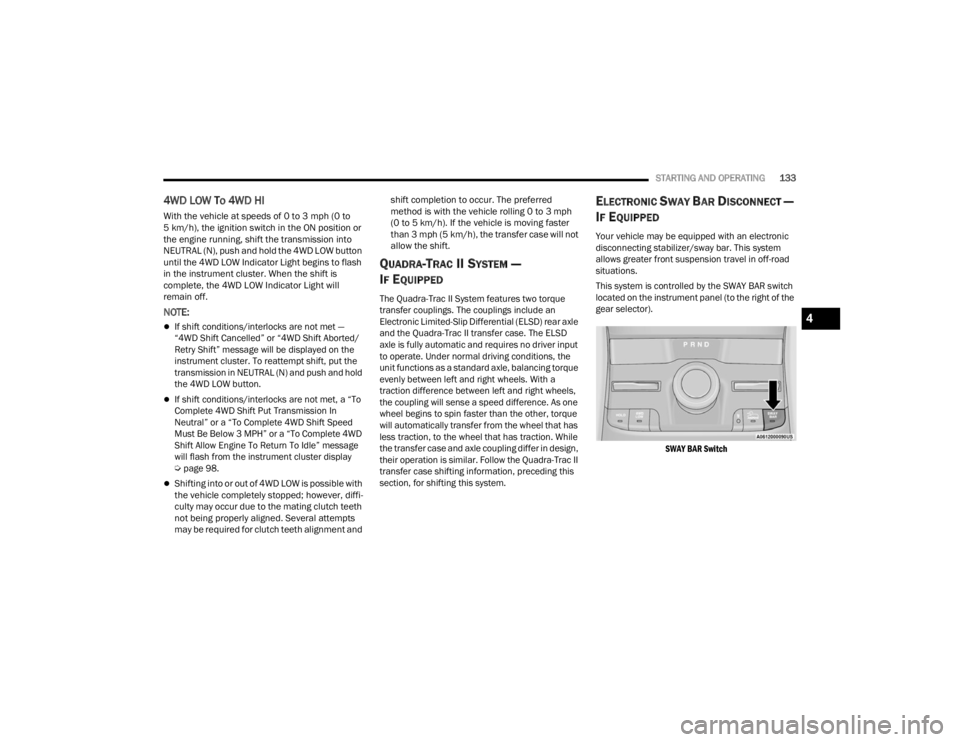
This system is controlled by the SWAY BAR switch
located on the instrument panel (to the right of the
gear selector).
SWAY BAR Switch
4
23_WL_OM_EN_USC_t.book Page 133
Page 136 of 424

134STARTING AND OPERATING
Push the SWAY BAR switch to activate the system.
Push the switch again to deactivate the system.
The Sway Bar Indicator Light (located in the
instrument cluster) will illuminate when the bar is
disconnected. The Sway Bar Indicator Light will
flash during activation transition, or when
activation conditions are not met. The stabilizer/
sway bar should remain in on-road mode during
normal driving conditions.
NOTE:If the electronic disconnecting stabilizer/sway bar
is disconnected and then driven at speeds above
18 mph (29 km/h), the system will reconnect for
driver safety. The Sway Bar Indicator Light will
continue to flash as the system waits for the driver
to slow the vehicle and will automatically
disconnect again unless the driver cancels the
request with the SWAY BAR switch. The system can
cancel the pending disconnect request if drivetrain
changes are made (e.g. 4WD HI to 4WD LOW)
based on road conditions. To disconnect the stabilizer/sway bar, shift to 4WD
LOW and push the SWAY BAR switch to obtain the
off-road position Ú
page 131. The Sway Bar
Indicator Light will flash until the stabilizer/sway
bar has been fully disconnected.
NOTE:The stabilizer/sway bar may be torque locked due
to left and right suspension height differences.
This condition is due to driving surface differences
or vehicle loading. In order for the stabilizer/sway bar to disconnect/reconnect, the right and left
halves of the bar must be aligned. This alignment
may require that the vehicle be driven onto level
ground or rocked from side to side.
To return to on-road mode, push the SWAY BAR
switch again.
SELEC-TERRAIN — IF EQUIPPED
SELEC-TERRAIN MODE SELECTION
Selec-Terrain combines the capabilities of the
vehicle control systems, along with driver input, to
provide the best performance for all terrains. Tap
the toggle up or down to cycle through the
positions.
WARNING!
Ensure the stabilizer/sway bar is reconnected
before driving on hard surfaced roads or at
speeds above 18 mph (29 km/h); a
disconnected stabilizer/sway bar may contribute
to the loss of vehicle control, which could result
in serious injury. Under certain circumstances,
the front stabilizer/sway bar enhances vehicle
stability and assists with vehicle control. The
system monitors vehicle speed and will attempt
to reconnect the stabilizer/sway bar at speeds
over 18 mph (29 km/h). This is indicated by a
flashing or solid Sway Bar Indicator Light. Once
vehicle speed is reduced below 14 mph
(22 km/h), the system will once again attempt to
return to off-road mode.
WARNING!
If the stabilizer/sway bar will not return to
on-road mode, the Sway Bar Indicator Light will
flash in the instrument cluster and vehicle
stability may be reduced. Do not attempt to drive
the vehicle over 18 mph (29 km/h). Driving
faster than 18 mph (29 km/h) with a
disconnected stabilizer/sway bar may contribute
to the loss of vehicle control, which could result
in serious injury.
23_WL_OM_EN_USC_t.book Page 134