wheel JEEP GRAND CHEROKEE LIMITED 2019 Service Manual
[x] Cancel search | Manufacturer: JEEP, Model Year: 2019, Model line: GRAND CHEROKEE LIMITED, Model: JEEP GRAND CHEROKEE LIMITED 2019Pages: 626, PDF Size: 3.77 MB
Page 281 of 626
Quadra-Drive II System — If Equipped
The optional Quadra-Drive II System features two torque
transfer couplings. The couplings include an Electronic
Limited-Slip Differential (ELSD) rear axle and the Quadra-
Trac II transfer case. The optional ELSD axle is fully
automatic and requires no driver input to operate. Under
normal driving conditions, the unit functions as a standard
axle, balancing torque evenly between left and right
wheels. With a traction difference between left and right
wheels, the coupling will sense a speed difference. As one
wheel begins to spin faster than the other, torque will
automatically transfer from the wheel that has less traction,
to the wheel that has traction. While the transfer case and
axle coupling differ in design, their operation is similar.
Follow the Quadra-Trac II transfer case shifting informa-
tion, preceding this section, for shifting this system.
QUADRA-LIFT — IF EQUIPPED
Description
The Quadra-Lift air suspension system provides full time
load leveling capability along with the benefit of vehicle
height adjustment by the push of a button. The vehicle will
automatically raise and lower the ride height to adapt to
the appropriate driving conditions. At higher speeds, thevehicle will lower to an aerodynamic ride height and when
operating in off-road modes, the vehicle will raise the ride
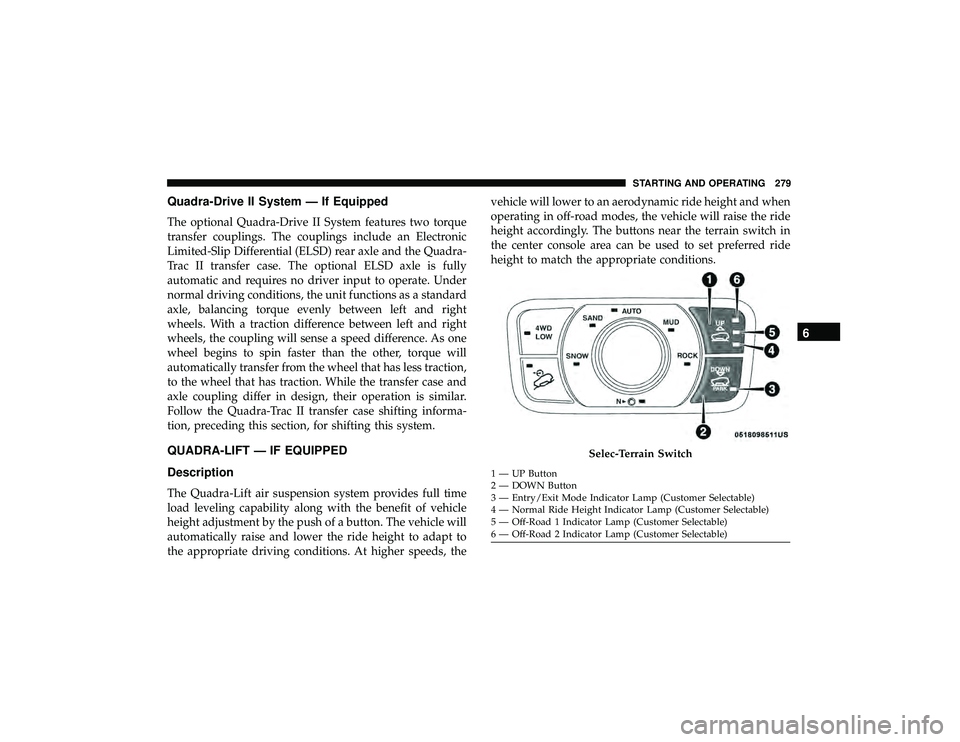
height accordingly. The buttons near the terrain switch in
the center console area can be used to set preferred ride
height to match the appropriate conditions.
Page 284 of 626
WARNING!
The air suspension system uses a high pressure vol-
ume of air to operate the system. To avoid personal
injury or damage to the system, see your authorized
dealer for service.
Air Suspension Modes
The Air Suspension system has multiple modes to protect
the system in unique situations:
Tire/Jack Mode
To assist with changing a spare tire, the air suspension
system has a feature which allows the automatic leveling to
be disabled. Refer to “Uconnect Settings” in “Multimedia”
for further information.
NOTE:This mode is intended to be enabled with engine
running.
Auto Entry/Exit Mode
To assist in entering and exiting the vehicle, the air
suspension system has a feature which automatically low-
ers the vehicle to entry/exit ride height. Refer to “Uconnect
Settings” in “Multimedia” for further information. NOTE:
This mode is intended to be enabled with engine
running.
Transport Mode
To assist with flat bed towing, the air suspension system
has a feature which will put the vehicle into Entry/Exit
height and disable the automatic load leveling system.
Refer to “Uconnect Settings” in “Multimedia” for further
information.
NOTE: This mode is intended to be enabled with engine
running.
Suspension Display Messages Mode
The “Suspension Display Messages” setting allows you to
only display suspension warnings. Refer to “Uconnect
Settings” in “Multimedia” for further information.
NOTE: This mode is intended to be enabled with engine
running.
Wheel Alignment Mode
Before performing a wheel alignment this mode must be
enabled. Refer to “Uconnect Settings” in “Multimedia” for
further information.
282 STARTING AND OPERATING
Page 286 of 626
Automatic height changes will occur based on vehicle
speed and the current vehicle height. The indicator lamps
and instrument cluster display messages will operate the
same for automatic changes and user requested changes.
•Off-Road 2 (OR2) – Indicator lamps 4, 5, and 6 will be
illuminated when the vehicle is in OR2.
• Off-Road 1 (OR1) – Indicator lamps 4 and 5 will be
illuminated when the vehicle is in OR1.
• Normal Ride Height (NRH) – Indicator lamp 4 will be
illuminated when the vehicle is in this position.
• Entry/Exit Mode – Indicator lamp 3 will be illuminated
when the vehicle is in Entry/Exit Mode. If Entry/Exit
Mode is requested while vehicle speed is between 15
mph (24 km/h) and 25 mph (40 km/h), indicator lamp 4
will remain on solid and indicator lamp 3 will flash as
the system waits for the vehicle to reduce speed. If
vehicle speed is reduced to, and kept below, 15 mph
(24 km/h) indicator lamp 4 will turn off and indicator lamp 3 will flash until Entry/Exit Mode is achieved at
which point indicator lamp 3 will go solid. If during the
height change to Entry/Exit Mode, the vehicle speed
exceeds 15 mph (24 km/h), the height change will be
paused until the vehicle speed either goes below 15 mph
(24 km/h) and the height change continues to Entry/
Exit Mode, or exceeds 25 mph (40 km/h) and the vehicle
height will return to NRH. Entry/Exit Mode may be
selected while the vehicle is not moving provided that
the engine is still running and all doors remain closed.
• Transport Mode - No indicator lamps will be illumi-
nated. Customer driving will disable Transport Mode.
• Tire/Jack Mode - Indicator lamps 3 and 6 will be
illuminated. Customer driving will disable Tire/Jack
Mode.
• Wheel Alignment Mode - Indicator lamps 3 and 4 will be
illuminated. Customer driving will disable Wheel Align-
ment Mode.
284 STARTING AND OPERATING
Page 287 of 626
SELEC-TERRAIN — IF EQUIPPED
Selec-Terrain Mode Selection
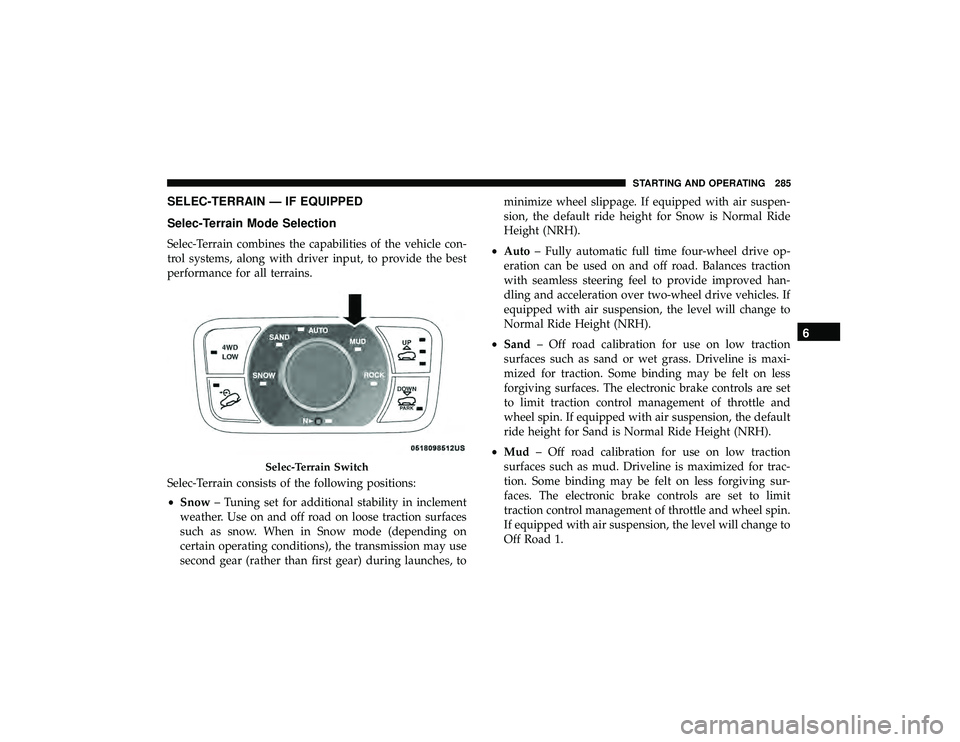
Selec-Terrain combines the capabilities of the vehicle con-
trol systems, along with driver input, to provide the best
performance for all terrains.
Selec-Terrain consists of the following positions:
•Snow – Tuning set for additional stability in inclement
weather. Use on and off road on loose traction surfaces
such as snow. When in Snow mode (depending on
certain operating conditions), the transmission may use
second gear (rather than first gear) during launches, to minimize wheel slippage. If equipped with air suspen-
sion, the default ride height for Snow is Normal Ride
Height (NRH).
• Auto – Fully automatic full time four-wheel drive op-
eration can be used on and off road. Balances traction
with seamless steering feel to provide improved han-
dling and acceleration over two-wheel drive vehicles. If
equipped with air suspension, the level will change to
Normal Ride Height (NRH).
• Sand – Off road calibration for use on low traction
surfaces such as sand or wet grass. Driveline is maxi-
mized for traction. Some binding may be felt on less
forgiving surfaces. The electronic brake controls are set
to limit traction control management of throttle and
wheel spin. If equipped with air suspension, the default
ride height for Sand is Normal Ride Height (NRH).
• Mud – Off road calibration for use on low traction
surfaces such as mud. Driveline is maximized for trac-
tion. Some binding may be felt on less forgiving sur-
faces. The electronic brake controls are set to limit
traction control management of throttle and wheel spin.
If equipped with air suspension, the level will change to
Off Road 1.
Page 292 of 626
2. The “STOP/START OFF” message will appear in instru-ment cluster display within the Stop/Start section. Refer
to “Instrument Cluster” in “Getting To Know Your
Instrument Panel” for further information.
3. At the next vehicle stop (after turning off the STOP/ START system), the engine will not be stopped.
4. The STOP/START system will reset itself back to an ON condition every time the ignition is turned off and back
on.
To Manually Turn On The Stop/Start System
Push the STOP/START OFF switch (located on the switch
bank). The light on the switch will turn off.
System Malfunction
If there is a malfunction in the STOP/START system, the
system will not shut down the engine. A “SERVICE STOP/
START SYSTEM” message will appear in the instrument
cluster display. Refer to “Instrument Cluster Display“ in
“Getting to Know Your Instrument Panel” for further
information.
If the “SERVICE STOP/START SYSTEM” message appears
in the instrument cluster display, have the system checked
by an authorized dealer.
SPEED CONTROL — IF EQUIPPED
When engaged, the Speed Control takes over accelerator
operations at speeds greater than 20 mph (32 km/h).
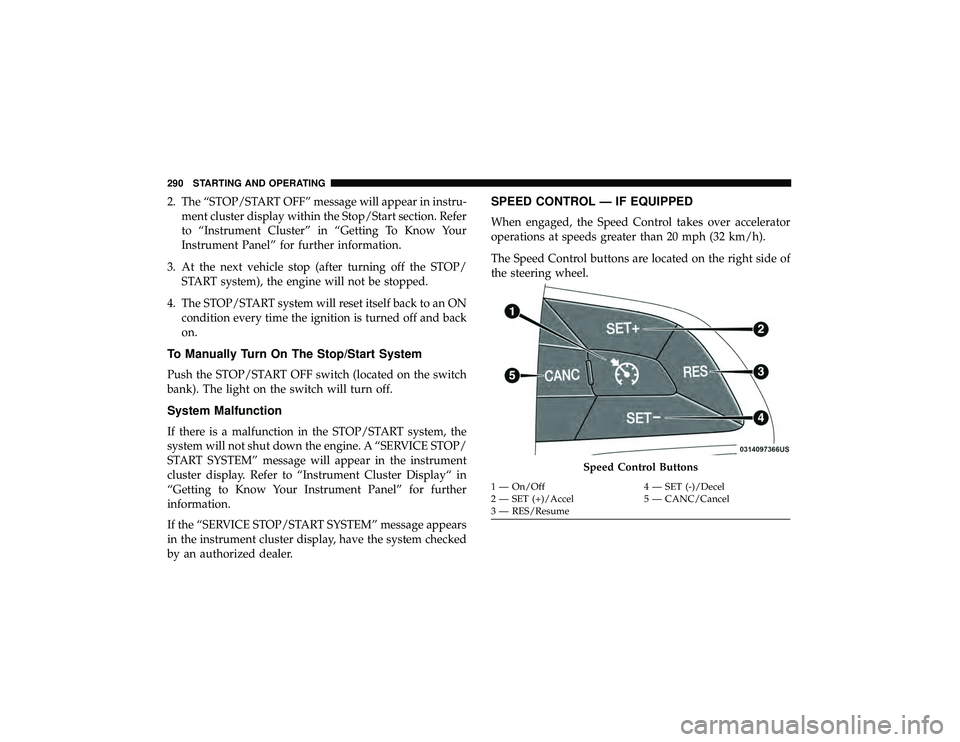
The Speed Control buttons are located on the right side of
the steering wheel.
Page 297 of 626
WARNING!(Continued)
•Will bring the vehicle to a complete stop while
following a target vehicle and hold the vehicle for
2 seconds in the stop position. If the target vehicle
does not start moving within two seconds the ACC
system will display a message that the system will
release the brakes and that the brakes must be
applied manually. An audible chime will sound
when the brakes are released.
You should switch off the ACC system:
• When driving in fog, heavy rain, heavy snow, sleet,
heavy traffic, and complex driving situations (i.e., in
highway construction zones).
• When entering a turn lane or highway off ramp;
when driving on roads that are winding, icy, snow-
covered, slippery, or have steep uphill or downhill
slopes.
• When towing a trailer up or down steep slopes.
• When circumstances do not allow safe driving at a
constant speed.
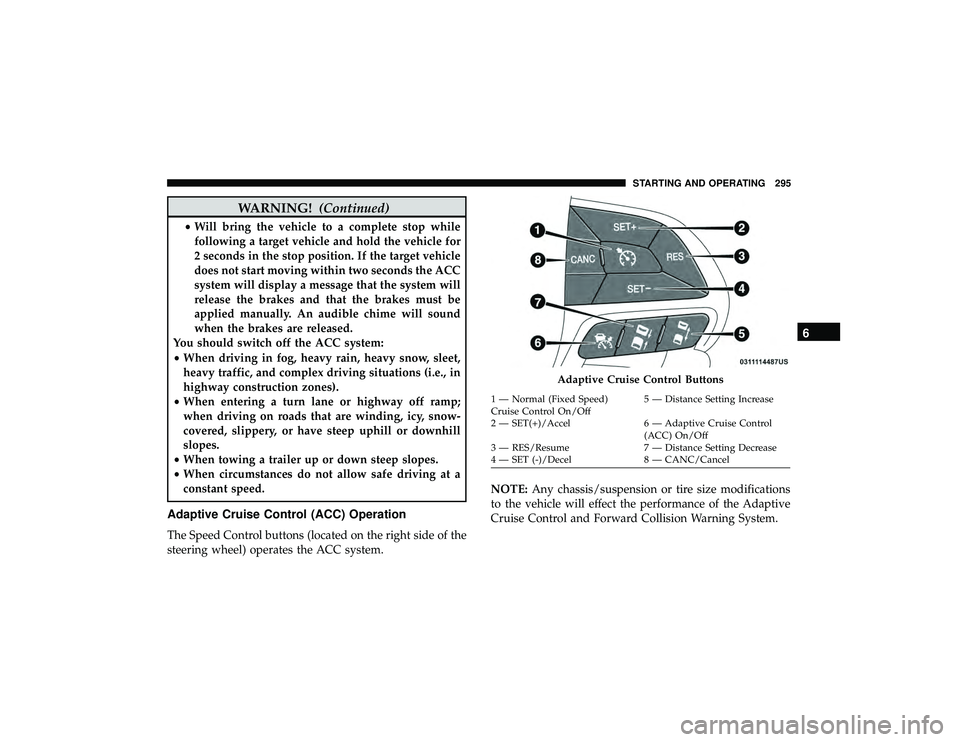
Adaptive Cruise Control (ACC) Operation
The Speed Control buttons (located on the right side of the
steering wheel) operates the ACC system. NOTE:
Any chassis/suspension or tire size modifications
to the vehicle will effect the performance of the Adaptive
Cruise Control and Forward Collision Warning System.
Page 298 of 626
Activating Adaptive Cruise Control (ACC)
You can only engage ACC if the vehicle speed is above
0 mph (0 km/h).
The minimum set speed for the ACC system is 20 mph
(32 km/h).
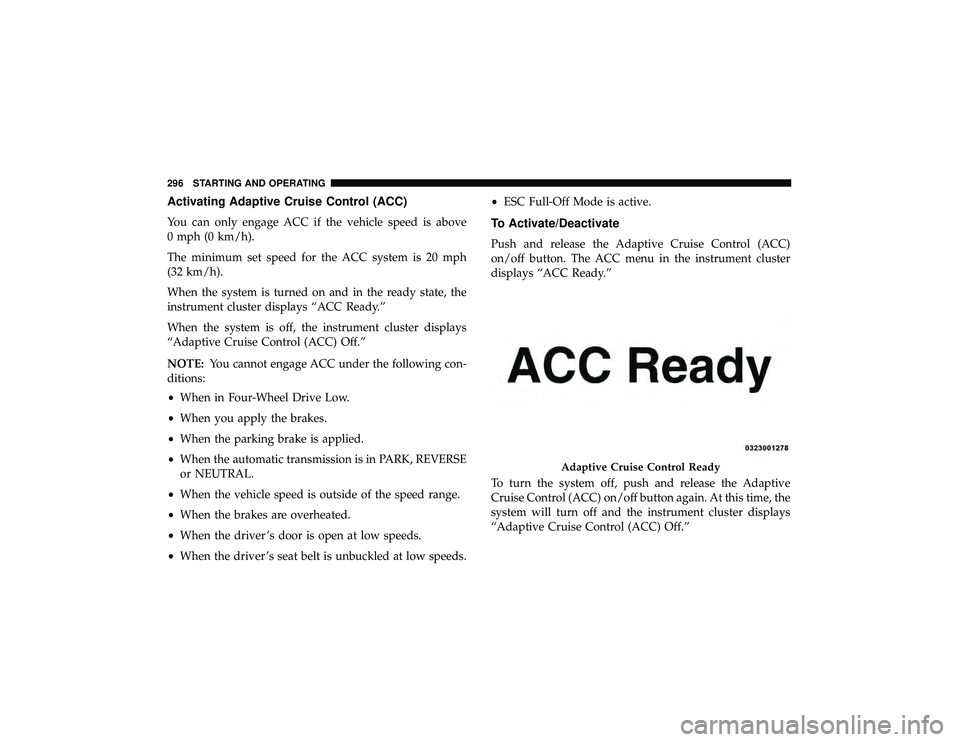
When the system is turned on and in the ready state, the
instrument cluster displays “ACC Ready.”
When the system is off, the instrument cluster displays
“Adaptive Cruise Control (ACC) Off.”
NOTE:You cannot engage ACC under the following con-
ditions:
• When in Four-Wheel Drive Low.
• When you apply the brakes.
• When the parking brake is applied.
• When the automatic transmission is in PARK, REVERSE
or NEUTRAL.
• When the vehicle speed is outside of the speed range.
• When the brakes are overheated.
• When the driver ’s door is open at low speeds.
• When the driver ’s seat belt is unbuckled at low speeds. •
ESC Full-Off Mode is active.To Activate/Deactivate
Push and release the Adaptive Cruise Control (ACC)
on/off button. The ACC menu in the instrument cluster
displays “ACC Ready.”
To turn the system off, push and release the Adaptive
Cruise Control (ACC) on/off button again. At this time, the
system will turn off and the instrument cluster displays
“Adaptive Cruise Control (ACC) Off.”
Page 300 of 626
•The gear selector is removed from the DRIVE position.
• The Electronic Stability Control/Traction Control Sys-
tem (ESC/TCS) activates.
• The vehicle parking brake is applied.
• Driver seatbelt is unbuckled at low speeds.
• Driver door is opened at low speeds.
• The braking temperature exceeds normal range (over-
heated).
• A Trailer Sway Control (TSC) event occurs.
To Turn Off
The system will turn off and clear the set speed in memory
if:
•The Adaptive Cruise Control (ACC) on/off button is
pushed.
• The Normal (Fixed Speed) Cruise Control on/off button
is pushed.
• The ignition is turned OFF.
• You switch to Four-Wheel Drive Low.
To Resume
If there is a set speed in memory push the RES (resume)
button and then remove your foot from the accelerator
pedal. The instrument cluster display will display the last
set speed.
NOTE:
•If your vehicle stays at standstill for longer than two
seconds, then the system will cancel and the brake force
will be ramped-out. The driver will have to apply the
brakes to keep the vehicle at a standstill.
• ACC cannot be resumed if there is a stationary vehicle
in-front of your vehicle in close proximity.
Page 307 of 626
Adaptive Cruise Control Set
When the SET (+) or the SET (-) button (located on the
steering wheel) is pushed, the display will read “ACC
SET.”
When ACC is set, the set speed will show in the instrument
cluster display.
The ACC screen may display once again if any ACC
activity occurs, which may include any of the following:
•System Cancel
• Driver Override
• System Off
• ACC Proximity Warning
• ACC Unavailable Warning
• The instrument cluster display will return to the last
display selected after five seconds of no ACC display
activityDisplay Warnings And Maintenance
“Wipe Front Radar Sensor In Front Of Vehicle”
Warning
The “ACC/FCW Unavailable Wipe Front Radar Sensor”
warning will display and also a chime will indicate when
conditions temporarily limit system performance.
This most often occurs at times of poor visibility, such as in
snow or heavy rain. The ACC system may also become
temporarily blinded due to obstructions, such as mud, dirt
or ice. In these cases, the instrument cluster display will
display “ACC/FCW Unavailable Wipe Front Radar Sen-
sor” and the system will deactivate.
The “ACC/FCW Unavailable Wipe Front Radar Sensor”
message can sometimes be displayed while driving in
highly reflective areas (i.e. tunnels with reflective tiles, or
ice and snow). The ACC system will recover after the
vehicle has left these areas. Under rare conditions, when
the radar is not tracking any vehicles or objects in its path
this warning may temporarily occur.
6
STARTING AND OPERATING 305
Page 315 of 626
Metric Speed (km/h)
•Pushing the SET (-)button once will result in a 1 km/h
decrease in set speed. Each subsequent tap of the button
results in a decrease of 1 km/h.
• If the button is continually pushed, the set speed will
continue to decrease in 10 km/h decrements until the
button is released. The decrease in set speed is reflected
in the instrument cluster display.
To Cancel
The following conditions will cancel the Normal (Fixed
Speed) Cruise Control without clearing the memory:
•The brake pedal is applied.
• The CANC button is pushed.
• The Electronic Stability Control/Traction Control Sys-
tem (ESC/TCS) activates.
• The vehicle parking brake is applied.
• The braking temperature exceeds normal range (over-
heated).
• The gear selector is removed from the DRIVE position.
• The driver switches ESC to full-off mode.
To Resume Speed
To resume a previously set speed, push the RES button and
release. Resume can be used at any speed above 20 mph
(32 km/h).
To Turn Off
The system will turn off and erase the set speed in memory if:
•The Normal (Fixed Speed) Cruise Control on/off button
is pushed.
• The ignition is turned OFF.
• You engage Four-Wheel Drive Low.
• The Adaptive Cruise Control (ACC) on/off button is
pushed.
PARKSENSE REAR PARK ASSIST — IF EQUIPPED
The ParkSense Rear Park Assist system provides visual and
audible indications of the distance between the rear fascia
and a detected obstacle when backing up, e.g. during a
parking maneuver. If your vehicle is equipped with an
automatic transmission, the vehicle brakes may be auto-
matically applied and released when performing a reverse
parking maneuver if the system detects a possible collision
with an obstacle.
6
STARTING AND OPERATING 313