service JEEP LIBERTY 2002 KJ / 1.G Repair Manual
[x] Cancel search | Manufacturer: JEEP, Model Year: 2002, Model line: LIBERTY, Model: JEEP LIBERTY 2002 KJ / 1.GPages: 1803, PDF Size: 62.3 MB
Page 279 of 1803

lating (AM) and Frequency Modulating (FM) com-
mercial frequency ranges.
The audio system components operate on battery
current received through a fuse in the Junction Block
(JB) on a fused ignition switch output (run-acc) cir-
cuit so that the system will only operate when the
ignition switch is in the Run or Accessory positions.
On vehicles that are equipped with the optional
remote radio switches, the Body Control Module
(BCM) receives hard wired resistor multiplexed
inputs from the remote radio switches. The program-
ming in the BCM allows it to process those inputs
and send the proper messages to the radio receiver
over the Programmable Communication Interface
(PCI) bus network to control the radio volume up or
down, station seek up or down, preset station
advance, and mode advance functions.
Refer to the owner's manual for more information
on the features, use and operation of each of the
available audio systems.
DIAGNOSIS AND TESTING - AUDIO
Any diagnosis of the Audio system should
begin with the use of the DRB diagnostic tool.For information on the use of the DRB, refer to
the appropriate Diagnostic Service Manual.
Refer to the appropriate wiring information. The
wiring information includes wiring diagrams, proper
wire and connector repair procedures, details of wire
harness routing and retention, connector pin-out
information and location views for the various wire
harness connectors, splices and grounds.
WARNING: DISABLE THE AIRBAG SYSTEM
BEFORE ATTEMPTING ANY STEERING WHEEL,
STEERING COLUMN, SEAT BELT TENSIONER, SIDE
AIRBAG, OR INSTRUMENT PANEL COMPONENT
DIAGNOSIS OR SERVICE. DISCONNECT AND ISO-
LATE THE BATTERY NEGATIVE (GROUND) CABLE,
THEN WAIT TWO MINUTES FOR THE AIRBAG SYS-
TEM CAPACITOR TO DISCHARGE BEFORE PER-
FORMING FURTHER DIAGNOSIS OR SERVICE. THIS
IS THE ONLY SURE WAY TO DISABLE THE AIRBAG
SYSTEM. FAILURE TO TAKE THE PROPER PRE-
CAUTIONS COULD RESULT IN ACCIDENTAL AIR-
BAG DEPLOYMENT AND POSSIBLE PERSONAL
INJURY.
AUDIO SYSTEM DIAGNOSIS TABLE
CONDITION POSSIBLE CAUSES CORRECTION
NO AUDIO 1. Fuse faulty. 1. Check radio fuse and Ignition-Off Draw (IOD)
fuse in Junction Block (JB). Replace fuses, if
required.
2. Radio connector faulty. 2. Check for loose or corroded radio connector.
Repair, if required.
3. Wiring faulty. 3. Check for shorted or open wires. Repair wiring,
if required.
4. Radio ground faulty. 4. Check for continuity between radio chassis and
a known good ground. There should be
continuity. Repair ground, if required.
5. Radio faulty. 5. Refer to appropriate Diagnostic Service
Manual.
6. Speakers faulty. 6. Replace speaker as necessary.
NO RADIO DISPLAY 1. Fuse faulty. 1. Check radio fuse and Ignition-Off Draw (IOD)
fuse in Junction Block (JB). Replace fuses, if
required.
2. Radio connector faulty. 2. Check for loose or corroded radio connector.
Repair, if required.
3. Wiring faulty. 3. Check for battery voltage at radio connector.
Repair wiring, if required.
4. Radio ground faulty. 4. Check for continuity between radio chassis and
a known good ground. There should be
continuity. Repair ground, if required.
8A - 2 AUDIOKJ
AUDIO (Continued)
Page 280 of 1803

CONDITION POSSIBLE CAUSES CORRECTION
5. Radio faulty. 5. Refer to appropriate Diagnostic Service
Manual.
CLOCK WILL NOT KEEP
SET TIME1. Fuse faulty. 1. Check Ignition-Off Draw (IOD) fuse in the
Junction Block (JB). Replace fuse, if required.
2. Radio connector faulty. 2. Check for loose or corroded radio connector.
Repair, if required.
3. Wiring faulty. 3. Check for battery voltage at radio connector.
Repair wiring, if required.
4. Radio ground faulty. 4. Check for continuity between radio chassis and
a known good ground. There should be
continuity. Repair ground, if required.
5. Radio faulty. 5. Refer to appropriate Diagnostic Service
Manual.
POOR RADIO RECEPTION 1. Antenna faulty. 1. (Refer to 8 - ELECTRICAL/AUDIO/ANTENNA
BODY & CABLE - DIAGNOSIS AND TESTING).
2. Radio ground faulty. 2. Check for continuity between radio chassis and
a known good ground. There should be
continuity. Repair ground, if required.
3. Radio noise suppression
faulty.3. Repair or replace ground strap as necessary.
4. Radio faulty. 4. Refer to appropriate Diagnostic Service
Manual.
NO/POOR TAPE
OPERATION1. Faulty tape. 1. Insert known good tape and test operation.
2. Foreign objects behind
tape door.2. Remove foreign objects and test operation.
3. Dirty cassette tape head. 3. Clean head with Mopar Cassette Head
Cleaner.
4. Faulty tape deck. 4. Exchange or replace radio, if required.
NO COMPACT DISC
OPERATION1. Faulty CD. 1. Insert known good CD and test operation.
2. Foreign material on CD. 2. Clean CD and test operation.
3. Condensation on CD or
optics.3. Allow temperature of vehicle interior to stabilize
and test operation.
4. Faulty CD player. 4. Refer to appropriate Diagnostic Service
Manual.
AMPLIFIER CHOKE AND
RELAY
DESCRIPTION
Models equipped with the premium speaker pack-
age have a amplifier choke and relay. The amplifier
choke and relay is mounted to the lower instrument
panel above the accelerator pedal.
The amplifier choke and relay should be checked if
there is no sound output from the speakers. The
amplifier choke and relay can not be repaired or
adjusted and, if faulty or damaged, the unit must be
replaced.
OPERATION
The amplifier choke and relay is used to control
the supply of fused battery current to the front door
speaker-mounted dual amplifiers. The speaker relay
is energized by a fused 12 volt output from the radio
receiver whenever the radio is turned on. For com-
plete circuit diagrams, refer to the appropriate wir-
ing information. The wiring information includes
wiring diagrams, proper wire and connector repair
procedures, details of wire harness routing and
retention, connector pin-out information and location
views for the various wire harness connectors, splices
and grounds.
KJAUDIO 8A - 3
AUDIO (Continued)
Page 281 of 1803

DIAGNOSIS AND TESTING - AMPLIFIER
CHOKE AND RELAY
Any diagnosis of the Audio system should
begin with the use of the DRB diagnostic tool.
For information on the use of the DRB, refer to
the appropriate Diagnostic Service Manual.
The amplifier choke and relay is used to switch
power to the individual speaker amplifiers used with
the premium speaker package. The amplifier choke
and relay is serviced only as a unit. If all of the
speakers are inoperative the amplifier choke and
relay should be inspected. Before replacement, make
the following inspections of the amplifier choke and
relay circuits. For complete circuit diagrams, refer to
the appropriate wiring information. The wiring infor-
mation includes wiring diagrams, proper wire and
connector repair procedures, details of wire harness
routing and retention, connector pin-out information
and location views for the various wire harness con-
nectors, splices and grounds.
(1)
Check the fused B(+) fuse in the junction block. If
OK, go to Step 2. If not OK, replace the faulty fuse.
(2) Check for battery voltage at the fused B(+) fuse
in the junction block. If OK, go to Step 3. If not OK,
repair the open fused B(+) circuit to the battery as
required.
(3) Disconnect the instrument panel wire harness
connector from the amplifier choke and relay. Check
for battery voltage at the fused B(+) circuit cavity of
the instrument panel wire harness connector for the
amplifier choke and relay. If OK, go to Step 4. If not
OK, repair the open fused B(+) circuit to the junction
block fuse as required.
(4) Probe the ground circuit cavity of the instru-
ment panel wire harness connector for the amplifier
choke and relay. Check for continuity to a good
ground. There should be continuity. If OK, go to Step
5. If not OK, repair the open ground circuit to ground
as required.
(5) Turn the ignition switch to the RUN position
and turn the radio ON. Check for battery voltage at
the radio 12-volt output circuit cavity of the instru-
ment panel wire harness connector for the amplifier
choke and relay. If OK, go to Step 6. If not OK,
repair the open radio 12-volt output circuit to the
radio as required.
(6) Turn the radio and ignition switches to the
OFF position. Reconnect the instrument panel wire
harness connector to the amplifier choke and relay.
Check for battery voltage at the amplified speaker
(+) circuit cavity of the instrument panel wire har-
ness connector for the amplifier choke and relay.
There should be zero volts. Turn the ignition and
radio switches to the ON position. There should now
be battery voltage. If OK, repair the open amplified
speaker (+) circuits to the speaker-mounted amplifi-ers as required. If not OK, replace the faulty ampli-
fier choke and relay.
REMOVAL
(1) Disconnect and isolate the battery negative
cable.
(2) Remove knee blocker cover and knee blocker.
(3) Disconnect the electrical harness connector
from the amplifier choke and relay (Fig. 1).
(4) Remove mounting screws and amplifier choke
and relay.
INSTALLATION
(1) Install the amplifier choke and relay.
(2) Install the mounting screws.
(3) Connect the electrical harness connector.
(4) Install knee blocker cover and knee blocker.
(5) Connect the battery negative cable.
ANTENNA BODY & CABLE
DESCRIPTION
The antenna body and cable is secured below the
fender panel by the antenna cap nut through a
mounting hole in the side of the right front fender.
The primary coaxial antenna cable is then routed
beneath the fender sheet metal and through a entry
hole in the right cowl side panel into the interior of
the vehicle. Inside the vehicle, the primary coaxial
cable is connected to a secondary instrument panel
antenna coaxial cable with an in-line connector that
is located behind the right kick panel. The secondary
coaxial cable is then routed behind the instrument
panel to the back of the radio.
Fig. 1 RADIO CHOKE
1 - RADIO CHOKE
2 - MOUNTING SCREWS
8A - 4 AUDIOKJ
AMPLIFIER CHOKE AND RELAY (Continued)
Page 282 of 1803

OPERATION
The antenna body and cable connects the antenna
mast to the radio. The radio antenna is an electro-
magnetic circuit component used to capture radio fre-
quency signals that are broadcast by local
commercial radio stations in both the Amplitude
Modulating (AM) and Frequency Modulating (FM)
frequency ranges. These electromagnetic radio fre-
quency signals induce small electrical modulations
into the antenna as they move past the mast. The
antenna body transfers the weak electromagnetic
radio waves induced into the rigid antenna mast into
the center conductor of the flexible primary antenna
coaxial cable. The braided outer shield of the
antenna coaxial cable is grounded through both the
antenna body and the radio chassis, effectively
shielding the radio waves as they are conducted to
the radio. The radio then tunes and amplifies the
weak radio signals into stronger electrical signals in
order to operate the audio system speakers.
DIAGNOSIS AND TESTING - ANTENNA BODY
AND CABLE
The following four tests are used to diagnose the
antenna with an ohmmeter:
²Test 1- Mast to ground test
²Test 2- Tip-of-mast to tip-of-conductor test
²Test 3- Body ground to battery ground test
²Test 4- Body ground to antenna coaxial cable
shield test.
WARNING: DISABLE THE AIRBAG SYSTEM
BEFORE ATTEMPTING ANY STEERING WHEEL,
STEERING COLUMN, SEAT BELT TENSIONER, SIDE
AIRBAG, OR INSTRUMENT PANEL COMPONENT
DIAGNOSIS OR SERVICE. DISCONNECT AND ISO-
LATE THE BATTERY NEGATIVE (GROUND) CABLE,
THEN WAIT TWO MINUTES FOR THE AIRBAG SYS-
TEM CAPACITOR TO DISCHARGE BEFORE PER-
FORMING FURTHER DIAGNOSIS OR SERVICE. THIS
IS THE ONLY SURE WAY TO DISABLE THE AIRBAG
SYSTEM. FAILURE TO TAKE THE PROPER PRE-
CAUTIONS COULD RESULT IN ACCIDENTAL AIR-
BAG DEPLOYMENT AND POSSIBLE PERSONAL
INJURY.
The ohmmeter test lead connections for each test
are shown in the illustration (Fig. 2).
NOTE: This model has a two-piece antenna coaxial
cable. Tests 2 and 4 must be conducted in two
steps to isolate an antenna cable problem. First,
test the primary antenna cable (integral to the
antenna body and cable) from the coaxial cable
connector behind the right side kick panel to the
antenna body. Then, test the secondary antennacable (instrument panel antenna cable) from the
coaxial cable connector behind the right side kick
panel to the coaxial cable connector at the radio.
TEST 1
Test 1 determines if the antenna mast is insulated
from ground. Proceed as follows:
(1) Disconnect and isolate the antenna coaxial
cable connector behind the right side kick panel.
(2) Touch one ohmmeter test lead to the tip of the
antenna mast. Touch the other test lead to known
ground. Check the ohmmeter reading for continuity.
(3) There should be no continuity. If OK, go to Test
2. If not OK, replace the faulty antenna body and
cable.
TEST 2
Test 2 checks the antenna conductor components
for an open circuit. This test should be performed
first on the entire antenna circuit, from the antenna
mast to the center conductor of the coaxial cable con-
nector at the radio. If an open circuit is detected,
each of the three antenna conductor components
(antenna mast, antenna body and cable, instrument
panel antenna cable) should be isolated and tested
individually to locate the exact component that is the
source of the open circuit. To begin this test, proceed
as follows:
(1) Disconnect the instrument panel antenna cable
coaxial connector from the back of the radio.
(2) Touch one ohmmeter test lead to the tip of the
antenna mast. Touch the other test lead to the center
conductor pin of the instrument panel antenna cable
coaxial connector for the radio. Check the ohmmeter
reading for continuity.
Fig. 2 Antenna Tests - Typical
KJAUDIO 8A - 5
ANTENNA BODY & CABLE (Continued)
Page 284 of 1803

(8) Install antenna mast.
(9) Tighten fender mounting bolts near door hinge
area.
(10) Install and tighten the upper fender mounting
bolts (Refer to 23 - BODY/EXTERIOR/FRONT
FENDER - INSTALLATION).
(11) Connect the battery negative cable.
CD CHANGER
DESCRIPTION
A factory-installed Compact Disc (CD) changer fea-
turing a six-CD magazine is an available option on
this model. The CD changer is mounted in the cargo
area of the passenger compartment on the right rear
quarter panel.
The controls on the radio receiver operate the CD
changer through messages sent over the Programma-
ble Communications Interface (PCI) data bus net-
work. For diagnosis of the messaging functions of the
radio receiver and the CD changer, or of the PCI data
bus, a DRB scan tool and the proper Diagnostic Pro-
cedures manual are required.
The CD changer can only be serviced by an autho-
rized radio repair station. See the latest Warranty
Policies and Procedures manual for a current listing
of authorized radio repair stations. Refer to the
appropriate wiring information. The wiring informa-
tion includes wiring diagrams, proper wire and con-
nector repair procedures, details of wire harness
routing and retention, connector pin-out information
and location views for the various wire harness con-
nectors, splices and grounds.
OPERATION
The CD changer will only operate when the igni-
tion switch is in the On or Accessory positions, and
the radio is turned on. The six-CD magazine may be
ejected with the ignition in the Off position. For more
information on the features, loading procedures and
radio control functions for the operation of the CD
changer, refer to the owner's manual.
REMOVAL
(1) Disconnect and isolate the battery negative
cable.
(2) Remove the right rear quarter trim panel.
(Refer to 23 - BODY/INTERIOR/QUARTER TRIM
PANEL - REMOVAL).
(3) Disconnect the electrical wire harness connec-
tor (Fig. 4).
(4) Remove the mounting nuts.
(5) Remove the CD Changer from the vehicle.
INSTALLATION
(1) Install the CD Changer to the vehicle.
(2) Install the mounting nuts. Tighten to 11.8 N´m
(104 in. lbs.).
(3) Connect the wire harness connector.
(4) Install the right rear quarter trim panel (Refer
to 23 - BODY/INTERIOR/QUARTER TRIM PANEL -
INSTALLATION).
(5) Connect the battery negative cable.
INSTRUMENT PANEL
ANTENNA CABLE
REMOVAL
WARNING: DISABLE THE AIRBAG SYSTEM
BEFORE ATTEMPTING ANY STEERING WHEEL,
STEERING COLUMN, SEAT BELT TENSIONER, SIDE
AIRBAG, OR INSTRUMENT PANEL COMPONENT
DIAGNOSIS OR SERVICE. DISCONNECT AND ISO-
LATE THE BATTERY NEGATIVE (GROUND) CABLE,
THEN WAIT TWO MINUTES FOR THE AIRBAG SYS-
TEM CAPACITOR TO DISCHARGE BEFORE PER-
FORMING FURTHER DIAGNOSIS OR SERVICE. THIS
IS THE ONLY SURE WAY TO DISABLE THE AIRBAG
SYSTEM. FAILURE TO TAKE THE PROPER PRE-
CAUTIONS COULD RESULT IN ACCIDENTAL AIR-
BAG DEPLOYMENT AND POSSIBLE PERSONAL
INJURY.
(1) Disconnect and isolate the battery negative
cable.
Fig. 4 CD CHANGER
1 - CD CHANGER
2 - WIRE HARNESS CONNECTOR
3 - MOUNTING NUT
KJAUDIO 8A - 7
ANTENNA BODY & CABLE (Continued)
Page 285 of 1803

(2) Remove the instrument panel (Refer to 23 -
BODY/INSTRUMENT PANEL/INSTRUMENT
PANEL ASSEMBLY - REMOVAL).
(3) Disconnect the antenna cable from radio by
pulling the locking antenna connector away from
radio (Fig. 5).
(4) Disengage each of the retainers that secure the
cable to the instrument panel (Fig. 6).
(5) Remove the cable from the instrument panel.
INSTALLATION
WARNING: DISABLE THE AIRBAG SYSTEM
BEFORE ATTEMPTING ANY STEERING WHEEL,STEERING COLUMN, SEAT BELT TENSIONER, SIDE
AIRBAG, OR INSTRUMENT PANEL COMPONENT
DIAGNOSIS OR SERVICE. DISCONNECT AND ISO-
LATE THE BATTERY NEGATIVE (GROUND) CABLE,
THEN WAIT TWO MINUTES FOR THE AIRBAG SYS-
TEM CAPACITOR TO DISCHARGE BEFORE PER-
FORMING FURTHER DIAGNOSIS OR SERVICE. THIS
IS THE ONLY SURE WAY TO DISABLE THE AIRBAG
SYSTEM. FAILURE TO TAKE THE PROPER PRE-
CAUTIONS COULD RESULT IN ACCIDENTAL AIR-
BAG DEPLOYMENT AND POSSIBLE PERSONAL
INJURY.
(1) Position the instrument panel antenna cable
onto the instrument panel.
(2) Engage each of the retainers that secure the
cable to the back side of the instrument panel.
(3) Connect cable to radio.
(4) Install instrument panel (Refer to 23 - BODY/
INSTRUMENT PANEL/INSTRUMENT PANEL
ASSEMBLY - INSTALLATION).
(5) Connect the battery negative cable.
RADIO
DESCRIPTION
Available factory-installed radio receivers for this
model include an AM/FM/cassette with CD changer
control feature (RBB sales code), an AM/FM/cassette/
CD/graphic equalizer with CD changer control fea-
ture (RBP sales code), or an AM/FM/CD/ with CD
changer control feature (RBK sales code). All factory-
installed radio receivers can communicate on the
Programmable Communications Interface (PCI) data
bus network. All factory-installed receivers are stereo
Electronically Tuned Radios (ETR) and include an
electronic digital clock function.
These radio receivers can only be serviced by an
authorized radio repair station. See the latest War-
ranty Policies and Procedures manual for a current
listing of authorized radio repair stations.
OPERATION
The radio receiver operates on ignition switched
battery current that is available only when the igni-
tion switch is in the On or Accessory positions. The
electronic digital clock function of the radio operates
on fused battery current supplied through the IOD
fuse, regardless of the ignition switch position.
For more information on the features, setting pro-
cedures, and control functions for each of the avail-
able factory-installed radio receivers, refer to the
owner's manual. For complete circuit diagrams, refer
to the appropriate wiring information. The wiring
information includes wiring diagrams, proper wire
and connector repair procedures, details of wire har-
Fig. 5 ANTENNA TO RADIO
1 - RADIO
2 - LOCKING ANTENNA CONNECTOR
3 - INSTRUMENT PANEL ANTENNA CABLE
Fig. 6 INSTRUMENT PANEL ANTENNA CABLE
1 - INSTRUMENT PANEL ANTENNA CABLE
2 - ANTENNA BODY AND CABLE
8A - 8 AUDIOKJ
INSTRUMENT PANEL ANTENNA CABLE (Continued)
Page 286 of 1803

ness routing and retention, connector pin-out infor-
mation and location views for the various wire
harness connectors, splices and grounds.
REMOVAL
(1) Disconnect and isolate the battery negative
cable.
(2) Remove the instrument panel center trim
panel.
(3) Remove the radio mounting screws (Fig. 7).
(4) Disconnect the antenna cable by pulling the
locking antenna connector away from the radio (Fig.
8).
(5) Disconnect the electrical harness connector(s).
(6) Remove radio from instrument panel.
INSTALLATION
(1) Connect the wire harness connector(s).
(2) Connect the antenna cable.
(3) Install the radio to the instrument panel.
(4) Install the radio mounting screws.
(5) Install the instrument panel center trim panel.
(6) Connect the battery negative cable.
RADIO NOISE SUPPRESSION
GROUND STRAP
DESCRIPTION
Radio noise suppression devices are factory-in-
stalled standard equipment on this vehicle. Radio
Frequency Interference (RFI) and ElectroMagnetic
Interference (EMI) can be produced by any on-board
or external source of electromagnetic energy. These
electromagnetic energy sources can radiate electro-
magnetic signals through the air, or conduct them
through the vehicle electrical system.
When the audio system converts RFI or EMI to an
audible acoustic wave form, it is referred to as radio
noise. This undesirable radio noise is generally man-
ifested in the form of ªbuzzing,º ªhissing,º ªpopping,º
ªclicking,º ªcrackling,º and/or ªwhirringº sounds. In
most cases, RFI and EMI radio noise can be sup-
pressed using a combination of vehicle and compo-
nent grounding, filtering and shielding techniques.
This vehicle is equipped with factory-installed radio
noise suppression devices that were designed to min-
imize exposure to typical sources of RFI and EMI;
thereby, minimizing radio noise complaints.
Factory-installed radio noise suppression is accom-
plished primarily through circuitry or devices that
are integral to the factory-installed radios, audio
power amplifiers and other on-board electrical com-
ponents such as generators, wiper motors, blower
motors, and fuel pumps that have been found to be
potential sources of RFI or EMI. External radio noise
suppression devices that are used on this vehicle to
control RFI or EMI, and can be serviced, include the
following:
²Engine-to-body ground strap- This length of
braided ground strap has an eyelet terminal connec-
tor crimped to each end. One end is secured to the
engine cylinder head(s). The other is secured to the
plenum.
²Resistor-type spark plugs- This type of spark
plug has an internal resistor connected in series
between the spark plug terminal and the center elec-
trode to help reduce the production of electromag-
netic radiation that can result in radio noise.
Fig. 7 RADIO
Fig. 8 ANTENNA TO RADIO
1 - RADIO
2 - LOCKING ANTENNA CONNECTOR
3 - INSTRUMENT PANEL ANTENNA CABLE
KJAUDIO 8A - 9
RADIO (Continued)
Page 289 of 1803
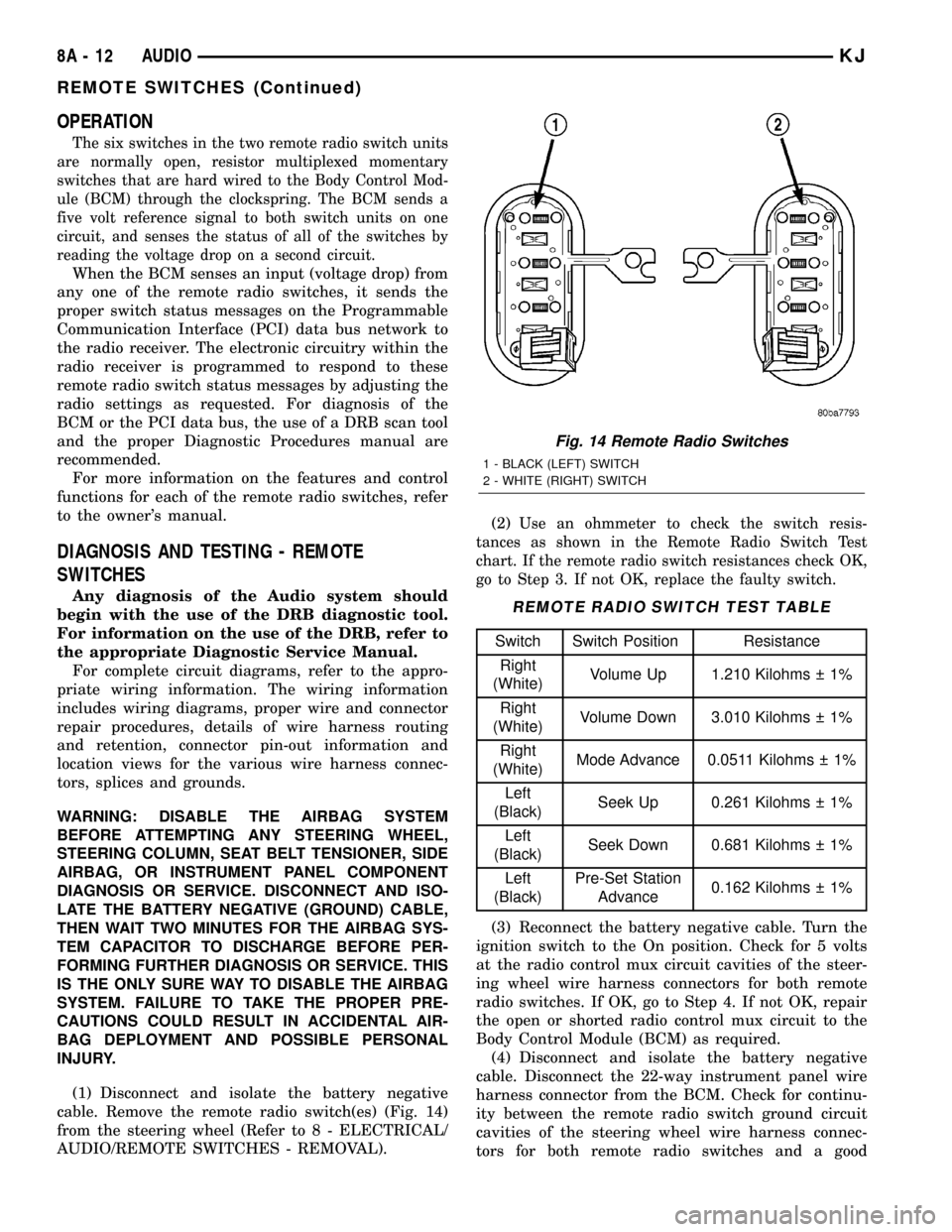
OPERATION
The six switches in the two remote radio switch units
are normally open, resistor multiplexed momentary
switches that are hard wired to the Body Control Mod-
ule (BCM) through the clockspring. The BCM sends a
five volt reference signal to both switch units on one
circuit, and senses the status of all of the switches by
reading the voltage drop on a second circuit.
When the BCM senses an input (voltage drop) from
any one of the remote radio switches, it sends the
proper switch status messages on the Programmable
Communication Interface (PCI) data bus network to
the radio receiver. The electronic circuitry within the
radio receiver is programmed to respond to these
remote radio switch status messages by adjusting the
radio settings as requested. For diagnosis of the
BCM or the PCI data bus, the use of a DRB scan tool
and the proper Diagnostic Procedures manual are
recommended.
For more information on the features and control
functions for each of the remote radio switches, refer
to the owner's manual.
DIAGNOSIS AND TESTING - REMOTE
SWITCHES
Any diagnosis of the Audio system should
begin with the use of the DRB diagnostic tool.
For information on the use of the DRB, refer to
the appropriate Diagnostic Service Manual.
For complete circuit diagrams, refer to the appro-
priate wiring information. The wiring information
includes wiring diagrams, proper wire and connector
repair procedures, details of wire harness routing
and retention, connector pin-out information and
location views for the various wire harness connec-
tors, splices and grounds.
WARNING: DISABLE THE AIRBAG SYSTEM
BEFORE ATTEMPTING ANY STEERING WHEEL,
STEERING COLUMN, SEAT BELT TENSIONER, SIDE
AIRBAG, OR INSTRUMENT PANEL COMPONENT
DIAGNOSIS OR SERVICE. DISCONNECT AND ISO-
LATE THE BATTERY NEGATIVE (GROUND) CABLE,
THEN WAIT TWO MINUTES FOR THE AIRBAG SYS-
TEM CAPACITOR TO DISCHARGE BEFORE PER-
FORMING FURTHER DIAGNOSIS OR SERVICE. THIS
IS THE ONLY SURE WAY TO DISABLE THE AIRBAG
SYSTEM. FAILURE TO TAKE THE PROPER PRE-
CAUTIONS COULD RESULT IN ACCIDENTAL AIR-
BAG DEPLOYMENT AND POSSIBLE PERSONAL
INJURY.
(1) Disconnect and isolate the battery negative
cable. Remove the remote radio switch(es) (Fig. 14)
from the steering wheel (Refer to 8 - ELECTRICAL/
AUDIO/REMOTE SWITCHES - REMOVAL).(2)
Use an ohmmeter to check the switch resis-
tances as shown in the Remote Radio Switch Test
chart. If the remote radio switch resistances check OK,
go to Step 3. If not OK, replace the faulty switch.
REMOTE RADIO SWITCH TEST TABLE
Switch Switch Position Resistance
Right
(White)Volume Up 1.210 Kilohms 1%
Right
(White)Volume Down 3.010 Kilohms 1%
Right
(White)Mode Advance 0.0511 Kilohms 1%
Left
(Black)Seek Up 0.261 Kilohms 1%
Left
(Black)Seek Down 0.681 Kilohms 1%
Left
(Black)Pre-Set Station
Advance0.162 Kilohms 1%
(3) Reconnect the battery negative cable. Turn the
ignition switch to the On position. Check for 5 volts
at the radio control mux circuit cavities of the steer-
ing wheel wire harness connectors for both remote
radio switches. If OK, go to Step 4. If not OK, repair
the open or shorted radio control mux circuit to the
Body Control Module (BCM) as required.
(4) Disconnect and isolate the battery negative
cable. Disconnect the 22-way instrument panel wire
harness connector from the BCM. Check for continu-
ity between the remote radio switch ground circuit
cavities of the steering wheel wire harness connec-
tors for both remote radio switches and a good
Fig. 14 Remote Radio Switches
1 - BLACK (LEFT) SWITCH
2 - WHITE (RIGHT) SWITCH
8A - 12 AUDIOKJ
REMOTE SWITCHES (Continued)
Page 290 of 1803

ground. There should be no continuity. If OK, go to
Step 5. If not OK, repair the shorted remote radio
switch ground circuit to the BCM as required.
(5) Check for continuity between the remote radio
switch ground circuit cavities of the steering wheel
wire harness connectors for both remote radio
switches and the 22-way instrument panel wire har-
ness connector for the BCM. There should be conti-
nuity. If OK, refer to the proper Diagnostic
Procedures manual to test the BCM and the PCI
data bus. If not OK, repair the open remote radio
switch ground circuit as required.
REMOVAL
WARNING:DISABLE THE AIRBAG SYSTEM BEFORE
ATTEMPTING ANY STEERING WHEEL, STEERING
COLUMN, SEAT BELT TENSIONER, SIDE AIRBAG,
OR INSTRUMENT PANEL COMPONENT DIAGNOSIS
OR SERVICE. DISCONNECT AND ISOLATE THE BAT-
TERY NEGATIVE (GROUND) CABLE, THEN WAIT
TWO MINUTES FOR THE AIRBAG SYSTEM CAPACI-
TOR TO DISCHARGE BEFORE PERFORMING FUR-
THER DIAGNOSIS OR SERVICE. THIS IS THE ONLY
SURE WAY TO DISABLE THE AIRBAG SYSTEM.
FAILURE TO TAKE THE PROPER PRECAUTIONS
COULD RESULT IN ACCIDENTAL AIRBAG DEPLOY-
MENT AND POSSIBLE PERSONAL INJURY.
(1) Disconnect and isolate the battery negative
cable.
(2) Remove the driver side airbag module from the
vehicle (Refer to 8 - ELECTRICAL/RESTRAINTS/
DRIVER AIRBAG - REMOVAL).
(3) Remove the cruise control switches (Fig. 15).
(4) Unplug the wire harness connector from the
remote radio switch(es).
(5)
Depress the tabs on each side of each switch and
push the switch through the rear steering wheel cover.
INSTALLATION
WARNING:DISABLE THE AIRBAG SYSTEM BEFORE
ATTEMPTING ANY STEERING WHEEL, STEERING
COLUMN, SEAT BELT TENSIONER, SIDE AIRBAG,
OR INSTRUMENT PANEL COMPONENT DIAGNOSIS
OR SERVICE. DISCONNECT AND ISOLATE THE BAT-
TERY NEGATIVE (GROUND) CABLE, THEN WAIT
TWO MINUTES FOR THE AIRBAG SYSTEM CAPACI-
TOR TO DISCHARGE BEFORE PERFORMING FUR-
THER DIAGNOSIS OR SERVICE. THIS IS THE ONLY
SURE WAY TO DISABLE THE AIRBAG SYSTEM.
FAILURE TO TAKE THE PROPER PRECAUTIONS
COULD RESULT IN ACCIDENTAL AIRBAG DEPLOY-
MENT AND POSSIBLE PERSONAL INJURY.
(1) Install remote radio switch to the steering
wheel.(2) Connect the wire harness to the remote radio
switch.
(3) Install the cruise control switches.
(4) Install the driver side airbag module (Refer to
8 - ELECTRICAL/RESTRAINTS/DRIVER AIRBAG -
INSTALLATION).
(5) Connect the battery negative cable.
SPEAKER
DESCRIPTION
STANDARD
The standard equipment speaker system includes
speakers in six locations. One 6.4 centimeter (2.50
inch) diameter speaker is installed on each end of the
instrument panel top pad. One 16.5 centimeter (6.5
inch) full-range speaker is located in each front door.
There is also one full-range 16.5 centimeter (6.5 inch)
diameter full-range speaker located in each rear door.
PREMIUM
The optional premium speaker system features six
Premium model speakers in six locations. Each of the
standard speakers is replaced with Premium model
speakers. One 6.4 centimeter (2.50 inch) diameter
Fig. 15 REMOTE SWITCH
1 - STEERING WHEEL
2 - SPEED CONTROL SWITCH
3 - SCREW
4 - DRIVER SIDE AIRBAG MODULE
5 - REMOTE RADIO SWITCH
6 - REAR TRIM COVER
KJAUDIO 8A - 13
REMOTE SWITCHES (Continued)
Page 298 of 1803

ever occurs first. The overspeed warning feature is
only enabled on a BCM that has been programmed
with a Middle East Gulf Coast Country (GCC) coun-
try code.
²No Airbag Indicator Message Warning- The
EMIC chime tone generator will generate one, short,
ªbong-likeº chime tone and turn on the ªAirbagº indi-
cator when the ignition switch is in the On position,
and a PCI data bus ªAirbagº indicator on or off mes-
sage is not received from the ACM for six consecutive
seconds.
²No Antilock Brake Indicator Message Warn-
ing- The EMIC chime tone generator will generate
one, short, ªbong-likeº chime tone and turn on the
ªABSº indicator when the ignition switch is in the On
position, and a PCI data bus ªABSº indicator on or
off message is not received from the CAB for six con-
secutive seconds.
²No Fuel Level Message Warning- The EMIC
chime tone generator will generate one, short, ªbong-
likeº chime tone and turn on the ªLow Fuelº indica-
tor when the ignition switch is in the On position,
and a PCI data bus fuel level message is not received
from the PCM for twelve consecutive seconds.
²Remote Keyless Entry Transmitter Pro-
gramming- On vehicles so equipped, the EMIC
chime tone generator will generate a single ªbong-
likeº chime tone when an electronic message is
received over the PCI data bus from the BCM indi-
cating that a Remote Keyless Entry (RKE) transmit-
ter has been successfully programmed by the
customer into the RKE module memory.
²Sentry Key Immobilizer System Transpon-
der Programming- On vehicles so equipped, the
EMIC chime tone generator will generate a single
ªbong-likeº chime tone when an electronic message is
received over PCI data bus message from the Sentry
Key Immobilizer Module (SKIM) indicating that the
Sentry Key Immobilizer System (SKIS) has been
placed in the ªCustomer Learnº programming mode,
and again each time a new SKIS transponder has
been successfully programmed by the customer.
²Turn Signal Cancel Warning- The EMIC
chime tone generator will generate repetitive ªbong-
likeº chime tones at a slow rate when the vehicle is
driven for a distance of about 3.2 kilometers (about
two miles) with a turn signal indicator flashing. The
EMIC uses an electronic message received over the
PCI data bus from the PCM, and a hard wired input
from the turn signal switch circuitry of the multi-
function switch to determine when to sound the turn
signal cancel warning. The PCM uses internal pro-
gramming and distance pulse information received
over a hard wired vehicle speed pulse input from the
BCM to determine the proper vehicle speed messages
to send to the EMIC. The BCM uses an internallyprogrammed electronic pinion factor and a hard
wired input from the rear wheel speed sensor to cal-
culate the proper distance pulse information to send
to the PCM. The electronic pinion factor represents
the proper tire size and axle ratio information for the
vehicle. These chimes will continue to sound until
the turn signal is turned Off, until the hazard warn-
ing system is turned On, or until the ignition switch
is turned to the Off position, whichever occurs first.
²Water-In-Fuel Warning- On vehicles equipped
with a diesel engine, each time the ignition switch is
turned to the On position, the EMIC chime tone gen-
erator will generate a single ªbong-likeº chime tone
the first time an electronic message is received over
the PCI data bus from the PCM requesting ªWater-
in-Fuelº indicator illumination. The PCM uses inter-
nal programming and a hard wired input from the
water-in-fuel sensor to determine the proper water-
in-fuel messages to send to the EMIC. This warning
will only occur once during an ignition cycle.
The EMIC provides chime service for all available
features in the chime warning system. The EMIC
relies upon its internal programming and hard wired
inputs from the turn signal (multi-function) switch,
the washer fluid level switch, and the engine coolant
level sensor (diesel engine only) to provide chime ser-
vice for the turn signal cancel warning, the low
washer fluid warning, and the low coolant warning
respectively. The EMIC relies upon electronic mes-
sage inputs received from other electronic modules
over the PCI data bus network to provide chime ser-
vice for all of the remaining chime warning system
features. Upon receiving the proper inputs, the EMIC
activates the integral chime tone generator to pro-
vide the audible chime warning to the vehicle opera-
tor. The internal programming of the EMIC
determines the priority of each chime request input
that is received, as well as the rate and duration of
each chime tone that is to be generated. See the own-
er's manual in the vehicle glove box for more infor-
mation on the features provided by the chime
warning system.
The hard wired chime warning system inputs to
the EMIC, as well as other hard wired circuits for
this system may be diagnosed and tested using con-
ventional diagnostic tools and procedures. However,
conventional diagnostic methods may not prove con-
clusive in the diagnosis of the EMIC, the PCI data
bus network, or the electronic message inputs used
by the EMIC to provide chime warning system ser-
vice. The most reliable, efficient, and accurate means
to diagnose the EMIC, the PCI data bus network,
and the electronic message inputs for the chime
warning system requires the use of a DRBIIItscan
tool. Refer to the appropriate diagnostic information.
KJCHIME/BUZZER 8B - 5
CHIME WARNING SYSTEM (Continued)