lights JEEP LIBERTY 2004 KJ / 1.G User Guide
[x] Cancel search | Manufacturer: JEEP, Model Year: 2004, Model line: LIBERTY, Model: JEEP LIBERTY 2004 KJ / 1.GPages: 374, PDF Size: 5.71 MB
Page 98 of 374
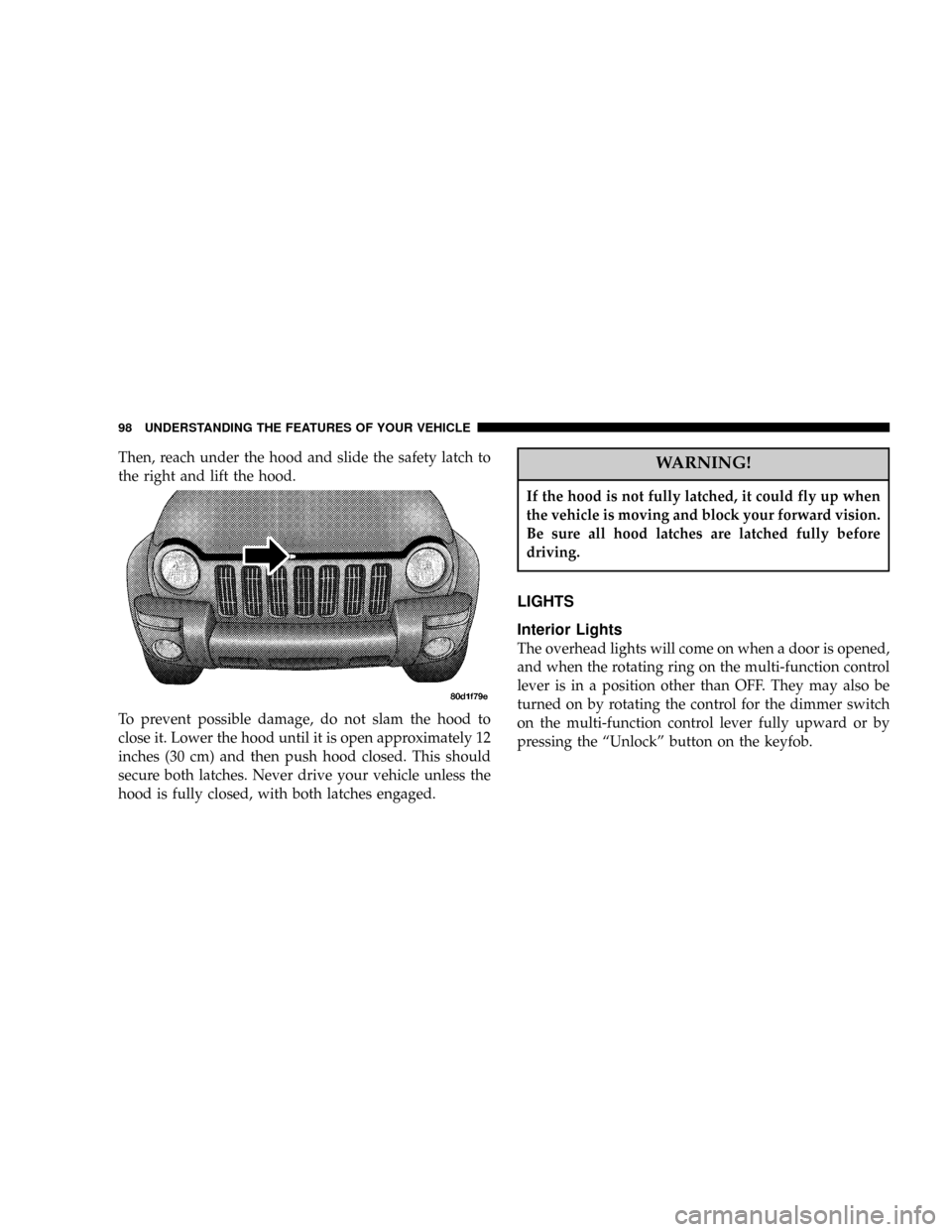
Then, reach under the hood and slide the safety latch to
the right and lift the hood.
To prevent possible damage, do not slam the hood to
close it. Lower the hood until it is open approximately 12
inches (30 cm) and then push hood closed. This should
secure both latches. Never drive your vehicle unless the
hood is fully closed, with both latches engaged.WARNING!
If the hood is not fully latched, it could fly up when
the vehicle is moving and block your forward vision.
Be sure all hood latches are latched fully before
driving.
LIGHTS
Interior Lights
The overhead lights will come on when a door is opened,
and when the rotating ring on the multi-function control
lever is in a position other than OFF. They may also be
turned on by rotating the control for the dimmer switch
on the multi-function control lever fully upward or by
pressing the ªUnlockº button on the keyfob.
98 UNDERSTANDING THE FEATURES OF YOUR VEHICLE
Page 99 of 374

The overhead lights will automatically turn off in about 8
minutes if a door is left open or the dimmer control is left
in the dome light position. Turn the ignition switch ON to
restore the overhead light operation.
Rear Cargo Light
The rear cargo light includes an independent ªOn/Offº
switch, which when ªoffº will not allow the illumination
of any interior lighting when the rear swing gate or
flipper glass is opened. All other methods of turning the
interior lighting on/off will function normally regardless
of the rear cargo light switch position.
Dimmer Control
With the park lights or headlights on, rotating the control
for the dimmer switch on the multi-function control lever
upward will increase the brightness of the instrument
panel lights. Rotating the control completely upward
turns on the dome light.
Daytime Brightness Feature
Certain components (odometer, radio, etc.) can be illumi-
nated at full brightness during the daytime. This can be
helpful when driving with your headlights on during the
daytime such as in a parade or a funeral procession. To
activate this feature, rotate the multi-function control
lever one detent lower than the dome light.
UNDERSTANDING THE FEATURES OF YOUR VEHICLE 99
3
Page 100 of 374

Front Map/Reading Lights
These lights are mounted in the overhead console. Each
light can be turned on by pressing the recessed area of the
lens. To turn these lights off, press the recessed area of the
lens a second time.
Multi-Function Control Lever
The multi-function control lever controls the operation of
the park lights, headlights, headlight beam selection,
passing light, fog lights, instrument panel light dimming,
and turn signals.
100 UNDERSTANDING THE FEATURES OF YOUR VEHICLE
Page 101 of 374

Parking Lights, Instrument Panel Lights, and
Headlights
Turn the end cap of the multi-function control lever to the
first detent for parking lights and instrument panel
lights. Turn to the second detent for headlight operation.
To change the brightness of the instrument panel lights,
rotate the center portion of the multi-function control
lever up or down.
High Beam/Low Beam Select Switch
Pull the multi-function control lever towards you to
switch the headlights to HIGH beam. Pull the multi-
function control lever a second time to switch the head-
lights to LOW beam. The ªHigh Beam Indicator Lightº
will illuminate when the high beams are on.
Passing Light
You can signal another vehicle with your headlights by
lightly pulling the multi-function control lever toward
the steering wheel. This will cause the headlights to turn
on at high beam and remain on until the lever is released.
The ªHigh Beam Indicator Lightº will illuminate when
the high beams are on.
Turn Signals
Move the multi-function control lever up or down and
the arrows on each side of the instrument cluster flash to
show proper operation of the front and rear turn signal
lights. You can signal a lane change by moving the lever
partially up or down without moving beyond the detent.
If either light flashes at a very fast rate, check for a
defective outside light bulb. If an indicator fails to light
when the lever is moved, it would suggest that the fuse
or indicator is defective.
UNDERSTANDING THE FEATURES OF YOUR VEHICLE 101
3
Page 102 of 374

NOTE:A tone will chime if the turn signals are left on
for more than 2 miles (3.2 km).
Lights-On Reminder
A chime will sound if the driver's door is left open, and
the headlights or parking lights are left on.
Battery Saver Feature Ð Exterior Lights
If the park lights, headlights, fog lights, or high beams are
left on when the ignition switch is in the OFF position,
the battery saver feature will automatically turn off the
exterior lights after eight minutes. Normal operation will
resume when the ignition is turned ON or when the
switch is turned to another position.
Fog Lights Ð If Equipped
The front fog light switch is in the multi-function
control lever. To activate the front fog lights, turn
on the park or low beam headlights and pull out
the end of the lever. The ªFog Light Indicator Lightº will
illuminate when the fog lights are on.
NOTE:The fog lights will only operate with the park
lights or the headlights on low beam. Selecting high
beam headlights will turn off the fog lights.
Daytime Running Lights Ð If Equipped
The headlights come on at a low intensity level after the
engine has started. They will turn off when the vehicle is
turned off, when the headlights are switched on, or when
the parking brake is set.
102 UNDERSTANDING THE FEATURES OF YOUR VEHICLE
Page 103 of 374
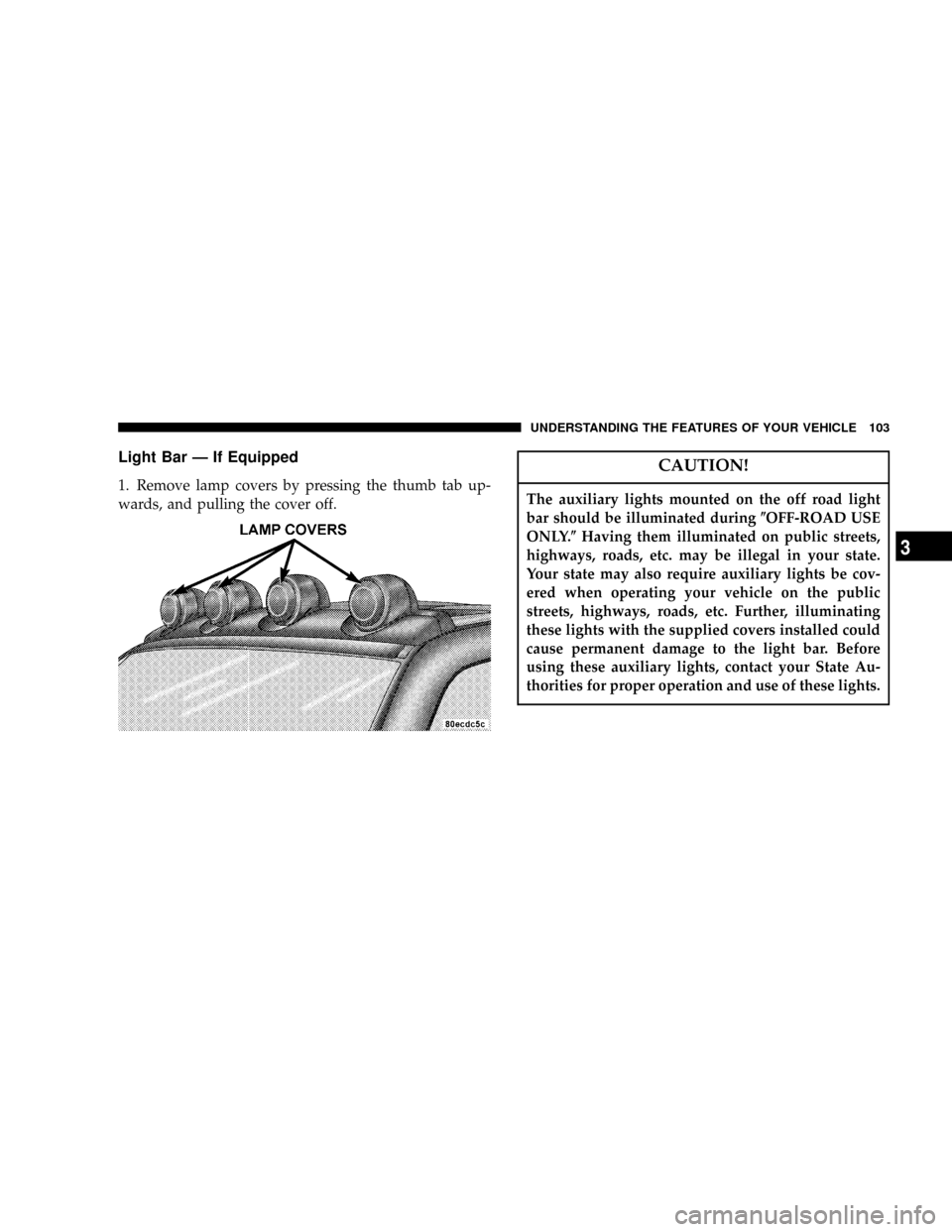
Light Bar Ð If Equipped
1. Remove lamp covers by pressing the thumb tab up-
wards, and pulling the cover off.
CAUTION!
The auxiliary lights mounted on the off road light
bar should be illuminated during(OFF-ROAD USE
ONLY.(Having them illuminated on public streets,
highways, roads, etc. may be illegal in your state.
Your state may also require auxiliary lights be cov-
ered when operating your vehicle on the public
streets, highways, roads, etc. Further, illuminating
these lights with the supplied covers installed could
cause permanent damage to the light bar. Before
using these auxiliary lights, contact your State Au-
thorities for proper operation and use of these lights.
UNDERSTANDING THE FEATURES OF YOUR VEHICLE 103
3
Page 110 of 374
NOTE:When driving uphill, at elevations above 2,000
ft. (610 meters), or when the vehicle is heavily loaded
(especially when towing) the vehicle may slow below the
SET speed. (If the vehicle speed drops below 30 mph (48
km/h), the Speed Control will automatically disengage).
If this happens, you can push down on the accelerator
pedal to maintain the desired speed.
A full throttle (high RPM) acceleration, while the system
is engaged, will cause the system to disengage.
Vehicles may exhibit several 4-3 downshifts under the
above conditions. To reduce the frequency of the down-
shifts and to improve vehicle performance, it is advisable
to lock out overdrive. Press the O/D OFF button on the
right side of the shift lever.WARNING!
Leaving the Speed Control on when not in use is
dangerous. You could accidentally set the system or
cause it to go faster than you want. You could lose
control and have an accident. Always turn the system
off when you are not using it.
OVERHEAD CONSOLE Ð IF EQUIPPED
The overhead console contains dome/reading lights, an
optional universal garage door opener (HomeLinkt), an
optional sunroof switch, and an Electronic Vehicle Infor-
mation Center (EVIC) that consists of the following:
²Compass/temperature display
²Trip information displays
²Vehicle information warning message displays
²Customer programmable features
110 UNDERSTANDING THE FEATURES OF YOUR VEHICLE
Page 111 of 374

Pressing the MENU button will change the displayed
programming features. Pressing the STEP button will
select the available choices. Pressing the C/T (Compass/
Temperature) button will return the display to the normal
compass/temperature display.
NOTE:Temperature accuracy can be effected from heat
soak. For best accuracy, the vehicle should be driven at a
speed greater than 20 mph (32 km/h) for several min-
utes.
Dome/Reading Lights
Located in the overhead console are two dome/reading
lights.The dome/reading lights illuminate when a door or the
swing gate is opened or when the interior lights are
turned on by rotating the dimmer control located on the
multi-function lever.
The reading lights are activated by pressing on the
recessed area of the corresponding lens.
UNDERSTANDING THE FEATURES OF YOUR VEHICLE 111
3
Page 112 of 374

NOTE:The dome/reading lights will remain on until
the switch is pressed a second time, so be sure they have
been turned off before leaving the vehicle.
Electronic Vehicle Information Center
The electronic vehicle information center (EVIC), when
the appropriate conditions exist, displays the following
messages and symbols. Each message is accompanied by
a series of beeps:
²DRIVER DOOR OPEN
²PASSENGER DOOR OPEN
²N DOORS OPEN (N = 2, 3, 4)
²RIGHT REAR DOOR OPEN
²REARGATE OPEN
²LEFT REAR DOOR OPEN
²LIFTGLASS OPEN
²TURN SIGNAL ON (with graphic)
²PERFORM SERVICE
²WASHER FLUID LOW
²REMOTE KEY BATTERY LOW
²NO J1850 BUS MSGS RECEIVED
²LEFT FRONT LOW PRESSURE
²LEFT FRONT HIGH PRESSURE
²RIGHT FRONT LOW PRESSURE
²RIGHT FRONT HIGH PRESSURE
²LEFT REAR LOW PRESSURE
²LEFT REAR HIGH PRESSURE
²RIGHT REAR LOW PRESSURE
²RIGHT REAR HIGH PRESSURE
112 UNDERSTANDING THE FEATURES OF YOUR VEHICLE
Page 117 of 374

To Train Additional Key Fobs (using the EVIC module)
1. Press the MENU button until TRAIN REMOTE? NO is
displayed. Press the STEP button to change to YES. Then,
PRESS A VALID FOB KEY will be displayed. Press either
the ªLockº or ªUnlockº button on the current key fob.
2. The next display will say PRESS FOB 2 LOCK &
UNLOCK. Press both key fob buttons simultaneously.
3. The next display will say PRESS FOB 2 UNLOCK.
Press the unlock button on the second key fob.
4. The next display will say FOB 2 TRAINED. At this
point, the procedure can be exited by pressing the STEP,
RESET, or C/T button.
5. Repeat step2Ð4totrain additional key fobs. A total
of four key fobs can be programmed.
Can also be programmed using the key fob, refer to
ªRemote Keyless Entryº earlier in this section.Sound Horn On Lock?
When this feature is selected, a short horn sound will
occur when the remote keyless entry ªLockº button is
pressed. This feature may be selected with or without the
flash lights on lock/unlock feature. Pressing the STEP
button when in this display will select ªYesº or ªNo.º
Can also be programmed using the key fob, refer to
ªRemote Keyless Entryº earlier in this section.
Flash Lights With Locks?
When this feature is selected, the front and rear turn
signals will flash when the doors are locked or unlocked
using the remote keyless entry transmitter. This feature
may be selected with or without the sound horn on lock
feature selected. Pressing the STEP button when in this
display will select ªYesº or ªNo.º Can also be pro-
grammed using the key fob, refer to ªRemote Keyless
Entryº earlier in this section.
UNDERSTANDING THE FEATURES OF YOUR VEHICLE 117
3