reset JEEP LIBERTY 2004 KJ / 1.G User Guide
[x] Cancel search | Manufacturer: JEEP, Model Year: 2004, Model line: LIBERTY, Model: JEEP LIBERTY 2004 KJ / 1.GPages: 374, PDF Size: 5.71 MB
Page 124 of 374

To set the variance: Turn the ignition ON and set the
display to ªCompass/Temperature.º Press and hold the
RESET button five seconds (no more than 10 seconds).
The last variance zone number will be displayed. Press
the STEP button to select the new variance zone and
press the RESET button to resume normal operation.
General Information
This transmitter complies with FCC rules part 15 and
with RSS-210 of Industry Canada. Operation is subject to
the following two conditions:
1. This device may not cause harmful interference
2. This device must accept any interference that may be
received, including interference that may cause undes-
ired operation
124 UNDERSTANDING THE FEATURES OF YOUR VEHICLE
Page 154 of 374

towing a trailer. It should not be allowed to exceed the
upper limits of the normal operating range.
If the pointer rises to the red zone (five chimes will
occur), pull over and stop the vehicle. Do not turn the
engine off. Idle the vehicle with the air conditioning
turned off, until the pointer drops back into the normal
range. If the engine remains in the high range, turn the
engine off and call for service.
12. Reset Button
Press this button to toggle between the odometer and trip
odometer display. When in the trip odometer mode,
holding the button in resets the trip odometer. Also,
pressing the ªResetº button will clear out any warning
messages in the odometer display.
13. Odometer/Trip Odometer
A vacuum fluorescent display indicates the total distance
the vehicle has been driven. Also, the cluster will display,
replacing the odometer/trip odometer, vehicle warningmessages such as: door/gate/glass ajar and low washer
fluid. See appropriate sections for more information.
NOTE:If vehicle is equipped with the optional Elec-
tronic Vehicle Information Center (EVIC) in the overhead
console, all warnings including ªdoorº, ªGATEº,
ªGLASSº, and ªLOWASHº will only be displayed in the
EVIC display (not in the instrument cluster). For addi-
tional information, refer to ªOverhead Console Ð If
Equippedº in Section 3.
U.S. federal regulations require that upon transfer of
vehicle ownership, the seller certify to the purchaser the
correct mileage that the vehicle has been driven. There-
fore, if the odometer reading is changed during repair or
replacement, be sure to keep a record of the reading
before and after the service so that the correct mileage can
be determined.
154 UNDERSTANDING YOUR INSTRUMENT PANEL
Page 162 of 374

Every time a preset button is used a corresponding
button number will be displayed.
Balance
The balance control adjusts the left-to-right speaker bal-
ance. Press the BAL button in and it will pop out. Adjust
the balance and push the button back in.
Fade
The fade control provides for balance between the front
and rear speakers. Press the FADE button in and it will
pop out. Adjust the balance and push the button back in.
Bass and Treble Tone Control
The tone controls consist of 2 separate bands. The bass
band is on the left, and the treble band is on the right.
Each band is adjusted by a slider control with a detent at
the mid-position. Moving the control up or down in-
creases or decreases amplification of that band. The mid
position provides a balanced output.
AM/FM Selection
Press the AM/FM button to change from AM to FM. The
operating mode will be displayed next to the station
frequency. The display will show ST when a stereo
station is received in the FM mode.
Mode Button
Press the MODE button to select between the cassette
tape player, CD changer, or the Satellite Radio (if
equipped). When the Satellite Radio (if equipped) is
selected ªSAº will appear in your radio display.
A CD or tape may remain in the player while in the
Satellite or radio mode.
Cassette Player Features
With ignition OFF and the sound system OFF, you can
eject the tape cassette by pushing the EJECT button.
162 UNDERSTANDING YOUR INSTRUMENT PANEL
Page 169 of 374
both AM and FM. This allows a total of 10 AM and 10 FM
stations to be locked into push-button memory. The
stations stored in SET 2 memory can be selected by
pressing the push-button twice. Every time a preset
button is used a corresponding button number will be
displayed.
Time
Press the TIME button to change the display between
radio frequency and time.
General Information
This radio complies with Part 15 of FCC rules and with
RSS-210 of Industry Canada. Operation is subject to the
following conditions:
1. This device may not cause harmful interference,
2. This device must accept any interference received,
including interference that may cause undesired opera-
tion.NOTE:Changes or modifications not expressively ap-
proved by the party responsible for compliance could
void the user's authority to operate the equipment.
CD Player Operation
NOTE:The ignition switch must be in the ON or ACC
position and the volume control ON before the CD player
will operate.
Inserting The Compact Disc
CAUTION!
This CD player will accept 43¤4inch (12 cm) discs
only. The use of other sized discs may damage the
CD player mechanism.
You may either insert or eject a disc with the radio OFF.
UNDERSTANDING YOUR INSTRUMENT PANEL 169
4
Page 176 of 374

The radio display will flash ªSEEKº and the selected PTY
program type when searching for the next PTY station. If
no station is found with the selected PTY program type,
the radio will return to the last preset station.
If a preset button is activated while in the PTY (Program
Type) mode, the PTY mode will be exited and the radio
will tune to the preset station.
Pressing PTY, then SCAN will scan the FM Band and stop
at all RDS stations that broadcast the station type. Each
RDS station will be played for a 5 second scan once
around the FM Band and stop at the last station. The PTY
icon will then turn off.
Seek
Press and release the SEEK button to search for the next
station in either the AM or FM mode. Press the top of the
button to seek up and the bottom to seek down. The
radio will remain tuned to the new station until youmake another selection. Holding the button in will by-
pass stations without stopping until you release it.
Scan
Press and release the SCAN button to search for the next
station in either the AM or FM mode. The radio will
pause for 5 seconds at each listenable station before
continuing to the next. To stop the search, press the
SCAN button a second time.
Tune
Press the TUNE control up or down to increase or
decrease the frequency. If you press and hold the button,
the radio will continue to tune until you release the
button. The frequency will be displayed and continu-
ously updated while the button is pressed.
Balance Ð BAL
The Balance control adjusts the left-to-right speaker bal-
ance. Press the BAL button in and it will pop out. Adjust
the balance and push the button back in.
176 UNDERSTANDING YOUR INSTRUMENT PANEL
Page 185 of 374

Balance Ð BAL
The Balance control adjusts the left-to-right speaker bal-
ance. Press the BAL button in and it will pop out. Adjust
the balance and push the button back in.
Fade
The Fade control provides for balance between the front
and rear speakers. Press the FADE button in and it will
pop out. Adjust the balance and push the button back in.
Tone Control
The tone controls affect the Bass and Treble frequency
bands. Each is controlled by a slider control with a detent
at the mid position. Moving a control up or down
increases or decreases amplification of the band. The mid
position provides a balanced output.
To Set The Radio Push-Button Memory
When you are receiving a station that you wish to
commit to push-button memory, press the SET RND
button. SET 1 will show in the display window. Select theª1±6º button you wish to lock onto this station and press
and release that button. If a button is not selected within
5 seconds after pressing the SET RND button, the station
will continue to play but will not be locked into push-
button memory.
You may add a second station to each push-button by
repeating the above procedure with this exception: Press
the SET button twice and SET 2 will show in the display
window. Each button can be set for SET 1 and SET 2 in
both AM and FM. This allows a total of 12 AM and 12 FM
stations to be locked into push-button memory. The
stations stored in SET 2 memory can be selected by
pressing the corresponding push-button twice. Every
time a preset button is used, a corresponding button
number will be displayed.Time Button
Press the TIME button to change the display between
radio frequency and time.
UNDERSTANDING YOUR INSTRUMENT PANEL 185
4
Page 189 of 374
Program Type Radio Display
Information Inform
Jazz Jazz
Foreign Language Language
News News
Nostalgia Nostalga
Oldies Oldies
Personality Persnlty
Public Public
Rhythm and Blues R & B
Religious Music Rel Musc
Religious Talk Rel Talk
Rock Rock
Soft Soft
Soft Rock Soft Rck
Soft Rhythm and Blues Soft R&B
Sports SportsProgram Type Radio Display
Talk Talk
Top 40 Top 40
Weather Weather
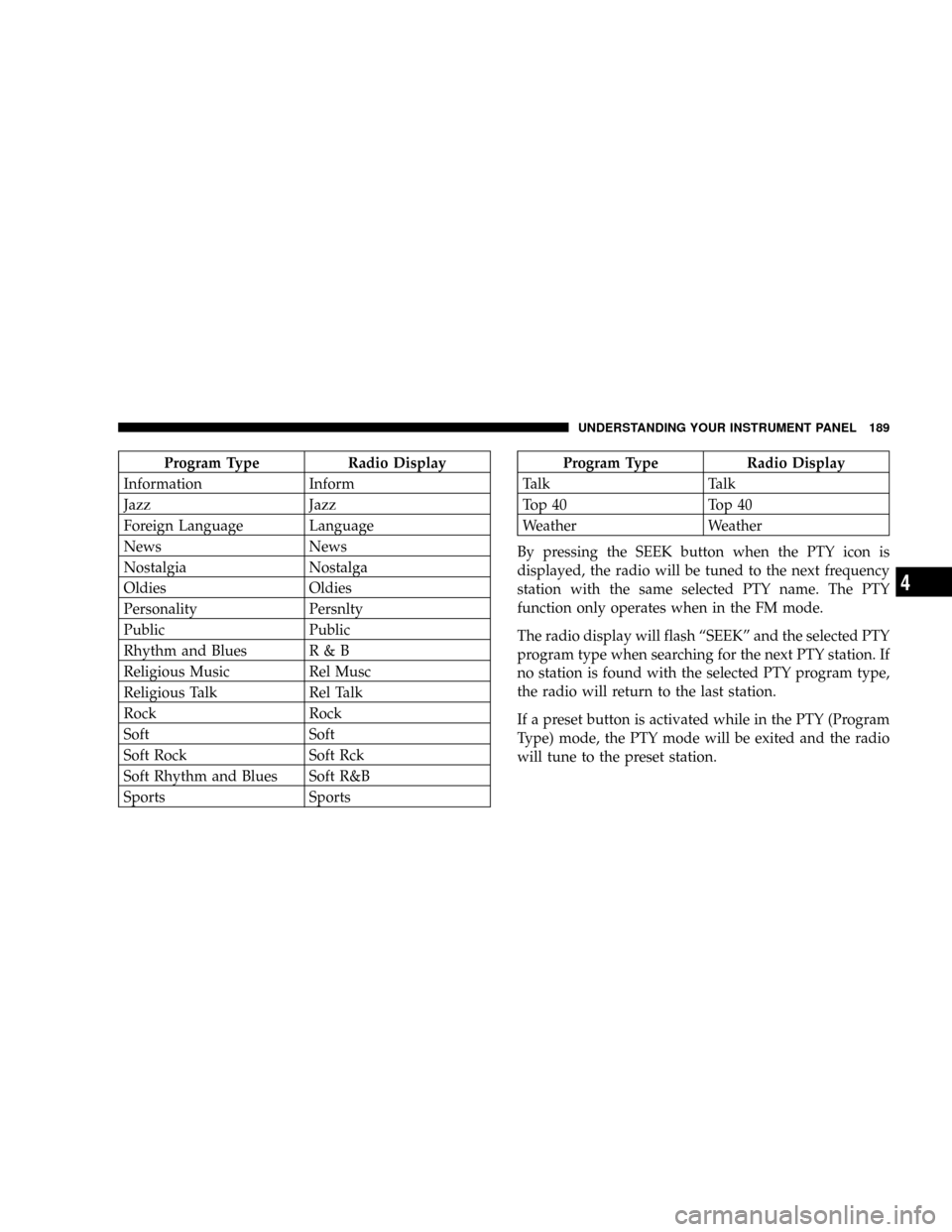
By pressing the SEEK button when the PTY icon is
displayed, the radio will be tuned to the next frequency
station with the same selected PTY name. The PTY
function only operates when in the FM mode.
The radio display will flash ªSEEKº and the selected PTY
program type when searching for the next PTY station. If
no station is found with the selected PTY program type,
the radio will return to the last station.
If a preset button is activated while in the PTY (Program
Type) mode, the PTY mode will be exited and the radio
will tune to the preset station.
UNDERSTANDING YOUR INSTRUMENT PANEL 189
4
Page 195 of 374

Pressing the center button will make the radio switch
between the various modes available (AM/FM/TAPE/
CD, Etc.).
The left hand control is a rocker type switch with a
push-button in the center. The function of the left hand
control is different depending on which mode you are in.
The following describes the left hand control operation in
each mode.
Radio Operation
Pressing the top of the switch will ªSeekº up for the next
listenable station and pressing the bottom of the switch
will ªSeekº down for the next listenable station.
The button located in the center of the left hand control
will tune to the next preset station that you have pro-
grammed in the radio preset push-button.
Tape Player
Pressing the top of the switch once will go to the next
selection on the cassette. Pressing the bottom of the
switch once will go to the beginning of the current
selection or to the beginning of the previous selection if it
is within the first 5 seconds of the current selection.
If you press the switch up or down twice it plays the
second selection, three times, it will play the third, etc.
The button in the center of the left hand switch switches
the side of the tape to be played.
CD Player Ð Single Disc in Radio
Pressing the top of the switch once will go to the next
track on the CD. Pressing the bottom of the switch once
will go to the beginning of the current track or to the
beginning of the previous track if it is within one second
after the current track begins to play.
UNDERSTANDING YOUR INSTRUMENT PANEL 195
4