Key JEEP LIBERTY 2004 KJ / 1.G Owner's Manual
[x] Cancel search | Manufacturer: JEEP, Model Year: 2004, Model line: LIBERTY, Model: JEEP LIBERTY 2004 KJ / 1.GPages: 374, PDF Size: 5.71 MB
Page 89 of 374

Low Signal, Battery Strength, and Roam
Notification
The UConnectŸ system will provide notification to
inform you if your cellular phone is in roaming status,
has low signal strength, or has a low battery when you
are trying to place a phone call.
Dialing Using the Cellular Phone Keypad
You can dial a phone number with your cellular phone
keypad and still use the UConnectŸ system. By dialing a
number with your paired BluetoothŸ cellular phone, the
audio will be played through your vehicle's stereo sys-
tem. The UConnectŸ system will work the same as if
you dialed the number using voice recognition.
Mute/Unmute
When you mute the UConnectŸ system, you will still be
able to hear the conversation coming from the other
party, but the other party will not be able to hear you. In
order to mute the UConnectŸ system press the 'VoiceRecognition' button and say9Mute9. In order to unmute
the UConnectŸ system; press the 'Voice Recognition'
button and say9Unmute9.
Help
If you need assistance at any prompt or if you want to
know what your options are at any prompt, say9Help9.
The UConnectŸ system will play all the options at any
prompt if you ask for help.
Cancel
At any prompt, you can say9Cancel9and you will be
returned to the previous menu.
Emergency Assistance
If you are in an emergency, say9Dial Emergency9or9Call
Emergency9and the UConnectŸ system will instruct
your cellular phone to call 911.
UNDERSTANDING THE FEATURES OF YOUR VEHICLE 89
3
Page 98 of 374
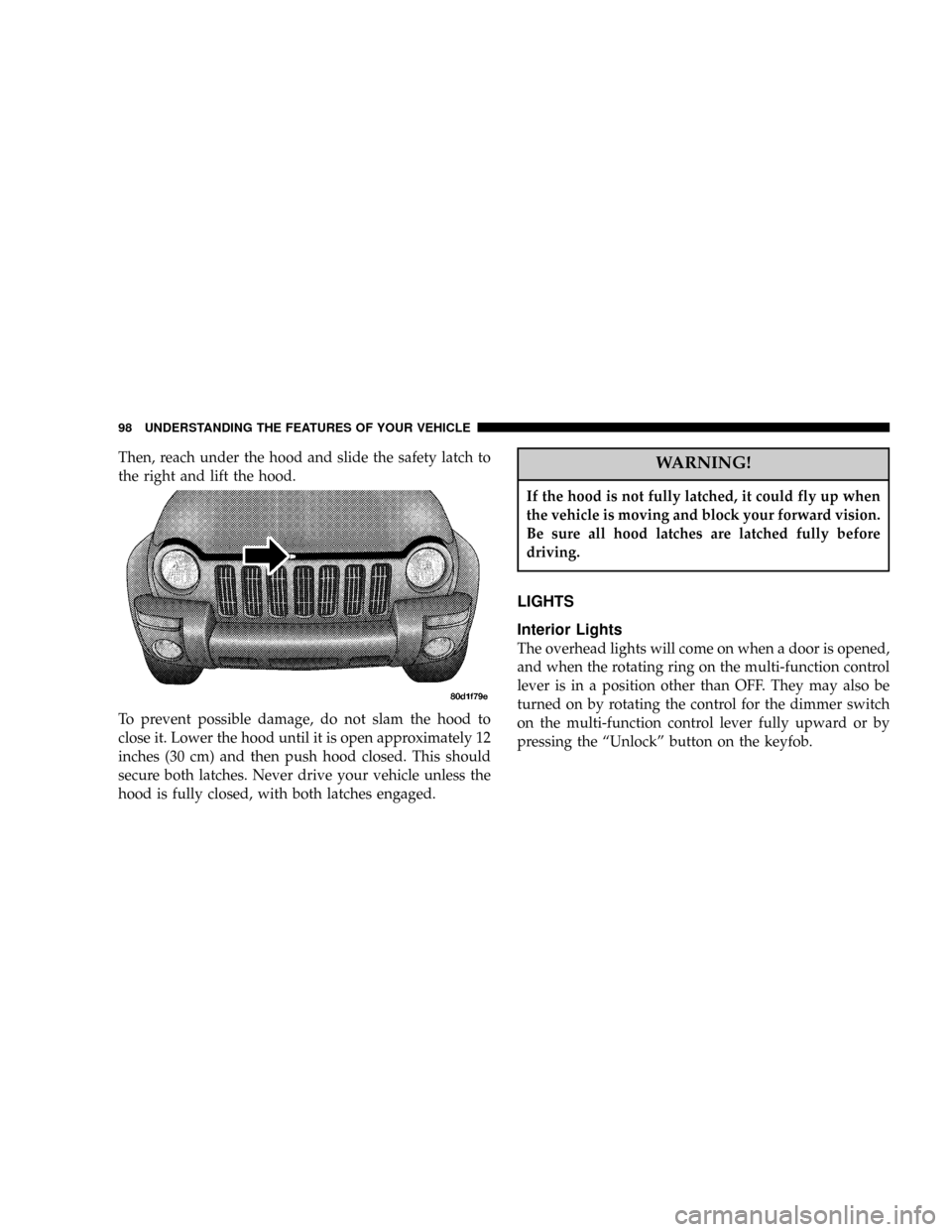
Then, reach under the hood and slide the safety latch to
the right and lift the hood.
To prevent possible damage, do not slam the hood to
close it. Lower the hood until it is open approximately 12
inches (30 cm) and then push hood closed. This should
secure both latches. Never drive your vehicle unless the
hood is fully closed, with both latches engaged.WARNING!
If the hood is not fully latched, it could fly up when
the vehicle is moving and block your forward vision.
Be sure all hood latches are latched fully before
driving.
LIGHTS
Interior Lights
The overhead lights will come on when a door is opened,
and when the rotating ring on the multi-function control
lever is in a position other than OFF. They may also be
turned on by rotating the control for the dimmer switch
on the multi-function control lever fully upward or by
pressing the ªUnlockº button on the keyfob.
98 UNDERSTANDING THE FEATURES OF YOUR VEHICLE
Page 112 of 374

NOTE:The dome/reading lights will remain on until
the switch is pressed a second time, so be sure they have
been turned off before leaving the vehicle.
Electronic Vehicle Information Center
The electronic vehicle information center (EVIC), when
the appropriate conditions exist, displays the following
messages and symbols. Each message is accompanied by
a series of beeps:
²DRIVER DOOR OPEN
²PASSENGER DOOR OPEN
²N DOORS OPEN (N = 2, 3, 4)
²RIGHT REAR DOOR OPEN
²REARGATE OPEN
²LEFT REAR DOOR OPEN
²LIFTGLASS OPEN
²TURN SIGNAL ON (with graphic)
²PERFORM SERVICE
²WASHER FLUID LOW
²REMOTE KEY BATTERY LOW
²NO J1850 BUS MSGS RECEIVED
²LEFT FRONT LOW PRESSURE
²LEFT FRONT HIGH PRESSURE
²RIGHT FRONT LOW PRESSURE
²RIGHT FRONT HIGH PRESSURE
²LEFT REAR LOW PRESSURE
²LEFT REAR HIGH PRESSURE
²RIGHT REAR LOW PRESSURE
²RIGHT REAR HIGH PRESSURE
112 UNDERSTANDING THE FEATURES OF YOUR VEHICLE
Page 116 of 374

Display U.S. or Metric?
Pressing the STEP button when in this display selects US
or Metric. The overhead console and instrument panel
displays will be in the selected units.
Auto Door Locks?
When this feature is selected, all doors and the swing
gate will lock automatically when the speed of the
vehicle reaches 15 mph (25 km/h). Pressing the STEP
button when in this display will select ªYesº or ªNo.º
Auto Unlock On Exit? (Available Only When the
AUTO DOOR LOCKS Feature is Turned On )
When this feature is selected all the vehicle's doors will
unlock when the driver's door is opened if the vehicle is
stopped and the transmission is in P (Park) or N (Neu-
tral) position. Pressing the STEP button when in this
display will select ªYesº or ªNo.º
Remote Unlock Driver's Door 1st?
When this feature is selected only the driver's door will
unlock on the first press of the remote keyless entry
unlock button and require a second press to unlock the
remaining locked doors and swing gate. WhenREMOTE
UNLOCK ALL DOORSis selected all of the doors and
the swing gate will unlock at the first press of the remote
keyless entry unlock button. Pressing the STEP button
when in this display will select DRIVER'S DOOR 1ST or
ALL DOORS. This can also be programmed using the key
fob, refer to ªRemote Keyless Entryº earlier in this
section.
Train Remote?
Pressing the STEP button when in this display will select
ªYesº or ªNo.º
NOTE:Any time you perform this procedure, it is
necessary to retrain all currently trained key fobs.
116 UNDERSTANDING THE FEATURES OF YOUR VEHICLE
Page 117 of 374

To Train Additional Key Fobs (using the EVIC module)
1. Press the MENU button until TRAIN REMOTE? NO is
displayed. Press the STEP button to change to YES. Then,
PRESS A VALID FOB KEY will be displayed. Press either
the ªLockº or ªUnlockº button on the current key fob.
2. The next display will say PRESS FOB 2 LOCK &
UNLOCK. Press both key fob buttons simultaneously.
3. The next display will say PRESS FOB 2 UNLOCK.
Press the unlock button on the second key fob.
4. The next display will say FOB 2 TRAINED. At this
point, the procedure can be exited by pressing the STEP,
RESET, or C/T button.
5. Repeat step2Ð4totrain additional key fobs. A total
of four key fobs can be programmed.
Can also be programmed using the key fob, refer to
ªRemote Keyless Entryº earlier in this section.Sound Horn On Lock?
When this feature is selected, a short horn sound will
occur when the remote keyless entry ªLockº button is
pressed. This feature may be selected with or without the
flash lights on lock/unlock feature. Pressing the STEP
button when in this display will select ªYesº or ªNo.º
Can also be programmed using the key fob, refer to
ªRemote Keyless Entryº earlier in this section.
Flash Lights With Locks?
When this feature is selected, the front and rear turn
signals will flash when the doors are locked or unlocked
using the remote keyless entry transmitter. This feature
may be selected with or without the sound horn on lock
feature selected. Pressing the STEP button when in this
display will select ªYesº or ªNo.º Can also be pro-
grammed using the key fob, refer to ªRemote Keyless
Entryº earlier in this section.
UNDERSTANDING THE FEATURES OF YOUR VEHICLE 117
3
Page 152 of 374

the vehicle's handling and stopping ability. Each tire,
including the spare, should be checked monthly when
cold and set to the recommended inflation pressure as
specified on the vehicle placard.
6. 4LO Mode Indicator Light Ð If Equipped
This light alerts the driver that the vehicle is in
the 4 LO four±wheel drive mode. The front and
rear driveshafts are mechanically locked to-
gether forcing the front and rear wheels to
rotate at the same speed.
7. Fog Light Indicator Light Ð If Equipped
This light shows when the front fog lights are on.
8. Malfunction Indicator Light
This light is part of an onboard diagnostic system
called OBD II which monitors engine and auto-
matic transmission control systems. This light
will illuminate when the ignition is in the ON positionbefore engine start. If the bulb does not come on when
turning the ignition key from OFF to ON, have the
condition checked promptly.
Certain conditions such has a loose or missing gas cap,
poor fuel quality, etc. may illuminate the light after
engine start. The vehicle should be serviced if the light
stays on through several typical driving cycles. In most
situations, the vehicle will drive normally and will not
require towing.
When the engine is running, the ªMalfunction Indicator
Lightº may flash to alert of serious conditions that could
lead to immediate loss of power or severe catalytic
converter damage. The vehicle should be serviced as
soon as possible if this occurs.
9. Anti-Lock Warning Light (ABS) Ð If Equipped
This light monitors the Anti-Lock Brake System
(ABS) described elsewhere in this manual. This
152 UNDERSTANDING YOUR INSTRUMENT PANEL
Page 157 of 374

the system is arming. After the alarm successfully arms,
the light will flash at a slower rate to indicate the alarm
is set.
21. Fuel Gage
When the ignition key is in the ON position, the pointer
will show the level of fuel remaining in the fuel tank. A
small arrow indicates the side of the vehicle where the
filler cap (gas cap) is located.
22. Sentry Key Indicator Light Ð If Equipped
Refer to ªSentry Key Immobilizer Systemº in
Section 2 of this manual for more information.
23. Low Fuel Warning Light
When the fuel level reaches approximately 2.7 U.S.
Gallons (10L) this light will come on and remain on
until fuel is added. The ªLow Fuel Warning Lightº
may turn on and off again, especially during and afterhard braking, accelerations, or turns. This occurs due to
the shifting of the fuel in the tank. Also, a single chime
will sound.
24. Airbag Warning Light
This indicator lights and remains lit for 6 to 8
seconds when the ignition is first turned on. If the
light doesn't come on, stays on, or comes on while
driving, have the airbag system checked by an autho-
rized dealer.
25. O/D (Overdrive) Off Indicator Light
This light will illuminate when the O/D OFF
button has been selected. The O/D OFF button is
located on the gear shift lever.
26. Seat Belt Indicator Light
When the ignition switch is first turned ON, this
light will turn on for 5 to 8 seconds as a bulb check.
During the bulb check, if the driver's seat belt is
unbuckled, a chime will sound. After the bulb check or
UNDERSTANDING YOUR INSTRUMENT PANEL 157
4
Page 204 of 374

If the rear wiper is operating when the ignition is turned
OFF, the wiper will automatically return to the ªParkº
position. When the vehicle is restarted, the wiper will
resume function at whichever position the switch is set
at.
If the swing gate flip-up window is open or the swing
gate is open, connection to the rear window wiper is
interrupted preventing activation of the rear wiper blade.
When the swing gate flip-up window or the swing gate is
closed, the rear wiper switch or the ignition switch needs
to be turned OFF, and then to ON to restart the rear
wiper.
NOTE: The rear swing gate will lock while the rear
wiper is operating. The gate will stay locked until the
wiper is turned off and the gate is unlocked (by key,
lock switch, or key fob).Adding Washer Fluid
The fluid reservoir for the windshield washers and the
rear window washer is shared. It is located in the front of
the engine compartment on the passenger side and
should be checked for fluid level at regular intervals. Fill
the reservoir with windshield washer solvent (not radia-
tor antifreeze) and operate the system for a few seconds
to flush out the residual water.
Rear Window Defroster
On the top of the climate control panel is a push
button for rear window defrosting. An amber
indicator in the push button will light when the defroster
is turned on. Push again to turn off the defroster prior to
an automatic time-out.
204 UNDERSTANDING YOUR INSTRUMENT PANEL
Page 210 of 374
STARTING PROCEDURES
Before starting your vehicle, adjust your seat, adjust both
inside and outside mirrors, and fasten your seat belts.
WARNING!
Do not leave children or animals inside parked
vehicles in hot weather. Interior heat build up may
cause serious injury or death.
Manual Transmission
Apply the parking brake, place the gearshift control lever
in N (Neutral) and depress the clutch pedal before
starting vehicle. This vehicle is equipped with a clutch
interlocking ignition system.4WD Models Only
In 4L mode, this vehicle will start regardless of whether
or not the clutch pedal is pressed to the floor. This feature
enhances off-road performance by allowing the vehicle to
start when in 4L without having to depress the clutch
pedal. The 4 LO MODE indicator light will illuminate
when the transfer case has been shifted into this mode.
Automatic Transmission
Start the engine with the selector lever in the N (Neutral)
or P (Park) position. Apply the brake before shifting to
any driving range.
Normal Starting
Normal starting of either a cold or a warm engine is
obtained without pumping or depressing the accelerator
pedal. Turn the key to the START position and release
when the engine starts. If the engine fails to start within
10 seconds, turn the key to the OFF position, wait 5
seconds, then repeat the normal starting procedure.
210 STARTING AND OPERATING
Page 212 of 374

If the engine has been flooded, it may start to run, but not
have enough power to continue running when the key is
released. If this occurs, continue cranking with the accel-
erator pedal pushed all the way to the floor. Release the
accelerator pedal and the key once the engine is running
smoothly.
If the engine shows no sign of starting after two 15
second periods of cranking with the accelerator pedal
held to the floor, the ªNormal Startingº or ªExtreme Cold
Weatherº procedures should be repeated.
WARNING!
Never pour fuel or other flammable liquids into the
throttle body air inlet opening in an attempt to start
the vehicle. This could result in a flash fire causing
serious personal injury.
After Starting
The idle speed will automatically decrease as the engine
warms up.
CAUTION!
Long periods of engine idling, especially at high
engine speeds can cause excessive exhaust tempera-
tures which can damage your vehicle. Do not leave
your vehicle unattended with the engine running.
ENGINE BLOCK HEATER Ð IF EQUIPPED
The engine block heater warms engine coolant and
permits quicker starts in cold weather. Connect the cord
to a standard 110-115 volt AC electrical outlet with a
grounded, three wire extension cord. The engine block
heater cord is found under the hood clipped to the heater
line on the left side of the engine (3.7L only).
212 STARTING AND OPERATING