lock JEEP LIBERTY 2011 KK / 2.G Owners Manual
[x] Cancel search | Manufacturer: JEEP, Model Year: 2011, Model line: LIBERTY, Model: JEEP LIBERTY 2011 KK / 2.GPages: 542
Page 328 of 542
the vehicle stopped or in motion. With the vehicle in
motion, the transfer case will engage/disengage faster if
you momentarily release the accelerator pedal after mov-
ing the transfer case switch. If the vehicle is stopped, the
ignition switch must be in the ON position with the
engine either OFF or RUNNING. This shift cannot be
completed if the ignition switch is in the ACC position.
NOTE:The four-wheel drive system will not allow
shifts between 2WD and 4WD LOCK if the rear wheels
are spinning (no traction). In this situation, the selected
position indicator light will flash and the original posi-
tion indicator light will remain ON. At this time, reduce
speed and stop spinning the wheels to complete the shift.
There may be a delay up to 10 seconds for the shift to
complete after the wheels have stopped spinning.
Delayed shifting out of 4WD LOCK may be experienced
due to uneven tire wear, low tire pressure, or excessive
loading. 4WD Lock To 4WD Low
When shifting into or out of 4WD LOW, some gear noise
may be heard. This noise is normal and is not detrimental
to the vehicle or its occupants.
Shifting can be performed with the vehicle rolling 2 to
3 mph (3 to 5 km/h) using the “Preferred Procedure” or
completely stopped using the “Alternate Procedure.”
Preferred Procedure
1. With the engine RUNNING, slow the vehicle speed to
2 to 3 mph (3 to 5 km/h).
2. Shift the transmission into NEUTRAL.
3. While still rolling, move the transfer case switch to the
desired position.
4. After the desired position indicator light is ON (not
flashing), shift the transmission into gear.
326 STARTING AND OPERATING
Page 330 of 542
This transfer case is intended to be driven in either the
two-wheel drive position (2WD) or the four-wheel drive
Auto position (4WD AUTO) for normal street and high-
way conditions such as dry hard-surfaced roads.
For added capability when traversing steep grades,
rough terrain, or extremely poor traction surfaces, select
the transfer case 4WD LOW position. This position locks
the front driveshaft and rear driveshaft together and
forces the front and rear wheels to rotate at the same
speed while multiplying engine torque.
Use the transfer case NEUTRAL position for recreational
towing only. Refer to “Recreational Towing” in “Starting
and Operating” for further information.CAUTION!
•The 4WD LOW position is intended for loose or
slippery road surfaces only. Driving in this posi-
tion on dry hard-surfaced roads may cause in-
creased tire wear and damage to the driveline
components.
•When operating your vehicle in 4WD LOW, the
engine speed is approximately three times that of
the 2WD position or 4WD AUTO position at a
given road speed. Take care not to over-speed the
engine and do not exceed 25 mph (40 km/h).
•Proper operation of four-wheel drive vehicles de-
pends on tires of equal size, type, and circumfer-
ence on each wheel. Any difference in tire size can
cause damage to the transfer case. Tire rotation
schedule should be followed to balance tire wear.
328 STARTING AND OPERATING
Page 332 of 542
Shift Positions
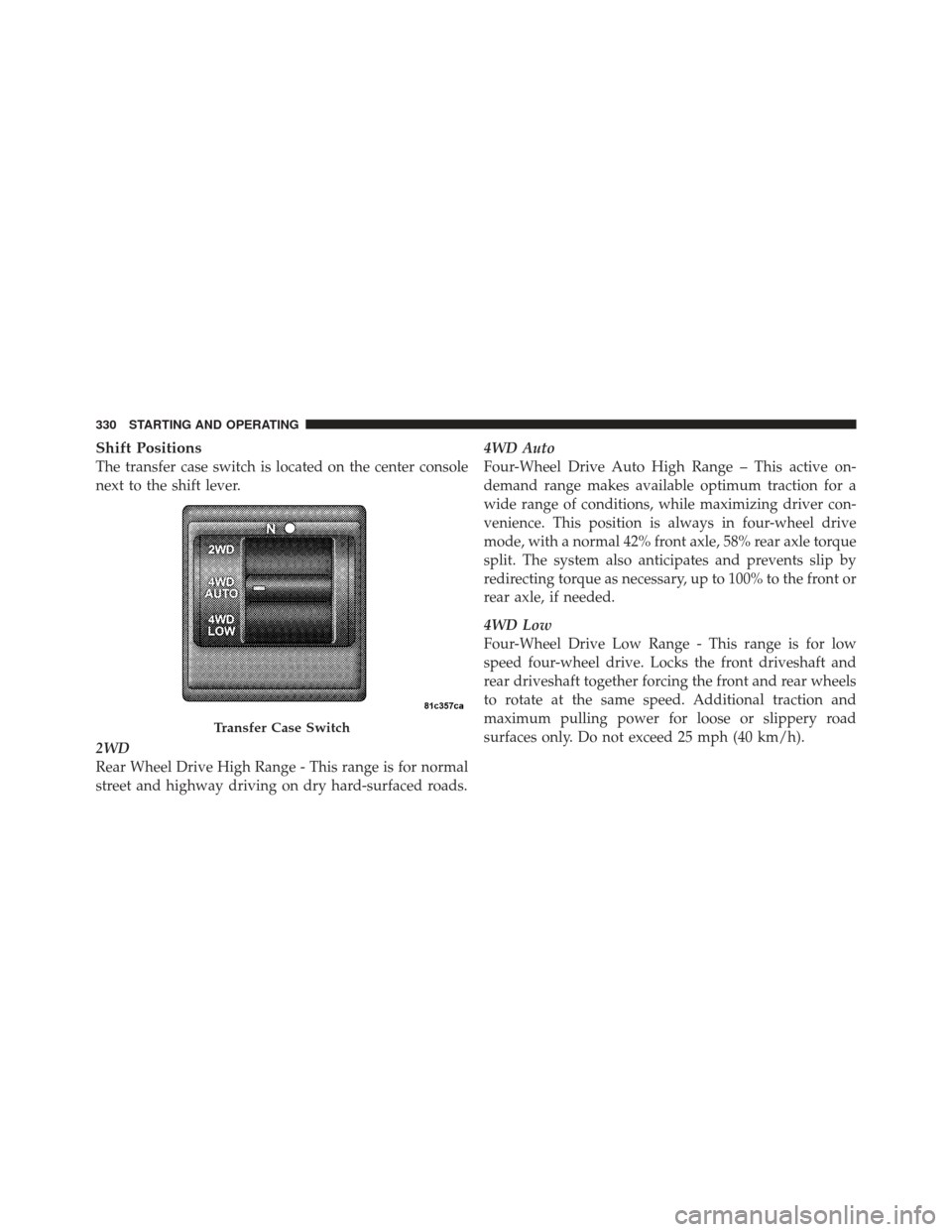
The transfer case switch is located on the center console
next to the shift lever.
2WD
Rear Wheel Drive High Range - This range is for normal
street and highway driving on dry hard-surfaced roads.4WD Auto
Four-Wheel Drive Auto High Range – This active on-
demand range makes available optimum traction for a
wide range of conditions, while maximizing driver con-
venience. This position is always in four-wheel drive
mode, with a normal 42% front axle, 58% rear axle torque
split. The system also anticipates and prevents slip by
redirecting torque as necessary, up to 100% to the front or
rear axle, if needed.
4WD Low
Four-Wheel Drive Low Range - This range is for low
speed four-wheel drive. Locks the front driveshaft and
rear driveshaft together forcing the front and rear wheels
to rotate at the same speed. Additional traction and
maximum pulling power for loose or slippery road
surfaces only. Do not exceed 25 mph (40 km/h).
Transfer Case Switch
330 STARTING AND OPERATING
Page 337 of 542
Maintenance
After driving through deep water, inspect your vehicle
fluids and lubricants (engine, transmission, axle, transfer
case) to assure they have not been contaminated. Con-
taminated fluids and lubricants (milky, foamy in appear-
ance) should be flushed/changed as soon as possible to
prevent component damage.
Driving In Snow, Mud And Sand
In heavy snow, when pulling a load, or for additional
control at slower speeds, shift the transmission to a low
gear and shift the transfer case to 4WD LOW if necessary.
Refer to “Four-Wheel Drive Operation” in “Starting and
Operating” for further information. Do not shift to a
lower gear than necessary to maintain headway. Over-
revving the engine can spin the wheels and traction will
be lost.Avoid abrupt downshifts on icy or slippery roads be-
cause engine braking may cause skidding and loss of
control.
Hill Climbing
NOTE:
Before attempting to climb a hill, determine the
conditions at the crest and/or on the other side.
Before climbing a steep hill, shift the transmission to a
lower gear and shift the transfer case to 4WD LOW. Use
first gear and 4WD LOW for very steep hills.
If you stall or begin to lose headway while climbing a
steep hill, allow your vehicle to come to a stop and
immediately apply the brakes. Restart the engine and
shift to REVERSE. Back slowly down the hill allowing the
compression braking of the engine to help regulate your
speed. If the brakes are required to control vehicle speed,
apply them lightly and avoid locking or skidding the
tires.
5
STARTING AND OPERATING 335
Page 342 of 542
The parking brake lever is located in the center console.
To apply the parking brake, pull the lever up as firmly as
possible. To release the parking brake, pull the lever up
slightly, press the center button, then lower the lever
completely.When the parking brake is applied with the ignition
switch ON, the “Brake Warning Light” in the instrument
cluster will illuminate.
NOTE:
•When the parking brake is applied and the transmis-
sion is placed in gear, the “Brake Warning Light” will
flash. If vehicle speed is detected, a chime will sound
to alert the driver. Fully release the parking brake
before attempting to move the vehicle.
•This light only shows that the parking brake is ap-
plied. It does not show the degree of brake application.
When parking on a hill, it is important to turn the front
wheels toward the curb on a downhill grade and away
from the curb on an uphill grade. Apply the parking
brake before placing the shift lever in PARK, otherwise
the load on the transmission locking mechanism may
Parking Brake
340 STARTING AND OPERATING
Page 344 of 542
ANTI-LOCK BRAKE SYSTEM
The Anti-Lock Brake System (ABS) is designed to aid the
driver in maintaining vehicle control under adverse
braking conditions. The system operates with a separate
computer to modulate hydraulic pressure, to prevent
wheel lock-up and help avoid skidding on slippery
surfaces.
All vehicle wheels and tires must be the same size and
type, and tires must be properly inflated, to produce
accurate signals for the computer.
WARNING!
Significant over or under-inflation of tires or mixing
sizes of tires or wheels on the vehicle can lead to loss
of braking effectiveness.The ABS conducts a low-speed self-test at about 12 mph
(20 km/h). If you have your foot lightly on the brake
while this test is occurring, you may feel slight pedal
movement. The movement can be more apparent on ice
and snow. This is normal.
The ABS pump motor runs during the self-test at 12 mph
(20 km/h) and during an ABS stop. The pump motor
makes a low humming noise during operation, which is
normal.
WARNING!
•Pumping of the Anti-Lock Brakes will diminish
their effectiveness and may lead to a collision.
Pumping makes the stopping distance longer. Just
press firmly on your brake pedal when you need
to slow down or stop.
(Continued)
342 STARTING AND OPERATING
Page 345 of 542
WARNING! (Continued)
•The ABS cannot prevent the natural laws of phys-
ics from acting on the vehicle, nor can it increase
braking or steering efficiency beyond that af-
forded by the condition of the vehicle brakes and
tires or the traction afforded.
•The ABS cannot prevent collisions, including
those resulting from excessive speed in turns,
following another vehicle too closely, or hydro-
planing.
•The capabilities of an ABS equipped vehicle must
never be exploited in a reckless or dangerous
manner, which could jeopardize the user’s safety
or the safety of others.
CAUTION!
The ABS is subject to possible detrimental effects of
electronic interference caused by improperly in-
stalled aftermarket radios or telephones.
NOTE: During severe braking conditions, a pulsing
sensation may occur and a clicking noise will be heard.
This is normal, indicating that the ABS is functioning.
•Do not “ride” the brakes by resting your foot on the
pedal. This could overheat the brakes and result in
unpredictable braking action, longer stopping dis-
tances, or brake damage.
•When descending mountains or hills, repeated brak-
ing can cause brake fade with loss of braking control.
Avoid repeated heavy braking by downshifting the
transmission or locking out overdrive whenever pos-
sible.
5
STARTING AND OPERATING 343
Page 346 of 542
•Engines may idle at higher speeds during warm-up,
which could cause rear wheels to spin and result in
loss of vehicle control. Be especially careful while
driving on slippery roads, in close-quarter maneuver-
ing, parking, or stopping.
•Do not drive too fast for road conditions, especially
when roads are wet or slushy. A wedge of water can
build up between the tire tread and the road. This
hydroplaning action can cause loss of traction, braking
ability, and control.
•After going through deep water or a car wash, brakes
may become wet, resulting in decreased performance
and unpredictable braking action. Dry the brakes by
gentle, intermittent pedal action while driving at very
slow speeds.
ELECTRONIC BRAKE CONTROL SYSTEM
Your vehicle is equipped with an advanced electronic
brake control system commonly referred to as ESC. This
system includes Anti-Lock Brake System (ABS), Traction
Control System (TCS), Brake Assist System (BAS), Hill
Start Assist (HSA), Electronic Roll Mitigation (ERM), and
Electronic Stability Control (ESC). These systems work
together to enhance both vehicle stability and control in
various driving conditions.
Two additional electronic brake control system options
are Hill Descent Control (HDC) and Trailer Sway Control
(TSC). Your vehicle may be equipped with one or both of
these options.
Anti-Lock Brake System (ABS)
This system aids the driver in maintaining vehicle control
under adverse braking conditions. The system controls
hydraulic brake pressure to prevent wheel lock-up to
344 STARTING AND OPERATING
Page 347 of 542
help avoid skidding on slippery surfaces during braking.
Refer to “Anti-Lock Brake System” in “Starting and
Operating” for further information.
WARNING!
The Anti-Lock Brake System (ABS) cannot prevent
the natural laws of physics from acting on the ve-
hicle, nor can it increase the traction afforded by
prevailing road conditions. ABS cannot prevent col-
lisions, including those resulting from excessive
speed in turns, driving on very slippery surfaces, or
hydroplaning. The capabilities of an ABS-equipped
vehicle must never be exploited in a reckless or
dangerous manner, which could jeopardize the user’s
safety or the safety of others.
Traction Control System (TCS)
This system monitors the amount of wheel spin of each of
the driven wheels. If wheel spin is detected, brake
pressure is applied to the slipping wheel(s) and engine
power is reduced to provide enhanced acceleration and
stability. A feature of the TCS system functions similar to
a limited slip differential and controls the wheel spin
across a driven axle. If one wheel on a driven axle is
spinning faster than the other, the system will apply the
brake of the spinning wheel. This will allow more engine
torque to be applied to the wheel that is not spinning.
This feature remains active even if TCS and ESC are in
the “Partial Off” mode or the “Full Off” mode. Refer to
“Electronic Stability Control (ESC)” in this section for
further information.
5
STARTING AND OPERATING 345
Page 348 of 542
Brake Assist System (BAS)
The BAS is designed to optimize the vehicle’s braking
capability during emergency braking maneuvers. The
system detects an emergency braking situation by sens-
ing the rate and amount of brake application and then
applies optimum pressure to the brakes. This can help
reduce braking distances. The BAS complements the
anti-lock brake system (ABS). Applying the brakes very
quickly results in the best BAS assistance. To receive the
benefit of the system, you must apply continuous brak-
ing pressure during the stopping sequence, (do not
“pump” the brakes). Do not reduce brake pedal pressure
unless braking is no longer desired. Once the brake pedal
is released, the BAS is deactivated.WARNING!
The Brake Assist System (BAS) cannot prevent the
natural laws of physics from acting on the vehicle,
nor can it increase the traction afforded by prevailing
road conditions. BAS cannot prevent collisions, in-
cluding those resulting from excessive speed in
turns, driving on very slippery surfaces, or hydro-
planing. The capabilities of a BAS-equipped vehicle
must never be exploited in a reckless or dangerous
manner, which could jeopardize the user’s safety or
the safety of others.
346 STARTING AND OPERATING