phone JEEP LIBERTY 2012 KK / 2.G User Guide
[x] Cancel search | Manufacturer: JEEP, Model Year: 2012, Model line: LIBERTY, Model: JEEP LIBERTY 2012 KK / 2.GPages: 124, PDF Size: 2.92 MB
Page 1 of 124
Jeep.com
Download a FREE el\Iectronic copy
of the Owner’s Man\f\aal or Warranty
\booklet by visiting\a the For Owners tab\a at:
www.Jeep.com (U.S.)\a or
www.Jeep.ca (Canada).\a
Getthe free mo bile appf or your phone
http:/ /getta g.mo bi
Download a free Vehicle
Information App
by visiting your
application store, Keyword (Jeep), or
scanning the Microsoft Tag. To put
Microsoft Tags to work for you, use your
mobile phone’s browser or App store to
download a Microsoft Tag reader, like the
free one at www.gettag.mobi. Then
follow the directions to scan the code.
12KK74-926-AA
Liberty
Fourth Edition
User Guide
2012
Liberty
User G\fide
919031_12d_Liberty_User_Guide_011212.indd 11/12/12 11:51 AM
Page 2 of 124
I\fportant:
This User G\fide is \aintended to familia\arize yo\f with the i\amportant feat\fres
of yo\fr vehicle. Th\ae DVD enclosed con\atains yo\fr Owner’s M\aan\fal,
Navigation/Media Cen\ater Man\fals, Warranty \a\booklets, Tire Warra\anty
and 24-Ho\fr Towing \aAssistance (new vehi\acles p\frchased in t\ahe U.S.) or
Roadside Assistance\a (new vehicles p\frch\aased in Canada) in e\alectronic
format. We hope yo\f \afind it \fsef\fl. Repl\aacement DVD kits ma\ay be
p\frchased by visitin\ag www.techa\fthority.\acom. Jeep
® is a registered
trademark of Chrysle\ar Gro\fp LLC. Copyri\aght 2012 Chrysler G\aro\fp LLC.
If you are the first registered retail owner of your
\fehicle, you may o\btain a complimentary printed
copy of the Owner’s Manual, Na\figation/Media
Center Manuals or Warranty Booklet \by calling
1-877-426-5337 (U.S.) or 1-800-387-1143 (Canada)
or \by contacting your dealer.
The driver’s primar\ay responsibility
is the safe operati\aon of the
vehicle. Driving w\ahile distracted
can res\flt in loss \aof vehicle
control, res\flting \ain a collision and
personal inj\fry. Chr\aysler Gro\fp
LLC strongly recomm\aends that
the driver \fse extr\aeme ca\ftion
when \fsing any devic\ae or feat\fre
that may take their \aattention off
the road. Use of an\ay electrical
devices s\fch as cel\al phones,
comp\fters, portable\a radios,
vehicle navigation \aor other
devices by the driv\aer while the vehicle is moving \ais dangero\fs
and co\fld lead to a \aserio\fs
collision. Texting\a while driving is
also dangero\fs and s\aho\fld never
be done while the \avehicle is
moving. If yo\f find \ayo\frself
\fnable to devote yo\f\ar f\fll
attention to vehicl\ae operation,
p\fll off the road t\ao a safe location
and stop yo\fr vehicl\ae. Some
States or Provinces\a prohibit the
\fse of cell\flar tele\aphones or
texting while driv\aing. It is always
the driver’s respo\ansibility to
comply with all loc\aal laws.
Driving after drink\aing can lead to a co\allision. Yo\fr perce\aptions are
less sharp, yo\fr refl\aexes are slower, an\ad yo\fr j\fdgment is i\ampaired
when yo\f have been drinki\ang. Never drink and\a then drive.
WAR\bI\bG!
Driving and Alcohol\I:
Dr\fnken driving is \aone of the most fr\aeq\fent ca\fses of col\alisions. Yo\fr
driving ability can \abe serio\fsly impaire\ad with blood alcoho\al levels far below \a
the legal minim\fm. \aIf yo\f are drinking,\a don’t drive. Ride\a with a designated \a
non-drinking drive\ar, call a cab, a fri\aend, or \fse p\fblic \atransportation.
This g\fide has been\a prepared to help y\ao\f get q\fickly
acq\fainted with yo\fr \anew Jeep and to pro\avide a convenient
reference so\frce fo\ar common q\festions.\a However, it is no\at a
s\fbstit\fte for yo\fr \aOwner’s Man\fal.
For complete operat\aional instr\fctions,\a maintenance proced\a\fres
and important safety\a messages, please c\aons\flt yo\fr Owner’s
Man\fal, Navigation/Me\adia Center Man\fals an\ad other Warning
Labels in yo\fr vehic\ale.
Not all feat\fres sho\awn in this g\fide ma\ay apply to yo\fr vehic\ale.
For additional info\armation on accessor\aies to help person\aalize
yo\fr vehicle, visit\a www.mopar.com or y\ao\fr local Jeep deale\ar.
919031_12d_Liberty_User_Guide_011212.indd 21/12/12 11:51 AM
Page 3 of 124
INTRODUCTION/WELCOMEWelcome From Chrysler Group LLC..2
CONTROLS AT A GLANCEDriver Cockpit..............4
Instrument Cluster ............6
GETTING STARTEDKeyFob ..................8
Remote Start...............9
Theft Alarm ................9
Seat Belt ..................9
Supplemental Restraint System
(SRS) — Air Bags ........... 10
Child Restraints .............11
FrontSeats ................13
RearSeats.................15
HeatedSeats .............. 16
Tilt Steering Column ..........17
OPERATING YOUR VEHICLEEngine Break-In
Recommendations............18
Turn Signal/Lights Lever ........18
Wiper/Washer Lever .........20
Speed Control ..............21
Manual Climate Controls .......22
Automatic Temperature Controls
(ATC) ..................23
Parksense® Rear Park Assist .....24
Liftgate Flipper Glass .........24
Power Sunroof .............25
Sky Slider® Roof ............26
Wind Buffeting .............27
ELECTRONICSYour Vehicle's Sound System ....28
Media Center 130
(Sales Code RES) ...........30
Media Center 130 With Satellite
Radio (Sales Code RES + RSC) . . . 32
Media Center 230 (Sales Code
REQ)...................34
Media Center 430/430N (Sales
Code RBZ/RHB) ............37
Media Center 730N (Sales Code
RHR) ...................46
Sirius XM™Satellite Radio/Travel
Link ....................56
Steering Wheel Audio Controls . . . 60
Uconnect™ Phone ...........60
Uconnect™ Voice Command .....63
Bluetooth® Streaming Audio .....65
Electronic Vehicle Information
Center (EVIC) .............65
Programmable Features .......66Universal Garage Door Opener
(HomeLink®)
..............68
Power Outlet ...............71
OFF-ROAD CAPABILITIESFour-Wheel Drive Operation .....72
UTILITYCargoAreaFeatures .........74
Trailer Towing Weights (Maximum
Trailer Weight Ratings)........76
Tow/Haul Mode ............ 77
Recreational Towing (Behind
Motorhome, Etc.) ........... 77
WHAT TO DO IN EMERGENCIES24-Hour Towing Assistance .....79
Instrument Cluster Warning
Lights ..................79
If Your Engine Overheats .......83
Jacking And Tire Changing .....84
Jump-Starting .............89
Shift Lever Override .......... 91
Towing A Disabled Vehicle ......92
Freeing A Stuck Vehicle .......93
Event Data Recorder (EDR) .....94
MAINTAINING YOUR VEHICLEOpening The Hood..........95
Engine Compartment .........96
Fluids And Capacities .........97
Maintenance Chart ..........99
Fuses ...................102
TirePressures..............106
Wheel And Wheel Trim Care .....107
Exterior Bulbs .............107
CONSUMER ASSISTANCEChrysler Group LLC Customer
Center ..................108
Chrysler Canada Inc. Customer
Center ..................108
Assistance For The Hearing
Impaired.................108
Publications Ordering .........108
Reporting Safety Defects In
The 50 United States And
Washington, D.C. ............109
MOPAR ACCESSORIESAuthentic Accessories By
MOPAR®.................110
INDEX................. 111
FAQ(HowTo?)Frequently Asked Questions .....114
TABLE OF CONTENTS
Page 5 of 124
Rollover Warning
WARNING!
• Pedals that cannot move freely can cause loss of vehicle control andincrease the risk of serious personal injury.
• Always make sure that objects cannot fall into the driver foot well
while the vehicle is moving. Objects can become trapped under the
brake pedal and accelerator pedal causing a loss of vehicle control.
• Failure to properly follow floor mat installation or mounting can cause interference with the brake pedal and accelerator pedal
operation causing loss of control of the vehicle.
• Never use the ‘PARK’ position as a substitute for the parking brake. Always apply the parking brake fully when parked to guard against
vehicle movement and possible injury or damage.
• Refer to your Owner's Manual on the DVD for further details.
USE OF AFTERMARKET PRODUCTS (ELECTRONICS)
The use of aftermarket devices including cell phones, MP3 players, GPS
systems, or chargers may affect the performance of on-board wireless
features including Keyless Enter-N-Go and Remote Start range. If you are
experiencing difficulties with any of your wireless features, try disconnecting
your aftermarket devices to see if the situation improves. If your symptoms
persist, please see an authorized dealer.
CHRYSLER, DODGE, JEEP, RAM TRUCK, ATF+4, MOPAR and Uconnect are
registered trademarks of Chrysler Group LLC. COPYRIGHT ©2012 CHRYSLER GROUP LLC
INTRODUCTION/WELCOME
3
Page 34 of 124
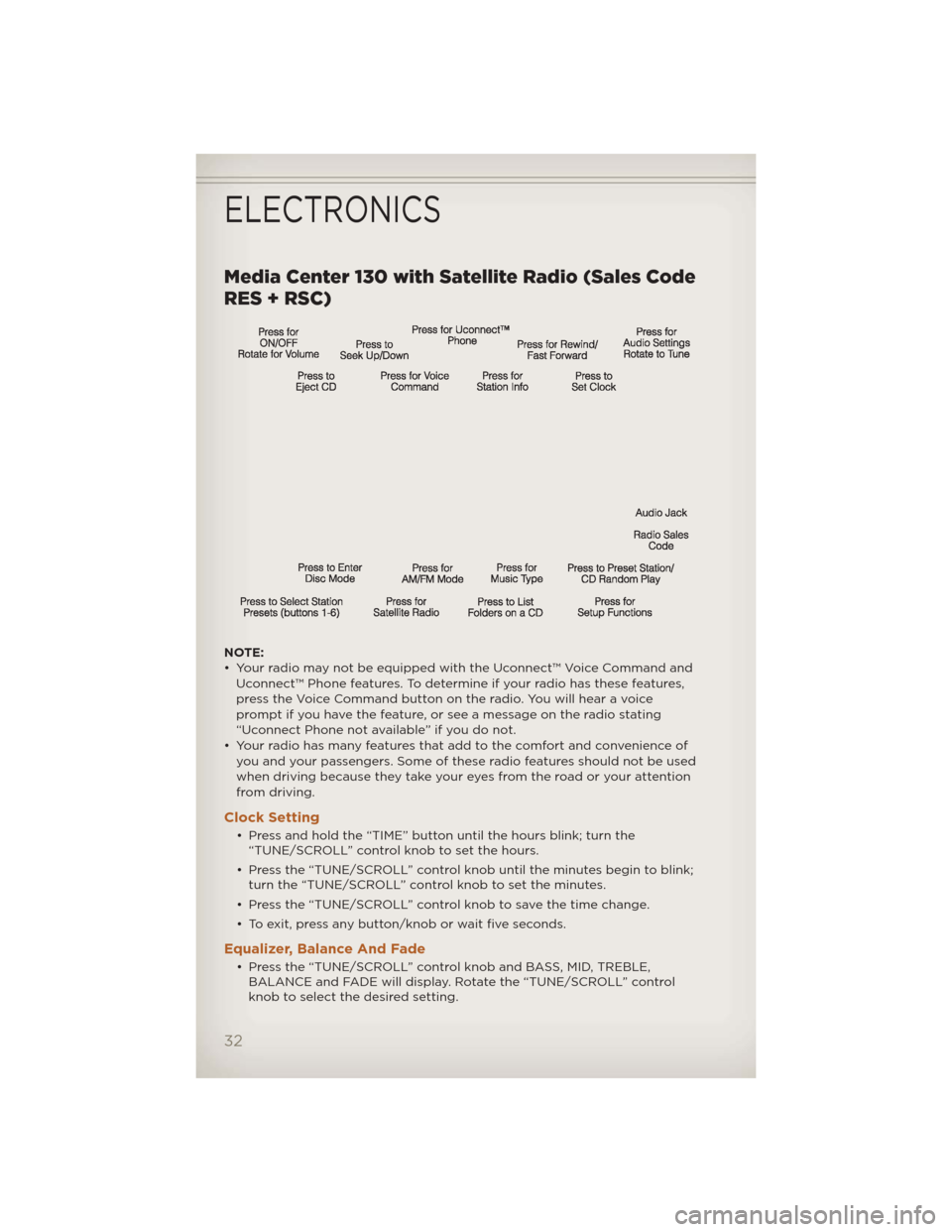
Media Center 130 with Satellite Radio (Sales Code
RES + RSC)
NOTE:
• Your radio may not be equipped with the Uconnect™ Voice Command andUconnect™ Phone features. To determine if your radio has these features,
press the Voice Command button on the radio. You will hear a voice
prompt if you have the feature, or see a message on the radio stating
“Uconnect Phone not available” if you do not.
• Your radio has many features that add to the comfort and convenience of you and your passengers. Some of these radio features should not be used
when driving because they take your eyes from the road or your attention
from driving.
Clock Setting
• Press and hold the “TIME” button until the hours blink; turn the“TUNE/SCROLL” control knob to set the hours.
• Press the “TUNE/SCROLL” control knob until the minutes begin to blink; turn the “TUNE/SCROLL” control knob to set the minutes.
• Press the “TUNE/SCROLL” control knob to save the time change.
• To exit, press any button/knob or wait five seconds.
Equalizer, Balance And Fade
• Press the “TUNE/SCROLL” control knob and BASS, MID, TREBLE, BALANCE and FADE will display. Rotate the “TUNE/SCROLL” control
knob to select the desired setting.
ELECTRONICS
32
Page 36 of 124
LIST Button• Press the “LIST” button to bring up a list of all folders on the CD. Scroll up or down the list by turning the “TUNE/SCROLL” control knob.
• To select a folder from the list, press the “TUNE/SCROLL” control knob and the radio will begin playing the files contained in that folder.
Audio Jack Operation
• The Audio Jack allows a portable device, such as an MP3 player or acassette player, to be plugged into the radio and utilize the vehicle’s
audio system, using a 3.5 mm audio cable, to amplify the source and play
through the vehicle speakers.
• Pressing the “AUX” button will change the mode to auxiliary device if the Audio Jack is connected, allowing the music from your portable device
to play through the vehicle's speakers.
• The functions of the portable device are controlled using the device buttons. The volume may be controlled using the radio or portable
device.
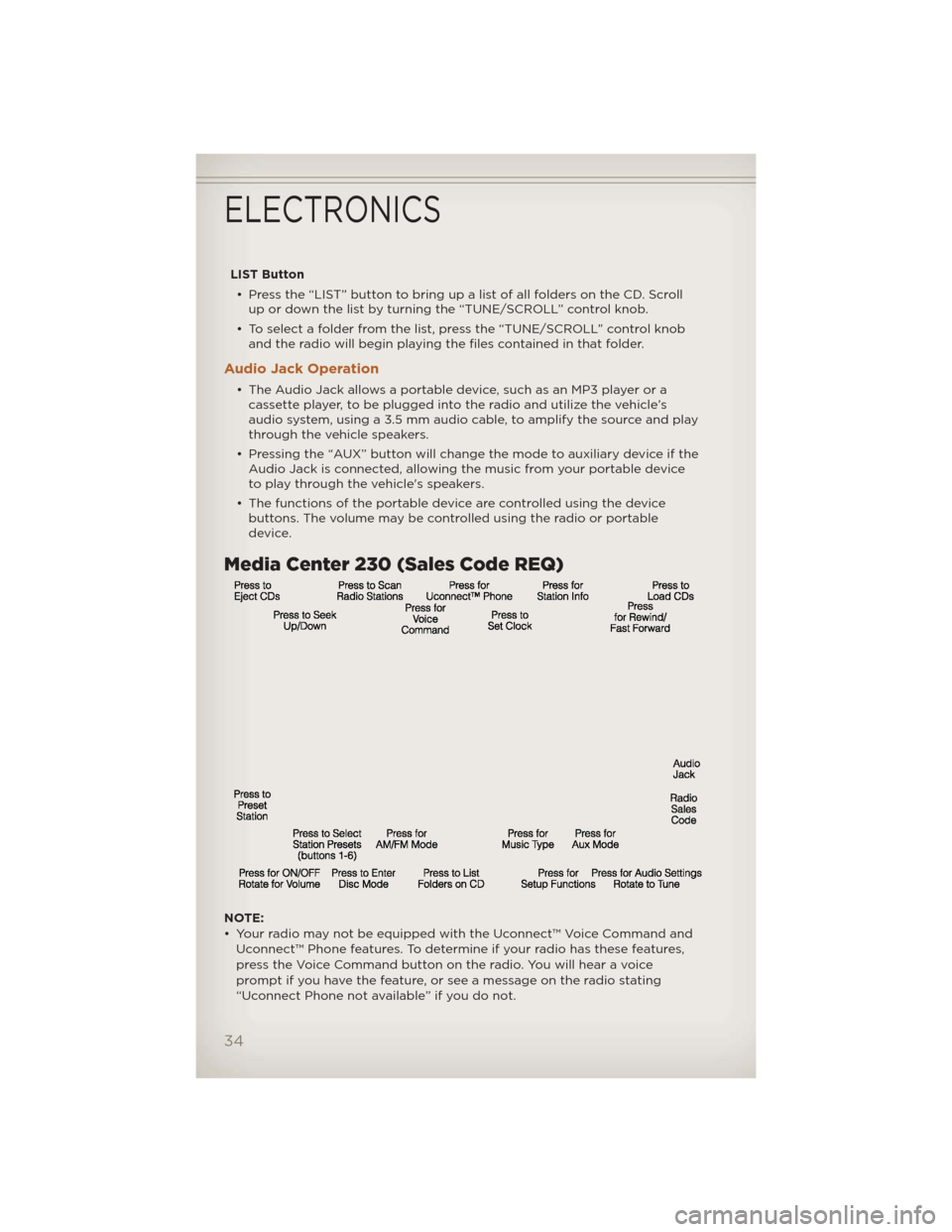
Media Center 230 (Sales Code REQ)
NOTE:
• Your radio may not be equipped with the Uconnect™ Voice Command and
Uconnect™ Phone features. To determine if your radio has these features,
press the Voice Command button on the radio. You will hear a voice
prompt if you have the feature, or see a message on the radio stating
“Uconnect Phone not available” if you do not.
ELECTRONICS
34
Page 39 of 124
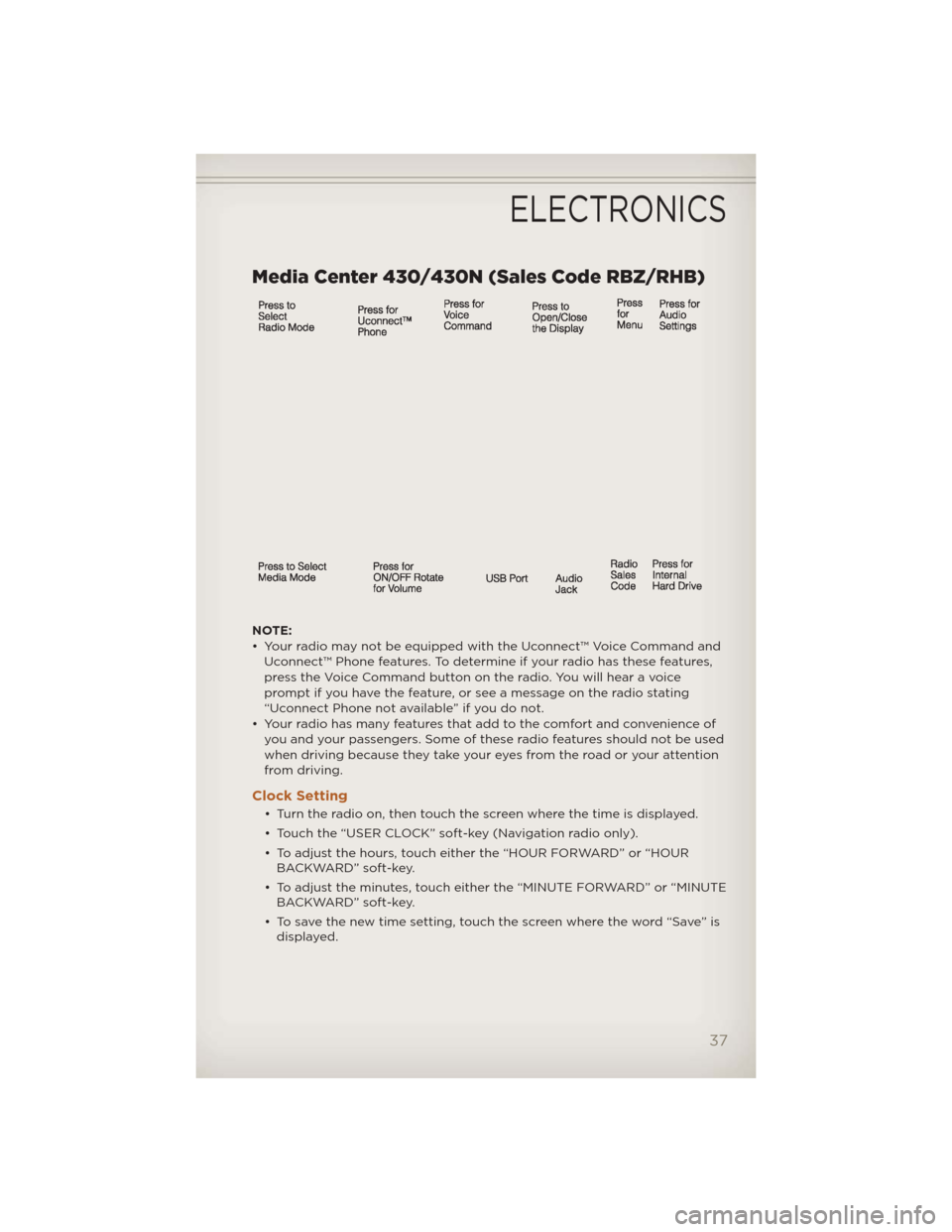
Media Center 430/430N (Sales Code RBZ/RHB)
NOTE:
• Your radio may not be equipped with the Uconnect™ Voice Command andUconnect™ Phone features. To determine if your radio has these features,
press the Voice Command button on the radio. You will hear a voice
prompt if you have the feature, or see a message on the radio stating
“Uconnect Phone not available” if you do not.
• Your radio has many features that add to the comfort and convenience of you and your passengers. Some of these radio features should not be used
when driving because they take your eyes from the road or your attention
from driving.
Clock Setting
• Turn the radio on, then touch the screen where the time is displayed.
• Touch the “USER CLOCK” soft-key (Navigation radio only).
• To adjust the hours, touch either the “HOUR FORWARD” or “HOURBACKWARD” soft-key.
• To adjust the minutes, touch either the “MINUTE FORWARD” or “MINUTE BACKWARD” soft-key.
• To save the new time setting, touch the screen where the word “Save” is displayed.
ELECTRONICS
37
Page 48 of 124
Taking A Detour• To take a detour you must be navigating a route.
• Touch the “back arrow” icon to return to the Main Navigation menu.
• Touch “Detour.”
NOTE: If the route you are currently taking is the only reasonable option,
the device might not calculate a detour.
Acquiring Satellites• The GPS Satellite strength bars indicate the strength of your satellite reception.
• Acquiring satellite signals can take a few minutes. When at least one of the bars is green, your device has acquired satellite signals.
• You may experience delays in acquisition of satellite signals when in areas with an obstructed view to the sky, such as garages, tunnels, or
large cities with tall buildings.
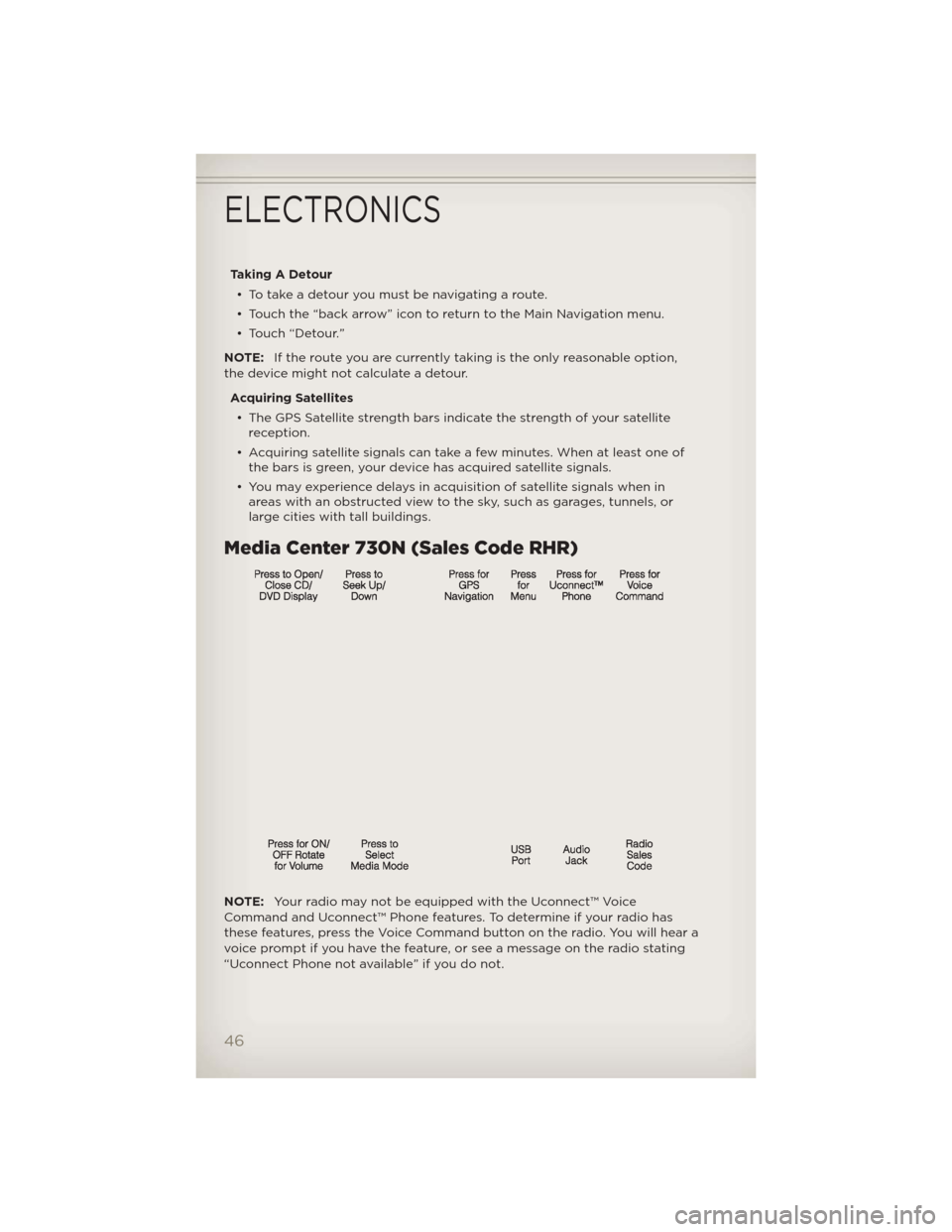
Media Center 730N (Sales Code RHR)
NOTE: Your radio may not be equipped with the Uconnect™ Voice
Command and Uconnect™ Phone features. To determine if your radio has
these features, press the Voice Command button on the radio. You will hear a
voice prompt if you have the feature, or see a message on the radio stating
“Uconnect Phone not available” if you do not.
ELECTRONICS
46
Page 62 of 124
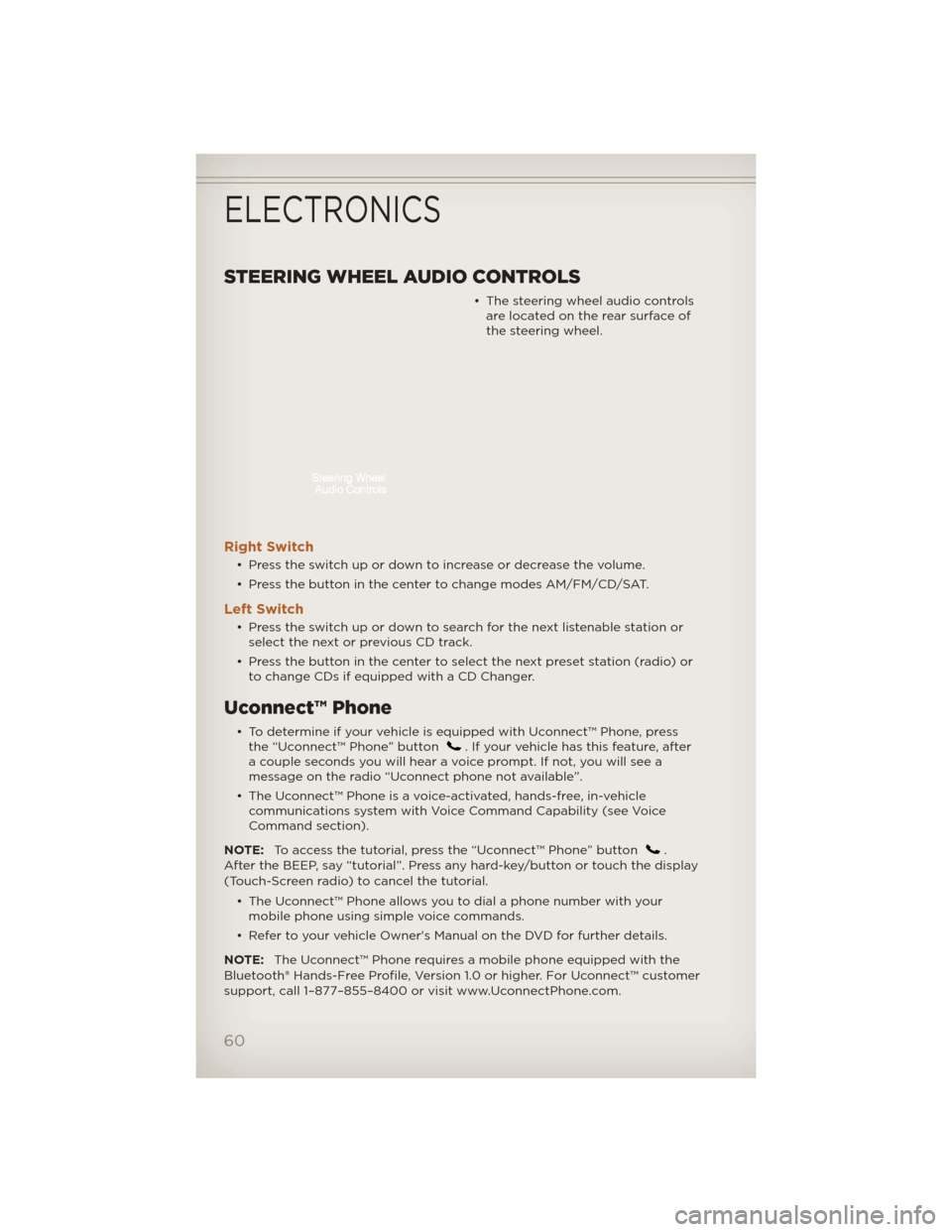
STEERING WHEEL AUDIO CONTROLS
• The steering wheel audio controlsare located on the rear surface of
the steering wheel.
Right Switch
• Press the switch up or down to increase or decrease the volume.
• Press the button in the center to change modes AM/FM/CD/SAT.
Left Switch
• Press the switch up or down to search for the next listenable station orselect the next or previous CD track.
• Press the button in the center to select the next preset station (radio) or to change CDs if equipped with a CD Changer.
Uconnect™ Phone
• To determine if your vehicle is equipped with Uconnect™ Phone, pressthe “Uconnect™ Phone” button. If your vehicle has this feature, after
a couple seconds you will hear a voice prompt. If not, you will see a
message on the radio “Uconnect phone not available”.
• The Uconnect™ Phone is a voice-activated, hands-free, in-vehicle communications system with Voice Command Capability (see Voice
Command section).
NOTE: To access the tutorial, press the “Uconnect™ Phone” button
.
After the BEEP, say “tutorial”. Press any hard-key/button or touch the display
(Touch-Screen radio) to cancel the tutorial.
• The Uconnect™ Phone allows you to dial a phone number with yourmobile phone using simple voice commands.
• Refer to your vehicle Owner's Manual on the DVD for further details.
NOTE: The Uconnect™ Phone requires a mobile phone equipped with the
Bluetooth® Hands-Free Profile, Version 1.0 or higher. For Uconnect™ customer
support, call 1–877–855–8400 or visit www.UconnectPhone.com.
ELECTRONICS
60
Page 63 of 124
Phone Pairing
NOTE:Pairing is a one-time initial setup before using the phone.
• Press the “Phone” button
to begin.
• Wait for the “ready” prompt and BEEP.
• (After the BEEP), say ”setup” or “Uconnect device setup”.
• (After the BEEP), say “device pairing”. • (After the BEEP), say “pair adevice”.
• Follow the audible prompts.
• You will be asked to say a four-digit Personal Identification Number (PIN), which you will later need to enter into your mobile phone. You can
say any four-digit PIN. You will not need to remember this PIN after the
initial pairing process.
• You will then be prompted to give the phone pairing a name (each phone paired should have a unique name).
• Next you will be asked to give this new pairing a priority of 1 thru 7 (up to seven phones may be paired); 1 is the highest and 7 is the lowest
priority. The system will only connect to the highest priority phone that
exists within the proximity of the vehicle.
• You will then need to start the pairing procedure on your cell phone. Follow the Bluetooth® instructions in your cell phone Owner's Manual to
complete the phone pairing setup.
Phonebook
Phonebook Download – Automatic Phonebook Transfer From Mobile
Phone
If equipped and specifically supported
by your phone, Uconnect™ Phone
automatically downloads names (text
names) and number entries from your
mobile phone’s phonebook. Specific
Bluetooth® Phones with Phone Book
Access Profile may support this
feature. Automatic Transfer is
indicated by a green arrow at the
bottom of the screen. See Uconnect™
website for supported phones.
• Automatic download and update, if supported, begins as soon as the Bluetooth® wireless phone connection is made to the Uconnect™ Phone,
for example, after you start the vehicle.
ELECTRONICS
61