lights JEEP PATRIOT 2007 1.G Owners Manual
[x] Cancel search | Manufacturer: JEEP, Model Year: 2007, Model line: PATRIOT, Model: JEEP PATRIOT 2007 1.GPages: 440, PDF Size: 7.26 MB
Page 11 of 440
NªChild-Protectionº Door Lock System (Rear Doors)
Ð If Equipped........................23
mRemote Keyless Entry Ð If Equipped.........24
NTo Unlock The Doors And Liftgate..........25
NTo Lock The Doors And Liftgate............26
NUsing The Panic Alarm:..................26
NTo Turn Off ªFlash Lights With Lockº........27
NProgramming Additional Transmitters........27
NGeneral Information....................29
NBattery Replacement....................29
mSecurity Alarm System Ð If Equipped.........30
NTo Set The Alarm......................31
NTo Disarm The System...................31NSecurity System Manual Override...........32
mLiftgate...............................32
mPower Windows........................34
NPower Window Switches.................34
NAuto Down..........................35
NWindow Lockout Switch.................36
mOccupant Restraints......................36
NLap/Shoulder Belts.....................37
NAdjustable Upper Shoulder Belt Anchorage....42
NSecond Row Center Lap/Shoulder Belt Operating
Instructions..........................43
NSeat Belt Pretensioners...................46
NEnhanced Driver Seat Belt Reminder System
(BeltAlert)...........................47
10 THINGS TO KNOW BEFORE STARTING YOUR VEHICLE
Page 26 of 440
NOTE:The line of transmission must not be blocked
with metal objects.
To unlock the doors and liftgate:
Press and release the UNLOCK button on the key fob
once to unlock only the driver's door or twice to unlock
all the doors and liftgate. When the UNLOCK button is
pressed, the illuminated entry will initiate, and the
parking lights will flash on twice. The time for this
feature is programmable on vehicles equipped with the
Electronic Vehicle Information Center (EVIC). Refer to
ªTurn Headlamps on with Remote Key Unlockº under
ªPersonal Settingsº in the Electronic Vehicle Information
Center (EVIC) section of this manual for details.
NOTE:The system can also be programmed to unlock
all doors on the first press of the UNLOCK button. On
electronic vehicle information center (EVIC) equipped
vehicles refer to ªRemote Unlock Driver's Door 1stºunder ªPersonal Settingsº in the EVIC section of this
manual. On non EVIC ± equipped vehicles perform the
following steps:
The system can be programmed to unlock all the doors
upon the first UNLOCK button press by using the
following procedure:
1. Press and hold the LOCK button on a programmed
key fob.
2. Continue to hold the LOCK button at least 4 seconds,
but not longer than 10 seconds, then press and hold the
UNLOCK button. A single chime will sound to indicate
that this feature has changed.
3. Release both buttons at the same time.
4. Test the feature while outside of the vehicle, by
pressing the LOCK/UNLOCK button on the keyfob.
THINGS TO KNOW BEFORE STARTING YOUR VEHICLE 25
2
Page 27 of 440
NOTE:Pressing the LOCK button on the keyfob while
you are inside the vehicle will activate the Security
Alarm. Opening a door with the Security Alarm activated
will cause the alarm to sound. Press the UNLOCK button
to deactivate the Security Alarm.
5. If the desired programming was not achieved or to
reactivate this feature, repeat the above steps.
To lock the doors and liftgate:
Press and release the LOCK button on the transmitter to
lock all doors. The turn signal lights will flash and the
horn will chip once to acknowledge the lock signal. If
desired, the ªSound Horn On Lockº feature can be
turned on or off. On electronic vehicle information center
(EVIC) equipped vehicles refer to ªPersonal Settingsº in
the ªElectronic Vehicle Information Center (EVIC)º sec-
tion of this manual. On non EVIC ± equipped vehicles
perform the following steps:
1. Press the LOCK button for 4 to 10 seconds.2. While the LOCK button is pressed (after 4 seconds),
press the PANIC button. Release both buttons.
The ªSound Horn On Lockº and ªFlash Lamps With
Lockº feature can be reactivated by repeating this proce-
dure.
Using The Panic Alarm:
To turn the panic alarm feature ON or OFF, press and
hold the PANIC button on the transmitter for at least one
second and release. When the panic alarm is on, the
headlights and park lights will flash, the horn will pulse
on and off and the interior lights will turn on.
The panic alarm will stay on for 3 minutes unless you
turn it off by pressing the PANIC button a second time or
if the vehicle speed is 5 mph (8 km/h) or greater.
26 THINGS TO KNOW BEFORE STARTING YOUR VEHICLE
Page 28 of 440
NOTE:When you turn off the panic alarm by pressing
the PANIC button a second time, you may have to be
closer to the vehicle due to the radio frequency noises of
the system.
To Turn Off ªFlash Lights With Lockº
NOTE:The Flash Lights With Lock feature can be
turned on or off. On electronic vehicle information center
(EVIC) equipped vehicles refer to9Personal Settings9in
the EVIC section of this manual. On non EVIC - equipped
vehicles perform the following steps:
1. Press the UNLOCK button for 4 to 10 seconds.
2. While the UNLOCK button is pressed, (after 4 sec-
onds) press the LOCK button. Release both buttons.
3. Test the flash lamps with LOCK feature while outside
of the vehicle, by pressing the LOCK button on the key
fob with the ignition in the LOCK position, and the key
removed.NOTE:Pressing the LOCK button on the key fob, while
you are in the vehicle, will activate the Security Alarm.
Opening a door with the Security Alarm activated will
cause the alarm to sound. Press the UNLOCK button to
deactivate the Security Alarm.
The ªFlash Lights On Lock/Unlockº feature can be
reactivated by repeating this procedure.
Programming Additional Transmitters
Vehicles will be shipped from the assembly plants with
two key fob transmitters programmed only for that
vehicle. A total of eight fobs can be programmed for your
vehicle. Additional fobs can be programmed to your
vehicle through the use of a currently programmed fob.
NOTE:When entering program mode using that fob, all
other programmed fobs will be erased and you will have
to reprogram them for your vehicle.
THINGS TO KNOW BEFORE STARTING YOUR VEHICLE 27
2
Page 31 of 440
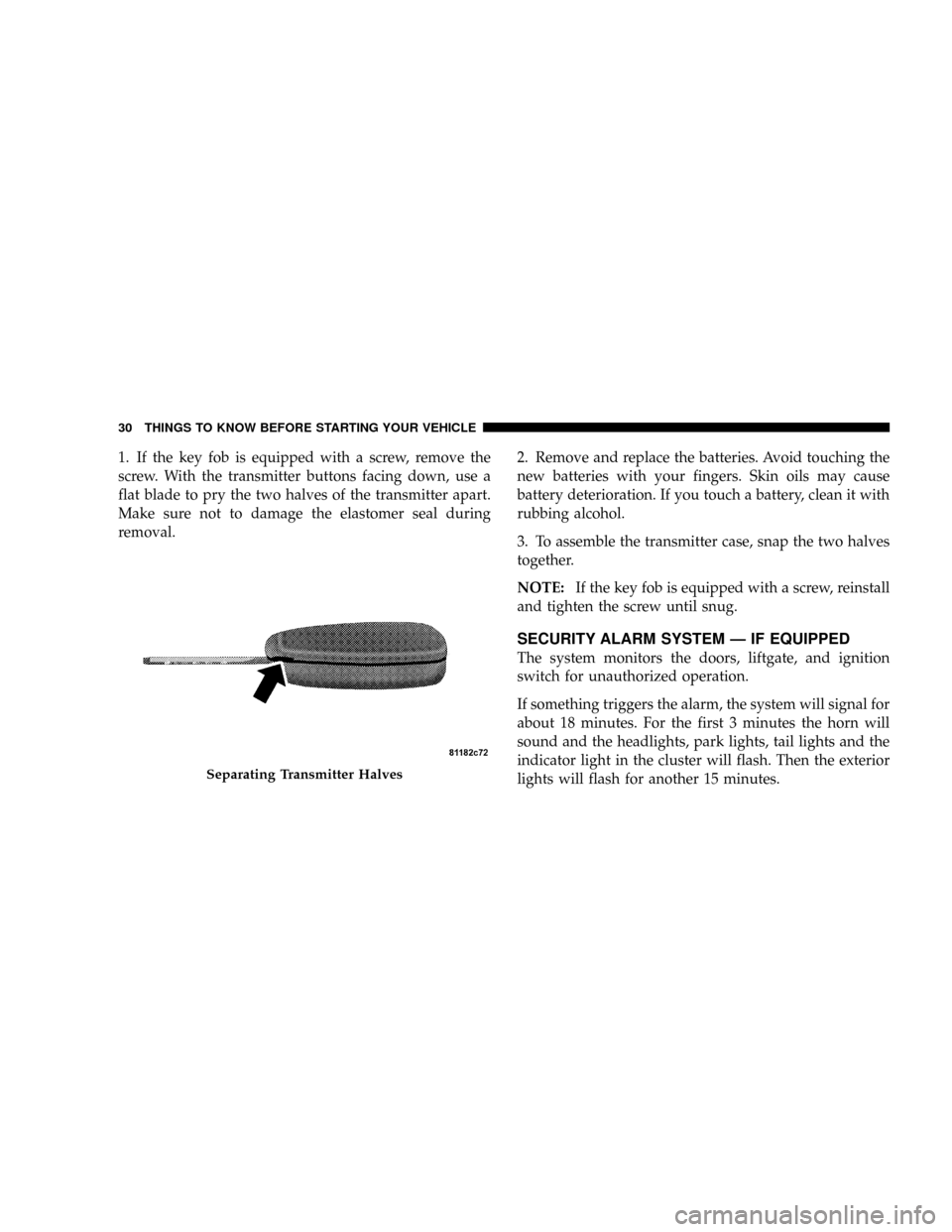
1. If the key fob is equipped with a screw, remove the
screw. With the transmitter buttons facing down, use a
flat blade to pry the two halves of the transmitter apart.
Make sure not to damage the elastomer seal during
removal.2. Remove and replace the batteries. Avoid touching the
new batteries with your fingers. Skin oils may cause
battery deterioration. If you touch a battery, clean it with
rubbing alcohol.
3. To assemble the transmitter case, snap the two halves
together.
NOTE:If the key fob is equipped with a screw, reinstall
and tighten the screw until snug.
SECURITY ALARM SYSTEM Ð IF EQUIPPED
The system monitors the doors, liftgate, and ignition
switch for unauthorized operation.
If something triggers the alarm, the system will signal for
about 18 minutes. For the first 3 minutes the horn will
sound and the headlights, park lights, tail lights and the
indicator light in the cluster will flash. Then the exterior
lights will flash for another 15 minutes.
Separating Transmitter Halves
30 THINGS TO KNOW BEFORE STARTING YOUR VEHICLE
Page 52 of 440
WARNING!
²Do not put anything on or around the front airbag covers or
attempt to manually open them. You may damage the airbags
and you could be injured because the airbags are no longer
functional. These protective covers for the airbag cushions
are designed to open only when the airbags are inflating.
²If your vehicle is equipped with side curtain airbags, do not
stack luggage or other cargo up high enough to block the
location of the side curtain airbag. The area where the side
curtain airbag is located should remain free from any ob-
structions.
²If your vehicle is equipped with side curtain airbags, do not
have any accessory items installed which will alter the roof,
including adding a sunroof to your vehicle. Do not add roof
racks that require permanent attachments (bolts or screws)
for installation on the vehicle roof. Do not drill into the roof
of the vehicle for any reason.
²Do not drill, cut or tamper with the knee bolster in any way.
²Do not mount any accessories to the knee bolster such as
alarm lights, stereos, citizens band radios etc.
NOTE:Do not use a clothing bar mounted to the coat
hooks in this vehicle. A clothing bar will impede the
proper performance of the curtain airbags.
Along with the seat belts, front airbags work with the
instrument panel knee bolsters to provide improved
protection for the driver and front passenger. Side Cur-
tain Airbags also work with seat belts to improve occu-
pant protection.
The seat belts are designed to protect you in many types
of collisions. The front airbags deploy in moderate to
severe frontal collisions.
If your vehicle is so equipped, the Side Curtain Airbag on
the crash side of the vehicle is triggered in moderate to
severe side collisions. However, even in collisions where
the airbags deploy, you need the seat belts to keep you in
the correct position for the airbags to protect you prop-
erly.
THINGS TO KNOW BEFORE STARTING YOUR VEHICLE 51
2
Page 58 of 440
WARNING!
Deployed airbags can't protect you in another colli-
sion. Have the airbags replaced by an authorized
dealer as soon as possible.
Enhanced Accident Response System
In the event of an impact that causes airbag deployment,
with the vehicle stopped, and the vehicle communication
network intact, and the power intact, the Enhanced Acci-
dent Response System performs the following functions:
²Cuts off fuel to the engine.
²Flashes hazard lights.
²Turns on the interior lamps which remain on as long as
the battery has power or until the ignition key is
removed.
²Unlocks the doors automatically
Maintaining Your Airbag System
WARNING!
²Modifications to any part of the airbag system
could cause it to fail when you need it. You could
be injured because the airbags are not there to
protect you. Do not modify the components or
wiring, including adding any kind of badges or
stickers to the steering wheel hub trim cover or the
upper passenger side of the instrument panel. Do
not modify the front bumper, vehicle body struc-
ture, or frame.
²You need proper knee impact protection in a
collision. Do not mount or locate any aftermarket
equipment on or behind the knee impact bolster.
²It is dangerous to try to repair any part of the
airbag system yourself. Be sure to tell anyone who
works on your vehicle that it has airbags.
THINGS TO KNOW BEFORE STARTING YOUR VEHICLE 57
2
Page 72 of 440
Defroster
Check operation by selecting the defrost mode and place
the blower control on high speed. You should be able to
feel the air directed against the windshield.
Periodic Safety Checks You Should Make Outside
The Vehicle
Tires
Examine tires for excessive tread wear or uneven wear
patterns. Check for stones, nails, glass, or other objects
lodged in the tread. Inspect tread and sidewall for cuts or
cracks. Check wheel nuts for tightness, and tires (includ-
ing spare) for proper pressure.
Lights
Have someone observe the operation of exterior lights
while you work the controls. Check turn signal and high
beam indicator lights on the instrument panel.
Fluid Leaks
Check area under vehicle after overnight parking for fuel,
engine coolant, oil or other fluid leaks. Also, if gasoline
fumes are detected or fuel, power steering fluid, trans-
mission fluid or brake fluid leaks are suspected, the cause
should be located and corrected immediately.
THINGS TO KNOW BEFORE STARTING YOUR VEHICLE 71
2
Page 75 of 440
NFront Seat Adjustment..................108
NManual Seat Height Adjustment Ð If
Equipped...........................109
NManual LumbarÐ If Equipped............109
NDriver's Seat Back Recline...............110
NAdjustable Head Restraints..............110
NHeated Seats Ð If Equipped.............111
NFold Flat Front Passenger Seat............113
NFolding Rear Seat.....................114
NReclining Rear Seat Ð If Equipped.........115
mTo Open And Close The Hood.............116
mLights...............................118
NMap/Reading Lights...................118NMulti-Function Control Lever.............119
NHeadlights, Parking Lights, Instrument Panel
Lights.............................119
NLights-On Reminder...................120
NFog Lights Ð If Equipped...............121
NTurn Signals.........................121
NHighbeam/Lowbeam Select Switch.........122
NPassing Light........................123
mDaytime Running Lights (DRL) Ð If Equipped . . 123
NFunctionality........................123
mWindshield Wipers And Washers...........123
NWindshield Washers...................123
NMist Feature.........................124
74 UNDERSTANDING THE FEATURES OF YOUR VEHICLE
Page 119 of 440
LIGHTS
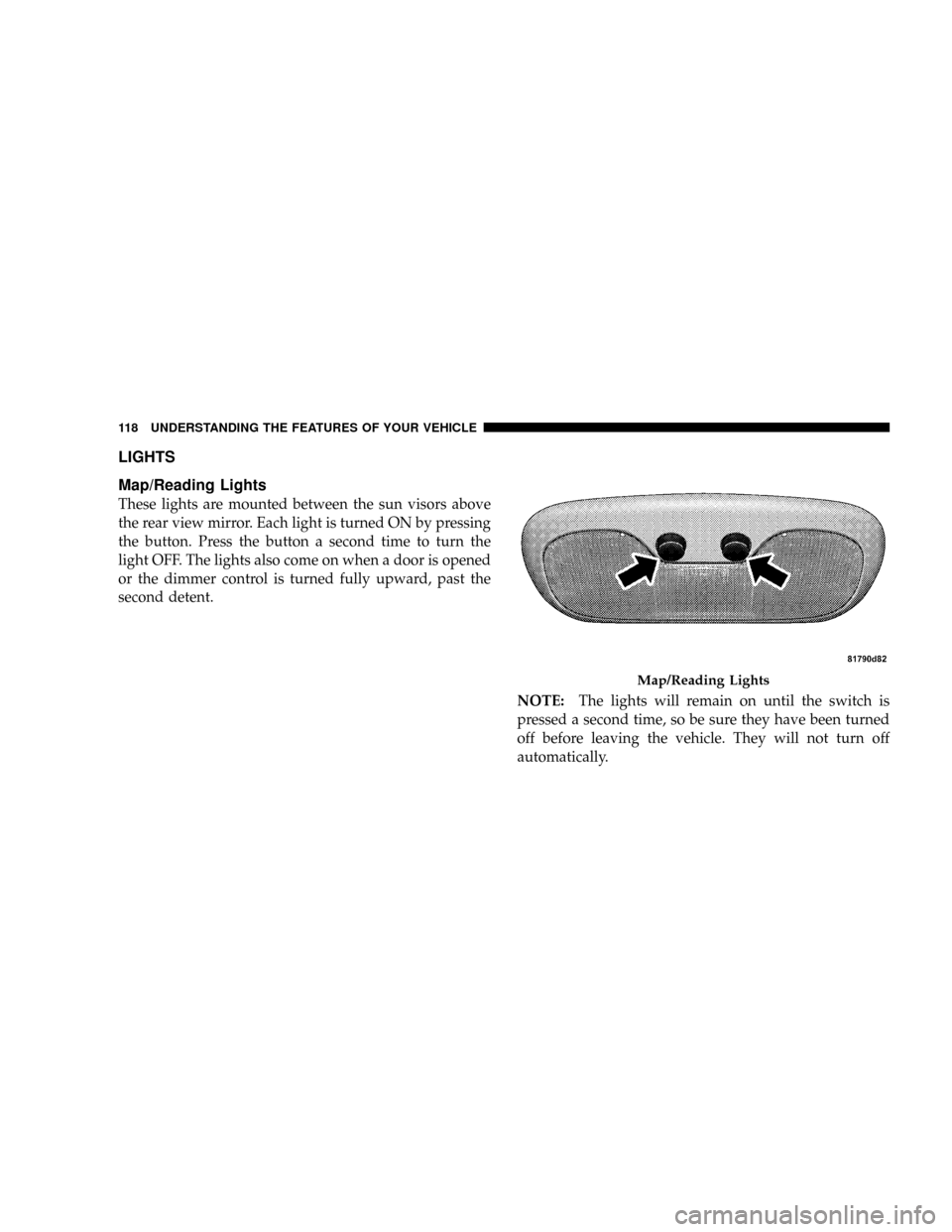
Map/Reading Lights
These lights are mounted between the sun visors above
the rear view mirror. Each light is turned ON by pressing
the button. Press the button a second time to turn the
light OFF. The lights also come on when a door is opened
or the dimmer control is turned fully upward, past the
second detent.
NOTE:The lights will remain on until the switch is
pressed a second time, so be sure they have been turned
off before leaving the vehicle. They will not turn off
automatically.
Map/Reading Lights
118 UNDERSTANDING THE FEATURES OF YOUR VEHICLE