radio JEEP PATRIOT 2015 1.G Owner's Manual
[x] Cancel search | Manufacturer: JEEP, Model Year: 2015, Model line: PATRIOT, Model: JEEP PATRIOT 2015 1.GPages: 132, PDF Size: 19.28 MB
Page 44 of 132
SiriusXM Satellite Radio
SiriusXM services require subscriptions, sold separately after the 12-month trial
included with the new vehicle purchase.If you decide to continue your service at the
end of your trial subscription, the plan you choose will automatically renew and bill at
then-current rates until you call SiriusXM at 1-866-635-2349 to cancel.See SiriusXM
Customer Agreement for complete terms at www.siriusxm.com. All fees and program-
ming subject to change. Our satellite service is available only to those at least 18 and
older in the 48 contiguous USA and D.C. Our Sirius satellite service is also available
in PR (with coverage limitations). Our Internet radio service is available throughout
our satellite service area and in AK and HI. ©2014 Sirius XM Radio Inc. Sirius, XM
and all related marks and logos are trademarks of Sirius XM Radio Inc.
SiriusXM Satellite Radio gives you over 130 channels, including 100% commercial-
free music from nearly every genre, plus all your favorite sports, news, talk and
entertainment channels – all with crystal clear, coast-to-coast coverage, all in one
place and all at your fingertips.
• To access SiriusXM Satellite Radio, push the SAT button on the faceplate.
CD/DISC Operation
Seek Up/Down Buttons
• Push to seek through CD tracks.
• Hold either button to bypass tracks without stopping.
SET/RND or RND (Depending On Radio) Button (Random Play)
• Push this button while the CD is playing to activate Random Play.
• This feature plays the selections on the CD in random order to provide an
interesting change of pace.
LIST Button
• Push the LIST button to bring up a list of all folders on the CD. Scroll up or down
the list by turning the TUNE/SCROLL control knob.
• To select a folder from the list, push the TUNE/SCROLL control knob and the radio
will begin playing the files contained in that folder.
Audio Jack Operation
The AUX/Audio Jack provides a means to connect a portable audio device, such as an
MP3 player or an iPod®, to the vehicle’s sound system. This requires the use of a
3.5 mm stereo audio patch cable.
• Pushing the AUX button will change the mode to auxiliary device if the Audio Jack
is connected, allowing the music from your portable device to play through the
vehicle's speakers.
The functions of the portable device are controlled using the device buttons, not the
buttons on the radio. However, the volume may be controlled using the radio or
portable device.
ELECTRONICS
42
Page 45 of 132
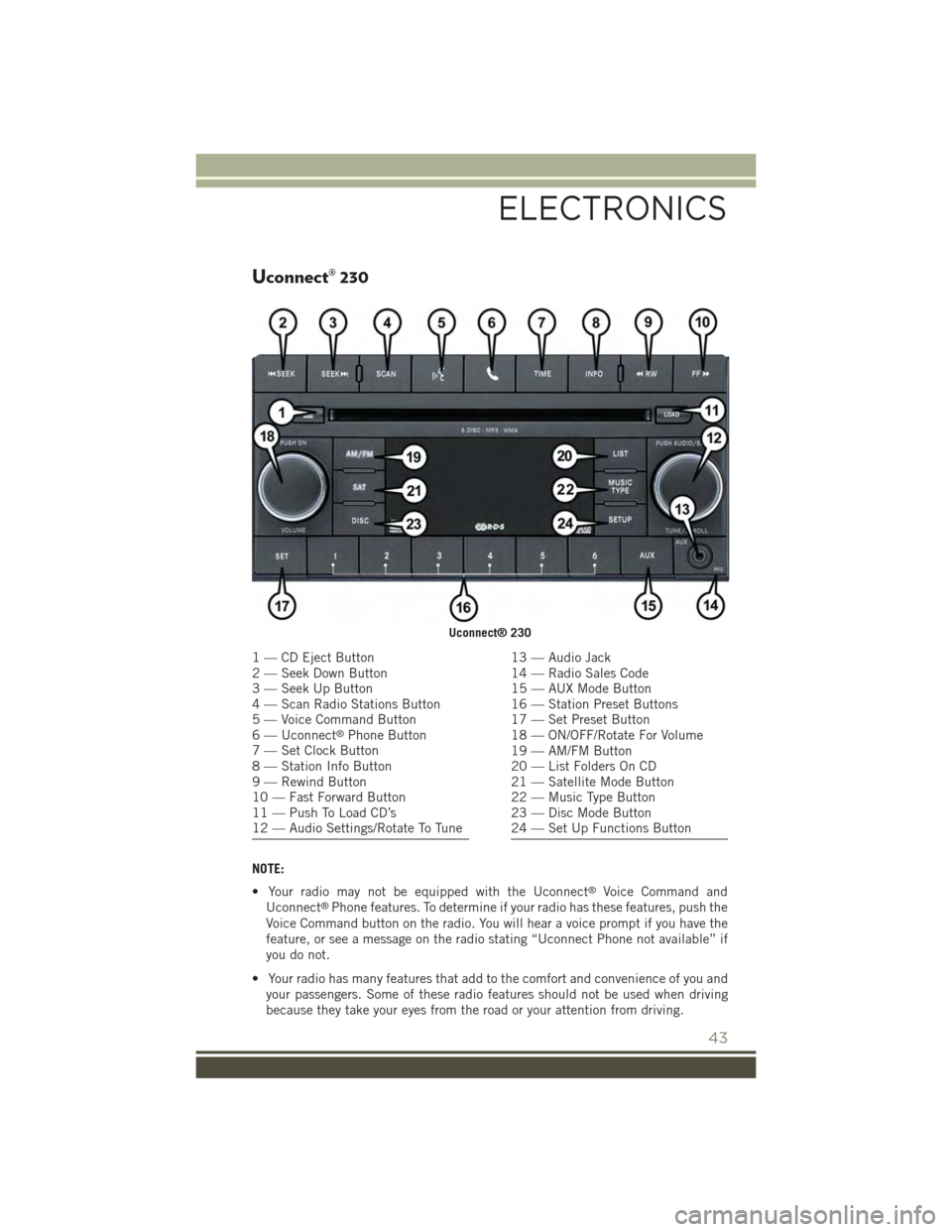
Uconnect® 230
NOTE:
• Your radio may not be equipped with the Uconnect®Voice Command and
Uconnect®Phone features. To determine if your radio has these features, push the
Voice Command button on the radio. You will hear a voice prompt if you have the
feature, or see a message on the radio stating “Uconnect Phone not available” if
you do not.
• Your radio has many features that add to the comfort and convenience of you and
your passengers. Some of these radio features should not be used when driving
because they take your eyes from the road or your attention from driving.
Uconnect® 230
1 — CD Eject Button2 — Seek Down Button3 — Seek Up Button4 — Scan Radio Stations Button5 — Voice Command Button6 — Uconnect®Phone Button7 — Set Clock Button8 — Station Info Button9 — Rewind Button10 — Fast Forward Button11 — Push To Load CD’s12 — Audio Settings/Rotate To Tune
13 — Audio Jack14 — Radio Sales Code15 — AUX Mode Button16 — Station Preset Buttons17 — Set Preset Button18 — ON/OFF/Rotate For Volume19 — AM/FM Button20 — List Folders On CD21 — Satellite Mode Button22 — Music Type Button23 — Disc Mode Button24 — Set Up Functions Button
ELECTRONICS
43
Page 46 of 132
Clock Setting
1. Push and hold the TIME button until the hours blink.
2. Turn the TUNE/SCROLL control knob to set the hours.
3. Push the TUNE/SCROLL control knob until the minutes begin to blink.
4. Turn the TUNE/SCROLL control knob to set the minutes.
5. Push the TUNE/SCROLL control knob to save the changes.
6. Push any button/knob or wait five seconds to exit.
Equalizer, Balance And Fade
1. Push the TUNE/SCROLL control knob and “BASS” will display.
2. Rotate the TUNE/SCROLL control knob to select the desired setting.
3. Continue pushing the TUNE/SCROLL control knob to display and set “MID
RANGE,” “TREBLE,” “BALANCE” and “FADE.”
Radio Operation
Seek Up/Down Buttons
• Push to seek through radio stations in AM, FM, or SAT bands.
• Hold either button to bypass stations without stopping.
Store Radio Presets
• Push the SET button once and SET 1 will show in the display. Then select button
(1–6).
• A second station may be added to each push button. Push the SET button twice
and SET 2 will show in the display. Then select button (1–6).
Music Type
NOTE:
The Music Type function only operates when in FM mode.
• Push the MUSIC TYPE button to activate this mode. Push the MUSIC TYPE button
again or turn the TUNE/SCROLL control knob to select the desired music type
(Adult Hits, Country, Jazz, Oldies, Rock, etc.).
• Once a music type is chosen and the music type is displayed, push the SEEK
button and the radio will only search for stations with the selected music type.
SETUP Button
• Pushing the SETUP button allows you to select between items that are available
in that particular mode.
• Turn the TUNE/SCROLL control knob to scroll through the entries. Push the
AUDIO/SELECT button to select an entry and make changes.
ELECTRONICS
44
Page 47 of 132
SiriusXM Satellite Radio
SiriusXM services require subscriptions, sold separately after the 12-month trial
included with the new vehicle purchase.If you decide to continue your service at the
end of your trial subscription, the plan you choose will automatically renew and bill at
then-current rates until you call SiriusXM at 1-866-635-2349 to cancel.See SiriusXM
Customer Agreement for complete terms at www.siriusxm.com. All fees and program-
ming subject to change. Our satellite service is available only to those at least 18 and
older in the 48 contiguous USA and D.C. Our Sirius satellite service is also available
in PR (with coverage limitations). Our Internet radio service is available throughout
our satellite service area and in AK and HI. ©2014 Sirius XM Radio Inc. Sirius, XM
and all related marks and logos are trademarks of Sirius XM Radio Inc.
SiriusXM Satellite Radio gives you over 130 channels, including 100% commercial-
free music from nearly every genre, plus all your favorite sports, news, talk and
entertainment channels – all with crystal clear, coast-to-coast coverage, all in one
place and all at your fingertips.
• To access SiriusXM Satellite Radio, push the SAT button on the faceplate.
CD/DISC Operation
Seek Up/Down Buttons
• Push to seek through CD tracks.
• Hold either button to bypass tracks without stopping.
LIST Button
• Push the LIST button to bring up a list of all folders on the CD. Scroll up or down
the list by turning the TUNE/SCROLL control knob.
• To select a folder from the list, push the TUNE/SCROLL control knob and the radio
will begin playing the files contained in that folder.
How To Load Multiple CDs/DVDs
• Push the LOAD button and then push the button with the corresponding number
(1–6) where the CD is being loaded. The radio will display “PLEASE WAIT” and
prompt when to “INSERT DISC.”
• After the radio displays “INSERT DISC,” insert the CD into the player. The radio
display will show “LOADING DISC” when the disc is loading and “READING
DISC” when the radio is reading the disc.
• Push the eject button and then the corresponding number (1–6) to eject the
desired disc.
Audio Jack Operation
The AUX/Audio Jack provides a means to connect a portable audio device, such as an
MP3 player or an iPod®, to the vehicle’s sound system. This requires the use of a
3.5 mm stereo audio patch cable.
ELECTRONICS
45
Page 48 of 132
• Pushing the AUX button will change the mode to auxiliary device if the Audio Jack
is connected, allowing the music from your portable device to play through the
vehicle's speakers.
The functions of the portable device are controlled using the device buttons, not the
buttons on the radio. However, the volume may be controlled using the radio or
portable device.
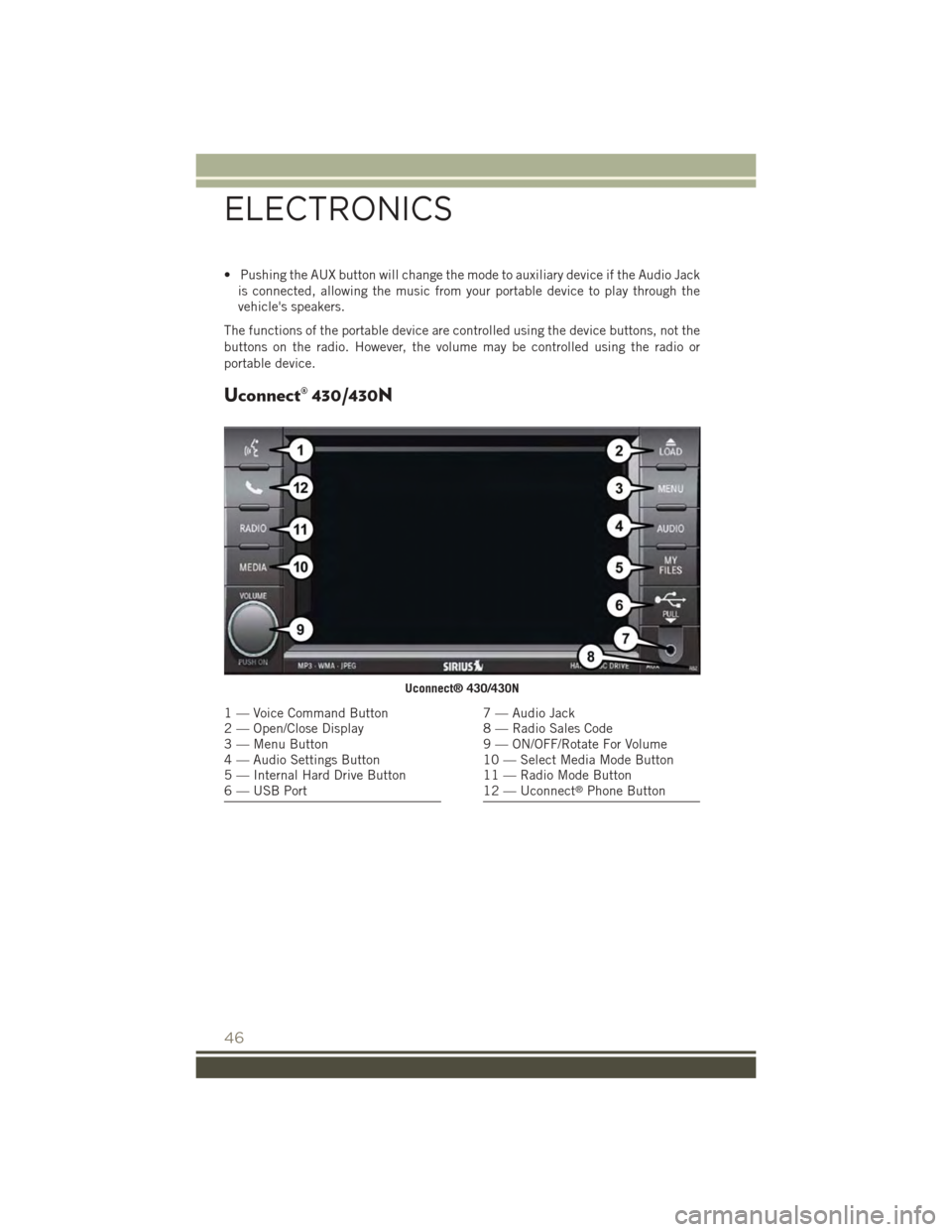
Uconnect® 430/430N
Uconnect® 430/430N
1 — Voice Command Button2 — Open/Close Display3 — Menu Button4 — Audio Settings Button5 — Internal Hard Drive Button6 — USB Port
7 — Audio Jack8 — Radio Sales Code9 — ON/OFF/Rotate For Volume10 — Select Media Mode Button11 — Radio Mode Button12 — Uconnect®Phone Button
ELECTRONICS
46
Page 49 of 132
NOTE:
• Your radio may not be equipped with the Uconnect®Voice Command and
Uconnect®Phone features. To determine if your radio has these features, push the
Voice Command button on the radio. You will hear a voice prompt if you have the
feature, or see a message on the radio stating “Uconnect Phone not available” if
you do not.
• Your radio has many features that add to the comfort and convenience of you and
your passengers. Some of these radio features should not be used when driving
because they take your eyes from the road or your attention from driving.
Clock Setting
1. Turn the radio on, then press the screen where the time is displayed.
2. Press the “User Clock” button on the touchscreen or the time display (Navigation
radio only).
3. To adjust the hours, press either the “Hour Forward” or “Hour Backward” button
on the touchscreen.
4. To adjust the minutes, press either the “Minute Forward” or “Minute Backward”
button on the touchscreen.
5. To save the new time setting, press the screen where the word “Save” is displayed.
Menu
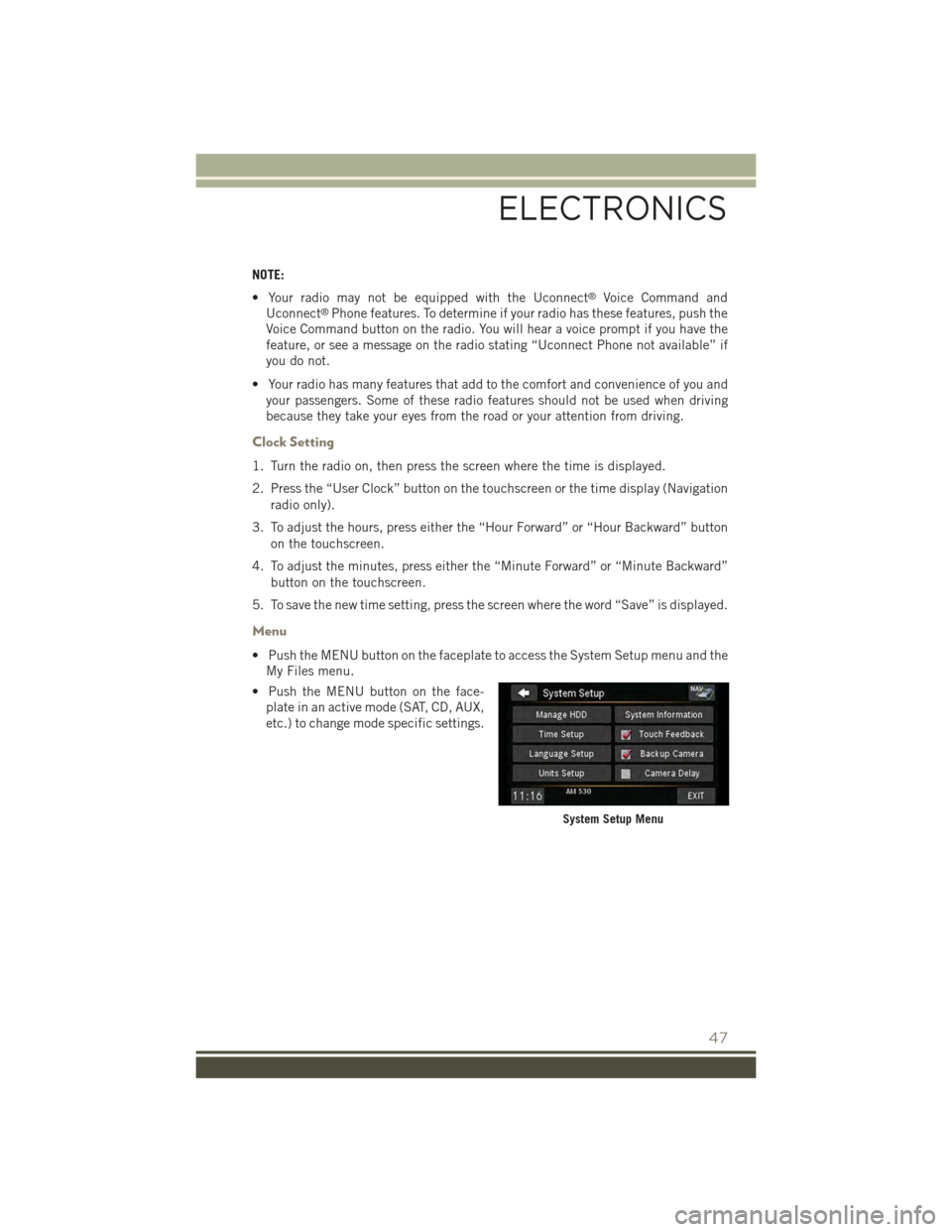
• Push the MENU button on the faceplate to access the System Setup menu and the
My Files menu.
• Push the MENU button on the face-
plate in an active mode (SAT, CD, AUX,
etc.) to change mode specific settings.
System Setup Menu
ELECTRONICS
47
Page 50 of 132
Equalizer, Balance And Fade
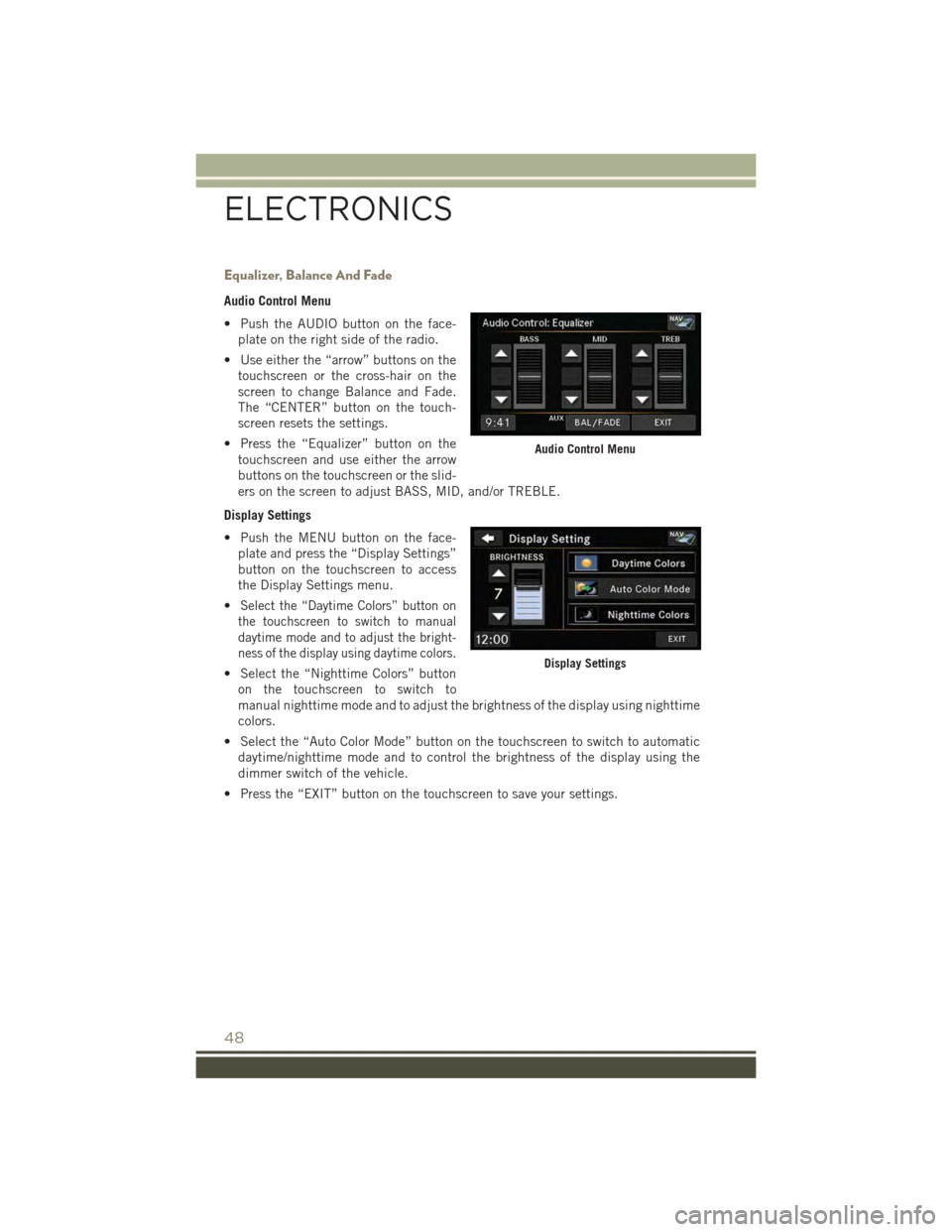
Audio Control Menu
• Push the AUDIO button on the face-
plate on the right side of the radio.
• Use either the “arrow” buttons on the
touchscreen or the cross-hair on the
screen to change Balance and Fade.
The “CENTER” button on the touch-
screen resets the settings.
• Press the “Equalizer” button on the
touchscreen and use either the arrow
buttons on the touchscreen or the slid-
ers on the screen to adjust BASS, MID, and/or TREBLE.
Display Settings
• Push the MENU button on the face-
plate and press the “Display Settings”
button on the touchscreen to access
the Display Settings menu.
•Select the “Daytime Colors” button on
the touchscreen to switch to manual
daytime mode and to adjust the bright-
ness of the display using daytime colors.
• Select the “Nighttime Colors” button
on the touchscreen to switch to
manual nighttime mode and to adjust the brightness of the display using nighttime
colors.
• Select the “Auto Color Mode” button on the touchscreen to switch to automatic
daytime/nighttime mode and to control the brightness of the display using the
dimmer switch of the vehicle.
• Press the “EXIT” button on the touchscreen to save your settings.
Audio Control Menu
Display Settings
ELECTRONICS
48
Page 51 of 132
Radio Operation
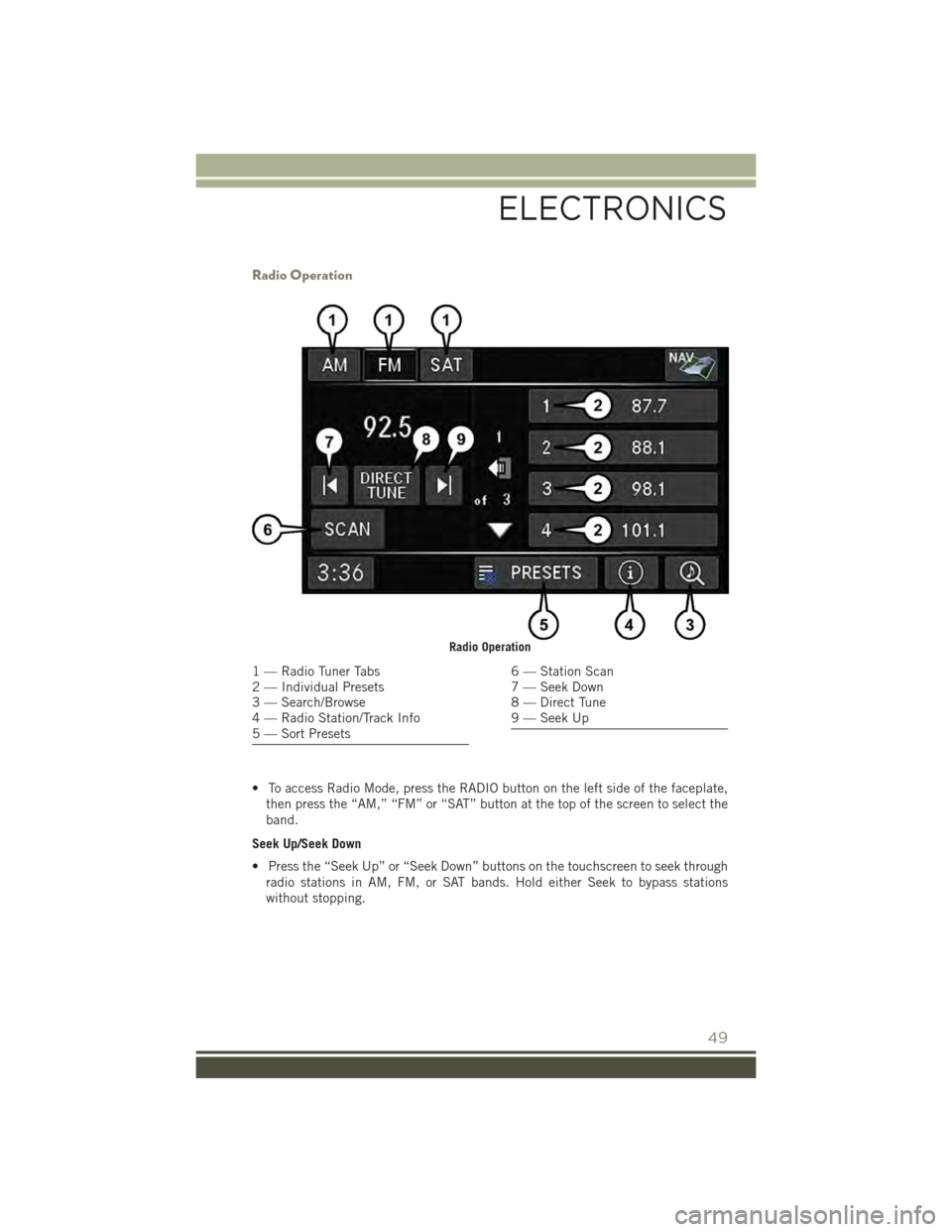
• To access Radio Mode, press the RADIO button on the left side of the faceplate,
then press the “AM,” “FM” or “SAT” button at the top of the screen to select the
band.
Seek Up/Seek Down
• Press the “Seek Up” or “Seek Down” buttons on the touchscreen to seek through
radio stations in AM, FM, or SAT bands. Hold either Seek to bypass stations
without stopping.
Radio Operation
1 — Radio Tuner Tabs2 — Individual Presets3 — Search/Browse4 — Radio Station/Track Info5 — Sort Presets
6 — Station Scan7 — Seek Down8 — Direct Tune9 — Seek Up
ELECTRONICS
49
Page 52 of 132
Store Radio Presets
• Select the radio band by pressing either the “AM,” “FM,” or “SAT” button on the
touchscreen.
• Find the station to store by either pressing the “Seek Up” or “Seek Down” buttons
on the touchscreen, pressing the “SCAN” button on the touchscreen, or by using
the “DIRECT TUNE” button on the touchscreen.
• Once the station is found, press and hold one of the “PRESET” buttons on the
touchscreen in the list to the right, until you hear a confirmation beep.
NOTE:
If the Presets are not visible on the right side of the screen, press the “PRESETS”
button on the touchscreen.
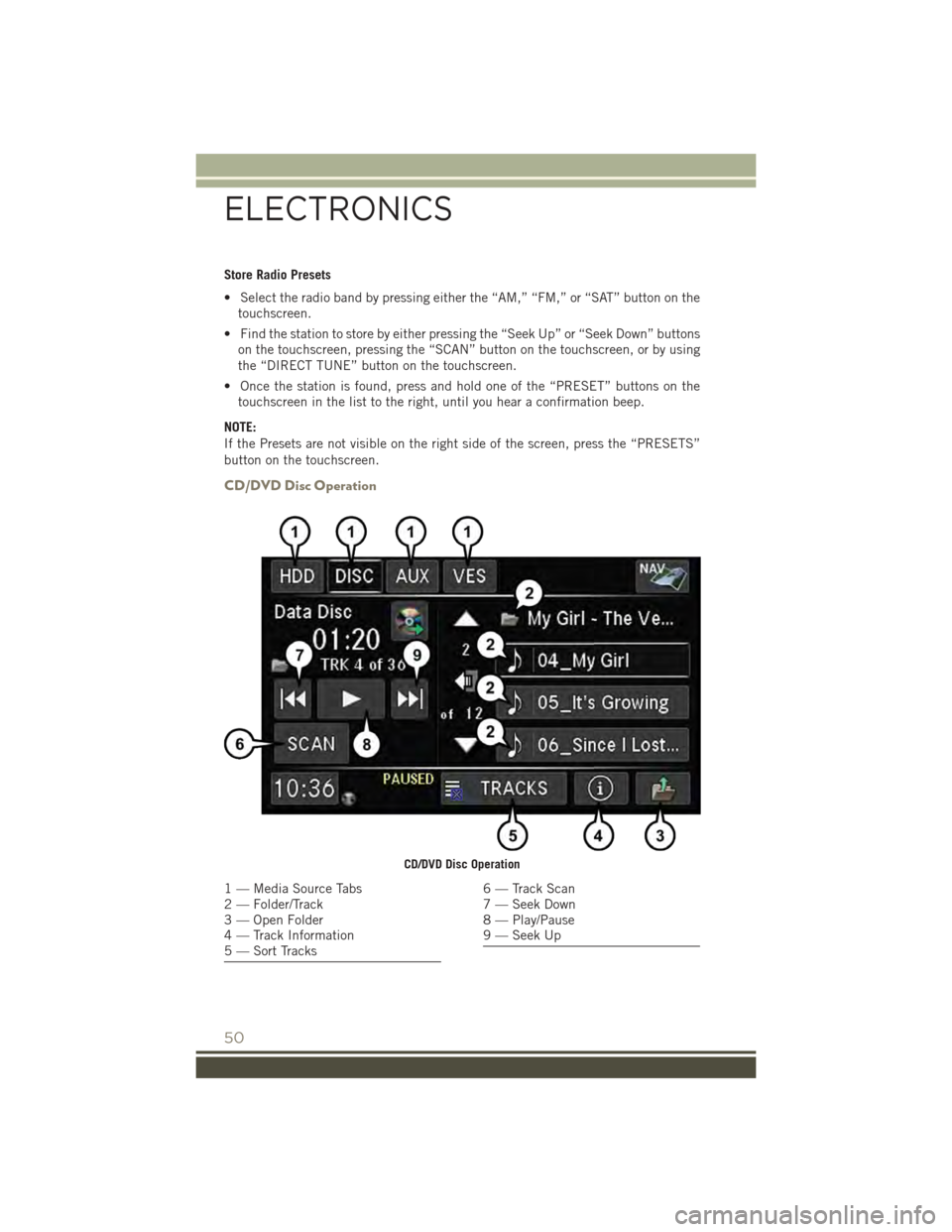
CD/DVD Disc Operation
CD/DVD Disc Operation
1 — Media Source Tabs2 — Folder/Track3 — Open Folder4 — Track Information5 — Sort Tracks
6 — Track Scan7 — Seek Down8 — Play/Pause9 — Seek Up
ELECTRONICS
50
Page 53 of 132
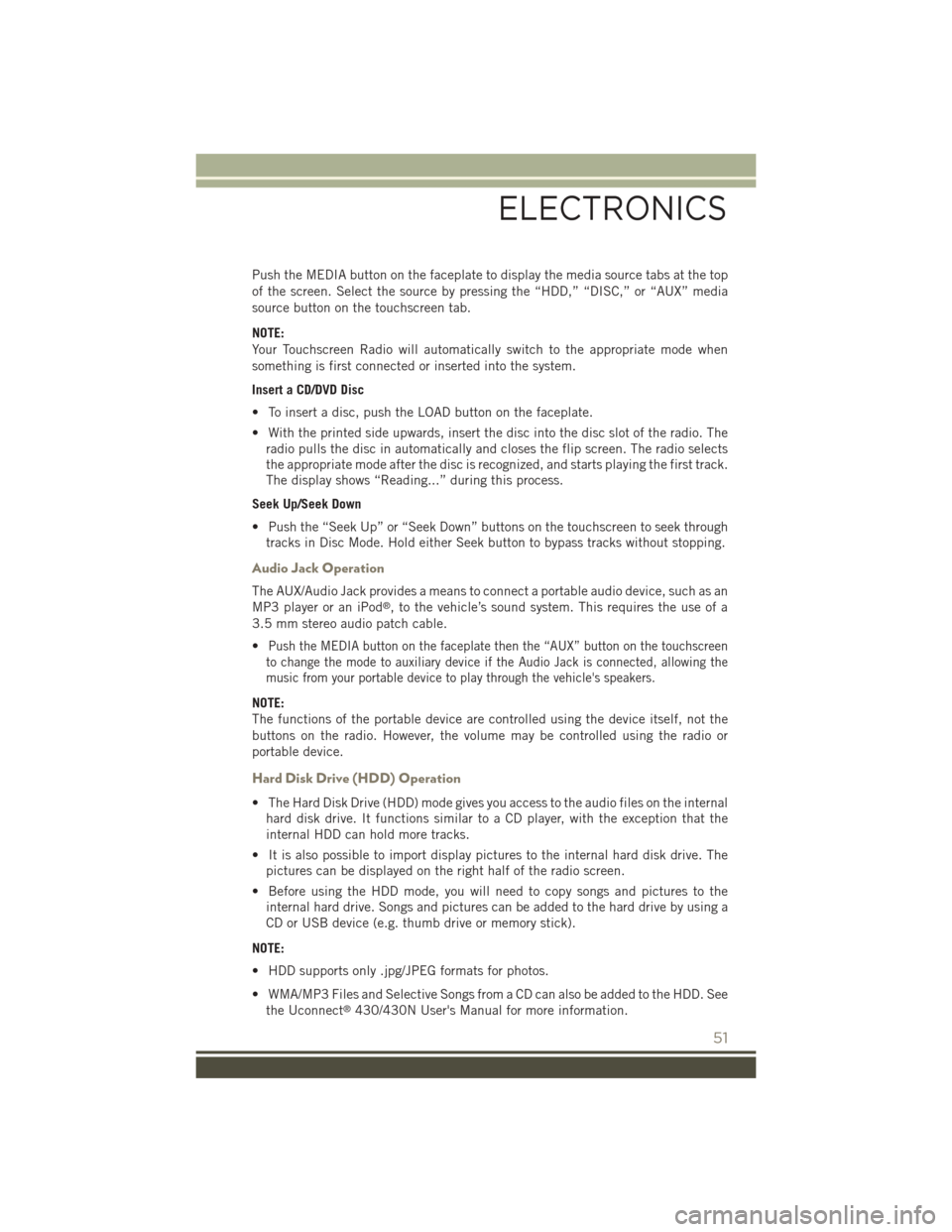
Push the MEDIA button on the faceplate to display the media source tabs at the top
of the screen. Select the source by pressing the “HDD,” “DISC,” or “AUX” media
source button on the touchscreen tab.
NOTE:
Your Touchscreen Radio will automatically switch to the appropriate mode when
something is first connected or inserted into the system.
Insert a CD/DVD Disc
• To insert a disc, push the LOAD button on the faceplate.
• With the printed side upwards, insert the disc into the disc slot of the radio. The
radio pulls the disc in automatically and closes the flip screen. The radio selects
the appropriate mode after the disc is recognized, and starts playing the first track.
The display shows “Reading...” during this process.
Seek Up/Seek Down
• Push the “Seek Up” or “Seek Down” buttons on the touchscreen to seek through
tracks in Disc Mode. Hold either Seek button to bypass tracks without stopping.
Audio Jack Operation
The AUX/Audio Jack provides a means to connect a portable audio device, such as an
MP3 player or an iPod®, to the vehicle’s sound system. This requires the use of a
3.5 mm stereo audio patch cable.
•Push the MEDIA button on the faceplate then the “AUX” button on the touchscreen
to change the mode to auxiliary device if the Audio Jack is connected, allowing the
music from your portable device to play through the vehicle's speakers.
NOTE:
The functions of the portable device are controlled using the device itself, not the
buttons on the radio. However, the volume may be controlled using the radio or
portable device.
Hard Disk Drive (HDD) Operation
• The Hard Disk Drive (HDD) mode gives you access to the audio files on the internal
hard disk drive. It functions similar to a CD player, with the exception that the
internal HDD can hold more tracks.
• It is also possible to import display pictures to the internal hard disk drive. The
pictures can be displayed on the right half of the radio screen.
• Before using the HDD mode, you will need to copy songs and pictures to the
internal hard drive. Songs and pictures can be added to the hard drive by using a
CD or USB device (e.g. thumb drive or memory stick).
NOTE:
• HDD supports only .jpg/JPEG formats for photos.
• WMA/MP3 Files and Selective Songs from a CD can also be added to the HDD. See
the Uconnect®430/430N User's Manual for more information.
ELECTRONICS
51