light JEEP PATRIOT 2016 1.G Owner's Manual
[x] Cancel search | Manufacturer: JEEP, Model Year: 2016, Model line: PATRIOT, Model: JEEP PATRIOT 2016 1.GPages: 148, PDF Size: 8.25 MB
Page 29 of 148
Reclining Rear Seat
For additional comfort, pull the strap forward just enough to release the seatback
latch. Then push the seatback to a reclined position, approximately 35 degrees
maximum, and release the strap.
WARNING!
Do not ride with the seatback reclined so that the shoulder belt is no longer resting
against your chest. In a collision you could slide under the seat belt and be
seriously or even fatally injured. Use the recliner only when the vehicle is parked.
HEATED SEATS
Heated Seats
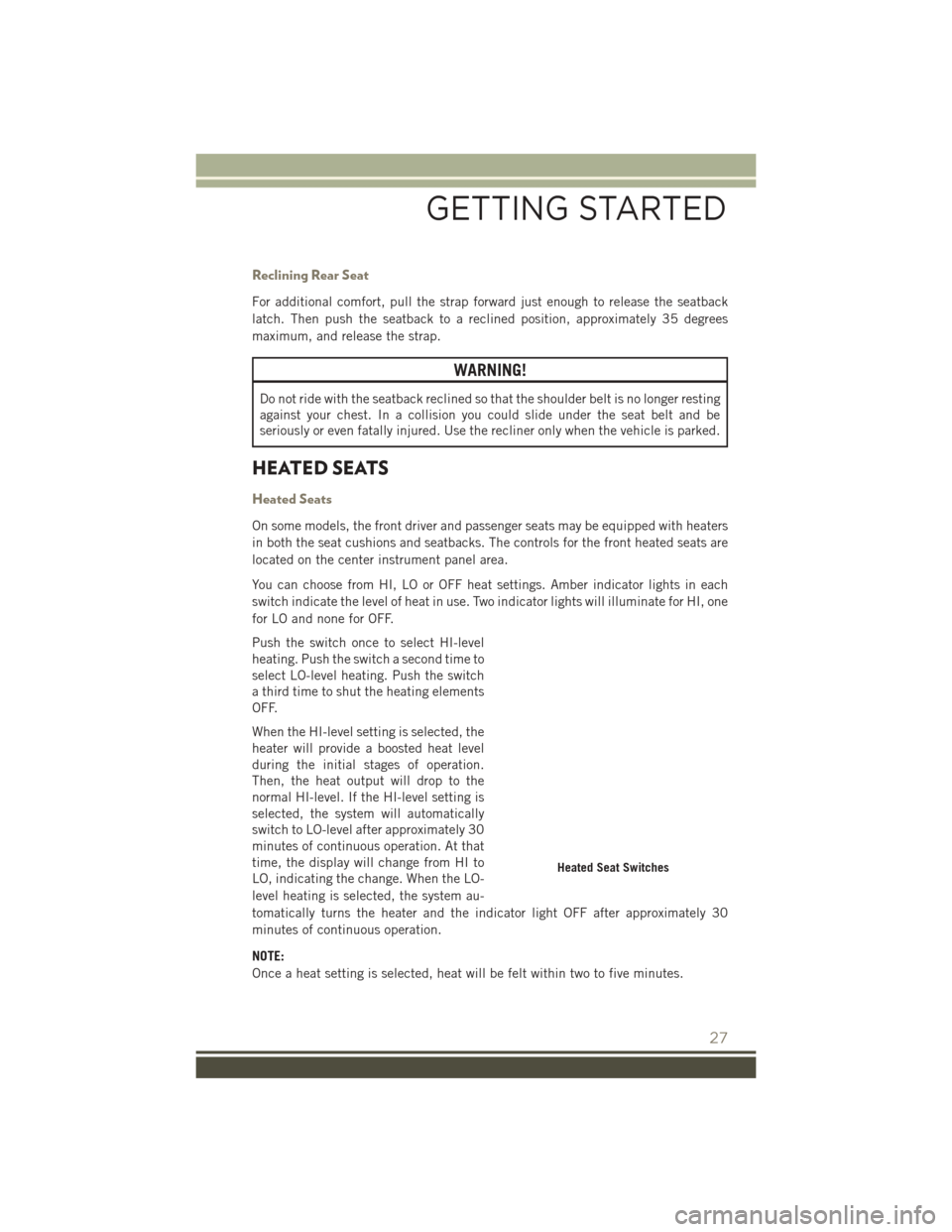
On some models, the front driver and passenger seats may be equipped with heaters
in both the seat cushions and seatbacks. The controls for the front heated seats are
located on the center instrument panel area.
You can choose from HI, LO or OFF heat settings. Amber indicator lights in each
switch indicate the level of heat in use. Two indicator lights will illuminate for HI, one
for LO and none for OFF.
Push the switch once to select HI-level
heating. Push the switch a second time to
select LO-level heating. Push the switch
a third time to shut the heating elements
OFF.
When the HI-level setting is selected, the
heater will provide a boosted heat level
during the initial stages of operation.
Then, the heat output will drop to the
normal HI-level. If the HI-level setting is
selected, the system will automatically
switch to LO-level after approximately 30
minutes of continuous operation. At that
time, the display will change from HI to
LO, indicating the change. When the LO-
level heating is selected, the system au-
tomatically turns the heater and the indicator light OFF after approximately 30
minutes of continuous operation.
NOTE:
Once a heat setting is selected, heat will be felt within two to five minutes.
Heated Seat Switches
GETTING STARTED
27
Page 31 of 148
ENGINE BREAK-IN RECOMMENDATIONS
A long break-in period is not required for the engine and drivetrain (transmission and
axle) in your vehicle.
Drive moderately during the first 300 miles (500 km). After the initial 60 miles
(100 km), speeds up to 50 or 55 mph (80 or 90 km/h) are desirable.
While cruising, brief full-throttle acceleration within the limits of local traffic laws
contributes to a good break-in. Wide-open throttle acceleration in low gear can be
detrimental and should be avoided.
The engine oil installed in the engine at the factory is a high-quality energy
conserving type lubricant. Oil changes should be consistent with anticipated climate
conditions under which vehicle operations will occur. Refer to “Maintaining Your
Vehicle,” for the recommended viscosity and quality grades.
NOTE:
A new engine may consume some oil during its first few thousand miles (kilometers)
of operation. This should be considered a normal part of the break-in and not
interpreted as an indication of an engine problem or malfunction.
CAUTION!
Never use Non-Detergent Oil or Straight Mineral Oil in the engine or damage may
result.
MULTIFUNCTION LEVER
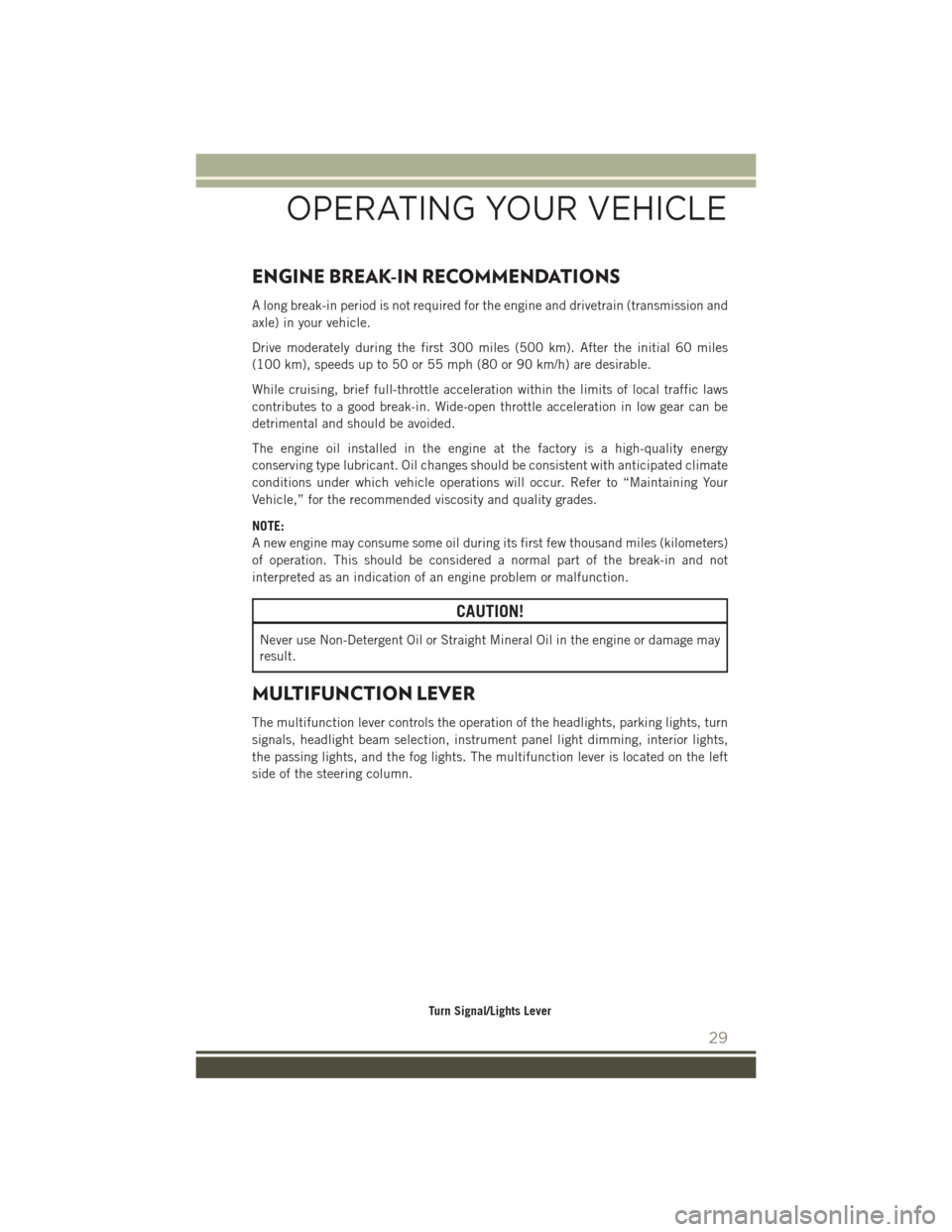
The multifunction lever controls the operation of the headlights, parking lights, turn
signals, headlight beam selection, instrument panel light dimming, interior lights,
the passing lights, and the fog lights. The multifunction lever is located on the left
side of the steering column.
Turn Signal/Lights Lever
OPERATING YOUR VEHICLE
29
Page 32 of 148
Headlights And Parking Lights
Turn the end of the multifunction lever to the first detent to turn on the parking lights.
Turn the end of the lever to the second detent to turn on the headlights.
Automatic Headlights
Turning the end of the multifunction lever to the third detent (AUTO), will activate the
automatic headlight system.
With the engine running and the multifunction lever in the AUTO position, the
headlights will turn on and turn off based on the surrounding light levels.
Instrument Panel Dimming
Rotate the center portion of the lever to the extreme bottom position to fully dim the
instrument panel lights and prevent the interior lights from illuminating when a door
is opened.
Rotate the center portion of the lever up to increase the brightness of the instrument
panel lights when the parking lights or headlights are on.
Rotate the center portion of the lever upward to the next detent position to brighten
the odometer and radio when the parking lights or headlights are on.
Rotate the center portion of the lever upward to the last detent to turn on the interior
lighting.
Flash-To-Pass
You can signal another vehicle with your headlights by lightly pulling the multifunc-
tion lever toward you. This will turn on the high beam headlights until the lever is
released.
NOTE:
If the multifunction lever is held in the flash-to-pass position for more than 20
seconds, the high beams will shut off. If this occurs, wait 30 seconds for the next
flash-to-pass operation.
High/Low Beam Switch
Push the multifunction lever away from you to switch the headlights to high beam.
Pull the multifunction lever toward you to switch the headlights back to low beam.
Fog Lights
The front fog light switch is on the multifunction lever. To activate the front fog lights,
turn on the parking lights or the low beam headlights and pull out the end of the
multifunction lever.
NOTE:
The fog lights will only operate with the headlights on low beam. Selecting high beam
headlights will turn off the fog lights.
OPERATING YOUR VEHICLE
30
Page 33 of 148
Turn Signals
Move the multifunction lever up or down and the arrows on each side of the
instrument cluster flash to show proper operation of the front and rear turn signal
lights.
NOTE:
If either light remains on and does not flash, or there is a very fast flash rate, check
for a defective outside light bulb. If an indicator fails to light when the lever is moved,
it would suggest that the indicator bulb is defective.
Lane Change Assist
Tap the lever up or down once, without moving beyond the detent, and the turn signal
(right or left) will flash three times then automatically turn off.
WINDSHIELD WIPERS AND WASHERS
CAUTION!
• Turn the windshield wipers off when driving through an automatic car wash.Damage to the windshield wipers may result if the wiper control is left in any
position other than off.
• In cold weather, always turn off the wiper switch and allow the wipers to return
to the “Park” position before turning off the engine. If the wiper switch is left
on and the wipers freeze to the windshield, damage to the wiper motor may
occur when the vehicle is restarted.
• Always remove any buildup of snow that prevents the windshield wiper blades
from returning to the off position. If the windshield wiper control is turned off
and the blades cannot return to the off position, damage to the wiper motor
may occur.
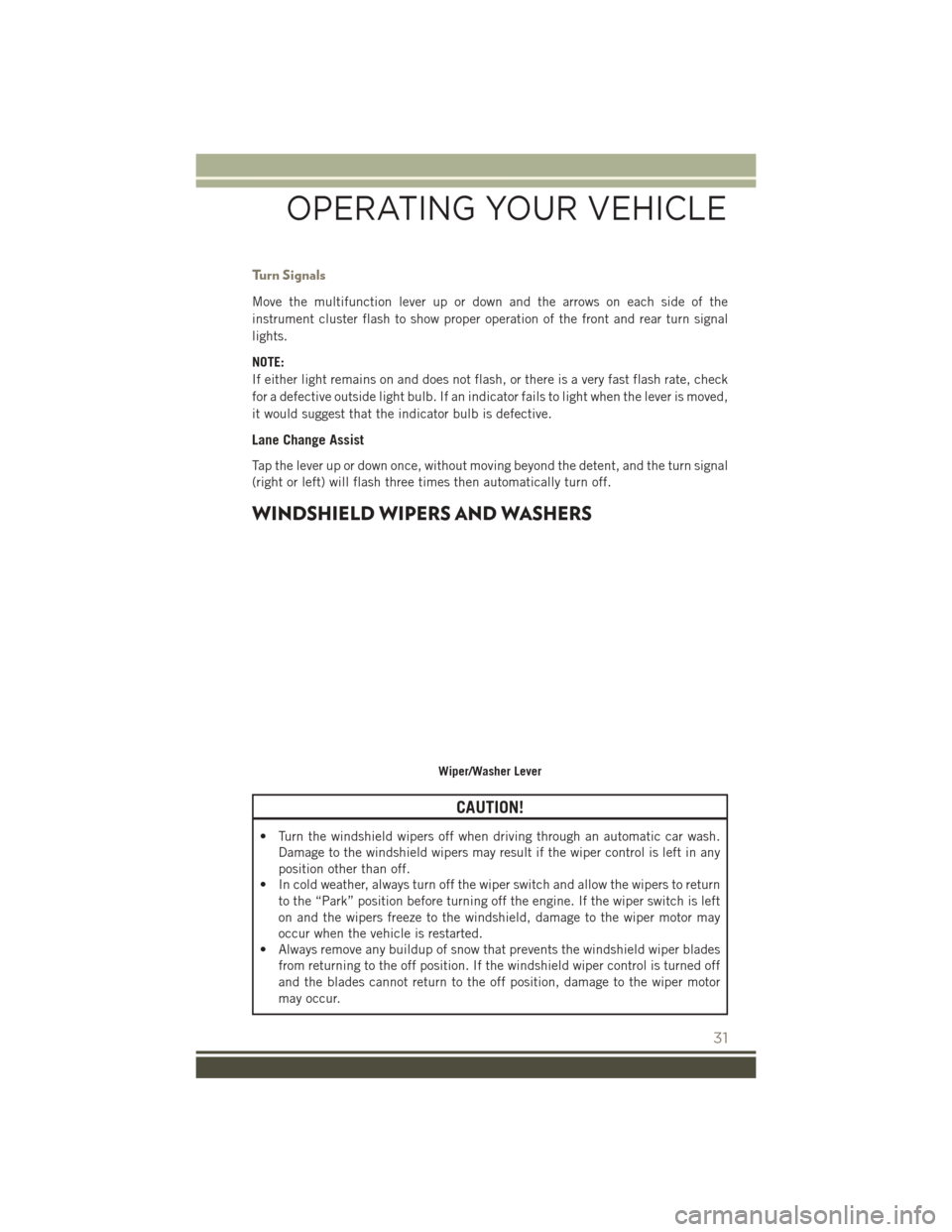
Wiper/Washer Lever
OPERATING YOUR VEHICLE
31
Page 34 of 148
Windshield Wiper Operation
Rotate the end of the lever upward to the second detent past the intermittent settings
for low-speed wiper operation. Rotate the end of the lever upward to the third detent
past the intermittent settings for high-speed wiper operation.
Intermittent Wiper System
Use the intermittent wiper when weather conditions make a single wiping cycle, with
a variable pause between cycles, desirable. Select the delay interval by turning the
end of the lever. Rotate the end of the lever upward (clockwise) to decrease the delay
time and downward (counterclockwise) to increase the delay time. The delay can be
regulated from a maximum of approximately 18 seconds between cycles, to a cycle
every second.
NOTE:
The wiper delay times depend on vehicle speed. If the vehicle is moving less than
10 mph (16 km/h), delay times will be doubled.
Windshield Washers
To use the washer, pull the control lever toward you and hold while spray is desired.
If the lever is pulled while in the delay range, the wiper will operate in low-speed
while the lever is pulled and for two wipe cycles after the lever is released, and then
resume the intermittent interval previously selected.
If the lever is pulled while in the off position, the wipers will operate for two wipe
cycles, then turn off.
WARNING!
Sudden loss of visibility through the windshield could lead to a collision. You
might not see other vehicles or other obstacles. To avoid sudden icing of the
windshield during freezing weather, warm the windshield with the defroster before
and during windshield washer use.
Headlights On With Wipers (Available With Automatic Headlights Only)
When this feature is active, the headlights will turn on approximately 10 seconds
after the wipers are turned on if the headlight switch is placed in the AUTO position.
In addition, the headlights will turn off when the wipers are turned off if they were
turned on by this feature.
NOTE:
The Headlights On with Wipers feature can be turned on or off using the Electronic
Vehicle Information Center (EVIC). Refer to “Electronic Vehicle Information Center
(EVIC)” in “Understanding Your Instrument Panel” on the DVD for further informa-
tion.
OPERATING YOUR VEHICLE
32
Page 36 of 148
ELECTRONIC SPEED CONTROL
When engaged, the Electronic Speed Control takes over accelerator operations at
speeds greater than 25 mph (40 km/h).
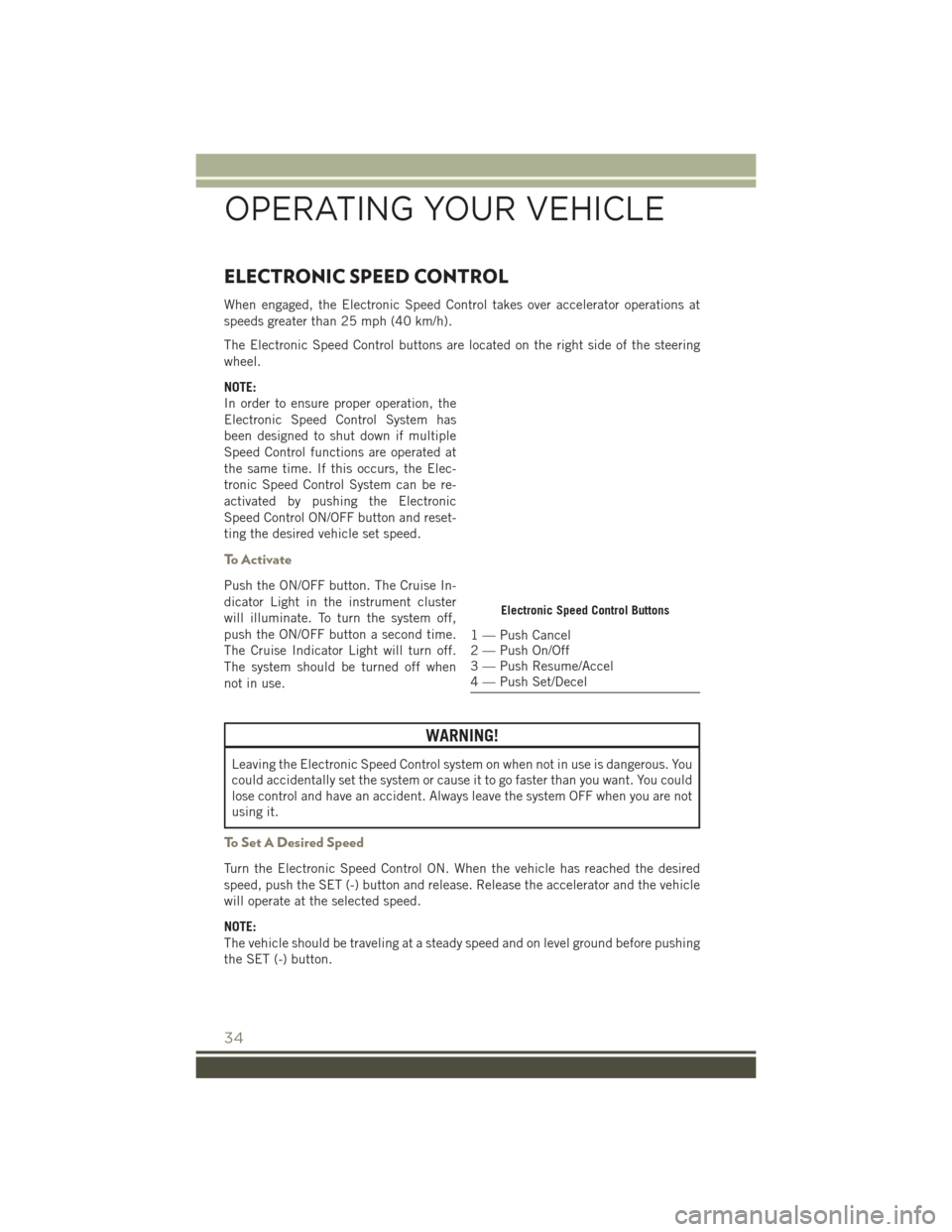
The Electronic Speed Control buttons are located on the right side of the steering
wheel.
NOTE:
In order to ensure proper operation, the
Electronic Speed Control System has
been designed to shut down if multiple
Speed Control functions are operated at
the same time. If this occurs, the Elec-
tronic Speed Control System can be re-
activated by pushing the Electronic
Speed Control ON/OFF button and reset-
ting the desired vehicle set speed.
To Activate
Push the ON/OFF button. The Cruise In-
dicator Light in the instrument cluster
will illuminate. To turn the system off,
push the ON/OFF button a second time.
The Cruise Indicator Light will turn off.
The system should be turned off when
not in use.
WARNING!
Leaving the Electronic Speed Control system on when not in use is dangerous. You
could accidentally set the system or cause it to go faster than you want. You could
lose control and have an accident. Always leave the system OFF when you are not
using it.
To Set A Desired Speed
Turn the Electronic Speed Control ON. When the vehicle has reached the desired
speed, push the SET (-) button and release. Release the accelerator and the vehicle
will operate at the selected speed.
NOTE:
The vehicle should be traveling at a steady speed and on level ground before pushing
the SET (-) button.
Electronic Speed Control Buttons
1 — Push Cancel
2 — Push On/Off
3 — Push Resume/Accel
4 — Push Set/Decel
OPERATING YOUR VEHICLE
34
Page 38 of 148
To Decrease Speed
When the Electronic Speed Control is set, you can decrease speed by pushing the
SET (-) button.
The drivers preferred units can be selected through the instrument panel settings if
equipped. Refer to “Understanding Your Instrument Panel” in the Owner’s Manual
on the DVD for more information. The speed decrement shown is dependant on the
chosen speed unit of U.S. (mph) or Metric (km/h):
U.S. Speed (mph)
• Pushing the SET (-) button once will result in a 1 mph decrease in set speed. Eachsubsequent tap of the button results in a decrease of 1 mph.
• If the button is continually pushed, the set speed will continue to decrease until the button is released, then the new set speed will be established.
Metric Speed (km/h)
• Pushing the SET (-) button once will result in a 1 km/h decrease in set speed. Each subsequent tap of the button results in a decrease of 1 km/h.
• If the button is continually pushed, the set speed will continue to decrease until the button is released, then the new set speed will be established.
To Accelerate For Passing
Press the accelerator as you would normally. When the pedal is released, the vehicle
will return to the set speed.
Using Electronic Speed Control On Hills
The transmission may downshift on hills to maintain the vehicle set speed.
NOTE:
The Electronic Speed Control system maintains speed up and down hills. A slight
speed change on moderate hills is normal.
On steep hills, a greater speed loss or gain may occur so it may be preferable to drive
without Electronic Speed Control.
WARNING!
Electronic Speed Control can be dangerous where the system cannot maintain a
constant speed. Your vehicle could go too fast for the conditions, and you could
lose control and have an accident. Do not use Electronic Speed Control in heavy
traffic or on roads that are winding, icy, snow-covered or slippery.
OPERATING YOUR VEHICLE
36
Page 41 of 148
AUTOMATIC TEMPERATURE CONTROLS (ATC)
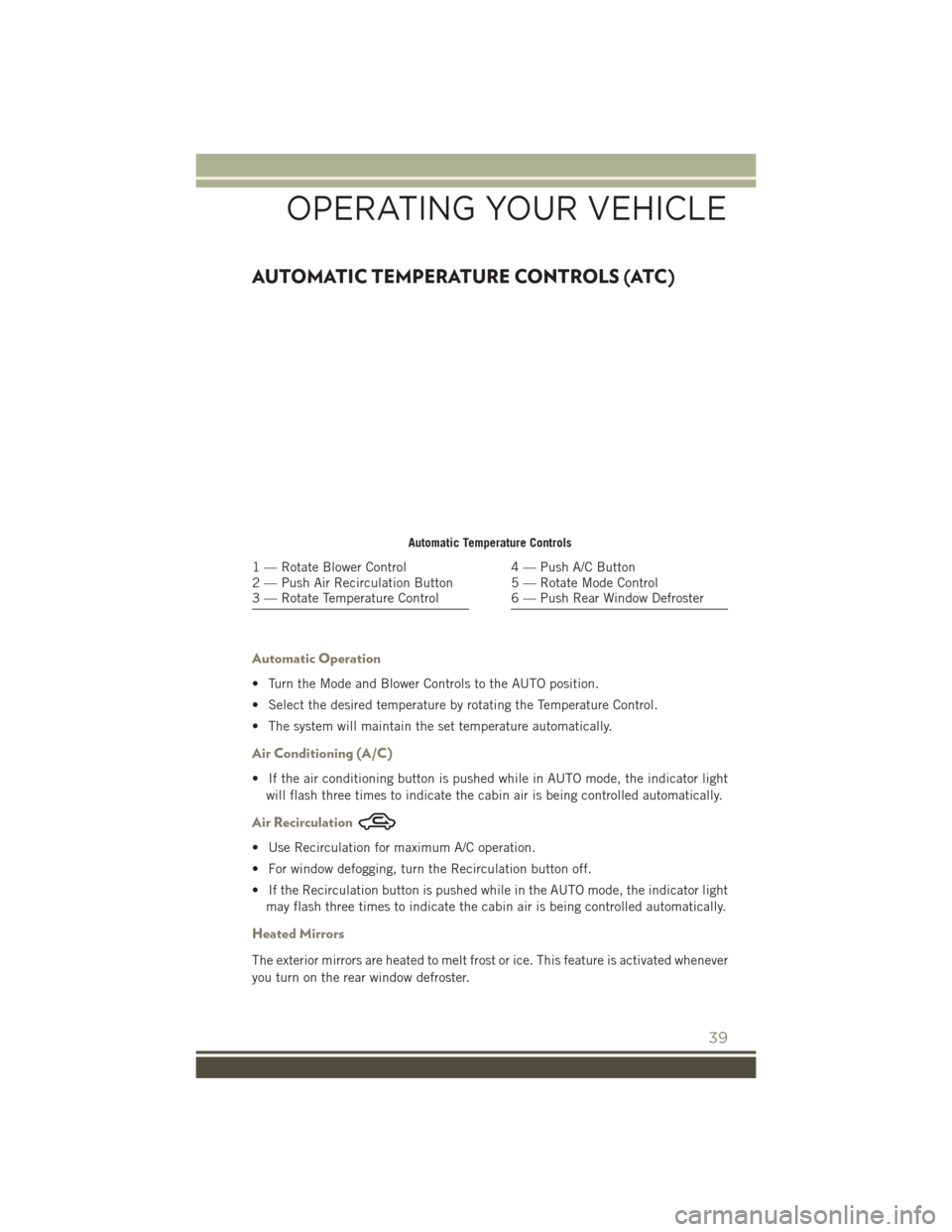
Automatic Operation
• Turn the Mode and Blower Controls to the AUTO position.
• Select the desired temperature by rotating the Temperature Control.
• The system will maintain the set temperature automatically.
Air Conditioning (A/C)
• If the air conditioning button is pushed while in AUTO mode, the indicator lightwill flash three times to indicate the cabin air is being controlled automatically.
Air Recirculation
• Use Recirculation for maximum A/C operation.
• For window defogging, turn the Recirculation button off.
• If the Recirculation button is pushed while in the AUTO mode, the indicator lightmay flash three times to indicate the cabin air is being controlled automatically.
Heated Mirrors
The exterior mirrors are heated to melt frost or ice. This feature is activated whenever
you turn on the rear window defroster.
Automatic Temperature Controls
1 — Rotate Blower Control
2 — Push Air Recirculation Button
3 — Rotate Temperature Control4 — Push A/C Button
5 — Rotate Mode Control
6 — Push Rear Window Defroster
OPERATING YOUR VEHICLE
39
Page 82 of 148
Auto Unlock Doors On Exit
To have all of the vehicle doors unlock when any door is opened:
• Enter your vehicle and close all the doors, and fasten your seat belt.
• Cycle the ignition switch between the LOCK and ON position four times, ending inthe LOCK position (do not start the engine).
• Push the power door UNLOCK switch to unlock the doors. A single chime will indicate that programming is complete.
Auto Door Lock
To have the doors lock automatically when the vehicle’s speed exceeds 15 mph
(24 km/h):
• Enter your vehicle and close all the doors.
• Cycle the ignition switch between LOCK and ON and then back to LOCK fourtimes, ending up in the LOCK position (do not start the engine).
• Push the power door LOCK switch to lock the doors. A single chime will indicate that programming is complete.
Sound Horn With Lock
To turn the horn chirp on or off when the doors are locked:
• Push the LOCK button for at least four seconds, but no longer than 10 seconds.Then, push the PANIC button while still holding the LOCK button.
• Release both buttons at the same time.
Flashing Lights With Lock
The turn signal lights flash when the doors are locked, which can be turned on or off.
To turn this feature on or off:
• Push and hold the UNLOCK button and the LOCK button at the same time for at least four seconds, but no longer than 10 seconds.
• Release both buttons at the same time.
ELECTRONICS
80
Page 83 of 148
UNIVERSAL GARAGE DOOR OPENER (HomeLink)
HomeLink replaces up to three hand-held transmitters that operate devices such as
garage door openers, motorized gates, lighting or home security systems. The
HomeLink unit is powered by your vehicles 12 Volt battery.
The HomeLink buttons that are located in the overhead console or sunvisor designate
the three different HomeLink channels.
The HomeLink indicator is located above the center button.
Before You Begin Programming
HomeLink
Ensure that your vehicle is parked out-
side of the garage before you begin pro-
gramming.
For efficient programming and accurate
transmission of the radio-frequency sig-
nal, it is recommended that a new battery
be placed in the hand-held transmitter of
the device that is being programmed to
the HomeLink system.
To erase the channels, place the ignition
switch into the ON/RUN position, then
push and hold the two outside HomeLink
buttons (I and III) for up to 20 seconds or
until the red indicator flashes.
NOTE:
Erasing all channels should only be performed when programming HomeLink for the
first time. Do not erase channels when programming additional buttons.
If you have any problems, or require assistance, please call toll-free
1-800-355-3515 or, on the Internet at HomeLink.com for information or assistance.
Programming A Rolling Code
NOTE:
For programming Garage Door Openers that were manufactured after 1995. These
Garage Door Openers can be identified by the “LEARN” or “TRAIN” button located
where the hanging antenna is attached to the Garage Door Opener. It is NOT the
button that is normally used to open and close the door. The name and color of the
button may vary by manufacturer.
1. Place the ignition switch into the ON/RUN position.
2.
Place the hand-held transmitter 1 to 3 inches (3 to 8 cm) away from the HomeLink
button you wish to program while keeping the HomeLink indicator light in view.
HomeLink Buttons
1 — HomeLink Channels
ELECTRONICS
81