radio JEEP PATRIOT 2016 1.G Owner's Guide
[x] Cancel search | Manufacturer: JEEP, Model Year: 2016, Model line: PATRIOT, Model: JEEP PATRIOT 2016 1.GPages: 148, PDF Size: 8.25 MB
Page 76 of 148
• A maximum of 1,000 entries per phone will be downloaded and updated everytime a phone is connected to the Uconnect Phone.
• Depending on the maximum number of entries downloaded, there may be a short delay before the latest downloaded names can be used. Until then, if available, the
previously downloaded phonebook is available for use.
• Only the phonebook of the currently connected mobile phone is accessible.
• Only the mobile phones phonebook is downloaded. The SIM card phonebook is not part of the Mobile phonebook.
• This downloaded phonebook cannot be edited or deleted on the Uconnect Phone. These can only be edited on the mobile phone. The changes are transferred and
updated to Uconnect Phone on the next phone connection.
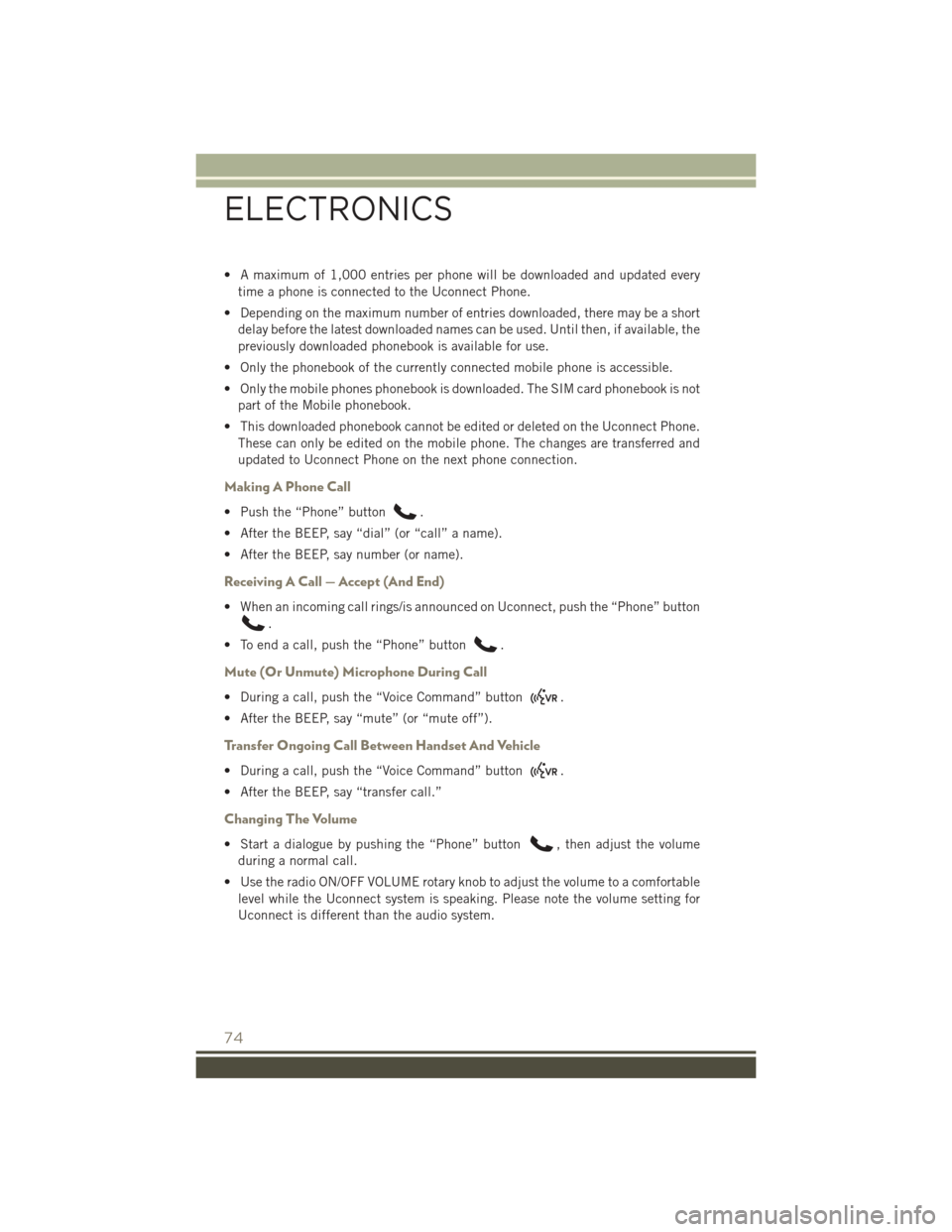
Making A Phone Call
• Push the “Phone” button.
• After the BEEP, say “dial” (or “call” a name).
• After the BEEP, say number (or name).
Receiving A Call — Accept (And End)
• When an incoming call rings/is announced on Uconnect, push the “Phone” button
.
• To end a call, push the “Phone” button
.
Mute (Or Unmute) Microphone During Call
• During a call, push the “Voice Command” button.
• After the BEEP, say “mute” (or “mute off”).
Transfer Ongoing Call Between Handset And Vehicle
• During a call, push the “Voice Command” button.
• After the BEEP, say “transfer call.”
Changing The Volume
• Start a dialogue by pushing the “Phone” button, then adjust the volume
during a normal call.
• Use the radio ON/OFF VOLUME rotary knob to adjust the volume to a comfortable level while the Uconnect system is speaking. Please note the volume setting for
Uconnect is different than the audio system.
ELECTRONICS
74
Page 77 of 148
WARNING!
• Any voice commanded system should be used only in safe driving conditionsfollowing applicable laws regarding phone use. Your attention should be
focused on safely operating the vehicle. Failure to do so may result in a
collision causing you and others to be severely injured or killed.
• In an emergency, to use Uconnect Phone, your mobile phone must be:
• turned on
• paired to Uconnect Phone
• have network coverage
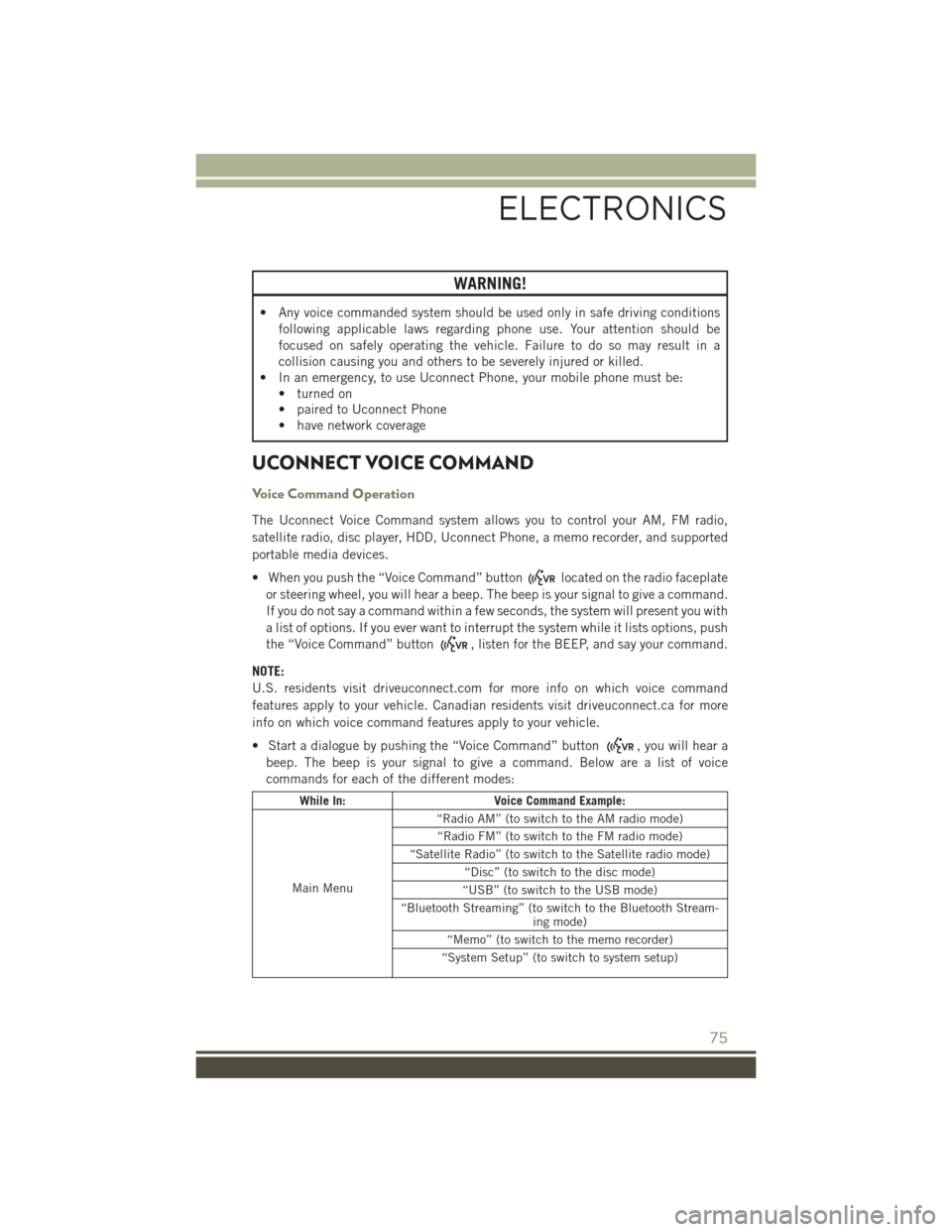
UCONNECT VOICE COMMAND
Voice Command Operation
The Uconnect Voice Command system allows you to control your AM, FM radio,
satellite radio, disc player, HDD, Uconnect Phone, a memo recorder, and supported
portable media devices.
• When you push the “Voice Command” button
located on the radio faceplate
or steering wheel, you will hear a beep. The beep is your signal to give a command.
If you do not say a command within a few seconds, the system will present you with
a list of options. If you ever want to interrupt the system while it lists options, push
the “Voice Command” button
, listen for the BEEP, and say your command.
NOTE:
U.S. residents visit driveuconnect.com for more info on which voice command
features apply to your vehicle. Canadian residents visit driveuconnect.ca for more
info on which voice command features apply to your vehicle.
• Start a dialogue by pushing the “Voice Command” button
, you will hear a
beep. The beep is your signal to give a command. Below are a list of voice
commands for each of the different modes:
While In: Voice Command Example:
Main Menu “Radio AM” (to switch to the AM radio mode)
“Radio FM” (to switch to the FM radio mode)
“Satellite Radio” (to switch to the Satellite radio mode) “Disc” (to switch to the disc mode)
“USB” (to switch to the USB mode)
“Bluetooth Streaming” (to switch to the Bluetooth Stream- ing mode)
“Memo” (to switch to the memo recorder)
“System Setup” (to switch to system setup)
ELECTRONICS
75
Page 78 of 148
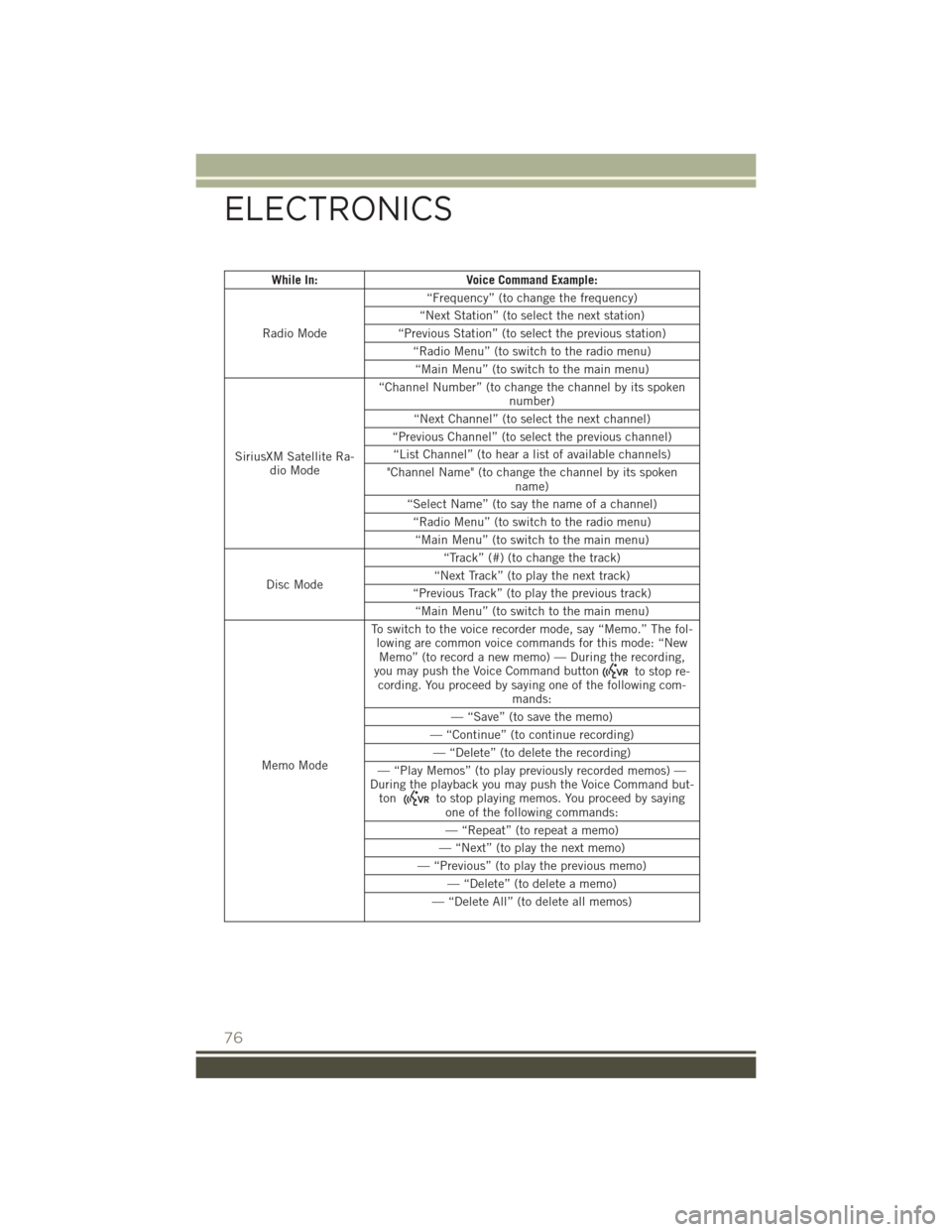
While In:Voice Command Example:
Radio Mode “Frequency” (to change the frequency)
“Next Station” (to select the next station)
“Previous Station” (to select the previous station) “Radio Menu” (to switch to the radio menu)“Main Menu” (to switch to the main menu)
SiriusXM Satellite Ra- dio Mode “Channel Number” (to change the channel by its spoken
number)
“Next Channel” (to select the next channel)
“Previous Channel” (to select the previous channel) “List Channel” (to hear a list of available channels)
"Channel Name" (to change the channel by its spoken name)
“Select Name” (to say the name of a channel) “Radio Menu” (to switch to the radio menu)“Main Menu” (to switch to the main menu)
Disc Mode “Track” (#) (to change the track)
“Next Track” (to play the next track)
“Previous Track” (to play the previous track) “Main Menu” (to switch to the main menu)
Memo Mode To switch to the voice recorder mode, say “Memo.” The fol-
lowing are common voice commands for this mode: “NewMemo” (to record a new memo) — During the recording,
you may push the Voice Command button
to stop re-
cording. You proceed by saying one of the following com- mands:
— “Save” (to save the memo)
— “Continue” (to continue recording) — “Delete” (to delete the recording)
— “Play Memos” (to play previously recorded memos) —
During the playback you may push the Voice Command but- ton
to stop playing memos. You proceed by saying one of the following commands:
— “Repeat” (to repeat a memo)
— “Next” (to play the next memo)
— “Previous” (to play the previous memo) — “Delete” (to delete a memo)
— “Delete All” (to delete all memos)
ELECTRONICS
76
Page 79 of 148
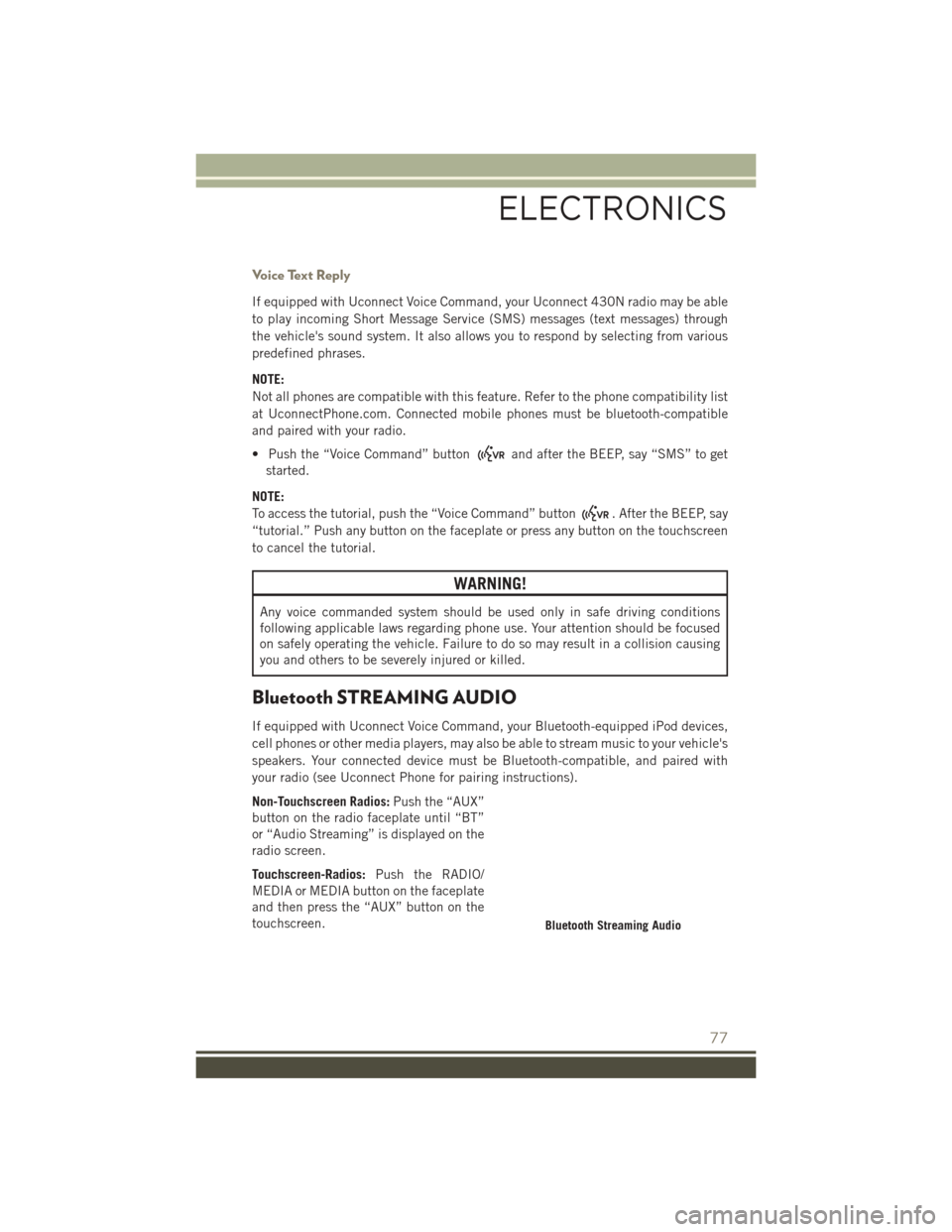
Voice Text Reply
If equipped with Uconnect Voice Command, your Uconnect 430N radio may be able
to play incoming Short Message Service (SMS) messages (text messages) through
the vehicle's sound system. It also allows you to respond by selecting from various
predefined phrases.
NOTE:
Not all phones are compatible with this feature. Refer to the phone compatibility list
at UconnectPhone.com. Connected mobile phones must be bluetooth-compatible
and paired with your radio.
• Push the “Voice Command” button
and after the BEEP, say “SMS” to get
started.
NOTE:
To access the tutorial, push the “Voice Command” button
. After the BEEP, say
“tutorial.” Push any button on the faceplate or press any button on the touchscreen
to cancel the tutorial.
WARNING!
Any voice commanded system should be used only in safe driving conditions
following applicable laws regarding phone use. Your attention should be focused
on safely operating the vehicle. Failure to do so may result in a collision causing
you and others to be severely injured or killed.
Bluetooth STREAMING AUDIO
If equipped with Uconnect Voice Command, your Bluetooth-equipped iPod devices,
cell phones or other media players, may also be able to stream music to your vehicle's
speakers. Your connected device must be Bluetooth-compatible, and paired with
your radio (see Uconnect Phone for pairing instructions).
Non-Touchscreen Radios: Push the “AUX”
button on the radio faceplate until “BT”
or “Audio Streaming” is displayed on the
radio screen.
Touchscreen-Radios: Push the RADIO/
MEDIA or MEDIA button on the faceplate
and then press the “AUX” button on the
touchscreen.
Bluetooth Streaming Audio
ELECTRONICS
77
Page 83 of 148
UNIVERSAL GARAGE DOOR OPENER (HomeLink)
HomeLink replaces up to three hand-held transmitters that operate devices such as
garage door openers, motorized gates, lighting or home security systems. The
HomeLink unit is powered by your vehicles 12 Volt battery.
The HomeLink buttons that are located in the overhead console or sunvisor designate
the three different HomeLink channels.
The HomeLink indicator is located above the center button.
Before You Begin Programming
HomeLink
Ensure that your vehicle is parked out-
side of the garage before you begin pro-
gramming.
For efficient programming and accurate
transmission of the radio-frequency sig-
nal, it is recommended that a new battery
be placed in the hand-held transmitter of
the device that is being programmed to
the HomeLink system.
To erase the channels, place the ignition
switch into the ON/RUN position, then
push and hold the two outside HomeLink
buttons (I and III) for up to 20 seconds or
until the red indicator flashes.
NOTE:
Erasing all channels should only be performed when programming HomeLink for the
first time. Do not erase channels when programming additional buttons.
If you have any problems, or require assistance, please call toll-free
1-800-355-3515 or, on the Internet at HomeLink.com for information or assistance.
Programming A Rolling Code
NOTE:
For programming Garage Door Openers that were manufactured after 1995. These
Garage Door Openers can be identified by the “LEARN” or “TRAIN” button located
where the hanging antenna is attached to the Garage Door Opener. It is NOT the
button that is normally used to open and close the door. The name and color of the
button may vary by manufacturer.
1. Place the ignition switch into the ON/RUN position.
2.
Place the hand-held transmitter 1 to 3 inches (3 to 8 cm) away from the HomeLink
button you wish to program while keeping the HomeLink indicator light in view.
HomeLink Buttons
1 — HomeLink Channels
ELECTRONICS
81
Page 107 of 148
WARNING!
• Take care to avoid the radiator cooling fan whenever the hood is raised. It canstart anytime the ignition switch is ON. You can be injured by moving fan
blades.
• Remove any metal jewelry such as rings, watch bands and bracelets that could
make an inadvertent electrical contact. You could be seriously injured.
• Batteries contain sulfuric acid that can burn your skin or eyes and generate
hydrogen gas which is flammable and explosive. Keep open flames or sparks
away from the battery.
1. Set the parking brake, shift the automatic transmission into PARK (manual transmission to NEUTRAL) and turn the ignition to LOCK.
2. Turn off the heater, radio, and all unnecessary electrical accessories.
3. If using another vehicle to jump-start the battery, park the vehicle within the jumper cables reach, set the parking brake and make sure the ignition is OFF.
WARNING!
Do not allow vehicles to touch each other as this could establish a ground
connection and personal injury could result.
Jump-Starting Procedure
WARNING!
Failure to follow this jump-starting procedure could result in personal injury or
property damage due to battery explosion.
CAUTION!
Failure to follow these procedures could result in damage to the charging system
of the booster vehicle or the discharged vehicle.
NOTE:
Remove Air Intake before proceeding with this Jump-Starting procedure.
Connecting The Jumper Cables
1. Connect the positive (+)end of the jumper cable to the positive (+)post of the
discharged vehicle.
2. Connect the opposite end of the positive (+)jumper cable to the positive (+)post
of the booster battery.
3. Connect the negative end (-)of the jumper cable to the negative (-)post of the
booster battery.
WHAT TO DO IN EMERGENCIES
105
Page 125 of 148
FUSES
Integrated Power Module (IPM)
The Integrated Power Module is located in the engine compartment near the air
cleaner assembly. This center contains cartridge fuses and mini-fuses. A label that
identifies each component may be printed on the inside of the cover. Refer to
“Engine Compartment” in “Maintaining Your Vehicle” for further information.
Cavity Cartridge FuseMini-FuseDescription
1 20 Amp Blue –Trailer Tow – If
Equipped
2 –15 Amp Lt Blue AWD/4WD Control
Module – If Equipped
3 – 10 Amp Red Rear Center Brake
Light Switch
4 – 10 Amp Red Ignition Switch/Clock
Spring
5 –15 Amp Lt Blue Battery Feed For Power
Tech
6 – 10 Amp Red Power Mirror/Steering
Control Satellite Radio/Hands-Free Phone
7 –30 Amp Green Ignition Off Draw
8 –30 Amp Green Ignition Off Draw
9 40 Amp Green –Power Seats
10 –20 Amp Yellow Power Locks/Interior
Lighting
11 –15 Amp Lt Blue Power Outlet
12 –20 Amp Yellow 115V AC Inverter – If
Equipped
13 –20 Amp Yellow Cigar Lighter
14 –10 Amp Red Instrument Cluster
15 40 Amp Green –Radiator Fan
16 –15 Amp Lt Blue Dome Lamp/Sunroof/
Rear Wiper Motor
17 –10 Amp Red Wireless Control Mod-
ule
18 40 Amp Green –Auto Shutdown Relay
19 –20 Amp Yellow Radio Amplifiers
20 –15 Amp Lt Blue Radio
21 –10 Amp Red Intrusion Module/Siren
– If Equipped
22 –10 Amp Red Heating, AC/Compass
MAINTAINING YOUR VEHICLE
123
Page 132 of 148
• Replacement User Guide kits or DVDs or, if you prefer, additional printed copiesof the Owner's Manual, Warranty Booklet or Radio Manuals may be purchased by
visiting www.techauthority.com or by calling 1-877-890-4038 (U.S.) or
1-800-387-1143 (Canada). Visa, Master Card, American Express and Discover
orders are accepted. If you prefer mailing your order, please call the above
numbers for an order form.
NOTE:
• A street address is required when ordering manuals (no P.O. Boxes).
• The Owner's Manual and User Guide electronic files are also available on the Chrysler, Jeep, Ram Truck, Dodge and SRT websites.
• Click on the “For Owners” tab, select “Owner/Service Manuals”, then select your desired model year and vehicle from the drop down lists.
REPORTING SAFETY DEFECTS IN THE UNITED
STATES
If you believe that your vehicle has a defect that could cause a collision or cause
injury or death, you should immediately inform the National Highway Traffic Safety
Administration (NHTSA) in addition to notifying the manufacturer.
If NHTSA receives similar complaints, it may open an investigation, and if it finds
that a safety defect exists in a group of vehicles, it may order a recall and remedy
campaign. However, NHTSA cannot become involved in individual problems between
you, your authorized dealer and the manufacturer.
To contact NHTSA, you may either call the Auto Safety Hotline toll free at
1-888-327-4236 (TTY: 1-800-424-9153), or go to http://www.safercar.gov; or write
to: Administrator, NHTSA, 1200 New Jersey Avenue, SE., West Building,
Washington, D.C. 20590. You can also obtain other information about motor vehicle
safety from http://www.safercar.gov.
In Canada
If you believe that your vehicle has a safety defect, you should contact the Customer
Service Department immediately. Canadian customers who wish to report a safety
defect to the Canadian government should contact Transport Canada, Motor Vehicle
Defect Investigations and Recalls at 1-800-333-0510 or go to
http://www.tc.gc.ca/roadsafety/.
French Canadian customers who wish to report a safety defect to the Canadian
government should contact Transport Canada, Motor Vehicle Defect Investigations
and Recalls at 1-800-333-0510 or go to http://www.tc.gc.ca/securiteroutiere/.
CUSTOMER ASSISTANCE
130
Page 134 of 148
FREQUENTLY ASKED QUESTIONS
GETTING STARTED
How do I install my LATCH Equipped Child Seat? pg. 20
How do my heated seats operate? pg. 27
ELECTRONICS
Which radio is in my vehicle?
• Uconnect 130 pg. 44
• Uconnect 130 with Satellite Radio pg. 47
• Uconnect 230 pg. 51
• Uconnect 430/430N pg. 54
How do I activate the Audio Jack?
• Uconnect 130 pg. 54
• Uconnect 130 with Satellite Radio pg. 54
• Uconnect 230 pg. 54
• Uconnect 430/430N pg. 59
How do I set the clock on my radio?
• Uconnect 130 pg. 52
• Uconnect 130 with Satellite Radio pg. 52
• Uconnect 230 pg. 52
• Uconnect 430/430N pg. 55
How do I use the Navigation feature? pg. 63
How do I pair my cell phone via Bluetooth with the Uconnect Hands-Free Voice
Activation System? pg. 73
How do I configure my Universal Garage Door Opener (HomeLink)? pg. 81
FAQ
132
Page 136 of 148
Adding Engine Coolant(Antifreeze) .............118
Adding Washer Fluid .........118
Adjust Down .................24
Forward ...............24
Rearward ..............24
Up ..................24
Air Bag AdvancedFrontAirBag ......14
AdvanceFrontAirBag ......14
AirBagComponents ........14
AirBags ...............14
AirBagWarningLight.....14,17
Enhanced Accident
Response ...........16,109
Event Data Recorder
(EDR) .............17,109
FrontAirBag ............14
Rollover ...............14
SideAirBags ............15
SideImpacts ............14
AirBagLight............17,89
Air Cleaner, Engine (Engine Air Cleaner Filter) ................118
Air Conditioner Maintenance ....118
Air Conditioning ............39
Air Conditioning Refrigerant .....118
Air Conditioning System .......118
Air Recirculation ..........38,39
Alarm Arm The System ..........12
Disarm The System ........12
Vehicle Security Alarm ......12
Alarm, Panic ..............10
Alarm (Security Alarm) ......12,94
Antifreeze (Engine Coolant) . .116, 118 Capacities ............116
Disposal ..............118
Anti-Lock Warning Light ........89
Appearance Care ...........118
Assistance Towing ...........89
Audio Jack ........46,50,54,59
Audio Settings ........45,48,52
Audio Systems (Radio) .........44
Automatic Temperature Control (ATC).................39
Automatic Transmission ........38 FluidType ............117
Overheating
............96
AxleFluid...............117
Back-Up Camera ............37
Battery .................118
Bluetooth Connecting To A Particular Mobile
Phone Or Audio Device After
Pairing ................73
Body Mechanism Lubrication ....118
BrakeFluid ..............117
Brakes.................118
Brake System .............118
Master Cylinder .........118
Warning Light ...........91
Break-In Recommendations, New Vehicle ................29
Bulb Replacement ..........128
Bulbs,Light..............128
Calibration, Compass .........78
Canada...............3,130
Capacities, Antifreeze (Engine Coolant) ..............116
Capacities, Fluid ...........116
Caps, Filler Oil (Engine) ............118
CarWashes ..............118
CD (Compact Disc) Player .........46,49,53,58
Change Oil Indicator ..........95
ChangingAFlatTire..........96
Charging System Light .........
89
Child Restraint .............18
Child Restraints ............18
Lower Anchors And Tethers For Chil-
dren .................18
Child Seat Installation .........18
Cleaning Wheels ..............118
Windshield Wiper Blades ....118
Climate Control .............38
Clock Setting .......45,48,52,55
Cluster Warning/Indicator Lights Anti-Lock Brake (ABS) Light . . .89
Brake Warning Light ........91
Charging System Light ......89
INDEX
134