warning light JEEP PATRIOT 2020 Owner handbook (in English)
[x] Cancel search | Manufacturer: JEEP, Model Year: 2020, Model line: PATRIOT, Model: JEEP PATRIOT 2020Pages: 332, PDF Size: 1.99 MB
Page 236 of 332
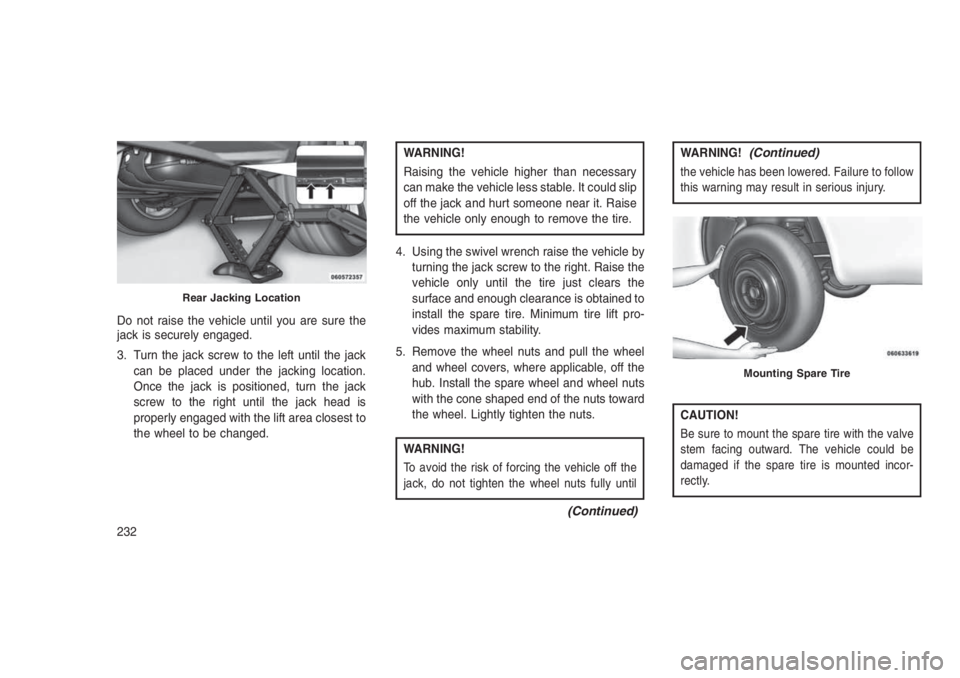
Do not raise the vehicle until you are sure the
jack is securely engaged.
3. Turn the jack screw to the left until the jack
can be placed under the jacking location.
Once the jack is positioned, turn the jack
screw to the right until the jack head is
properly engaged with the lift area closest to
the wheel to be changed.
WARNING!
Raising the vehicle higher than necessary
can make the vehicle less stable. It could slip
off the jack and hurt someone near it. Raise
the vehicle only enough to remove the tire.
4. Using the swivel wrench raise the vehicle by
turning the jack screw to the right. Raise the
vehicle only until the tire just clears the
surface and enough clearance is obtained to
install the spare tire. Minimum tire lift pro-
vides maximum stability.
5. Remove the wheel nuts and pull the wheel
and wheel covers, where applicable, off the
hub. Install the spare wheel and wheel nuts
with the cone shaped end of the nuts toward
the wheel. Lightly tighten the nuts.
WARNING!
To avoid the risk of forcing the vehicle off the
jack, do not tighten the wheel nuts fully until
(Continued)
WARNING!(Continued)
the vehicle has been lowered. Failure to follow
this warning may result in serious injury.
CAUTION!
Be sure to mount the spare tire with the valve
stem facing outward. The vehicle could be
damaged if the spare tire is mounted incor-
rectly.
Rear Jacking Location
Mounting Spare Tire
232
Page 238 of 332
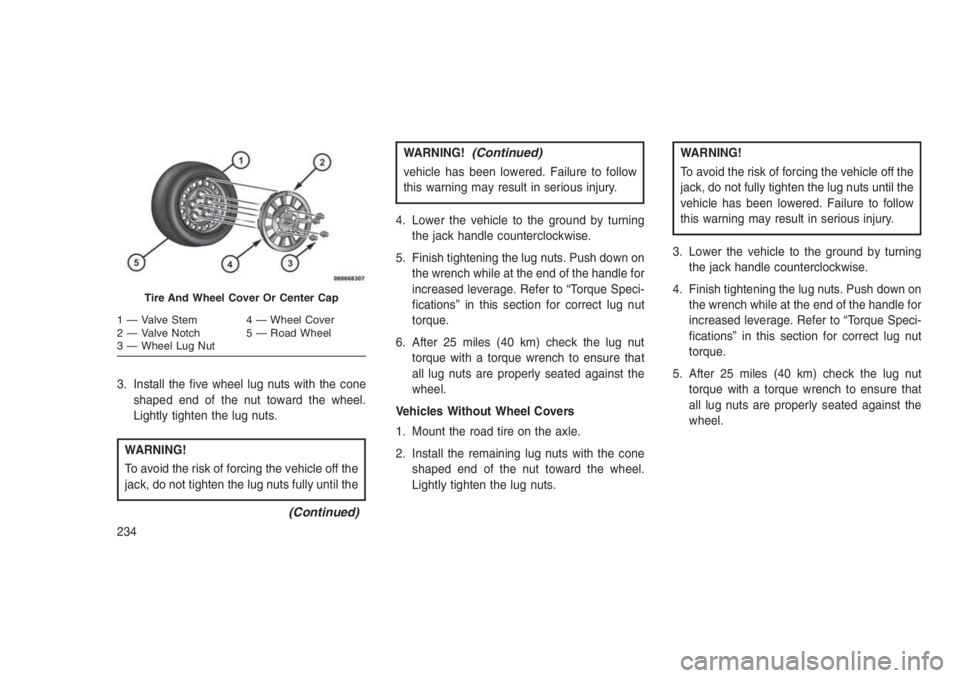
3. Install the five wheel lug nuts with the cone
shaped end of the nut toward the wheel.
Lightly tighten the lug nuts.
WARNING!
To avoid the risk of forcing the vehicle off the
jack, do not tighten the lug nuts fully until the
(Continued)
WARNING!(Continued)
vehicle has been lowered. Failure to follow
this warning may result in serious injury.
4. Lower the vehicle to the ground by turning
the jack handle counterclockwise.
5. Finish tightening the lug nuts. Push down on
the wrench while at the end of the handle for
increased leverage. Refer to “Torque Speci-
fications” in this section for correct lug nut
torque.
6. After 25 miles (40 km) check the lug nut
torque with a torque wrench to ensure that
all lug nuts are properly seated against the
wheel.
Vehicles Without Wheel Covers
1. Mount the road tire on the axle.
2. Install the remaining lug nuts with the cone
shaped end of the nut toward the wheel.
Lightly tighten the lug nuts.
WARNING!
To avoid the risk of forcing the vehicle off the
jack, do not fully tighten the lug nuts until the
vehicle has been lowered. Failure to follow
this warning may result in serious injury.
3. Lower the vehicle to the ground by turning
the jack handle counterclockwise.
4. Finish tightening the lug nuts. Push down on
the wrench while at the end of the handle for
increased leverage. Refer to “Torque Speci-
fications” in this section for correct lug nut
torque.
5. After 25 miles (40 km) check the lug nut
torque with a torque wrench to ensure that
all lug nuts are properly seated against the
wheel.
Tire And Wheel Cover Or Center Cap
1 — Valve Stem 4 — Wheel Cover
2 — Valve Notch 5 — Road Wheel
3 — Wheel Lug Nut
234
Page 259 of 332
ONBOARD DIAGNOSTIC
SYSTEM — OBD II
Your vehicle is equipped with a sophisticated
onboard diagnostic system called OBD II. This
system monitors the performance of the emis-
sions, engine, and automatic transmission con-
trol systems. When these systems are operat-
ing properly, your vehicle will provide excellent
performance and fuel economy, as well as
engine emissions well within current govern-
ment regulations.
If any of these systems require service, the
OBD II system will turn on the “Malfunction
Indicator Light” (MIL). It will also store diagnos-
tic codes and other information to assist your
service technician in making repairs. Although
your vehicle will usually be drivable and not
need towing, see your authorized dealer for
service as soon as possible.
CAUTION!
•Prolonged driving with the MIL on could
cause further damage to the emission con-
trol system. It could also affect fuel
economy and driveability. The vehicle
must be serviced before any emissions
tests can be performed.
•If the MIL is flashing while the engine is
running, severe catalytic converter dam-
age and power loss will soon occur. Imme-
diate service is required.
Onboard Diagnostic System (OBD II)
Cybersecurity
Your vehicle is required to have an Onboard
Diagnostic system (OBD II) and a connection
port to allow access to information related to the
performance of your emissions controls. Autho-
rized service technicians may need to access
this information to assist with the diagnosis and
service of your vehicle and emissions system.
WARNING!
•ONLY an authorized service technician
should connect equipment to the OBD II
connection port in order to diagnose or
service your vehicle.
•If unauthorized equipment is connected to
the OBD II connection port, such as a
driver-behavior tracking device, it may:
•Be possible that vehicle systems, in-
cluding safety related systems, could be
impaired or a loss of vehicle control
could occur that may result in an acci-
dent involving serious injury or death.
•Access, or allow others to access, infor-
mation stored in your vehicle systems,
including personal information.
For further information, refer to “Cybersecurity”
in the “Understanding Your Instrument Panel”
section.
255
Page 270 of 332
•If frequent engine coolant (antifreeze) addi-
tions are required, the cooling system should
be pressure tested for leaks.
•Maintain engine coolant (antifreeze) concen-
tration at a minimum of 50% OAT coolant
(conforming to MS.90032) and distilled water
for proper corrosion protection of your engine
which contains aluminum components.
•Make sure that the coolant expansion bottle
overflow hoses are not kinked or obstructed.
•Keep the front of the radiator clean. If your
vehicle is equipped with air conditioning,
keep the front of the condenser clean.
•Do not change the thermostat for Summer or
Winter operation. If replacement is ever nec-
essary, install ONLY the correct type thermo-
stat. Other designs may result in unsatisfac-
tory engine coolant (antifreeze) performance,
poor gas mileage, and increased emissions.
Brake SystemIn order to assure brake system performance,
all brake system components should be in-spected periodically. Refer to the “Maintenance
Schedule” for the proper maintenance intervals.
WARNING!
Riding the brakes can lead to brake failure
and possibly a collision. Driving with your
foot resting or riding on the brake pedal can
result in abnormally high brake tempera-
tures, excessive lining wear, and possible
brake damage. You would not have your full
braking capacity in an emergency.
Brake Master Cylinder
The fluid level in the master cylinder should be
checked when performing under hood services,
or immediately if the brake system warning light
is on.
Be sure to clean the top of the master cylinder
area before removing the cap. If necessary, add
fluid to bring the fluid level up to the require-
ments described on the brake fluid reservoir.
Fluid level can be expected to fall as the brake
pads wear. The brake fluid level should be
checked when the pads are replaced. However,low fluid level may be caused by a leak and a
checkup may be needed.
NOTE:
If your vehicle is equipped with a manual
transmission, the brake fluid reservoir sup-
plies fluid to both the brake system and the
clutch release system. The two systems are
separated in the reservoir, and a leak in one
system will not affect the other system. The
manual transmission clutch release system
should not require fluid replacement during
the life of the vehicle. If the brake fluid
reservoir is low and the brake system does
not indicate any leaks or other problems, it
may be a result of a leak in the hydraulic
clutch release system. See your local autho-
rized dealer for service.
Use only manufacturer’s recommended brake
fluid. Refer to “Fluids, Lubricants, And Genuine
Parts” in “Maintaining Your Vehicle” for further
information.
266
Page 277 of 332
Use MOPAR Total Clean to clean vinyl uphol-
stery.
MOPAR Total Clean is specifically recom-
mended for leather upholstery.
Your leather upholstery can be best preserved
by regular cleaning with a damp soft cloth.
Small particles of dirt can act as an abrasive
and damage the leather upholstery and should
be removed promptly with a damp cloth. Stub-
born soils can be removed easily with a soft
cloth and MOPAR Total Clean. Care should be
taken to avoid soaking your leather upholstery
with any liquid. Please do not use polishes, oils,
cleaning fluids, solvents, detergents, or
ammonia-based cleaners to clean your leather
upholstery. Application of a leather conditioner
is not required to maintain the original condition.
WARNING!
Do not use volatile solvents for cleaning
purposes. Many are potentially flammable,
and if used in closed areas they may cause
respiratory harm.
CAUTION!
Direct contact of air fresheners, insect repel-
lents, suntan lotions, or hand sanitizers to
the plastic, painted, or decorated surfaces of
the interior may cause permanent damage.
Wipe away immediately.
CAUTION!
Damage caused by these type of products
may not be covered by your New Vehicle
Limited Warranty.
CAUTION!
Do not use Alcohol and Alcohol-based and/or
Keton based cleaning products to clean
leather seats, as damage to the seat may
result.Cleaning Headlights
Your vehicle has plastic headlights that are
lighter and less susceptible to stone breakage
than glass headlights.
Plastic is not as scratch resistant as glass and
therefore different lens cleaning procedures
must be followed.
To minimize the possibility of scratching the
lenses and reducing light output, avoid wiping
with a dry cloth. To remove road dirt, wash with
a mild soap solution followed by rinsing.
Do not use abrasive cleaning components, sol-
vents, steel wool or other aggressive material to
clean the lenses.
Glass Surfaces
All glass surfaces should be cleaned on a
regular basis with MOPAR Glass Cleaner, or
any commercial household-type glass cleaner.
Never use an abrasive type cleaner. Use cau-
tion when cleaning the inside rear window
equipped with electric defrosters or windows
equipped with radio antennas. Do not use
scrapers or other sharp instrument that may
scratch the elements.
273
Page 279 of 332
WARNING!(Continued)
•Before replacing a fuse, make sure that the
ignition is off and that all the other services
are switched off and/or disengaged.
•If the replaced fuse blows again, contact
an authorized dealer.
•If a general protection fuse for safety sys-
tems (air bag system, braking system),
power unit systems (engine system, gear-
box system) or steering system blows,
contact an authorized dealer.
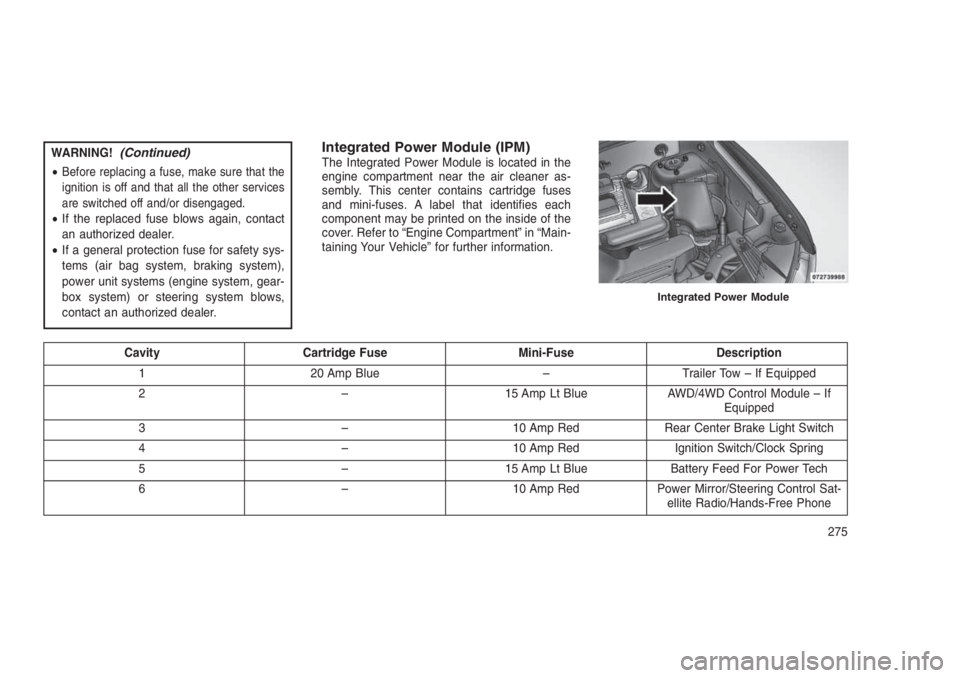
Integrated Power Module (IPM)The Integrated Power Module is located in the
engine compartment near the air cleaner as-
sembly. This center contains cartridge fuses
and mini-fuses. A label that identifies each
component may be printed on the inside of the
cover. Refer to “Engine Compartment” in “Main-
taining Your Vehicle” for further information.
Cavity Cartridge Fuse Mini-Fuse Description
1 20 Amp Blue – Trailer Tow – If Equipped
2 – 15 Amp Lt Blue AWD/4WD Control Module – If
Equipped
3 – 10 Amp Red Rear Center Brake Light Switch
4 – 10 Amp Red Ignition Switch/Clock Spring
5 – 15 Amp Lt Blue Battery Feed For Power Tech
6 – 10 Amp Red Power Mirror/Steering Control Sat-
ellite Radio/Hands-Free Phone
Integrated Power Module
275
Page 322 of 332
Adding Engine Coolant (Antifreeze). . . .264
Adding Fuel..................212
Adding Washer Fluid.............261
Additives, Fuel................211
Adjust
Down....................89
Forward...................89
Rearward..................89
Up......................89
AirBag.....................38
Advance Front Air Bag..........38
Air Bag Operation.............39
Air Bag Warning Light...........44
Enhanced Accident Response......43
Event Data Recorder (EDR).......45
Front Air Bag................38
If A Deployment Occurs..........43
Knee Impact Bolsters...........40
Maintaining Your Air Bag System.....45
Side Air Bags...............40
Transporting Pets.............57
Air Bag Deployment..............38
Air Bag Light.............44, 59, 123
Air Bag Maintenance.............45
Air Cleaner, Engine (Engine Air Cleaner
Filter)....................258
Air Conditioner Maintenance........259Air Conditioning................150
Air Conditioning Controls..........150
Air Conditioning Filter.........158, 260
Air Conditioning Refrigerant......259, 260
Air Conditioning System.....150, 153, 259
Air Conditioning, Operating Tips. . . .157, 159
Air Pressure, Tires..............196
Alarm (Security Alarm)............125
Alarm System (Security Alarm)......14, 15
Alterations/Modifications, Vehicle.......8
Anti-Lock Brake System (ABS).......187
Anti-Lock Warning Light...........133
Antifreeze (Engine Coolant)......263, 280
Capacities................280
Disposal..................265
Appearance Care...............271
Assist, Hill Start................189
Automatic Dimming Mirror..........65
Automatic Door Locks.............22
Automatic Temperature Control (ATC) . . .153
Automatic Transaxle..............12
Fluid Level Check.........268, 269
Automatic Transmission . .168, 169, 267, 268
Autostick.................176
Fluid And Filter Changes........269
Fluid Type.............267, 268
Gear Ranges............170, 174Special Additives..........268, 269
Autostick.................176, 177
Battery..................127, 258
Charging System Light.........127
Keyless Transmitter Replacement
(RKE)...................18
Belts, Seat...................59
Body Mechanism Lubrication........261
Brake Assist System.............189
Brake Fluid..................282
Brake System..............186, 266
Master Cylinder.............266
Parking..................185
Warning Light..............124
Brake, Parking................185
Brake/Transmission Interlock........169
Brakes.....................186
Bulb Replacement..............279
Bulbs, Light................60, 279
Calibration, Compass............144
Camera, Rear.................104
Capacities, Antifreeze (Engine Coolant) . .280
Capacities, Fluid...............280
Caps, Filler
Fuel....................212
318
Page 323 of 332
Oil (Engine)..........253, 254, 257
Power Steering.............184
Radiator (Coolant Pressure)......264
Car Washes..................271
Carbon Monoxide Warning..........58
Cargo Area Cover..............111
Cargo Area Features.............111
Cargo Compartment.............111
Light....................111
Luggage Carrier.............114
Cargo Light..................111
Cargo Load Floor...............112
Cargo Tie-Downs...............112
Cellular Phone.................67
Center High Mounted Stop Light......280
Chains, Tire..................202
Changing A Flat Tire.............228
Checking Your Vehicle For Safety......58
Checks, Safety.................58
Child Restraints
How To Stow An Unused ALR Seat Belt .56
Child Safety Locks...............23
Clean Air Gasoline..............211
Cleaning
Wheels..................272
Climate Control................150
Clutch.....................266Clutch Fluid..................266
Coin Holder..................111
Compact Disc (CD) Maintenance......150
Compact Spare Tire.............199
Compass Calibration.............144
Compass Variance..............143
Connector
UCI ....................145
Universal Consumer Interface (UCI) . .145
Console....................111
Coolant (Antifreeze).............280
Coolant Pressure Cap (Radiator Cap) . . .264
Cooling System................263
Adding Coolant (Antifreeze)......264
Coolant Level...........263, 265
Disposal Of Used Coolant.......265
Drain, Flush, And Refill
.........263
Inspection................265
Points To Remember..........265
Pressure Cap..............264
Radiator Cap...............264
Selection Of Coolant (Antifreeze) . . .263
Corrosion Protection.............271
Cupholders..................111
Customer Assistance.............296
Data Recorder, Event.............45Defroster, Rear Window...........114
Defroster, Windshield.......59, 152, 156
Delay (Intermittent) Wipers.........100
Diagnostic System, Onboard........255
Dimmer Switch, Headlight...........98
Dipsticks
Power Steering..............184
Disposal
Antifreeze (Engine Coolant)......265
Door Locks
Child-Protection Door Lock — Rear
Doors....................23
Door Locks.................21
KeyFob ..................21
Remote...................21
Remote Keyless Entry (RKE).......21
Door Locks, Automatic............22
Downshifting.................168
Driver’s Seat Back Tilt.............91
Driving.....................179
Off-Pavement..............179
Off-Road.................179
Electric Remote Mirrors............66
Electrical Power Outlets...........108
Electronic Brake Control System......187
Anti-Lock Brake System........187
319
Page 324 of 332
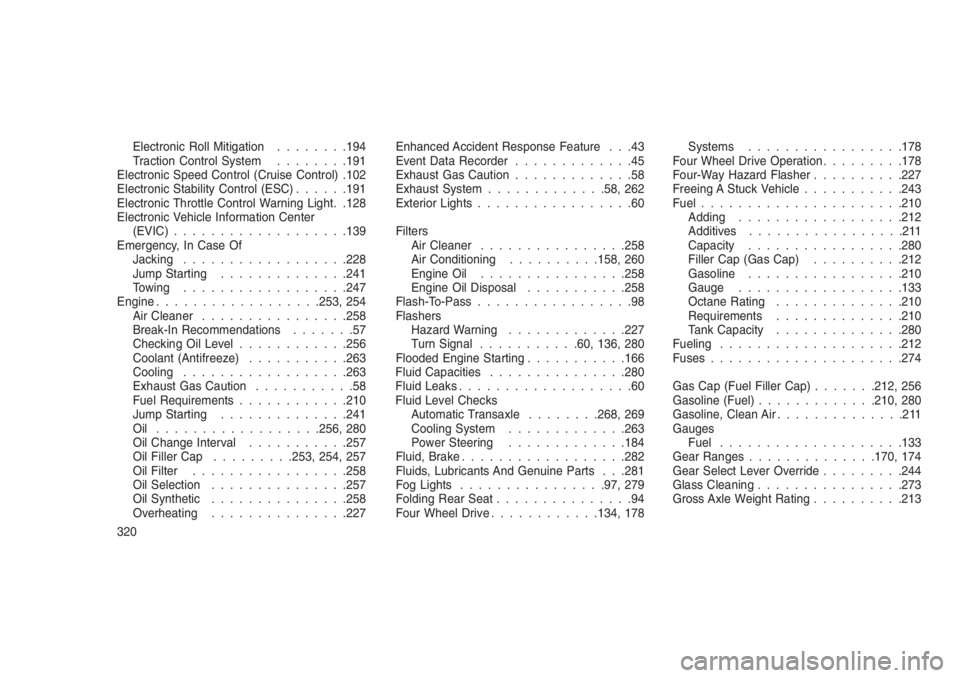
Electronic Roll Mitigation........194
Traction Control System........191
Electronic Speed Control (Cruise Control) .102
Electronic Stability Control (ESC)......191
Electronic Throttle Control Warning Light. .128
Electronic Vehicle Information Center
(EVIC)...................139
Emergency, In Case Of
Jacking..................228
Jump Starting..............241
Towing..................247
Engine..................253, 254
Air Cleaner................258
Break-In Recommendations.......57
Checking Oil Level............256
Coolant (Antifreeze)...........263
Cooling..................263
Exhaust Gas Caution...........58
Fuel Requirements............210
Jump Starting..............241
Oil ..................256, 280
Oil Change Interval...........257
Oil Filler Cap.........253, 254, 257
Oil Filter.................258
Oil Selection...............257
Oil Synthetic...............258
Overheating...............227Enhanced Accident Response Feature . . .43
Event Data Recorder.............45
Exhaust Gas Caution.............58
Exhaust System.............58, 262
Exterior Lights.................60
Filters
Air Cleaner................258
Air Conditioning..........158, 260
Engine Oil................258
Engine Oil Disposal...........258
Flash-To-Pass.................98
Flashers
Hazard Warning.............227
Turn Signal...........60, 136, 280
Flooded Engine Starting...........166
Fluid Capacities...............280
Fluid Leaks...................60
Fluid Level Checks
Automatic Transaxle........268, 269
Cooling System.............263
Power Steering.............184
Fluid, Brake..................282
Fluids, Lubricants And Genuine Parts . . .281
Fog Lights................97, 279
Folding Rear Seat...............94
Four Wheel Drive............134, 178Systems.................178
Four Wheel Drive Operation.........178
Four-Way Hazard Flasher..........227
Freeing A Stuck Vehicle...........243
Fuel......................210
Adding..................212
Additives.................211
Capacity.................280
Filler Cap (Gas Cap)..........212
Gasoline.................210
Gauge..................133
Octane Rating..............210
Requirements..............210
Tank Capacity..............280
Fueling....................212
Fuses.....................274
Gas Cap (Fuel Filler Cap).......212, 256
Gasoline (Fuel).............210, 280
Gasoline, Clean Air..............211
Gauges
Fuel....................133
Gear Ranges..............170, 174
Gear Select Lever Override.........244
Glass Cleaning................273
Gross Axle Weight Rating..........213
320
Page 325 of 332
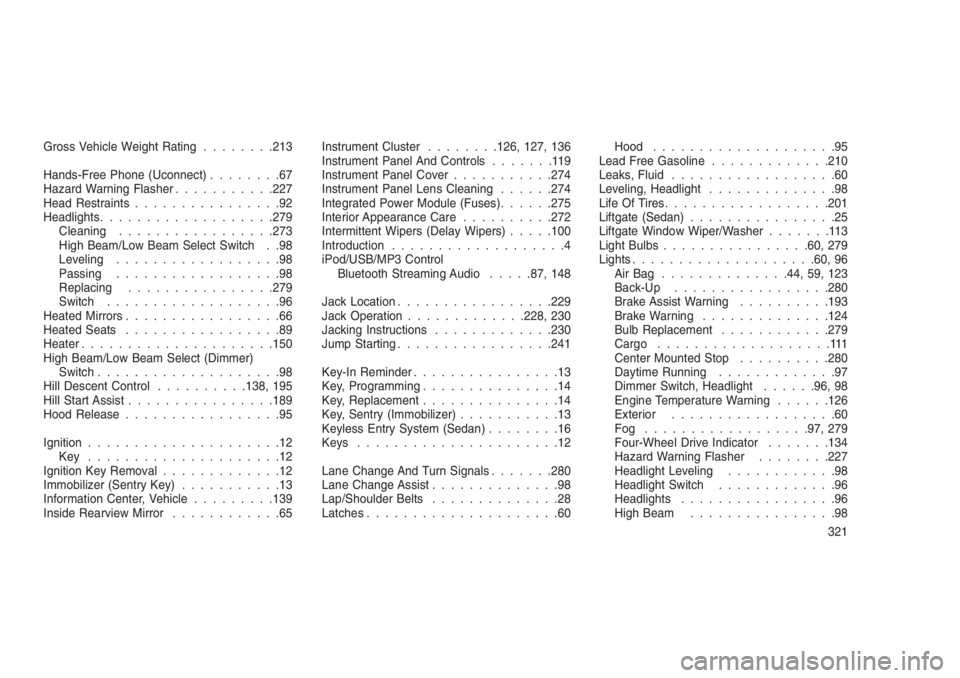
Gross Vehicle Weight Rating........213
Hands-Free Phone (Uconnect)........67
Hazard Warning Flasher...........227
Head Restraints................92
Headlights...................279
Cleaning.................273
High Beam/Low Beam Select Switch . .98
Leveling..................98
Passing..................98
Replacing................279
Switch...................96
Heated Mirrors.................66
Heated Seats.................89
Heater.....................150
High Beam/Low Beam Select (Dimmer)
Switch....................98
Hill Descent Control..........138, 195
Hill Start Assist................189
Hood Release.................95
Ignition.....................12
Key .....................12
Ignition Key Removal.............12
Immobilizer (Sentry Key)...........13
Information Center, Vehicle.........139
Inside Rearview Mirror............65Instrument Cluster........126, 127, 136
Instrument Panel And Controls.......119
Instrument Panel Cover...........274
Instrument Panel Lens Cleaning......274
Integrated Power Module (Fuses)......275
Interior Appearance Care..........272
Intermittent Wipers (Delay Wipers).....100
Introduction...................4
iPod/USB/MP3 Control
Bluetooth Streaming Audio.....87, 148
Jack Location.................229
Jack Operation.............228, 230
Jacking Instructions.............230
Jump Starting.................241
Key-In Reminder................13
Key, Programming...............14
Key, Replacement...............14
Key, Sentry (Immobilizer)
...........13
Keyless Entry System (Sedan)........16
Keys......................12
Lane Change And Turn Signals.......280
Lane Change Assist..............98
Lap/Shoulder Belts..............28
Latches.....................60Hood....................95
Lead Free Gasoline.............210
Leaks, Fluid..................60
Leveling, Headlight..............98
Life Of Tires..................201
Liftgate (Sedan)................25
Liftgate Window Wiper/Washer.......113
Light Bulbs................60, 279
Lights....................60, 96
AirBag ..............44, 59, 123
Back-Up.................280
Brake Assist Warning..........193
Brake Warning..............124
Bulb Replacement............279
Cargo...................111
Center Mounted Stop..........280
Daytime Running.............97
Dimmer Switch, Headlight......96, 98
Engine Temperature Warning......126
Exterior..................60
Fog ..................97, 279
Four-Wheel Drive Indicator.......134
Hazard Warning Flasher........227
Headlight Leveling............98
Headlight Switch.............96
Headlights.................96
High Beam................98
321