fuel JEEP PATRIOT 2021 Owner handbook (in English)
[x] Cancel search | Manufacturer: JEEP, Model Year: 2021, Model line: PATRIOT, Model: JEEP PATRIOT 2021Pages: 332, PDF Size: 1.99 MB
Page 137 of 332
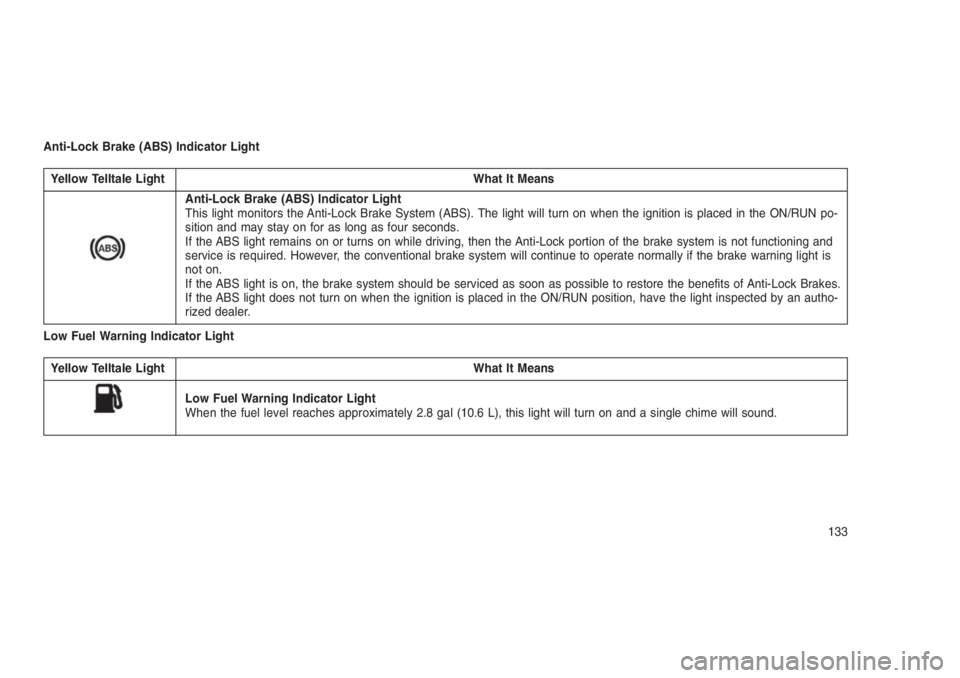
Anti-Lock Brake (ABS) Indicator Light
Yellow Telltale Light What It Means
Anti-Lock Brake (ABS) Indicator Light
This light monitors the Anti-Lock Brake System (ABS). The light will turn on when the ignition is placed in the ON/RUN po-
sition and may stay on for as long as four seconds.
If the ABS light remains on or turns on while driving, then the Anti-Lock portion of the brake system is not functioning and
service is required. However, the conventional brake system will continue to operate normally if the brake warning light is
not on.
If the ABS light is on, the brake system should be serviced as soon as possible to restore the benefits of Anti-Lock Brakes.
If the ABS light does not turn on when the ignition is placed in the ON/RUN position, have the light inspected by an autho-
rized dealer.
Low Fuel Warning Indicator Light
Yellow Telltale Light What It Means
Low Fuel Warning Indicator Light
When the fuel level reaches approximately 2.8 gal (10.6 L), this light will turn on and a single chime will sound.
133
Page 138 of 332
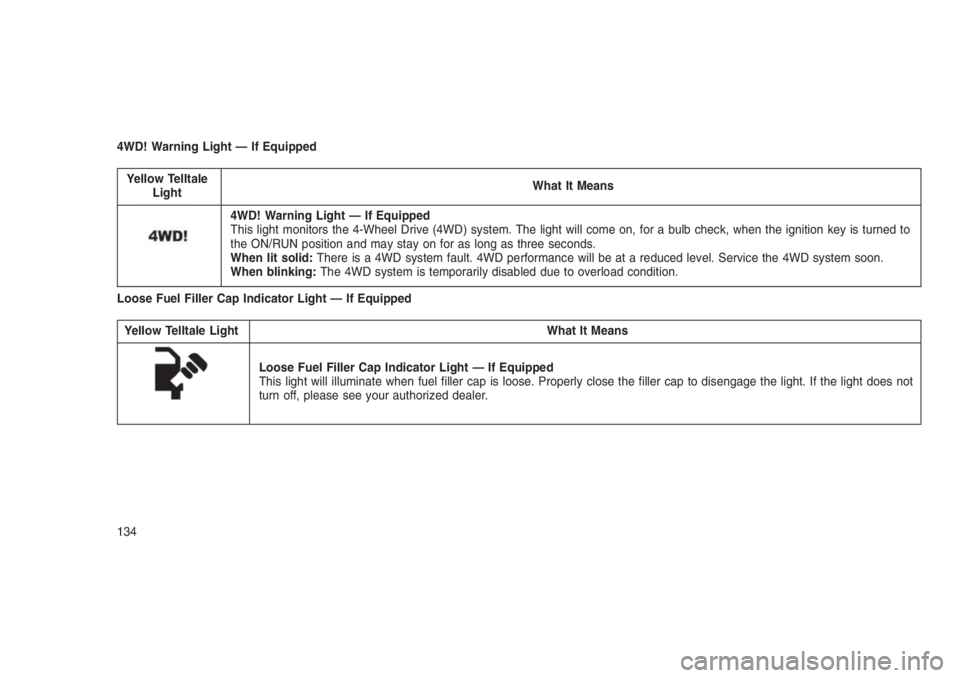
4WD! Warning Light — If Equipped
Yellow Telltale
LightWhat It Means
4WD! Warning Light — If Equipped
This light monitors the 4-Wheel Drive (4WD) system. The light will come on, for a bulb check, when the ignition key is turned to
the ON/RUN position and may stay on for as long as three seconds.
When lit solid:There is a 4WD system fault. 4WD performance will be at a reduced level. Service the 4WD system soon.
When blinking:The 4WD system is temporarily disabled due to overload condition.
Loose Fuel Filler Cap Indicator Light — If Equipped
Yellow Telltale Light What It Means
Loose Fuel Filler Cap Indicator Light — If Equipped
This light will illuminate when fuel filler cap is loose. Properly close the filler cap to disengage the light. If the light does not
turn off, please see your authorized dealer.
134
Page 144 of 332
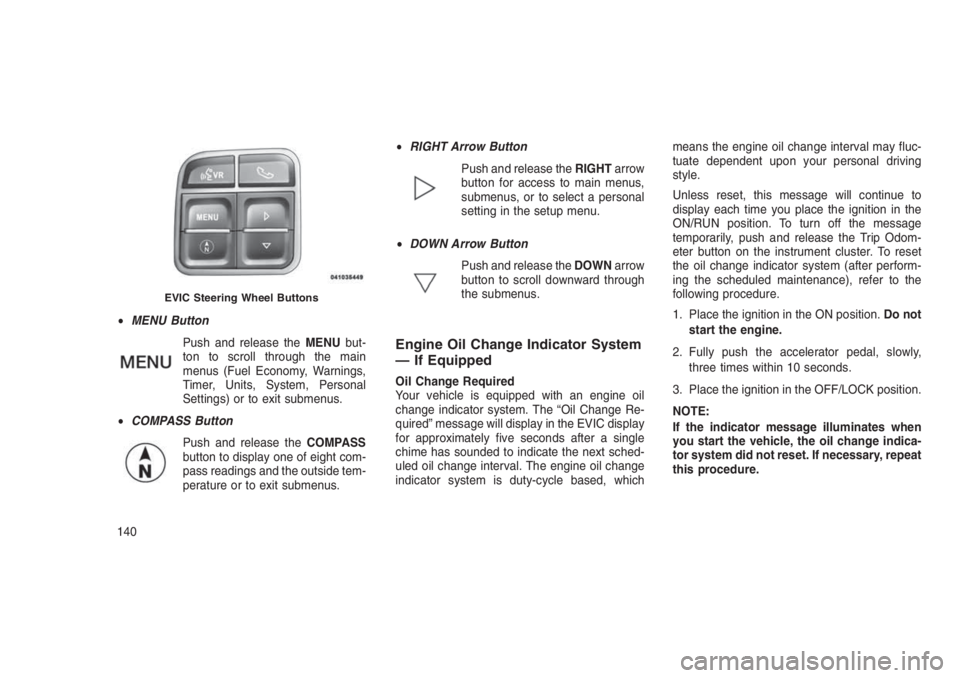
•MENU Button
Push and release theMENUbut-
ton to scroll through the main
menus (Fuel Economy, Warnings,
Timer, Units, System, Personal
Settings) or to exit submenus.
•COMPASS Button
Push and release theCOMPASS
button to display one of eight com-
pass readings and the outside tem-
perature or to exit submenus.•RIGHT Arrow Button
Push and release theRIGHTarrow
button for access to main menus,
submenus, or to select a personal
setting in the setup menu.
•DOWN Arrow Button
Push and release theDOWNarrow
button to scroll downward through
the submenus.
Engine Oil Change Indicator System
— If Equipped
Oil Change Required
Your vehicle is equipped with an engine oil
change indicator system. The “Oil Change Re-
quired” message will display in the EVIC display
for approximately five seconds after a single
chime has sounded to indicate the next sched-
uled oil change interval. The engine oil change
indicator system is duty-cycle based, whichmeans the engine oil change interval may fluc-
tuate dependent upon your personal driving
style.
Unless reset, this message will continue to
display each time you place the ignition in the
ON/RUN position. To turn off the message
temporarily, push and release the Trip Odom-
eter button on the instrument cluster. To reset
the oil change indicator system (after perform-
ing the scheduled maintenance), refer to the
following procedure.
1. Place the ignition in the ON position.Do not
start the engine.
2. Fully push the accelerator pedal, slowly,
three times within 10 seconds.
3. Place the ignition in the OFF/LOCK position.
NOTE:
If the indicator message illuminates when
you start the vehicle, the oil change indica-
tor system did not reset. If necessary, repeat
this procedure.
EVIC Steering Wheel Buttons
140
Page 145 of 332
Compass/Temperature/AudioPush and release theCOMPASSbutton to dis-
play one of eight compass headings to indicate
the direction the vehicle is facing, the outside
temperature, and the current radio station.
Refer to “Personal Settings (Customer-
Programmable Features)” in this section for
additional information regarding the compass.
Average Fuel EconomyShows the average fuel economy since the last
reset (pushing and holding theRIGHTarrow
button as prompted in the EVIC display to
reset). When the fuel economy is reset, the
display will read “RESET” or show dashes for
two seconds. Then, the history information will
be erased, and the averaging will continue from
the last fuel reading before the reset.
Distance To Empty (DTE)Shows the estimated distance that can be trav-
elled with the fuel remaining in the tank. This
estimated distance is determined by a weighted
average of the instantaneous and average fuel
economy, according to the current fuel tank
level. This is not resettable.NOTE:
Significant changes in driving style or ve-
hicle loading will greatly affect the actual
drivable distance of the vehicle, regardless
of the DTE displayed value.
When the DTE value is less than 30 miles
(48 km) estimated driving distance, the DTE
display will change to a text display of"LOW
FUEL.” This display will continue until the ve-
hicle runs out of fuel. Adding a significant
amount of fuel to the vehicle will turn off the
"LOW FUEL"text and a new DTE value will be
displayed, based on the current values in the
DTE calculation and the current fuel tank level.
Tire Pressure Monitor (TPM) — If
Equipped
Refer to “Starting And Operating,” “Tire Pres-
sure Monitoring System (TPMS) for system
operation.
Elapsed TimeShows the total elapsed time of travel since the
last reset. Elapsed time will increment when the
ignition is placed in the RUN/START position.Elapsed time is displayed as follows:
hours: minutes: seconds
Elapsed time can be reset by pushing and
holding theRIGHT
arrow button (as
prompted in the EVIC display). Upon reset, all
digits will change to zeros, and time will start
again if the ignition is in the RUN or START
position.
EVIC Units Selection (Units In
Display)
Displays the units used for the Outside Tem-
perature, Average Fuel Economy, Distance to
Empty, and Tire Pressure features. Push and
release theRIGHT
arrow button to toggle
units between"U.S."and"METRIC."
System WarningsDisplays “SYSTEM OK” if there are no active
Warning Messages stored. Pushing and releas-
ing theDOWN
arrow button when “SYSTEM
OK” is displayed will do nothing. Displays “SYS-
TEM WARNINGS PRESENT” if there are active
Warning Messages stored. Pushing and releas-
ing theDOWN
arrow button when “SYSTEM
141
Page 156 of 332
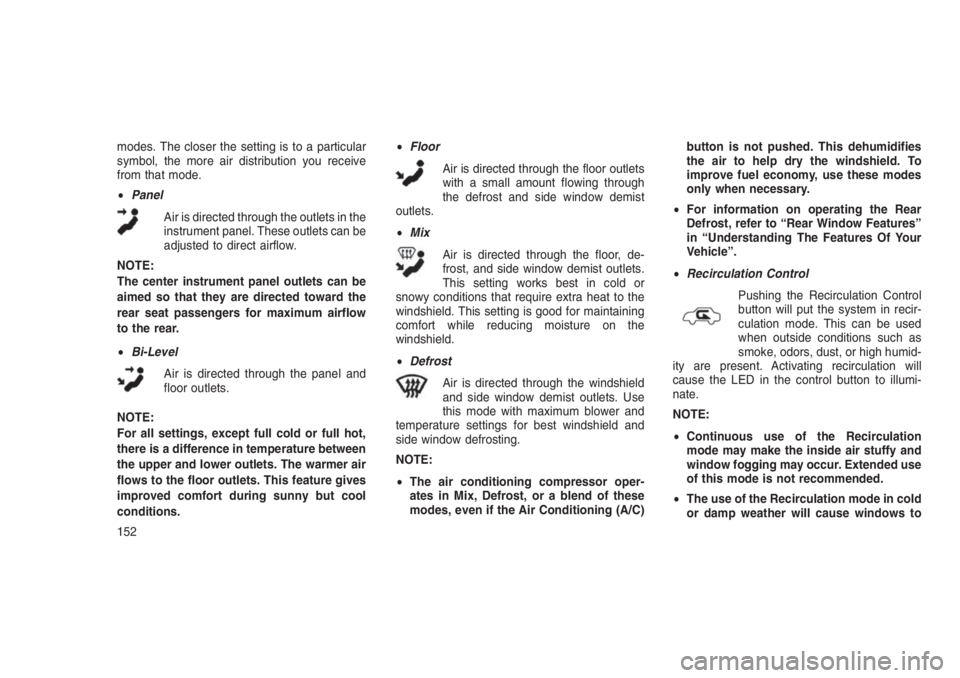
modes. The closer the setting is to a particular
symbol, the more air distribution you receive
from that mode.
•Panel
Air is directed through the outlets in the
instrument panel. These outlets can be
adjusted to direct airflow.
NOTE:
The center instrument panel outlets can be
aimed so that they are directed toward the
rear seat passengers for maximum airflow
to the rear.
•Bi-Level
Air is directed through the panel and
floor outlets.
NOTE:
For all settings, except full cold or full hot,
there is a difference in temperature between
the upper and lower outlets. The warmer air
flows to the floor outlets. This feature gives
improved comfort during sunny but cool
conditions.•Floor
Air is directed through the floor outlets
with a small amount flowing through
the defrost and side window demist
outlets.
•Mix
Air is directed through the floor, de-
frost, and side window demist outlets.
This setting works best in cold or
snowy conditions that require extra heat to the
windshield. This setting is good for maintaining
comfort while reducing moisture on the
windshield.
•Defrost
Air is directed through the windshield
and side window demist outlets. Use
this mode with maximum blower and
temperature settings for best windshield and
side window defrosting.
NOTE:
•The air conditioning compressor oper-
ates in Mix, Defrost, or a blend of these
modes, even if the Air Conditioning (A/C)button is not pushed. This dehumidifies
the air to help dry the windshield. To
improve fuel economy, use these modes
only when necessary.
•For information on operating the Rear
Defrost, refer to “Rear Window Features”
in “Understanding The Features Of Your
Vehicle”.
•Recirculation Control
Pushing the Recirculation Control
button will put the system in recir-
culation mode. This can be used
when outside conditions such as
smoke, odors, dust, or high humid-
ity are present. Activating recirculation will
cause the LED in the control button to illumi-
nate.
NOTE:
•Continuous use of the Recirculation
mode may make the inside air stuffy and
window fogging may occur. Extended use
of this mode is not recommended.
•The use of the Recirculation mode in cold
or damp weather will cause windows to
152
Page 167 of 332
•Tire Inflation Pressures........................196
•Tire Pressures For High Speed Operation.............197
•Radial Ply Tires.............................197
•Tire Types................................198
•Run Flat Tires — If Equipped.....................199
•Spare Tires — If Equipped.......................199
•Tire Spinning..............................200
•Tread Wear Indicators.........................200
•Life Of Tire...............................201
•Replacement Tires...........................201
•TIRE CHAINS (TRACTION DEVICES) . . . . . . . . . . . . .. . . .202
•TIRE ROTATION RECOMMENDATIONS . . . . . . .. . . . . . . .203
•TIRE PRESSURE MONITORING SYSTEM (TPMS) . . . . .. . . .204
•Base System...............................205
•Premium System — If Equipped...................207
•TPMS Deactivation — If Equipped..................209
•FUEL REQUIREMENTS — GASOLINE ENGINE . . . . . . . . . . .210•Methanol.................................210
•Ethanol..................................210
•Clean Air Gasoline...........................211
•MMT In Gasoline............................211
•Materials Added To Fuel.......................211
•ADDING FUEL...............................212•Locking Fuel Filler Cap (Gas Cap).................212
•Loose Fuel Filler Cap Message...................212
•TRAILER TOWING . . ..........................213•Common Towing Definitions.....................213
163
Page 170 of 332
WARNING!
Do not attempt to push or tow your vehicle to
get it started. Vehicles equipped with an
automatic transmission cannot be started
this way. Unburned fuel could enter the cata-
lytic converter and once the engine has
started, ignite and damage the converter and
vehicle. If the vehicle has a discharged bat-
tery, booster cables may be used to obtain a
start from another vehicle. This type of start
can be dangerous if done improperly, so
follow the procedure carefully. Refer to
“Jump-Starting” in “What To Do In Emergen-
cies” for further information.
Extreme Cold Weather (below −20°F
or −29°C)
To ensure reliable starting at these tempera-
tures, use of an externally powered electric
engine block heater (available from your autho-
rized dealer) is recommended.
If Engine Fails To StartIf the engine fails to start after you have followed
the “Normal Starting” procedure, it may be
flooded. Push the accelerator pedal all the way
to the floor and hold it there. Crank the engine
for no more than 15 seconds. This should clear
any excess fuel in case the engine is flooded.
Leave the ignition key in the ON position, re-
lease the accelerator pedal and repeat the
“Normal Starting” procedure.
WARNING!
Never pour fuel or other flammable liquid into
the throttle body air inlet opening in an
attempt to start the vehicle. This could result
in flash fire causing serious personal injury.
CAUTION!
To prevent damage to the starter, do not
crank the engine for more than 15 seconds
at a time. Wait 10 to 15 seconds before trying
again.
After StartingThe idle speed will automatically decrease as
the engine warms up.
MANUAL TRANSMISSION — IF
EQUIPPED
Five-Speed Manual Transmission
WARNING!
You or others could be injured if you leave
the vehicle unattended without having the
parking brake fully applied. The parking
brake should always be applied when the
driver is not in the vehicle, especially on an
incline.
Fully press the clutch pedal before you shift
gears. As you release the clutch pedal, lightly
press the accelerator pedal.
166
Page 171 of 332
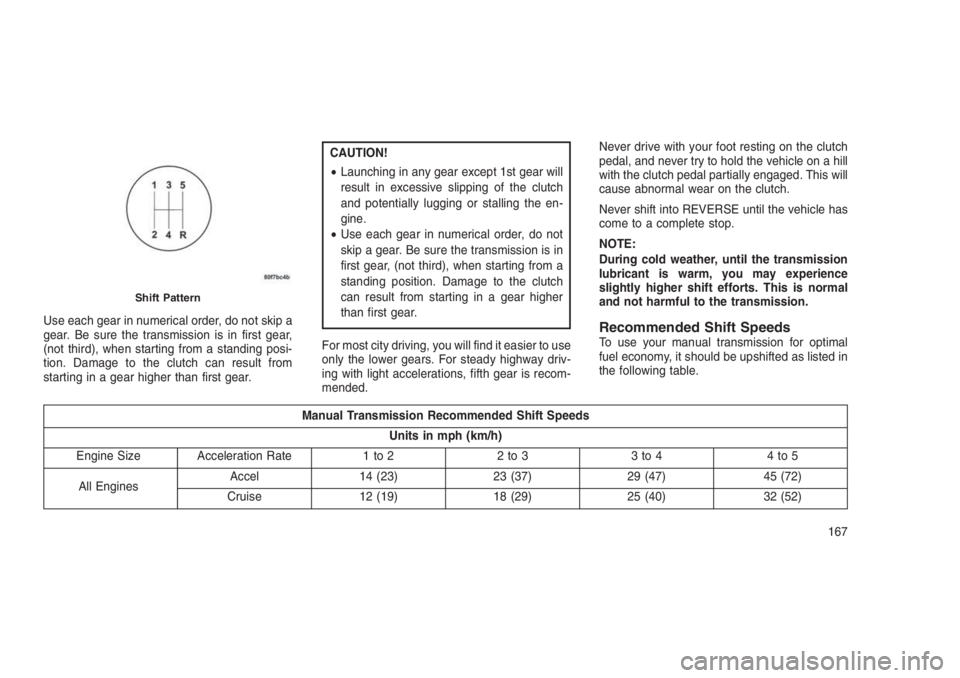
Use each gear in numerical order, do not skip a
gear. Be sure the transmission is in first gear,
(not third), when starting from a standing posi-
tion. Damage to the clutch can result from
starting in a gear higher than first gear.
CAUTION!
•Launching in any gear except 1st gear will
result in excessive slipping of the clutch
and potentially lugging or stalling the en-
gine.
•Use each gear in numerical order, do not
skip a gear. Be sure the transmission is in
first gear, (not third), when starting from a
standing position. Damage to the clutch
can result from starting in a gear higher
than first gear.
For most city driving, you will find it easier to use
only the lower gears. For steady highway driv-
ing with light accelerations, fifth gear is recom-
mended.Never drive with your foot resting on the clutch
pedal, and never try to hold the vehicle on a hill
with the clutch pedal partially engaged. This will
cause abnormal wear on the clutch.
Never shift into REVERSE until the vehicle has
come to a complete stop.
NOTE:
During cold weather, until the transmission
lubricant is warm, you may experience
slightly higher shift efforts. This is normal
and not harmful to the transmission.
Recommended Shift SpeedsTo use your manual transmission for optimal
fuel economy, it should be upshifted as listed in
the following table.
Manual Transmission Recommended Shift Speeds
Units in mph (km/h)
Engine Size Acceleration Rate 1 to 2 2 to 3 3 to 4 4 to 5
All EnginesAccel 14 (23) 23 (37) 29 (47) 45 (72)
Cruise 12 (19) 18 (29) 25 (40) 32 (52)
Shift Pattern
167
Page 172 of 332
DownshiftingProper downshifting will improve fuel economy
and prolong engine life.
CAUTION!
If you skip a gear while downshifting or
downshift at too high of a vehicle speed,
these conditions may cause the engine to
overspeed if too low of a gear is selected and
the clutch pedal is released. Damage to the
clutch and the transmission can result from
skipping a gear while downshifting or down-
shifting at too high of a vehicle speed even if
the clutch pedal is held pressed (i.e., not
released).
To maintain a safe speed and prolong brake life,
shift down to second or first gear when de-
scending a steep grade.
When turning a corner or driving up a steep
grade, downshift early so that the engine will not
be overburdened.
AUTOMATIC TRANSMISSION
— IF EQUIPPED
CAUTION!
Damage to the transmission may occur if
the following precautions are not observed:
•Shift into or out of PARK or REVERSE only
after the vehicle has come to a complete
stop.
•Do not shift between PARK, REVERSE,
NEUTRAL, or DRIVE when the engine is
above idle speed.
•Before shifting into any gear, make sure
your foot is firmly pressing the brake pedal.
NOTE:
You must press and hold the brake pedal
while shifting out of PARK.
WARNING!
•It is dangerous to shift out of PARK or
NEUTRAL if the engine speed is higher
than idle speed. If your foot is not firmly
pressing the brake pedal, the vehicle could
accelerate quickly forward or in reverse.
You could lose control of the vehicle and
hit someone or something. Only shift into
gear when the engine is idling normally
and your foot is firmly pressing the brake
pedal.
•Unintended movement of a vehicle could
injure those in or near the vehicle. As with
all vehicles, you should never exit a ve-
hicle while the engine is running. Before
exiting a vehicle, always shift the transmis-
sion into PARK, apply the parking brake,
turn the engine OFF, and remove the igni-
tion key. Once the key is removed, the
transmission is locked in PARK, securing
the vehicle against unwanted movement.
(Continued)
168
Page 176 of 332
CAUTION!
Towing the vehicle, coasting, or driving for
any other reason with the transmission in
NEUTRAL can cause severe transmission
damage. Refer to “Recreational Towing” in
“Starting And Operating” and “Towing A Dis-
abled Vehicle” in “What To Do In Emergen-
cies” for further information.
DRIVE (D)
This range should be used for most city and
highway driving. It provides the smoothest up-
shifts and downshifts, and the best fuel
economy. The transmission automatically up-
shifts through underdrive first, second, third,
and fourth gears, direct fifth gear and overdrive
sixth gear. The DRIVE position provides opti-
mum driving characteristics under all normal
operating conditions.
When frequent transmission shifting occurs
(such as when operating the vehicle under
heavy loading conditions, in hilly terrain, travel-
ing into strong head winds, or while towing
heavy trailers), use the AutoStick shift control(refer to “AutoStick (Six-Speed Automatic
Transmission)” in this section for further infor-
mation) to select a lower gear. Under these
conditions, using a lower gear will improve
performance and extend transmission life by
reducing excessive shifting and heat buildup.
If the transmission temperature exceeds normal
operating limits, the transmission controller will
modify the transmission shift schedule and ex-
pand the range of torque converter clutch en-
gagement. This is done to prevent transmission
damage due to overheating. If the transmission
becomes extremely hot, the “Transmission
Temperature Warning Light” may illuminate and
the transmission may operate differently until
the transmission cools down.
During very cold temperatures (-4°F [-20°C] or
below), transmission operation may be modified
depending on engine and transmission tem-
perature as well as vehicle speed. Normal op-
eration will resume once the transmission tem-
perature has risen to a suitable level.
Transmission Limp Home Mode
Transmission function is monitored electroni-
cally for abnormal conditions. If a condition isdetected that could result in transmission dam-
age, Transmission Limp Home Mode is acti-
vated. In this mode, the transmission remains in
fourth gear regardless of which forward gear is
selected. PARK, REVERSE, and NEUTRAL will
continue to operate. The Malfunction Indicator
Light (MIL) may be illuminated. Limp Home
Mode allows the vehicle to be driven to an
authorized dealer for service without damaging
the transmission.
In the event of a momentary problem, the
transmission can be reset to regain all forward
gears by performing the following steps:
1. Stop the vehicle.
2. Shift the transmission into PARK.
3. Turn the ignition switch to the LOCK/OFF
position.
4. Wait approximately 10 seconds.
5. Restart the engine.
6. Shift into the desired gear range. If the
problem is no longer detected, the transmis-
sion will return to normal operation.
172