steering JEEP PATRIOT 2021 Owner handbook (in English)
[x] Cancel search | Manufacturer: JEEP, Model Year: 2021, Model line: PATRIOT, Model: JEEP PATRIOT 2021Pages: 332, PDF Size: 1.99 MB
Page 100 of 332

CAUTION!
To prevent possible damage:
•Before closing hood, make sure the hood
prop rod is fully seated into its storage
retaining clips.
•
Do not slam the hood to close it. Use a firm
downward push at the center front edge of the
hood to ensure that both latches engage.
Never drive your vehicle unless the hood is
fully closed, with both latches engaged.
WARNING!
Be sure the hood is fully latched before
driving your vehicle. If the hood is not fully
latched, it could open when the vehicle is in
motion and block your vision. Failure to
follow this warning could result in serious
injury or death.
LIGHTS
Multifunction LeverThe multifunction lever controls the operation of
the headlights, position lights, side marker
lights, turn signals, headlight beam selection,
instrument panel light dimming, interior lights,
the passing lights and fog lights. The lever is
located on the left side of the steering column.Headlights And Parking LightsTurn the end of the multifunction lever to the first
detent to activate parking lights. Turn to the
second detent for headlight operation.
Prop Rod LocationMultifunction Lever
96
Page 104 of 332
WINDSHIELD WIPERS AND
WASHERS
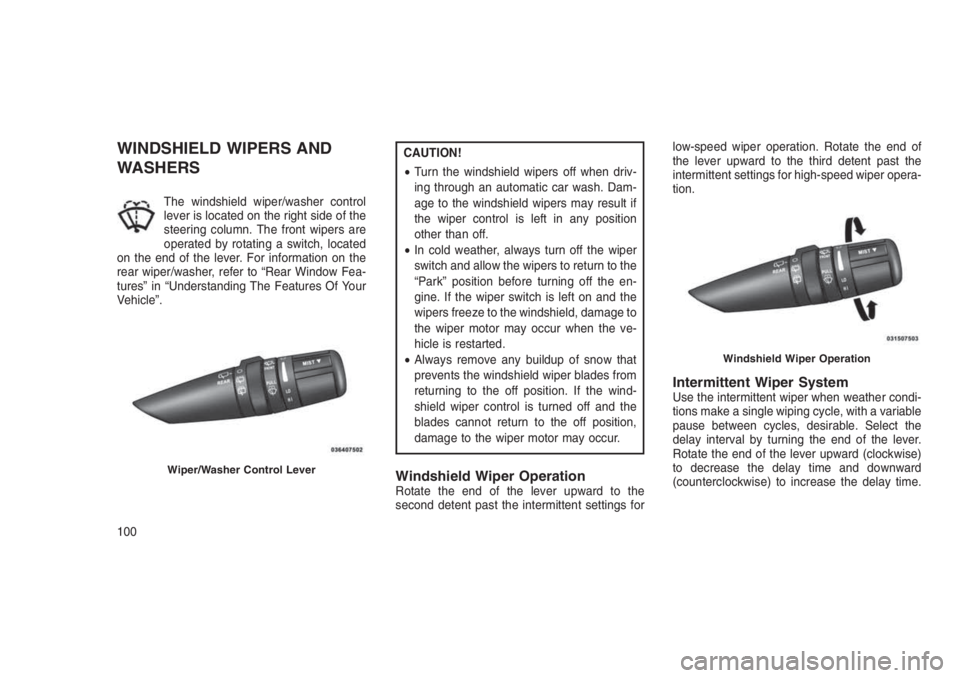
The windshield wiper/washer control
lever is located on the right side of the
steering column. The front wipers are
operated by rotating a switch, located
on the end of the lever. For information on the
rear wiper/washer, refer to “Rear Window Fea-
tures” in “Understanding The Features Of Your
Vehicle”.
CAUTION!
•Turn the windshield wipers off when driv-
ing through an automatic car wash. Dam-
age to the windshield wipers may result if
the wiper control is left in any position
other than off.
•In cold weather, always turn off the wiper
switch and allow the wipers to return to the
“Park” position before turning off the en-
gine. If the wiper switch is left on and the
wipers freeze to the windshield, damage to
the wiper motor may occur when the ve-
hicle is restarted.
•Always remove any buildup of snow that
prevents the windshield wiper blades from
returning to the off position. If the wind-
shield wiper control is turned off and the
blades cannot return to the off position,
damage to the wiper motor may occur.
Windshield Wiper OperationRotate the end of the lever upward to the
second detent past the intermittent settings forlow-speed wiper operation. Rotate the end of
the lever upward to the third detent past the
intermittent settings for high-speed wiper opera-
tion.
Intermittent Wiper SystemUse the intermittent wiper when weather condi-
tions make a single wiping cycle, with a variable
pause between cycles, desirable. Select the
delay interval by turning the end of the lever.
Rotate the end of the lever upward (clockwise)
to decrease the delay time and downward
(counterclockwise) to increase the delay time.
Wiper/Washer Control Lever
Windshield Wiper Operation
100
Page 105 of 332
The delay can be regulated from a maximum of
approximately 18 seconds between cycles, to a
cycle every second.
NOTE:
The wiper delay times depend on vehicle
speed. If the vehicle is moving less than
10 mph (16 km/h), delay times will be
doubled.
Windshield WashersTo use the washer, pull the control lever toward
you and hold while spray is desired. If the lever
is pulled while in the delay range, the wiper will
operate in low-speed while the lever is pulled
and for two wipe cycles after the lever is re-
leased, and then resume the intermittent inter-
val previously selected.
If the lever is pulled while in the off position, the
wipers will operate for two wipe cycles, then turn
off.
WARNING!
Sudden loss of visibility through the wind-
shield could lead to a collision. You might not
see other vehicles or other obstacles. To
avoid sudden icing of the windshield during
freezing weather, warm the windshield with
the defroster before and during windshield
washer use.
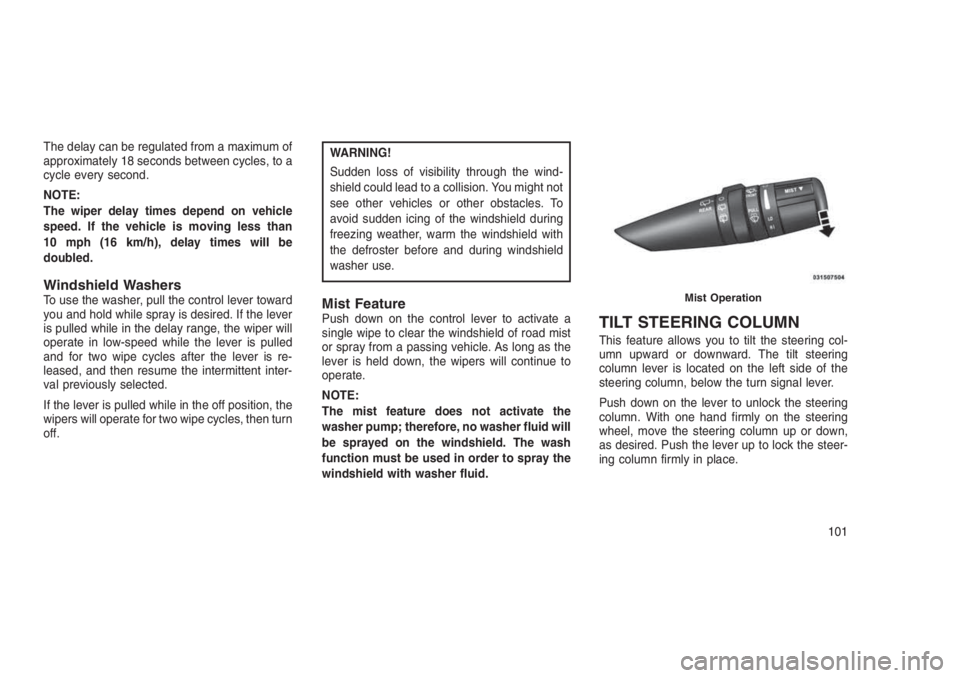
Mist FeaturePush down on the control lever to activate a
single wipe to clear the windshield of road mist
or spray from a passing vehicle. As long as the
lever is held down, the wipers will continue to
operate.
NOTE:
The mist feature does not activate the
washer pump; therefore, no washer fluid will
be sprayed on the windshield. The wash
function must be used in order to spray the
windshield with washer fluid.TILT STEERING COLUMN
This feature allows you to tilt the steering col-
umn upward or downward. The tilt steering
column lever is located on the left side of the
steering column, below the turn signal lever.
Push down on the lever to unlock the steering
column. With one hand firmly on the steering
wheel, move the steering column up or down,
as desired. Push the lever up to lock the steer-
ing column firmly in place.
Mist Operation
101
Page 106 of 332
WARNING!
Do not adjust the steering column while
driving. Adjusting the steering column while
driving or driving with the steering column
unlocked, could cause the driver to lose
control of the vehicle. Failure to follow this
warning may result in serious injury or death.
ELECTRONIC SPEED
CONTROL — IF EQUIPPED
When engaged, the Electronic Speed Control
takes over accelerator operations at speeds
greater than 25 mph (40 km/h).
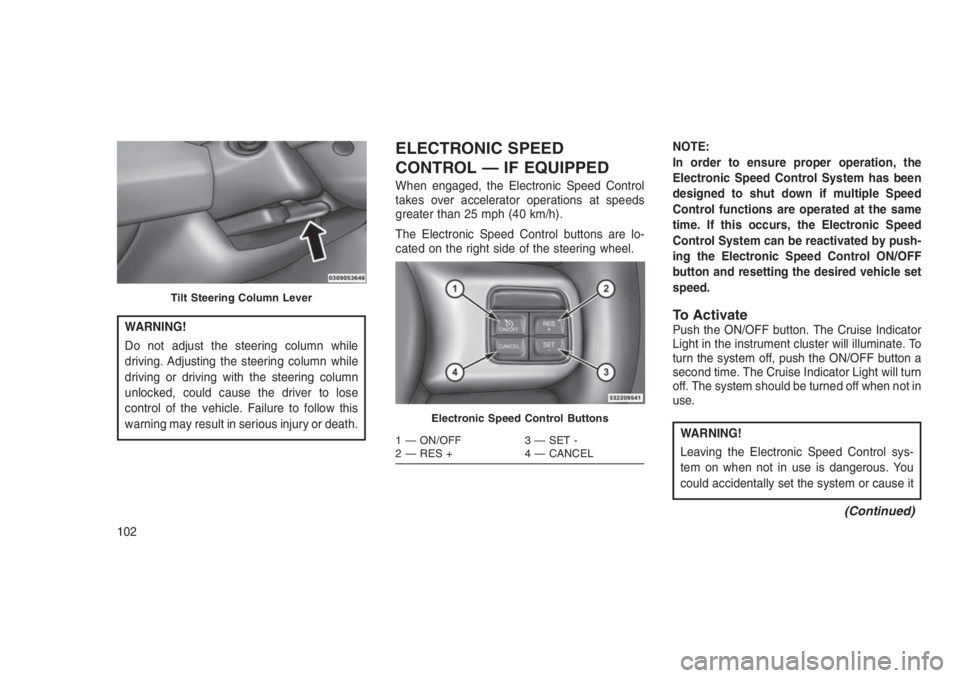
The Electronic Speed Control buttons are lo-
cated on the right side of the steering wheel.NOTE:
In order to ensure proper operation, the
Electronic Speed Control System has been
designed to shut down if multiple Speed
Control functions are operated at the same
time. If this occurs, the Electronic Speed
Control System can be reactivated by push-
ing the Electronic Speed Control ON/OFF
button and resetting the desired vehicle set
speed.
To ActivatePush the ON/OFF button. The Cruise Indicator
Light in the instrument cluster will illuminate. To
turn the system off, push the ON/OFF button a
second time. The Cruise Indicator Light will turn
off. The system should be turned off when not in
use.
WARNING!
Leaving the Electronic Speed Control sys-
tem on when not in use is dangerous. You
could accidentally set the system or cause it
(Continued)
Tilt Steering Column Lever
Electronic Speed Control Buttons
1 — ON/OFF 3 — SET -
2 — RES + 4 — CANCEL
102
Page 117 of 332
WARNING!(Continued)
•The weight and position of cargo and
passengers can change the vehicle center
of gravity and vehicle handling. To avoid
loss of control resulting in personal injury,
follow these guidelines for loading your
vehicle:
•Always place cargo evenly on the cargo
floor. Put heavier objects as low and as far
forward as possible.
•Place as much cargo as possible in front of
the rear axle. Too much weight or improp-
erly placed weight over or behind the rear
axle can cause the rear of the vehicle to
sway.
•Do not pile luggage or cargo higher than
the top of the seatback. This could impair
visibility or become a dangerous projectile
in a sudden stop or collision.
(Continued)
WARNING!(Continued)
•To help protect against personal injury,
passengers should not be seated in the
rear cargo area. The rear cargo space is
intended for load carrying purposes only,
not for passengers, who should sit in seats
and use seat belts.
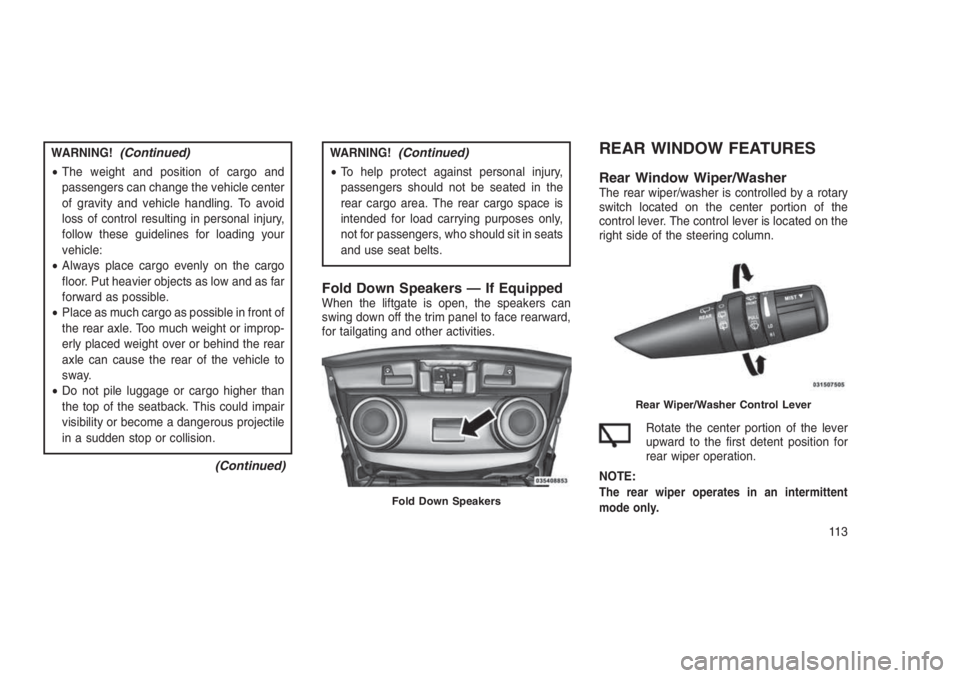
Fold Down Speakers — If EquippedWhen the liftgate is open, the speakers can
swing down off the trim panel to face rearward,
for tailgating and other activities.
REAR WINDOW FEATURES
Rear Window Wiper/WasherThe rear wiper/washer is controlled by a rotary
switch located on the center portion of the
control lever. The control lever is located on the
right side of the steering column.
Rotate the center portion of the lever
upward to the first detent position for
rear wiper operation.
NOTE:
The rear wiper operates in an intermittent
mode only.Fold Down Speakers
Rear Wiper/Washer Control Lever
11 3
Page 122 of 332
•Personal Settings (Customer-Programmable Features).......142•CYBERSECURITY . . . . . . . . . . . . . . . . . . . . . .. . . . . . . . .144
•SOUND SYSTEMS . . . . . .. . . . . . . . . . . . . . . . . . . . . . . .145
•iPod/USB/MP3 CONTROL — IF EQUIPPED . . . . . . . . . . . . . . .145
•Connecting The iPod Or External USB Device.............145
•Using This Feature.............................146
•Controlling The iPod Or External USB Device Using Radio
Buttons....................................146
•Play Mode..................................146
•List Or Browse Mode............................147
•Bluetooth Streaming Audio (BTSA)...................148
•NAVIGATION SYSTEM — IF EQUIPPED . . . . . . . . . . . . .. . . .149
•STEERING WHEEL AUDIO CONTROLS.................149
•Radio Operation...............................149
•CD Player...................................149
•CD/DVD DISC MAINTENANCE . . . . . . . . . . . . . . . ........150
•RADIO OPERATION AND MOBILE DEVICES . . . . . . . . ......150
•CLIMATE CONTROLS . . . . . . . . . . . . . . . .............150
•Manual Heating And Air Conditioning..................150
•Automatic Temperature Control (ATC) — If Equipped........153
•Operating Tips...............................157
11 8
Page 126 of 332
NOTE:
Some of the above warnings will be dis-
played in the Electronic Vehicle Information
Center Display Area located in the instru-
ment cluster.
Refer to ”Electronic Vehicle Information Center
(EVIC) — If Equipped” in this section for further
information.
LoW tirE
When the appropriate condition exists, the
odometer display will toggle between LoW and
tirE for three cycles.
gASCAP
If the vehicle diagnostic system determines that
the fuel filler cap is loose, improperly installed,
or damaged, a “gASCAP” message will display
in the odometer display area. Tighten the fuel
filler cap properly and push the STEP button on
the steering wheel to turn off the message. If the
problem continues, the message will appear the
next time the vehicle is started.noFUSE
If the vehicle diagnostic system determines that
the Ignition Off Draw (IOD) fuse is improperly
installed, or damaged, a “noFUSE” message
will display in the odometer display area. Refer
to “Fuses” in “Maintaining Your Vehicle” for
further information on fuses and fuse locations.
CHAngE OIL
Your vehicle is equipped with an engine oil
change indicator system. The odometer display
will toggle betweenCHAngEandOilfor ap-
proximately 12 seconds, after a single chime
has sounded, to indicate the next scheduled oil
change interval. The engine oil change indicator
system is duty cycle-based, which means the
engine oil change interval may fluctuate depen-
dent upon your personal driving style.
5. Fuel Gauge
•The pointer shows the level of fuel in the
fuel tank when the ignition is placed in the
ON/RUN position.•The fuel pump symbol points to the
side of the vehicle where the fuel door is
located.
WARNING AND INDICATOR
LIGHTS
IMPORTANT:The warning / indicator lights
switch on in the instrument panel together with
a dedicated message and/or acoustic signal
when applicable. These indications are indica-
tive and precautionary and as such must not be
considered as exhaustive and/or alternative to
the information contained in the Owner’s
Manual, which you are advised to read carefully
in all cases. Always refer to the information in
this chapter in the event of a failure indication.
All active telltales will display first if applicable.
The system check menu may appear different
based upon equipment options and current
vehicle status. Some telltales are optional and
may not appear.
122
Page 134 of 332
Tire Pressure Monitoring Indicator Light
Yellow Telltale Light What It Means
Tire Pressure Monitoring Indicator Light
The warning light switches on and a message is displayed to indicate that the tire pressure is lower than the recom-
mended value and/or that slow pressure loss is occurring. In these cases, optimal tire duration and fuel consumption may
not be guaranteed.
Should one or more tires be in the condition mentioned above, the display will show the indications corresponding to each
tire in sequence.
IMPORTANT:Do not continue driving with one
or more flat tires as handling may be compro-
mised. Stop the vehicle, avoiding sharp braking
and steering. Repair immediately using the
dedicated tire repair kit and contact your autho-
rized dealership as soon as possible.
Each tire, including the spare (if provided),
should be checked monthly when cold and
inflated to the inflation pressure recommended
by the vehicle manufacturer on the vehicle
placard or tire inflation pressure label. If your
vehicle has tires of a different size than the size
indicated on the vehicle placard or tire inflation
pressure label, you should determine the proper
tire inflation pressure for those tires.As an added safety feature, your vehicle has
been equipped with a Tire Pressure Monitoring
System (TPMS) that illuminates a low tire pres-
sure telltale when one or more of your tires is
significantly under-inflated. Accordingly, when
the low tire pressure telltale illuminates, you
should stop and check your tires as soon as
possible and inflate them to the proper pres-
sure. Driving on a significantly under-inflated
tire causes the tire to overheat and can lead to
tire failure. Under-inflation also reduces fuel
efficiency and tire tread life, and may affect the
vehicle’s handling and stopping ability.
Please note that the TPMS is not a substitute for
proper tire maintenance, and it is the driver’sresponsibility to maintain correct tire pressure,
even if under-inflation has not reached the level
to trigger illumination of the TPMS low tire
pressure telltale.
Your vehicle has also been equipped with a
TPMS malfunction indicator to indicate when
the system is not operating properly. The TPMS
malfunction indicator is combined with the low
tire pressure telltale. When the system detects
a malfunction, the telltale will flash for approxi-
mately one minute and then remain continu-
ously illuminated. This sequence will continue
upon subsequent vehicle start-ups as long as
the malfunction exists. When the malfunction
indicator is illuminated, the system may not be
130
Page 143 of 332
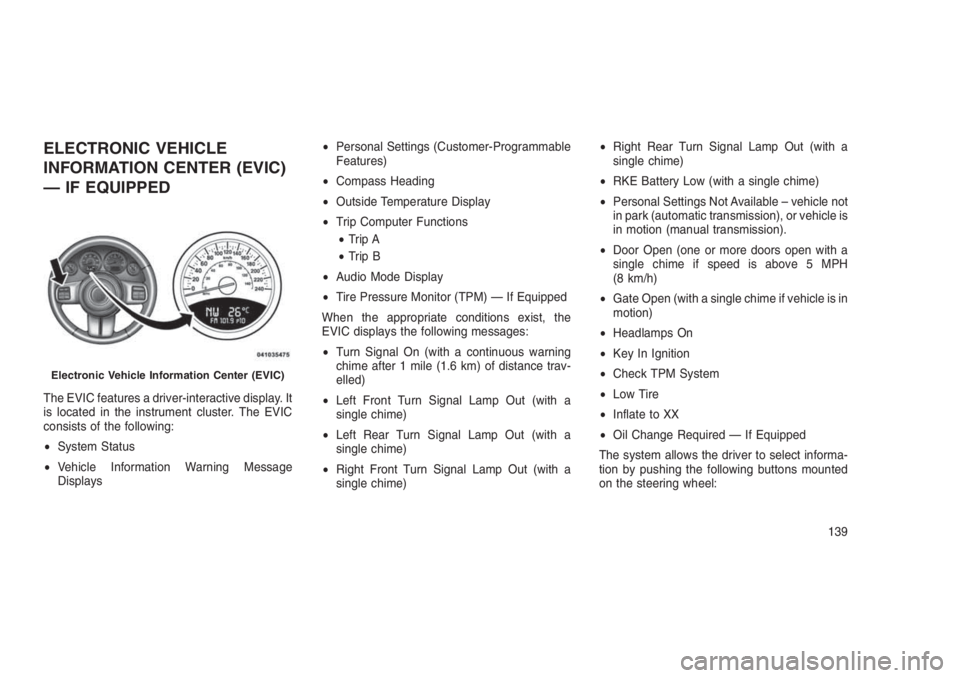
ELECTRONIC VEHICLE
INFORMATION CENTER (EVIC)
— IF EQUIPPED
The EVIC features a driver-interactive display. It
is located in the instrument cluster. The EVIC
consists of the following:
•System Status
•Vehicle Information Warning Message
Displays•Personal Settings (Customer-Programmable
Features)
•Compass Heading
•Outside Temperature Display
•Trip Computer Functions
•Trip A
•Trip B
•Audio Mode Display
•Tire Pressure Monitor (TPM) — If Equipped
When the appropriate conditions exist, the
EVIC displays the following messages:
•Turn Signal On (with a continuous warning
chime after 1 mile (1.6 km) of distance trav-
elled)
•Left Front Turn Signal Lamp Out (with a
single chime)
•Left Rear Turn Signal Lamp Out (with a
single chime)
•Right Front Turn Signal Lamp Out (with a
single chime)•Right Rear Turn Signal Lamp Out (with a
single chime)
•RKE Battery Low (with a single chime)
•Personal Settings Not Available – vehicle not
in park (automatic transmission), or vehicle is
in motion (manual transmission).
•Door Open (one or more doors open with a
single chime if speed is above 5 MPH
(8 km/h)
•Gate Open (with a single chime if vehicle is in
motion)
•Headlamps On
•Key In Ignition
•Check TPM System
•Low Tire
•Inflate to XX
•Oil Change Required — If Equipped
The system allows the driver to select informa-
tion by pushing the following buttons mounted
on the steering wheel:
Electronic Vehicle Information Center (EVIC)
139
Page 144 of 332
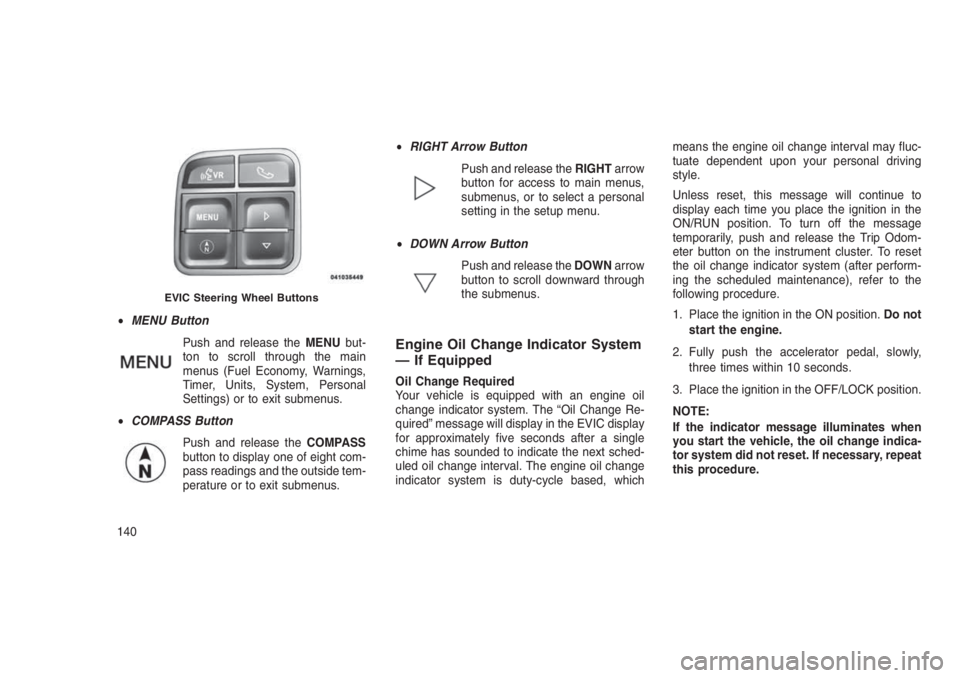
•MENU Button
Push and release theMENUbut-
ton to scroll through the main
menus (Fuel Economy, Warnings,
Timer, Units, System, Personal
Settings) or to exit submenus.
•COMPASS Button
Push and release theCOMPASS
button to display one of eight com-
pass readings and the outside tem-
perature or to exit submenus.•RIGHT Arrow Button
Push and release theRIGHTarrow
button for access to main menus,
submenus, or to select a personal
setting in the setup menu.
•DOWN Arrow Button
Push and release theDOWNarrow
button to scroll downward through
the submenus.
Engine Oil Change Indicator System
— If Equipped
Oil Change Required
Your vehicle is equipped with an engine oil
change indicator system. The “Oil Change Re-
quired” message will display in the EVIC display
for approximately five seconds after a single
chime has sounded to indicate the next sched-
uled oil change interval. The engine oil change
indicator system is duty-cycle based, whichmeans the engine oil change interval may fluc-
tuate dependent upon your personal driving
style.
Unless reset, this message will continue to
display each time you place the ignition in the
ON/RUN position. To turn off the message
temporarily, push and release the Trip Odom-
eter button on the instrument cluster. To reset
the oil change indicator system (after perform-
ing the scheduled maintenance), refer to the
following procedure.
1. Place the ignition in the ON position.Do not
start the engine.
2. Fully push the accelerator pedal, slowly,
three times within 10 seconds.
3. Place the ignition in the OFF/LOCK position.
NOTE:
If the indicator message illuminates when
you start the vehicle, the oil change indica-
tor system did not reset. If necessary, repeat
this procedure.
EVIC Steering Wheel Buttons
140