open JEEP PATRIOT 2021 Owner handbook (in English)
[x] Cancel search | Manufacturer: JEEP, Model Year: 2021, Model line: PATRIOT, Model: JEEP PATRIOT 2021Pages: 332, PDF Size: 1.99 MB
Page 17 of 332
WARNING!(Continued)
•Allowing children to be in a vehicle unat-
tended is dangerous for a number of rea-
sons. A child or others could be seriously
or fatally injured. Children should be
warned not to touch the parking brake,
brake pedal or the gear selector.
•Do not leave the RKE Key Fob in or near
the vehicle, or in a location accessible to
children. A child could operate power win-
dows, other controls, or move the vehicle.
•Do not leave children or animals inside
parked vehicles in hot weather. Interior
heat build-up may cause serious injury or
death.
CAUTION!
Always remove the RKE Key Fobs from the
vehicle and lock all doors when leaving the
vehicle unattended.
Locking Doors With A RKE KeyYou can insert the RKE Key with either side up.
To lock the door, turn the RKE Key to the right.
To unlock the door, turn the RKE Key to the left.
Refer to ”Body Lubrication” in Maintenance
Procedures” in “Maintaining Your Vehicle” for
further information.
RKE Key Fob-In-Ignition ReminderOpening the driver’s door when the RKE Key is
in the ignition and the ignition position is LOCK
or ACC sounds a signal to remind you to
remove the RKE Key.
NOTE:
With the driver’s door open and the RKE Key
in the ignition, the power door locks will not
lock, and RKE Key Fob will not function.
STEERING WHEEL LOCK — IF
EQUIPPED
Your vehicle may be equipped with a passive
electronic steering wheel lock. This lock pre-
vents steering the vehicle with the ignition OFF.
The steering wheel lock releases with the igni-
tion On. If the lock does not disengage and thevehicle does not start, turn the wheel to the left
and right to disengage the lock.
SENTRY KEY
The Sentry Key Immobilizer System prevents
unauthorized vehicle operation by disabling the
engine. The system does not need to be armed
or activated. Operation is automatic, regardless
of whether the vehicle is locked or unlocked.
The system uses ignition RKE Key Fobs, which
have an embedded electronic chip (transpon-
der) to prevent unauthorized vehicle operation.
Only RKE Key Fobs that are programmed to the
vehicle can be used to start and operate the
vehicle. The system will shut the engine off in
two seconds if someone uses an invalid key to
start the engine.
NOTE:
A RKE Key Fob that has not been pro-
grammed is also considered an invalid RKE
Key Fob even if it is cut to fit the ignition
cylinder for that vehicle.
During normal operation, after placing the igni-
tion in the ON/RUN position, the Vehicle Secu-
rity Light will turn on for three seconds for a bulb
13
Page 19 of 332
To Arm The System
1. Remove the RKE Key Fob from the ignition
and get out of the vehicle.
2. Lock the door using either the power door
lock
switch or the RKE Key Fob lockbutton and close all doors.
3. The Vehicle Security Light in the instrument
cluster will flash rapidly for approximately 16
seconds. This shows that the Vehicle Secu-
rity Alarm is arming. During this period, if a
door is opened, the ignition is placed in the
ON/RUN position, or the power door locks
are unlocked in any manner, the Vehicle
Security Alarm will automatically disarm. Af-
ter approximately 16 seconds, the Vehicle
Security Light will flash slowly. This shows
that the Vehicle Security Alarm is fully
armed.
Rearming Of The SystemIf something triggers the alarm, and no action is
taken to disarm it, the Vehicle Security Alarm
will turn off the horn after 29 seconds, turn off all
of the visual signals after one minute, and then
the Vehicle Security Alarm will rearm itself.
To Disarm The SystemPush UNLOCK on the RKE Key Fob, or insert
the key into the ignition and place the ignition in
the ON/RUN position.
If something has triggered the Vehicle Security
Alarm in your absence, the exterior lights blink
three times when you unlock the doors. Check
the vehicle for tampering. The Vehicle Security
Alarm is designed to protect your vehicle; how-
ever, you can create conditions where the Ve-
hicle Security Alarm will arm unexpectedly. If
you remain in the vehicle and lock the doors
with the RKE Key Fob, once the Vehicle Secu-
rity Alarm is armed (after 16 seconds), when
you pull the door handle to exit, the alarm will
sound. If this occurs, push the UNLOCK button
on the RKE Key Fob to disarm the Vehicle
Security Alarm.
Vehicle Security Alarm Manual
Override
The Vehicle Security Alarm will not arm if you
lock the doors using the manual door lock
plunger.
PREMIUM VEHICLE SECURITY
ALARM — IF EQUIPPED
The Premium Vehicle Security Alarm system
monitors the doors, hood latch, liftgate, and
ignition switch for unauthorized operation.
If something triggers the security alarm, the
audible alert will sound for 29 seconds and flash
the lights for 60 seconds. If the triggering device
is not deactivated, the audible alert will sound
again after a five-second delay for another 29
seconds. If the trigger remains present, this
cycle will repeat for up to five minutes.
If the intrusion sensor is enabled, the security
alarm system will also monitor the vehicle for
movement. When this portion of the alarm is
set, movement inside the vehicle or movement
of the vehicle will trigger the Vehicle Security
Alarm.
15
Page 20 of 332
To Arm The System
1. Remove the RKE Key Fob from the ignition
and get out of the vehicle.
2. Lock the door using either the power door
lock switch or the RKE Key Fob, and close
all doors.
3. The Vehicle Security Light in the instrument
cluster will flash rapidly for 16 seconds. This
shows that the security alarm is arming. After
16 seconds, the locks will activate and the
Vehicle Security Light will continue to flash
slowly. This shows that the Vehicle Security
Alarm system is fully armed.
NOTE:
The intrusion sensor (motion detector) ac-
tively monitors your vehicle every time you
arm the security alarm. If you prefer, you can
turn off the intrusion sensor when arming
the security alarm.
To disable the intrusion sensor, activate the
LOCK request three times using the RKE Key
Fob during the arming period (lamp flashingquickly). The intrusion sensor will automatically
be enabled the next time the security alarm is
set.
To Disarm The SystemPush UNLOCK on the RKE Key Fob, or insert
the RKE Key into the ignition and place the
ignition in the ON/RUN position.
NOTE:
•Battery disconnects will not disarm the
security alarm system.
•Using the RKE Key in the door lock cylin-
der will only unlock the deadbolt locks.
•To open the doors after the security alarm
is set and the locks are activated, push
the unlock button on the RKE Key Fob.
You can also unlock the door lock plunger
and door handle by inserting the RKE Key
into lock cylinder on the door and turning
it, but the alarm will sound. In this case,
insert the RKE Key into the ignition and
place it in the ON/RUN position.If the security alarm has been triggered, the
Vehicle Security Light will flash twice every two
seconds.Vehicle Security Alarm Manual
Override
The security alarm will not arm if you lock the
doors using the manual door lock plunger.
REMOTE KEYLESS ENTRY
(RKE)
This system allows you to lock or unlock the
doors and liftgate from distances up to approxi-
mately 33 ft (10 m) using a hand-held RKE Key
Fob. The RKE Key Fob does not need to be
pointed at the vehicle to activate the system.
16
Page 21 of 332
NOTE:
The line of transmission must not be
blocked with metal objects.
To Unlock The Doors And LiftgatePush and release the UNLOCKbutton on
the RKE Key Fob once to unlock the driver’s
door or twice within five seconds to unlock all
doors and liftgate. The turn signal lights will
flash to acknowledge the unlock signal. The
illuminated entry system will also turn on.
RKE Key Fob Unlock, Driver
Door/All First Press
This feature lets you program the system to
unlock either the driver’s door or all doors on the
first push of the UNLOCK
button on the RKE
Key Fob. To change the current setting, proceed
as follows:
•For vehicles equipped with the Electronic
Vehicle Information Center (EVIC), refer to
“Electronic Vehicle Information Center
(EVIC)/Personal Settings (Customer-
Programmable Features)” in “Understanding
Your Instrument Panel” for further informa-
tion.
•For vehicles not equipped with the EVIC,
perform the following steps:
1. Push and hold the LOCK
button on a
programmed RKE Key Fob for at least 4
seconds but no longer than 10 seconds.
Then, push and hold the UNLOCK
button
while still holding the LOCKbutton.
2. Release both buttons at the same time.3. Test the feature while outside of the vehicle
by pushing the LOCK/UNLOCK buttons on
the RKE Key Fob with the ignition in the
LOCK position and the RKE Key removed.
4. Repeat these steps if you want to return this
feature to its previous setting.
NOTE:
Pushing the LOCK button on the RKE Key
Fob while you are inside the vehicle will
activate the Vehicle Security Alarm. Opening
a door with the Vehicle Security Alarm acti-
vated will cause the alarm to sound. Push
the UNLOCK button to deactivate the Ve-
hicle Security Alarm.
Illuminated Approach — If EquippedThis feature activates the headlights for up to 90
seconds when the doors are unlocked with the
RKE Key Fob. The time for this feature is
programmable on vehicles equipped with the
EVIC. Refer to “Electronic Vehicle Information
Center (EVIC)/Personal Settings (Customer-
Programmable Features)” in “Understanding
Your Instrument Panel” for further information.
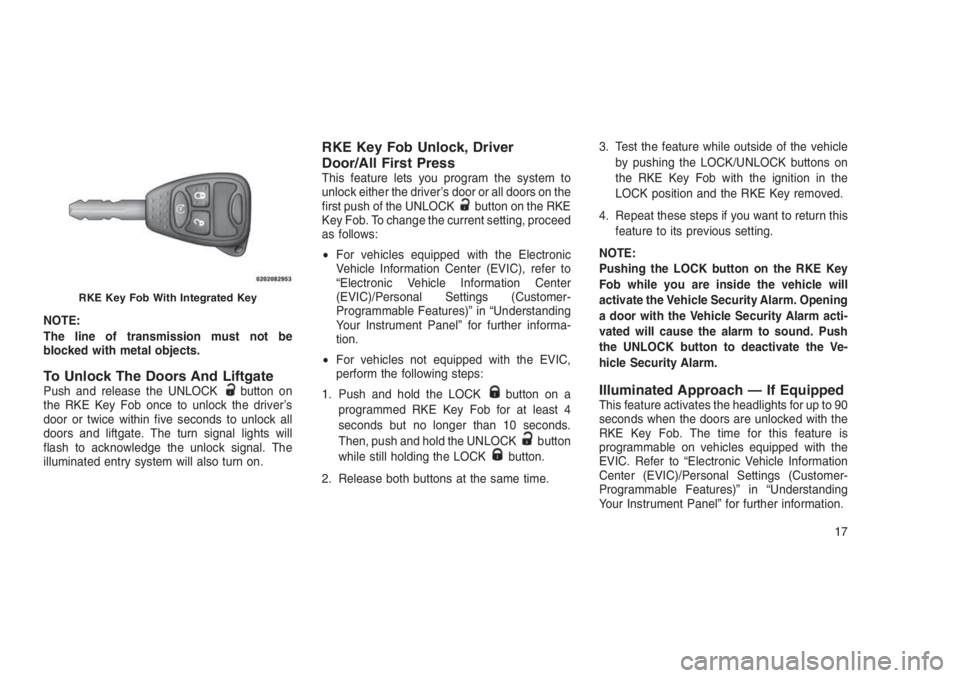
RKE Key Fob With Integrated Key
17
Page 22 of 332
To Lock The Doors And LiftgatePush and release the LOCK button on the RKE
Key Fob to lock all doors and liftgate. The turn
signal lights will flash to acknowledge the sig-
nal.
Flash Lights With Remote Key
Lock/Unlock
This feature will cause the turn signal lights to
flash when the doors are lockedor unlockedwith the RKE Key Fob. This feature can be
turned on or turned off. To change the current
setting, proceed as follows:
•For vehicles equipped with the EVIC, refer to
“Electronic Vehicle Information Center
(EVIC)/Personal Settings (Customer-
Programmable Features)” in “Understanding
Your Instrument Panel” for further informa-
tion.
•For vehicles not equipped with the EVIC,
perform the following steps:
1. Push and hold the UNLOCK
button on a
programmed RKE Key Fob for at least 4
seconds but no longer than 10 seconds.Then, push and hold the LOCK
button
while still holding the UNLOCKbutton.
2. Release both
buttons at the same
time.
3. Test the feature while outside of the vehicle
by pushing the LOCK
/UNLOCK
buttons on the RKE Key Fob with the ignition
in the LOCK position and the RKE Key
removed.
4. Repeat these steps if you want to return this
feature to its previous setting.
NOTE:
Pushing the LOCK
button on the RKE
Key Fob while you are in the vehicle will
activate the Vehicle Security Alarm. Opening
a door with the Vehicle Security Alarm acti-
vated will cause the alarm to sound. Push
the UNLOCK
button to deactivate the
Vehicle Security Alarm.
RKE Key Fob Battery ReplacementThe recommended replacement battery is
CR2032.NOTE:
Perchlorate Material — special handling
may apply.
1. If the RKE Key Fob is equipped with a screw,
remove the screw. With the RKE Key Fob
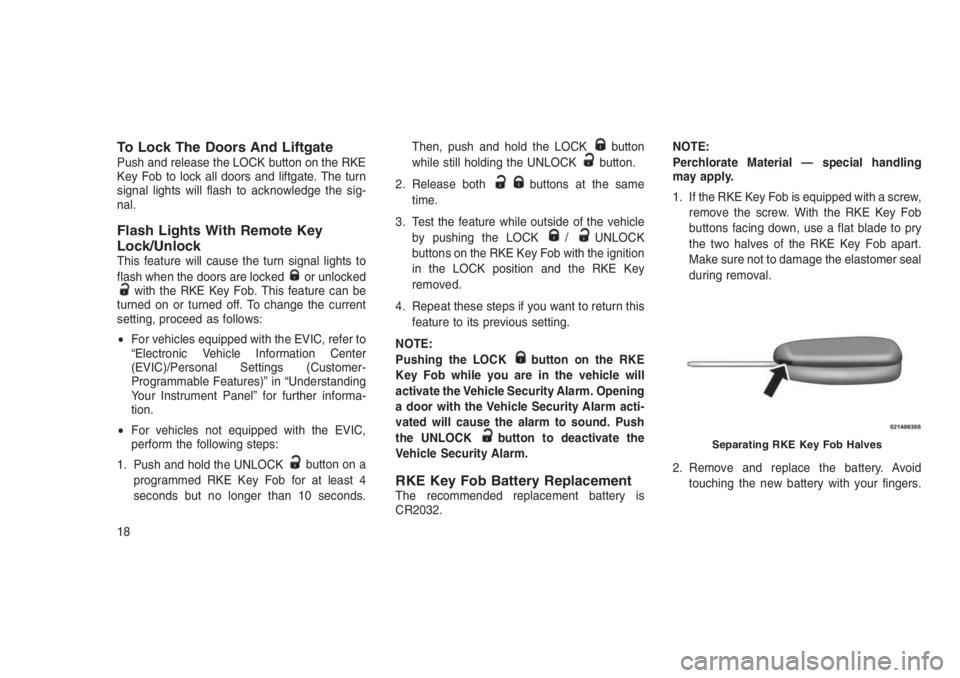
buttons facing down, use a flat blade to pry
the two halves of the RKE Key Fob apart.
Make sure not to damage the elastomer seal
during removal.
2. Remove and replace the battery. Avoid
touching the new battery with your fingers.
Separating RKE Key Fob Halves
18
Page 23 of 332
Skin oils may cause battery deterioration. If
you touch a battery, clean it with rubbing
alcohol.
3. To assemble the RKE Key Fob case, snap
the two halves together.
NOTE:
If the RKE Key Fob is equipped with a screw,
reinstall and tighten the screw until snug.
REMOTE STARTING SYSTEM
— IF EQUIPPED
This system uses the RKE Key Fob
to start the engine conveniently
from outside the vehicle while still
maintaining security. The system
has a range of approximately 300 ft
(91 m). Obstructions between the
vehicle and RKE Key Fob may reduce this
range.NOTE:
•The vehicle must be equipped with an
automatic transmission to be equipped
with Remote Start.
•Obstructions between the vehicle and the
RKE Key Fob may reduce this range.
How To Use Remote StartAll of the following conditions must be met
before the engine will remote start:
•Gear selector in PARK
•Doors closed
•Hood closed
•Hazard switch off
•Brake switch inactive (brake pedal not
pushed)
•Ignition RKE Key removed from ignition
•Battery at an acceptable charge level
•System not disabled from previous remote
start event
•Vehicle Security Alarm not active
WARNING!
•Do not start or run an engine in a closed
garage or confined area. Exhaust gas con-
tains Carbon Monoxide (CO) which is
odorless and colorless. Carbon Monoxide
is poisonous and can cause serious injury
or death when inhaled.
•Keep RKE Key Fobs away from children.
Operation of the Remote Start System,
windows, door locks or other controls
could cause serious injury or death.
Remote Start Abort Message On
Electronic Vehicle Information
Center (EVIC) — If Equipped
The following messages will display in the EVIC
if the vehicle fails to remote start or exits remote
start prematurely:
•Remote Start Aborted — Door Open
•Remote Start Aborted — Hood Open
•Remote Start Aborted — L/Gate Open
•Remote Start Aborted — Fuel Low
19
Page 24 of 332
•Remote Start Aborted — System Fault
The EVIC message stays active until the igni-
tion is placed in the ON/RUN position.
To Enter Remote StartPush and release the REMOTE STARTbut-
ton on the RKE Key Fob twice within five
seconds. The vehicle doors will lock, the park-
ing lights will flash, and the horn will chirp twice
(if programmed). Then, the engine will start and
the vehicle will remain in the Remote Start
mode for a 15-minute cycle.
NOTE:
•The park lamps will turn on and remain on
during Remote Start mode.
•For security, power window and power
sunroof operation (if equipped) are dis-
abled when the vehicle is in the Remote
Start mode.
•If your power door locks were unlocked,
Remote Start will automatically lock the
doors.•The engine can be started two consecu-
tive times (two 15-minute cycles) with the
RKE Key Fob. However, the ignition must
be placed in the ON/RUN position before
you can repeat the start sequence for a
third cycle.
Remote Start will also cancel if any of the
following occur:
•The engine stalls or RPM exceeds 2500.
•Any engine warning lamps come on.
•Low Fuel Light turns on.
•The hood is opened.
•The hazard switch is pushed.
•The transmission is moved out of PARK.
•The brake pedal is pushed.
To Exit Remote Start Mode Without
Driving The Vehicle
Push and release the REMOTE STARTbut-
ton one time or allow the engine to run for the
entire 15-minute cycle.NOTE:
To avoid unintentional shut downs, the sys-
tem will disable the one time push of the
REMOTE START
button for two seconds
after receiving a valid Remote Start request.
To Exit Remote Start Mode And
Drive The Vehicle
Before the end of the 15-minute cycle, push and
release the UNLOCKbutton on the RKE Key
Fob to unlock the doors and disarm the Vehicle
Security Alarm (if equipped). Then, insert the
RKE Key into the ignition and place the ignition
in the ON/RUN position.
NOTE:
The ignition must be placed in the ON/RUN
position in order to drive the vehicle.
20
Page 25 of 332
DOOR LOCKS
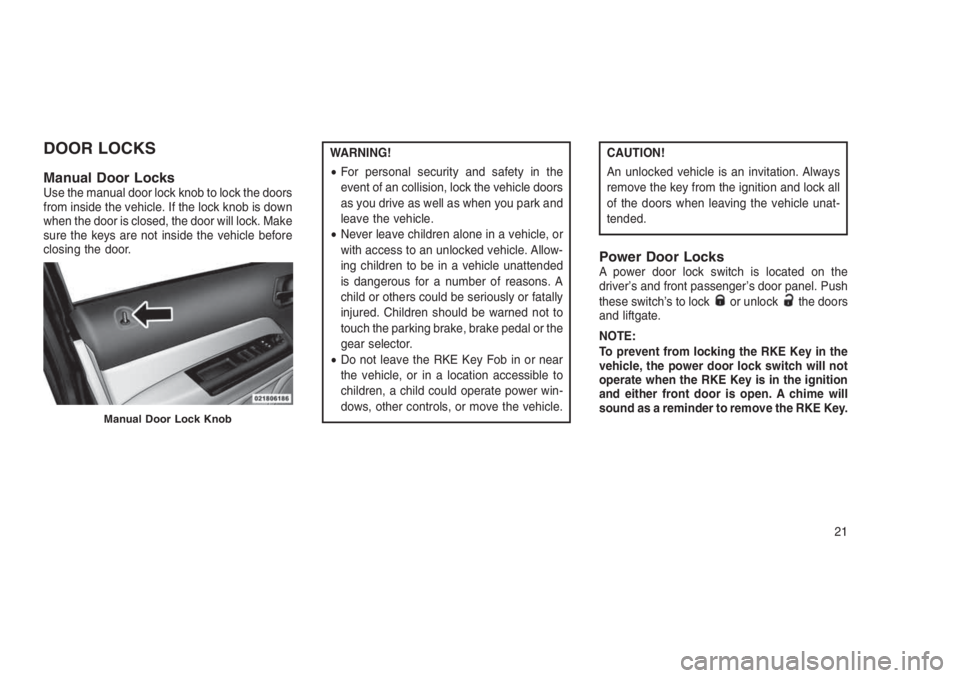
Manual Door LocksUse the manual door lock knob to lock the doors
from inside the vehicle. If the lock knob is down
when the door is closed, the door will lock. Make
sure the keys are not inside the vehicle before
closing the door.
WARNING!
•For personal security and safety in the
event of an collision, lock the vehicle doors
as you drive as well as when you park and
leave the vehicle.
•Never leave children alone in a vehicle, or
with access to an unlocked vehicle. Allow-
ing children to be in a vehicle unattended
is dangerous for a number of reasons. A
child or others could be seriously or fatally
injured. Children should be warned not to
touch the parking brake, brake pedal or the
gear selector.
•Do not leave the RKE Key Fob in or near
the vehicle, or in a location accessible to
children, a child could operate power win-
dows, other controls, or move the vehicle.CAUTION!
An unlocked vehicle is an invitation. Always
remove the key from the ignition and lock all
of the doors when leaving the vehicle unat-
tended.
Power Door LocksA power door lock switch is located on the
driver’s and front passenger’s door panel. Push
these switch’s to lock
or unlockthe doors
and liftgate.
NOTE:
To prevent from locking the RKE Key in the
vehicle, the power door lock switch will not
operate when the RKE Key is in the ignition
and either front door is open. A chime will
sound as a reminder to remove the RKE Key.
Manual Door Lock Knob
21
Page 27 of 332
•The transmission is in NEUTRAL or PARK.
•The driver’s door is opened.
•The doors were not previously unlocked.
Automatic Unlock Doors On Exit
Programming
The Automatic Unlock Doors On Exit feature
can be enabled or disabled as follows:
•For vehicles equipped with the EVIC, refer to
“Electronic Vehicle Information Center
(EVIC) — If Equipped/Personal Settings
(Customer-Programmable Features)” in “Un-
derstanding Your Instrument Panel” for fur-
ther information.
•For vehicles not equipped with the EVIC,
perform the following procedure:
1. Close all doors and place the RKE Key in the
ignition.
2. Within 15 seconds, place the ignition be-
tween LOCK and ON/RUN and then back to
LOCK five times, ending up in the ON/RUN
position (do not start the engine).3. Within 30 seconds, push the power door
UNLOCK switch to unlock the doors.
4. A single chime will indicate the completion of
the programming.
5. Repeat these steps if you want to return this
feature to its previous setting.
NOTE:
•If you do not hear the chime, it means that
the system did not enter the programming
mode and you will need to repeat the
procedure.
•Use the Automatic Unlock Doors On Exit
feature in accordance with local laws.
Child-Protection Door Lock System
— Rear Doors
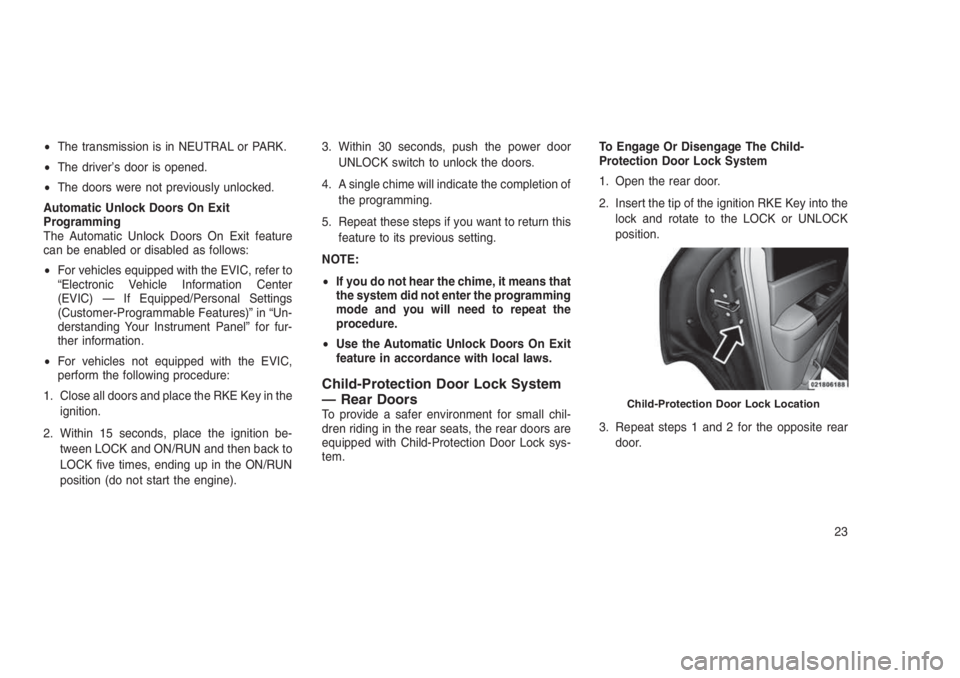
To provide a safer environment for small chil-
dren riding in the rear seats, the rear doors are
equipped with Child-Protection Door Lock sys-
tem.To Engage Or Disengage The Child-
Protection Door Lock System
1. Open the rear door.
2. Insert the tip of the ignition RKE Key into the
lock and rotate to the LOCK or UNLOCK
position.
3. Repeat steps 1 and 2 for the opposite rear
door.Child-Protection Door Lock Location
23
Page 28 of 332
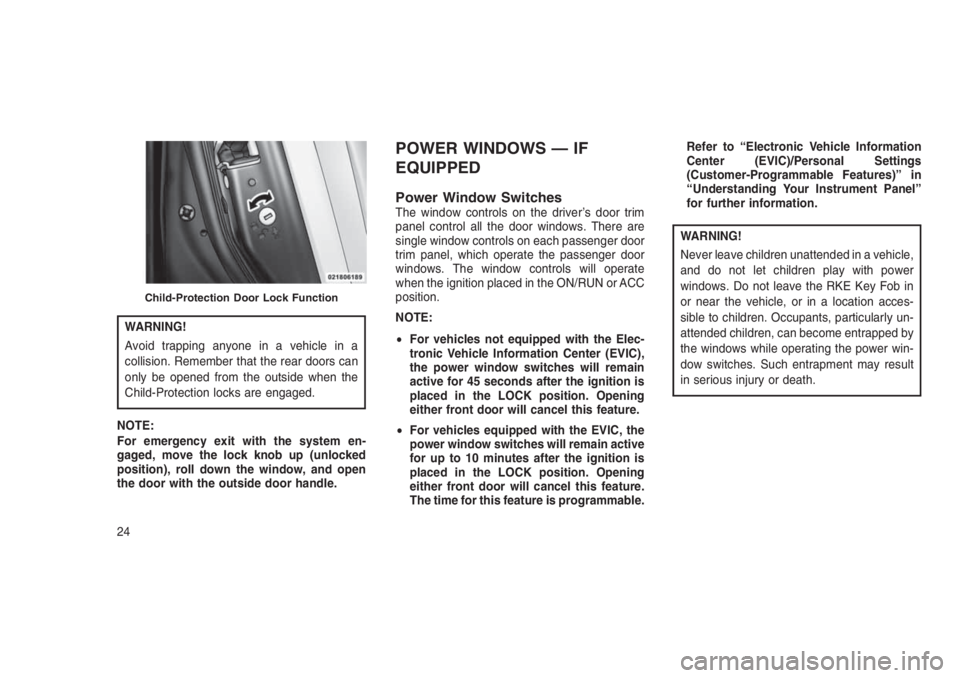
WARNING!
Avoid trapping anyone in a vehicle in a
collision. Remember that the rear doors can
only be opened from the outside when the
Child-Protection locks are engaged.
NOTE:
For emergency exit with the system en-
gaged, move the lock knob up (unlocked
position), roll down the window, and open
the door with the outside door handle.
POWER WINDOWS — IF
EQUIPPED
Power Window SwitchesThe window controls on the driver’s door trim
panel control all the door windows. There are
single window controls on each passenger door
trim panel, which operate the passenger door
windows. The window controls will operate
when the ignition placed in the ON/RUN or ACC
position.
NOTE:
•For vehicles not equipped with the Elec-
tronic Vehicle Information Center (EVIC),
the power window switches will remain
active for 45 seconds after the ignition is
placed in the LOCK position. Opening
either front door will cancel this feature.
•For vehicles equipped with the EVIC, the
power window switches will remain active
for up to 10 minutes after the ignition is
placed in the LOCK position. Opening
either front door will cancel this feature.
The time for this feature is programmable.Refer to “Electronic Vehicle Information
Center (EVIC)/Personal Settings
(Customer-Programmable Features)” in
“Understanding Your Instrument Panel”
for further information.
WARNING!
Never leave children unattended in a vehicle,
and do not let children play with power
windows. Do not leave the RKE Key Fob in
or near the vehicle, or in a location acces-
sible to children. Occupants, particularly un-
attended children, can become entrapped by
the windows while operating the power win-
dow switches. Such entrapment may result
in serious injury or death.
Child-Protection Door Lock Function
24