change time JEEP RENEGADE 2014 1.G User Guide
[x] Cancel search | Manufacturer: JEEP, Model Year: 2014, Model line: RENEGADE, Model: JEEP RENEGADE 2014 1.GPages: 212, PDF Size: 17.48 MB
Page 139 of 212
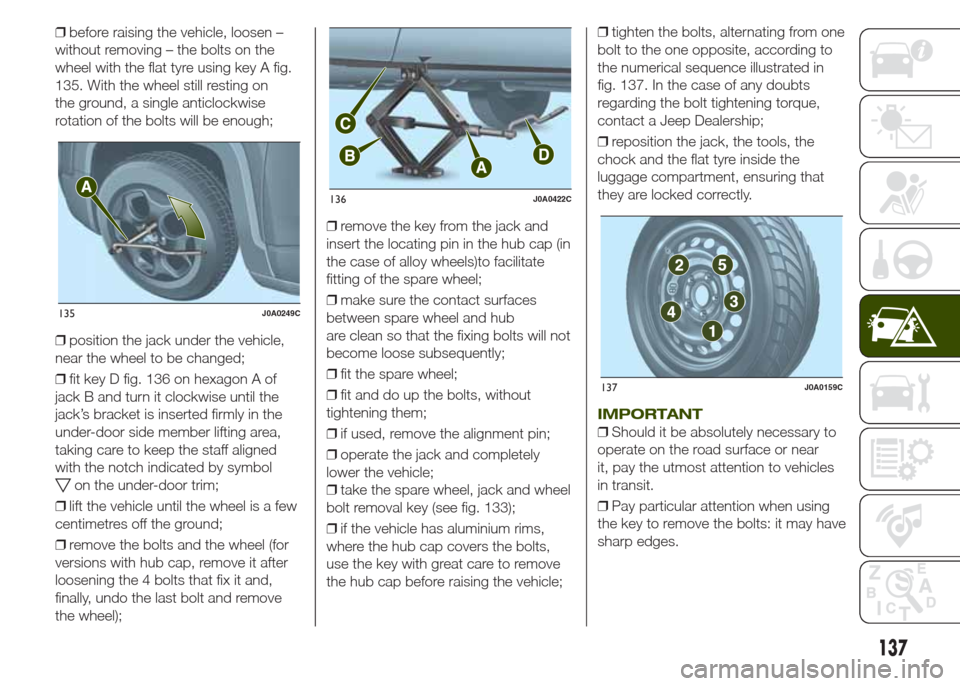
❒before raising the vehicle, loosen –
without removing – the bolts on the
wheel with the flat tyre using key A fig.
135. With the wheel still resting on
the ground, a single anticlockwise
rotation of the bolts will be enough;
❒position the jack under the vehicle,
near the wheel to be changed;
❒fit key D fig. 136 on hexagon A of
jack B and turn it clockwise until the
jack’s bracket is inserted firmly in the
under-door side member lifting area,
taking care to keep the staff aligned
with the notch indicated by symbol
on the under-door trim;
❒lift the vehicle until the wheel is a few
centimetres off the ground;
❒remove the bolts and the wheel (for
versions with hub cap, remove it after
loosening the 4 bolts that fix it and,
finally, undo the last bolt and remove
the wheel);❒remove the key from the jack and
insert the locating pin in the hub cap (in
the case of alloy wheels)to facilitate
fitting of the spare wheel;
❒make sure the contact surfaces
between spare wheel and hub
are clean so that the fixing bolts will not
become loose subsequently;
❒fit the spare wheel;
❒fit and do up the bolts, without
tightening them;
❒if used, remove the alignment pin;
❒operate the jack and completely
lower the vehicle;
❒take the spare wheel, jack and wheel
bolt removal key (see fig. 133);
❒if the vehicle has aluminium rims,
where the hub cap covers the bolts,
use the key with great care to remove
the hub cap before raising the vehicle;❒tighten the bolts, alternating from one
bolt to the one opposite, according to
the numerical sequence illustrated in
fig. 137. In the case of any doubts
regarding the bolt tightening torque,
contact a Jeep Dealership;
❒reposition the jack, the tools, the
chock and the flat tyre inside the
luggage compartment, ensuring that
they are locked correctly.
IMPORTANT
❒Should it be absolutely necessary to
operate on the road surface or near
it, pay the utmost attention to vehicles
in transit.
❒Pay particular attention when using
the key to remove the bolts: it may have
sharp edges.
135J0A0249C
136J0A0422C
137J0A0159C
137
Page 140 of 212
❒Raising the vehicle any more than
necessary may lower its stability: the
jack may slip and injure those nearby.
Do not raise the vehicle any more
than required for the removal of the
wheel.
❒Tyres with unidirectional tread can be
recognised by arrows on the side of
the tyre which indicate the direction of
rotation. This must of necessity be
complied with. Only in this way can the
tyres maintain their characteristics in
terms of grip, noise, resistance to wear
and drainage on wet surfaces.
❒If, after a puncture, it is necessary to
fit such a tyre the wrong way round,
it will be necessary to continue driving
with great care, since the tyre’s
performance is limited in these
conditions. This precaution must be
borne in mind above all when the road
surface is wet.
❒In order to benefit completely from
the unidirectional tread, it is advisable to
restore all wheels to the correct
direction of rotation as soon as
possible.
❒Make sure that the spare wheel is
fitted with the valve facing outwards.
The wheel may be damaged if fitted
incorrectly.❒If the vehicle has a hub cap or wheel
cover, do not attempt to fit it on the
spare wheel.
❒To prevent injury to persons, the
complete tightening of the bolts must
only be carried out when all of the
vehicle’s wheels are on the ground, to
prevent the vehicle falling from the jack.
❒After having travelled for about
40 km, stop and check that the bolts
are tightened correctly.
WARNING
141)If left in the passenger compartment,
the punctured wheel and jack constitute
a serious risk to the safety of occupants in
the event of accidents or sharp braking.
Therefore, always place both the jack and
punctured wheel in the dedicated housing
in the luggage compartment.
142)It is extremely dangerous to attempt
to change a wheel on the side of the
vehicle next to the driving lane: make sure
that the vehicle is at a sufficient distance
from the road, to avoid being run over.
143)Indicate the presence of the stationary
vehicle in accordance with current
regulations: hazard warning lights, warning
triangle, etc. Those on board should get
out of the vehicle, particularly if it is heavily
laden, and wait for the wheel to be
changed away from the threat posed by
the traffic. On slopes or on unsurfaced
roads, chock the wheels with the chocks
provided.144)The vehicle's driving characteristics
will be modified with the space-saver wheel
fitted. Avoid violent acceleration and
braking, abrupt steering and fast cornering.
The overall duration of the space-saver
wheel is of about 3000 km, after which the
relevant tyre must be replaced with another
one of the same type. Never install a
standard tyre on a rim that is designed for
use with a space-saver wheel. Have the
wheel repaired and refitted as soon as
possible. Using two or more space-saver
wheels at the same time is forbidden.
Do not grease the threads of the bolts
before fitting them: they might slip out
when driving!
145)The space-saver wheel (where
provided) is specific to your vehicle: do not
use it on other models, or use the
space-saver wheel of other models on your
vehicle. The space-saver wheel must only
be used in the event of emergency. It
must only be used for the distance
necessary to reach a service point and the
vehicle speed must not exceed 80 km/h.
The space-saver wheel has an orange label
that summarises the main cautions for
use and limitations. Never remove or cover
the label. Never apply a hub cap on a
space-saver wheel.
138
IN AN EMERGENCY
Page 150 of 212
SCHEDULED
SERVICING
Correct servicing is crucial for
guaranteeing a long life for the vehicle
under the best conditions. For this
reason, Jeep has planned a series of
checks and services at fixed distance
intervals and, where provided, at fixed
time intervals, as described in the
Scheduled Servicing Plan.
Before each service, it is always
necessary to carefully follow the
instructions in the Scheduled Servicing
Plan (e.g. periodically check level of
fluids, tyre pressure, etc.).
Scheduled Servicing is offered by all
Jeep Dealerships according to a set
time schedule. If, during each
operation, in addition to the ones
scheduled, the need arises for further
replacements or repairs, these may
be carried out with your explicit
agreement only. If your vehicle is used
frequently for towing, the interval
between one service operation and the
next should be reduced.IMPORTANT Scheduled Servicing
Coupons are required by the
Manufacturer. Failure to have them
carried out may invalidate the warranty.
It is advisable to inform a Jeep
Dealership of any small operating
irregularities without waiting for the next
service.
PERIODIC CHECKS
Every1,000km or before long
journeys, check and if necessary, top
up: engine coolant level; brake fluid
level; screen washer fluid level; tyre
inflation pressure and condition; lighting
system operation (headlights, direction
indicators, hazard warning lights, etc.);
screen washer/wiper system operation
and positioning/wear of windscreen/
rear window wiper blades.
Every3,000km, check and top up if
required: engine oil level.
HEAVY-DUTY USE OF THE
VEHICLE
If the vehicle is used under one of the
following conditions: towing a trailer
or caravan; dusty roads; short (less
than 7-8 km), repeated journeys with
sub-zero outside temperatures; engine
often idling or driving long distances
at low speed or long periods of
inactivity, the following checks must be
carried out more often than indicated
in the Scheduled Servicing Plan:❒check front disc brake pad condition
and wear;
❒check cleanliness of bonnet and
luggage compartment locks,
cleanliness and lubrication of linkage;
❒visually inspect condition of: engine,
gearbox, transmission, pipes and hoses
(exhaust/fuel system/brakes) and
rubber elements (boots/sleeves/
bushes, etc.);
❒check battery charge and battery
fluid level (electrolyte);
❒visually inspect condition of the
accessory drive belts;
❒check and, if necessary, change
engine oil and replace oil filter;
❒check and, if necessary, replace
pollen filter;
❒check and, if necessary, replace air
cleaner.
On versions with automatic
transmission, change transmission oil
and replace oil filter every 60,000 km
(40,000) or every 4 years.
148
SERVICING AND MAINTENANCE
Page 161 of 212
WARNING
164)Never smoke when performing
operations in the engine compartment.
Flammable gases and fumes may be
present and risk igniting.
165)Be very careful when working in the
engine compartment when the engine
is hot: you may get burned.
166)If the engine oil is being topped up,
wait for the engine to cool down before
loosening the filler plug, particularly for
vehicles with aluminium plug (where
provided). CAUTION: risk of burns!
167)The cooling system is pressurised. If
necessary, only replace the cap with
another original one or the operation of the
system may be adversely affected. Do
not remove the reservoir cap when the
engine is hot: risk of burns.
168)Do not travel with the windscreen
washer reservoir empty: the windscreen
washer is essential for improving visibility.
Repeated operation of the system without
fluid could damage or cause rapid
deterioration of some system components.
169)Certain commercial additives for
windscreen washer fluids are inflammable.
The engine compartment contains hot
components which may set it on fire.
170)Brake fluid is poisonous and highly
corrosive. In the event of accidental
contact, immediately wash the affected
parts with water and mild soap. Then rinse
thoroughly. Call a doctor immediately if
swallowed.171)The
symbol on the container
indicates a synthetic brake fluid, which is
different from a mineral fluid. Using a
mineral fluid will damage the special rubber
seals of the braking system beyond repair.
172)Battery fluid is poisonous and
corrosive. Avoid contact with the skin and
eyes. Keep open flames away from the
battery and do not use objects that might
create sparks: risk of explosion and fire.
173)Using the battery with insufficient
fluid irreparably damages the battery and
may cause an explosion.
174)If the vehicle must remain unused for
a long time at a very low temperature,
remove the battery and take it to a warm
place, to avoid freezing.
175)When performing any operation on
the battery or near it, always protect your
eyes with special goggles.
WARNING
58)Be careful not to confuse the various
types of fluids while topping up: they
are not compatible with each other!
Topping up with an unsuitable fluid could
severely damage your vehicle.
59)The oil level should never exceed the
MAX mark.
60)Do not add oil with specifications other
than those of the oil already in the engine.61)PARAFLU
UPanti-freeze fluid is used in
the engine cooling system; use the same
fluid type as that already in the cooling
system when topping up. PARAFLU
UP
may not be mixed with other types of
anti-freeze fluids. In the event of topping up
with an unsuitable product, under no
circumstances start the engine and contact
a Jeep Dealership.
62)Avoid allowing brake fluid, which is
extremely corrosive, to come into contact
with painted areas. Should it happen, wash
immediately with water.
63)Incorrect assembly of electrical and
electronic accessories may cause severe
damage to your vehicle. Go to a Jeep
Dealership if you want to install accessories
(e.g. anti-theft, radio phone, etc.): they will
suggest the most suitable devices and
advise you whether a higher capacity
battery needs to be installed.
WARNING
4)Used engine oil and oil filters contain
substances which are harmful to the
environment. You are advised to contact a
Jeep Dealership to have the oil and filters
changed.
5)Used transmission fluid contains
substances that are harmful to the
environment. It is advisable to contact a
Jeep Dealership for oil changes.
6)Batteries contain substances which are
very dangerous for the environment. For
battery replacement, contact a Jeep
Dealership.
159
Page 193 of 212
❒tap the screen to open the Main
menu;
❒select "Navigate to" or "Drive to";
❒select "Address": you can change the
country or state setting by tapping the
flag before you select a city;
❒enter the town or city name, or the
postcode. Towns with similar names
are shown in the list while you type;
Tip: tap the arrow to the right of the list
to expand the list of suggested towns.
When the correct city or town appears
in the list, tap the name to select the
destination.
❒enter the street name. Streets with
similar names are shown in the list while
you type. When the correct street
name appears in the list, tap the name
to select the destination;
❒enter the house number, then tap
"Done";
❒the location is shown on the map.
Tap "Select" to continue or tap "Back"
to enter another address;
❒when the new route is shown, tap
"Done". For more information about the
route, tap "Details". To change your
route, for example, to travel via a
particular location or to select a new
destination, tap "Change route". You
are guided to your destination, using
spoken instructions and on-screen
directions.
MAP UPDATE(Uconnect 5" Radio Nav versions only)
The map can be updated in two
different ways:
❒most recent maps guarantee:ifa
new map is available for your system
within 90 day of initial use, it can be
downloaded once free of charge.
❒map update: it is possible to
purchase a new version of the map
installed on your system.
Preparing a USB device
To update the map, a USB device that
meets the following requirements must
be used:
❒ideally, the USB device should be
empty;
❒the USB device must have at least
8 GB of memory free;
❒the USB must use a FAT-32 file
system;
❒the USB device must not be blocked
and must allow files to be saved.
NOTE The use of a memory stick is
recommended, while the use of mass
storage devices, such as mobile
phones or multimedia players, is not
recommended.
To prepare a USB device, proceed as
follows:❒ensure that the map you wish to
update is active in the navigation
system. If the navigation system has
several maps and you wish to update a
map which is not currently active,
activate the map. To do this, select
"Change map" in the "Settings" menu
of the navigation application;
❒select "Navigation updates" in the
"Settings" menu. You are asked
whether you wish to prepare a USB
device for downloading updates;
❒select "Yes";
❒insert the USB device.
The system starts to prepare the USB
device.
When the USB device is ready, the
display shows a dedicated message.
Remove the USB device and connect it
to the computer. The new map can
now be downloaded to the USB
device.
TomTom HOME installation
To install TomTom HOME and create
a MyTomTom account, proceed as
follows:
❒download and install the TomTom
HOME application on the computer. On
the computer, access
www.tomtom.com/getstarted. Select
"Download TomTom HOME", then
follow the instructions provided.
191
To plan a route, do the following:
Page 200 of 212
SMS message reader
The system can read the messages
received by the mobile phone. To use
this function the mobile phone must
support the SMS exchange function
throughBluetooth®.
If this function is not supported by the
phone, the corresponding
button is
deactivated (greyed out).
When a text message is received, the
display will show a screen where the
options "Listen", "Call" or "Ignore" can
be selected.
Press the
button to access the list
of SMS messages received by the
mobile phone (the list displays a
maximum of 60 messages received).
SETTINGS
Press the +MORE button on the front
panel to display the main "Settings"
menu.
NOTE The menu items displayed vary
according to the versions.
The menu includes the following items:
❒Display;
❒Units;
❒Voice commands;
❒Clock & Date;
❒Safety & Driving Assistance;
❒Lights;
❒Doors & Locks;❒Vehicle shutdown options;
❒Audio;
❒Phone/Bluetooth;
❒Sirius XM configuration (where
available);
❒Radio Setup;
❒System Information;
❒Restore defaults;
❒Clear Personal Data.
Safety & Driving Assistance
This function can be used to carry
out the following adjustments:
ParkView camera(where provided)
Allows you to activate the display of the
shooting of the ParkView camera when
the reverse gear is engaged.
Delayed ParkView deactivation(where provided)
Allows you to delay the switching off of
the shooting of the ParkView camera
when the reverse gear is disengaged.
Guidelines for load platform camera(where provided)
Allows you to activate the display of the
dynamic guidelines that indicate the
route of the vehicle.
Forward Collision Warning(where provided)
Allows you to select the intervention
mode for the Forward Collision Warning
system. The options available are:
❒"Off": the system is deactivated;
❒"Only warning": the system
intervenes only by providing the driver
with a warning (option available for
versions/markets, where provided);
❒"Only active braking": the system
intervenes by activating automatic
braking (option available for
versions/markets, where provided);
❒"Alarm + active braking": the system
intervenes by providing the driver with
a warning and activating automatic
braking;
Forward Collision Sensitivity(where provided)
Allows you to select the intervention
readiness for the system according to
the distance of the obstacle. The
options available are "Near", "Med",
"Far".
ParkSense(where provided)
Allows you to select the type of warning
provided by the ParkSense system.
The options available are:
198
MULTIMEDIA
Page 202 of 212
View Map
Press the "View Map" button in the
main Navigation Menu to display the
map relative to the current position.
When the display shows the map, the
following options are available:
❒"Menu": press this button to return to
the main Navigation Menu;
❒"+/–": press the "+" or " –" button to
change the dimension of the map (it
is not possible to zoom in on minor
roads);
❒"Time of Arrival/Time to Destination/
Distance"(only during navigation): press
this button at the top right of the
display to view one of the following
options: "Time of Arrival", "Time to
Destination", "Distance".
❒"Turn List"(only during navigation):
press the list of turns along the route at
the middle of the top of the display.
Select a turn through the following
options: "Show on Map" or "Avoid
Street".
❒"Options": press this button to
display the map display options.
Information
Press the "Information" button in the
main Navigation Menu to select from
the following information:
❒Traffic
❒Where Am I?
❒Trip Computer
Emergency
Press the "Emergency" button in the
main Navigation Menu to select one of
the following options for searching
for and navigating towards a
destination:
❒"Hospital": press this button to set a
trip to a hospital near the destination;
❒"Police": press this button to set
a trip to a police station near the
destination.
VOICE COMMANDS
For the functions controlled with voice
commands see paragraph Uconnect 5"
Radio/Uconnect 5" Radio Nav.
200
MULTIMEDIA
Page 209 of 212
INDEX
4
WD LOW mode
(engagement/release)................... 110
ABS (system) ................................ 64
Active safety systems ..................... 64
Airbag ............................................ 91
Alarm ............................................. 11
All-wheel drive ................................ 109
Automatic transmission gear
lever unlocking ............................. 143
Automatic transmission .................. 103
Auxiliary driving systems................. 69
Battery recharging ........................ 160
Bodywork (cleaning and
maintenance) ............................... 164
Bonnet ........................................... 33
Broken-down vehicle towing .......... 146
BSM system .................................. 69
Changing a wheel ......................... 135
Child protection systems ................ 81
Climate control ............................... 24
CO2 emissions............................... 179
Control panel and on-board
instruments .................................. 38
Daytime running lights (DRL) ......... 19
Dimensions .................................... 171
Dipped beam headlights ................ 19
Direction indicators ........................ 20
Disabling active safety systems ...... 66Display ........................................... 40
Doors ............................................. 11
DST (system).................................. 65
DTC (system) ................................. 64
Electric Parking Brake (EPB) ......... 100
Electric steering wheel heating ....... 17
Electric sun roof ............................. 29
Electric windows ............................ 28
Electronic Cruise Control ................ 108
Engine compartment...................... 155
Engine............................................ 167
ERM (system) ................................. 65
ESC (system) ................................. 64
Exterior lights ................................. 19
Fluids and lubricants ..................... 176
Fog lights ....................................... 19
Forward Collision Warning Plus
system ......................................... 71
Front airbags .................................. 91
Front courtesy lights ....................... 21
Fuel consumption .......................... 178
Fuel cut-off system......................... 143
Fuse boxes .................................... 130
Fuses (replacement) ....................... 130
Hazard warning lights ................... 124
HDC (system) ................................. 65
Headlight alignment adjustment ..... 20
Head restraints............................... 16
HSA (system) ................................. 64
Identification data .......................... 166
Ignition device ................................ 8
Important information and
recommendations ........................ 201
Interior lights .................................. 21
Jump starting ................................ 141
Keys
– electronic key ............................ 7
– key with remote control ............. 7
Lane Change ................................ 20
LaneSense system ......................... 114
Lifting the vehicle ........................... 163
Light switch.................................... 19
Luggage compartment................... 34
Main beam headlights .................. 20
Main beam headlights
– Automatic main beam
headlights ................................. 20
Manual gearbox ............................. 103
MySky sun roof .............................. 31
Occupant protection systems ....... 76
Parking lights ................................ 20
ParkSense (system)........................ 112
PBA (system) ................................. 64
Performance (top speed) ................ 178
Prescriptions for handling the
vehicle at the end of its life ........... 179
Pretensioners ................................. 79