ignition JEEP RENEGADE 2014 1.G User Guide
[x] Cancel search | Manufacturer: JEEP, Model Year: 2014, Model line: RENEGADE, Model: JEEP RENEGADE 2014 1.GPages: 212, PDF Size: 17.48 MB
Page 20 of 212
REAR VIEW
MIRRORS
INTERIOR MIRROR
The mirror is fitted with a safety device
that causes its release in the event of
a violent impact with the passenger.
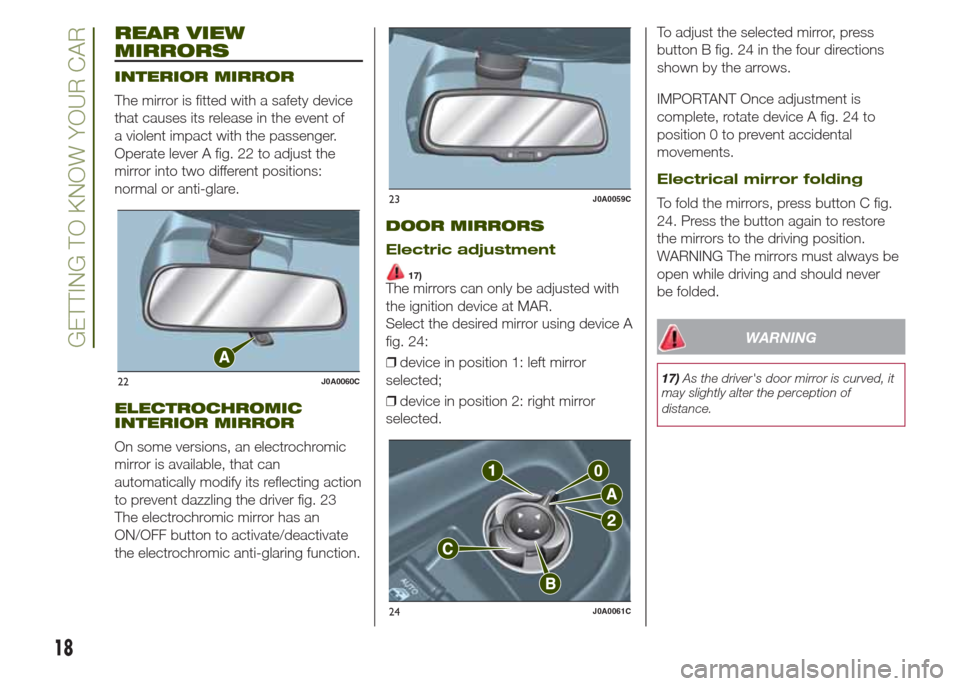
Operate lever A fig. 22 to adjust the
mirror into two different positions:
normal or anti-glare.
ELECTROCHROMIC
INTERIOR MIRROR
On some versions, an electrochromic
mirror is available, that can
automatically modify its reflecting action
to prevent dazzling the driver fig. 23
The electrochromic mirror has an
ON/OFF button to activate/deactivate
the electrochromic anti-glaring function.
DOOR MIRRORS
Electric adjustment
17)The mirrors can only be adjusted with
the ignition device at MAR.
Select the desired mirror using device A
fig. 24:
❒device in position 1: left mirror
selected;
❒device in position 2: right mirror
selected.To adjust the selected mirror, press
button B fig. 24 in the four directions
shown by the arrows.
IMPORTANT Once adjustment is
complete, rotate device A fig. 24 to
position 0 to prevent accidental
movements.
Electrical mirror folding
To fold the mirrors, press button C fig.
24. Press the button again to restore
the mirrors to the driving position.
WARNING The mirrors must always be
open while driving and should never
be folded.
WARNING
17)As the driver's door mirror is curved, it
may slightly alter the perception of
distance.22J0A0060C
23J0A0059C
24J0A0061C
18
GETTING TO KNOW YOUR CAR
Page 21 of 212
EXTERIOR LIGHTS
LIGHT SWITCH
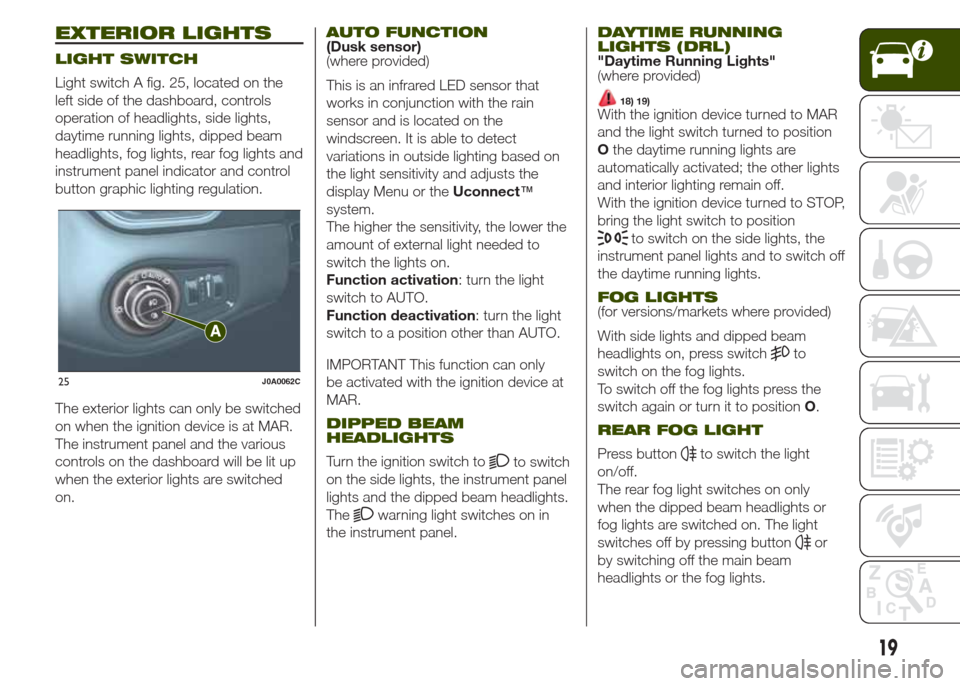
Light switch A fig. 25, located on the
left side of the dashboard, controls
operation of headlights, side lights,
daytime running lights, dipped beam
headlights, fog lights, rear fog lights and
instrument panel indicator and control
button graphic lighting regulation.
The exterior lights can only be switched
on when the ignition device is at MAR.
The instrument panel and the various
controls on the dashboard will be lit up
when the exterior lights are switched
on.
AUTO FUNCTION(Dusk sensor)
(where provided)
This is an infrared LED sensor that
works in conjunction with the rain
sensor and is located on the
windscreen. It is able to detect
variations in outside lighting based on
the light sensitivity and adjusts the
display Menu or theUconnect™
system.
The higher the sensitivity, the lower the
amount of external light needed to
switch the lights on.
Function activation: turn the light
switch to AUTO.
Function deactivation: turn the light
switch to a position other than AUTO.
IMPORTANT This function can only
be activated with the ignition device at
MAR.
DIPPED BEAM
HEADLIGHTS
Turn the ignition switch toto switch
on the side lights, the instrument panel
lights and the dipped beam headlights.
The
warning light switches on in
the instrument panel.
DAYTIME RUNNING
LIGHTS (DRL)
"Daytime Running Lights"
(where provided)
18) 19)With the ignition device turned to MAR
and the light switch turned to position
Othe daytime running lights are
automatically activated; the other lights
and interior lighting remain off.
With the ignition device turned to STOP,
bring the light switch to position
to switch on the side lights, the
instrument panel lights and to switch off
the daytime running lights.
FOG LIGHTS(for versions/markets where provided)
With side lights and dipped beam
headlights on, press switch
to
switch on the fog lights.
To switch off the fog lights press the
switch again or turn it to positionO.
REAR FOG LIGHT
Press buttonto switch the light
on/off.
The rear fog light switches on only
when the dipped beam headlights or
fog lights are switched on. The light
switches off by pressing button
or
by switching off the main beam
headlights or the fog lights.
25J0A0062C
19
Page 22 of 212
PARKING LIGHTS
These lights can be switched on with
ignition device at STOP or with key
removed, by moving the light switch to
positionOand then to position
.
The
warning light switches on
in the instrument panel.
HEADLIGHTS OFF TIMER
Function activation: with lights on,
bring the ignition device to STOP. Then
switch off the headlights within 45
seconds: timing will start when the light
switch is turned toO.
IMPORTANT To activate this functions
the headlights must be deactivated
within 45 seconds after the ignition
device has been taken to STOP.
Function deactivation: this function is
deactivated by switching on the
headlights, the side lights or bringing
the ignition device to MAR. If the
headlights are switched off before
ignition, they will go out normally.
MAIN BEAM HEADLIGHTS
To activate the fixed main beam
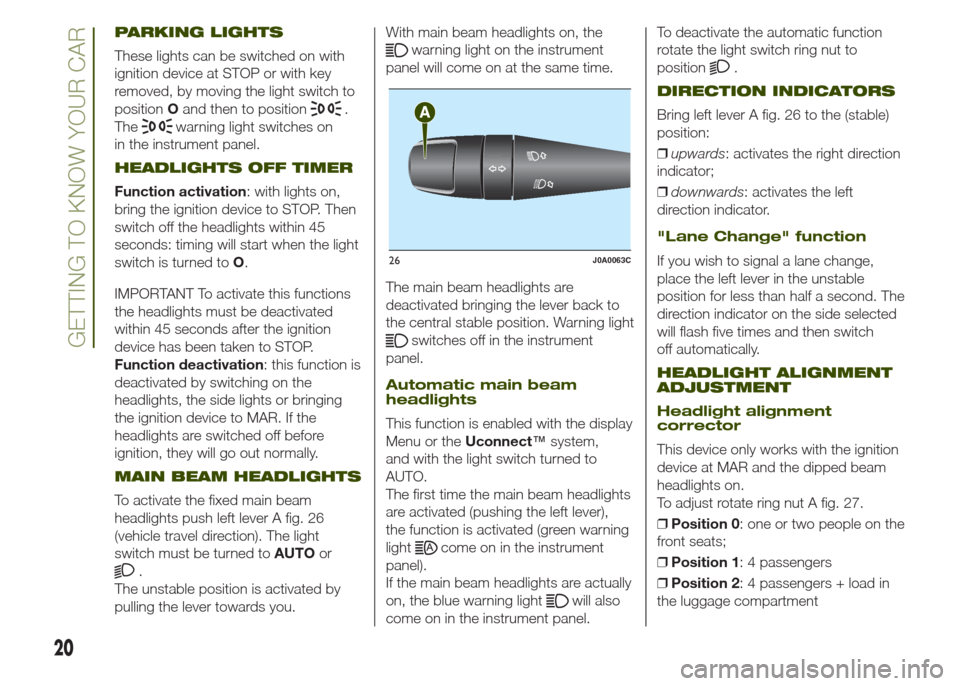
headlights push left lever A fig. 26
(vehicle travel direction). The light
switch must be turned toAUTOor
.
The unstable position is activated by
pulling the lever towards you.With main beam headlights on, the
warning light on the instrument
panel will come on at the same time.
The main beam headlights are
deactivated bringing the lever back to
the central stable position. Warning light
switches off in the instrument
panel.
Automatic main beam
headlights
This function is enabled with the display
Menu or theUconnect™system,
and with the light switch turned to
AUTO.
The first time the main beam headlights
are activated (pushing the left lever),
the function is activated (green warning
light
come on in the instrument
panel).
If the main beam headlights are actually
on, the blue warning light
will also
come on in the instrument panel.To deactivate the automatic function
rotate the light switch ring nut to
position
.
DIRECTION INDICATORS
Bring left lever A fig. 26 to the (stable)
position:
❒upwards: activates the right direction
indicator;
❒downwards: activates the left
direction indicator.
"Lane Change" function
If you wish to signal a lane change,
place the left lever in the unstable
position for less than half a second. The
direction indicator on the side selected
will flash five times and then switch
off automatically.
HEADLIGHT ALIGNMENT
ADJUSTMENT
Headlight alignment
corrector
This device only works with the ignition
device at MAR and the dipped beam
headlights on.
To adjust rotate ring nut A fig. 27.
❒Position 0: one or two people on the
front seats;
❒Position 1: 4 passengers
❒Position 2: 4 passengers + load in
the luggage compartment
26J0A0063C
20
GETTING TO KNOW YOUR CAR
Page 24 of 212
WINDSCREEN/REAR
WINDOW WIPER
WINDSCREEN
WIPER/WASHER
20)7) 8)
This operates only with the ignition
device at MAR.
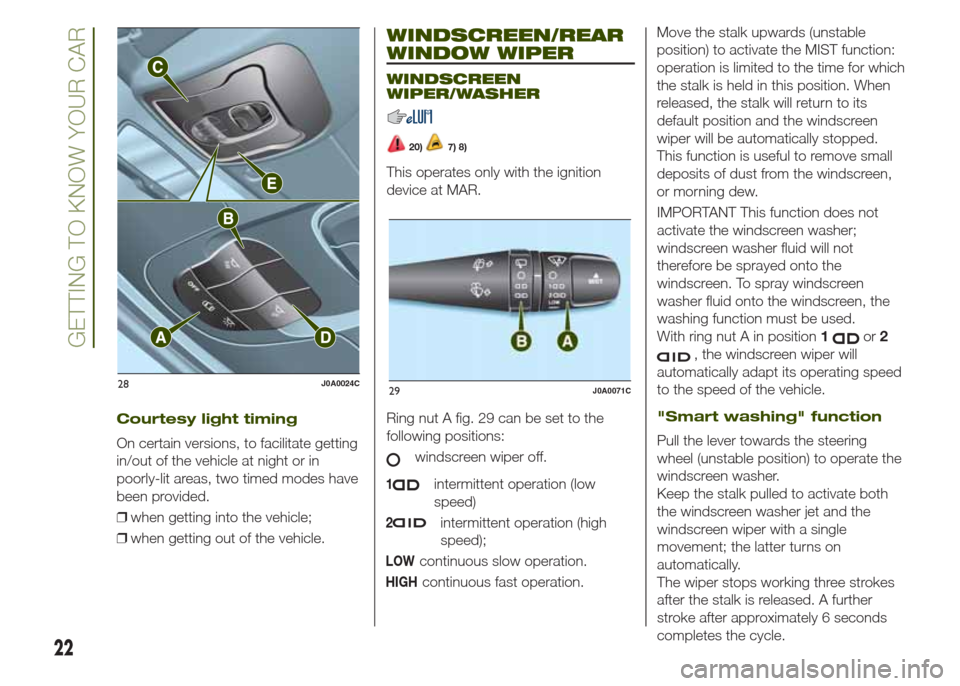
Ring nut A fig. 29 can be set to the
following positions:
windscreen wiper off.
1intermittent operation (low
speed)
2intermittent operation (high
speed);
LOWcontinuous slow operation.
HIGHcontinuous fast operation.Move the stalk upwards (unstable
position) to activate the MIST function:
operation is limited to the time for which
the stalk is held in this position. When
released, the stalk will return to its
default position and the windscreen
wiper will be automatically stopped.
This function is useful to remove small
deposits of dust from the windscreen,
or morning dew.
IMPORTANT This function does not
activate the windscreen washer;
windscreen washer fluid will not
therefore be sprayed onto the
windscreen. To spray windscreen
washer fluid onto the windscreen, the
washing function must be used.
With ring nut A in position1
or2
, the windscreen wiper will
automatically adapt its operating speed
to the speed of the vehicle.
"Smart washing" function
Pull the lever towards the steering
wheel (unstable position) to operate the
windscreen washer.
Keep the stalk pulled to activate both
the windscreen washer jet and the
windscreen wiper with a single
movement; the latter turns on
automatically.
The wiper stops working three strokes
after the stalk is released. A further
stroke after approximately 6 seconds
completes the cycle.
28J0A0024C29J0A0071C
22
GETTING TO KNOW YOUR CAR
Courtesy light timing
On certain versions, to facilitate getting
in/out of the vehicle at night or in
poorly-lit areas, two timed modes have
been provided.
❒when getting into the vehicle;
❒when getting out of the vehicle.
Page 25 of 212
RAIN SENSOR(where provided)
This is located behind the interior rear
view mirror, in contact with the
windscreen and can detect the
presence of rain and, consequently,
manage the cleaning of the windscreen
in accordance with the amount of
water on the screen.
Activation/deactivation
9) 10)
By acting on the display menu or on the
Uconnect™system you can
activate/deactivate the rain sensor. The
sensor can also be deactivated by
bringing the ignition device to STOP.
The activation of the sensor is signalled
by a "stroke" to show that the
command has been acquired.
If the ignition device is moved to STOP
position, leaving the ring nut A fig. 29
in1
or2, when the vehicle is
next started (ignition device at MAR),
no wiping cycle occurs even if it rains.
REAR WINDOW
WIPER/WASHER
Activation
Turn ring nut B fig. 29 from positionO
to position
to operate the rear
window wiper as follows:
❒in intermittent mode when the
windscreen wiper is not operating;❒in synchronous mode (at half the
speed of the windscreen wiper) when
the windscreen wiper is operating;
❒in continuous mode with reverse gear
engaged and the control active.
Position1
: intermittent operation
(low speed).
Position2
: continuous slow
operation.
With reverse gear engaged and
windscreen wiper on, the rear window
wiper is activated in continuous mode.
Pushing the stalk towards the
dashboard (unstable position) will
activate the rear window washer jet.
Keep the stalk pushed for more than
half a second to activate the rear
window wiper as well. Releasing the
stalk will activate the smart washing
function, as described for the
windscreen wiper.
Deactivation
Release the lever.
WARNING
20)Make sure the device is switched off
whenever the windscreen must be
cleaned.
WARNING
7)Do not use the screen wiper to remove
layers of snow or ice from the windscreen.
In such conditions, the windscreen wiper
may be subjected to excessive stress
and the motor cut-out switch, which
prevents operation for a few seconds, may
intervene. If operation is not subsequently
restored, even after the vehicle is restarted,
contact a Jeep Dealership.
8)Do not operate the windscreen wiper
with blades lifted from the windscreen.
9)Do not activate the rain sensor while
washing the vehicle in an automatic
washing system.
10)If ice is found on the windscreen, make
sure that the device was disconnected
properly.
23
Page 30 of 212
ELECTRIC WINDOWS
ELECTRIC WINDOWS
21)They operate with the ignition device at
MAR and for nearly 3 minutes after
the ignition device switches to STOP (or
also after the mechanical key has
been extracted, for vehicles equipped
with mechanical key with remote
control). When one of the front doors is
opened this operation is disabled.
Driver side front door
controls
The buttons are located on the door
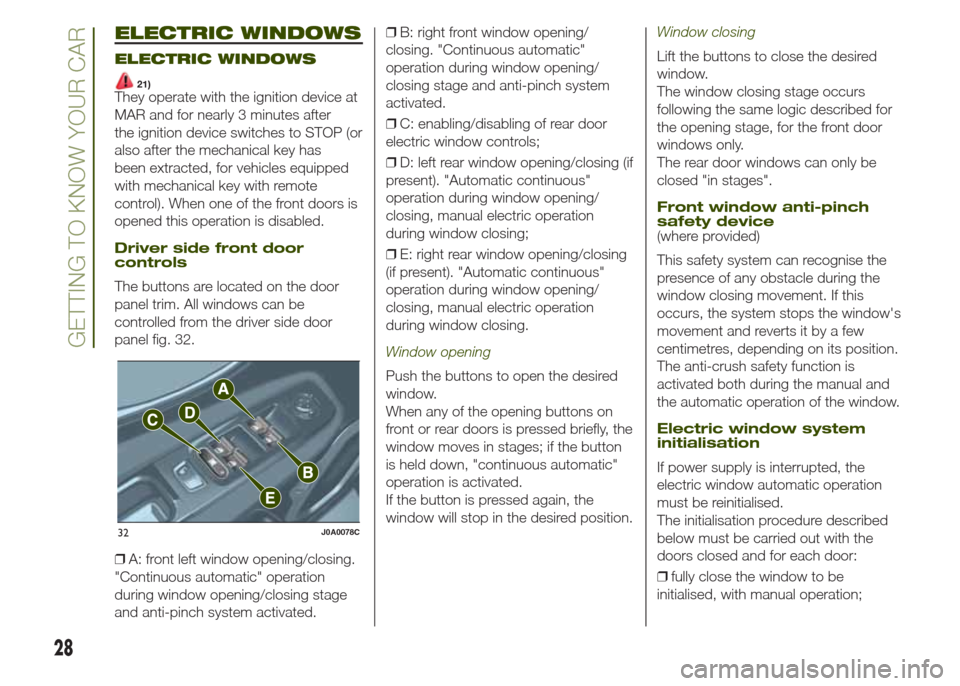
panel trim. All windows can be
controlled from the driver side door
panel fig. 32.
❒A: front left window opening/closing.
"Continuous automatic" operation
during window opening/closing stage
and anti-pinch system activated.❒B: right front window opening/
closing. "Continuous automatic"
operation during window opening/
closing stage and anti-pinch system
activated.
❒C: enabling/disabling of rear door
electric window controls;
❒D: left rear window opening/closing (if
present). "Automatic continuous"
operation during window opening/
closing, manual electric operation
during window closing;
❒E: right rear window opening/closing
(if present). "Automatic continuous"
operation during window opening/
closing, manual electric operation
during window closing.
Window opening
Push the buttons to open the desired
window.
When any of the opening buttons on
front or rear doors is pressed briefly, the
window moves in stages; if the button
is held down, "continuous automatic"
operation is activated.
If the button is pressed again, the
window will stop in the desired position.
Window closing
Lift the buttons to close the desired
window.
The window closing stage occurs
following the same logic described for
the opening stage, for the front door
windows only.
The rear door windows can only be
closed "in stages".
Front window anti-pinch
safety device
(where provided)
This safety system can recognise the
presence of any obstacle during the
window closing movement. If this
occurs, the system stops the window's
movement and reverts it by a few
centimetres, depending on its position.
The anti-crush safety function is
activated both during the manual and
the automatic operation of the window.
Electric window system
initialisation
If power supply is interrupted, the
electric window automatic operation
must be reinitialised.
The initialisation procedure described
below must be carried out with the
doors closed and for each door:
❒fully close the window to be
initialised, with manual operation;
32J0A0078C
28
GETTING TO KNOW YOUR CAR
Page 31 of 212
❒after the window has reached the
upper end of travel, hold the up button
down for at least 3 seconds.
WARNING
21)Incorrect use of the electric windows
may be dangerous. Before and during their
operation, ensure that any passengers
are not at risk from the moving glass either
by personal objects getting caught in the
mechanism or by being hit by it directly.
When leaving the vehicle (equipped with
mechanical key with remote control),
always remove the key from the ignition
device to prevent accidental operation of
the electric windows from being a hazard
for those still on board.
ELECTRIC SUN
ROOF
22)11)The electric sun roof comprises two
glass panels (the front one is mobile
and the rear one fixed) and is fitted with
an electrically operated sun blind.
The sun roof and the blind can
be operated only with the ignition
device turned to MAR.
CONTROL BUTTONS
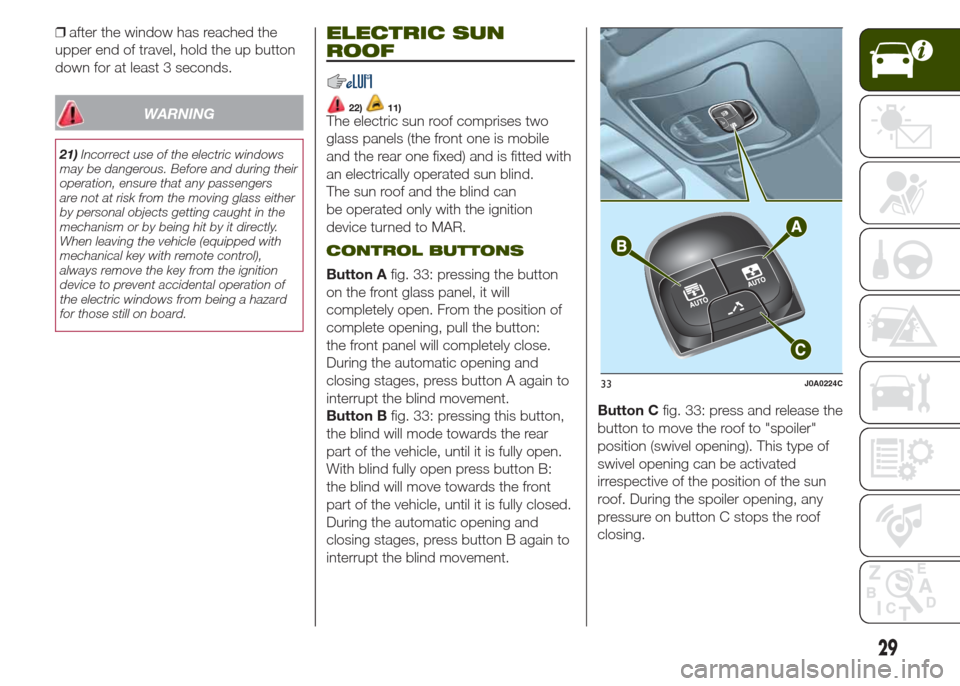
Button Afig. 33: pressing the button
on the front glass panel, it will
completely open. From the position of
complete opening, pull the button:
the front panel will completely close.
During the automatic opening and
closing stages, press button A again to
interrupt the blind movement.
Button Bfig. 33: pressing this button,
the blind will mode towards the rear
part of the vehicle, until it is fully open.
With blind fully open press button B:
the blind will move towards the front
part of the vehicle, until it is fully closed.
During the automatic opening and
closing stages, press button B again to
interrupt the blind movement.Button Cfig. 33: press and release the
button to move the roof to "spoiler"
position (swivel opening). This type of
swivel opening can be activated
irrespective of the position of the sun
roof. During the spoiler opening, any
pressure on button C stops the roof
closing.
33J0A0224C
29
Page 32 of 212
ANTI-PINCH DEVICE
The sun roof and the electric blind are
equipped with an anti-pinch safety
system capable of detecting the
presence of an obstacle whilst the roof
is closing: if this happens, the system
intervenes and the movement of the
glass is immediately reversed.
EMERGENCY OPERATION
If the control buttons fail to operate, the
sun blind and the sun roof can be
moved manually, proceeding as
described below:
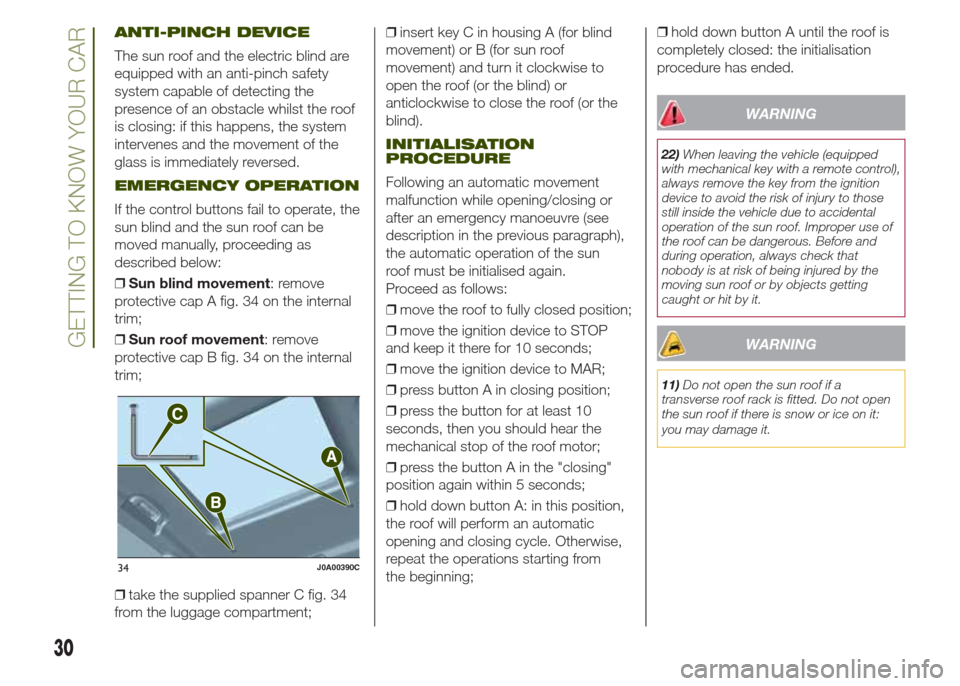
❒Sun blind movement: remove
protective cap A fig. 34 on the internal
trim;
❒Sun roof movement: remove
protective cap B fig. 34 on the internal
trim;
❒take the supplied spanner C fig. 34
from the luggage compartment;❒insert key C in housing A (for blind
movement) or B (for sun roof
movement) and turn it clockwise to
open the roof (or the blind) or
anticlockwise to close the roof (or the
blind).
INITIALISATION
PROCEDURE
Following an automatic movement
malfunction while opening/closing or
after an emergency manoeuvre (see
description in the previous paragraph),
the automatic operation of the sun
roof must be initialised again.
Proceed as follows:
❒move the roof to fully closed position;
❒move the ignition device to STOP
and keep it there for 10 seconds;
❒move the ignition device to MAR;
❒press button A in closing position;
❒press the button for at least 10
seconds, then you should hear the
mechanical stop of the roof motor;
❒press the button A in the "closing"
position again within 5 seconds;
❒hold down button A: in this position,
the roof will perform an automatic
opening and closing cycle. Otherwise,
repeat the operations starting from
the beginning;❒hold down button A until the roof is
completely closed: the initialisation
procedure has ended.
WARNING
22)When leaving the vehicle (equipped
with mechanical key with a remote control),
always remove the key from the ignition
device to avoid the risk of injury to those
still inside the vehicle due to accidental
operation of the sun roof. Improper use of
the roof can be dangerous. Before and
during operation, always check that
nobody is at risk of being injured by the
moving sun roof or by objects getting
caught or hit by it.
WARNING
11)Do not open the sun roof if a
transverse roof rack is fitted. Do not open
the sun roof if there is snow or ice on it:
you may damage it.
34J0A00390C
30
GETTING TO KNOW YOUR CAR
Page 33 of 212
MySky SUN ROOF
12)
The roof has two panels, a front and a
rear one, that can be individually or
simultaneously removed, as wished.
Front and rear panels are distinguished
by a dedicated symbol on the bottom
of the panels themselves.
IMPORTANT The panels can withstand
any snow that may deposit on them.
In any case, it is advisable to remove
excessive snow.
FRONT PANEL ELECTRIC
MOVEMENT
On some versions, the front panel
might be electrically operated. This
operates only with the ignition device at
MAR. The panel can be adjusted
forward/backward and opened in swivel
position.
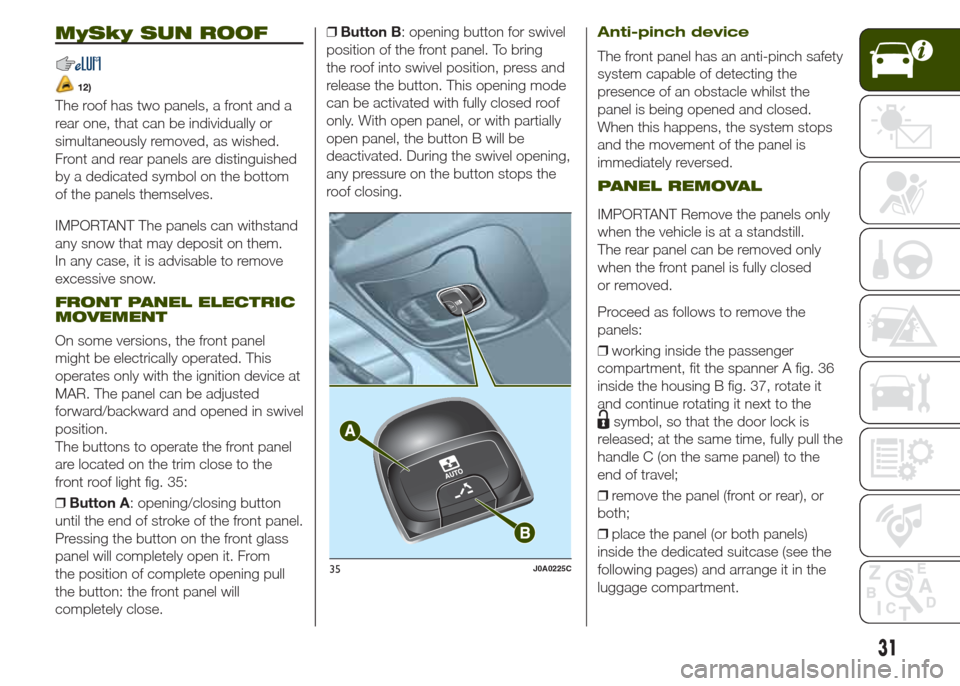
The buttons to operate the front panel
are located on the trim close to the
front roof light fig. 35:
❒Button A: opening/closing button
until the end of stroke of the front panel.
Pressing the button on the front glass
panel will completely open it. From
the position of complete opening pull
the button: the front panel will
completely close.❒Button B: opening button for swivel
position of the front panel. To bring
the roof into swivel position, press and
release the button. This opening mode
can be activated with fully closed roof
only. With open panel, or with partially
open panel, the button B will be
deactivated. During the swivel opening,
any pressure on the button stops the
roof closing.
Anti-pinch device
The front panel has an anti-pinch safety
system capable of detecting the
presence of an obstacle whilst the
panel is being opened and closed.
When this happens, the system stops
and the movement of the panel is
immediately reversed.
PANEL REMOVAL
IMPORTANT Remove the panels only
when the vehicle is at a standstill.
The rear panel can be removed only
when the front panel is fully closed
or removed.
Proceed as follows to remove the
panels:
❒working inside the passenger
compartment, fit the spanner A fig. 36
inside the housing B fig. 37, rotate it
and continue rotating it next to the
symbol, so that the door lock is
released; at the same time, fully pull the
handle C (on the same panel) to the
end of travel;
❒remove the panel (front or rear), or
both;
❒place the panel (or both panels)
inside the dedicated suitcase (see the
following pages) and arrange it in the
luggage compartment.
35J0A0225C
31
Page 38 of 212
WARNING
27)Be careful not to hit objects on the
storage shelf when you open the tailgate.
WARNING
13)The dimensions of the platform permit
a maximum capacity of distributed weight
of 70 kg (in position 0) or 40 kg (in position
1): do not load objects with a higher
weight.
36
GETTING TO KNOW YOUR CAR
Power socket
This is located on the left side of the
luggage compartment. It only operates
with the ignition device at MAR.
IMPORTANT Do not connect devices
with power higher than 180 W to the
socket. Do not damage the socket by
using unsuitable adaptors.