light JEEP RENEGADE 2014 1.G User Guide
[x] Cancel search | Manufacturer: JEEP, Model Year: 2014, Model line: RENEGADE, Model: JEEP RENEGADE 2014 1.GPages: 212, PDF Size: 17.48 MB
Page 23 of 212
❒Position 3: driver + maximum
permitted load stowed only in the
luggage compartment
IMPORTANT Check the headlight
alignment each time the weight of the
load transported changes.
INSTRUMENT PANEL AND
CONTROL BUTTON
GRAPHICS BRIGHTNESS
ADJUSTMENT
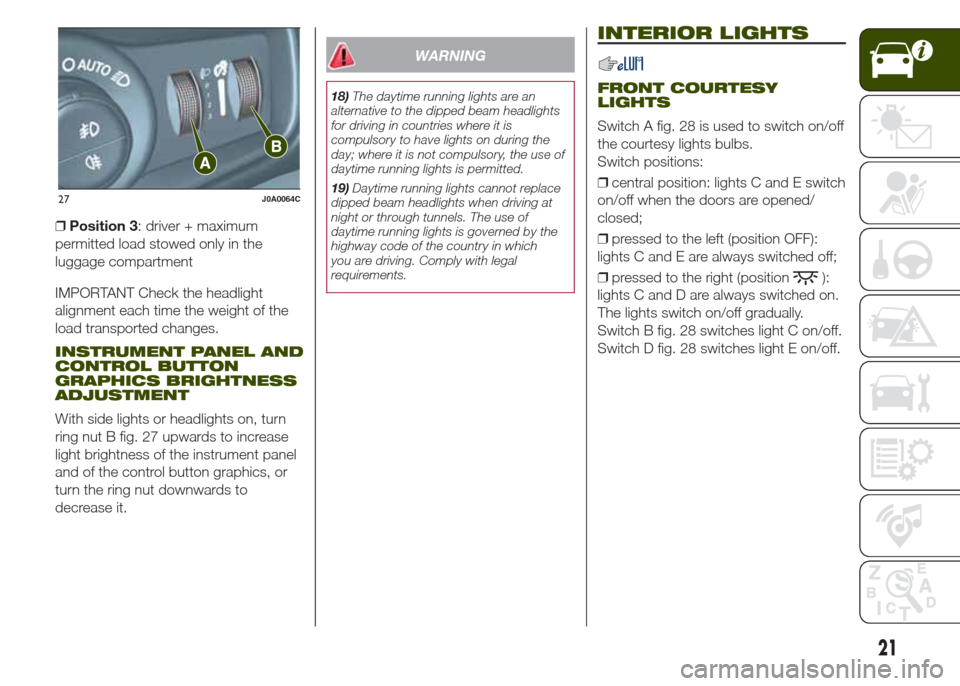
With side lights or headlights on, turn
ring nut B fig. 27 upwards to increase
light brightness of the instrument panel
and of the control button graphics, or
turn the ring nut downwards to
decrease it.
WARNING
18)The daytime running lights are an
alternative to the dipped beam headlights
for driving in countries where it is
compulsory to have lights on during the
day; where it is not compulsory, the use of
daytime running lights is permitted.
19)Daytime running lights cannot replace
dipped beam headlights when driving at
night or through tunnels. The use of
daytime running lights is governed by the
highway code of the country in which
you are driving. Comply with legal
requirements.
INTERIOR LIGHTS
FRONT COURTESY
LIGHTS
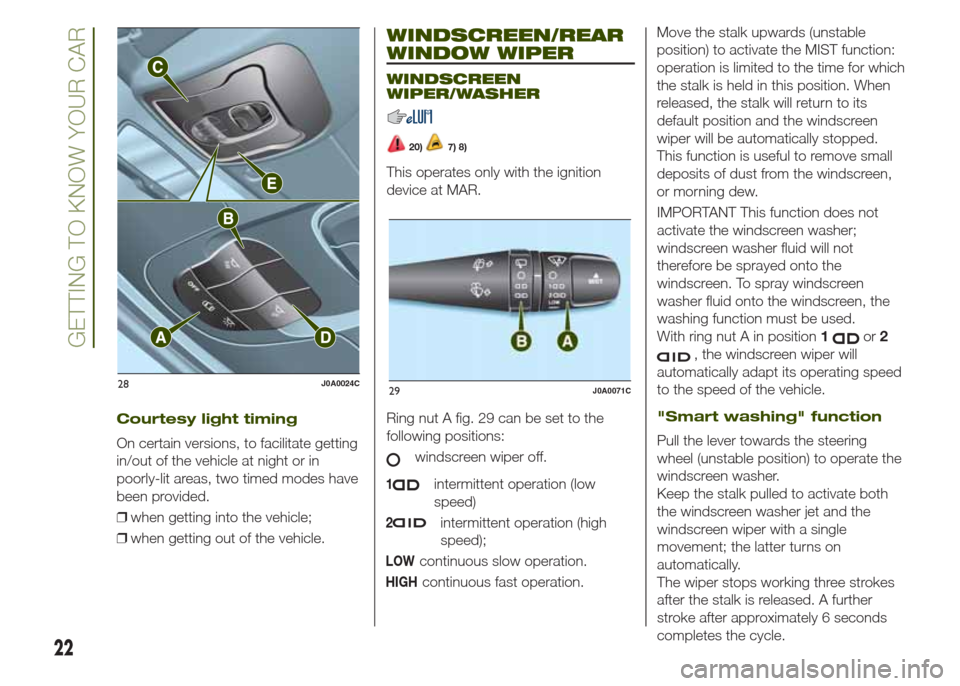
Switch A fig. 28 is used to switch on/off
the courtesy lights bulbs.
Switch positions:
❒central position: lights C and E switch
on/off when the doors are opened/
closed;
❒pressed to the left (position OFF):
lights C and E are always switched off;
❒pressed to the right (position
):
lights C and D are always switched on.
The lights switch on/off gradually.
Switch B fig. 28 switches light C on/off.
Switch D fig. 28 switches light E on/off.
27J0A0064C
21
Page 24 of 212
WINDSCREEN/REAR
WINDOW WIPER
WINDSCREEN
WIPER/WASHER
20)7) 8)
This operates only with the ignition
device at MAR.
Ring nut A fig. 29 can be set to the
following positions:
windscreen wiper off.
1intermittent operation (low
speed)
2intermittent operation (high
speed);
LOWcontinuous slow operation.
HIGHcontinuous fast operation.Move the stalk upwards (unstable
position) to activate the MIST function:
operation is limited to the time for which
the stalk is held in this position. When
released, the stalk will return to its
default position and the windscreen
wiper will be automatically stopped.
This function is useful to remove small
deposits of dust from the windscreen,
or morning dew.
IMPORTANT This function does not
activate the windscreen washer;
windscreen washer fluid will not
therefore be sprayed onto the
windscreen. To spray windscreen
washer fluid onto the windscreen, the
washing function must be used.
With ring nut A in position1
or2
, the windscreen wiper will
automatically adapt its operating speed
to the speed of the vehicle.
"Smart washing" function
Pull the lever towards the steering
wheel (unstable position) to operate the
windscreen washer.
Keep the stalk pulled to activate both
the windscreen washer jet and the
windscreen wiper with a single
movement; the latter turns on
automatically.
The wiper stops working three strokes
after the stalk is released. A further
stroke after approximately 6 seconds
completes the cycle.
28J0A0024C29J0A0071C
22
GETTING TO KNOW YOUR CAR
Courtesy light timing
On certain versions, to facilitate getting
in/out of the vehicle at night or in
poorly-lit areas, two timed modes have
been provided.
❒when getting into the vehicle;
❒when getting out of the vehicle.
Page 27 of 212
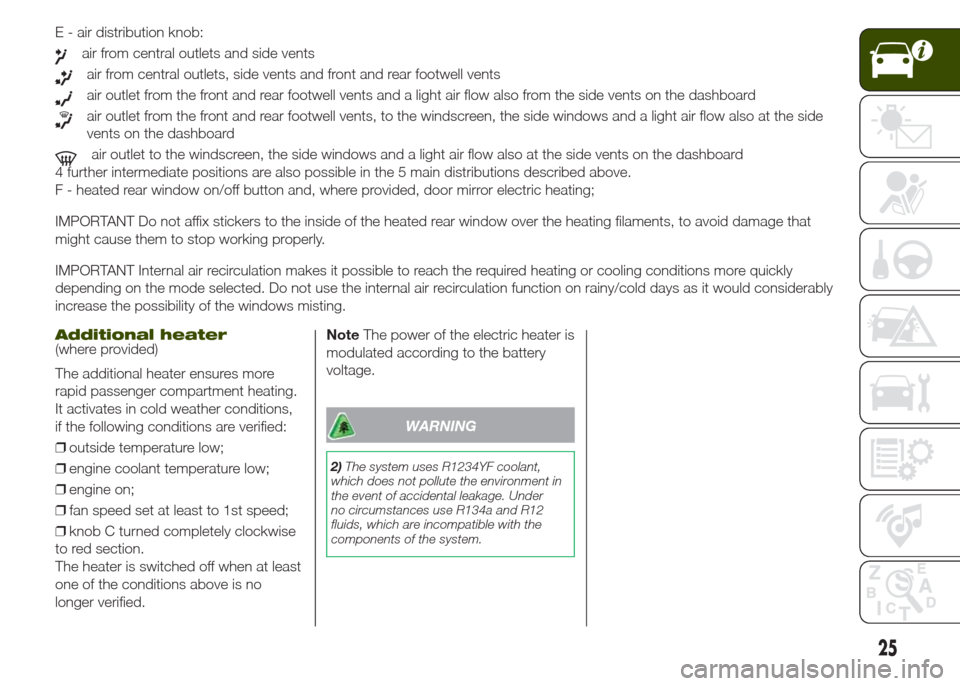
E - air distribution knob:
air from central outlets and side vents
air from central outlets, side vents and front and rear footwell vents
air outlet from the front and rear footwell vents and a light air flow also from the side vents on the dashboard
air outlet from the front and rear footwell vents, to the windscreen, the side windows and a light air flow also at the side
vents on the dashboard
air outlet to the windscreen, the side windows and a light air flow also at the side vents on the dashboard
4 further intermediate positions are also possible in the 5 main distributions described above.
F - heated rear window on/off button and, where provided, door mirror electric heating;
IMPORTANT Do not affix stickers to the inside of the heated rear window over the heating filaments, to avoid damage that
might cause them to stop working properly.
IMPORTANT Internal air recirculation makes it possible to reach the required heating or cooling conditions more quickly
depending on the mode selected. Do not use the internal air recirculation function on rainy/cold days as it would considerably
increase the possibility of the windows misting.
Additional heater(where provided)
The additional heater ensures more
rapid passenger compartment heating.
It activates in cold weather conditions,
if the following conditions are verified:
❒outside temperature low;
❒engine coolant temperature low;
❒engine on;
❒fan speed set at least to 1st speed;
❒knob C turned completely clockwise
to red section.
The heater is switched off when at least
one of the conditions above is no
longer verified.NoteThe power of the electric heater is
modulated according to the battery
voltage.
WARNING
2)The system uses R1234YF coolant,
which does not pollute the environment in
the event of accidental leakage. Under
no circumstances use R134a and R12
fluids, which are incompatible with the
components of the system.
25
Page 29 of 212
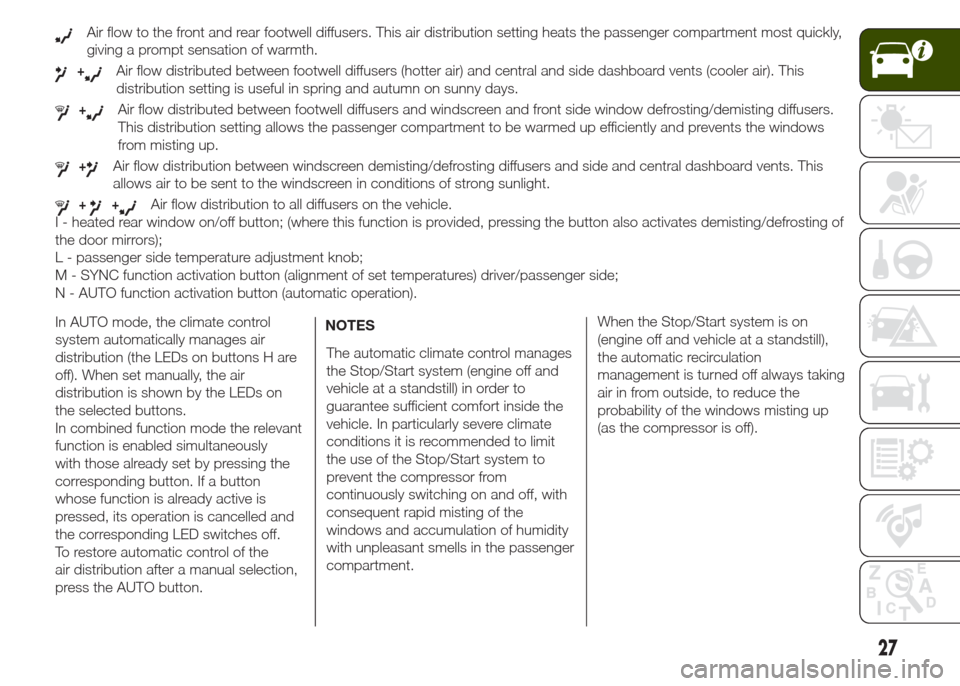
Air flow to the front and rear footwell diffusers. This air distribution setting heats the passenger compartment most quickly,
giving a prompt sensation of warmth.
+Air flow distributed between footwell diffusers (hotter air) and central and side dashboard vents (cooler air). This
distribution setting is useful in spring and autumn on sunny days.
+Air flow distributed between footwell diffusers and windscreen and front side window defrosting/demisting diffusers.
This distribution setting allows the passenger compartment to be warmed up efficiently and prevents the windows
from misting up.
+Air flow distribution between windscreen demisting/defrosting diffusers and side and central dashboard vents. This
allows air to be sent to the windscreen in conditions of strong sunlight.
++Air flow distribution to all diffusers on the vehicle.
I - heated rear window on/off button; (where this function is provided, pressing the button also activates demisting/defrosting of
the door mirrors);
L - passenger side temperature adjustment knob;
M - SYNC function activation button (alignment of set temperatures) driver/passenger side;
N - AUTO function activation button (automatic operation).
In AUTO mode, the climate control
system automatically manages air
distribution (the LEDs on buttons H are
off). When set manually, the air
distribution is shown by the LEDs on
the selected buttons.
In combined function mode the relevant
function is enabled simultaneously
with those already set by pressing the
corresponding button. If a button
whose function is already active is
pressed, its operation is cancelled and
the corresponding LED switches off.
To restore automatic control of the
air distribution after a manual selection,
press the AUTO button.NOTES
The automatic climate control manages
the Stop/Start system (engine off and
vehicle at a standstill) in order to
guarantee sufficient comfort inside the
vehicle. In particularly severe climate
conditions it is recommended to limit
the use of the Stop/Start system to
prevent the compressor from
continuously switching on and off, with
consequent rapid misting of the
windows and accumulation of humidity
with unpleasant smells in the passenger
compartment.When the Stop/Start system is on
(engine off and vehicle at a standstill),
the automatic recirculation
management is turned off always taking
air in from outside, to reduce the
probability of the windows misting up
(as the compressor is off).
27
Page 33 of 212
MySky SUN ROOF
12)
The roof has two panels, a front and a
rear one, that can be individually or
simultaneously removed, as wished.
Front and rear panels are distinguished
by a dedicated symbol on the bottom
of the panels themselves.
IMPORTANT The panels can withstand
any snow that may deposit on them.
In any case, it is advisable to remove
excessive snow.
FRONT PANEL ELECTRIC
MOVEMENT
On some versions, the front panel
might be electrically operated. This
operates only with the ignition device at
MAR. The panel can be adjusted
forward/backward and opened in swivel
position.
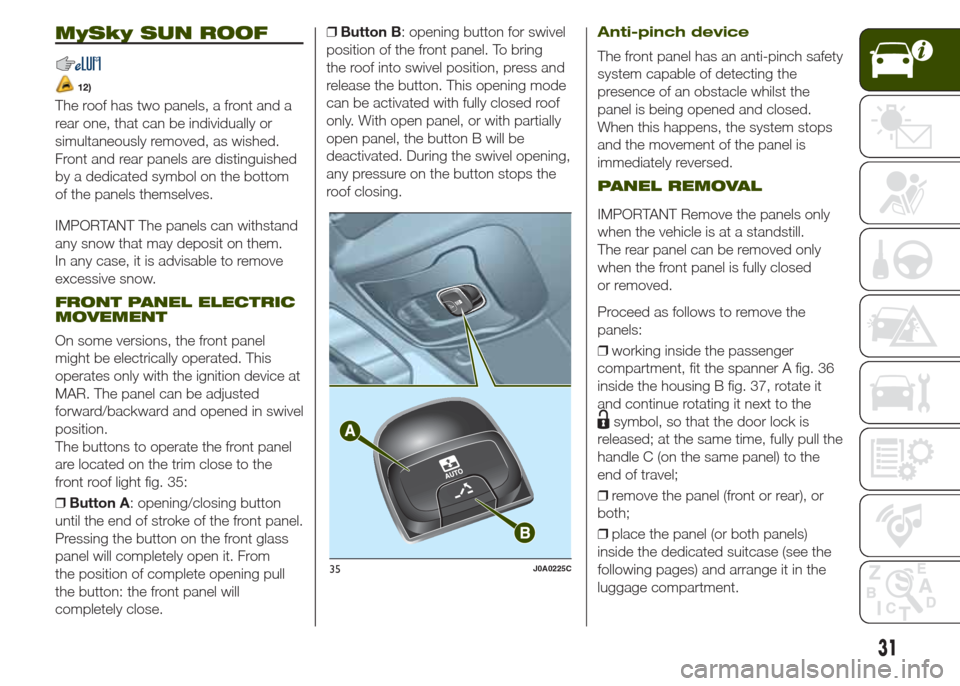
The buttons to operate the front panel
are located on the trim close to the
front roof light fig. 35:
❒Button A: opening/closing button
until the end of stroke of the front panel.
Pressing the button on the front glass
panel will completely open it. From
the position of complete opening pull
the button: the front panel will
completely close.❒Button B: opening button for swivel
position of the front panel. To bring
the roof into swivel position, press and
release the button. This opening mode
can be activated with fully closed roof
only. With open panel, or with partially
open panel, the button B will be
deactivated. During the swivel opening,
any pressure on the button stops the
roof closing.
Anti-pinch device
The front panel has an anti-pinch safety
system capable of detecting the
presence of an obstacle whilst the
panel is being opened and closed.
When this happens, the system stops
and the movement of the panel is
immediately reversed.
PANEL REMOVAL
IMPORTANT Remove the panels only
when the vehicle is at a standstill.
The rear panel can be removed only
when the front panel is fully closed
or removed.
Proceed as follows to remove the
panels:
❒working inside the passenger
compartment, fit the spanner A fig. 36
inside the housing B fig. 37, rotate it
and continue rotating it next to the
symbol, so that the door lock is
released; at the same time, fully pull the
handle C (on the same panel) to the
end of travel;
❒remove the panel (front or rear), or
both;
❒place the panel (or both panels)
inside the dedicated suitcase (see the
following pages) and arrange it in the
luggage compartment.
35J0A0225C
31
Page 39 of 212
KNOWING THE INSTRUMENT PANEL
This section of the booklet gives you all
the information you need to
understand, interpret and use the
instrument panel correctly.CONTROL PANEL AND
ON-BOARD INSTRUMENTS ........... 38
DISPLAY ......................................... 40
WARNING LIGHTS AND
MESSAGES .................................... 43
-Red warning lights............................ 43
-Amber warning lights........................ 47
-Green warning lights........................ 51
-Blue warning lights........................... 52
-Red symbols on the display.............. 52
-Amber symbols on the display.......... 54
-White symbols.................................. 60
-Messages on the display.................. 61
37
Page 40 of 212
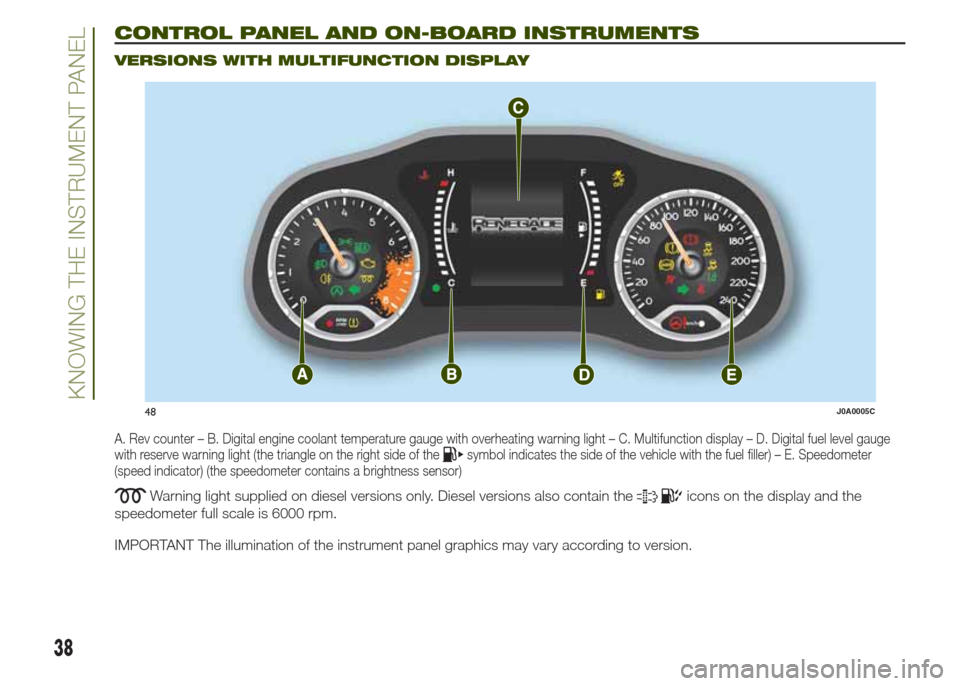
CONTROL PANEL AND ON-BOARD INSTRUMENTS.
VERSIONS WITH MULTIFUNCTION DISPLAY
A. Rev counter – B. Digital engine coolant temperature gauge with overheating warning light – C. Multifunction display – D. Digital fuel level gauge
with reserve warning light (the triangle on the right side of thesymbol indicates the side of the vehicle with the fuel filler) – E. Speedometer
(speed indicator) (the speedometer contains a brightness sensor)
Warning light supplied on diesel versions only. Diesel versions also contain theicons on the display and the
speedometer full scale is 6000 rpm.
IMPORTANT The illumination of the instrument panel graphics may vary according to version.
48J0A0005C
38
KNOWING THE INSTRUMENT PANEL
Page 41 of 212
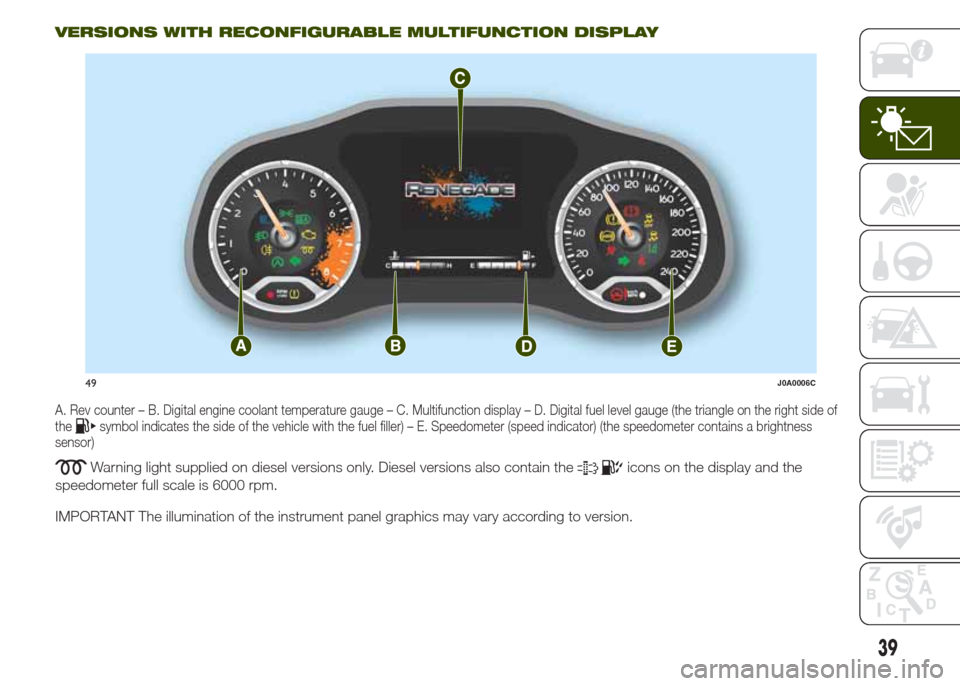
VERSIONS WITH RECONFIGURABLE MULTIFUNCTION DISPLAY
A. Rev counter – B. Digital engine coolant temperature gauge – C. Multifunction display – D. Digital fuel level gauge (the triangle on the right side of
thesymbol indicates the side of the vehicle with the fuel filler) – E. Speedometer (speed indicator) (the speedometer contains a brightness
sensor)
Warning light supplied on diesel versions only. Diesel versions also contain theicons on the display and the
speedometer full scale is 6000 rpm.
IMPORTANT The illumination of the instrument panel graphics may vary according to version.
49J0A0006C
39
Page 43 of 212
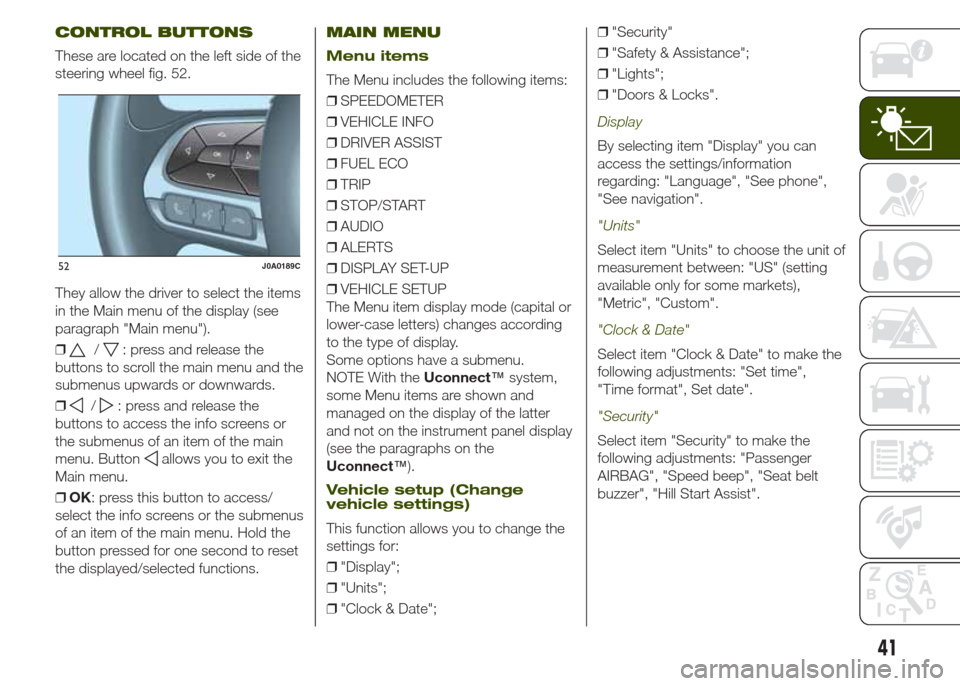
CONTROL BUTTONS
These are located on the left side of the
steering wheel fig. 52.
They allow the driver to select the items
in the Main menu of the display (see
paragraph "Main menu").
❒
/: press and release the
buttons to scroll the main menu and the
submenus upwards or downwards.
❒
/: press and release the
buttons to access the info screens or
the submenus of an item of the main
menu. Button
allows you to exit the
Main menu.
❒OK: press this button to access/
select the info screens or the submenus
of an item of the main menu. Hold the
button pressed for one second to reset
the displayed/selected functions.
MAIN MENU
Menu items
The Menu includes the following items:
❒SPEEDOMETER
❒VEHICLE INFO
❒DRIVER ASSIST
❒FUEL ECO
❒TRIP
❒STOP/START
❒AUDIO
❒ALERTS
❒DISPLAY SET-UP
❒VEHICLE SETUP
The Menu item display mode (capital or
lower-case letters) changes according
to the type of display.
Some options have a submenu.
NOTE With theUconnect™system,
some Menu items are shown and
managed on the display of the latter
and not on the instrument panel display
(see the paragraphs on the
Uconnect™).
Vehicle setup (Change
vehicle settings)
This function allows you to change the
settings for:
❒"Display";
❒"Units";
❒"Clock & Date";❒"Security"
❒"Safety & Assistance";
❒"Lights";
❒"Doors & Locks".
Display
By selecting item "Display" you can
access the settings/information
regarding: "Language", "See phone",
"See navigation".
"Units"
Select item "Units" to choose the unit of
measurement between: "US" (setting
available only for some markets),
"Metric", "Custom".
"Clock & Date"
Select item "Clock & Date" to make the
following adjustments: "Set time",
"Time format", Set date".
"Security"
Select item "Security" to make the
following adjustments: "Passenger
AIRBAG", "Speed beep", "Seat belt
buzzer", "Hill Start Assist".
52J0A0189C
41
Page 44 of 212
The "Passenger AIRBAG" function is
used to activate/deactivate the front
passenger side airbag.Passenger's
protection active: the LED
ON
comes on constantly on the dashboard
located in the instrument panel.
Passenger's protection not active:
the LED
OFFon the dashboard
comes on constantly in the control
panel.
"Safety & Assistance"
For possible adjustments see
paragraphUconnect™in chapter
"Multimedia".
"Lights"
Select item "Lights" to make the
following adjustments: "Ambient
lighting", "Follow me", "Headlights while
opening", "Headlight sensor", "High
Beams Auto Dim", "Daytime Lights",
"Cornering lights".
"Doors & Locks"
Select item "Doors & Locks" to make
the following adjustments: "Autoclose",
"Auto unlock on exit", "Flash Lights
w/Lock", "Horn with Lock", "Horn
w/Remote Start", "Remote Unlock"
(versions without Passive Entry), "Door
Unlock" (versions with Passive Entry),
"Passive Entry".
Versions with
reconfigurable multifunction
display
On versions equipped with
reconfigurable multifunction display only
the following items are available:
"Display" (only items "See phone" and
"See navigation" can be selected),
"Security" and "Safety & Assistance"
(only item "Buzzer volume" can be
selected). All other items will be shown
and managed on theUconnect™
system display.
TRIP COMPUTER
The “Trip computer” is used to display
information on vehicle operation when
the ignition device is at MAR.
This function is characterised by two
separate memories, called "Trip A" and
"Trip B", where the vehicle's "complete
missions" (journeys) are recorded in a
reciprocally independent manner.
“Trip A”allows the following values to
be displayed: "Distance travelled A",
"Average consumption A", "Journey
time (driving time) A".
“Trip B”allows the following values to
be displayed: "Distance travelled B",
"Average consumption B", "Journey
time (driving time) B". The “Trip B”
function may be excluded.
Both memories can be reset: (reset -
start of a new journey).
To reset the values of "Trip A" and "Trip
B" press and hold theOKbutton on
the steering wheel controls.
NOTE “Range” and “Instantaneous fuel
consumption" parameters cannot be
reset.
42
KNOWING THE INSTRUMENT PANEL