fuel JEEP RENEGADE 2014 1.G Owners Manual
[x] Cancel search | Manufacturer: JEEP, Model Year: 2014, Model line: RENEGADE, Model: JEEP RENEGADE 2014 1.GPages: 212, PDF Size: 17.48 MB
Page 4 of 212
READ THIS CAREFULLY
REFUELLING
Petrol engines: only refuel with unleaded petrol with octane rating (RON) not less than 95 in compliance with the European specification
EN228. Do not use petrol containing methanol or ethanol E85. Using these mixtures may cause misfiring and driving issues, as well as
damage fundamental components of the supply system.
Diesel engines: refuel only with diesel fuel conforming to the European specification EN590. The use of other products or mixtures may
damage the engine beyond repair and consequently invalidate the warranty, due to the damage caused.
For further details on the use of the correct fuel see paragraph "Refuelling the vehicle" in the "Starting and driving" chapter.
STARTING THE ENGINE
Versions with manual gearbox (petrol engines): make sure that the parking brake is engaged; set the gear lever to neutral, fully depress
the clutch pedal without pressing the accelerator, then bring the ignition device to AVV or press the ignition device button and release the
key or the button as soon as the engine has started.
Versions with manual gearbox (diesel engines): make sure that the parking brake is engaged; set the gear lever to neutral, fully depress
the clutch pedal without pressing the accelerator, then bring the ignition device to MAR and wait for warning lights
andto switch
off. Bring the ignition device to AVV or press the ignition device button and finally release the key or the button as soon as the engine has
started.
Versions with automatic transmission: make sure that the parking brake is engaged and that the gear lever is in P (Park) or N (Neutral),
fully depress the brake pedal, then bring the ignition device to AVV or press the ignition device button.
PARKING ON FLAMMABLE MATERIAL
The catalytic converter develops high temperatures during operation. Do not park the vehicle on grass, dry leaves, pine needles or other
flammable material: fire hazard.
RESPECTING THE ENVIRONMENT
The vehicle is fitted with a system that carries out a continuous diagnosis of the emission-related components in order to help protect the
environment.
ELECTRICAL ACCESSORIES
If, after buying the vehicle, you decide to add electrical accessories (with the risk of gradually draining the battery), contact a Jeep Dealership.
They can calculate the overall electrical requirement and check that the vehicle's electric system can support the required load.
SCHEDULED SERVICING
Correct maintenance of the vehicle is essential for ensuring that it maintains its performance and its safety features, its environmental
friendliness and low running costs unchanged in time.
Page 40 of 212
CONTROL PANEL AND ON-BOARD INSTRUMENTS.
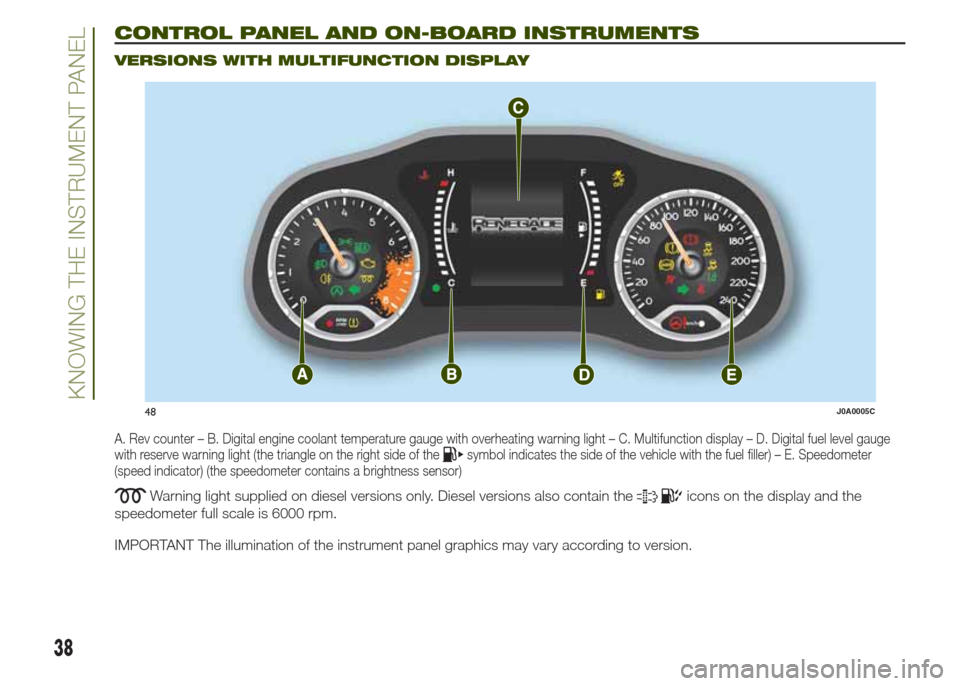
VERSIONS WITH MULTIFUNCTION DISPLAY
A. Rev counter – B. Digital engine coolant temperature gauge with overheating warning light – C. Multifunction display – D. Digital fuel level gauge
with reserve warning light (the triangle on the right side of thesymbol indicates the side of the vehicle with the fuel filler) – E. Speedometer
(speed indicator) (the speedometer contains a brightness sensor)
Warning light supplied on diesel versions only. Diesel versions also contain theicons on the display and the
speedometer full scale is 6000 rpm.
IMPORTANT The illumination of the instrument panel graphics may vary according to version.
48J0A0005C
38
KNOWING THE INSTRUMENT PANEL
Page 41 of 212
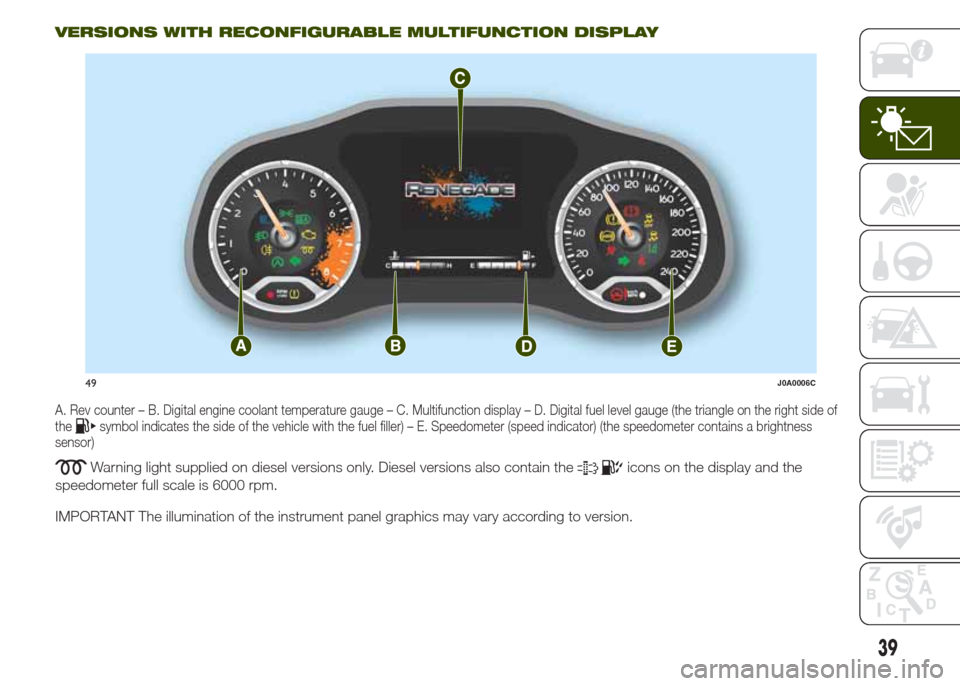
VERSIONS WITH RECONFIGURABLE MULTIFUNCTION DISPLAY
A. Rev counter – B. Digital engine coolant temperature gauge – C. Multifunction display – D. Digital fuel level gauge (the triangle on the right side of
thesymbol indicates the side of the vehicle with the fuel filler) – E. Speedometer (speed indicator) (the speedometer contains a brightness
sensor)
Warning light supplied on diesel versions only. Diesel versions also contain theicons on the display and the
speedometer full scale is 6000 rpm.
IMPORTANT The illumination of the instrument panel graphics may vary according to version.
49J0A0006C
39
Page 42 of 212
DISPLAY
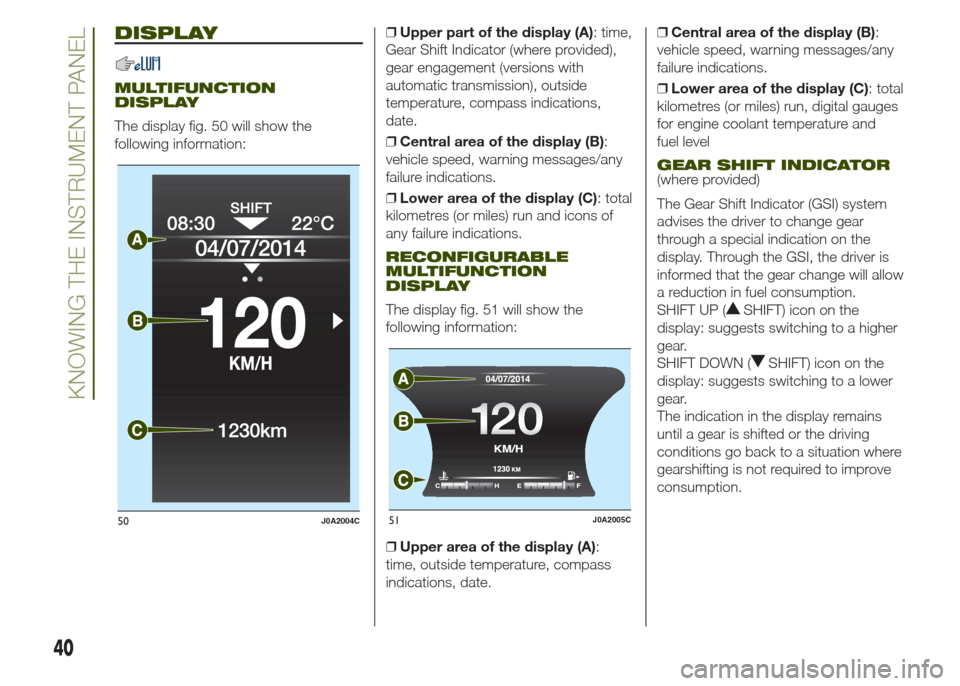
MULTIFUNCTION
DISPLAY
The display fig. 50 will show the
following information:❒Upper part of the display (A): time,
Gear Shift Indicator (where provided),
gear engagement (versions with
automatic transmission), outside
temperature, compass indications,
date.
❒Central area of the display (B):
vehicle speed, warning messages/any
failure indications.
❒Lower area of the display (C): total
kilometres (or miles) run and icons of
any failure indications.
RECONFIGURABLE
MULTIFUNCTION
DISPLAY
The display fig. 51 will show the
following information:
❒Upper area of the display (A):
time, outside temperature, compass
indications, date.❒Central area of the display (B):
vehicle speed, warning messages/any
failure indications.
❒Lower area of the display (C): total
kilometres (or miles) run, digital gauges
for engine coolant temperature and
fuel level
GEAR SHIFT INDICATOR(where provided)
The Gear Shift Indicator (GSI) system
advises the driver to change gear
through a special indication on the
display. Through the GSI, the driver is
informed that the gear change will allow
a reduction in fuel consumption.
SHIFT UP (
SHIFT) icon on the
display: suggests switching to a higher
gear.
SHIFT DOWN (
SHIFT) icon on the
display: suggests switching to a lower
gear.
The indication in the display remains
until a gear is shifted or the driving
conditions go back to a situation where
gearshifting is not required to improve
consumption.
50J0A2004C
12 0120
51J0A2005C
40
KNOWING THE INSTRUMENT PANEL
Page 43 of 212
CONTROL BUTTONS
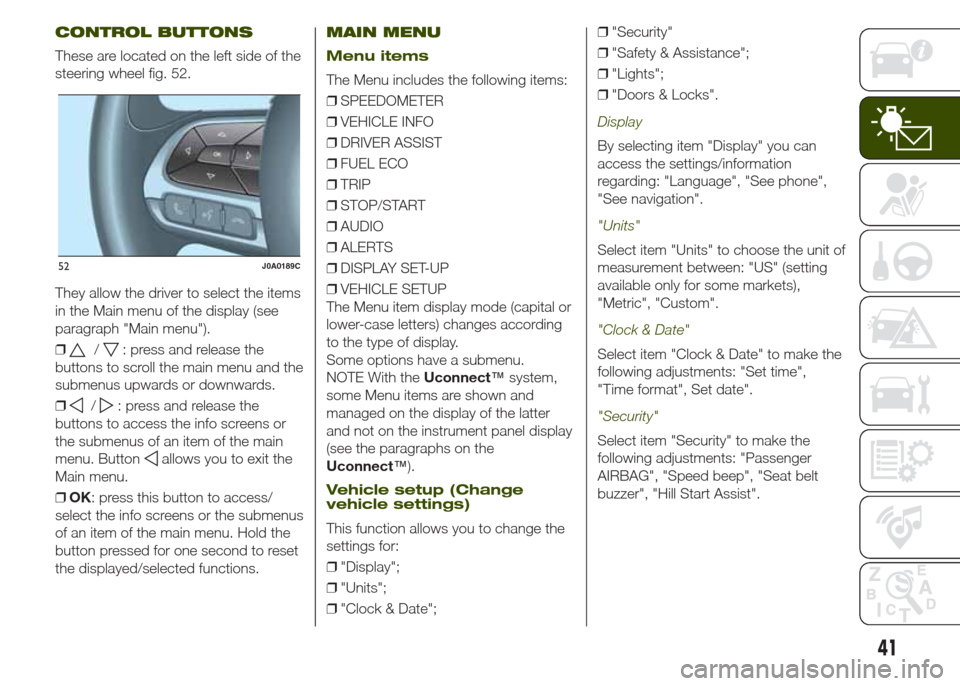
These are located on the left side of the
steering wheel fig. 52.
They allow the driver to select the items
in the Main menu of the display (see
paragraph "Main menu").
❒
/: press and release the
buttons to scroll the main menu and the
submenus upwards or downwards.
❒
/: press and release the
buttons to access the info screens or
the submenus of an item of the main
menu. Button
allows you to exit the
Main menu.
❒OK: press this button to access/
select the info screens or the submenus
of an item of the main menu. Hold the
button pressed for one second to reset
the displayed/selected functions.
MAIN MENU
Menu items
The Menu includes the following items:
❒SPEEDOMETER
❒VEHICLE INFO
❒DRIVER ASSIST
❒FUEL ECO
❒TRIP
❒STOP/START
❒AUDIO
❒ALERTS
❒DISPLAY SET-UP
❒VEHICLE SETUP
The Menu item display mode (capital or
lower-case letters) changes according
to the type of display.
Some options have a submenu.
NOTE With theUconnect™system,
some Menu items are shown and
managed on the display of the latter
and not on the instrument panel display
(see the paragraphs on the
Uconnect™).
Vehicle setup (Change
vehicle settings)
This function allows you to change the
settings for:
❒"Display";
❒"Units";
❒"Clock & Date";❒"Security"
❒"Safety & Assistance";
❒"Lights";
❒"Doors & Locks".
Display
By selecting item "Display" you can
access the settings/information
regarding: "Language", "See phone",
"See navigation".
"Units"
Select item "Units" to choose the unit of
measurement between: "US" (setting
available only for some markets),
"Metric", "Custom".
"Clock & Date"
Select item "Clock & Date" to make the
following adjustments: "Set time",
"Time format", Set date".
"Security"
Select item "Security" to make the
following adjustments: "Passenger
AIRBAG", "Speed beep", "Seat belt
buzzer", "Hill Start Assist".
52J0A0189C
41
Page 44 of 212
The "Passenger AIRBAG" function is
used to activate/deactivate the front
passenger side airbag.Passenger's
protection active: the LED
ON
comes on constantly on the dashboard
located in the instrument panel.
Passenger's protection not active:
the LED
OFFon the dashboard
comes on constantly in the control
panel.
"Safety & Assistance"
For possible adjustments see
paragraphUconnect™in chapter
"Multimedia".
"Lights"
Select item "Lights" to make the
following adjustments: "Ambient
lighting", "Follow me", "Headlights while
opening", "Headlight sensor", "High
Beams Auto Dim", "Daytime Lights",
"Cornering lights".
"Doors & Locks"
Select item "Doors & Locks" to make
the following adjustments: "Autoclose",
"Auto unlock on exit", "Flash Lights
w/Lock", "Horn with Lock", "Horn
w/Remote Start", "Remote Unlock"
(versions without Passive Entry), "Door
Unlock" (versions with Passive Entry),
"Passive Entry".
Versions with
reconfigurable multifunction
display
On versions equipped with
reconfigurable multifunction display only
the following items are available:
"Display" (only items "See phone" and
"See navigation" can be selected),
"Security" and "Safety & Assistance"
(only item "Buzzer volume" can be
selected). All other items will be shown
and managed on theUconnect™
system display.
TRIP COMPUTER
The “Trip computer” is used to display
information on vehicle operation when
the ignition device is at MAR.
This function is characterised by two
separate memories, called "Trip A" and
"Trip B", where the vehicle's "complete
missions" (journeys) are recorded in a
reciprocally independent manner.
“Trip A”allows the following values to
be displayed: "Distance travelled A",
"Average consumption A", "Journey
time (driving time) A".
“Trip B”allows the following values to
be displayed: "Distance travelled B",
"Average consumption B", "Journey
time (driving time) B". The “Trip B”
function may be excluded.
Both memories can be reset: (reset -
start of a new journey).
To reset the values of "Trip A" and "Trip
B" press and hold theOKbutton on
the steering wheel controls.
NOTE “Range” and “Instantaneous fuel
consumption" parameters cannot be
reset.
42
KNOWING THE INSTRUMENT PANEL
Page 49 of 212
Amber warning lights
Warning light What it means
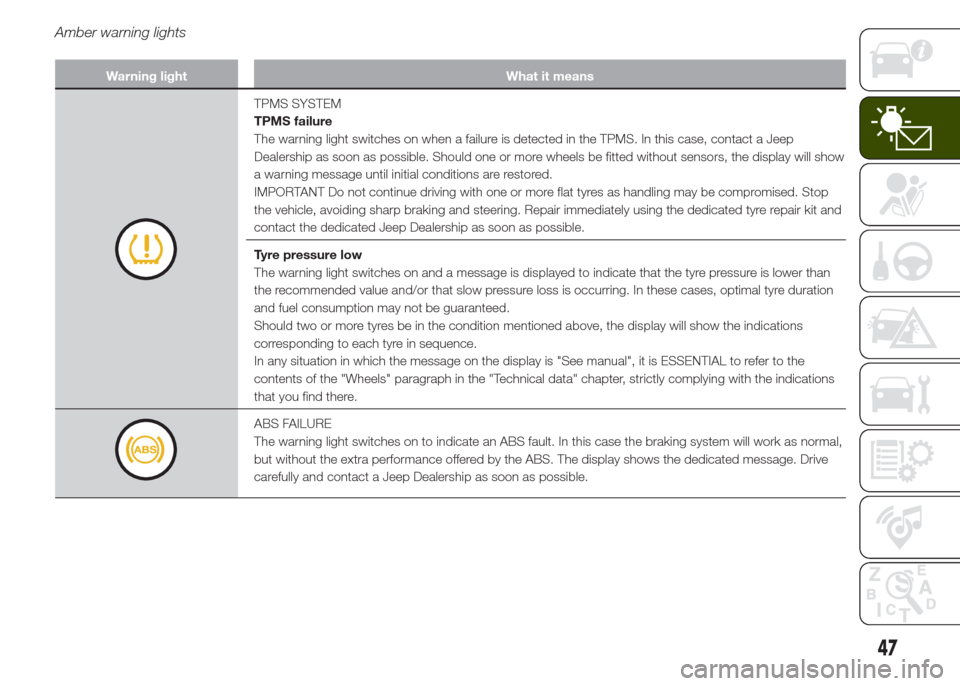
TPMS SYSTEM
TPMS failure
The warning light switches on when a failure is detected in the TPMS. In this case, contact a Jeep
Dealership as soon as possible. Should one or more wheels be fitted without sensors, the display will show
a warning message until initial conditions are restored.
IMPORTANT Do not continue driving with one or more flat tyres as handling may be compromised. Stop
the vehicle, avoiding sharp braking and steering. Repair immediately using the dedicated tyre repair kit and
contact the dedicated Jeep Dealership as soon as possible.
Tyre pressure low
The warning light switches on and a message is displayed to indicate that the tyre pressure is lower than
the recommended value and/or that slow pressure loss is occurring. In these cases, optimal tyre duration
and fuel consumption may not be guaranteed.
Should two or more tyres be in the condition mentioned above, the display will show the indications
corresponding to each tyre in sequence.
In any situation in which the message on the display is "See manual", it is ESSENTIAL to refer to the
contents of the "Wheels" paragraph in the "Technical data" chapter, strictly complying with the indications
that you find there.
ABS FAILURE
The warning light switches on to indicate an ABS fault. In this case the braking system will work as normal,
but without the extra performance offered by the ABS. The display shows the dedicated message. Drive
carefully and contact a Jeep Dealership as soon as possible.
47
Page 52 of 212
Warning light What it means
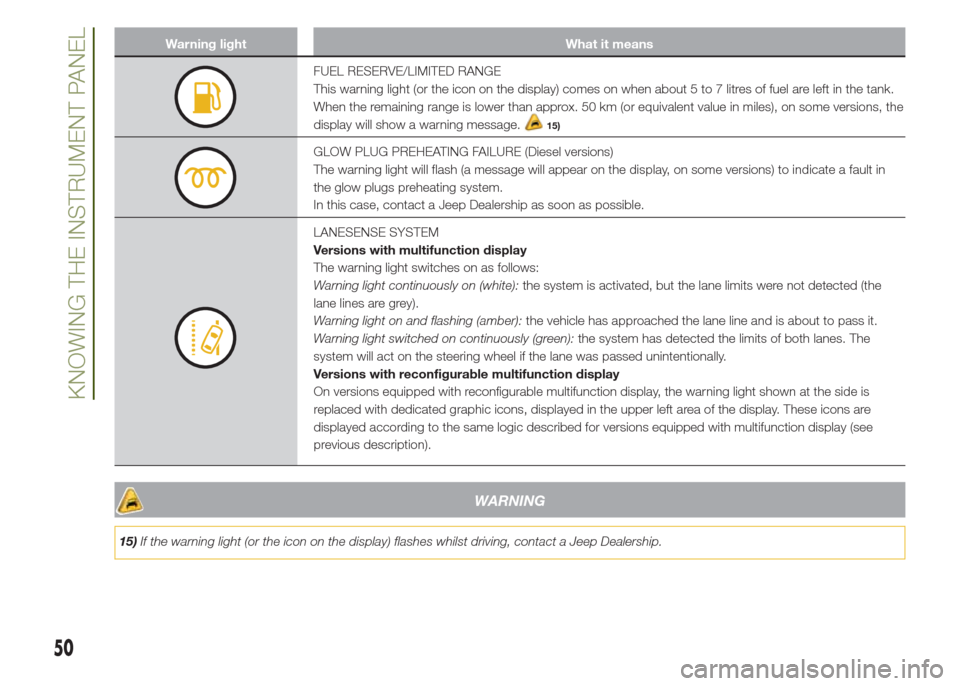
FUEL RESERVE/LIMITED RANGE
This warning light (or the icon on the display) comes on when about 5 to 7 litres of fuel are left in the tank.
When the remaining range is lower than approx. 50 km (or equivalent value in miles), on some versions, the
display will show a warning message.
15)
GLOW PLUG PREHEATING FAILURE (Diesel versions)
The warning light will flash (a message will appear on the display, on some versions) to indicate a fault in
the glow plugs preheating system.
In this case, contact a Jeep Dealership as soon as possible.
LANESENSE SYSTEM
Versions with multifunction display
The warning light switches on as follows:
Warning light continuously on (white):the system is activated, but the lane limits were not detected (the
lane lines are grey).
Warning light on and flashing (amber):the vehicle has approached the lane line and is about to pass it.
Warning light switched on continuously (green):the system has detected the limits of both lanes. The
system will act on the steering wheel if the lane was passed unintentionally.
Versions with reconfigurable multifunction display
On versions equipped with reconfigurable multifunction display, the warning light shown at the side is
replaced with dedicated graphic icons, displayed in the upper left area of the display. These icons are
displayed according to the same logic described for versions equipped with multifunction display (see
previous description).
WARNING
15)If the warning light (or the icon on the display) flashes whilst driving, contact a Jeep Dealership.
50
KNOWING THE INSTRUMENT PANEL
Page 56 of 212
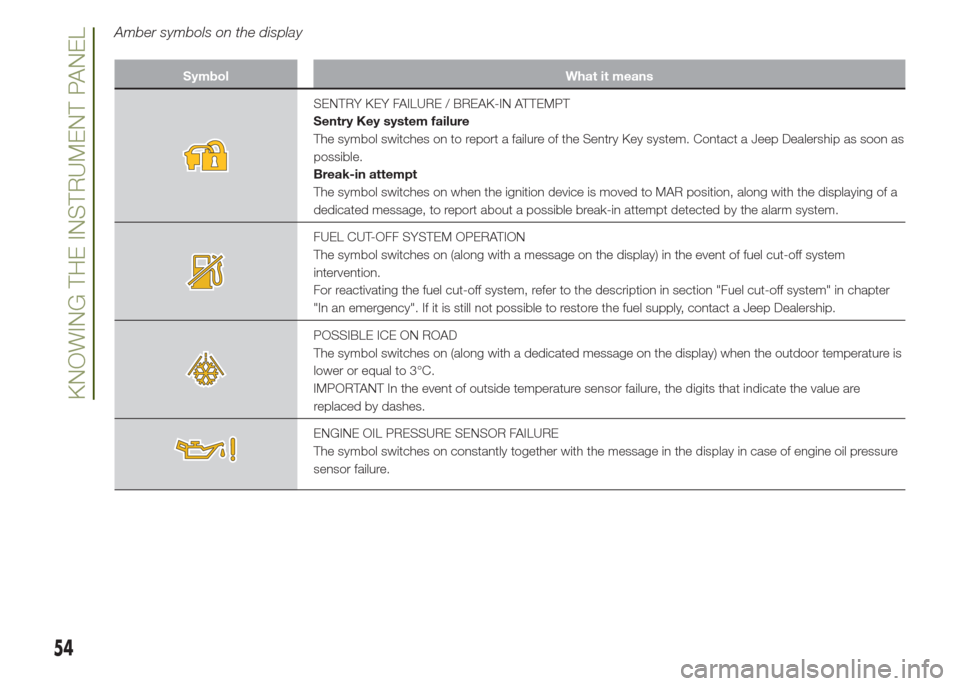
Amber symbols on the display
Symbol What it means
SENTRY KEY FAILURE / BREAK-IN ATTEMPT
Sentry Key system failure
The symbol switches on to report a failure of the Sentry Key system. Contact a Jeep Dealership as soon as
possible.
Break-in attempt
The symbol switches on when the ignition device is moved to MAR position, along with the displaying of a
dedicated message, to report about a possible break-in attempt detected by the alarm system.
FUEL CUT-OFF SYSTEM OPERATION
The symbol switches on (along with a message on the display) in the event of fuel cut-off system
intervention.
For reactivating the fuel cut-off system, refer to the description in section "Fuel cut-off system" in chapter
"In an emergency". If it is still not possible to restore the fuel supply, contact a Jeep Dealership.
POSSIBLE ICE ON ROAD
The symbol switches on (along with a dedicated message on the display) when the outdoor temperature is
lower or equal to 3°C.
IMPORTANT In the event of outside temperature sensor failure, the digits that indicate the value are
replaced by dashes.
ENGINE OIL PRESSURE SENSOR FAILURE
The symbol switches on constantly together with the message in the display in case of engine oil pressure
sensor failure.
54
KNOWING THE INSTRUMENT PANEL
Page 57 of 212
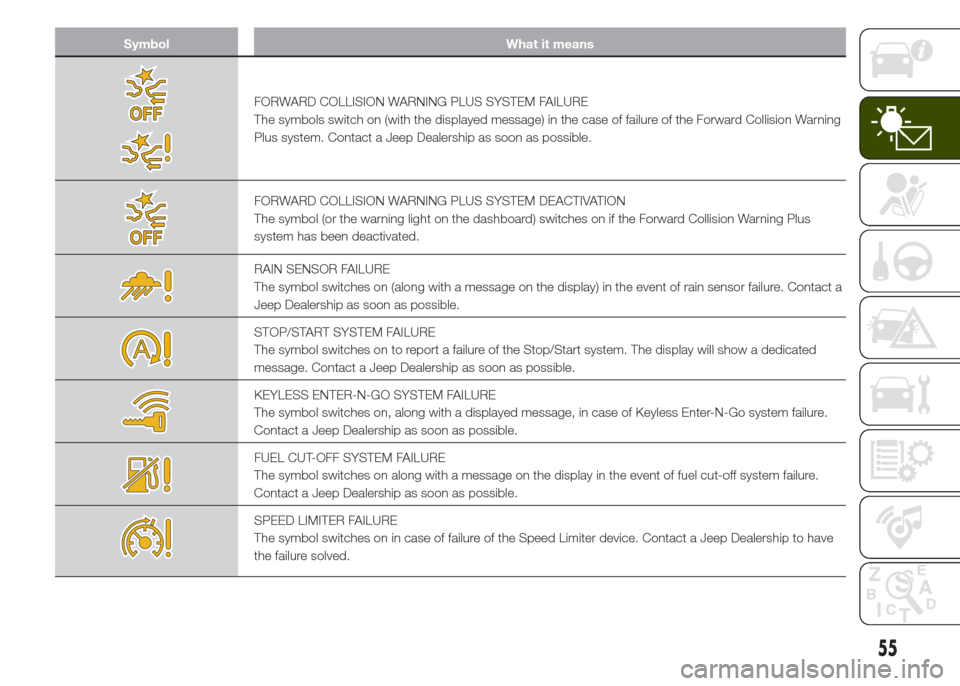
Symbol What it means
FORWARD COLLISION WARNING PLUS SYSTEM FAILURE
The symbols switch on (with the displayed message) in the case of failure of the Forward Collision Warning
Plus system. Contact a Jeep Dealership as soon as possible.
FORWARD COLLISION WARNING PLUS SYSTEM DEACTIVATION
The symbol (or the warning light on the dashboard) switches on if the Forward Collision Warning Plus
system has been deactivated.
RAIN SENSOR FAILURE
The symbol switches on (along with a message on the display) in the event of rain sensor failure. Contact a
Jeep Dealership as soon as possible.
STOP/START SYSTEM FAILURE
The symbol switches on to report a failure of the Stop/Start system. The display will show a dedicated
message. Contact a Jeep Dealership as soon as possible.
KEYLESS ENTER-N-GO SYSTEM FAILURE
The symbol switches on, along with a displayed message, in case of Keyless Enter-N-Go system failure.
Contact a Jeep Dealership as soon as possible.
FUEL CUT-OFF SYSTEM FAILURE
The symbol switches on along with a message on the display in the event of fuel cut-off system failure.
Contact a Jeep Dealership as soon as possible.
SPEED LIMITER FAILURE
The symbol switches on in case of failure of the Speed Limiter device. Contact a Jeep Dealership to have
the failure solved.
55