mirror JEEP RENEGADE 2015 1.G User Guide
[x] Cancel search | Manufacturer: JEEP, Model Year: 2015, Model line: RENEGADE, Model: JEEP RENEGADE 2015 1.GPages: 678, PDF Size: 29.84 MB
Page 93 of 678
WARNING!
The Blind Spot Monitoring system is only an aid to
help detect objects in the blind spot zones. The BSM
(Continued)
WARNING!(Continued)
system is not designed to detect pedestrians, bicy-
clists, or animals. Even if your vehicle is equipped
with the BSM system, always check your vehicles
mirrors, glance over your shoulder, and use your turn
signal before changing lanes. Failure to do so can
result in serious injury or death.
Rear Cross Path (RCP)
The Rear Cross Path (RCP) feature is intended to aid the
driver when backing out of parking spaces where their
vision of oncoming vehicles may be blocked. Proceed
slowly and cautiously out of the parking space until the
rear end of the vehicle is exposed. The RCP system will
then have a clear view of the cross traffic and if an
oncoming vehicle is detected, alert the driver.
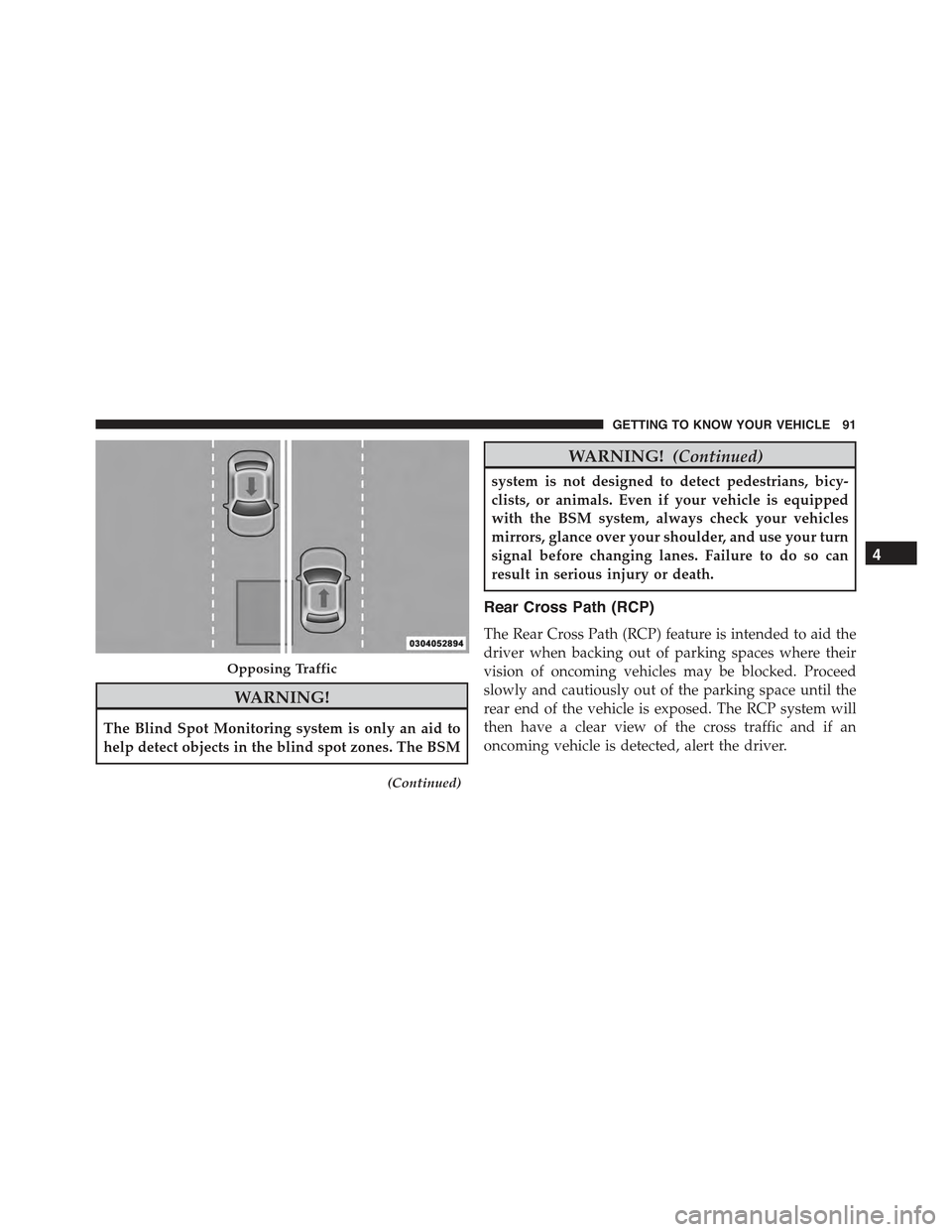
Opposing Traffic
4
GETTING TO KNOW YOUR VEHICLE 91
Page 95 of 678
Mode Of Operation
Three selectable modes of operation are available in the
Uconnect® System. Refer to “Uconnect® Settings” in
“Multimedia” for further information.
Blind Spot Alert Lights Only
When operating in Blind Spot Alert mode, the BSM
system will provide a visual alert in the appropriate side
view mirror based on a detected object. However, when
the system is operating in Rear Cross Path (RCP) mode,
the system will respond with both visual and audible
alerts when a detected object is present. Whenever an
audible alert is requested, the radio is muted.
Blind Spot Alert Lights/Chime
When operating in Blind Spot Alert Lights/Chime mode,
the BSM system will provide a visual alert in the appro-
priate side view mirror based on a detected object. If the
turn signal is then activated, and it corresponds to an
alert present on that side of the vehicle, an audible chime
will also be sounded. Whenever a turn signal and de-
tected object are present on the same side at the same
time, both the visual and audible alerts will be issued. In
addition to the audible alert, the radio (if on) will also be
muted.
NOTE:Whenever an audible alert is requested by the
BSM system, the radio is also muted.
When the system is in RCP, the system will respond with
both visual and audible alerts when a detected object is
present. Whenever an audible alert is requested, the radio
is also muted. Turn/hazard signal status is ignored; the
RCP state always requests the chime.
Blind Spot Alert Off
When the BSM system is turned off, there will be no
visual or audible alerts from either the BSM or RCP
systems.
4
GETTING TO KNOW YOUR VEHICLE 93
Page 96 of 678
NOTE:The BSM system will store the current operating
mode when the vehicle is shut off. Each time the vehicle
is started the previously stored mode will be recalled and
used.
Blind Spot Monitoring Fault Warnings
Sensor Blinded
In the case of a sensor blinded:
•BSM Mirror Warning Lights are turned on continu-
ously.
•A chime will turn on.
•A instrument cluster message will display“Blind Spot
Monitoring Unavailable - Wipe Rear Bumper Cor-
ners.”
NOTE:The rear bumper must be clean and free of any
obstructing debris.
System Not Available
In the case of the system being temporary unavailable:
•BSM Mirror Warning Lights are turned on continu-
ously.
•A chime will turn on.
•A instrument cluster message will display“Blind Spot
Monitoring Temporary Unavailable.”
In the case of the system being completely unavailable:
•A chime will turn on.
•A instrument cluster message will display“Blind Spot
Monitoring Unavailable - Service Required.”
NOTE:Vehicle must be taken to the nearest authorized
dealer for service.
94 GETTING TO KNOW YOUR VEHICLE
Page 104 of 678
Timing Exiting The Vehicle
The dome light will illuminate under the following
conditions when the ignition is turned to the STOP/OFF
position and the key is removed:
•The dome light will illuminate for 10 seconds after the
key is removed from the ignition.
•The opening of one of the doors (approximately three
minutes).
•After closing a door (approximately 10 seconds).
The dome light timing is disabled when the doors are
locked.
Illuminated Vanity Mirrors — If Equipped
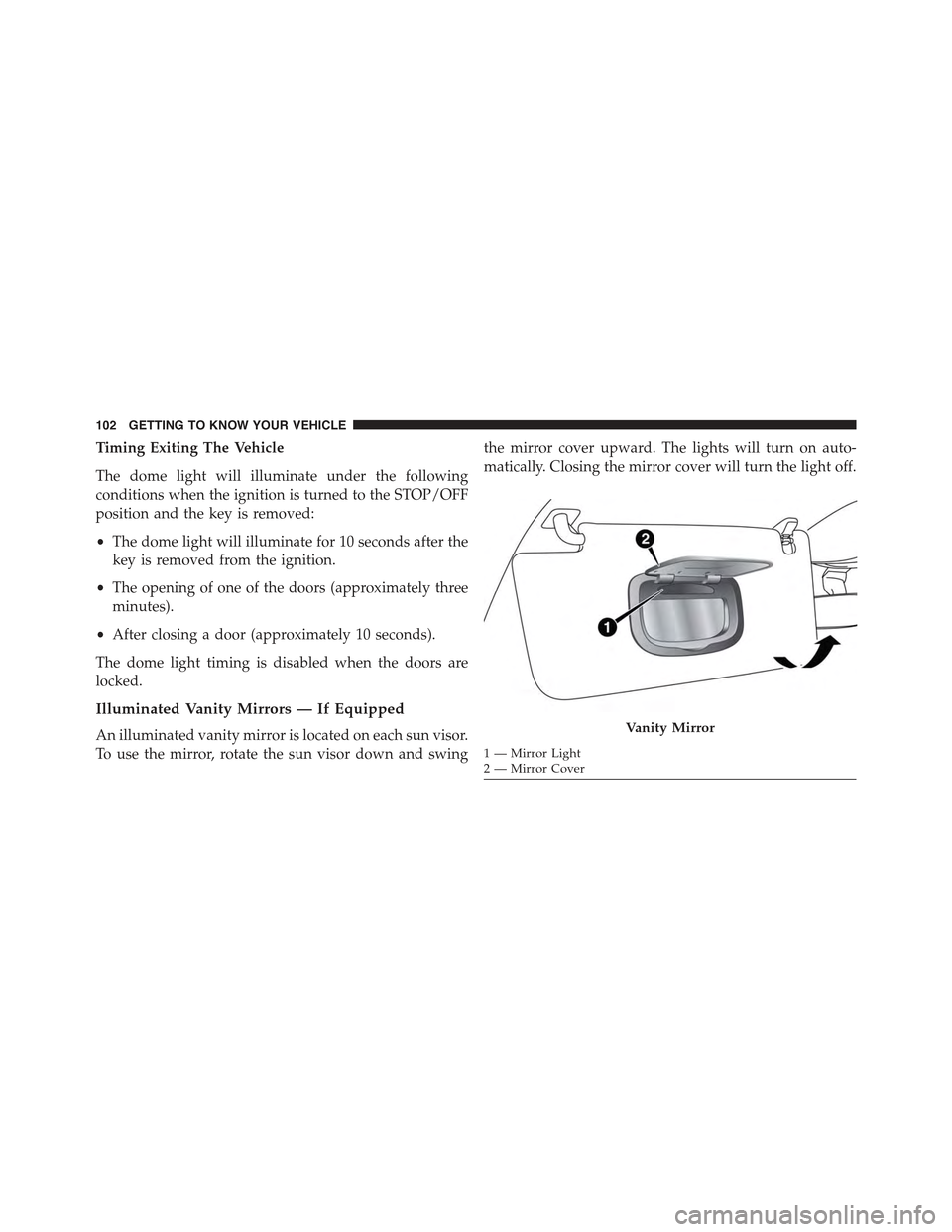
An illuminated vanity mirror is located on each sun visor.
To use the mirror, rotate the sun visor down and swing
the mirror cover upward. The lights will turn on auto-
matically. Closing the mirror cover will turn the light off.
Vanity Mirror
1—MirrorLight2—MirrorCover
102 GETTING TO KNOW YOUR VEHICLE
Page 119 of 678
4. Rear Defrost Button
Push and release the Rear Defrost Control button to turn
ON the rear window defroster and the heated outside
mirrors (if equipped). An indicator will illuminate when
the rear window defroster is ON. The rear window
defroster automatically turns OFF after 20 minutes.
5. A/C Button — If Equipped
Push this button to engage the Air Conditioning. A light
will illuminate when the Air Conditioning system is
engaged.
6. Recirculation Button
Push this control button to change the system between
recirculation mode and outside air mode. Recirculation
can be used when outside conditions such as smoke,
odors, dust, or high humidity are present.
NOTE:
•Continuous use of the Recirculation mode may make
the inside air stuffy and window fogging may occur.
Extended use of this mode is not recommended.
•The use of the Recirculation mode in cold or damp
weather could cause windows to fog on the inside,
because of moisture buildup inside the vehicle. Se-
lect the outside air position for maximum defogging.
•Recirculation can be used in all modes except for
Defrost.
•The A/C can be deselected manually without dis-
turbing the mode control selection.
Rear Window Defrosting
Push and release the rear window defrost button to turn
the function on/off.
4
GETTING TO KNOW YOUR VEHICLE 117
Page 120 of 678
Activation of this function is indicated by the rear defrost
indicator light on the instrument panel turning on. The
function is automatically deactivated after 20 minutes.
If equipped, push the rear defrost button to activate the
defrosting of door mirrors and heated rear window.
CAUTION!
To avoid causing damage to the rear window de-
froster heating filaments do not affix stickers or other
objects to the inside of the rear glass.
Air Recirculation
Push and release the Air Recirculation button so that the
LED is on, to enter recirculation mode. It is recommended
to turn the internal air recirculation on while standing in
traffic or in tunnels to prevent the introduction of pol-
luted air.
Do not use the function for a long period of time,
particularly if there are many passengers in the vehicle,
to prevent the windows from misting up.
NOTE:Internal air recirculation makes it possible to reach
the required heating or cooling conditions quickly depend-
ing on the mode selected. Do not use the internal air
recirculation function on rainy/cold days as it would con-
siderably increase the possibility of the windows misting.
System Maintenance
In Winter, the Climate Control system must be turned on
at least once a month for approximately 10 minutes.
Have the system inspected at an authorized dealership
before the summer.
NOTE:The system uses R-1234yf (refrigerant) which
does not pollute the environment in the event of acciden-
tal leakage. Under no circumstances is the use of R-134a
(refrigerant) allowed.
11 8 G E T T I N G TO K N O W Y O U R V E H I C L E
Page 122 of 678
mode is selected, the air conditioning compressor is
turned ON (LED ON), both driver and passenger tem-
perature controls are set to (HI), defrost mode is selected
(LED ON), rear defroster is turned ON (LED ON) and the
air recirculation is turned OFF (LED OFF). If the MAX
Defrost mode is turned OFF, the climate system will
return to the previous setting.
4. Blower Control Indicator LEDs
A total of eight LEDs illuminate to visually indicate
blower speeds.
5. Rear Defrost Button
Push the Rear Defrost button to turn ON the rear window
defroster and the heated outside mirrors (if equipped).
An indicator will illuminate when the rear window
defroster is ON. The rear window defroster automatically
turns OFF after 20 minutes.
6. AUTO Button
Pushing this button will automatically control the inte-
rior cabin temperature by adjusting airflow distribution
and amount. Performing this function will cause the
Automatic Temperature Controls (ATC) to change be-
tween manual mode and automatic modes.
7. Passenger Temperature Control
Provides the passenger with independent temperature
control. Rotate the adjustment knob to set desired tem-
perature shown in the Temperature Display.
NOTE:Rotating the Passenger Temperature Control
knob while in Sync mode will automatically exit Sync.
8. Passenger Temperature Display
Rotate the Passenger Temperature Control dial clockwise
or counter-clockwise to adjust the air temperature in the
front right (Passenger Temperature Control) zone of the
passenger compartment. The set temperature is shown
120 GETTING TO KNOW YOUR VEHICLE
Page 126 of 678
•Heated rear window
•System deactivation
NOTE:The Climate Control system detects the passenger
compartment temperature using a temperature sensor
located in the interior rearview mirror and protected by a
specific cover. Obstructing the field of view of this sensor
with any object could cause the climate control system to
operate with less than optimal efficiency.
Turning On The Climate Control System
The Climate Control system can be turned on in different
ways: it is recommended to push the AUTO button and
turn the Temperature Control knobs to set the desired
temperatures.
The system operates automatically to adjust the tempera-
ture, quantity and distribution of the air introduced into
the passenger compartment. It also manages the air
recirculation function and the activation of the air condi-
tioning compressor.
During automatic operation, you can change the set
temperatures, air distribution and blower speed at any
time by using the relevant buttons or knobs: the system
will automatically change the settings to adjust to the
new requirements.
During automatic operation (AUTO), varying the air
flow and/or distribution (which are not displayed)
causes the AUTO function LED to turn off and the system
to operate in MANUAL mode (displaying both the flow
and distribution requested).
When the compressor is deactivated, the AUTO opera-
tion remains active only if the system can guarantee
in-car comfort. Otherwise, the system changes to
124 GETTING TO KNOW YOUR VEHICLE
Page 133 of 678
NOTE:The Front Defrost Control (MAX-DEF) function
remains on for approximately three minutes from when
the engine coolant reaches the appropriate temperature.
When the function is activated, the AUTO button LED
turns off. With the function activated, the only possible
manual adjustments are adjusting the fan speed and
turning the heated rear window off.
When the Recirculation Control, Rear Defrost Control , or
AUTO buttons are pushed, the Climate Control system
will deactivate the Front Defrost (MAX-DEF) function.
Selecting the footwell/windshield or only windshield
distribution activates the Climate Control system com-
pressor (LED on A/C button on) and the air recirculation
is set to#outside air#intake (LED on the recirculation
button off).
This logic guarantees optimum visibility at the windows.
It is, however, always possible to manage air recirculation
and the Climate Control system compressor manually.
Rear Window Defrosting
Push and release the rear window defrost button to turn
the function on/off.
Activation of this function is indicated by the rear defrost
indicator light on the instrument panel turning on. The
function is automatically deactivated after 20 minutes.
If equipped, push the rear defrost button to activate the
defrosting of door mirrors and heated rear window.
CAUTION!
To avoid causing damage to the rear window de-
froster heating filaments do not affix stickers or other
objects to the inside of the rear glass.
4
GETTING TO KNOW YOUR VEHICLE 131
Page 164 of 678
NOTE:
•Do not insert objects in the glove compartment that
will not allow the compartment to fully close.
•The glove compartment should be completely closed
while the vehicle is in motion.
Sun Visors “Slide-On-Rod”
Sun visors are located on both sides of the rearview
mirror. The visors can be lowered or moved to the side to
help block sunlight from entering the windshield or door
glass.
To move the sun visor against the driver or passenger
door glass, remove the sun visor from the hook and turn
it toward the side window.
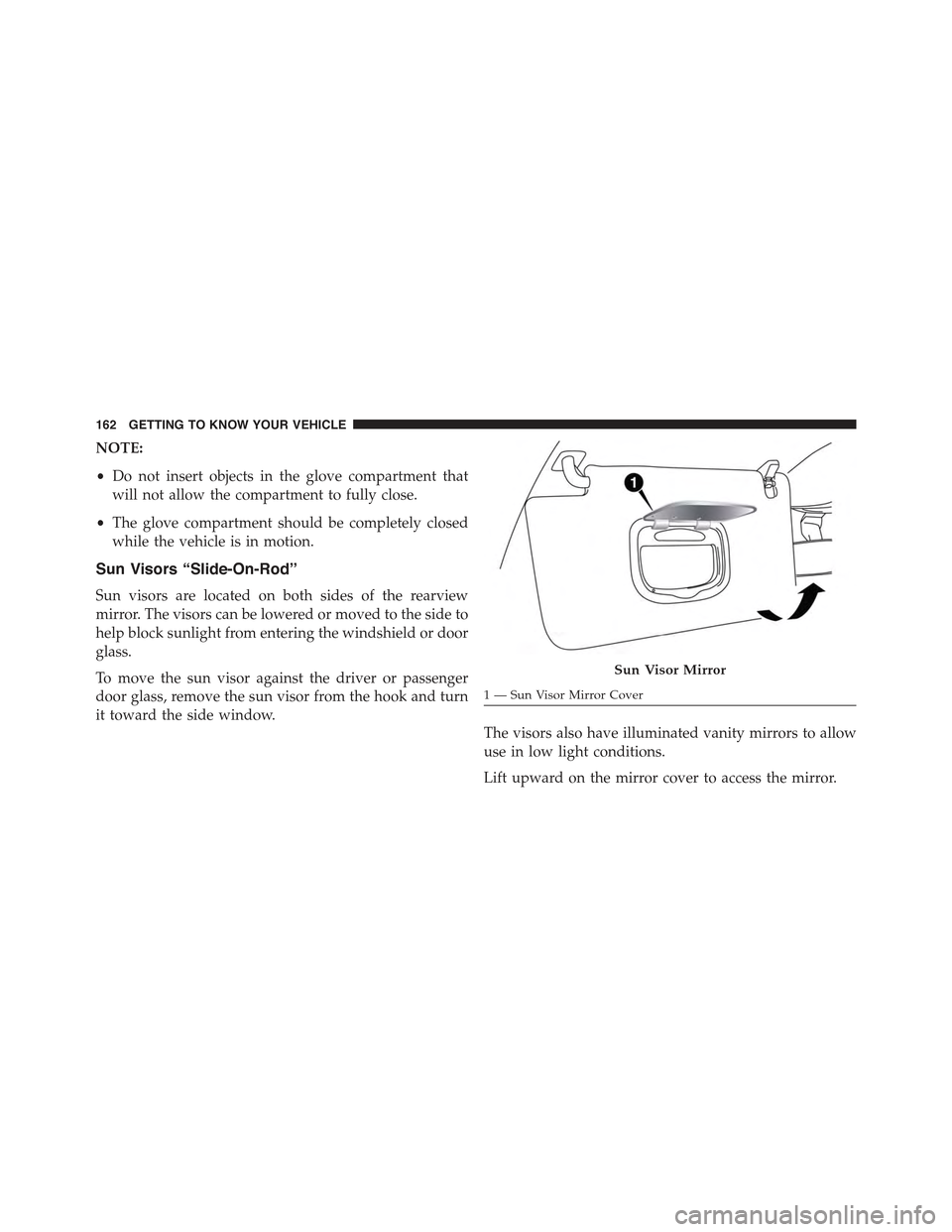
The visors also have illuminated vanity mirrors to allow
use in low light conditions.
Lift upward on the mirror cover to access the mirror.
Sun Visor Mirror
1 — Sun Visor Mirror Cover
162 GETTING TO KNOW YOUR VEHICLE