4WD JEEP RENEGADE 2023 User Guide
[x] Cancel search | Manufacturer: JEEP, Model Year: 2023, Model line: RENEGADE, Model: JEEP RENEGADE 2023Pages: 364, PDF Size: 18.65 MB
Page 96 of 364

94 STARTING AND OPERATING
POSSIBLE REASONS THE ENGINE DOES
N
OT AUTOSTOP
Prior to engine shut down, the system will check
many safety and comfort conditions to see if they
are fulfilled. Detailed information about the
operation of the Stop/Start system may be viewed
in the instrument cluster display Stop/Start
Screen. In the following situations the engine will
not stop:
Driver’s seat belt is not buckled.
Driver’s door is not closed.
Battery temperature is too warm or cold.
Battery charge is low.
The vehicle is on a steep grade.
Cabin heating or cooling is in process and an
acceptable cabin temperature has not been
achieved.
HVAC is set to full defrost mode at a high blower
speed.
HVAC is set to MAX A/C.
Engine has not reached normal operating
temperature.
The transmission is not in a forward gear.
Hood is open.
Vehicle is in 4WD LOW transfer case mode (if
equipped with 4WD).
Brake pedal is not pressed with sufficient pres -
sure with vehicle in DRIVE position.
Accelerator pedal input.
Engine temp is too high.
5 mph (8 km/h) threshold not achieved from
previou
s AUTOSTOP.
Steering angle is beyond threshold.
It may be possible for the vehicle to be driven
s e v
e r
a
l times without the Stop/Start system going
into a STOP/START READY state under more
extreme conditions of the items listed above.
TO START THE ENGINE WHILE IN
A
UTOSTOP MODE
While in a forward gear, the engine will start when
the brake pedal is released or the throttle pedal is
pressed. The transmission will automatically
re-engage upon engine restart.
Conditions That Will Cause The Engine To Start
Automat
ically While In Autostop Mode:
The transmission gear selector is moved out of
DRIVE except in the PARK and NEUTRAL posi
-
tion.
To maintain cabin temperature comfort.
HVAC is set to full defrost mode.
HVAC system temperature or fan speed is
manually adjusted.
Battery voltage drops too low.
Stop/Start OFF switch is pushed.
A Stop/Start system error occurs.
4WD system is put into 4WD LOW mode (if
equipped with 4WD).
A system fault is present.
Conditions That Force An Application Of The
E le
ct
r
ic Park Brake While In Autostop Mode:
The driver’s door is open and brake pedal
released.
The driver’s door is open and the driver’s seat
belt is unbuckled.
The engine hood has been opened.
A Stop/Start system error occurs.
If the Electric Park Brake is applied with the engine
of f,
t
h
e engine may require a manual restart and
the Electric Park Brake may require a manual
release (press brake pedal and push Electric Park
Brake switch) Ú page 64.
Page 98 of 364
96 STARTING AND OPERATING
NOTE:
The Cruise Control function will not work in 4WD
Low.
Activation
Push the on/off button to activate the Cruise
Control. The Cruise Indicator Light in the
instrument cluster display will illuminate. To turn
the system off, push the on/off button a second
time. The Cruise Indicator Light will turn off. The
system should be turned off when not in use.
Setting A Desired Speed
Turn the Cruise Control on. When the vehicle has
reached the desired speed, push and release the
SET (+) or SET (-) button. Release the accelerator
and the vehicle will operate at the selected speed.
The Cruise Indicator Light, along with set speed will
also appear and stay on in the instrument cluster
when the speed is set.
To Vary The Speed Setting
To Increase Or Decrease The Set Speed
When the Cruise Control is set, you can increase
s p e
ed
by pushing the SET (+) button, or decrease
speed by pushing the SET (-) button.
U.S. Speed (mph)
Pushing the SET (+) , or SET (-) button once will
result in a 1 mph speed adjustment. Each
s u
bs
e q
uent tap of the button results in an
adjustment of 1 mph.
If the button is continually pushed, the set
speed will continue to adjust until the button is
released, then the new set speed will be estab -
lished.
Metric Speed (km/h)
Pushing the SET (+), or SET (-) button once will
result in a 1 km/h speed adjustment. Each
subse q
uent tap of the button results in an
adjustment of 1 km/h.
If the button is continually pushed, the set
speed will continue to adjust until the button is
released, then the new set speed will be estab -
lished.
Accelerating For Passing
While the Cruise Control is set, press the
accelerator to pass as you would normally. When
the pedal is released, the vehicle will return to the
set speed.
USING CRUISE CONTROL ON HILLS
The transmission may downshift on hills to
maintain the vehicle set speed.
The Cruise Control system maintains speed up and
down hi
lls. A slight speed change on moderate hills
is normal. On steep hills, a greater speed loss or
gain may occur so it may be preferable to drive
without Cruise Control.
WARNING!
Cruise Control can be dangerous where the
system cannot maintain a constant speed. Your
vehicle could go too fast for the conditions, and
you could lose control and have an accident. Do
not use Cruise Control in heavy traffic or on
roads that are winding, icy, snow-covered or
slippery.
WARNING!
Leaving the Cruise Control system on when not
in use is dangerous. You could accidentally set
the system or cause it to go faster than you
want. You could lose control and have an
accident. Always leave the system OFF when you
are not using it.
WARNING!
Cruise Control can be dangerous where the
system cannot maintain a constant speed. Your
vehicle could go too fast for the conditions, and
you could lose control and have an accident. Do
not use Cruise Control in heavy traffic or on
roads that are winding, icy, snow-covered or
slippery.
Page 100 of 364
98 STARTING AND OPERATING
Adaptive Cruise Control (ACC) Operation
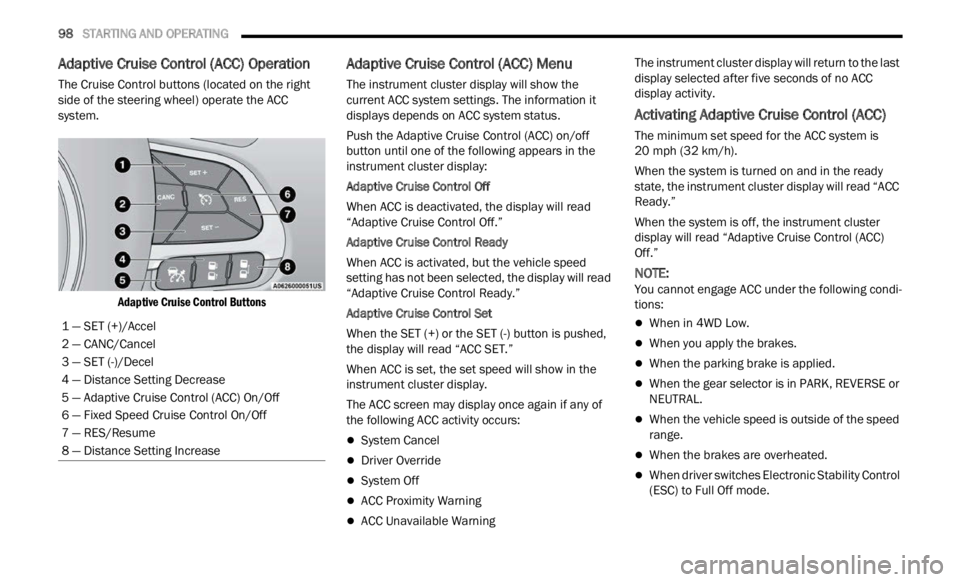
The Cruise Control buttons (located on the right
side of the steering wheel) operate the ACC
system.
Adaptive Cruise Control Buttons
Adaptive Cruise Control (ACC) Menu
The instrument cluster display will show the
current ACC system settings. The information it
displays depends on ACC system status.
Push the Adaptive Cruise Control (ACC) on/off
button
until one of the following appears in the
instrument cluster display:
Adaptive Cruise Control Off
When ACC is deactivated, the display will read
“ Adapt
ive Cruise Control Off.”
Adaptive Cruise Control Ready
When ACC is activated, but the vehicle speed
setti n
g has not been selected, the display will read
“Adaptive Cruise Control Ready.”
Adaptive Cruise Control Set
When the SET (+) or the SET (-) button is pushed,
t he di
splay will read “ACC SET.”
When ACC is set, the set speed will show in the
instru
ment cluster display.
The ACC screen may display once again if any of
the fol
lowing ACC activity occurs:
System Cancel
Driver Override
System Off
ACC Proximity Warning
ACC Unavailable Warning The instrument cluster display will return to the last
displ
a
y selected after five seconds of no ACC
display activity.
Activating Adaptive Cruise Control (ACC)
The minimum set speed for the ACC system is
20 mph (32 km/h).
When the system is turned on and in the ready
state,
the instrument cluster display will read “ACC
Ready.”
When the system is off, the instrument cluster
displ a
y will read “Adaptive Cruise Control (ACC)
Off.”
NOTE:
You cannot engage ACC under the following condi -
tions:
When in 4WD Low.
When you apply the brakes.
When the parking brake is applied.
When the gear selector is in PARK, REVERSE or
NEUTRAL.
When the vehicle speed is outside of the speed
range.
When the brakes are overheated.
When driver switches Electronic Stability Control
(ESC) to Full Off mode.
1 — SET (+)/Accel
2 — CANC/Cancel
3 — SET (-)/Decel
4 — Distance Setting Decrease
5 — Adaptive Cruise Control (ACC) On/Off
6 — Fixed Speed Cruise Control On/Off
7 — RES/Resume
8 — Distance Setting Increase
Page 101 of 364
STARTING AND OPERATING 99
To Activate/Deactivate
Push and release the Adaptive Cruise Control
(ACC) on/off button. The ACC menu in the
instrument cluster display will read “ACC Ready.”
To turn the system off, push and release the
Adapt i
ve Cruise Control (ACC) on/off button again.
At this time, the system will turn off and the
instrument cluster display will read “Adaptive
Cruise Control (ACC) Off.”
To Set A Desired Speed
When the vehicle reaches the speed desired, push
the SET (+) button or the SET (-) button and
release. The instrument cluster display will show
the set speed.
NOTE:
Fixed Speed Cruise Control can be used without
ACC e n
abled. To change between the different
modes, push the ACC on/off button which turns
the ACC and the Fixed Speed Cruise Control off. Pushing the Fixed Speed Cruise Control on/off
button will result in turning on (changing to) Fixed
Speed Cruise Control mode.
ACC or Fixed Speed Cruise Control is set when the
vehic
l
e speed is above 20 mph (32 km/h), the set
s p
ee
d
shall be the current speed of the vehicle.
Neither system cannot be set below 20 mph
(32 km/
h).
NOTE:
Keeping your foot on the accelerator pedal can
cause the vehicle to continue to accelerate
beyond the set speed. If this occurs, the
message “DRIVER OVERRIDE” will display in the
instrument cluster display.
If you continue to accelerate beyond the set
speed while ACC is enabled, the system will not
be controlling the distance between your vehicle and the vehicle ahead. The vehicle speed will
only be determined by the position of the accel
-
erator pedal.
To Cancel
The following conditions cancel the system:
The brake pedal is applied.
The CANC button is pushed.
An Anti-Lock Brake System (ABS) event occurs.
The gear selector is removed from the DRIVE
position.
The braking temperature exceeds normal range
(overheated).
The Electronic Stability Control/Traction Control
System (ESC/TCS) activates.
The vehicle parking brake is applied.
The driver switches ESC to Full Off mode.
To Turn Off
The system will turn off and clear the set speed in
memory if:
The Adaptive Cruise Control (ACC) on/off button
is pushed
The Fixed Speed Cruise Control on/off button is
pushed
The ignition is placed in the OFF position
4WD Low is engaged
WARNING!
Leaving the Adaptive Cruise Control (ACC)
system on when not in use is dangerous. You
could accidentally set the system or cause it to
go faster than you want. You could lose control
and have a collision. Always ensure that the
system is off when you are not using it.
WARNING!
In Fixed Speed Cruise Control mode, the system
will not react to vehicles ahead. In addition, the
proximity warning does not activate and no
alarm will sound even if you are too close to the
vehicle ahead since neither the presence of the
vehicle ahead nor the vehicle-to-vehicle distance
is detected. Be sure to maintain a safe distance
between your vehicle and the vehicle ahead.
Always be aware which mode is selected.
4
Page 131 of 364

STARTING AND OPERATING 129
Automatic Transmission
Select the DRIVE range when towing. The
transmission controls include a drive strategy to
avoid frequent shifting when towing. However, if
frequent shifting does occur while in DRIVE, you
can use the AutoStick shift control to manually
select a lower gear.
NOTE:
Using a lower gear while operating the vehicle
under
heavy loading conditions will improve perfor -
mance and extend transmission life by reducing
e xcess
ive shifting and heat build up. This action
will also provide better engine braking.
AutoStick
When using the AutoStick shift control, select
the highest gear that allows for adequate perfor -
mance and avoids frequent downshifts. For
exampl
e, choose “5” if the desired speed can be
maintained. Choose “4” or “3” if needed to
maintain the desired speed.
To prevent excess heat generation, avoid
continuous driving at high RPM. Reduce vehicle
speed as necessary to avoid extended driving at
high RPM. Return to a higher gear or vehicle
speed when grade and road conditions allow.
Cruise Control — If Equipped
Do not use in hilly terrain or with heavy loads.
When using the Cruise Control, if you experience
speed drops greater than 10 mph (16 km/h),
d i
s e
n g
age until you can get back to cruising
speed.
Use Cruise Control in flat terrain and with light
loads to maximize fuel efficiency.
RECREATIONAL TOWING
TOWING THIS VEHICLE BEHIND
A
NOTHER VEHICLE
NOTE:
When towing your vehicle, always follow appli -
cable state and provincial laws. Contact state
a nd
p
r
ovincial Highway Safety offices for addi -
tional details.
You must ensure that the Auto Park Brake
feature is disabled before towing this vehicle, to
avoid inadvertent Electric Park Brake engage -
ment. The Auto Park Brake feature is enabled or
disab l
ed via the customer programmable
features in the Uconnect Settings.
RECREATIONAL TOWING
Models With Front-Wheel Drive (FWD)
Recreational towing is allowed ONLY if the front
w he
el
s
are OFF the ground. This may be
accomplished using a tow dolly (front wheels off
the ground) or vehicle trailer (all four wheels off the
ground). If using a tow dolly, follow this procedure:
Properly secure the dolly to the tow vehicle,
following the dolly manufacturer's instructions.
Drive the front wheels onto the tow dolly.
Apply the Electric Park Brake (EPB). Place the
transmission in PARK. Turn the engine off.
Properly secure the front wheels to the dolly,
following the dolly manufacturer's instructions.
Turn the ignition to the RUN position, but do not
start the engine.
Towing
Condit i
on Wheels
Off T h
e
Ground Front-
Wheel
D
rive
(FWD) Four-
Wheel D
rive
(4WD)
Flat Tow NONENOT
ALLOWED N
O
T
ALLOWED
Dol
ly Tow REAR
NOT
ALLOWED N
O
T
ALLOWED
FR
ONT OK NOT
ALLOWED
O n
Trailer ALLBEST
METHOD O
K
4
Page 132 of 364

130 STARTING AND OPERATING
Press and hold the brake pedal.
Release the EPB.
Turn the ignition OFF, and release the brake
pedal.
Models With Four-Wheel Drive (4WD)
Recreational towing (with all four wheels on the
g roun d
, or using a towing dolly) is NOT ALLOWED.
This vehicle may be towed on a flatbed or vehicle
trailer provided all four wheels are OFF the ground.
DRIVING TIPS
ON-ROAD DRIVING TIPS
Utility vehicles have higher ground clearance and a
narrower track to make them capable of
performing in a wide variety of off-road
applications. Specific design characteristics give
them a higher center of gravity than conventional
passenger cars.
An advantage of the higher ground clearance is a
better
view of the road, allowing you to anticipate
problems. They are not designed for cornering at
the same speeds as conventional passenger cars
any more than low-slung sports cars are designed
to perform satisfactorily in off-road conditions.
Avoid sharp turns or abrupt maneuvers. As with
other vehicles of this type, failure to operate this
vehicle correctly may result in loss of control or
vehicle rollover.
OFF-ROAD DRIVING TIPS
When To Use 4WD LOW
When off-road driving, shift to 4WD LOW for
additional traction and control on slippery or
difficult terrain, ascending or descending steep
hills, and to increase low-speed pulling power
Ú page 91. This range should be limited to
extreme situations such as deep snow, mud, or
s and w
here additional low speed pulling power is
needed. Vehicle speeds in excess of 25 mph
(40 km/
h) should be avoided when in 4WD LOW.
Driving Through Water
Although your vehicle is capable of driving through
water, there are a number of precautions that
must be considered before entering the water:
Driving through water more than a few inches/
centi m
eters deep will require extra caution to
ensure safety and prevent damage to your vehicle.
If you must drive through water, try to determine
CAUTION!
DO NOT flat tow this vehicle. Damage to the
drivetrain will result. If this vehicle requires
towing, make sure the drive wheels are OFF
the ground.
Ensure that the Electric Park Brake is
released, and remains released, while being
towed.
Towing this vehicle in violation of the above
requirements can cause severe transmission
damage. Damage from improper towing is not
covered under the New Vehicle Limited
Warranty.
CAUTION!
Towing this vehicle with ANY of its wheels on the
ground can cause severe transmission and/or
power transfer unit damage. Damage from
improper towing is not covered under the New
Vehicle Limited Warranty.
CAUTION!
When driving through water, do not exceed
5 mph (8 km/h). Always check water depth
before
entering as a precaution, and check all
fluids afterward. Driving through water may
cause damage that may not be covered by the
New Vehicle Limited Warranty.
Page 133 of 364

STARTING AND OPERATING 131
the depth and the bottom condition (and location
of any obstacles) prior to entering. Proceed with
caution and maintain a steady controlled speed
less than 5
mph (8 km/h) in deep water to
minim i
ze wave effects.
Flowing Water
If the water is swift flowing and rising (as in storm
run-of f
) avoid crossing until the water level recedes
and/or the flow rate is reduced. If you must cross
flowing-water, avoid depths in excess of 9 inches
(22 c m
). The flowing water can erode the
streambed causing your vehicle to sink into deeper
water. Determine exit point(s) that are downstream
of your entry point to allow for drifting.
Standing Water — Trailhawk Only
Avoid driving in standing water deeper than
1 9 inch
es (48 cm), and reduce speed
approp r
iately to minimize wave effects. Maximum
speed in 19 inches (48 cm) of water is less than
5 mph (8 km/h).
Maintenance
After driving through deep water, inspect your
v ehic l
e fluids and lubricants (engine, transmission,
Power Transfer Unit and Rear Drive Module) to
ensure they have not been contaminated.
Contaminated fluids and lubricants (milky, foamy
in appearance) should be flushed/changed as
soon as possible to prevent component damage.
Driving In Snow, Mud And Sand
In heavy snow, when pulling a load, or for
additional control at slower speeds, shift the
transmission to a low gear and shift the 4WD
system to the appropriate terrain mode, using
4WD Low if necessary Ú page 91. Do not shift to a
lower gear than necessary to maintain headway.
Over- r
evving the engine can spin the wheels and
traction will be lost.
Avoid abrupt downshifts on icy or slippery roads
becau s
e engine braking may cause skidding and
loss of control.
Hill Climbing
NOTE:
Before attempting to climb a hill, determine the
condit i
ons at the crest and/or on the other side.
Before climbing a steep hill, shift
the transmission
to a lower gear and shift the 4WD System to 4WD
Low. Use first gear and 4WD Low for very steep
hills.
If you stall or begin to lose headway while
climbing
a steep hill, allow your vehicle to come to a stop
and immediately apply the brakes. Restart the
engine and shift to REVERSE. Back slowly down the
hill allowing the compression braking of the engine
to help regulate your speed. If the brakes are
required to control vehicle speed, apply them
lightly and avoid locking or skidding the tires.
NOTE:
Remember, never drive diagonally across a hill -
drive
straight up or down.
If the wheels start to slip as you approach the crest
of a hi
ll, ease off the accelerator and maintain
headway by turning the front wheels slowly left and
right. This may provide a fresh “bite” into the
surface and will usually provide traction to
complete the climb.
Traction Downhill
Shift the transmission into a low gear and the 4WD
System to 4WD Low range or select Hill Descent
Control (if equipped) Ú page 222 . Let the vehicle
go slowly down the hill with all four wheels turning
again s
t engine compression drag. This will permit
you to control the vehicle speed and direction.
When descending mountains or hills, repeated
braki n
g can cause brake fade with loss of braking
control. Avoid repeated heavy braking by
downshifting the transmission whenever possible.
WARNING!
If the engine stalls or you lose headway or
cannot make it to the top of a steep hill or grade,
never attempt to turn around. To do so may
result in tipping and rolling the vehicle. Always
back straight down a hill in REVERSE gear
carefully. Never back down a hill in NEUTRAL
using only the brake.
4
Page 226 of 364
224 SAFETY
ESC Operation Modes
To disable ESC and other safety systems, follow
the instructions below.
There are three modes of active safety systems
presen
t on the vehicle:
ESC On
Partial Off
Full Off
ESC On – Two-Wheel Drive Vehicles And
Four-W h
eel Drive Vehicles In 2WD And 4WD High
This is the normal operating mode for ESC when
operati
ng a two-wheel drive vehicle. It is also the
normal mode for operating a four-wheel drive
vehicle in 2WD or 4WD High. The ESC system will
be in “ESC On” mode whenever the vehicle is
started or the power transfer unit (if equipped) is
shifted out of 4WD Low. This mode should be used
for most driving situations. ESC should only be
turned to “Partial Off” or “Full Off” for specific
reasons as noted. Refer to “Partial Off” and to “Full
Off” for additional information.
NOTE:
It is recommended to select the mode "Partial Off"
or "Fu l
l Off" only for specific reasons.
Partial Off – Two-Wheel Drive Vehicles And
Four-Wh
eel Drive Vehicles In 2WD And 4WD High
The “Partial Off” mode is intended for driving in
deep s
now, sand, or gravel. This mode raises the threshold for TCS and ESC activation, which allows
for more wheel spin than what ESC normally
allows.
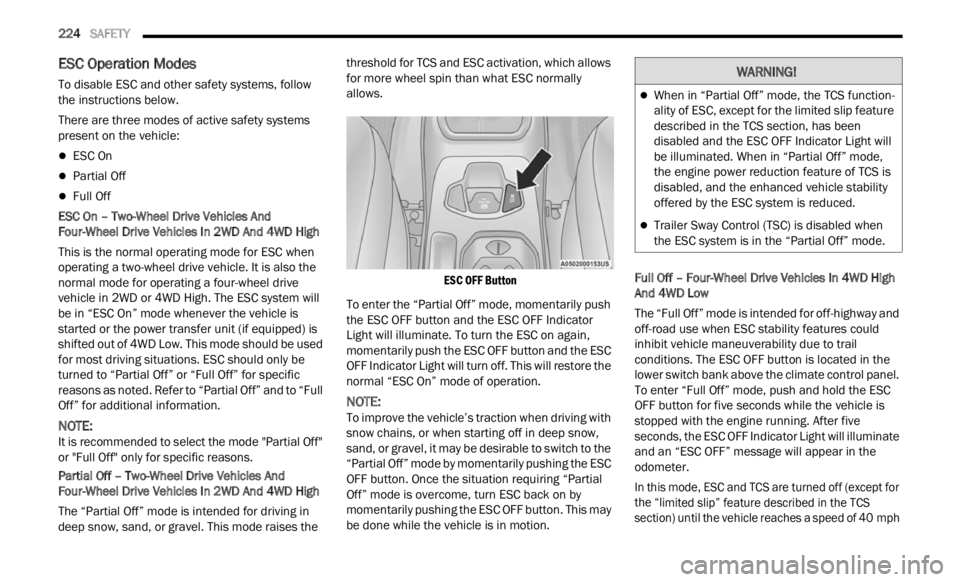
ESC OFF Button
To enter the “Partial Off” mode, momentarily push
the E S
C OFF button and the ESC OFF Indicator
Light will illuminate. To turn the ESC on again,
momentarily push the ESC OFF button and the ESC
OFF Indicator Light will turn off. This will restore the
normal “ESC On” mode of operation.
NOTE:
To improve the vehicle’s traction when driving with
snow c h
ains, or when starting off in deep snow,
sand, or gravel, it may be desirable to switch to the
“Partial Off” mode by momentarily pushing the ESC
OFF button. Once the situation requiring “Partial
Off” mode is overcome, turn ESC back on by
momentarily pushing the ESC OFF button. This may
be done while the vehicle is in motion. Full Off – Four-Wheel Drive Vehicles In 4WD High
And 4
W
D Low
The “Full Off” mode is intended for off-highway and
off-road
use when ESC stability features could
inhibit vehicle maneuverability due to trail
conditions. The ESC OFF button is located in the
lower switch bank above the climate control panel.
To enter “Full Off” mode, push and hold the ESC
OFF button for five seconds while the vehicle is
stopped with the engine running. After five
seconds, the ESC OFF Indicator Light will illuminate
and an “ESC OFF” message will appear in the
odometer.
In this mode, ESC and TCS are turned off (except for
the “ l
imited slip” feature described in the TCS
section) until the vehicle reaches a speed of 40 mph
WARNING!
When in “Partial Off” mode, the TCS function -
ality of ESC, except for the limited slip feature
descr i
bed in the TCS section, has been
disabled and the ESC OFF Indicator Light will
be illuminated. When in “Partial Off” mode,
the engine power reduction feature of TCS is
disabled, and the enhanced vehicle stability
offered by the ESC system is reduced.
Trailer Sway Control (TSC) is disabled when
the ESC system is in the “Partial Off” mode.
Page 227 of 364

SAFETY 225
(64 km/h). At speeds over 40 mph (64 km/h), the
system
automatically switches to “Partial Off” mode,
described above. When the vehicle speed returns to
less than 35 mph (56 km/h), the ESC system will
retur n
to “Full Off” mode. The ESC OFF Indicator
Light is always illuminated when ESC is off. To turn
ESC on again, momentarily push the ESC OFF
button. This will restore the normal “ESC On” mode
of operation.
NOTE:
With the ESC switched off, the enhanced vehicle
stabi l
ity offered by ESC is unavailable. In an emer -
gency evasive maneuver, the ESC system will not
e ngage
to assist in maintaining stability. “Full Off”
mode is only intended for off-highway or off-road
use.
NOTE:
“Full Off” is the only operating mode for ESC in
4WD Low. The ESC system will be in this mode
whenever the vehicle is started in 4WD Low or
the power transfer unit is shifted into 4WD Low.
The “ESC OFF” message will display and a chime
will sound when the gear selector is moved from
any position to the PARK (P) position and then
moved out of the PARK position. This will occur
even if the message was cleared previously.
Selec-Terrain — If Equipped
On models equipped with Selec-Terrain, the
a ctiva
tion of some driving modes provide partial off or full off of some active safety systems in order
to optimize performance in specific modes.
Partial or full off of the active safety systems will be
indic
a
ted by a light in the instrument cluster.
In "SAND" and "MUD", the active safety systems
are pa
rtially disabled and put in place to ensure
maximum performance in the specific mode of
operation. However, you can reactivate them
completely at any time by pushing the ESC button.
NOTE:
In 4WD Low, the active safety systems are
comple t
ely bypassed in order to ensure maximum
off-road performance.
ESC Activation/Malfunction Indicator Light
And ESC OFF Indicator Light
The ESC Activation/Malfunction Indicator
Light in the instrument cluster will come
on whe n
the ignition switch is placed in
the ON position. It should go out with the
engine running. If the ESC Activation/Malfunction
Indicator Light comes on continuously with the
engine running, a malfunction has been detected
in the ESC system. If this light remains on after
several ignition cycles, and the vehicle has been
driven several miles/kilometers at speeds greater
than 30 mph (48 km/h), see an authorized dealer
as soon
as possible to have the problem
diagnosed and corrected. The ESC Activation/Malfunction Indicator Light
(locat
e
d in the instrument cluster) starts to flash as
soon as the tires lose traction and the ESC system
becomes active. The ESC Activation/Malfunction
Indicator Light also flashes when Traction Control
System is active. If the ESC Activation/Malfunction
Indicator Light begins to flash during acceleration,
ease up on the accelerator and apply as little
throttle as possible. Be sure to adapt your speed
and driving to the prevailing road conditions.
NOTE:
The ESC Activation/Malfunction Indicator Light
and the ESC OFF Indicator Light come on
momentarily each time the ignition switch is
placed in the ON position.
Each time the ignition is placed in the ON posi -
tion, the ESC system will be on even if it was
turne d
off previously.
The ESC system will make buzzing or clicking
sounds when it is active. This is normal; the
sounds will stop when ESC becomes inactive
following the maneuver that caused the ESC
activation.
The ESC OFF Indicator Light indicates the
Electronic Stability Control (ESC) is in
“Part i
al Off” or “Full Off” modes.
The ESC OFF button is located in the center
console.
6
Page 228 of 364
226 SAFETY
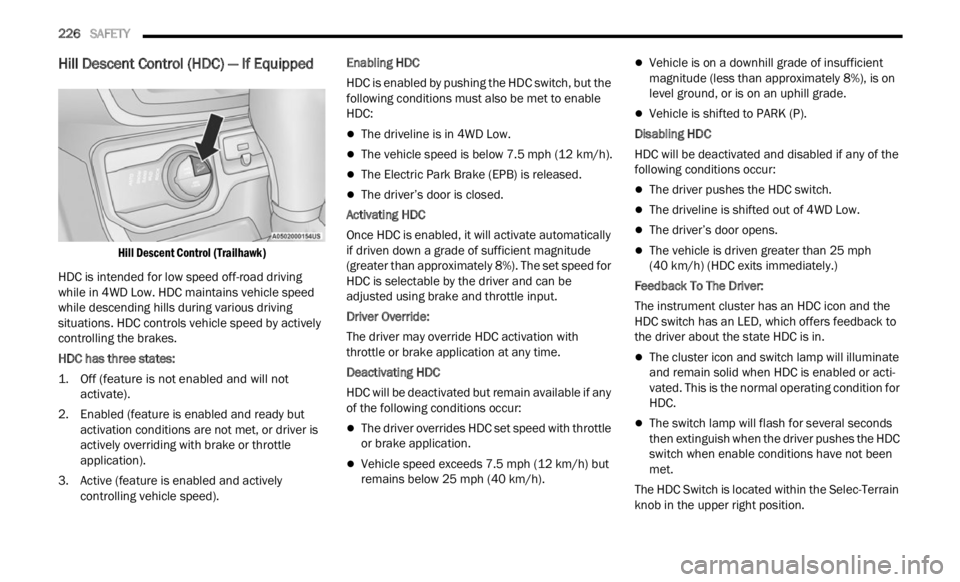
Hill Descent Control (HDC) — If Equipped
Hill Descent Control (Trailhawk)
HDC is intended for low speed off-road driving
while
in 4WD Low. HDC maintains vehicle speed
while descending hills during various driving
situations. HDC controls vehicle speed by actively
controlling the brakes.
HDC has three states:
1. O ff (feature is not enabled and will not
acti va
te).
2. Enabled (feature is enabled and ready but activ
ation conditions are not met, or driver is
actively overriding with brake or throttle
application).
3. Active (feature is enabled and actively control
ling vehicle speed). Enabling HDC
HDC is enabled by pushing the HDC switch, but the
f
ollow i
ng conditions must also be met to enable
HDC:
The driveline is in 4WD Low.
The vehicle speed is below 7.5 mph (12 km/h).
The Electric Park Brake (EPB) is released.
The driver’s door is closed.
Activating HDC
Once HDC is enabled, it will activate automatically
i f dri
ven down a grade of sufficient magnitude
(greater than approximately 8%). The set speed for
HDC is selectable by the driver and can be
adjusted using brake and throttle input.
Driver Override:
The driver may override HDC activation with
t hrott l
e or brake application at any time.
Deactivating HDC
HDC will be deactivated but remain available if any
of the
following conditions occur:
The driver overrides HDC set speed with throttle
or brake application.
Vehicle speed exceeds 7.5 mph (12 km/h) but
remain
s below 25 mph (40 km/h).
Vehicle is on a downhill grade of insufficient
magnitude (less than approximately 8%), is on
level ground, or is on an uphill grade.
Vehicle is shifted to PARK (P).
Disabling HDC
HDC will be deactivated and disabled if any of the
f ollowin
g conditions occur:
The driver pushes the HDC switch.
The driveline is shifted out of 4WD Low.
The driver’s door opens.
The vehicle is driven greater than 25 mph
(40 km/
h) (HDC exits immediately.)
Feedback To The Driver:
The instrument cluster has an HDC icon and the
HDC sw i
tch has an LED, which offers feedback to
the driver about the state HDC is in.
The cluster icon and switch lamp will illuminate
and remain solid when HDC is enabled or acti -
vated. This is the normal operating condition for
HD C.
The switch lamp will flash for several seconds
then extinguish when the driver pushes the HDC
switch when enable conditions have not been
met.
The HDC Switch is located within the Selec-Terrain
knob in
the upper right position.