child lock JEEP RENEGADE 2023 User Guide
[x] Cancel search | Manufacturer: JEEP, Model Year: 2023, Model line: RENEGADE, Model: JEEP RENEGADE 2023Pages: 364, PDF Size: 18.65 MB
Page 57 of 364

GETTING TO KNOW YOUR VEHICLE 55
OPENING AND CLOSING THE SUNROOF
To retract the sunroof to the open position, push
the Open/Close switch and the sunroof will fully
open. The sunroof can be stopped in any position
by pushing/pulling the switch a second time while
opening.
To close the sunroof completely, pull the Open/
Close s
witch and the sunroof will fully close. The
sunroof can be stopped in any position by pushing/
pulling the switch a second time while it is closing.
VENTING SUNROOF
To vent the sunroof push the vent switch.
NOTE:
The vent switch has the automatic function only at
the op e
ning of the sunroof. During the closing of
the sunroof, the switch must be held until closed.
OPENING AND CLOSING THE POWER
S
UNSHADE
Express Open/Close
Push the shade switch for about one-half second
and t h
e shade will automatically open. During the
automatic open operation, any movement of the
shade switch will stop the shade. Pull the shade switch for about one-half second
and t
h
e shade will automatically close. During the
automatic close operation, any movement of the
shade switch will stop the shade.
Manual Open/Close
To open the shade part way, push the shade switch
brief l
y and release.
To close the shade part way, pull the shade switch
briefl
y and release.
NOTE:
The sunroof and the shade controls will operate
only when the ignition is in the ON/RUN posi -
tion.
If the Remote Start functionality is active, it is
not possible to move the sunroof.
PINCH PROTECT FEATURE
This feature will detect an obstruction in the
opening of the sunroof during Express Close
operation. If an obstruction in the path of the
sunroof is detected, the sunroof will automatically
retract. Remove the obstruction if this occurs.
WARNING!
Do not let children play with the sunroof.
Never leave children unattended in a vehicle,
or with access to an unlocked vehicle. Do not
leave the key fob in or near the vehicle, and do
not leave the ignition of a vehicle equipped
with Keyless Enter ‘n Go™ in the ACC or ON/
RUN position. Occupants, particularly unat -
tended children, can become entrapped by
the p ow
er sunroof while operating the power
sunroof switch. Such entrapment may result
in serious injury or death.
In a collision, there is a greater risk of being
thrown from a vehicle with an open sunroof.
You could also be severely injured or killed.
Always fasten your seat belt properly and
make sure all passengers are properly
secured.
Do not allow small children to operate the
sunroof. Never allow your fingers, other body
parts, or any object to project through the
sunroof opening. Injury may result.
2
Page 82 of 364
80
(Continued)
STARTING AND OPERATING
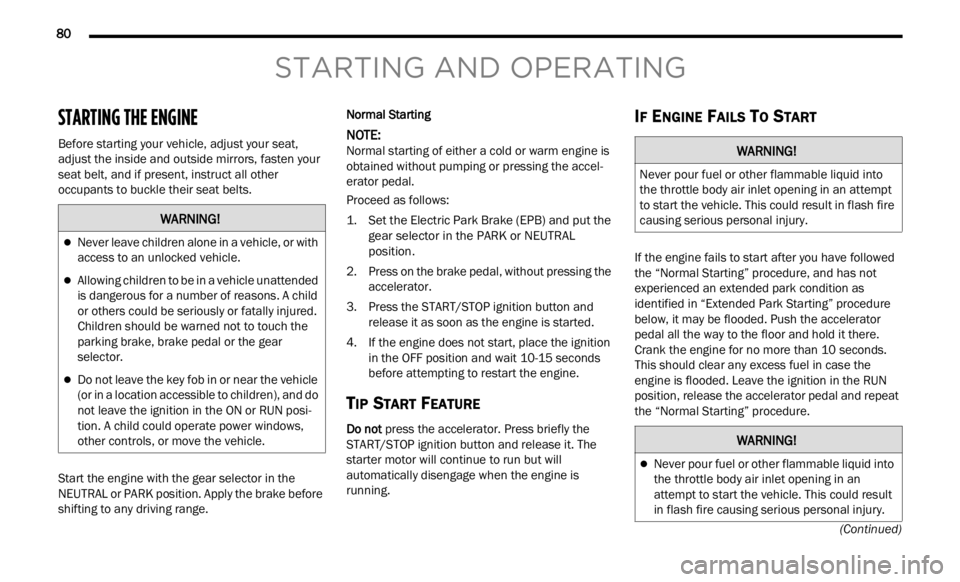
STARTING THE ENGINE
Before starting your vehicle, adjust your seat,
adjust the inside and outside mirrors, fasten your
seat belt, and if present, instruct all other
occupants to buckle their seat belts.
Start the engine with the gear selector in the
NEUTRA
L or PARK position. Apply the brake before
shifting to any driving range. Normal Starting
NOTE:
Normal starting of either a cold or warm engine is
obtain e
d without pumping or pressing the accel -
erator pedal.
Proceed as follows:
1. S et the Electric Park Brake (EPB) and put the
gear s
elector in the PARK or NEUTRAL
position.
2. Press on the brake pedal, without pressing the acce l
erator.
3. Press the START/STOP ignition button and relea
se it as soon as the engine is started.
4. If the engine does not start, place the ignition in th
e OFF position and wait 10-15 seconds
before attempting to restart the engine.
TIP START FEATURE
Do not press the accelerator. Press briefly the
START/STOP ignition button and release it. The
starter motor will continue to run but will
automatically disengage when the engine is
running.
IF ENGINE FAILS TO START
If the engine fails to start after you have followed
the “Normal Starting” procedure, and has not
experienced an extended park condition as
identified in “Extended Park Starting” procedure
below, it may be flooded. Push the accelerator
pedal all the way to the floor and hold it there.
Crank the engine for no more than 10 seconds.
This should clear any excess fuel in case the
engine is flooded. Leave the ignition in the RUN
position, release the accelerator pedal and repeat
the “Normal Starting” procedure.
WARNING!
Never leave children alone in a vehicle, or with
access to an unlocked vehicle.
Allowing children to be in a vehicle unattended
is dangerous for a number of reasons. A child
or others could be seriously or fatally injured.
Children should be warned not to touch the
parking brake, brake pedal or the gear
selector.
Do not leave the key fob in or near the vehicle
(or in a location accessible to children), and do
not leave the ignition in the ON or RUN posi -
tion. A child could operate power windows,
other c
ontrols, or move the vehicle.
WARNING!
Never pour fuel or other flammable liquid into
the throttle body air inlet opening in an attempt
to start the vehicle. This could result in flash fire
causing serious personal injury.
WARNING!
Never pour fuel or other flammable liquid into
the throttle body air inlet opening in an
attempt to start the vehicle. This could result
in flash fire causing serious personal injury.
Page 85 of 364
STARTING AND OPERATING 83
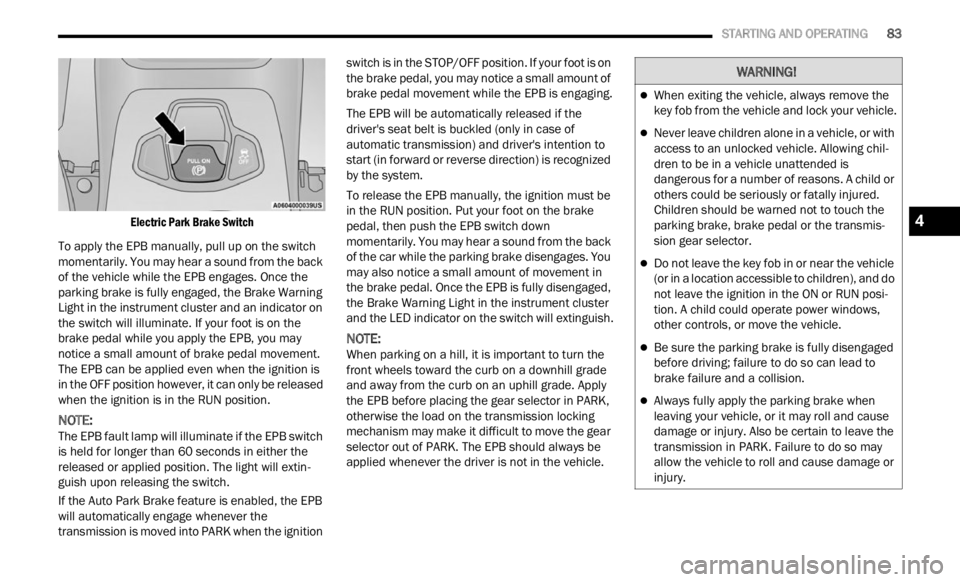
Electric Park Brake Switch
To apply the EPB manually, pull up on the switch
momenta
rily. You may hear a sound from the back
of the vehicle while the EPB engages. Once the
parking brake is fully engaged, the Brake Warning
Light in the instrument cluster and an indicator on
the switch will illuminate. If your foot is on the
brake pedal while you apply the EPB, you may
notice a small amount of brake pedal movement.
The EPB can be applied even when the ignition is
in the OFF position however, it can only be released
when the ignition is in the RUN position.
NOTE:
The EPB fault lamp will illuminate if the EPB switch
is he l
d for longer than 60 seconds in either the
released or applied position. The light will extin -
guish upon releasing the switch.
If the Auto Park Brake feature is enabled, the EPB
w ill a
utomatically engage whenever the
transmission is moved into PARK when the ignition switch is in the STOP/OFF position. If your foot is on
the brake pedal, you may notice a small amount of
brake pedal movement while the EPB is engaging.
The EPB will be automatically released if the
drive
r
's seat belt is buckled (only in case of
automatic transmission) and driver's intention to
start (in forward or reverse direction) is recognized
by the system.
To release the EPB manually, the ignition must be
in th e
RUN position. Put your foot on the brake
pedal, then push the EPB switch down
momentarily. You may hear a sound from the back
of the car while the parking brake disengages. You
may also notice a small amount of movement in
the brake pedal. Once the EPB is fully disengaged,
the Brake Warning Light in the instrument cluster
and the LED indicator on the switch will extinguish.
NOTE:
When parking on a hill, it is important to turn the
front w
heels toward the curb on a downhill grade
and away from the curb on an uphill grade. Apply
the EPB before placing the gear selector in PARK,
otherwise the load on the transmission locking
mechanism may make it difficult to move the gear
selector out of PARK. The EPB should always be
applied whenever the driver is not in the vehicle.
WARNING!
When exiting the vehicle, always remove the
key fob from the vehicle and lock your vehicle.
Never leave children alone in a vehicle, or with
access to an unlocked vehicle. Allowing chil -
dren to be in a vehicle unattended is
d anger
ous for a number of reasons. A child or
others could be seriously or fatally injured.
Children should be warned not to touch the
parking brake, brake pedal or the transmis -
sion gear selector.
Do not leave the key fob in or near the vehicle
(or in a location accessible to children), and do
not leave the ignition in the ON or RUN posi -
tion. A child could operate power windows,
other c
ontrols, or move the vehicle.
Be sure the parking brake is fully disengaged
before driving; failure to do so can lead to
brake failure and a collision.
Always fully apply the parking brake when
leaving your vehicle, or it may roll and cause
damage or injury. Also be certain to leave the
transmission in PARK. Failure to do so may
allow the vehicle to roll and cause damage or
injury.
4
Page 88 of 364
86 STARTING AND OPERATING
GEAR SELECTOR
The transmission gear selector has PARK,
REVERSE, NEUTRAL, DRIVE, and AutoStick (+/-)
shift positions. Manual shifts can be made using
the AutoStick shift control. Toggling the gear
selector forward (-) or rearward (+) while in the
AutoStick position (beside the DRIVE position) will
manually select the transmission gear, and will
display the current gear in the instrument cluster
as 1, 2, 3, etc.
NOTE:
If the gear selector cannot be moved to the PARK,
REVER S
E, or NEUTRAL position (when pushed
forward) it is probably in the AutoStick (+/-)
position (beside the DRIVE position). In AutoStick
mode, the transmission gear (1, 2, 3, etc.) is
displayed in the instrument cluster. Move the gear
selector to the right (into the DRIVE [D] position) for
access to PARK, REVERSE, and NEUTRAL.
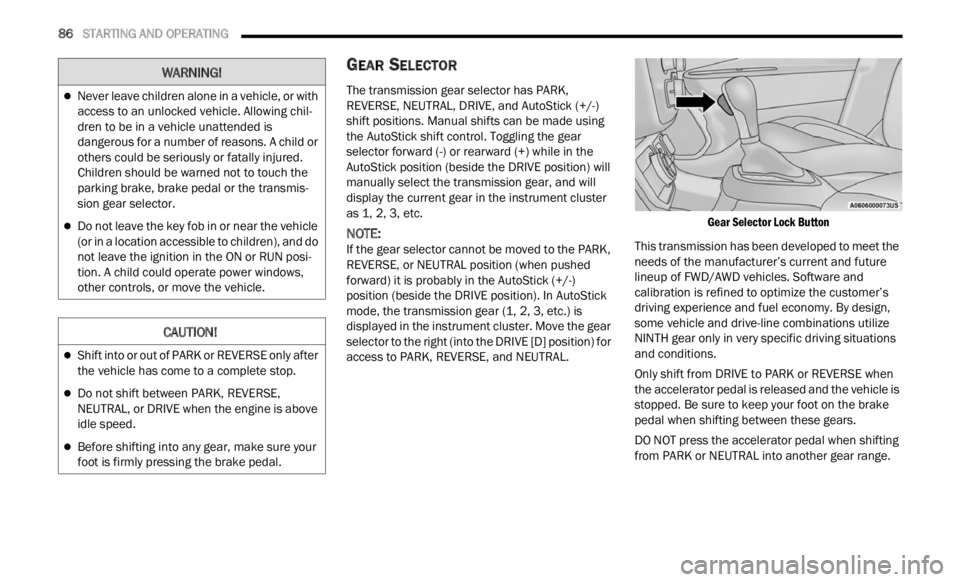
Gear Selector Lock Button
This transmission has been developed to meet the
needs
of the manufacturer’s current and future
lineup of FWD/AWD vehicles. Software and
calibration is refined to optimize the customer’s
driving experience and fuel economy. By design,
some vehicle and drive-line combinations utilize
NINTH gear only in very specific driving situations
and conditions.
Only shift from DRIVE to PARK or REVERSE when
the a c
celerator pedal is released and the vehicle is
stopped. Be sure to keep your foot on the brake
pedal when shifting between these gears.
DO NOT press the accelerator pedal when shifting
from PA
RK or NEUTRAL into another gear range.
Never leave children alone in a vehicle, or with
access to an unlocked vehicle. Allowing chil -
dren to be in a vehicle unattended is
d anger
ous for a number of reasons. A child or
others could be seriously or fatally injured.
Children should be warned not to touch the
parking brake, brake pedal or the transmis -
sion gear selector.
Do not leave the key fob in or near the vehicle
(or in a location accessible to children), and do
not leave the ignition in the ON or RUN posi -
tion. A child could operate power windows,
other c
ontrols, or move the vehicle.
CAUTION!
Shift into or out of PARK or REVERSE only after
the vehicle has come to a complete stop.
Do not shift between PARK, REVERSE,
NEUTRAL, or DRIVE when the engine is above
idle speed.
Before shifting into any gear, make sure your
foot is firmly pressing the brake pedal.
WARNING!
Page 90 of 364
88 STARTING AND OPERATING
The following indicators should be used to ensure
that you have properly engaged the transmission
into the PARK position:
When shifting into PARK, press the lock button
on the gear selector, and firmly move the gear
selector all the way forward until it stops and is
fully seated.
Look at the transmission gear position display
and verify that it indicates the PARK position (P),
and is not blinking.
With the brake pedal released, verify that the
gear selector will not move out of PARK.
REVERSE (R)
This range is for moving the vehicle backward.
Shift
into REVERSE only after the vehicle has come
to a complete stop.
NEUTRAL (N)
Use this range when the vehicle is standing for
p rolonge
d periods with the engine running. The
engine may be started in this range. Apply the
Electric Park Brake and shift the transmission into
PARK if you must exit the vehicle. DRIVE (D)
This range should be used for most city and
highwa
y driving. It provides the smoothest upshifts
and downshifts, and the best fuel economy. The
transmission automatically upshifts through all
forward gears.
When frequent transmission shifting occurs (such
as wh e
n operating the vehicle under heavy loading
conditions, in hilly terrain, traveling into strong
head winds or while towing a heavy trailer), use the
AutoStick shift control to select a lower gear. Under
Never leave children alone in a vehicle, or with
access to an unlocked vehicle. Allowing chil -
dren to be in a vehicle unattended is
d anger
ous for a number of reasons. A child or
others could be seriously or fatally injured.
Children should be warned not to touch the
parking brake, brake pedal or the transmis -
sion gear selector.
Do not leave the key fob in or near the vehicle
(or in a location accessible to children), and do
not leave the ignition in the ON/RUN position.
A child could operate power windows, other
controls, or move the vehicle.
CAUTION!
Before moving the transmission gear selector
out of PARK, you must turn the ignition to the
ON/RUN position, and also press the brake
pedal. Otherwise, damage to the gear selector
could result.
DO NOT race the engine when shifting from
PARK or NEUTRAL into another gear range, as
this can damage the drivetrain.
WARNING!WARNING!
Do not coast in NEUTRAL and never turn off the
ignition to coast down a hill. These are unsafe
practices that limit your response to changing
traffic or road conditions. You might lose control
of the vehicle and have a collision.
CAUTION!
Towing the vehicle, coasting, or driving for any
other reason with the transmission in NEUTRAL
can cause severe transmission damage.
For Recreational Towing Ú page 129.
For Towing A Disabled Vehicle Ú page 283.
Page 152 of 364
150 MULTIMEDIA
Safe Usage Of The Uconnect System
The Uconnect system is a sophisticated elec -
tronic device. Do not let young children use the
syste m
.
Permanent hearing loss may occur if you play
your music or sound system at loud volumes.
Exercise caution when setting the volume on the
system.
Keep drinks, rain and other sources of moisture
away from the system. Besides damage to the
system, moisture can cause electric shocks as
with any electronic device.
NOTE:
Many features of this system are speed
depen d
ent. For your own safety, it is not possible to
use some of the touchscreen features while the
vehicle is in motion.
Care And Maintenance
Do not press the touchscreen with any hard or
sharp objects (pen, USB stick, jewelry, etc.),
which could scratch the surface.
Do not spray any liquid or chemicals directly on
the screen! Use a clean and dry microfiber lens
cleaning cloth in order to clean the touchscreen.
If necessary, use a lint-free cloth dampened
with a cleaning solution, such as isopropyl
alcohol or an isopropyl alcohol and water solu -tion ratio of 50:50. Be sure to follow the solvent
manuf
a
cturer's precautions and directions
Ú page 349.
UCONNECT MODES
STEERING WHEEL AUDIO CONTROLS
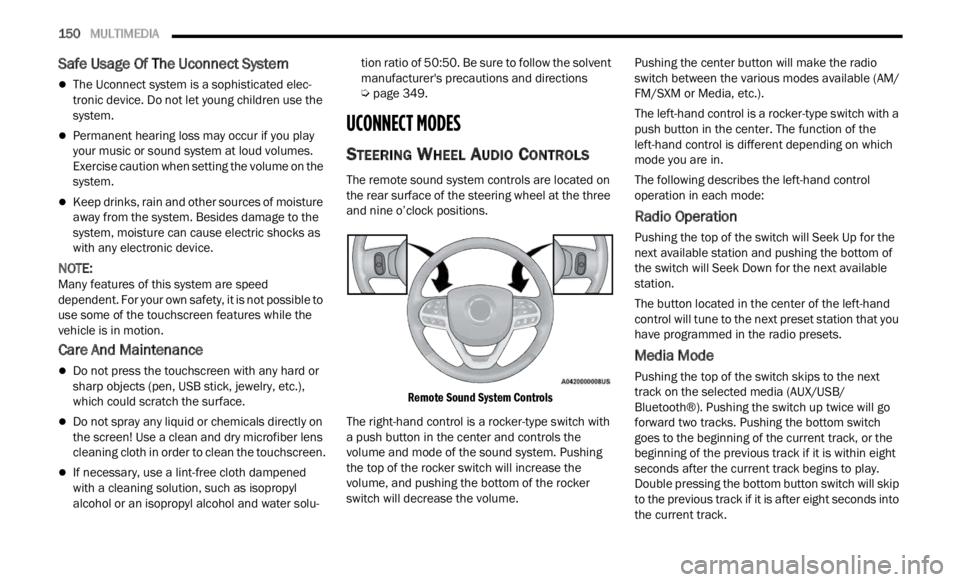
The remote sound system controls are located on
the rear surface of the steering wheel at the three
and nine o’clock positions.
Remote Sound System Controls
The right-hand control is a rocker-type switch with
a pus h
button in the center and controls the
volume and mode of the sound system. Pushing
the top of the rocker switch will increase the
volume, and pushing the bottom of the rocker
switch will decrease the volume. Pushing the center button will make the radio
switc
h
between the various modes available (AM/
FM/SXM or Media, etc.).
The left-hand control is a rocker-type switch with a
push b
utton in the center. The function of the
left-hand control is different depending on which
mode you are in.
The following describes the left-hand control
operati
on in each mode:
Radio Operation
Pushing the top of the switch will Seek Up for the
next available station and pushing the bottom of
the switch will Seek Down for the next available
station.
The button located in the center of the left-hand
control
will tune to the next preset station that you
have programmed in the radio presets.
Media Mode
Pushing the top of the switch skips to the next
track on the selected media (AUX/USB/
Bluetooth®). Pushing the switch up twice will go
forward two tracks. Pushing the bottom switch
goes to the beginning of the current track, or the
beginning of the previous track if it is within eight
seconds after the current track begins to play.
Double pressing the bottom button switch will skip
to the previous track if it is after eight seconds into
the current track.
Page 247 of 364
SAFETY 245
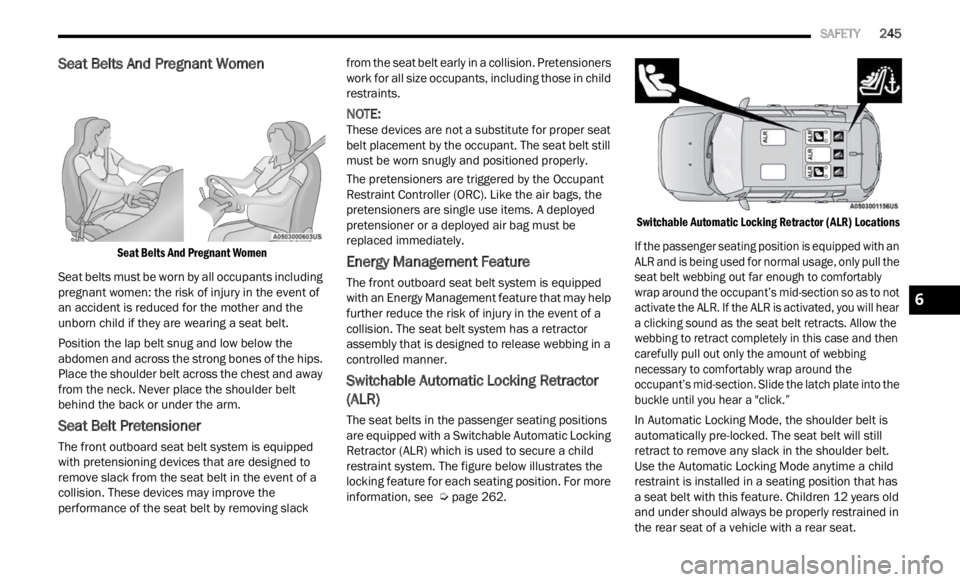
Seat Belts And Pregnant Women
Seat Belts And Pregnant Women
Seat belts must be worn by all occupants including
pregna
nt women: the risk of injury in the event of
an accident is reduced for the mother and the
unborn child if they are wearing a seat belt.
Position the lap belt snug and low below the
abdomen
and across the strong bones of the hips.
Place the shoulder belt across the chest and away
from the neck. Never place the shoulder belt
behind the back or under the arm.
Seat Belt Pretensioner
The front outboard seat belt system is equipped
with pretensioning devices that are designed to
remove slack from the seat belt in the event of a
collision. These devices may improve the
performance of the seat belt by removing slack from the seat belt early in a collision. Pretensioners
work for all size occupants, including those in child
restraints.
NOTE:
These devices are not a substitute for proper seat
belt p
lacement by the occupant. The seat belt still
must be worn snugly and positioned properly.
The pretensioners are triggered by the Occupant
Restr a
int Controller (ORC). Like the air bags, the
pretensioners are single use items. A deployed
pretensioner or a deployed air bag must be
replaced immediately.
Energy Management Feature
The front outboard seat belt system is equipped
with an Energy Management feature that may help
further reduce the risk of injury in the event of a
collision. The seat belt system has a retractor
assembly that is designed to release webbing in a
controlled manner.
Switchable Automatic Locking Retractor
(ALR)
The seat belts in the passenger seating positions
are equipped with a Switchable Automatic Locking
Retractor (ALR) which is used to secure a child
restraint system. The figure below illustrates the
locking feature for each seating position. For more
information, see Ú page 262.
Switchable Automatic Locking Retractor (ALR) Locations
If the passenger seating position is equipped with an
ALR an
d is being used for normal usage, only pull the
seat belt webbing out far enough to comfortably
wrap around the occupant’s mid-section so as to not
activate the ALR. If the ALR is activated, you will hear
a clicking sound as the seat belt retracts. Allow the
webbing to retract completely in this case and then
carefully pull out only the amount of webbing
necessary to comfortably wrap around the
occupant’s mid-section. Slide the latch plate into the
buckle until you hear a "click.”
In Automatic Locking Mode, the shoulder belt is
automa t
ically pre-locked. The seat belt will still
retract to remove any slack in the shoulder belt.
Use the Automatic Locking Mode anytime a child
restraint is installed in a seating position that has
a seat belt with this feature. Children 12 years old
and under should always be properly restrained in
the rear seat of a vehicle with a rear seat.
6
Page 248 of 364
246 SAFETY
How To Engage The Automatic Locking Mode
1. Buckle the combination lap and shoulder
belt.
2
. Grab the shoulder portion and pull downward until
the entire seat belt is extracted.
3. Allow the seat belt to retract. As the seat belt retra
cts, you will hear a clicking sound. This
indicates the seat belt is now in the Automatic
Locking Mode.
How To Disengage The Automatic Locking Mode
Unbuckle the combination lap/shoulder belt and
allow i
t to retract completely to disengage the
Automatic Locking Mode and activate the vehicle
sensitive (emergency) locking mode.
SUPPLEMENTAL RESTRAINT SYSTEMS
(SRS)
Some of the safety features described in this
section may be standard equipment on some
models, or may be optional equipment on others. If
you are not sure, ask an authorized dealer.
The air bag system must be ready to protect you in
a colli
sion. The Occupant Restraint Controller
(ORC) monitors the internal circuits and
interconnecting wiring associated with the electrical Air Bag System Components. Your
vehicle may be equipped with the following Air Bag
System Components:
Air Bag System Components
Occupant Restraint Controller (ORC)
Air Bag Warning Light
Steering Wheel and Column
Instrument Panel
Knee Impact Bolsters
Driver and Front Passenger Air Bags
Seat Belt Buckle Switch
Supplemental Side Air Bags
Supplemental Knee Air Bags
Front and Side Impact Sensors
Seat Belt Pretensioners
Seat Track Position Sensors
Air Bag Warning Light
The Occupant Restraint Controller (ORC)
monitors the readiness of the electronic
parts
of the air bag system whenever the
ignition switch is in the AVV/START or
MAR/ACC/ON/RUN position. If the ignition switch
is in the STOP/OFF/LOCK position the air bag
system is not on and the air bags will not inflate.
WARNING!
Never place a rear-facing child restraint in
front of an air bag. A deploying passenger
front air bag can cause death or serious injury
to a child 12 years or younger, including a
child in a rear-facing child restraint.
Never install a rear-facing child restraint in the
front seat of a vehicle. Only use a rear-facing
child restraint in the rear seat. If the vehicle
does not have a rear seat, do not transport a
rear-facing child restraint in that vehicle.
WARNING!
The seat belt assembly must be replaced if the
switchable Automatic Locking Retractor (ALR)
feature or any other seat belt function is not
working properly when checked according to
the procedures in the Service Manual.
Failure to replace the seat belt assembly
could increase the risk of injury in collisions.
Do not use the Automatic Locking Mode to
restrain occupants who are wearing the seat
belt or children who are using booster seats.
The locked mode is only used to install
rear-facing or forward-facing child restraints
that have a harness for restraining the child.
Page 252 of 364
250 SAFETY
Supplemental Side Air Bag Inflatable Curtains
(SABICs)
This vehicle is equipped with Supplemental Side
Air Ba
g Inflatable Curtains (SABICs).
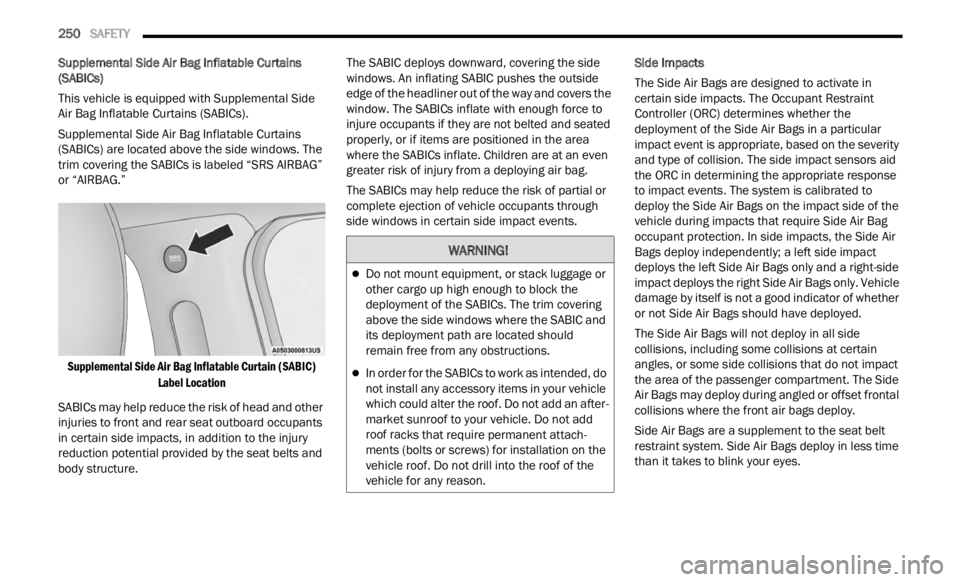
Supplemental Side Air Bag Inflatable Curtains
(SABIC
s) are located above the side windows. The
trim covering the SABICs is labeled “SRS AIRBAG”
or “AIRBAG.”
Supplemental Side Air Bag Inflatable Curtain (SABIC) Label
Location
SABICs may help reduce the risk of head and other
injuri
es to front and rear seat outboard occupants
in certain side impacts, in addition to the injury
reduction potential provided by the seat belts and
body structure. The SABIC deploys downward, covering the side
window
s
. An inflating SABIC pushes the outside
edge of the headliner out of the way and covers the
window. The SABICs inflate with enough force to
injure occupants if they are not belted and seated
properly, or if items are positioned in the area
where the SABICs inflate. Children are at an even
greater risk of injury from a deploying air bag.
The SABICs may help reduce the risk of partial or
comple t
e ejection of vehicle occupants through
side windows in certain side impact events. Side Impacts
The Side Air Bags are designed to activate in
c
erta i
n side impacts. The Occupant Restraint
Controller (ORC) determines whether the
deployment of the Side Air Bags in a particular
impact event is appropriate, based on the severity
and type of collision. The side impact sensors aid
the ORC in determining the appropriate response
to impact events. The system is calibrated to
deploy the Side Air Bags on the impact side of the
vehicle during impacts that require Side Air Bag
occupant protection. In side impacts, the Side Air
Bags deploy independently; a left side impact
deploys the left Side Air Bags only and a right-side
impact deploys the right Side Air Bags only. Vehicle
damage by itself is not a good indicator of whether
or not Side Air Bags should have deployed.
The Side Air Bags will not deploy in all side
collis i
ons, including some collisions at certain
angles, or some side collisions that do not impact
the area of the passenger compartment. The Side
Air Bags may deploy during angled or offset frontal
collisions where the front air bags deploy.
Side Air Bags are a supplement to the seat belt
restr a
int system. Side Air Bags deploy in less time
than it takes to blink your eyes.
WARNING!
Do not mount equipment, or stack luggage or
other cargo up high enough to block the
deployment of the SABICs. The trim covering
above the side windows where the SABIC and
its deployment path are located should
remain free from any obstructions.
In order for the SABICs to work as intended, do
not install any accessory items in your vehicle
which could alter the roof. Do not add an after -
market sunroof to your vehicle. Do not add
roof r a
cks that require permanent attach -
ments (bolts or screws) for installation on the
v ehicl
e roof. Do not drill into the roof of the
vehicle for any reason.
Page 263 of 364
SAFETY 261
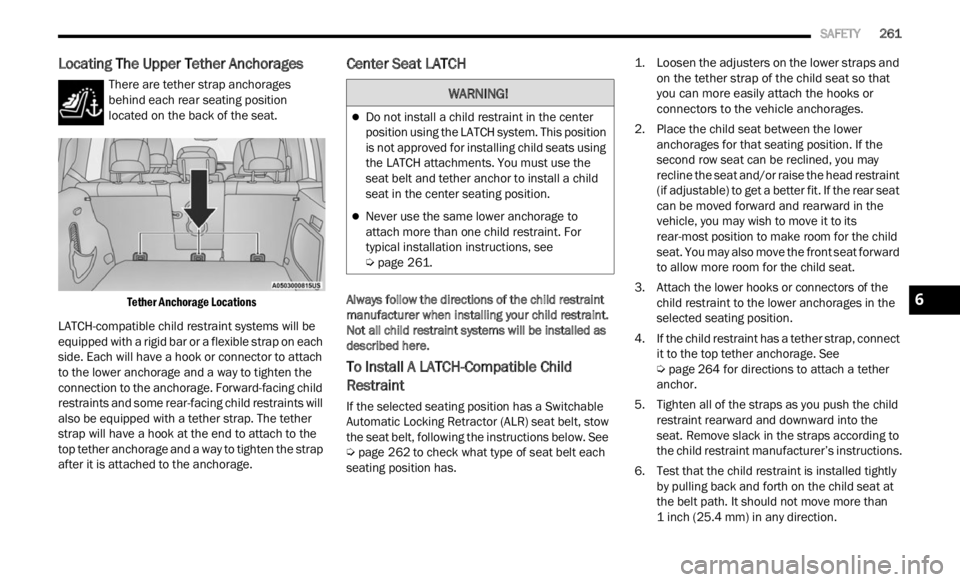
Locating The Upper Tether Anchorages
There are tether strap anchorages
behind each rear seating position
locate d
on the back of the seat.
Tether Anchorage Locations
LATCH-compatible child restraint systems will be
equip p
ed with a rigid bar or a flexible strap on each
side. Each will have a hook or connector to attach
to the lower anchorage and a way to tighten the
connection to the anchorage. Forward-facing child
restraints and some rear-facing child restraints will
also be equipped with a tether strap. The tether
strap will have a hook at the end to attach to the
top tether anchorage and a way to tighten the strap
after it is attached to the anchorage.
Center Seat LATCH
Always follow the directions of the child restraint
manufacturer when installing your child restraint.
Not all child restraint systems will be installed as
described here.
To Install A LATCH-Compatible Child
Restraint
If the selected seating position has a Switchable
Automatic Locking Retractor (ALR) seat belt, stow
the seat belt, following the instructions below. See
Ú page 262 to check what type of seat belt each
seating position has.
1. L
oosen the adjusters on the lower straps and
on t he
tether strap of the child seat so that
you can more easily attach the hooks or
connectors to the vehicle anchorages.
2. Place the child seat between the lower anchor
ages for that seating position. If the
second row seat can be reclined, you may
recline the seat and/or raise the head restraint
(if adjustable) to get a better fit. If the rear seat
can be moved forward and rearward in the
vehicle, you may wish to move it to its
rear-most position to make room for the child
seat. You may also move the front seat forward
to allow more room for the child seat.
3. Attach the lower hooks or connectors of the child
restraint to the lower anchorages in the
selected seating position.
4. If the child restraint has a tether strap, connect it to
the top tether anchorage. See
Ú page 264 for directions to attach a tether
anchor.
5. T ighten all of the straps as you push the child
restr
aint rearward and downward into the
seat. Remove slack in the straps according to
the child restraint manufacturer’s instructions.
6. Test that the child restraint is installed tightly by pu
lling back and forth on the child seat at
the belt path. It should not move more than
1 inch (25.4 mm) in any direction.
WARNING!
Do not install a child restraint in the center
position using the LATCH system. This position
is not approved for installing child seats using
the LATCH attachments. You must use the
seat belt and tether anchor to install a child
seat in the center seating position.
Never use the same lower anchorage to
attach more than one child restraint. For
typical installation instructions, see
Ú page 261.
6