ignition JEEP RENEGADE 2023 User Guide
[x] Cancel search | Manufacturer: JEEP, Model Year: 2023, Model line: RENEGADE, Model: JEEP RENEGADE 2023Pages: 364, PDF Size: 18.65 MB
Page 24 of 364
22 GETTING TO KNOW YOUR VEHICLE
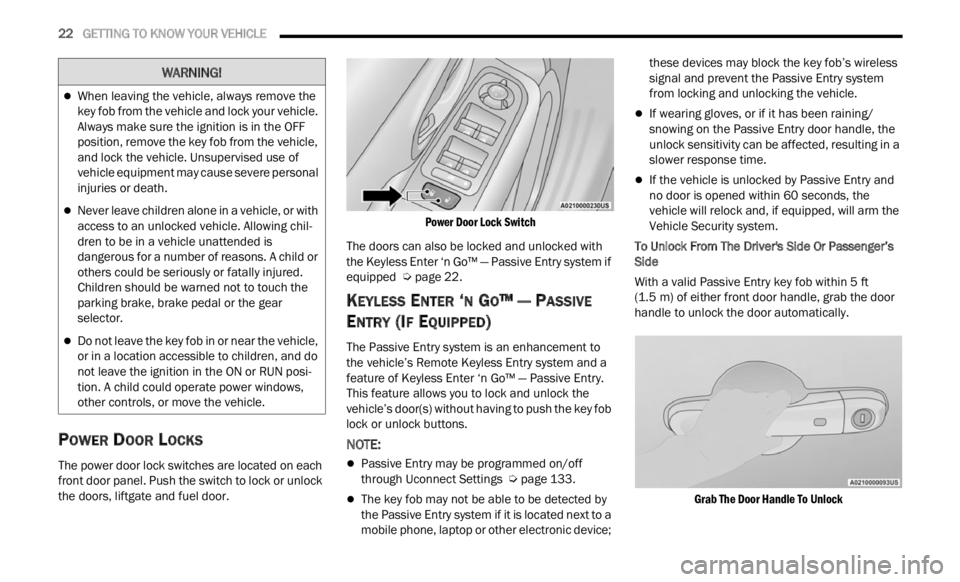
POWER DOOR LOCKS
The power door lock switches are located on each
front door panel. Push the switch to lock or unlock
the doors, liftgate and fuel door.
Power Door Lock Switch
The doors can also be locked and unlocked with
the K e
yless Enter ‘n Go™ — Passive Entry system if
equipped Ú page 22.
KEYLESS ENTER ‘N GO™ — PASSIVE
E
NTRY (IF EQUIPPED)
The Passive Entry system is an enhancement to
the vehicle’s Remote Keyless Entry system and a
feature of Keyless Enter ‘n Go™ — Passive Entry.
This feature allows you to lock and unlock the
vehicle’s door(s) without having to push the key fob
lock or unlock buttons.
NOTE:
Passive Entry may be programmed on/off
through Uconnect Settings Ú page 133.
The key fob may not be able to be detected by
the Passive Entry system if it is located next to a
mobile phone, laptop or other electronic device; these devices may block the key fob’s wireless
signal and prevent the Passive Entry system
from locking and unlocking the vehicle.
If wearing gloves, or if it has been raining/
snowing on the Passive Entry door handle, the
unlock sensitivity can be affected, resulting in a
slower response time.
If the vehicle is unlocked by Passive Entry and
no door is opened within 60 seconds, the
vehicle will relock and, if equipped, will arm the
Vehicle Security system.
To Unlock From The Driver's Side Or Passenger’s
Side
Wit
h a valid Passive Entry key fob within 5 ft
(1.5 m)
of either front door handle, grab the door
handl e
to unlock the door automatically.
Grab The Door Handle To Unlock
When leaving the vehicle, always remove the
key fob from the vehicle and lock your vehicle.
Always make sure the ignition is in the OFF
position, remove the key fob from the vehicle,
and lock the vehicle. Unsupervised use of
vehicle equipment may cause severe personal
injuries or death.
Never leave children alone in a vehicle, or with
access to an unlocked vehicle. Allowing chil -
dren to be in a vehicle unattended is
d anger
ous for a number of reasons. A child or
others could be seriously or fatally injured.
Children should be warned not to touch the
parking brake, brake pedal or the gear
selector.
Do not leave the key fob in or near the vehicle,
or in a location accessible to children, and do
not leave the ignition in the ON or RUN posi -
tion. A child could operate power windows,
other c
ontrols, or move the vehicle.
WARNING!
Page 25 of 364
GETTING TO KNOW YOUR VEHICLE 23
NOTE:
Either the driver door only or all doors will unlock
when you grab hold of the front driver’s door
handle, depending on the selected setting in the
Uconnect system
Ú page 133.
All doors will unlock when the front passenger
door handle is grabbed regardless of the
driver’s door unlock preference setting.
Frequency Operated Button Integrated Key
(FOBI K
-Safe)
To minimize the possibility of unintentionally
locking
a Passive Entry key fob inside your vehicle,
the Passive Entry system is equipped with an
automatic door unlock feature which will function if
the ignition switch is in the OFF position.
There are three situations that trigger a
FOBIK -
Safe search in any Passive Entry vehicle:
A lock request is made by a valid Passive Entry
key fob while a door is open.
A lock request is made by the Passive Entry door
handle while a door is open.
A lock request is made by the door panel switch
while the door is open.
When any of these situations occur, after all open
doors ar
e shut, the FOBIK-Safe search will be
executed. If it detects a Passive Entry key fob inside the vehicle and it does not detect any
Passive Entry key fobs outside the vehicle, then the
vehicle will unlock and alert the customer.
NOTE:
The vehicle will only unlock the doors when a valid
Passi v
e Entry key fob is detected inside the
vehicle. The vehicle will not unlock the doors when
any of the following conditions are true:
The doors are manually locked using the door
lock knobs.
Three attempts are made to lock the doors
using the door panel switch and then the doors
are closed.
There is a valid Passive Entry key fob outside the
vehicle and within 5 ft (1.5 m) of either Passive
Entry
door handle.
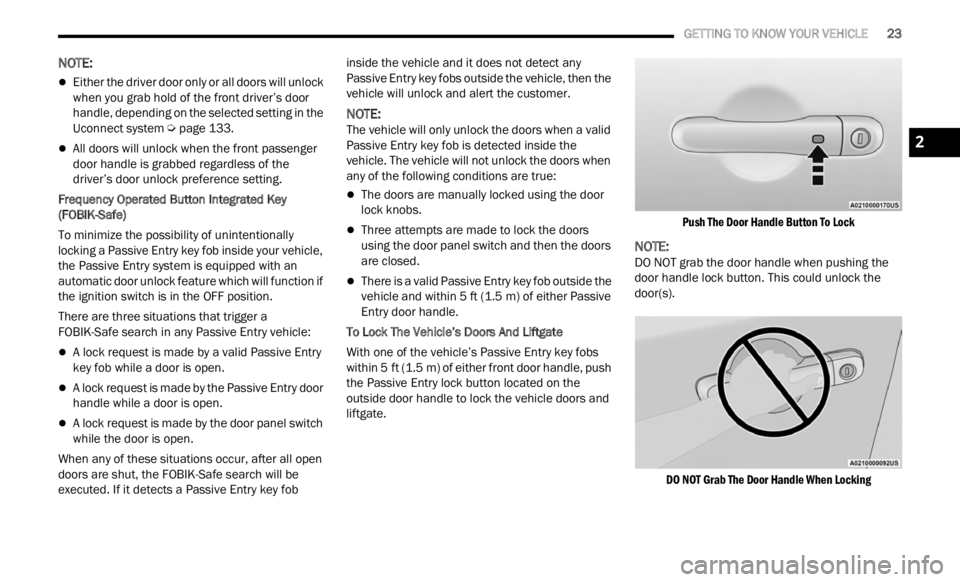
To Lock The Vehicle’s Doors And Liftgate
With one of the vehicle’s Passive Entry key fobs
withi n
5 ft (1.5 m) of either front door handle, push
the P a
ssive Entry lock button located on the
outside door handle to lock the vehicle doors and
liftgate.
Push The Door Handle Button To Lock
NOTE:
DO NOT grab the door handle when pushing the
door ha n
dle lock button. This could unlock the
door(s).
DO NOT Grab The Door Handle When Locking
2
Page 26 of 364
24 GETTING TO KNOW YOUR VEHICLE
NOTE:
After pushing the door handle button, you must
wait two seconds before you can lock or unlock
the doors, using either Passive Entry door
handle. This is done to allow you to check if the
vehicle is locked by pulling the door handle
without the vehicle unlocking.
The Passive Entry system will not operate if the
key fob battery is depleted.
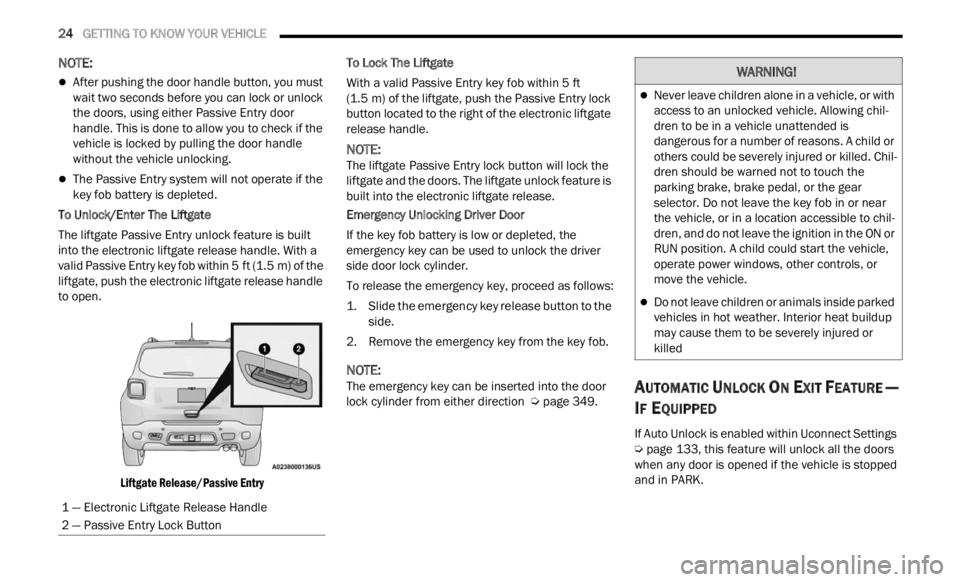
To Unlock/Enter The Liftgate
The liftgate Passive Entry unlock feature is built
into t h
e electronic liftgate release handle. With a
valid Passive Entry key fob within 5 ft (1.5 m) of the
liftga
te, push the electronic liftgate release handle
to open.
Liftgate Release/Passive Entry
To Lock The Liftgate
With a valid Passive Entry key fob within 5
ft
(1.5 m)
of the liftgate, push the Passive Entry lock
button
located to the right of the electronic liftgate
release handle.
NOTE:
The liftgate Passive Entry lock button will lock the
liftg a
te and the doors. The liftgate unlock feature is
built into the electronic liftgate release.
Emergency Unlocking Driver Door
If the key fob battery is low or depleted, the
e merge
ncy key can be used to unlock the driver
side door lock cylinder.
To release the emergency key, proceed as follows:
1. S lide the emergency key release button to the
side.
2
. Remove the emergency key from the key fob.
NOTE:
The emergency key can be inserted into the door
lock c y
linder from either direction Ú page 349.
AUTOMATIC UNLOCK ON EXIT FEATURE —
I
F EQUIPPED
If Auto Unlock is enabled within Uconnect Settings
Ú page 133, this feature will unlock all the doors
when any door is opened if the vehicle is stopped
a nd in
PARK.
1 — Electronic Liftgate Release Handle
2 — Passive Entry Lock Button
WARNING!
Never leave children alone in a vehicle, or with
access to an unlocked vehicle. Allowing chil -
dren to be in a vehicle unattended is
d anger
ous for a number of reasons. A child or
others could be severely injured or killed. Chil -
dren should be warned not to touch the
p arki
n
g brake, brake pedal, or the gear
selector. Do not leave the key fob in or near
the vehicle, or in a location accessible to chil -
dren, and do not leave the ignition in the ON or
R UN pos
ition. A child could start the vehicle,
operate power windows, other controls, or
move the vehicle.
Do not leave children or animals inside parked
vehicles in hot weather. Interior heat buildup
may cause them to be severely injured or
killed
Page 27 of 364
GETTING TO KNOW YOUR VEHICLE 25
DEAD LOCK DEVICE — IF EQUIPPED
The Dead Lock Device is a safety device that
prevents the use of the internal door handles of
the vehicle and the power door lock switch.
This device prevents the doors from opening within
the p a
ssenger compartment.
Arming The Dead Lock Device
The device works on all doors and requires two
pushes of the lock button on the key fob. For
vehicles equipped with Passive Entry, the device
will also work by pushing the lock button on the
driver’s or passenger’s side exterior door
handle.
The arming of the device is indicated by three
flashes of the turn signals.
The device does not operate if one or more
doors are not properly closed.
Disarming The Device
The device will automatically disarm by pushing
the unlock button on the key fob. For vehicles
equipped with Passive Entry, the device will also
disarm by using the driver or passenger Passive
Entry door handle to unlock and open the door.
Placing the ignition in the ON/RUN position.
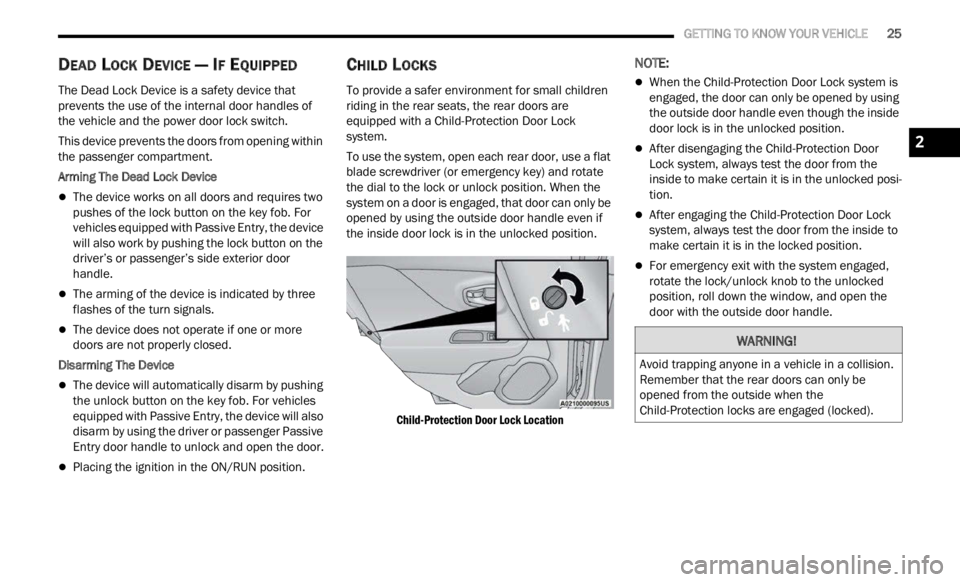
CHILD LOCKS
To provide a safer environment for small children
riding in the rear seats, the rear doors are
equipped with a Child-Protection Door Lock
system.
To use the system, open each rear door, use a flat
blade
screwdriver (or emergency key) and rotate
the dial to the lock or unlock position. When the
system on a door is engaged, that door can only be
opened by using the outside door handle even if
the inside door lock is in the unlocked position.
Child-Protection Door Lock Location
NOTE:
When the Child-Protection Door Lock system is
engaged, the door can only be opened by using
the outside door handle even though the inside
door lock is in the unlocked position.
After disengaging the Child-Protection Door
Lock system, always test the door from the
inside to make certain it is in the unlocked posi -
tion.
After engaging the Child-Protection Door Lock
system, always test the door from the inside to
make certain it is in the locked position.
For emergency exit with the system engaged,
rotate the lock/unlock knob to the unlocked
position, roll down the window, and open the
door with the outside door handle.
WARNING!
Avoid trapping anyone in a vehicle in a collision.
Remember that the rear doors can only be
opened from the outside when the
Child-Protection locks are engaged (locked).
2
Page 37 of 364
GETTING TO KNOW YOUR VEHICLE 35
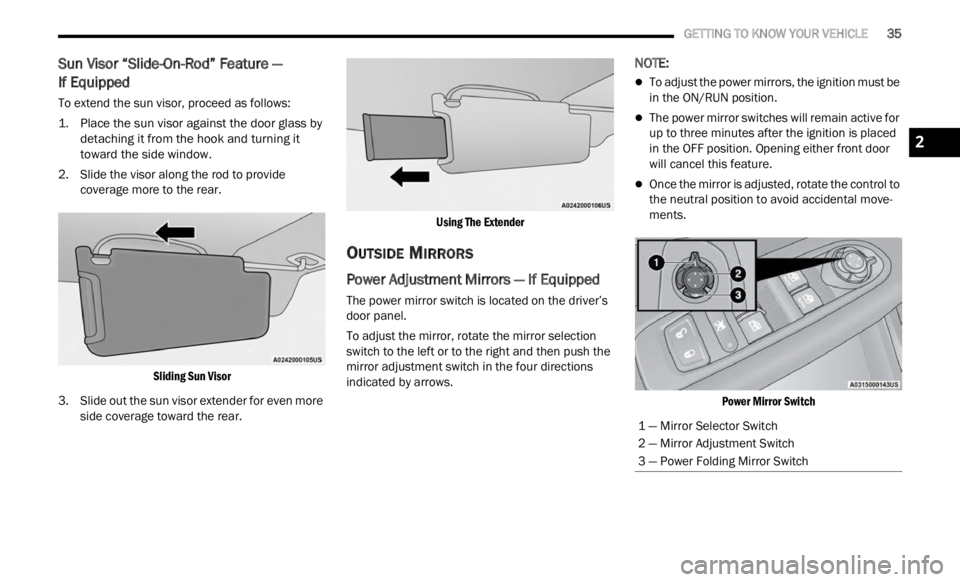
Sun Visor “Slide-On-Rod” Feature —
If Equipped
To extend the sun visor, proceed as follows:
1. P lace the sun visor against the door glass by
d e
ta
c
hing it from the hook and turning it
toward the side window.
2. Slide the visor along the rod to provide cover a
ge more to the rear.
Sliding Sun Visor
3. Slide out the sun visor extender for even more side
coverage toward the rear.
Using The Extender
OUTSIDE MIRRORS
Power Adjustment Mirrors — If Equipped
The power mirror switch is located on the driver’s
door panel.
To adjust the mirror, rotate the mirror selection
switch
to the left or to the right and then push the
mirror adjustment switch in the four directions
indicated by arrows.
NOTE:
To adjust the power mirrors, the ignition must be
in the ON/RUN position.
The power mirror switches will remain active for
up to three minutes after the ignition is placed
in the OFF position. Opening either front door
will cancel this feature.
Once the mirror is adjusted, rotate the control to
the neutral position to avoid accidental move -
ments.
Power Mirror Switch
1 — Mirror Selector Switch
2 — Mirror Adjustment Switch
3 — Power Folding Mirror Switch
2
Page 38 of 364
36 GETTING TO KNOW YOUR VEHICLE
Manual Adjustment Mirrors — If Equipped
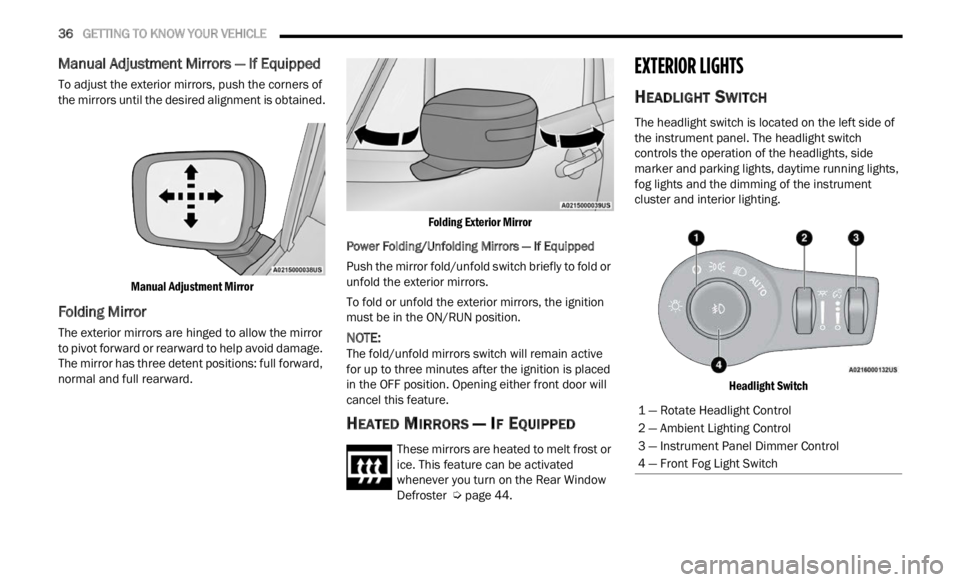
To adjust the exterior mirrors, push the corners of
the mirrors until the desired alignment is obtained.
Manual Adjustment Mirror
Folding Mirror
The exterior mirrors are hinged to allow the mirror
to pivot forward or rearward to help avoid damage.
The mirror has three detent positions: full forward,
normal and full rearward.
Folding Exterior Mirror
Power Folding/Unfolding Mirrors — If Equipped
Push the mirror fold/unfold switch briefly to fold or
unfold
the exterior mirrors.
To fold or unfold the exterior mirrors, the ignition
must b
e in the ON/RUN position.
NOTE:
The fold/unfold mirrors switch will remain active
for up
to three minutes after the ignition is placed
in the OFF position. Opening either front door will
cancel this feature.
HEATED MIRRORS — IF EQUIPPED
These mirrors are heated to melt frost or
ice. This feature can be activated
whene v
er you turn on the Rear Window
Defroster Ú page 44.
EXTERIOR LIGHTS
HEADLIGHT SWITCH
The headlight switch is located on the left side of
the instrument panel. The headlight switch
controls the operation of the headlights, side
marker and parking lights, daytime running lights,
fog lights and the dimming of the instrument
cluster and interior lighting.
Headlight Switch
1 — Rotate Headlight Control
2 — Ambient Lighting Control
3 — Instrument Panel Dimmer Control
4 — Front Fog Light Switch
Page 40 of 364

38 GETTING TO KNOW YOUR VEHICLE
AUTOMATIC HEADLIGHTS — IF EQUIPPED
This system automatically turns the headlights on
or off according to ambient light levels. To turn the
system on, rotate the headlight switch clockwise to
the last detent (AUTO position) for automatic
headlight operation. To turn the automatic system
off, move the headlight switch out of the AUTO
position.
NOTE:
The ignition must be in the ON/RUN or START
positi on
before the headlights will come on in the
automatic mode.
Dusk Sensor
There is an infrared LED sensor that works with the
rain sensor, located on the windshield. It detects
changes in light intensity outside the vehicle,
based on the sensitivity of light set by using the
menu on the display or on the Uconnect system.
The higher the sensitivity, the lesser the amount of
exter n
al light required for controlling the lighting.
To turn the dusk sensor on, rotate the headlight
switch
to the AUTO position. To turn it off, rotate the
headlight switch to a position other than AUTO.
NOTE:
The dusk sensor can only be activated with the
ignit i
on in the ON/RUN position.
PARKING LIGHTS
Rotate the headlight switch to the first detent to
turn on the parking lights. The parking light
indicator in the instrument cluster display will
illuminate.
HEADLIGHT TIME DELAY
This feature provides the safety of headlight
illumination for up to 90 seconds when leaving
your vehicle in an unlit area.
The time delay of the headlights is programmable
betwe e
n 0, 30, 60 and 90 seconds within
Uconnect Settings Ú page 133.
Headlight Delay Activation
To activate the delay feature, place the ignition in
t he OF
F position while the headlights are still on.
The delay interval begins when the headlight
switch is turned off from the low beam position.
If the headlight switch is in AUTO and the
headli
ghts were on before the ignition was turned
off, the delay interval begins automatically.
Headlight Delay Deactivation
The feature is disabled by turning on the
h eadli
ghts, the parking lights or by placing the
ignition in the RUN position.
If you shut off the lights before the ignition is
turne d
on, they will turn off in the normal manner.
NOTE:
The lights must be turned off within two minutes of
placi n
g the ignition in the OFF position to activate
this feature.
FRONT FOG LIGHTS — IF EQUIPPED
The front fog light switch is built into the headlight
switch.
Fog Light Switch
To activate the front fog lights, turn on the parking
light s
or the low beam headlights and push the fog
light button on the headlight switch. The front fog
lights feature is latching, which means that every
time that the button is pressed and the fog lights
are activated, the vehicle memorizes the request
and reactivates the front fog lights every time that
the parking lights or low beams are active. To
deactivate the feature, push the front fog button
Page 41 of 364
GETTING TO KNOW YOUR VEHICLE 39
again. The front fog lights are deactivated each
time the parking or low beam lights are
deactivated or the ignition is placed in the OFF
position.
An indicator light in the instrument cluster
illumi
nates when the fog lights are turned on.
NOTE:
The fog lights will operate with the low beam head -
lights or parking lights on. Selecting the high beam
h eadl i
ghts will turn off the fog lights.
Cornering Lights
The cornering lights are a feature to improve
visib i
lity at night while turning the vehicle. When
activated, a light incorporated in the front fog light
will illuminate on the side of the vehicle the
steering wheel is rotated or the turn signal
indicator is on. It can be activated through the
Uconnect system Ú page 133.
TURN SIGNALS
Move the multifunction lever up or down to
activate the turn signals. The arrows on each side
of the instrument cluster display flash to show
proper operation.
LANE CHANGE ASSIST
Lightly push the multifunction lever up or down,
without moving beyond the detent, and the turn
signal will flash five times then automatically turn
off.
COURTESY LIGHTS
The courtesy lights feature allows you to activate
the low beam, parking lights, and sidemarker lights
for 25 seconds when the vehicle is unlocked
(through the key fob or the Passive Entry door
handles [if equipped]). The courtesy lights feature
can be activated or deactivated through the
Uconnect Settings. When a door is open with the
feature active, the activation of the lights is
extended for five seconds. The feature is disabled
when the vehicle is locked or when the ignition is
placed in the ON/RUN position.
INTERIOR LIGHTS
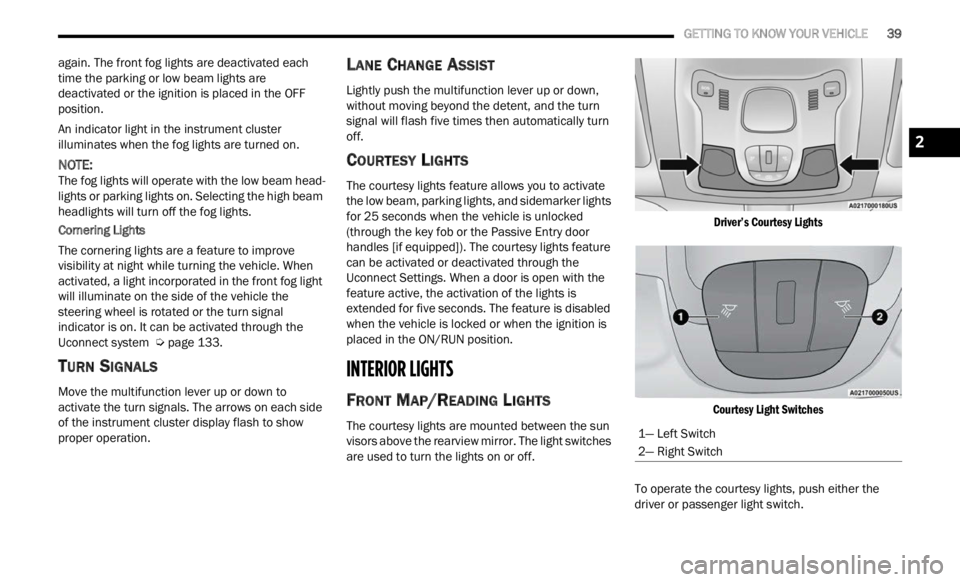
FRONT MAP/READING LIGHTS
The courtesy lights are mounted between the sun
visors above the rearview mirror. The light switches
are used to turn the lights on or off.
Driver’s Courtesy Lights
Courtesy Light Switches
To operate the courtesy lights, push either the
d rive
r
or passenger light switch.
1— Left Switch
2— Right Switch
2
Page 42 of 364
40 GETTING TO KNOW YOUR VEHICLE
NOTE:
Before exiting the vehicle, make sure that the
interior lights are turned off. This will prevent the
battery from discharging once the doors are
closed.
If a light is left on, it will automatically be turned
off after approximately 15 minutes after the
ignit i
on is in the OFF position.
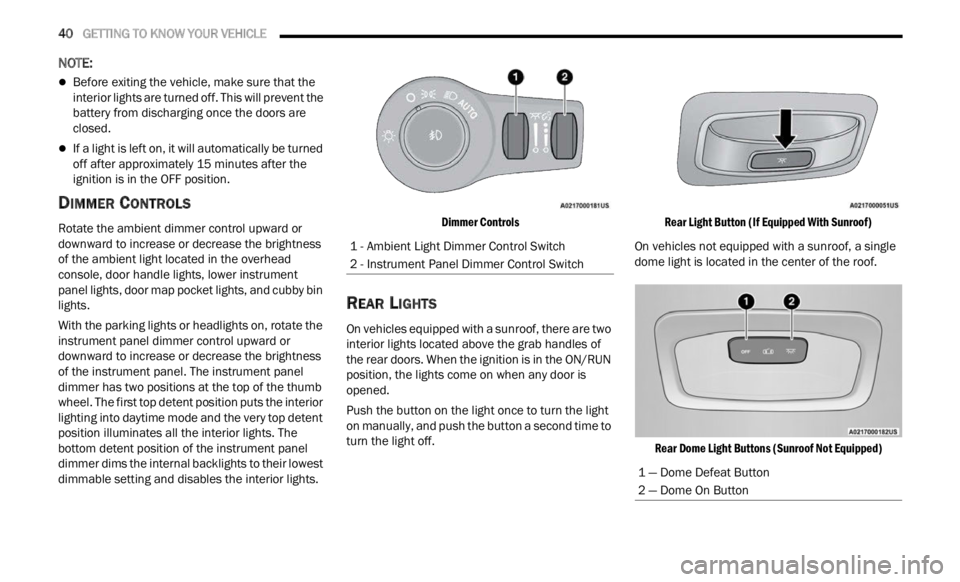
DIMMER CONTROLS
Rotate the ambient dimmer control upward or
downward to increase or decrease the brightness
of the ambient light located in the overhead
console, door handle lights, lower instrument
panel lights, door map pocket lights, and cubby bin
lights.
With the parking lights or headlights on, rotate the
instru
ment panel dimmer control upward or
downward to increase or decrease the brightness
of the instrument panel. The instrument panel
dimmer has two positions at the top of the thumb
wheel. The first top detent position puts the interior
lighting into daytime mode and the very top detent
position illuminates all the interior lights. The
bottom detent position of the instrument panel
dimmer dims the internal backlights to their lowest
dimmable setting and disables the interior lights.
Dimmer Controls
REAR LIGHTS
On vehicles equipped with a sunroof, there are two
interior lights located above the grab handles of
the rear doors. When the ignition is in the ON/RUN
position, the lights come on when any door is
opened.
Push the button on the light once to turn the light
on man
u
ally, and push the button a second time to
turn the light off.
Rear Light Button (If Equipped With Sunroof)
On vehicles not equipped with a sunroof, a single
dome l i
ght is located in the center of the roof.
Rear Dome Light Buttons (Sunroof Not Equipped)
1 - Ambient Light Dimmer Control Switch
2 - Instrument Panel Dimmer Control Switch
1 — Dome Defeat Button
2 — Dome On Button
Page 43 of 364

GETTING TO KNOW YOUR VEHICLE 41
To operate the rear dome light, proceed as follows:
Push the switch to the on/right position from its
center position and the lights are always on.
Push the switch to the off/left position from its
center position and the lights are always off.
Leave the switch in the center position, and the
lights are turned on and off when the doors are
opened or closed.
DOME LIGHT TIMING
The dome light will automatically illuminate when
the doors are unlocked, the doors are opened or
after the doors are closed.
Timing Entering The Vehicle
The dome lights illuminate in the following ways:
When the doors are unlocked, the dome light
will illuminate for approximately 27 seconds.
When one of the doors is opened, the dome light
will illuminate for approximately three minutes.
When the doors are closed, the dome light will
automatically shut off after approximately 27
seconds.
The timing stops once the ignition is placed in the
ON/RU N
position. The dome light will turn off under any of the
follow
i
ng conditions:
The dome light is disabled when the ignition is
placed in the ON/RUN position.
The dome lights will turn off automatically when
the doors are locked.
The dome lights will automatically turn off after
approximately 15 minutes of inactivity to
prese r
ve the battery.
Timing Exiting The Vehicle
The dome light will illuminate under the following
condit i
ons when the ignition is placed to the OFF
position and the key is removed:
The dome light will illuminate for 27 seconds
after the ignition is placed in the OFF position.
The opening of one of the doors (approximately
three minutes).
After closing a door (approximately 27 seconds).
The dome light timing is disabled when the doors
a re
l
oc
ked.
WINDSHIELD WIPERS AND WASHERS
The windshield wiper/washer controls are located
on the windshield wiper/washer lever on the right
side of the steering column. The front wipers are
operated by rotating a switch, located on the end of
the lever.
Windshield Wiper Lever
1 — Push Forward For Rear Washer
2 — Rotate For Rear Wiper Operation
3 — Rotate For Front Wiper Operation
4 — Pull For Front Washer
5 — Push Up For Mist
CAUTION!
Always remove any buildup of snow that
prevents the windshield wiper blades from
returning to the “park” position. If the windshield
wiper switch is turned off, and the blades cannot
return to the “park” position, damage to the
wiper motor may occur.
2