belt JEEP RENEGADE 2023 Owners Manual
[x] Cancel search | Manufacturer: JEEP, Model Year: 2023, Model line: RENEGADE, Model: JEEP RENEGADE 2023Pages: 364, PDF Size: 18.65 MB
Page 7 of 364
5
NAVIGATION MODE — IF EQUIPPED
(UCONNECT 4C NAV ONLY) ...... ......................... 180
Operating Navigation ...... ............................. 180
Where To? . ..
..
. ............................................... 180
View Map ...................................................... 191
Infor m
ation . ..
..
. ............................................. 199
Emergency ..... . .............................................. 200
Map Updates . ..
. .
. .......................................... 200
SiriusXM® Travel Link ..... . ............................ 201
SiriusXM® Traffic Plus ..... . ........................... 201
CONNECTED VEHICLE SERVICES —
IF EQUIPPED ..... .
.................................................. 202
Is My Vehicle Connected?...... ....................... 202
Introduction To Connected Vehicle
Services . ........................................................ 202
Getti
ng Started With Connected Vehicle
Services . ........................................................ 203
Using
SiriusXM Guardian™ . ..
..
. .................... 205
Manage My SiriusXM Guardian™ Account .. 215
C O
NNECTED SERVICES FAQS . ..
..
. ..................... 215
Connected Services SOS FAQs —
If Equipped ..... .
.............................................. 215
Connected Services Remote Door Lock/
Unlock FAQs . .....
............................................ 215
Connected Services Roadside Assistance
FAQs . ............................................................. 216
Connec
ted Services Send & Go FAQs —
If Equipped . .....
.............................................. 216 Connected Services Vehicle Finder FAQs ... 21
6
C
onnected Services Stolen Vehicle
Assistance FAQs — If Equipped . .....
............. 217
Connected Services Remote Vehicle Start
FAQs . ............................................................. 217
Connec
ted Services Remote Horn & Lights
FAQs . .............................................................. 217
Connec
ted Services Account
FAQs — If Equipped . .....
................................. 218
Data Collection & Privacy ..... . ....................... 220
RADIO OPERATION AND MOBILE PHONES . ..
..
2 20
Regulatory And Safety Information ...... ........ 220
SAFETY
SAFETY FEATURES .............................................. 221
Anti-Lock Brake System (ABS) ...... ............... 221
Electronic Brake Control (EBC) System . ..
..
. . 222
AUXILIARY DRIVING SYSTEMS ..... . ................... 228
Blind Spot Monitoring (BSM) —
If Equipped..... .
............................................... 228
Forward Collision Warning (FCW) With
Mitigation Operation — If Equipped . .....
....... 232
Tire Pressure Monitoring System (TPMS) .... 2 3 5
OCCUPANT RESTRAINT SYSTEMS . ..
..
. ............. 240
Occupant Restraint Systems ...... .................. 240
Important Safety Precautions . ..
..
. ................ 240
Seat Belt Systems ..... . ................................... 241
Supplemental Restraint Systems (SRS) ..... . 246
Child Restraints . ..
..
. ...................................... 255 SAFETY TIPS .....
.
................................................... 265
Transporting Passengers...... ........................ 265
Transporting Pets ..... . .................................... 265
Connected Vehicles . ..
..
. ................................ 265
Safety Checks You Should Make Inside The
Vehicle . ......................................................... 265
Period
ic Safety Checks You Should Make
Outside The Vehicle . .....
................................ 267
Exhaust Gas ..... . ............................................ 267
Carbon Monoxide Warnings ..... . ................... 267
IN CASE OF EMERGENCY
HAZARD WARNING FLASHERS ......................... 268
ASSIST AND SOS SYSTEM — IF EQUIPPED ...... 268
JACKING AND TIRE CHANGING ...... .................. 271
Preparations For Jacking ...... ....................... 271
Jack Location/Spare Tire Stowage ..... . ....... 272
Jacking Instructions ..... . ................................ 273
TIRE SERVICE KIT — IF EQUIPPED . ..
..
. ............... 276
Tire Service Kit Storage ...... .......................... 276
Tire Service Kit Components And
Operation . ...................................................... 276
Tire
Service Kit Usage Precautions ..... . ........ 277
Replacing The Sealant . ..
..
. ............................ 278
JUMP STARTING ..... . ............................................ 278
Preparations For Jump Start ...... .................. 278
Jump Starting Procedure ..... . ........................ 279
Page 11 of 364
9
SYMBOLS KEY
If you do not read this entire Owner’s Manual, you may miss important
information. Observe all Cautions and Warnings.
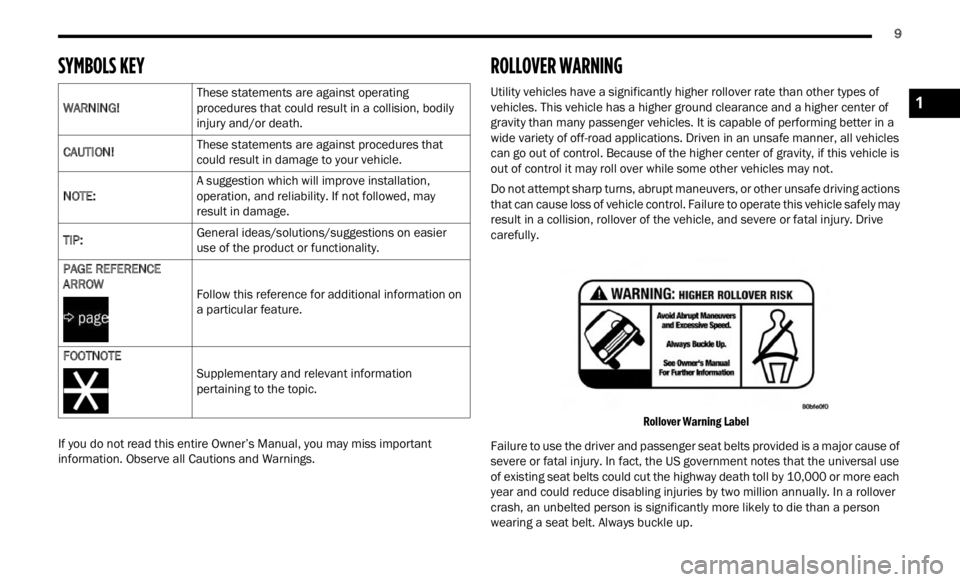
ROLLOVER WARNING
Utility vehicles have a significantly higher rollover rate than other types of
vehicles. This vehicle has a higher ground clearance and a higher center of
gravity than many passenger vehicles. It is capable of performing better in a
wide variety of off-road applications. Driven in an unsafe manner, all vehicles
can go out of control. Because of the higher center of gravity, if this vehicle is
out of control it may roll over while some other vehicles may not.
Do not attempt sharp turns, abrupt maneuvers, or other unsafe driving actions
that c
an cause loss of vehicle control. Failure to operate this vehicle safely may
result in a collision, rollover of the vehicle, and severe or fatal injury. Drive
carefully.
Rollover Warning Label
Failure to use the driver and passenger seat belts provided is a major cause of
sever e
or fatal injury. In fact, the US government notes that the universal use
of existing seat belts could cut the highway death toll by 10,000 or more each
year and could reduce disabling injuries by two million annually. In a rollover
crash, an unbelted person is significantly more likely to die than a person
wearing a seat belt. Always buckle up.
WARNING!
These statements are against operating
proced
u
res that could result in a collision, bodily
injury and/or death.
CAUTION! These statements are against procedures that
could r
esult in damage to your vehicle.
NOTE: A suggestion which will improve installation,
op
erat
i
on, and reliability. If not followed, may
result in damage.
TIP: General ideas/solutions/suggestions on easier
use of
the product or functionality.
PAGE REFERENCE
ARROW Fol
low this reference for additional information on
a par t
icular feature.
FOOTNOTE Supplementary and relevant information
pertai
ning to the topic.
1
Page 13 of 364
11
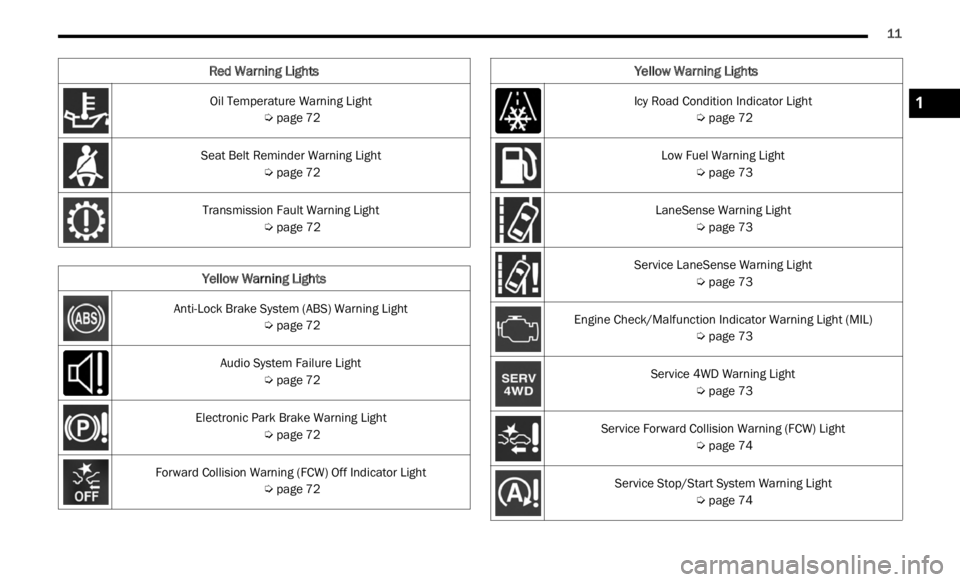
Oil Temperature Warning Light
Ú page 72
Seat Belt Reminder Warning Light Ú page 72
Transmission Fault Warning Light Ú page 72
Yellow Warning Lights
Anti-Lock Brake System (ABS) Warning Light
Ú page 72
Audio System Failure Light Ú page 72
Electronic Park Brake Warning Light Ú page 72
Forward Collision Warning (FCW) Off Indicator Light Ú page 72
Red Warning Lights
Icy Road Condition Indicator Light
Ú page 72
Low Fuel Warning Light Ú page 73
LaneSense Warning Light Ú page 73
Service LaneSense Warning Light Ú page 73
Engine Check/Malfunction Indicator Warning Light (MIL) Ú page 73
Service 4WD Warning Light Ú page 73
Service Forward Collision Warning (FCW) Light Ú page 74
Service Stop/Start System Warning Light Ú page 74
Yellow Warning Lights
1
Page 29 of 364
GETTING TO KNOW YOUR VEHICLE 27
MANUAL FRONT SEATS
Manual Front Seats Forward/Rearward
Adjustment
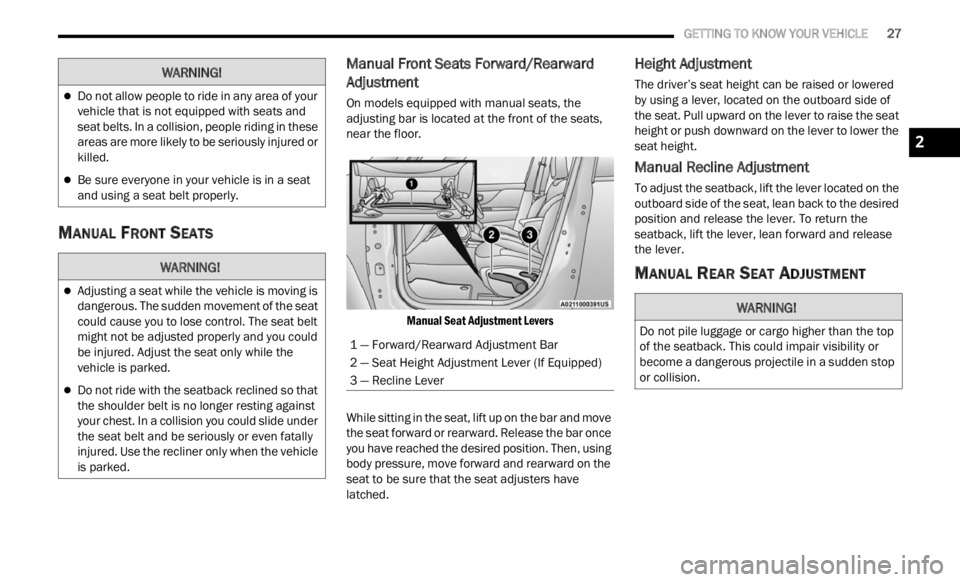
On models equipped with manual seats, the
adjusting bar is located at the front of the seats,
near the floor.
Manual Seat Adjustment Levers
While sitting in the seat, lift up on the bar and move
the se
at forward or rearward. Release the bar once
you have reached the desired position. Then, using
body pressure, move forward and rearward on the
seat to be sure that the seat adjusters have
latched.
Height Adjustment
The driver’s seat height can be raised or lowered
by using a lever, located on the outboard side of
the seat. Pull upward on the lever to raise the seat
height or push downward on the lever to lower the
seat height.
Manual Recline Adjustment
To adjust the seatback, lift the lever located on the
outboard side of the seat, lean back to the desired
position and release the lever. To return the
seatback, lift the lever, lean forward and release
the lever.
MANUAL REAR SEAT ADJUSTMENT
Do not allow people to ride in any area of your
vehicle that is not equipped with seats and
seat belts. In a collision, people riding in these
areas are more likely to be seriously injured or
killed.
Be sure everyone in your vehicle is in a seat
and using a seat belt properly.
WARNING!
Adjusting a seat while the vehicle is moving is
dangerous. The sudden movement of the seat
could cause you to lose control. The seat belt
might not be adjusted properly and you could
be injured. Adjust the seat only while the
vehicle is parked.
Do not ride with the seatback reclined so that
the shoulder belt is no longer resting against
your chest. In a collision you could slide under
the seat belt and be seriously or even fatally
injured. Use the recliner only when the vehicle
is parked.
WARNING!
1 — Forward/Rearward Adjustment Bar
2 — Seat Height Adjustment Lever (If Equipped)
3 — Recline Lever
WARNING!
Do not pile luggage or cargo higher than the top
of the seatback. This could impair visibility or
become a dangerous projectile in a sudden stop
or collision.
2
Page 30 of 364
28 GETTING TO KNOW YOUR VEHICLE
Split Rear Seats
The split rear seat has the ability to fold flat which
increases the storage of the rear cargo area.
NOTE:
Prior to folding the rear seat down, it may be
necessary to position the front seat to its
mid-track position. Be sure that the front seats
are fully upright and positioned forward, this will
allow the rear seat to fold down easily.
Prior to folding the rear seat, you must secure
the rear armrest in the upright position.
You may experience deformation in the seat
cushion from the seat belt buckles if the seats
are left folded for an extended period of time.
This is normal and by simply unfolding the seats
to the open position, over time the seat cushion
will return to its normal shape.
Cargo Area Enlargement
Folding both sides of the rear seat provides
additional storage in the rear cargo area.
Proceed as follows:
1. Fully lower the rear seat head restraints.
2. Mov e
the seat belts to the outboard side of the
seat .
3
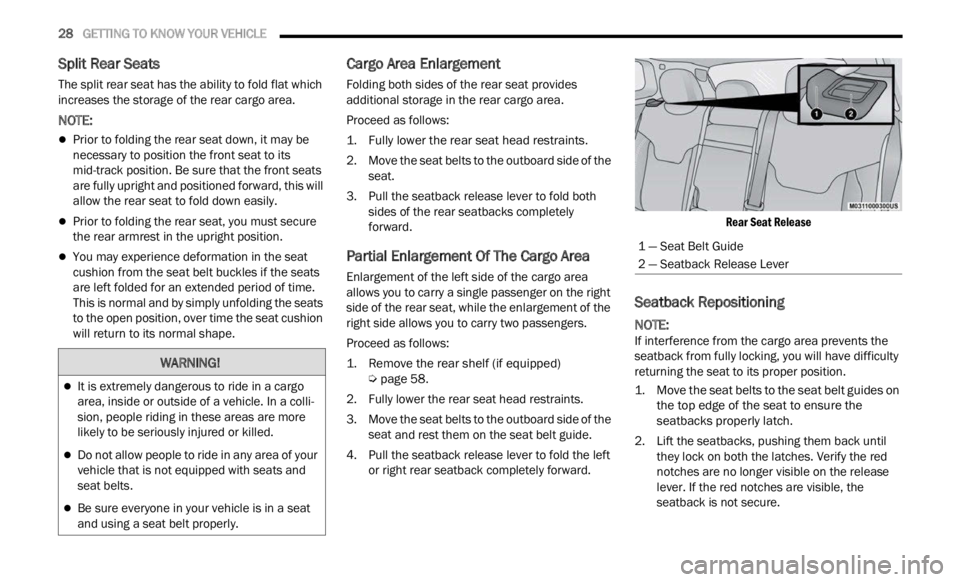
. Pull the seatback release lever to fold both sides
of the rear seatbacks completely
forward.
Partial Enlargement Of The Cargo Area
Enlargement of the left side of the cargo area
allows you to carry a single passenger on the right
side of the rear seat, while the enlargement of the
right side allows you to carry two passengers.
Proceed as follows:
1. Remove the rear shelf (if equipped)
Ú
pag e
58.
2. F ully lower the rear seat head restraints.
3. Move
the seat belts to the outboard side of the
seat
and rest them on the seat belt guide.
4. Pull the seatback release lever to fold the left or rig
ht rear seatback completely forward.
Rear Seat Release
Seatback Repositioning
NOTE:
If interference from the cargo area prevents the
seatb a
ck from fully locking, you will have difficulty
returning the seat to its proper position.
1. Move the seat belts to the seat belt guides on the t o
p edge of the seat to ensure the
seatbacks properly latch.
2. Lift the seatbacks, pushing them back until they
lock on both the latches. Verify the red
notches are no longer visible on the release
lever. If the red notches are visible, the
seatback is not secure.
WARNING!
It is extremely dangerous to ride in a cargo
area, inside or outside of a vehicle. In a colli -
sion, people riding in these areas are more
l ikely
to be seriously injured or killed.
Do not allow people to ride in any area of your
vehicle that is not equipped with seats and
seat belts.
Be sure everyone in your vehicle is in a seat
and using a seat belt properly.
1 — Seat Belt Guide
2 — Seatback Release Lever
Page 31 of 364
GETTING TO KNOW YOUR VEHICLE 29
POWER ADJUSTMENT (FRONT) —
I
F EQUIPPED
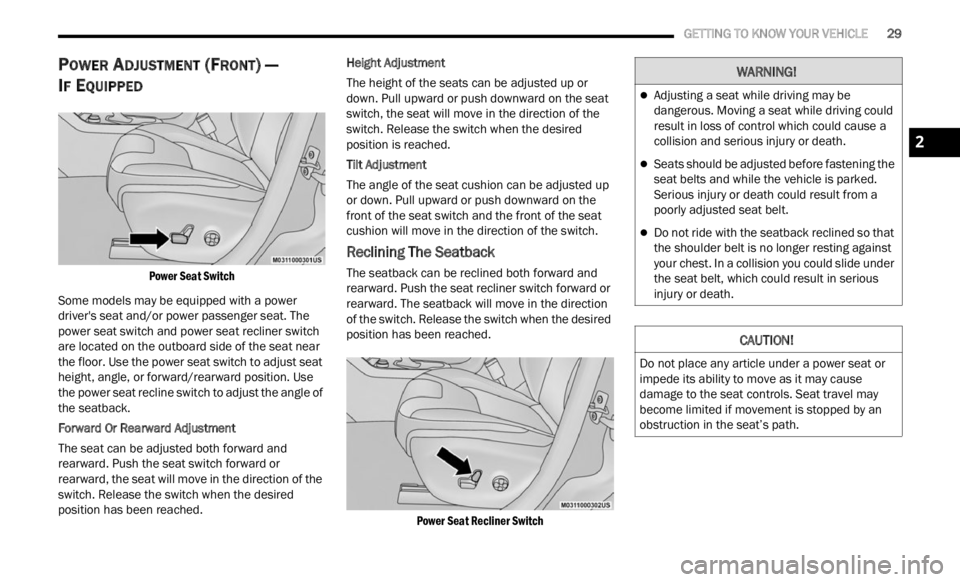
Power Seat Switch
Some models may be equipped with a power
driver
's seat and/or power passenger seat. The
power seat switch and power seat recliner switch
are located on the outboard side of the seat near
the floor. Use the power seat switch to adjust seat
height, angle, or forward/rearward position. Use
the power seat recline switch to adjust the angle of
the seatback.
Forward Or Rearward Adjustment
The seat can be adjusted both forward and
rearw a
rd. Push the seat switch forward or
rearward, the seat will move in the direction of the
switch. Release the switch when the desired
position has been reached. Height Adjustment
The height of the seats can be adjusted up or
d
own. P
ull upward or push downward on the seat
switch, the seat will move in the direction of the
switch. Release the switch when the desired
position is reached.
Tilt Adjustment
The angle of the seat cushion can be adjusted up
or down .
Pull upward or push downward on the
front of the seat switch and the front of the seat
cushion will move in the direction of the switch.
Reclining The Seatback
The seatback can be reclined both forward and
rearward. Push the seat recliner switch forward or
rearward. The seatback will move in the direction
of the switch. Release the switch when the desired
position has been reached.
Power Seat Recliner Switch
WARNING!
Adjusting a seat while driving may be
dangerous. Moving a seat while driving could
result in loss of control which could cause a
collision and serious injury or death.
Seats should be adjusted before fastening the
seat belts and while the vehicle is parked.
Serious injury or death could result from a
poorly adjusted seat belt.
Do not ride with the seatback reclined so that
the shoulder belt is no longer resting against
your chest. In a collision you could slide under
the seat belt, which could result in serious
injury or death.
CAUTION!
Do not place any article under a power seat or
impede its ability to move as it may cause
damage to the seat controls. Seat travel may
become limited if movement is stopped by an
obstruction in the seat’s path.
2
Page 56 of 364
54 GETTING TO KNOW YOUR VEHICLE
WINDOW LOCKOUT SWITCH
The window lockout switch on the driver's door trim
panel allows you to disable the window controls on
the rear passenger doors. To disable the window
controls, push and release the window lockout
switch (the indicator light on the switch will turn
on). To enable the window controls, push and
release the window lockout switch again (the
indicator light on the switch will turn off).
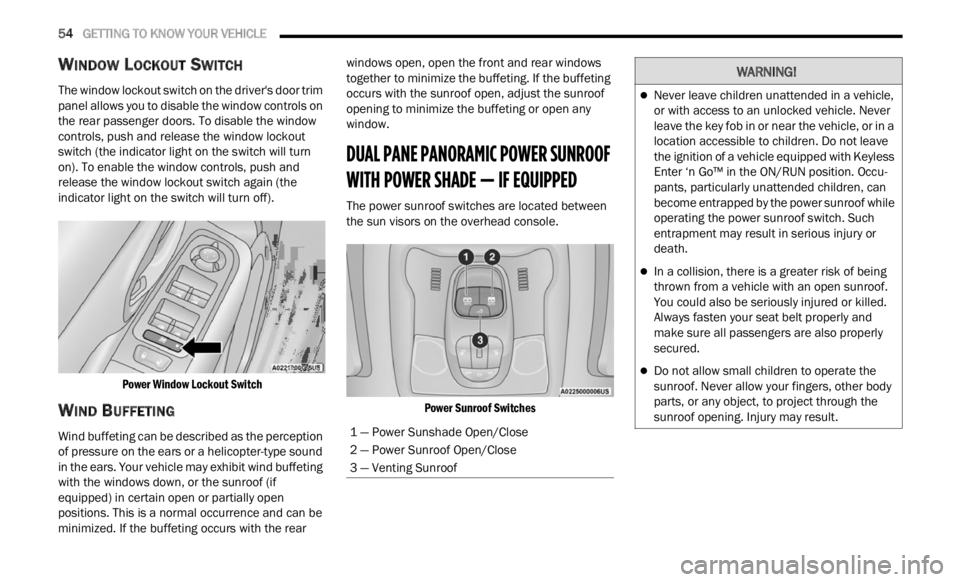
Power Window Lockout Switch
WIND BUFFETING
Wind buffeting can be described as the perception
of pressure on the ears or a helicopter-type sound
in the ears. Your vehicle may exhibit wind buffeting
with the windows down, or the sunroof (if
equipped) in certain open or partially open
positions. This is a normal occurrence and can be
minimized. If the buffeting occurs with the rear windows open, open the front and rear windows
together to minimize the buffeting. If the buffeting
occurs with the sunroof open, adjust the sunroof
opening to minimize the buffeting or open any
window.
DUAL PANE PANORAMIC POWER SUNROOF
WITH POWER SHADE — IF EQUIPPED
The power sunroof switches are located between
the sun visors on the overhead console.
Power Sunroof Switches
1 — Power Sunshade Open/Close
2 — Power Sunroof Open/Close
3 — Venting Sunroof
WARNING!
Never leave children unattended in a vehicle,
or with access to an unlocked vehicle. Never
leave the key fob in or near the vehicle, or in a
location accessible to children. Do not leave
the ignition of a vehicle equipped with Keyless
Enter ‘n Go™ in the ON/RUN position. Occu -
pants, particularly unattended children, can
b ecom e
entrapped by the power sunroof while
operating the power sunroof switch. Such
entrapment may result in serious injury or
death.
In a collision, there is a greater risk of being
thrown from a vehicle with an open sunroof.
You could also be seriously injured or killed.
Always fasten your seat belt properly and
make sure all passengers are also properly
secured.
Do not allow small children to operate the
sunroof. Never allow your fingers, other body
parts, or any object, to project through the
sunroof opening. Injury may result.
Page 57 of 364

GETTING TO KNOW YOUR VEHICLE 55
OPENING AND CLOSING THE SUNROOF
To retract the sunroof to the open position, push
the Open/Close switch and the sunroof will fully
open. The sunroof can be stopped in any position
by pushing/pulling the switch a second time while
opening.
To close the sunroof completely, pull the Open/
Close s
witch and the sunroof will fully close. The
sunroof can be stopped in any position by pushing/
pulling the switch a second time while it is closing.
VENTING SUNROOF
To vent the sunroof push the vent switch.
NOTE:
The vent switch has the automatic function only at
the op e
ning of the sunroof. During the closing of
the sunroof, the switch must be held until closed.
OPENING AND CLOSING THE POWER
S
UNSHADE
Express Open/Close
Push the shade switch for about one-half second
and t h
e shade will automatically open. During the
automatic open operation, any movement of the
shade switch will stop the shade. Pull the shade switch for about one-half second
and t
h
e shade will automatically close. During the
automatic close operation, any movement of the
shade switch will stop the shade.
Manual Open/Close
To open the shade part way, push the shade switch
brief l
y and release.
To close the shade part way, pull the shade switch
briefl
y and release.
NOTE:
The sunroof and the shade controls will operate
only when the ignition is in the ON/RUN posi -
tion.
If the Remote Start functionality is active, it is
not possible to move the sunroof.
PINCH PROTECT FEATURE
This feature will detect an obstruction in the
opening of the sunroof during Express Close
operation. If an obstruction in the path of the
sunroof is detected, the sunroof will automatically
retract. Remove the obstruction if this occurs.
WARNING!
Do not let children play with the sunroof.
Never leave children unattended in a vehicle,
or with access to an unlocked vehicle. Do not
leave the key fob in or near the vehicle, and do
not leave the ignition of a vehicle equipped
with Keyless Enter ‘n Go™ in the ACC or ON/
RUN position. Occupants, particularly unat -
tended children, can become entrapped by
the p ow
er sunroof while operating the power
sunroof switch. Such entrapment may result
in serious injury or death.
In a collision, there is a greater risk of being
thrown from a vehicle with an open sunroof.
You could also be severely injured or killed.
Always fasten your seat belt properly and
make sure all passengers are properly
secured.
Do not allow small children to operate the
sunroof. Never allow your fingers, other body
parts, or any object to project through the
sunroof opening. Injury may result.
2
Page 70 of 364

68 GETTING TO KNOW YOUR INSTRUMENT PANEL
“Vehicle Shut Off (If Equipped)”
By selecting the item “Vehicle Shut Off”, you can
turn of
f the engine from the instrument cluster.
This feature is available in the event of an ignition
switch failure, and will display instructions for
turning off the engine via the instrument cluster
display controls.
“Display”
By selecting the “Display,” you can access the
follow i
ng setting:
Language : allows you to select the language in
which to display the information/warnings.
“Units Of Measure”
By selecting the item “Units of Measure,” you can
selec t
the unit of measure to use for displaying
various magnitudes.
Possible options are:
US
Metric
Custom
“Clock & Date”
By selecting the item, “Clock & Date” you can
a djust
the clock.
Possible options are:
Set Time: adjust hours/minutes
Set Format: adjust the time format “12h”
(12 hours) or “24h” (24 hours)
Set Date: adjust day/month/year
“Security”
By selecting the item “Security,” you can make the
f ollowi
ng adjustments:
Speed Warning:
Set the vehicle speed limit, which the driver is
notifi e
d through a visual and acoustic signaling
(display of a message and a symbol on the
display).
When the speed warning is set, the icon should
remain
visualized for the same duration time of
the pop-up. If the driver exceeded the set speed,
the icon should remain for however long the
vehicle is over the set speed.
Driver may also turn the Speed Warning “OFF”
should
you choose not to use this feature.
Seat Belt Reminder:
This function is only viewable when the Seat Belt
Remin d
er (SBR) system is active.
Hill Start Assist:
Activation/Deactivation of the Hill Start Assist
syste m
.
Passenger Air Bag — If Equipped
Front passenger air bag may be enabled or
disab l
ed. “Lights”
By selecting the item “Lights,” you can make the
followi
n
g adjustments:
Headlight Off Delay: set the delay for headlight
shutoff after engine shutoff
Headlight Sensitivity: adjust the sensitivity of
headlight brightness
Daytime Running Lights: activate/deactivate
the daytime running lights
Cornering lights: activate/deactivate the
cornering lights (If Equipped)
Interior Ambient lights: adjust the level of inte-
rior ambient lights
Greeting Lights: activate / deactivate greeting
lights
“Doors & Locks”
By selecting the item “Doors & Locks,” you can
make t
he following adjustments:
Auto Door Lock: activate/deactivate the auto -
matic locking of the doors with the vehicle
m ov i
n g
Auto Unlock On Exit: automatic unlocking of the
doors when exiting the vehicle
Flash Light with Lock: activate the direction indi
-
cators when closing the doors
Page 74 of 364
72 GETTING TO KNOW YOUR INSTRUMENT PANEL
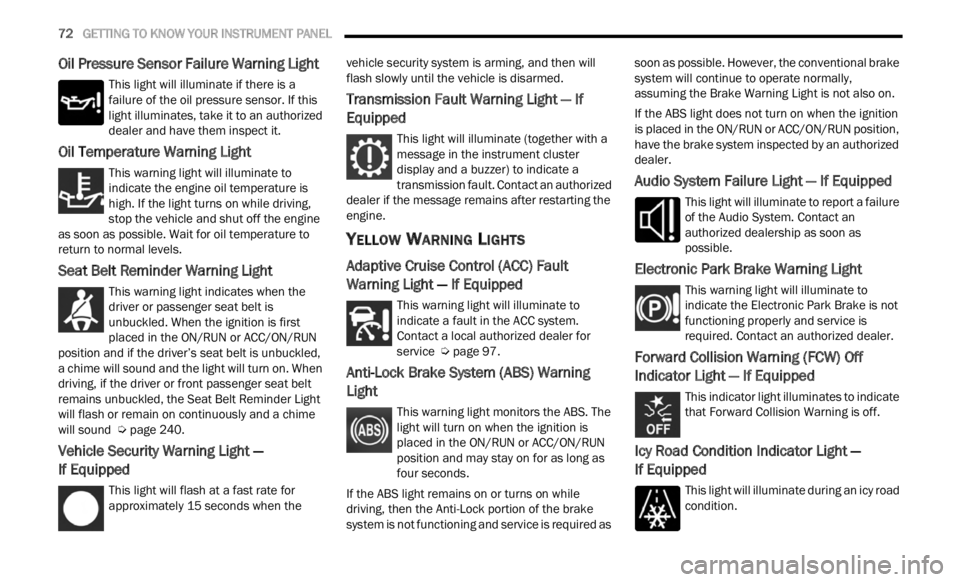
Oil Pressure Sensor Failure Warning Light
This light will illuminate if there is a
failure of the oil pressure sensor. If this
light
illuminates, take it to an authorized
dealer and have them inspect it.
Oil Temperature Warning Light
This warning light will illuminate to
indicate the engine oil temperature is
high.
If the light turns on while driving,
stop the vehicle and shut off the engine
as soon as possible. Wait for oil temperature to
return to normal levels.
Seat Belt Reminder Warning Light
This warning light indicates when the
driver or passenger seat belt is
unbuc k
led. When the ignition is first
placed in the ON/RUN or ACC/ON/RUN
position and if the driver’s seat belt is unbuckled,
a chime will sound and the light will turn on. When
driving, if the driver or front passenger seat belt
remains unbuckled, the Seat Belt Reminder Light
will flash or remain on continuously and a chime
will sound Ú page 240.
Vehicle Security Warning Light —
If Equipped
This light will flash at a fast rate for
approximately 15 seconds when the v
e h
ic
l e security system is arming, and then will
flash slowly until the vehicle is disarmed.
Transmission Fault Warning Light — If
Equipped
This light will illuminate (together with a
message in the instrument cluster
d is
p l
a
y and a buzzer) to indicate a
transmission fault. Contact an authorized
dealer if the message remains after restarting the
engine.
YELLOW WARNING LIGHTS
Adaptive Cruise Control (ACC) Fault
Warning Light — If Equipped
This warning light will illuminate to
indicate a fault in the ACC system.
C on t
a c
t
a local authorized dealer for
service Ú page 97.
Anti-Lock Brake System (ABS) Warning
Light
This warning light monitors the ABS. The
light will turn on when the ignition is
p
la
ce
d
in the ON/RUN or ACC/ON/RUN
position and may stay on for as long as
four seconds.
If the ABS light remains on or turns on while
drivin
g, then the Anti-Lock portion of the brake
system is not functioning and service is required as soon as possible. However, the conventional brake
system will continue to operate normally,
assuming the Brake Warning Light is not also on.
If the ABS light does not turn on when the ignition
is pl
a
ced in the ON/RUN or ACC/ON/RUN position,
have the brake system inspected by an authorized
dealer.
Audio System Failure Light — If Equipped
This light will illuminate to report a failure
of the Audio System. Contact an
author i
zed dealership as soon as
possible.
Electronic Park Brake Warning Light
This warning light will illuminate to
indicate the Electronic Park Brake is not
funct i
oning properly and service is
required. Contact an authorized dealer.
Forward Collision Warning (FCW) Off
Indicator Light — If Equipped
This indicator light illuminates to indicate
that Forward Collision Warning is off.
Icy Road Condition Indicator Light —
If Equipped
This light will illuminate during an icy road
condition.