horn JEEP RENEGADE 2023 Owners Manual
[x] Cancel search | Manufacturer: JEEP, Model Year: 2023, Model line: RENEGADE, Model: JEEP RENEGADE 2023Pages: 364, PDF Size: 18.65 MB
Page 7 of 364
5
NAVIGATION MODE — IF EQUIPPED
(UCONNECT 4C NAV ONLY) ...... ......................... 180
Operating Navigation ...... ............................. 180
Where To? . ..
..
. ............................................... 180
View Map ...................................................... 191
Infor m
ation . ..
..
. ............................................. 199
Emergency ..... . .............................................. 200
Map Updates . ..
. .
. .......................................... 200
SiriusXM® Travel Link ..... . ............................ 201
SiriusXM® Traffic Plus ..... . ........................... 201
CONNECTED VEHICLE SERVICES —
IF EQUIPPED ..... .
.................................................. 202
Is My Vehicle Connected?...... ....................... 202
Introduction To Connected Vehicle
Services . ........................................................ 202
Getti
ng Started With Connected Vehicle
Services . ........................................................ 203
Using
SiriusXM Guardian™ . ..
..
. .................... 205
Manage My SiriusXM Guardian™ Account .. 215
C O
NNECTED SERVICES FAQS . ..
..
. ..................... 215
Connected Services SOS FAQs —
If Equipped ..... .
.............................................. 215
Connected Services Remote Door Lock/
Unlock FAQs . .....
............................................ 215
Connected Services Roadside Assistance
FAQs . ............................................................. 216
Connec
ted Services Send & Go FAQs —
If Equipped . .....
.............................................. 216 Connected Services Vehicle Finder FAQs ... 21
6
C
onnected Services Stolen Vehicle
Assistance FAQs — If Equipped . .....
............. 217
Connected Services Remote Vehicle Start
FAQs . ............................................................. 217
Connec
ted Services Remote Horn & Lights
FAQs . .............................................................. 217
Connec
ted Services Account
FAQs — If Equipped . .....
................................. 218
Data Collection & Privacy ..... . ....................... 220
RADIO OPERATION AND MOBILE PHONES . ..
..
2 20
Regulatory And Safety Information ...... ........ 220
SAFETY
SAFETY FEATURES .............................................. 221
Anti-Lock Brake System (ABS) ...... ............... 221
Electronic Brake Control (EBC) System . ..
..
. . 222
AUXILIARY DRIVING SYSTEMS ..... . ................... 228
Blind Spot Monitoring (BSM) —
If Equipped..... .
............................................... 228
Forward Collision Warning (FCW) With
Mitigation Operation — If Equipped . .....
....... 232
Tire Pressure Monitoring System (TPMS) .... 2 3 5
OCCUPANT RESTRAINT SYSTEMS . ..
..
. ............. 240
Occupant Restraint Systems ...... .................. 240
Important Safety Precautions . ..
..
. ................ 240
Seat Belt Systems ..... . ................................... 241
Supplemental Restraint Systems (SRS) ..... . 246
Child Restraints . ..
..
. ...................................... 255 SAFETY TIPS .....
.
................................................... 265
Transporting Passengers...... ........................ 265
Transporting Pets ..... . .................................... 265
Connected Vehicles . ..
..
. ................................ 265
Safety Checks You Should Make Inside The
Vehicle . ......................................................... 265
Period
ic Safety Checks You Should Make
Outside The Vehicle . .....
................................ 267
Exhaust Gas ..... . ............................................ 267
Carbon Monoxide Warnings ..... . ................... 267
IN CASE OF EMERGENCY
HAZARD WARNING FLASHERS ......................... 268
ASSIST AND SOS SYSTEM — IF EQUIPPED ...... 268
JACKING AND TIRE CHANGING ...... .................. 271
Preparations For Jacking ...... ....................... 271
Jack Location/Spare Tire Stowage ..... . ....... 272
Jacking Instructions ..... . ................................ 273
TIRE SERVICE KIT — IF EQUIPPED . ..
..
. ............... 276
Tire Service Kit Storage ...... .......................... 276
Tire Service Kit Components And
Operation . ...................................................... 276
Tire
Service Kit Usage Precautions ..... . ........ 277
Replacing The Sealant . ..
..
. ............................ 278
JUMP STARTING ..... . ............................................ 278
Preparations For Jump Start ...... .................. 278
Jump Starting Procedure ..... . ........................ 279
Page 16 of 364
14
GETTING TO KNOW YOUR VEHICLE
KEYS
KEY FOB
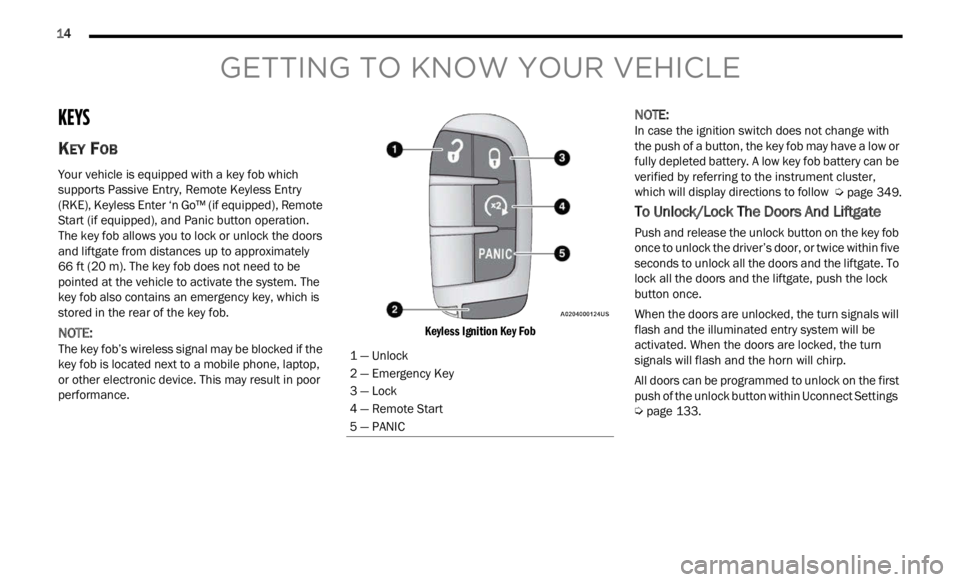
Your vehicle is equipped with a key fob which
supports Passive Entry, Remote Keyless Entry
(RKE), Keyless Enter ‘n Go™ (if equipped), Remote
Start (if equipped), and Panic button operation.
The key fob allows you to lock or unlock the doors
and liftgate from distances up to approximately
66
ft (20 m). The key fob does not need to be
pointed
at the vehicle to activate the system. The
key fob also contains an emergency key, which is
stored in the rear of the key fob.
NOTE:
The key fob’s wireless signal may be blocked if the
key f ob
is located next to a mobile phone, laptop,
or other electronic device. This may result in poor
performance.
Keyless Ignition Key Fob
NOTE:
In case the ignition switch does not change with
the p u
sh of a button, the key fob may have a low or
fully depleted battery. A low key fob battery can be
verified by referring to the instrument cluster,
which will display directions to follow Ú page 349.
To Unlock/Lock The Doors And Liftgate
Push and release the unlock button on the key fob
once to unlock the driver’s door, or twice within five
seconds to unlock all the doors and the liftgate. To
lock all the doors and the liftgate, push the lock
button once.
When the doors are unlocked, the turn signals will
flash
and the illuminated entry system will be
activated. When the doors are locked, the turn
signals will flash and the horn will chirp.
All doors can be programmed to unlock on the first
push of
the unlock button within Uconnect Settings
Ú page 133.
1 — Unlock
2 — Emergency Key
3 — Lock
4 — Remote Start
5 — PANIC
Page 17 of 364
GETTING TO KNOW YOUR VEHICLE 15
Key Left Vehicle Feature — If Equipped
If a valid key fob is no longer detected inside the
vehicle while the vehicle’s ignition system is in the
ON/RUN or START position, the message “Key Fob
Has Left Vehicle” will be shown in the instrument
cluster display along with an interior chime. An
exterior audible and visual alert will also be
activated to warn the driver.
The vehicle’s horn will rapidly chirp three times
along
with a single flash of the vehicle’s exterior
lights.
NOTE:
The doors have to be open and then closed in
order for the vehicle to check for the presence of
a key fob; the Key Left Vehicle feature will not
activate until all of the doors are closed.
These alerts will not be activated in situations
where the vehicle’s engine is left running with
the key fob inside.
Replacing The Battery In The Key Fob
The replacement battery is one CR2032 battery.
NOTE:
Customers are recommended to use a battery
obtained from Mopar®. Aftermarket coin
battery dimensions may not meet the original
OEM coin battery dimensions.
Perchlorate Material — special handling may
apply. See www.dtsc.ca.gov/hazardouswaste/
perchlorate for further information.
Do not touch the battery terminals that are on
the back housing or the printed circuit board.
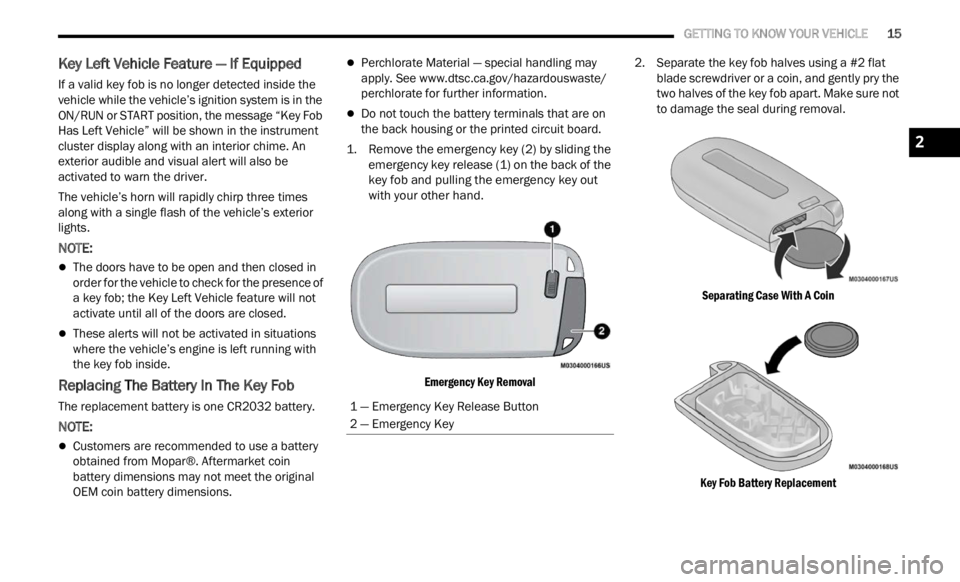
1. Remove the emergency key (2) by sliding the emerge
ncy key release (1) on the back of the
key fob and pulling the emergency key out
with your other hand.
Emergency Key Removal
2. Separate the key fob halves using a #2 flat
blad e
screwdriver or a coin, and gently pry the
two halves of the key fob apart. Make sure not
to damage the seal during removal.
Separating Case With A Coin
Key Fob Battery Replacement
1 — Emergency Key Release Button
2 — Emergency Key
2
Page 20 of 364
18 GETTING TO KNOW YOUR VEHICLE
For information on normal starting, see
Ú page 80.
REMOTE START — IF EQUIPPED
This system uses the key fob to start the
engine conveniently from outside the
vehic l
e while still maintaining security.
The system has a range of approximately
328 ft (100 m).
Remote Start is used to defrost windows in cold
w eathe
r, and to reach a comfortable climate in all
ambient conditions before the driver enters the
vehicle.
NOTE:
Obstructions between the vehicle and key fob may
reduc e
this range.
HOW TO USE REMOTE START
Push and release the Remote Start button on the
key fob twice within five seconds. The vehicle
doors will lock, the parking lights will flash, and the
horn will chirp twice (if programmed). Then, the
engine will start, and the vehicle will remain in the
Remote Start mode for a 15 minute cycle. Pushing
the R e
mote Start button a third time shuts the
engine off.
NOTE:
With Remote Start, the engine will only run for
15 minutes.
Remote Start can only be used twice.
If an engine fault is present or fuel level is low,
the vehicle will start and then shut down in
10 seconds.
The parking lights will turn on and remain on
during Remote Start mode.
For security, power window and power sunroof
operation (if equipped) are disabled when the
vehicle is in the Remote Start mode.
The ignition must be placed in the ON/RUN posi -
tion before the Remote Start sequence can be
repea t
ed for a third cycle.
Never leave children alone in a vehicle, or with
access to an unlocked vehicle.
Allowing children to be in a vehicle unattended
is dangerous for a number of reasons. A child
or others could be seriously or fatally injured.
Children should be warned not to touch the
parking brake, brake pedal or the gear
selector.
Do not leave the key fob in or near the vehicle,
or in a location accessible to children, and do
not leave the ignition in the ON or RUN posi -
tion. A child could operate power windows,
other c
ontrols, or move the vehicle.
Do not leave children or animals inside parked
vehicles in hot weather. Interior heat buildup
may cause serious injury or death.
CAUTION!
An unlocked vehicle is an invitation for thieves.
Always remove key fob from the vehicle and lock
all doors when leaving the vehicle unattended.
WARNING!
WARNING!
Do not start or run an engine in a closed
garage or confined area. Exhaust gas contains
Carbon Monoxide (CO) which is odorless and
colorless. Carbon Monoxide is poisonous and
can cause serious injury or death when
inhaled.
Keep key fobs away from children. Operation
of the Remote Start system, windows, door
locks or other controls could cause serious
injury or death.
Page 22 of 364

20 GETTING TO KNOW YOUR VEHICLE
Manual Temperature Control (MTC) — If Equipped
In ambient temperatures at 40°F (4.4°C) or
below, the climate settings will default to
maximum heat, with fresh air entering the
cabin. If the front defrost timer expires, the
vehicle will enter Mix Mode.
In ambient temperatures from 40°F (4.4°C) to
78°F (26°C), the climate settings will be based
on the last settings selected by the driver.
In ambient temperatures at 78°F (26°C) or
above, the climate settings will default to MAX
A/C, Bi-Level Mode, with Recirculation on.
For more information on ATC, MTC, and climate
control
settings, see Ú page 44.
NOTE:
These features will stay on through the duration of
Remote
Start until the ignition is placed in the ON/
RUN position. The climate control settings will
change if manually adjusted by the driver while the
vehicle is in Remote Start mode, and exit auto -
matic override. This includes the OFF button on the
clima t
e controls, which will turn the system off.
REMOTE START WINDSHIELD WIPER
D
E–ICER ACTIVATION — IF EQUIPPED
When Remote Start Is active and the outside
ambient temperature is less than 40°F (4.4°C),
the Windshield Wiper De-Icer will activate. Exiting
Remote Start will resume its previous operation. If the Windshield Wiper De-Icer was active, the timer
and operation will continue
Ú page 349.
REMOTE START CANCEL MESSAGE —
I
F EQUIPPED
The following messages will display in the
instrument cluster display if the vehicle fails to
remote start or exits Remote Start prematurely:
Remote Start Cancelled — Door Open
Remote Start Cancelled — Hood Open
Remote Start Cancelled — Fuel Low
Remote Start Cancelled — Liftgate Open
Remote Start Cancelled — Too Cold
Remote Start Cancelled — Time Expired
Remote Start Disabled — Start Vehicle To Reset
The message will stay active until the ignition is
p la
ce
d
in the ON/RUN position.
VEHICLE SECURITY SYSTEM — IF EQUIPPED
The Vehicle Security system monitors the vehicle
doors, hood, liftgate, and the Keyless Enter ‘n Go™
Ignition for unauthorized operation. While the
Vehicle Security system is armed, interior switches
for door locks and liftgate release are disabled. If
something triggers the system, the Vehicle Security
system will provide the following audible and
visible signals:
The horn will pulse
The turn signals will flash
The Vehicle Security Light in the instrument
cluster will flash
NOTE:
The Vehicle Security system is factory adjusted
to standards from different countries.
The Vehicle Security system is a complementary
security system developed to hinder the occur -
rence of vehicle theft and prevent vandalism. It
does not
prevent the theft of your vehicle; the
system is a deterrent.
The Vehicle Security system does not monitor
glass breakage or the movement of objects or
people inside the vehicle. The alarm does not
intervene in the case of vehicle tilt variations
when it is parked.
TO ARM THE SYSTEM
Follow these steps to arm the Vehicle Security
system:
1. Make sure the vehicle’s ignition is placed in the OF
F position.
2. Perform one of the following methods to lock the v
ehicle:
Push the lock button on the interior power
door lock switch with the driver and/or
passenger door open.
Page 23 of 364
GETTING TO KNOW YOUR VEHICLE 21
(Continued)
Push the lock button on the exterior Passive
Entry door handle with a valid key fob avail -
able in the same exterior zone Ú page 22.
Push the lock button on the key fob.
3. If any doors are open, close them.
TO DISARM THE SYSTEM
The Vehicle Security system can be disarmed using
any of the following methods:
Push the unlock button on the key fob.
Grab the Passive Entry door handle to unlock
the door Ú page 22.
Cycle the ignition out of the OFF position to
disarm the system.
NOTE:
The driver's door key cylinder cannot arm or
disarm the Vehicle Security system.
When the Vehicle Security system is armed, the
interior power door lock switches will not unlock
the doors.
The Vehicle Security system is designed to protect
your v e
hicle. However, you can create conditions
where the system will give you a false alarm. If one
of the previously described arming sequences has
occurred, the Vehicle Security system will arm
regardless of whether you are in the vehicle or not.
If you remain in the vehicle and open a door, the alarm will sound. If this occurs, disarm the Vehicle
Security system.
If the Vehicle Security system is armed and the
batte
r
y becomes disconnected, the Vehicle
Security system will remain armed when the
battery is reconnected; the exterior lights will flash,
and the horn will sound. If this occurs, disarm the
Vehicle Security system.
To completely disable the alarm (e.g. in the case of
long in
activity of the vehicle), lock the doors by
turning the emergency key in the exterior door lock
cylinder.
NOTE:
If the batteries in the key fob discharge in the event
of a f a
ilure to the system, place the ignition in the
ON/RUN position to turn the alarm off.
DOORS
MANUAL DOOR LOCKS
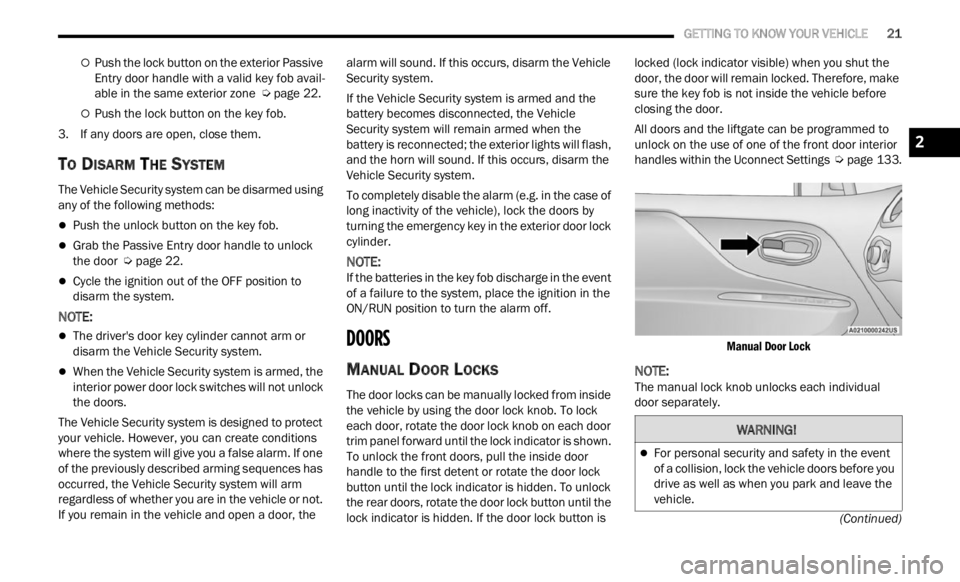
The door locks can be manually locked from inside
the vehicle by using the door lock knob. To lock
each door, rotate the door lock knob on each door
trim panel forward until the lock indicator is shown.
To unlock the front doors, pull the inside door
handle to the first detent or rotate the door lock
button until the lock indicator is hidden. To unlock
the rear doors, rotate the door lock button until the
lock indicator is hidden. If the door lock button is locked (lock indicator visible) when you shut the
door, the door will remain locked. Therefore, make
sure the key fob is not inside the vehicle before
closing the door.
All doors and the liftgate can be programmed to
unlock
on the use of one of the front door interior
handles within the Uconnect Settings Ú page 133.
Manual Door Lock
NOTE:
The manual lock knob unlocks each individual
door se p
arately.
WARNING!
For personal security and safety in the event
of a collision, lock the vehicle doors before you
drive as well as when you park and leave the
vehicle.
2
Page 71 of 364

GETTING TO KNOW YOUR INSTRUMENT PANEL 69
Sound Horn With Lock: activate/deactivate the
horn when pushing the LOCK button on the key
fob. The options are “Off,” “First Press,” and
“Second Press”
Horn With Remote Start: activate/deactivate
the horn at the Remote Starting of the engine
with the key fob
Remote Door Unlock: allows you to open the
driver door only on the first push of the UNLOCK
button on the key fob
“Compass”
By selecting the item “Compass” you can make the
f ollowi
ng adjustments:
Compass Calibration
Compass Variance
TRIP COMPUTER
The Trip computer is used to display information on
car operation when the key is turned to the RUN
position.
This function allows you to define two separate
trips
called “Trip A” and “Trip B” where the car's
“complete trips” are monitored in an independent
manner.
Both trips can be reset (reset - start of a new trip).
To perf
orm a reset, push and hold the OK button on
the steering wheel controls. “Trip A” and “Trip B” are used to display the figures
relat
i
ng to:
Distance Traveled
Average Consumption
Travel Time (driving time)
Quantities Displayed
Distance Traveled
Indicates the distance traveled by the start of
the new trip.
Average Consumption
Represents the average fuel consumption since
the start of the new trip.
Travel Time
Elapsed time since the start of the new trip.
OK Button
Short Push Of The Button: display of various
p arame
ters.
Long Push Of The Button: reset quantities and
begin
a new trip.
New trip
Starts after reset:
“Manual” by pushing the OK button.
“Automatic” when the “distance” reaches the
value of 62140 (99999.9 km) or when the “time
travel” reaches the value of 999.59
(999 hours and 59 minutes).
After each disconnection and reconnection of
the battery.
WARNING/INDICATOR LIGHTS AND
MESSAGES
The warning/indicator light switches on in the
instrument panel together with a dedicated
message and/or acoustic signal when applicable.
These indications are indicative and precautionary
and as such must not be considered as exhaustive
and/or alternative to the information contained in
the Owner Manual, which you are advised to read
carefully in all cases. Always refer to the
information in this chapter in the event of a failure
indication.
All active telltales will display first, if applicable.
The sy
stem check menu may appear different
based upon equipment options and current vehicle
status. Some telltales are optional and may not
appear.
The following warning lamps and indicators will
alert
you to a vehicle condition that may become
serious. Some lamps will illuminate when you start
your vehicle to make sure they work. If any lamps
remain on after starting your vehicle, refer to the
respective system warning lamp for further
information.
3
Page 144 of 364

142 MULTIMEDIA
Doors & Locks
When the Doors & Locks button is pressed on the touchscreen, the system displays the options related to locking and unlocking the vehicle’s doors.
NOTE:
Depending on the vehicle’s options, feature settings may vary.
Setting Name Description
Auto Door Locks This setting will automatically lock your doors.
Auto Unlock On Exit This setting will unlock the doors when any of the doors are opened from the
inside
.
Flash Lights With Lock This setting will allow you to turn the flashing of the lights when the Lock
button
is pushed on the key fob on or off.
Sound Horn With Lock This setting will sound the horn when the Lock button is pushed on the key
fob. T
h
e “Off” setting will not sound the horn when the Lock button is pushed.
The “1st Press” setting will sound the horn when the Lock button is pushed
once. The “2nd Press” setting will sound the horn when the Lock button is
pushed twice.
Sound Horn With Remote Start This setting will sound the horn when the remote start is activated from the
key fob
.
Passive Entry This setting will allow you to turn the Passive Entry feature (Keyless
Enter ‘n Go™) on or off.
Page 206 of 364

204 MULTIMEDIA
For customers in the United States, visit
www.mopar.com , and click the Sign In/Register
button in the upper right-hand corner to register
y our ac
count online.
a. Click the Register button. b. Sel
ect the correct country and email
addr e
ss then click “Register”.
c. You will then receive an email notification to confir
m/verify your newly created account.
d. After clicking the email link, it will take you to a w
ebsite and prompt you to assign your
account with a password.
e. Once you have added a password, the webs i
te will direct you to your homepage
where you can add in your VIN.
For customers in Canada, register your account
via your vehicle.
a. Press the Apps button in the bottom menu bar. b.
Press the Activate Services button from the
apps
list.
c. Enter your email and press “OK”. A confir -
mation
email will be sent to the provided
e m a
il
address.
d. Press “Continue Activation” from the confir -
mation
email. It may take a short time
before
remote services will be available, but
you will be able to log into the Mobile App
and the Owner’s Site.
Once on the Remote screen and you have set up
your four-digit PIN, you can begin using Remote
Door Lock/Unlock, Remote Vehicle Start, and
activate your horn and lights remotely, if
equipped.
Press the Location button on the bottom menu
bar of the app to bring up a map to locate your
vehicle or send a location to your Mobile Naviga -
tion, if equipped.
Press the Settings side menu in the upper left
corner of the app to bring up app settings and
access the Assist Call Centers.
Using Your Owner’s Site
Your Owner’s Site website https://
www.mopar.com/en-us.html (US Residents), or
www.mopar.ca (Canadian Residents) provides you
with all the information you need, all in one place.
Y ou ca n
track your service history, find
recommended accessories for your vehicle, watch videos about your vehicle's features, and easily
access your manuals. It is also where you can
manage your SiriusXM Guardian™ account. This
section will familiarize you with the key elements of
the website that will help you get the most of your
SiriusXM Guardian™ connected services.
For customers in the United States, press the Sign
In/Re
g
ister button and enter your email address
and password.
For customers in Canada, press the My Vehicle
button .
Select from “Dashboard”, “Vehicle Health
Report”, and “Recalls”. The website will then
prompt you to log in using your email address and
password.
Edit/Edit Profile:
To manage the details of your SiriusXM
G ua
rd
i
an™ account, such as your contact infor -
mation, password and SiriusXM Guardian™ PIN,
c lick
on the Edit/Edit Profile button to access
the details of your account.
Connected Services Status:
This statement will indicate your SiriusXM
Guard i
an™-equipped vehicle.
Remote Commands:
For vehicles with an active SiriusXM Guardian™
subscr
iption, press one of these icons and enter
your four-digit SiriusXM Guardian™ Security PIN
to remotely start (if equipped), lock/unlock
doors or sound the horn and flash the lights.
Page 209 of 364

MULTIMEDIA 207
Automatic SOS — If Equipped
Automatic SOS is a hands-free safety service that
can immediately connect you with help in the event
that your vehicle’s airbags deploy. After an
accident, a live agent will contact you through the
Uconnect system and alert emergency services.
NOTE:
An active SiriusXM Guardian™ subscription is
requi r
ed for this feature to function.
After a crash where the airbags deploy:
1. Automatic SOS will initiate a call with an agen t
.
2. An agent will receive the call and confirm the locati
on of the emergency.
3. If needed, the agent will request the assis
tance of emergency services.
4. First responders will arrive on scene. The agent
will remain on the call until emergency
services arrive.
NOTE:
Agents are available 24/7 to assist you in the
case of an emergency.
On your behalf, agents are able to notify family
members about the collision.
Agents can brief first responders of the situation
before they arrive on scene.
In the event vehicle occupants are unable to
speak, emergency services will be dispatched
based on the last known GPS coordinates.
SiriusXM Guardian™ connected services are
dependent upon an operative telematics
device, a cellular connection, navigation map
data, and GPS satellite reception, which can
limit the ability to reach the response center or
reach emergency support.
Terms of service of the Uconnect and the
SiriusXM Guardian™ subscriber agreement
apply. See terms of services for complete
service limitation.
Remote Commands
On the Remote Commands screen, you have
access to several vehicle features that can be
controlled remotely from your mobile device. These
features include locking/unlocking, remote
starting, and activating the horn and lights of the
vehicle.
The Occupant Restraint Controller (ORC) turns
on the Air Bag Warning Light on the instru -
ment panel if a malfunction in any part of the
a ir ba
g system is detected. If the Air Bag
Warning Light is illuminated, the air bag
system may not be working properly and the
SOS Call system may not be able to send a
signal to the SiriusXM Guardian™ Customer
Care center. If the Air Bag Warning Light is illu -
minated, have an authorized dealer service
your v e
hicle immediately.
Ignoring the Rearview Mirror Light could mean
you will not have SOS Call services if needed.
If the Rearview Mirror Light is illuminated,
have an authorized dealer service the SOS
Call system immediately.
If anyone in the vehicle could be in danger
(e.g., fire or smoke is visible, dangerous road
conditions or location), do not wait for voice
contact from a SiriusXM Guardian™ Customer
Care agent. All occupants should exit the
vehicle immediately and move to a safe loca -
tion.
Failure to perform scheduled maintenance
and regular inspection of your vehicle may
result in vehicle damage, accident or injury.
WARNING!
LockPress this button to lock your vehicle.
Vehicle Start Press this button to
start
your vehicle.
Horn & Lights Press this button to
s ound
t
he horn and
activate your lights.
5