seat adjustment JEEP RENEGADE 2023 Owners Manual
[x] Cancel search | Manufacturer: JEEP, Model Year: 2023, Model line: RENEGADE, Model: JEEP RENEGADE 2023Pages: 364, PDF Size: 18.65 MB
Page 4 of 364

2
INTRODUCTION
SYMBOLS KEY ...........................................................9
ROLLOVER WARNING ...... ....................................... 9
VEHICLE MODIFICATIONS/ALTERATIONS ...... .... 10
SYMBOL GLOSSARY...... ........................................ 10
GETTING TO KNOW YOUR VEHICLE
KEYS ....................................................................... 14
Key Fob .............................................................14
SENTRY KEY ..... . ..................................................... 16
IGNITION SWITCH ...... ............................................ 17
Keyless Enter ‘n Go™ Ignition ...... ...................17
REMOTE START — IF EQUIPPED ..... . .................... 18
How To Use Remote Start ...... ..........................18
To Exit Remote Start Mode ..... . ........................19
Remote Start Front Defrost Activation —
If Equipped. .....
..................................................19
Remote Start Comfort Systems —
If Equipped . .....
.................................................19
Remote Start Windshield Wiper
De–Icer Activation — If Equipped . .....
..............20
Remote Start Cancel Message —
If Equipped. .....
..................................................20
VEHICLE SECURITY SYSTEM — IF EQUIPPED ..... 2 0
To Arm The System ...... ...................................20
To Disarm The System . ..
..
. ..............................21DOORS .....................................................................21
Manu a
l Door Locks ...... ....................................21
Power Door Locks ..... . .....................................22
Keyless Enter ‘n Go™ — Passive Entry
(If Equipped) . .....
...............................................22
Automatic Unlock On Exit Feature —
If Equipped. .....
..................................................24
Dead Lock Device — If Equipped. ..
..
. ...............25
Child Locks ..... . ................................................25
STEERING WHEEL ..... . ............................................26
Tilt/Telescoping Steering Column ...... .............26
Heated Steering Wheel — If Equipped ..... . .....26
SEATS . ....................................................................26
M a
n u
a
l Front Seats...... ....................................27
Manual Rear Seat Adjustment ..... . ..................27
Power Adjustment (Front) — If Equipped . ..
..
. ..29
Heated Seats — If Equipped . ..
..
. .....................30
Unfolding The Rear Armrest
40/20/40 . ........................................................31
Head R
estraints . ..
..
. .........................................31
UCONNECT VOICE RECOGNITION ..... . ..................33
Introducing Voice Recognition...... ...................33
Basic Voice Commands . ..
..
. .............................33
Get Started ..... . .................................................33
Additional Information . ..
..
. ...............................33MIRRORS ................................................................ 34
Insi d
e Rearview Mirror...... ............................... 34
Illuminated Vanity Mirrors — If Equipped ..... . 34
Outside Mirrors . ..
..
. .......................................... 35
Heated Mirrors — If Equipped ..... . ................... 36
EXTERIOR LIGHTS. ..
..
. ............................................ 36
Headlight Switch ...... ....................................... 36
Daytime Running Lights (DRLs) —
If Equipped . .....
................................................ 37
High Beams ..... . ............................................... 37
Automatic High Beam Headlamp Control —
If Equipped . .....
................................................ 37
Flash-To-Pass . ..
..
. ............................................. 37
Automatic Headlights — If Equipped ..... . ........ 38
Parking Lights ..... . ............................................. 38
Headlight Time Delay . ..
..
. ................................ 38
Front Fog Lights — If Equipped ..... . .................38
Turn Signals. ..
..
. ................................................ 39
Lane Change Assist..... . ....................................39
Courtesy Lights. ..
..
. ...........................................39
INTERIOR LIGHTS ..... . ........................................... 39
Front Map/Reading Lights ...... ........................ 39
Dimmer Controls ..... . ....................................... 40
Rear Lights . ..
..
. .................................................40
Dome Light Timing ..... . ..................................... 41
Page 29 of 364
GETTING TO KNOW YOUR VEHICLE 27
MANUAL FRONT SEATS
Manual Front Seats Forward/Rearward
Adjustment
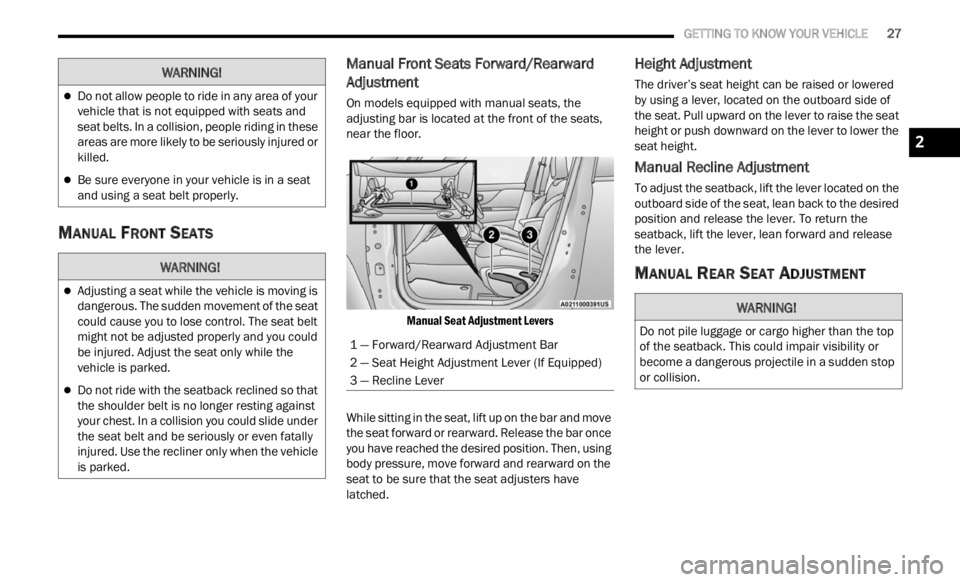
On models equipped with manual seats, the
adjusting bar is located at the front of the seats,
near the floor.
Manual Seat Adjustment Levers
While sitting in the seat, lift up on the bar and move
the se
at forward or rearward. Release the bar once
you have reached the desired position. Then, using
body pressure, move forward and rearward on the
seat to be sure that the seat adjusters have
latched.
Height Adjustment
The driver’s seat height can be raised or lowered
by using a lever, located on the outboard side of
the seat. Pull upward on the lever to raise the seat
height or push downward on the lever to lower the
seat height.
Manual Recline Adjustment
To adjust the seatback, lift the lever located on the
outboard side of the seat, lean back to the desired
position and release the lever. To return the
seatback, lift the lever, lean forward and release
the lever.
MANUAL REAR SEAT ADJUSTMENT
Do not allow people to ride in any area of your
vehicle that is not equipped with seats and
seat belts. In a collision, people riding in these
areas are more likely to be seriously injured or
killed.
Be sure everyone in your vehicle is in a seat
and using a seat belt properly.
WARNING!
Adjusting a seat while the vehicle is moving is
dangerous. The sudden movement of the seat
could cause you to lose control. The seat belt
might not be adjusted properly and you could
be injured. Adjust the seat only while the
vehicle is parked.
Do not ride with the seatback reclined so that
the shoulder belt is no longer resting against
your chest. In a collision you could slide under
the seat belt and be seriously or even fatally
injured. Use the recliner only when the vehicle
is parked.
WARNING!
1 — Forward/Rearward Adjustment Bar
2 — Seat Height Adjustment Lever (If Equipped)
3 — Recline Lever
WARNING!
Do not pile luggage or cargo higher than the top
of the seatback. This could impair visibility or
become a dangerous projectile in a sudden stop
or collision.
2
Page 31 of 364
GETTING TO KNOW YOUR VEHICLE 29
POWER ADJUSTMENT (FRONT) —
I
F EQUIPPED
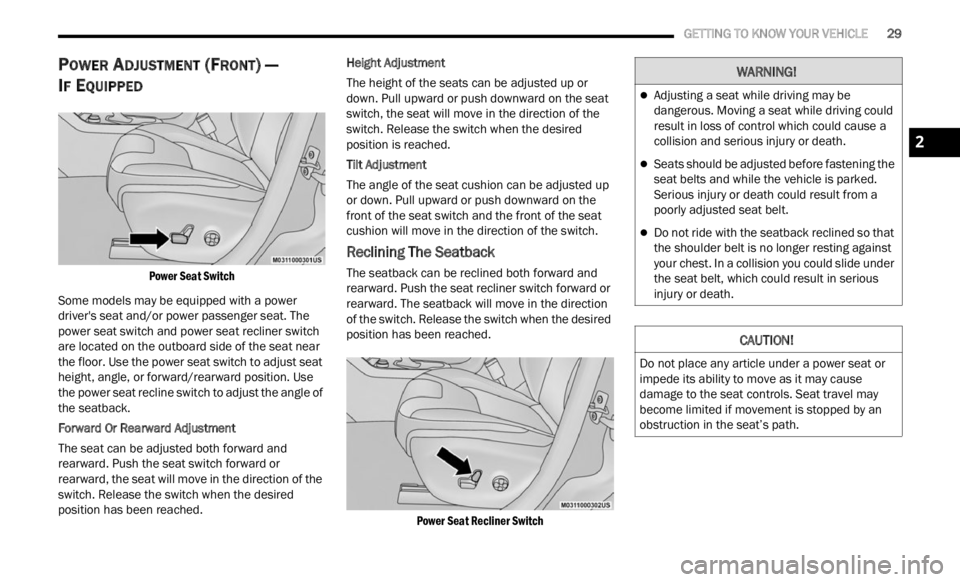
Power Seat Switch
Some models may be equipped with a power
driver
's seat and/or power passenger seat. The
power seat switch and power seat recliner switch
are located on the outboard side of the seat near
the floor. Use the power seat switch to adjust seat
height, angle, or forward/rearward position. Use
the power seat recline switch to adjust the angle of
the seatback.
Forward Or Rearward Adjustment
The seat can be adjusted both forward and
rearw a
rd. Push the seat switch forward or
rearward, the seat will move in the direction of the
switch. Release the switch when the desired
position has been reached. Height Adjustment
The height of the seats can be adjusted up or
d
own. P
ull upward or push downward on the seat
switch, the seat will move in the direction of the
switch. Release the switch when the desired
position is reached.
Tilt Adjustment
The angle of the seat cushion can be adjusted up
or down .
Pull upward or push downward on the
front of the seat switch and the front of the seat
cushion will move in the direction of the switch.
Reclining The Seatback
The seatback can be reclined both forward and
rearward. Push the seat recliner switch forward or
rearward. The seatback will move in the direction
of the switch. Release the switch when the desired
position has been reached.
Power Seat Recliner Switch
WARNING!
Adjusting a seat while driving may be
dangerous. Moving a seat while driving could
result in loss of control which could cause a
collision and serious injury or death.
Seats should be adjusted before fastening the
seat belts and while the vehicle is parked.
Serious injury or death could result from a
poorly adjusted seat belt.
Do not ride with the seatback reclined so that
the shoulder belt is no longer resting against
your chest. In a collision you could slide under
the seat belt, which could result in serious
injury or death.
CAUTION!
Do not place any article under a power seat or
impede its ability to move as it may cause
damage to the seat controls. Seat travel may
become limited if movement is stopped by an
obstruction in the seat’s path.
2
Page 32 of 364
30 GETTING TO KNOW YOUR VEHICLE
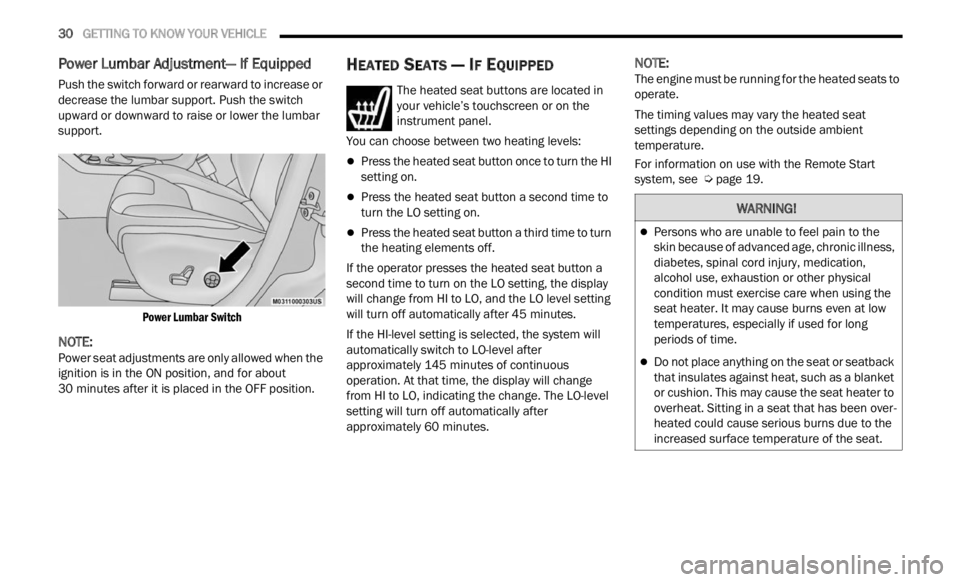
Power Lumbar Adjustment— If Equipped
Push the switch forward or rearward to increase or
decrease the lumbar support. Push the switch
upward or downward to raise or lower the lumbar
support.
Power Lumbar Switch
NOTE:
Power seat adjustments are only allowed when the
ignit i
on is in the ON position, and for about
30 minutes after it is placed in the OFF position.
HEATED SEATS — IF EQUIPPED
The heated seat buttons are located in
your vehicle’s touchscreen or on the
instr u
ment panel.
You can choose between two heating levels:
Press the heated seat button once to turn the HI
setting on.
Press the heated seat button a second time to
turn the LO setting on.
Press the heated seat button a third time to turn
the heating elements off.
If the operator presses the heated seat button a
second
time to turn on the LO setting, the display
will change from HI to LO, and the LO level setting
will turn off automatically after 45 minutes.
If the HI-level setting is selected, the system will
a utomat
ically switch to LO-level after
approximately 145 minutes of continuous
operati
on. At that time, the display will change
from HI to LO, indicating the change. The LO-level
setting will turn off automatically after
approximately 60 minutes.
NOTE:
The engine must be running for the heated seats to
operat e
.
The timing values may vary the heated seat
settin
gs depending on the outside ambient
temperature.
For information on use with the Remote Start
syste m
, see Ú page 19.
WARNING!
Persons who are unable to feel pain to the
skin because of advanced age, chronic illness,
diabetes, spinal cord injury, medication,
alcohol use, exhaustion or other physical
condition must exercise care when using the
seat heater. It may cause burns even at low
temperatures, especially if used for long
periods of time.
Do not place anything on the seat or seatback
that insulates against heat, such as a blanket
or cushion. This may cause the seat heater to
overheat. Sitting in a seat that has been over
-
heated could cause serious burns due to the
i ncrea
sed surface temperature of the seat.
Page 34 of 364
32 GETTING TO KNOW YOUR VEHICLE
Front Head Restraints
Your vehicle is equipped with front driver and
passenger head restraints.
To raise the head restraint, pull upward on the
head r
estraint. To lower the head restraint, push
the adjustment button, located at the base of the
head restraint, and push downward on the head
restraint.
Head Restraint Adjustment Button
NOTE:
The head restraints should only be removed by
quali f
ied technicians, for service purposes only. If
either of the head restraints require removal, see
an authorized dealer.
Rear Head Restraints
Your vehicle is equipped with two outboard head
restraints and one center head restraint for its rear
passengers. The rear head restraints can be raised
or lowered. When the center seat is being
occupied, the head restraint should be in the
raised position. When there are no occupants in
the center seat, the head restraint can be lowered
for maximum visibility for the driver. To raise the head restraint, pull upward on the
head
r
estraint.
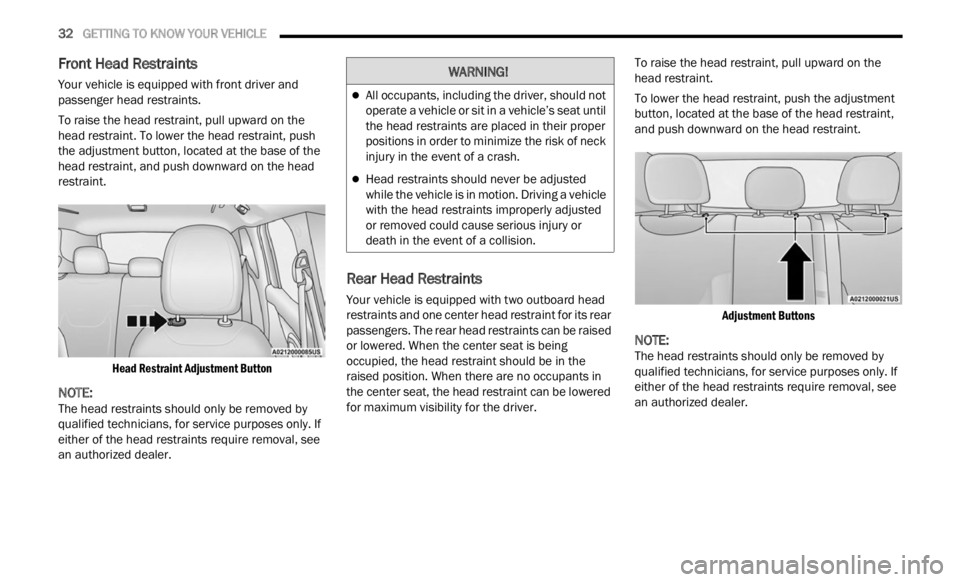
To lower the head restraint, push the adjustment
button,
located at the base of the head restraint,
and push downward on the head restraint.
Adjustment Buttons
NOTE:
The head restraints should only be removed by
quali f
ied technicians, for service purposes only. If
either of the head restraints require removal, see
an authorized dealer.
WARNING!
All occupants, including the driver, should not
operate a vehicle or sit in a vehicle’s seat until
the head restraints are placed in their proper
positions in order to minimize the risk of neck
injury in the event of a crash.
Head restraints should never be adjusted
while the vehicle is in motion. Driving a vehicle
with the head restraints improperly adjusted
or removed could cause serious injury or
death in the event of a collision.
Page 70 of 364

68 GETTING TO KNOW YOUR INSTRUMENT PANEL
“Vehicle Shut Off (If Equipped)”
By selecting the item “Vehicle Shut Off”, you can
turn of
f the engine from the instrument cluster.
This feature is available in the event of an ignition
switch failure, and will display instructions for
turning off the engine via the instrument cluster
display controls.
“Display”
By selecting the “Display,” you can access the
follow i
ng setting:
Language : allows you to select the language in
which to display the information/warnings.
“Units Of Measure”
By selecting the item “Units of Measure,” you can
selec t
the unit of measure to use for displaying
various magnitudes.
Possible options are:
US
Metric
Custom
“Clock & Date”
By selecting the item, “Clock & Date” you can
a djust
the clock.
Possible options are:
Set Time: adjust hours/minutes
Set Format: adjust the time format “12h”
(12 hours) or “24h” (24 hours)
Set Date: adjust day/month/year
“Security”
By selecting the item “Security,” you can make the
f ollowi
ng adjustments:
Speed Warning:
Set the vehicle speed limit, which the driver is
notifi e
d through a visual and acoustic signaling
(display of a message and a symbol on the
display).
When the speed warning is set, the icon should
remain
visualized for the same duration time of
the pop-up. If the driver exceeded the set speed,
the icon should remain for however long the
vehicle is over the set speed.
Driver may also turn the Speed Warning “OFF”
should
you choose not to use this feature.
Seat Belt Reminder:
This function is only viewable when the Seat Belt
Remin d
er (SBR) system is active.
Hill Start Assist:
Activation/Deactivation of the Hill Start Assist
syste m
.
Passenger Air Bag — If Equipped
Front passenger air bag may be enabled or
disab l
ed. “Lights”
By selecting the item “Lights,” you can make the
followi
n
g adjustments:
Headlight Off Delay: set the delay for headlight
shutoff after engine shutoff
Headlight Sensitivity: adjust the sensitivity of
headlight brightness
Daytime Running Lights: activate/deactivate
the daytime running lights
Cornering lights: activate/deactivate the
cornering lights (If Equipped)
Interior Ambient lights: adjust the level of inte-
rior ambient lights
Greeting Lights: activate / deactivate greeting
lights
“Doors & Locks”
By selecting the item “Doors & Locks,” you can
make t
he following adjustments:
Auto Door Lock: activate/deactivate the auto -
matic locking of the doors with the vehicle
m ov i
n g
Auto Unlock On Exit: automatic unlocking of the
doors when exiting the vehicle
Flash Light with Lock: activate the direction indi
-
cators when closing the doors
Page 246 of 364
244 SAFETY
5. Position the shoulder belt across the shoulder
and chest with minimal, if any slack so that it
is comfortable and not resting on your neck.
The retractor will withdraw any slack in the
shoulder belt.
6. To release the seat belt, push the red button on th e
buckle. The seat belt will automatically
retract to its stowed position. If necessary,
slide the latch plate down the webbing to allow
the seat belt to retract fully.
Lap/Shoulder Belt Untwisting Procedure
Use the following procedure to untwist a twisted
lap/shoulder belt.
1. Position the latch plate as close as possible to the an
chor point.
2. At about 6 to 12 inch
es (15 to 30 cm) above
the la
tch plate, grab and twist the seat belt
webbing 180 degrees to create a fold that
begins immediately above the latch plate.
3. Slide the latch plate upward over the folded webbi
ng. The folded webbing must enter the
slot at the top of the latch plate.
4. Continue to slide the latch plate up until it clea r
s the folded webbing and the seat belt is
no longer twisted.
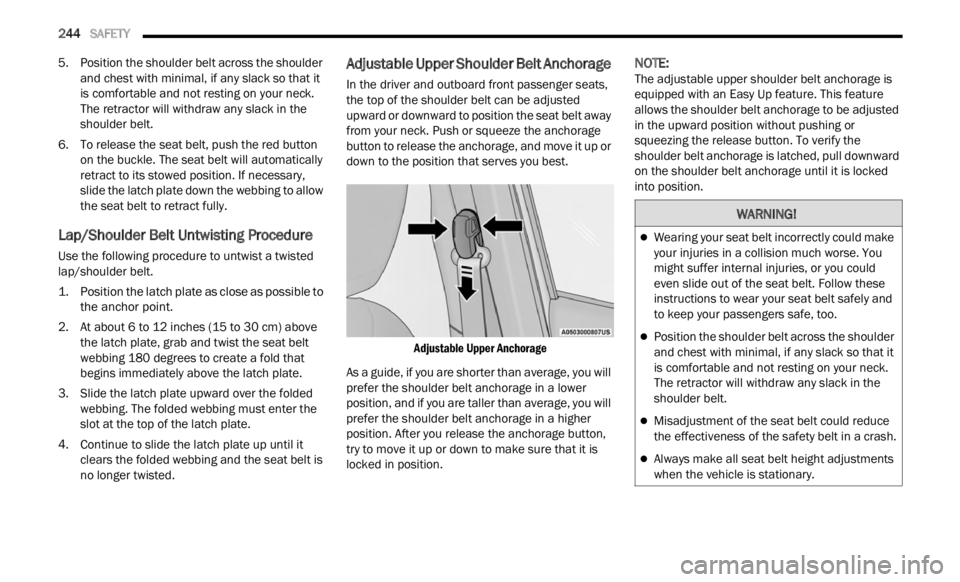
Adjustable Upper Shoulder Belt Anchorage
In the driver and outboard front passenger seats,
the top of the shoulder belt can be adjusted
upward or downward to position the seat belt away
from your neck. Push or squeeze the anchorage
button to release the anchorage, and move it up or
down to the position that serves you best.
Adjustable Upper Anchorage
As a guide, if you are shorter than average, you will
p refe
r
the shoulder belt anchorage in a lower
position, and if you are taller than average, you will
prefer the shoulder belt anchorage in a higher
position. After you release the anchorage button,
try to move it up or down to make sure that it is
locked in position.
NOTE:
The adjustable upper shoulder belt anchorage is
equip p
ed with an Easy Up feature. This feature
allows the shoulder belt anchorage to be adjusted
in the upward position without pushing or
squeezing the release button. To verify the
shoulder belt anchorage is latched, pull downward
on the shoulder belt anchorage until it is locked
into position.
WARNING!
Wearing your seat belt incorrectly could make
your injuries in a collision much worse. You
might suffer internal injuries, or you could
even slide out of the seat belt. Follow these
instructions to wear your seat belt safely and
to keep your passengers safe, too.
Position the shoulder belt across the shoulder
and chest with minimal, if any slack so that it
is comfortable and not resting on your neck.
The retractor will withdraw any slack in the
shoulder belt.
Misadjustment of the seat belt could reduce
the effectiveness of the safety belt in a crash.
Always make all seat belt height adjustments
when the vehicle is stationary.
Page 312 of 364

310 SERVICING AND MAINTENANCE
Fuse Holder No. 1
Fuse Holder No. 2
On the controller there is also a 20 amp fuse for the sun visor of the retractable roof.
Cavity Mini Fuse Description
F130 Amp BluePower Inverter
F2 20 Amp YellowHIFI Audio System
F3 20 Amp YellowMY SKY
F5 30 Amp GreenPower Seat (Driver Side)
F6 7.5 Amp BrownLumbar Adjustment Front Seat (Driver Side)
F8 20 Amp YellowHeating Front Seats
CavityMini Fuse Description
F515 Amp BlueController Exterior Lighting Lights (Drivers Side)
F6 15 Amp BlueController Exterior Lighting Lights (Passenger Side)
Page 360 of 364

358
Seats...............................................................26Adjustment...........................................26, 27Head Restraints..........................................31Heated........................................................30Rear Folding................................................26Reclining.....................................................27Seatback Release.......................................27Tilting...................................................26, 27Security Alarm..........................................20, 72Arm The System..........................................20Disarm The System.....................................21Selection Of Coolant (Antifreeze)...................345Send & Go...........................................211, 216Service Assistance.........................................346Service Contract............................................347Service Manuals............................................348Settings, Audio..............................................160Shift Lever Override.......................................281Shoulder Belts...............................................241Side View Mirror Adjustment...........................35Signals, Turn....................................39, 76, 267Sirius Satellite Radio.....................................155Favorites...................................................158Replay.......................................................156SiriusXM Traffic.........................................201SiriusXM Travel Link..................................201Traffic & Weather......................................158
SiriusXM Satellite Radio
Browse in SXM.........................................158Favorites...................................................158Replay......................................................156Traffic and Weather..................................158Smart Watch.................................................215Snow Chains (Tire Chains)............................335Snow Tires....................................................333SOS Call...............................................205, 215Spare Tires..........................................333, 334SpecificationsFuel (Gasoline).........................................345Oil.............................................................345Speed Control (Cruise Control)........................95Starting............................................................80Button.........................................................17Cold Weather...............................................81Engine Fails To Start....................................80Remote........................................................18Starting And Operating.....................................80Starting Procedures.........................................80SteeringTilt Column..................................................26Wheel, Heated.............................................26Wheel, Tilt....................................................26Steering Wheel Audio Controls.....................150Steering Wheel Mounted Sound System......150
Stolen Vehicle Assistance....................212, 217Storage, Vehicle...............................................47Store Radio Presets......................................160Stuck, Freeing...............................................282Sun Roof...................................................54, 56Opening.......................................................55Supplemental Restraint System – Air Bag....247Sway Control, Trailer............................124, 227Symbol Glossary...............................................10Synthetic Engine Oil......................................295System, Remote Starting.................................18
T
Telescoping Steering Column...........................26Temperature Control, Automatic (ATC).............47Tilt Steering Column.........................................26Time DelayHeadlight.....................................................38Tip Start...........................................................80Tire And Loading Information Placard...........326Tire Markings................................................322Tire Safety Information..................................322Tire Service Kit..............................................276